Support for SRTP Termination

This Support for SRTP Termination feature enables Cisco Unified Border Element (Cisco UBE) support for Secure Real-time Transport Protocol (SRTP) on the Session Initiation Protocol (SIP) Trunk interface.

Feature Information for Support for SRTP Termination

The following table provides release information about the feature or features described in this module. This table lists only the software release that introduced support for a given feature in a given software release train. Unless noted otherwise, subsequent releases of that software release train also support that feature.

Use Cisco Feature Navigator to find information about platform support and Cisco software image support. To access Cisco Feature Navigator, go to https://cfnng.cisco.com/. An account on Cisco.com is not required.
Table 1. Feature Information for Support for SRTP Termination

Feature Name

Releases

Feature Information

Support for SRTP Termination

Baseline Functionality

The support for SRTP Termination feature describes how to configure Cisco Unified Border Element to support AES_CM_128_HMAC_SHA1_80 crypto suite on the Session Initiation Protocol (SIP) Trunk interface.

The following commands were introduced or modified: show sip-ua srtp , srtp-auth , and voice-class sip srtp-auth .

Support for AES_CM_128_HMAC_SHA1_80 Crypto Suite

The Support for AES_CM_128_HMAC_SHA1_80 crypto suite feature configures Cisco Unified Border Element (CUBE) support for a Secure Real-time Transport Protocol (SRTP) connection using the AES_CM_128_HMAC_SHA1_80 crypto suite. This feature implements crypto-suite negotiation and appropriately sets up the call on the following two sides:

  • The Cisco Unified Call Manager (CUCM) or IP phones side—Connection between the end devices and CUBE

  • SIP Trunk side—Connection between CUBE and Service Provider

Prior to the Support for AES_CM_128_HMAC_SHA1_80 crypto suite, CUBE could support an SRTP connection using the AES_CM_128_HMAC_SHA1_32 crypto suite. This crypto suite is still used by default, unless CUBE is configured to use AES_CM_128_HMAC_SHA1_80 crypto suite.

SRTP-RTP interworking is used with devices (CUCM or IP Phone devices) that still support AES_CM_128_HMAC_SHA1_32 crypto suite only.

For End Devices Supporting AES_CM_128_HMAC_SHA1_80 Crypto Suite

This method is used between Cisco Unified Border Element (CUBE), IP Phones, and other Cisco Unified Call Manager (CUCM ) devices that support AES_CM_128_HMAC_SHA1_80 crypto suite.

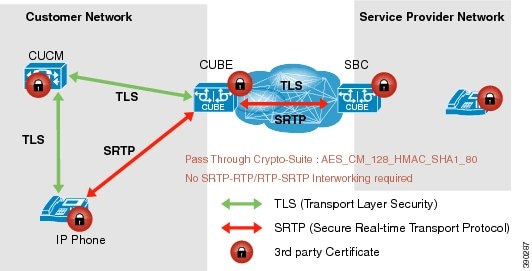
  • CUCM or IP Phones side—A Secure Real-time Transport Protocol (SRTP) connection using the AES_CM_128_HMAC_SHA1_80 crypto suite exists here. In the figure below, IP Phone and CUBE within the customer network connect with an SRTP connection using AES_CM_128_HMAC_SHA1_80 crypto suite.

  • Session Initiation Protocol (SIP) Trunk side—An SRTP connection using the AES_CM_128_HMAC_SHA1_80 crypto suite. In the figure below, CUBE on the Customer Network and SBC on the Service Provider Network connect with an SRTP connection using the AES_CM_128_HMAC_SHA1_80 crypto suite.

Figure 1. SRTP Connection Supporting AES_CM_128_HMAC_SHA1_80 crypto suite


Using SRTP-RTP Chain for Interworking Between AES_CM_128_HMAC_SHA1_32 and AES_CM_128_HMAC_SHA1_80 Crypto Suites

A single Cisco Unified Call Manager (CUCM) device cannot terminate a Secure Real-time Transport Protocol (SRTP) connection with an IP Phone using the AES_CM_128_HMAC_SHA1_32 crypto suite and initiate an SRTP connection with an external CUBE device with the AES_CM_128_HMAC_SHA1_80 crypto suite at the same time.

For Cisco Unified Call Manager (Unified Communications Manager) and IP Phone devices that support only AES_CM_128_HMAC_SHA1_32 crypto suite, the interim SRTP-RTP interworking solution that is described below can be implemented.

  • CUCM or IP Phone side:

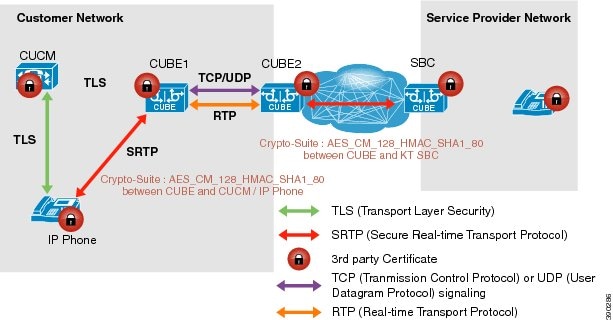
    • An SRTP connection using the AES_CM_128_HMAC_SHA1_32 crypto suite exists between the IP Phone and CUBE1.

    • An RTP connection exists between CUBE1 and CUBE2.

  • SIP trunk side—An SRTP connection using the AES_CM_128_HMAC_SHA1_80 crypto suite is initiated by CUBE2 here. In the image below, CUBE2 is the border element on the Customer Network and SBC is the border element on the Service Provider Network.

Figure 2. SRTP-RTP Interworking Supporting AES_CM_128_HMAC_SHA1_32 crypto suite


Note


  • AES_CM_128_HMAC_SHA1_32 to AES_CM_128_HMAC_SHA1_80 interworking is not supported upto Cisco IOS 15.5(3)M Release and Cisco IOS XE Everest 16.4.1 Release.

  • From Cisco IOS XE Everest 16.5.1b Release onwards, SRTP-SRTP interworking is supported and therefore SRTP-RTP chain is not required.


How to Configure Support for SRTP Termination

Configure Crypto Authentication

Configure Crypto Authentication (Global Level)

SUMMARY STEPS

  1. enable
  2. configure terminal
  3. voice service voip
  4. sip
  5. srtp-auth {sha1-32 | sha1-80}
  6. end

DETAILED STEPS

  Command or Action Purpose

Step 1

enable

Example:
Device> enable

Enables privileged EXEC mode.

  • Enter your password if prompted.

Step 2

configure terminal

Example:
Device# configure terminal

Enters global configuration mode.

Step 3

voice service voip

Example:
Device(config)# voice service voip

Specifies VoIP encapsulation and enters voice-service configuration mode.

Step 4

sip

Example:
Device(conf-voi-serv)# sip

Enters the Session Initiation Protocol (SIP) configuration mode.

Step 5

srtp-auth {sha1-32 | sha1-80}

Example:
Device(conf-serv-sip)# srtp-auth sha1-80 

Configures an SRTP connection on CUBE using the preferred crypto suite.

  • The default value is sha1-32 .

Step 6

end

Example:
Router(conf-serv-sip)# end

Ends the current configuration session and returns to privileged EXEC mode.

Configure Crypto Authentication


Note


Use voice class srtp-crypto command to configure the preferred cipher-suites for the SRTP call leg (connection). For more information, see SRTP-SRTP Interworking.

SUMMARY STEPS

  1. enable
  2. configure terminal
  3. Execute the commands based on your configuration mode
    • In dial-peer configuration mode:

      dial-peer voice tag voip

      voice-class sip srtp-auth {sha1-32 | sha1-80 | system}
    • In global VoIP SIP configuration mode:

      voice service voip

      sip

      srtp-auth {sha1-32 | sha1-80}
  4. end

DETAILED STEPS

  Command or Action Purpose

Step 1

enable

Example:
Device> enable
Enables privileged EXEC mode.
  • Enter your password if prompted.

Step 2

configure terminal

Example:
Device# configure terminal

Enters global configuration mode.

Step 3

Execute the commands based on your configuration mode

  • In dial-peer configuration mode:

    dial-peer voice tag voip

    voice-class sip srtp-auth {sha1-32 | sha1-80 | system}
  • In global VoIP SIP configuration mode:

    voice service voip

    sip

    srtp-auth {sha1-32 | sha1-80}
Example:

Device(config)# dial-peer voice 15 voip
Device(config-dial-peer)# voice-class sip srtp-auth sha1-80
Example:

Device(config)# voice service voip
Device(conf-voi-serv)# sip
Device(conf-serv-sip)# srtp-auth sha1-80
Configures an SRTP connection on CUBE using the preferred crypto suite.
  • The default value is sha1-32 .

Step 4

end

Example:
Device(conf-serv-sip)# end

Ends the current configuration session and returns to privileged EXEC mode.

Verify Support for SRTP Termination

Perform this task to verify the configuration of an SRTP connection on Cisco Unified Border Element using the AES_CM_128_HMAC_SHA1_80 crypto suite. The show commands can be entered in any order.

SUMMARY STEPS

  1. show sip-ua calls
  2. show sip-ua srtp

DETAILED STEPS


Step 1

show sip-ua calls

Example:

The following example displays sample output for active user agent client (UAC) and user agent server (UAS) information on Session Initiation Protocol (SIP) calls:

Device# show sip-ua calls
Call 1
SIP Call ID                : 20894
   Media Stream 1
     Local Crypto Suite    : AES_CM_128_HMAC_SHA1_80
     Remote Crypto Suite: AES_CM_128_HMAC_SHA1_80 (AES_CM_128_HMAC_SHA1_80 AES_CM_128_HMAC_SHA1_32 )

Step 2

show sip-ua srtp

Example:

The following example displays sample output for Session Initiation Protocol (SIP) user-agent (UA) SRTP information:

Device# show sip-ua srtp
SIP UA SRTP
Crypto-suite Negotiation
 AES_CM_128_HMAC_SHA1_80:  3
 AES_CM_128_HMAC_SHA1_32:  2

Configuration Examples for Support for SRTP Termination

Example: Configuring Crypto Authentication


Note


Effective Cisco IOS XE Everest Releases 16.5.1b, srtp-auth command is deprecated. Although this command is still available in Cisco IOS XE Everest software, executing this command does not cause any configuration changes. Use voice class srtp-crypto command to configure the preferred cipher-suites for the SRTP call leg (connection). For more information, see SRTP-SRTP Interworking.

Example: Configuring Crypto Authentication (Global Level)

The following example shows how to configure Cisco UBE to support an SRTP connection using the AES_CM_128_HMAC_SHA1_80 crypto suite at the global level:

Device> enable
Device# configure terminal
Device(config)# voice service voip
Device(conf-voi-serv)# sip
Device(conf-serv-sip)# srtp-auth sha1-80
Device(conf-serv-sip)# end

Example: Configuring Crypto Authentication (Dial Peer Level)

The following example shows how to configure Cisco UBE to support an SRTP connection using the AES_CM_128_HMAC_SHA1_80 crypto suite at the dial peer level:

Device> enable
Device# configure terminal
Device(config)# dial-peer voice 15 voip
Device(config-dial-peer)# voice-class sip srtp-auth sha1-80
Device(config-dial-peer)# end

Additional References for Support for SRTP Termination

Related Documents

Related Topic Document Title
Voice commands Cisco IOS Voice Command Reference
Cisco IOS commands Cisco IOS Master Command List, All Releases
SIP configuration tasks SIP Configuration Guide, Cisco IOS Release 15M&T

Technical Assistance

Description Link

The Cisco Support website provides extensive online resources, including documentation and tools for troubleshooting and resolving technical issues with Cisco products and technologies.

To receive security and technical information about your products, you can subscribe to various services, such as the Product Alert Tool (accessed from Field Notices), the Cisco Technical Services Newsletter, and Really Simple Syndication (RSS) Feeds.

Access to most tools on the Cisco Support website requires a Cisco.com user ID and password.

http://www.cisco.com/support