About 802.1x
802.1X is a client-server based access control and authentication protocol that restricts unauthorized clients from connecting to a LAN through publicly accessible ports.
-
Authenticates each client connected to a Cisco NX-OS device port using an authentication server.
-
Allows only Extensible Authentication Protocol over LAN (EAPOL) traffic until authentication is successful.
-
Permits normal traffic through the port after successful authentication.
Device roles
Device roles in 802.1X define the responsibilities of network devices in port-based authentication, including the supplicant, authenticator, and authentication server.
-
Supplicant : The client device that requests access to the LAN and responds to requests from the Cisco NX-OS device, requiring 802.1X-compliant client software.
-
Authentication server : Performs the actual authentication of the supplicant, validates its identity, and notifies the Cisco NX-OS device about authorization. RADIUS with EAP extensions is the only supported authentication server.
-
Authenticator : Controls physical access to the network based on the supplicant's authentication status, acts as an intermediary between the supplicant and authentication server, and includes the RADIUS client for EAP frame handling.
Details of device roles in 802.1x authentication
With 802.1X port-based authentication, devices in the network have specific roles that determine how access is granted and managed.
-
The supplicant is typically a workstation or client device running 802.1X-compliant software, such as Microsoft Windows XP.
-
The authentication server is usually a RADIUS server with EAP extensions, such as Cisco Secure Access Control Server, version 3.0.
-
The authenticator is the Cisco NX-OS device, which acts as a proxy between the supplicant and the authentication server.
-
When the authenticator receives EAPOL frames from the supplicant, it strips the Ethernet header and encapsulates the EAP frame in RADIUS format for the authentication server.
-
The authentication server processes the EAP frame and sends a response back to the authenticator.
-
The authenticator removes the server’s frame header, encapsulates the EAP frame for Ethernet, and sends it to the supplicant.
 Note |
The Cisco NX-OS device can only be an 802.1X authenticator. |
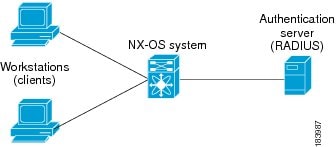
Device roles in 802.1x
For example, when a user connects a workstation (supplicant) to a network port, the Cisco NX-OS device (authenticator) requests identity information. The authentication server (RADIUS) validates the credentials and authorizes access if the supplicant is verified.
Authentication initiation and message exchange
Authentication initiation and message exchange describe the process by which either the authenticator (Cisco NX-OS device) or the supplicant (client) starts the authentication process, and how EAP frames are exchanged to establish network access.
-
Authentication can be initiated by either the authenticator or the supplicant.
-
The authenticator sends EAP-request/identity frames when a port transitions from down to up.
-
The supplicant responds with EAP-response/identity frames or can initiate authentication with an EAPOL-start frame if no request is received.
Details of authentication initiation and message exchange
Authentication on Cisco NX-OS devices can be initiated by either the authenticator or the supplicant. When authentication is enabled on a port and the link state transitions from down to up, the authenticator sends an EAP-request/identity frame to the supplicant. The supplicant responds with an EAP-response/identity frame. If the supplicant does not receive a request, it can initiate authentication by sending an EAPOL-start frame. The authenticator then acts as an intermediary, passing EAP frames between the supplicant and the authentication server until authentication succeeds or fails. If authentication is successful, the port becomes authorized.
Note |
If 802.1X is not enabled or supported on the network access device, the Cisco NX-OS device drops any EAPOL frames from the supplicant. If the supplicant does not receive an EAP-request/identity frame after three attempts to start authentication, the supplicant transmits data as if the port is in the authorized state. A port in the authorized state means that the supplicant has been successfully authenticated. |
The specific exchange of EAP frames depends on the authentication method being used.
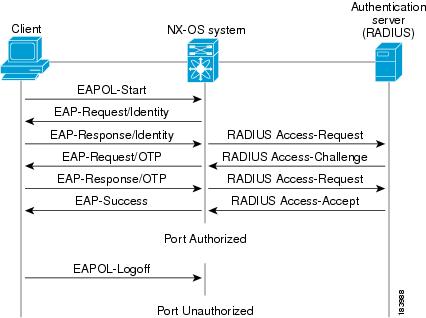
The user’s secret pass-phrase never crosses the network at any time such as during authentication or during pass-phrase changes.
Authentication message exchange
This example shows a message exchange initiated by the supplicant using the One-Time-Password (OTP) authentication method with a RADIUS server. The OTP authentication device uses a secret pass-phrase to generate a sequence of one-time (single use) passwords.
Authenticator PAE status for interfaces
An authenticator PAE (Port Access Entity) is a protocol entity that supports authentication on an interface when 802.1X is enabled.
-
Created automatically when 802.1X is enabled on an interface.
-
Not automatically cleared when 802.1X is disabled on the interface.
-
Can be explicitly removed and reapplied as needed.
When 802.1X is enabled on an interface, the Cisco NX-OS software creates an authenticator PAE instance to support authentication. Disabling 802.1X does not automatically remove the PAE instance; manual removal and reapplication may be required.
Managing authenticator PAE instances
For example, after disabling 802.1X on an interface, you may need to explicitly remove the authenticator PAE before re-enabling it to ensure proper authentication behavior.
Ports in authorized and unauthorized states
The port authorization state determines whether a supplicant is granted access to the network. Ports can be in authorized or unauthorized states, which control the flow of network traffic based on authentication status.
-
In the unauthorized state, the port blocks all ingress and egress traffic except for 802.1X protocol packets.
-
When a supplicant is successfully authenticated, the port transitions to the authorized state, allowing all traffic for the supplicant.
-
Ports support three authorization states: Force authorized, Force unauthorized, and Auto.
Authorization states and port behavior
Ports can operate in different authorization states, each affecting how authentication and network access are managed.
-
Force authorized : Disables 802.1X port-based authentication and transitions to the authorized state without requiring any authentication exchange. The port transmits and receives normal traffic without 802.1X-based authentication of the client. This authorization state is the default.
-
Force unauthorized : Causes the port to remain in the unauthorized state, ignoring all attempts by the client to authenticate. The authenticator cannot provide authentication services to the client through the interface.
-
Auto : Enables 802.1X port-based authentication and causes the port to begin in the unauthorized state, allowing only EAPOL frames to be sent and received through the port. The authentication process begins when the link state of the port transitions from down to up or when an EAPOL-start frame is received from the supplicant. The authenticator requests the identity of the client and begins relaying authentication messages between the client and the authentication server. Each supplicant that attempts to access the network is uniquely identified by the authenticator by using the supplicant’s MAC address.
When a client that does not support 802.1X is connected to an unauthorized 802.1X port, the authenticator requests the client’s identity. If the client does not respond, the port remains in the unauthorized state and the client is not granted access to the network.
When an 802.1X-enabled client connects to a port that is not running the 802.1X protocol, the client initiates the authentication process by sending the EAPOL-start frame. If no response is received, the client retries a fixed number of times and then begins sending frames as if the port is in the authorized state.
If the supplicant is successfully authenticated (receives an Accept frame from the authentication server), the port state changes to authorized, and all frames from the authenticated supplicant are allowed through the port. If authentication fails, the port remains in the unauthorized state, but authentication can be retried. If the authentication server cannot be reached, the authenticator can retransmit the request. If no response is received from the server after the specified number of attempts, authentication fails, and the supplicant is not granted network access.
When a supplicant logs off, it sends an EAPOL-logoff message, which causes the authenticator port to transition to the unauthorized state. If the link state of a port transitions from up to down, or if an EAPOL-logoff frame is received, the port returns to the unauthorized state.
Port state transitions
For example, if a supplicant is authenticated successfully, the port transitions to the authorized state and allows all traffic. If authentication fails or the supplicant logs off, the port returns to the unauthorized state, restricting network access.
If a non-802.1X client is connected to an unauthorized port, it does not respond to identity requests, and the port remains unauthorized, denying network access.
Port authorization states are like a security checkpoint: only authenticated individuals (supplicants) are allowed through (authorized state), while others are stopped at the gate (unauthorized state).
MAC authentication bypass
MAC Authentication Bypass is a feature that enables a Cisco NX-OS device to authorize a supplicant based on its MAC address when 802.1X authentication is not available or times out.
-
Allows network access for devices without 802.1X capability by using their MAC address as identity.
-
Triggers when 802.1X authentication times out or is not supported by the connected device.
-
Relies on an authentication server with a database of permitted MAC addresses for authorization.
How MAC authentication bypass works and interacts with other features
MAC Authentication Bypass (MAB) is used to authorize devices on Cisco NX-OS interfaces when 802.1X authentication is unavailable or times out. The device uses the MAC address as the supplicant identity and communicates with the authentication server to grant or deny network access.
-
When 802.1X authentication times out, the device attempts MAB.
-
If an EAPOL packet is detected, 802.1X authentication is used instead of MAB.
-
Reauthentication can occur for clients authorized by MAB, following the same process as 802.1X clients.
-
MAB interacts with features such as 802.1X authentication, port security, and Network Admission Control (NAC) Layer 2 IP validation.
-
Enable 802.1X authentication on the port.
-
If 802.1X times out, MAB is triggered and the MAC address is used for authorization.
-
If EAPOL is detected, revert to 802.1X authentication.
-
802.1X authentication: MAB can only be enabled if 802.1X is enabled on the port.
-
Port security: 802.1X authentication and port security cannot be configured on the same Layer 2 ports.
-
NAC Layer 2 IP validation: Takes effect after an 802.1X port is authenticated with MAB, including hosts in the exception list.
Comparison of authentication methods and their triggers:
|
Attributes |
802.1X Authentication |
MAC Authentication Bypass |
|---|---|---|
|
Trigger |
EAPOL packet detected |
802.1X timeout or not supported |
|
Identity Used |
Supplicant credentials |
MAC address |
 Tip |
Enable MAC Authentication Bypass only if 802.1X authentication is enabled on the port, and do not configure port security on the same Layer 2 ports. |
Using MAC authentication bypass for a printer
For example, if a printer is connected to an interface configured for 802.1X and does not support 802.1X, the Cisco NX-OS device can use MAC Authentication Bypass to authorize the printer based on its MAC address, granting it network access.
If a device connected to the interface is 802.1X-capable and sends an EAPOL packet, the Cisco NX-OS device uses 802.1X authentication instead of MAC Authentication Bypass.
MAC Authentication Bypass acts like a backup key for network access, allowing entry when the primary method (802.1X) is unavailable or fails.
Dynamic VLAN assignment based on MAC-Based authentication (MAB)
Dynamic VLAN assignment based on MAC-Based Authentication (MAB) is a process where a switch assigns a VLAN to a device after successful authentication, as directed by a RADIUS server.
-
Supports dynamic VLAN assignment on Cisco Nexus 9000 Series switches.
-
Uses 802.1x or MAB for authentication before port activation.
-
RADIUS server specifies the VLAN using tunnel attributes in the Access-Accept message.
How dynamic VLAN assignment works with MAB
Dynamic VLAN assignment allows a switch to place authenticated devices into specific VLANs as determined by a RADIUS server, enhancing network segmentation and security.
Dynamic VLAN assignment with MAB
For example, when a device connects to a Cisco Nexus 9000 Series switch port, the switch uses MAB to authenticate the device's MAC address. Upon successful authentication, the RADIUS server responds with tunnel attributes specifying the VLAN, and the switch assigns the port to that VLAN dynamically.
VLAN assignment from RADIUS
VLAN assignment from RADIUS is the process of dynamically assigning a VLAN to a port based on tunnel attributes received from the RADIUS server after successful authentication.
-
The RADIUS server sends tunnel attributes in the Accept-Access message.
-
The required tunnel attributes for VLAN assignment are Tunnel-type=VLAN(13), Tunnel-Medium-Type=802, and Tunnel-Private-Group-ID=VLANID.
-
All three parameters must be received to configure the access VLAN.
After authentication via 802.1X or MAB, the RADIUS server can provide dynamic VLAN information in the Accept-Access message using tunnel attributes.
-
Tunnel-type=VLAN(13)
-
Tunnel-Medium-Type=802
-
Tunnel-Private-Group-ID=VLANID
VLAN assignment from RADIUS
For example, when a device authenticates using 802.1X, the RADIUS server responds with the required tunnel attributes, allowing the switch to assign the appropriate VLAN to the port dynamically.
Single host and multiple hosts support
Single-host and multiple-host support in 802.1X define how many endpoint devices can access a port and how authentication and security violations are handled.
-
Single-host mode restricts port access to only one authenticated endpoint device.
-
Multiple-host mode allows multiple endpoint devices to access a port after the first device is authenticated.
-
Security violations are handled differently in each mode, with stricter enforcement in single-host mode.
Details of single host and multiple hosts support in 802.1x
The 802.1X feature can restrict traffic on a port to only one endpoint device (single-host mode) or allow traffic from multiple endpoint devices on a port (multi-host mode).
-
Single-host mode: Only one endpoint device is allowed on the port. After authentication, the port is authorized. If the device leaves, the port becomes unauthorized. Any traffic from a different MAC address triggers a security violation, disabling the interface. This mode is used for host-to-switch topologies and applies to both Layer 2 and Layer 3 ports.
-
Multiple-host mode: Only the first host must be authenticated. Once authorized, additional hosts can access the network without separate authentication. If the port becomes unauthorized, all hosts lose access. Security violation shutdown is disabled in this mode. It is applicable to both switch-to-switch and host-to-switch topologies.
Single host and multiple hosts support
For example, in single-host mode, a single computer connected to a switch port must authenticate before gaining network access. In multiple-host mode, once the first device authenticates, other devices connected to the same port can access the network without additional authentication.
Supported topology
Supported topology for 802.1X port-based authentication refers to the network configuration in which the authentication protocol operates.
-
Supports point-to-point topology.
-
Only one supplicant (client) can connect to the 802.1X-enabled authenticator port at a time.
-
The authenticator detects the supplicant when the port link state changes to up, and returns to unauthorized state if the supplicant leaves or is replaced.
The 802.1X port-based authentication is designed for point-to-point topologies, ensuring that only a single client is authenticated per port.
For example, when a client device connects to a Cisco NX-OS device port configured for 802.1X, the device authenticates the client. If the client disconnects and another device connects, the port transitions to the unauthorized state until the new device is authenticated.
About Per-User DACLs
Per-user DACLs are dynamic access control lists that are downloaded from the Cisco ISE Server and applied to authenticated users on 802.1X ports in Cisco NX-OS.
-
They provide different levels of network access and service to 802.1X-authenticated users.
-
The switch applies the DACL attributes for the duration of the user session and removes them when the session ends or authentication fails.
-
Per-user DACLs use RADIUS vendor-specific attributes (VSAs) in the octet-string format, specifically
inacl#<n>for ingress direction.
Per-user DACLs are configured and enforced using RADIUS authentication and vendor-specific attributes (VSAs) in Cisco NX-OS environments.
-
VSAs are used in the ingress direction only.
-
The syntax for per-user DACLs is:
ip:inacl#<n>=permit | deny [protocol] [source_subnet] [dest_subnet] [operator][port]
|
Attribute |
Example 1 |
Example 2 |
|---|---|---|
|
VSA Syntax |
|
|
Note |
TIP: The switch supports VSAs only in the ingress direction. |
Per-user DACL example
For example, to permit UDP traffic on port 5555 for a user, use
ip:inacl#1=permit udp any any eq 5555
. To deny UDP traffic on port 6666, use
ip:inacl#2=deny udp any any eq 6666
.
Critical authentication
Critical Authentication is a feature that allows 802.1X users to access the network when RADIUS or ISE servers are unreachable or authentication fails.
-
Permits network access for 802.1X users who fail RADIUS authentication due to server unreachability.
-
Supported when 802.1X authentication is performed only through RADIUS or ISE servers.
-
Can be enabled using the dot1x authentication event server dead action authorize command and disabled with the no command.
Beginning with Cisco NX-OS Release 10.5(2)F, the 802.1X feature and critical authentication feature are supported on multi-domain ports.

 Feedback