When you provision a wireless controller for the first time, Catalyst Center also provisions the associated APs. When you reprovision the wireless controller, Catalyst Center detects if there are any changes to these AP intent configurations:
-
VLAN configurations: local VLAN, native VLAN, and AAA VLAN.
-
Tag configurations: policy tag, site tag, AP profile name, flex profile name, and site tag load count.
-
Failed AP wireless configuration parameters from the previous provisioning attempts.
If there are no changes to these AP intent configurations, Catalyst Center skips the provisioning of associated APs. If there are changes to the AP intent configurations, you can use the Skip AP Provision option to skip the AP provisioning during wireless controller reprovisioning. If you check the Skip AP Provision check box, Catalyst Center doesn't reprovision the existing APs and the APs managed by the wireless controller. However, the newly added APs are provisioned.
The selective AP group Resource Facing Service (RFS) translate feature optimizes wireless controller reprovisioning for AP-related configurations (such as AP tag mapping, RF tags, and flex or RF profiles) by translating only
the AP intent that has changed. Out-of-band AP configurations are not automatically corrected during reprovisioning unless
a compliance report explicitly flags them. To correct the AP-related out-of-band configurations to match your network intent,
perform a wireless controller resynchronization and compliance run. For example, if you manually update the static tag mapping:
-
With resynchronization and compliance run, the manual change is corrected to match the intent configuration.
-
Without resynchronization and compliance run, the manual change is not corrected and only the new intent changes are applied.
To disable the selective AP group RFS translate feature, contact Cisco Technical Assistance Center (TAC).
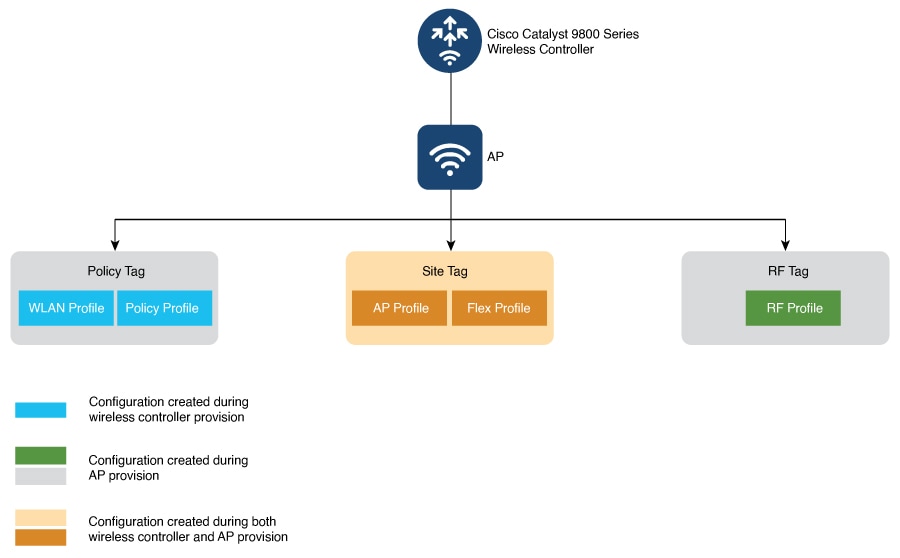
Catalyst Center uses policy tags, site tags, and RF tags to push the wireless network configurations to individual APs through Cisco Catalyst 9800 Series Wireless Controllers.
For the first-time provisioning, Catalyst Center configures both the custom and Catalyst Center-generated site tags, policy tags, and RF tags only during the AP provisioning. For more information about the tag and flex
profile configurations, see Overview of AP groups, flex groups, site tags, and policy tags.
This figure shows how Catalyst Center processes the tags.
For information about the tags on the wireless controller, see Understand Catalyst 9800 Wireless Controllers Configuration Model.
This table lists the tags and the associated tag information during the first-time provisioning of wireless controller and APs:
|
Tag
|
Design window
|
Wireless Controller provision (with the Skip AP Provision unchecked)
|
AP provision
|
|
Policy tag
|
|
Autogenerated names for WLAN profile and policy profile are created.
|
Policy tags with the required WLAN profiles are created.
|
|
Site tag
|
AP profile:
Custom site tag and flex profile:
|
For nonflex configurations, an AP profile mapped to the custom site tag is created.
|
Note
|
The site tag is created and associated with the AP profile during AP provisioning.
|
|
For nonflex:
|
|
For flex configurations, intent configurations defined in the feature template with IP Overlap enabled and native VLAN configurations are created.
|
For flex, a nondefault flex profile is created.
|
|
RF tag
|
|
No change
|
RF tag and RF profiles are created.
|
This table lists the tags and the associated tag information during the wireless controller and AP reprovisioning when there are changes to the AP intent configurations:
|
Tag
|
Design window
|
Wireless Controller provision (with the Skip AP Provision unchecked)
|
AP provision
|
|
Policy tag
|
|
-
WLAN profile and policy profile mappings are configured.
-
Updates to policy tags are configured for the provisioned APs.
-
Updates to the policy tag name are configured for the provisioned APs.
|
|
|
Site tag
|
AP profile:
Custom site tag and flex profile:
|
Updates to site tags are configured for the provisioned APs.
|
Site tag, flex profile, and AP profile are created or configured.
|
|
RF tag
|
|
Updates to the RF profile are configured.
|
RF tags are configured.
|

Note
|
If there are no provisioned APs on a floor, tags aren’t configured on the floor during the wireless controller reprovisioning.
|

 Feedback