How RedCap Support works
Summary
This process explains the process in which Reduced Capability functionality works.
Workflow
 Note |
For this feature to work
|
These stages explain the process of RedCap support on SMF:
-
RedCap PDU Session Establishment: A RedCap UE sends a PDU Session Establishment Request to AMF.
Upon receiving the request, AMF sends a PDU Session SM Context Request to SMF and sets the ratType IE as RedCap in the message.
-
Subscription, policy creation, and charging data requests: SMF receives the ratType IE as RedCap from AMF and forwards it to UDM, PCF, and CHF for subscription, policy creation, and charging data requests respectively.
-
BAR creation during N4 Session Establishment: The buffering duration and packet count for HLCOM are communicated from the SMF to the UPF using Buffering Action Rules (BARs) as defined in the 3GPP TS 29.244 specification.
SMF sends the N4 Session Establishment Request to the UPF including the ratType IE as RedCap. SMF also creates an empty BAR and associates it to the FARs during N4 Session Establishment.
-
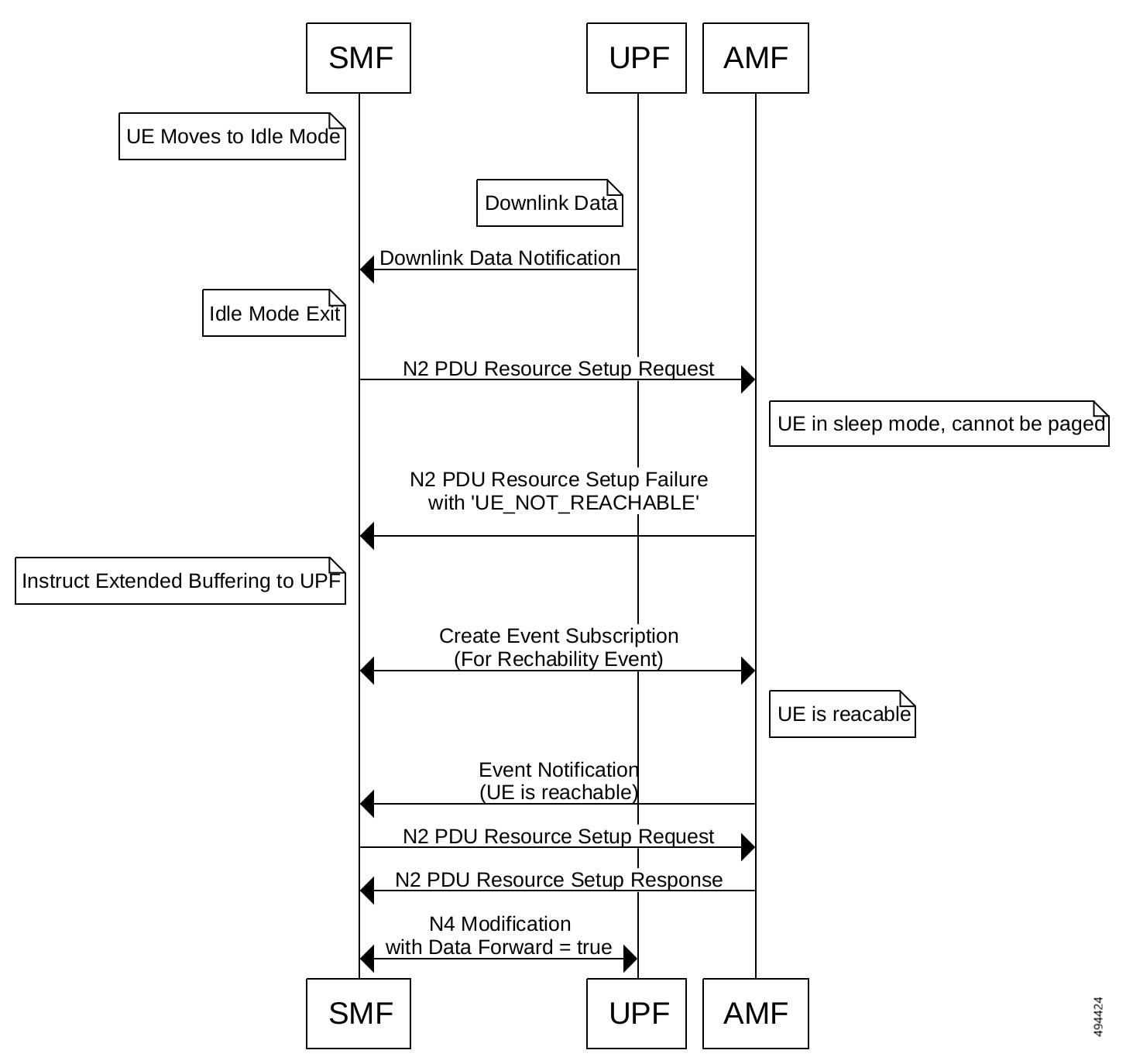
UE's entry in the Idle mode: SMF instructs the UPF to buffer when the UE moves to idle state. SMF sends an N4 Session Modification Request to UPF with UpdateBAR IE containing these IEs:
Table 2. Buffering IEs in UpdateBAR IE Buffering IE
Description
DDND (Downlink Data Notification Delay)
The UP function supports the buffering parameter "Downlink Data Notification Delay (DDND)". SBPC (Suggested Buffering Packets Count)
The UP function supports the "Suggested Buffering Packets Count (SBPC)" is present, when the UP function indicates the support of the feature UL/DL Buffering Control (UDBC).
UPF sends the Downlink Data Notification to SMF.
-
UE's exit from the Idle mode: SMF sends an N1 N2 Transfer Request to AMF. SMF sets the extBufSupport IE (Extended Buffering Support) to true in the N2 PDU Setup Request message to indicate extended buffering support to AMF based on configuration and based on the UPF support.
SMF does not set extBufSupport to true in case of paging for a control plane message.
As the UE is unreachable, the AMF sends a PDUSessionResourceSetupRequestTransfer Response message to SMF including the status code and cause as 504: UE_NOT_REACHABLE. SMF also receives a maxWaitingTime IE (Estimated Maximum Waiting Time) in the N1N2MsgTxfrErrDetail IE. SMF starts the maxWaitingTime IE timer and stores the flow information for retry.
SMF sends the N4 Modification Request with UpdateBAR with "DL Buffering Duration (DBD)" same as the estimated maximum wait time and "DL Buffering Suggested Packet Count (DBPC)" from the configuration, if the UPF has indicated the support for DBDM.
-
Subscription to UE reachability Notification: SMF subscribes to AMF's CreateEventSubscriptions, when it receives the error 504: UE_NOT_REACHABLE from the AMF. The subscription includes the event types as REACHABILITY_REPORT and reachability filter as UE_REACHABLE_DL_TRAFFIC, if the configuration is present.
For more details on the configuration, see the Configure HLCOM RedCap sessions section.
-
UE reachable: SMF receives the event notification from the AMF, once the UE is reachable again. This notification includes a UE Reachability filter as Reachable.
SMF extracts the QCI and ARP values from the flow that is marked as awaiting_reachability. When the UE moves to the active state, the status is reset.
SMF sends the N1N2 Transfer Request containing N2 Setup Request, to AMF.
AMF sends a N2 Setup Request to the gNB. The gNB sends N2 Setup Response. SMF sends the N4 Modification Request to the UPF.
Note
In case of AMF change, the N1N2 Transfer Request should happen before the event subscription. Therefore, even during AMF change, it does not require any additional change for event exposure discovery.
Selection of AMF address for event exposure
SMF uses these two methods to determine the AMF's address for event exposure:
-
NRF-based AMF discovery: SMF selects the NF service with service name configured as namf-evts and selects the peer address from NF service.
In case SMF does not find the matching NF service, it selects the peer address from the NF client profile configuration.
-
NF client profile configuration: SMF uses the AMF's IP address configured under the NF client profile corresponding to the AMF event exposure service to determine the AMF.
To see the NF client profile configuration, see the Subscribe to AMF's Event Exposure service.
Limitations
These are the known limitations of Reduced Capability support on SMF:
-
17.x compliance profile is required for nsmf-pdusession, npcf-smpolicycontrol, and chf-convergedcharging services.
-
16.9.x compliance profile is required for namf-comm services.
-
SMF supports the extended buffering (HLCOM) functionality only for the RedCap RatType and not for other RatTypes.
-
SMF supports the extended buffering only for Idle mode exit due to data trigger.
-
The RedCap PDU Session Establishment is not supported for roaming calls.
-
UPF selection based on HLCOM supported feature bits is not supported.
-
The AMF selection or discovery for namf-comm service based on HLCOM is not supported.
-
SMF will cap the DBD value to a higher value in case of encoding restrictions on the N4 interface.
-
The ratType label with NR_REDCAP value is not supported for policy_msg_processing_status stats.
Standards compliance
SMF supports 3GPP compliance profile version 17.5.0 for the service nsmf-pdusession, 17.15.0 for the npcf-smpolicycontrol, and 17.1.0 for chf-convergedcharging.
 Feedback