Preparing for System Upgrade
Available Languages
Table Of Contents
Cisco Unified CallManager Upgrade and Compatibility Considerations
Cisco Unified CallManager 5.0(2) and Cisco Unified CallManager 5.0(4) Compatibility Matrix
Customer Response Solutions Considerations
Cisco Unified IP Phones Considerations
Backward Compatibility Scenarios
Software Releases for Contact Center Components
Software Releases for IP Telephony Components
Preparing for System Upgrade
This topic discusses information to be aware of prior to the actual upgrade process such as the general upgrade approach for the different components, upgrade release versions of components involved in the upgrade, and release version compatibility.
This topic contains the following sections:
System Upgrade Approach
The general approach is to upgrade one Cisco Unified CallManager (Unified CallManager) cluster and its associated components one at a time before upgrading the next cluster.
For each cluster, upgrade the components of the Cisco Unified Communications System solution in the following order:
1.
Infrastructure components, including Catalyst 6000 switches, routers and domain controllers (including Active Directory). These components should be upgraded first to ensure that the infrastructure is able to support the services required by Cisco Unified Communications System components.
2.
3.
4.
5.
6.
7.
See Chapter 3, "Upgrading IPT Software Components" and Chapter 4, "Upgrading Contact Center Software Components" for detailed information on the order in which the above components have to be upgraded.
The upgrade sequence of the components should also be dictated by the following considerations:
•
•
See Table 2-1 which indicates which components need to be upgraded prior to or after upgrading Unified CallManager, or if the upgrade order does not matter.
System Upgrade Dependencies
It should be assumed that components within each release set are compatible with each other and will interoperate correctly. For example, components in the Cisco Unified Communications System
Release 5.0 release set are compatible with each other and will interoperate, as also the components in the Release 5.0(2) release set.The order of operations also needs to take into account the impact of backwards (in)compatibility as described later in this section, especially for Multistage System and Multisite Migration upgrades, where each stage (or maintenance window) only upgrades some of the components in the release set.
However, as you upgrade individual components of the integrated system, the overall system may operate in a state of degraded service where one or more components have been upgraded to the next release level and may not interoperate with components that are still at the previous release level.
For the upgrade order listed previously for the various deployment models, the components that are upgraded first should interoperate with other components that are still at the previous release level.
For example, Unified CallManager is upgraded before the gateways. Therefore, Unified CallManager, which is now at the next release level, must interoperate with the gateways that have not been upgraded and are still at the previous release level.
Cisco Unified CallManager Upgrade and Compatibility Considerations
Since Unified CallManager is upgraded from the Cisco Unified Communications System Release 5.0 release set to the Release 5.0(2) release set early in the upgrade sequence, it has to be compatible with other components running Cisco Unified Communications System software release versions.
Be aware of the following constraints to upgrade with regards to Unified CallManager:
•
•
•
•
After all nodes in the cluster are upgraded, make sure you do the following:
–
–
–
–
–

Note
•
•
Note
•
•
•
–
–
•
•
Cisco Unified CallManager 5.0(2) and Cisco Unified CallManager 5.0(4) Compatibility Matrix
Table 2-1 lists the release versions of the components that are compatible with the Unified CallManager 5.0(2) and Unified CallManager 5.0(4) release versions. The table also specifies the upgrade order for the listed component in relation to Unified CallManager, where "Any" means that the component can be upgraded either before or after upgrading Unified CallManager.
Table 2-1 Unified CallManager Release 5.0(2) and Release 5.0(4) Upgrade Compatibility
Cisco Unified CallManager Express
3.4(0)
Yes
Yes
Any
Cisco Unity Express
2.2.2
Yes
Yes1
After Unified CallManager (see above considerations)
Cisco Unity (Exchange/Domino)
4.2(1) ES9
Yes with TSP 8.1(2)
Yes with TSP 8.1(2)
Any (see above considerations)
Cisco Unity TSP
8.1(2)
Yes
Yes
Any
Cisco Unity Connection
1.1.(1) SR1 ES12
Yes
Yes
Any
1.1(2) SR1
ES30Yes
Yes
Cisco Unified MeetingPlace
5.3
Yes
Yes
Any
Cisco Unified MeetingPlace Express
1.1.1.11
Yes
No
Any
1.1(2)
Yes
Yes
Cisco Unified MobilityManager
1.2.0.1-5
Yes
Yes
Before Unified CallManager (see above considerations)
CRS (Unified IP IVR & Unified Contact Center Express)
3.5(3)
Yes
No
Same stage as Unified CallManager (see above considerations)
4.5(2)
No
Yes
Unified CCE/Unified ICM and CTI OS Server
7.0(0) SR3
Yes
Yes
Any
7.0(0) SR4
Yes
Yes
Cisco Unified Customer Voice Portal
3.1(0)ES2
Yes
Yes
Any
3.1(0) SR1 ES2
Yes
Yes
Cisco Agent Desktop/Cisco Supervisor Desktop
6.0(0)
Yes
No
Any
7.0.1.17
Yes
Yes
CTI OS Agent/Supervisor
6.0(0)
Yes
No
Any
7.0SR2
Yes
Yes
Cisco Unified ICM Support Tools
2.0
Yes
Yes
Any (upgrade with Unified ICM)
Cisco Emergency Responder
1.3.1
Yes
Yes
Any (see above considerations)
Cisco IP Communicator
2.0(1a)
Yes
Yes
Any
Cisco Unified Operations Manager
1.1
Yes
Yes
Any
IOS Gateway and Gatekeeper
12.4(6)T
Yes
Yes
Any
12.4(6)T1
Yes
Yes
Cisco Unified Survivable Remote Site Telephony (SRST)
3.4(0)
Yes
Yes
Any
Cisco Unified VT Advantage
1.0(2)
Yes
Yes
Any
2.0(1a)
Yes
Yes
Cisco VG224 (analog voice gateway)
12.4(6)T
Yes
No
Any
12.4(6)T1
No
Yes
Cisco VG248 (analog voice gateway)
1.3(1)ES8.2
Yes
Yes
Any
Cisco Aironet Access Point AP 1200G
12.3(8)JA
Yes
Yes
Any
Cisco Secure PIX Firewall 535
7.0(4)5
Yes
Yes
Before Unified CallManager and Unified Communications products
7.2
Yes
Yes
Cisco Unified Personal Communicator
1.1(1)
No
Yes
After Unified CallManager upgrade and Presence Server installation
Cisco Unified Presence Server
1.0(1)
No
Yes
After Unified CallManager
1 See additional compatibility information in the Cisco Unified CallManager Upgrade and Compatibility Considerations section.
Customer Response Solutions Considerations
For CRS 4.5(2), be aware of the following:
•
•
Note
•
•
•
•
•
–
–
–
Cisco Unified IP Phones Considerations
When enabling or upgrading phones to SIP, certain features and functionality that were previously available may no longer be supported. Be aware of the following:
•
•
For more detailed information on this and the differences between features on the SCCP and SIP phones, see the documentation at:
•
http://www.cisco.com/en/US/products/hw/phones/ps379/prod_maintenance_guides_list.html•
http://www.cisco.com/en/US/products/hw/phones/ps379/products_user_guide_list.html•
http://www.cisco.com/en/US/products/sw/voicesw/ps556/products_implementation_design_guide_book09186a00806492bb.htmlBackward Compatibility Issues
In Multistage System upgrade scenarios, you may have to consider additional issues such as backward compatibility across components.
A version of one component is backward compatible with a previous version of another component when service functionality and behavior are maintained between the two component versions. Backward compatibility between two components or applications may limit the order of upgrade of the components and cause service outage during upgrades.
If two components are upgraded during separate maintenance windows, as in the Multistage System or Multisite Migration upgrade scenarios, the whole system exists in a partially upgraded state in the interval between the two maintenance windows (MW).
The service capability during the period between maintenance windows depends on backwards compatibility between the two components as discussed in this section. If the two components are not backward compatible, then service outages occur in the interval between the two maintenance windows.
You may need to consider the following backward compatibility situations that may occur during the upgrade process. For more information, see the component compatibility matrices listed in Chapter 3, "Related Documentation" (for IP telephony) and Chapter 4, "Related Documentation" (for Contact Center).
Backward Compatibility Scenarios
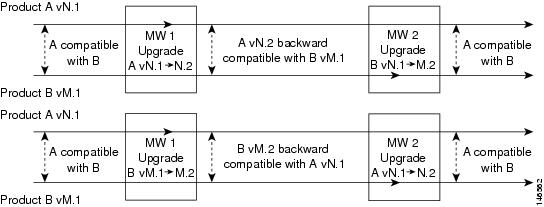
Both New Versions Are Backward Compatible
Both new versions of the two components are backward compatible with the previous version of the other component.
In this case, there is no restriction in the order of upgrades relating to backward compatibility. Either component may be upgraded first and be able to interoperate with the other component as shown in Figure 2-1.
You can perform the upgrade for these components across multiple maintenance windows. This type of upgrade is described in the Multistage System and Multisite Migration upgrade approaches in "Planning Your System Upgrade" (for IP telephony) or "Planning Your System Upgrade" (for Contact Center).
Figure 2-1 Both New Release Versions are Backward Compatible
Only One New Version is Backward Compatible
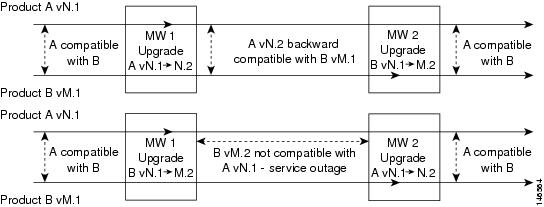
Only one of the new versions is backward compatible with the previous version of the other component.
In this case, the component that is backward compatible should be upgraded first in order to avoid a service outage during the upgrade as shown in Figure 2-2.
You should perform the upgrade for these components across two separate maintenance windows. This type of upgrade is described in the Multistage System and Multisite Migration upgrade approaches in "Planning Your System Upgrade" (for IP telephony) or "Planning Your System Upgrade" (for Contact Center).
Figure 2-2 One New Release Version is Backward Compatible
Neither New Version is Backward Compatible
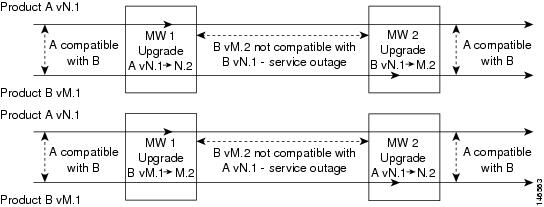
Neither of the new versions is backward compatible with the previous version of the other component, as with CRS and Unified CallManager.
There will be a service outage which exists from the time the first product is upgraded until the second component has completed its upgrade as shown in Figure 2-3.
For example, CRS 3.5(3) does not support Unified CallManager 5.0(4) and CRS 4.5(2) does not support Cisco CallManager 4.1(3). Since neither component is backward compatible with the other, both components have to be upgraded in the same maintenance window to avoid service outage. This upgrade is described in the Single-Stage upgrade approach in "Planning Your System Upgrade" (for IP telephony) or "Planning Your System Upgrade" (for Contact Center).
Essentially, all CRS upgrades should be treated as fresh installations.
Figure 2-3 Neither New Release Version is Backward Compatible
Upgrade Release Versions
Software Releases for Contact Center Components
Table 2-2 lists the software versions for the contact center components in the Cisco Unified Communications System Release 5.0 and Release 5.0(2) release sets:
Software Releases for IP Telephony Components
Table 2-3 lists the software versions for IPT components in the Cisco Unified Communications System
Release 5.0 and Release 5.0(2) release sets:
Table 2-3 IPT Components in Cisco Unified Communications System Release 5.0 and Release 5.0(2) Release Sets
Release 5.0 Component NameCisco Unified CallManager
5.0(2)
5.0(4)
Cisco Unified CallManager—Cisco IP Telephony Operating System
Included with Unified CallManager
Included with Unified CallManager
Cisco Customer Response Solutions (Cisco Unified Contact Center Express)
4.5(2)
4.5(2)
Cisco Customer Response Solutions—Cisco IP Telephony Operating System
2000.4.2SR3
2000.4.2SR8
Cisco Emergency Responder
1.3.1
1.3(1a)
Cisco Emergency Responder—Cisco IP Telephony Operating System
2000.4.2SR3
2000.4.2SR8
Cisco Unified Presence Server
not used
1.0(1)
Cisco Unity, TSP
4.2(1), 8.1(2)
4.2(1) ES9, 8.1(2)
Cisco Unity—Microsoft Exchange
Microsoft Exchange 2000/2003
Microsoft Exchange 2000/2003
Cisco Unity—IBM/Lotus Domino1
6.5 with DUC 1.2.3
6.5 with DUC 1.2.3
Cisco Unified MeetingPlace
5.3
5.3
Cisco Unified CallManager Express
3.4(0) / IOS 12.4(6)T
3.4(0) / IOS 12.4(6)T1
Cisco Unity Express2
2.2.1
2.2.2
Cisco Unity Connection
1.1(1)SR1 ES12 (for SIP interworking),
1.1(1)SR1 (for SCCP only, no SIP)1.1(1)SR1 ES30 (for SIP integration),
1.1(1)SR1 (for SCCP only integration)Cisco Unified MeetingPlace Express
1.1.1.11
1.1(2)
Cisco Unified Survivable Remote Site Telephony (SRST)
3.4(0)
3.4(0)
Cisco Unified Videoconferencing Multipoint Control Unit (MCU) 35111
4.1.9
5.0
Cisco Unified Videoconferencing MCU 3540
4.2.10
5.0
Cisco Unified Videoconferencing Enhanced Media Processor (EMP) Module
4.2.8 and 4.2.8.1
4.2.8 and 4.2.8.1
Cisco Unified Videoconferencing Gateway 3521 (ISDN BRI)1
4.0.0.40
4.0.0.40
Cisco Unified Videoconferencing Gateway 3526 (ISDN PRI)1
4.0.0.40
4.0.0.40
Cisco 1760 (voice/data gateway)1
not used
12.4(6)T1
Cisco 2610XM, 2611XM, 2620XM, 2621XM, 2650XM, 2651XM, 2691 (router)
12.4(6)T
12.4(6)T1
Cisco 2801, 2821, 2851, 3825, 3845 (router, voice/data gateway)
12.4(6)T
12.4(6)T1
Cisco 3745 (gatekeeper)
12.4(6)T
12.4(6)T1
Cisco 3725, 3745 (voice/data gateway)
12.4(6)T
12.4(6)T1
Cisco 3725, 3745, 3825 (SRTP3 and Secure SRST gateways)
12.4(6)T
12.4(6)T1
Cisco 7206 (voice/data gateway)
12.4(6)T
12.4(6)T1
Cisco Catalyst 3550 (access switch)
12.2(25)SEC2
12.2(25)SEC2
Cisco Catalyst 3560 (access switch)
12.2(25r)SE1 -3560
12.2(25r)SE1 -3560
Cisco Catalyst 3750 (data center switch)
12.2(25)SEC2
12.2(25)SEC2
Cisco Catalyst 4506 (access switch)
12.2(20)EWA
(3.86)12.2(20)EWA
(3.86)Cisco Catalyst 6506, 6509 (voice access switch, supervisor 2 / MSFC2)
CatOS 8.4(3) / 12.2(17d)SXB9
CatOS 8.5(2) / 12.2(18)SXF3
Cisco Catalyst 6506, 6509 (core switch, supervisor 720)
IOS 12.2(18)SXE4
(native-mode)IOS 12.2(18)SXF3 (native-mode)
Cisco Catalyst Communications Media Module (CMM)
12.4(4)T1
12.4(6)T1
Cisco Catalyst Firewall Service Module (FWSM)
3.1(1)
3.1(3)
Cisco Catalyst 6608, 6624 (voice gateway)
Bundled with Unified CallManager
Bundled with Unified CallManager
Cisco VG224 (analog voice gateway)
12.4(6)T
12.4(6)T1
Cisco VG248 (analog voice gateway)
1.3(1)ES8.2
1.3(1)ES8.2
Cisco ATA 186, 188 (analog telephony adaptor)
Bundled with Unified CallManager
Bundled with Unified CallManager
Cisco Security Agent for Unified CallManager—Engine/Policy
4.5.1.(652.1)
4.5.1.(652.1)
Cisco Security Agent for Cisco Emergency Responder
4.5.1-639-2.0.3
4.5.1-639-2.0.4
Cisco Security Agent for Cisco Customer Response Solutions
4.5.1-639-2.0.3
4.5.1-639-2.0.4
Cisco Security Agent for Cisco Unity
4.5.1-639-2.0.2
4.5.1-639-2.0.3
Cisco Fax Server
9.0
9.0
Cisco Secure PIX Firewall 535
7.0(4)5
7.2
Cisco SIP Proxy Server
2.2.1.11
2.2.1.11
Cisco Unified MobilityManager
1.2.0.1-5
1.2.1
Cisco Unified Operations Manager
1.1
1.1
Cisco Resource Management Essentials (RME)
4.0.3
4.0.3
Cisco Unified IP Phones models 7905G, 7911G, 7912G, 7920, 7935, 7940G, 7941G 7960G, 7961G, 7970G, 7971G
Bundled with Unified CallManager
Bundled with Unified CallManager
Cisco Aironet Access Point (AP) 1200G
12.3(8)JA
12.3(8)JA
Cisco IP Communicator
2.0(1a)
2.0(1a)
Cisco Unified Personal Communicator
not used
1.1(1)
Cisco Unified VT Advantage
1.0(2)
2.0(1a)
McAfee Antivirus
Enterprise 8.0.0
Patch Version: 11Enterprise 8.0.0
Patch Version: 11Polycom VSX7000
8.0.3 (H.323)
8.0.3 (H.323)
Tandberg 7985 (SCCP video endpoint)
4.0(2)
4.0(2)
Tandberg 990 MXP (H.323 video endpoint)
F4.0 (H.323)
F4.1 (H.323)
Tandberg T1000 (SCCP video endpoint)
I2.1
I2.1
Tandberg T1000 MXP (H.323 and SCCP video endpoint)
F4.0 (H.323), M2.1 (SCCP)
F4.0 (H.323), M2.1 (SCCP)
1 Applies to EUEM (European & Emerging Markets) deployments only.
2 See additional compatibility information in the Cisco Unified CallManager Upgrade and Compatibility Considerations section.
3 SRTP supported for MGCP gateways only (not H.323 gateways or SIP servers).
 Feedback
Contact Cisco
- Open a Support Case

- (Requires a Cisco Service Contract)