Cisco Cyber Vision Classic UI Administration Guide, Release 5.6.0

PDF

Cisco Cyber Vision Classic UI Administration Guide, Release 5.6.0

XDR

Want to summarize with AI?

Log in

Introduces the Cisco Cyber Vision integration with Cisco XDR and explains the available XDR features, including their XDR SSO login requirements.


The Cisco Cyber Vision XDR integration connects Cisco Cyber Vision with Cisco XDR, a cloud-native, built-in platform that connects the Cisco Secure portfolio with your infrastructure.

Cisco XDR centralizes security events from Cisco software through an API. It can receive and correlate Cisco Cyber Vision events and firewall activities, then present them in dashboards.

The integration can significantly reduce dwell time and human-powered tasks.

The XDR integration enables the following three features in Cisco Cyber Vision:

  • Without XDR SSO login, Investigate in XDR Threat Response appears on component technical sheets.

  • With XDR SSO login, Report to XDR appears for certain events on the event calendar page. Use Report to XDR to send these events to XDR.

  • With XDR SSO login, you can activate the XDR ribbon in Cisco Cyber Vision to access its features.

Note

SecureX reached end of life on 2024-07-31.

Configure XDR

Configure the XDR integration in Cisco Cyber Vision.

Before you begin

Before you begin, ensure that you have Admin access to Cisco Cyber Vision Center, a Cisco Cyber Vision Center with internet access, and an XDR account with an admin role.

Procedure

  1. From the main menu, choose Admin > Integrations > XDR.

  2. Click the Region drop-down list and select a region.

  3. Select Enable XDR to enable the link.

    The control turns red to indicate Disable XDR.

    You can now use Investigate in XDR Threat Response, which appears in the component technical sheet. Complete the remaining steps to install and use the XDR ribbon and Report to XDR.

  4. In the upper-right corner of the GUI, open the user menu and select My Settings.

    An XDR menu appears on the right side of the My Settings page.

  5. Click Log in.

    A Grant Application Access popup appears with an authentication code.

  6. Click Verify and Authorize. In the Security Cloud Sign On window that opens, enter Email and click Continue to grant Cisco Cyber Vision access to XDR.

  7. Click Authorize Cyber Vision.

    A Client Access Granted popup appears. In Cisco Cyber Vision Center > My Settings, the XDR menu indicates that Cisco Cyber Vision is connected to XDR.

  8. Use the Ribbon status toggle to enable the XDR ribbon.

    After you enable Ribbon status, a message appears.

  9. To log out, click Logout of XDR, then click Save settings.


XDR Ribbon

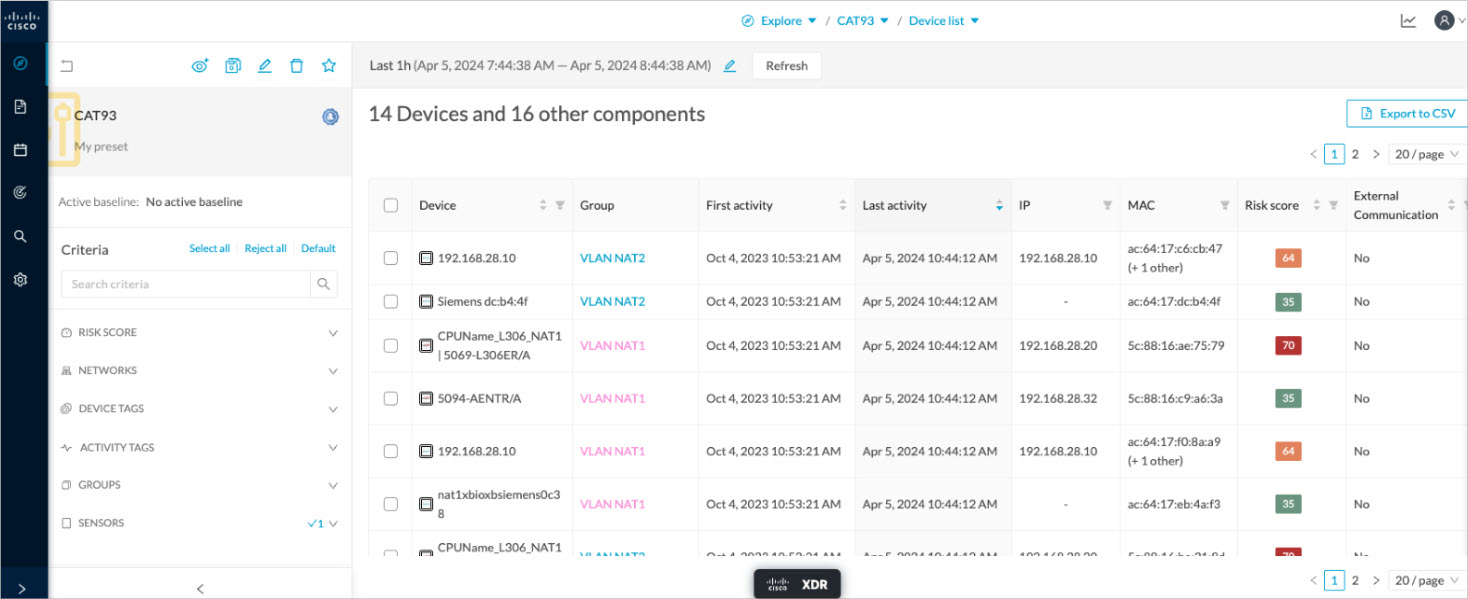
The XDR ribbon appears at the bottom of the Cisco Cyber Vision GUI in the Explore menu once it is configured and activated.

The XDR ribbon in the Device List view:

The Cisco XDR Getting Started Guide explains how to use the XDR ribbon.

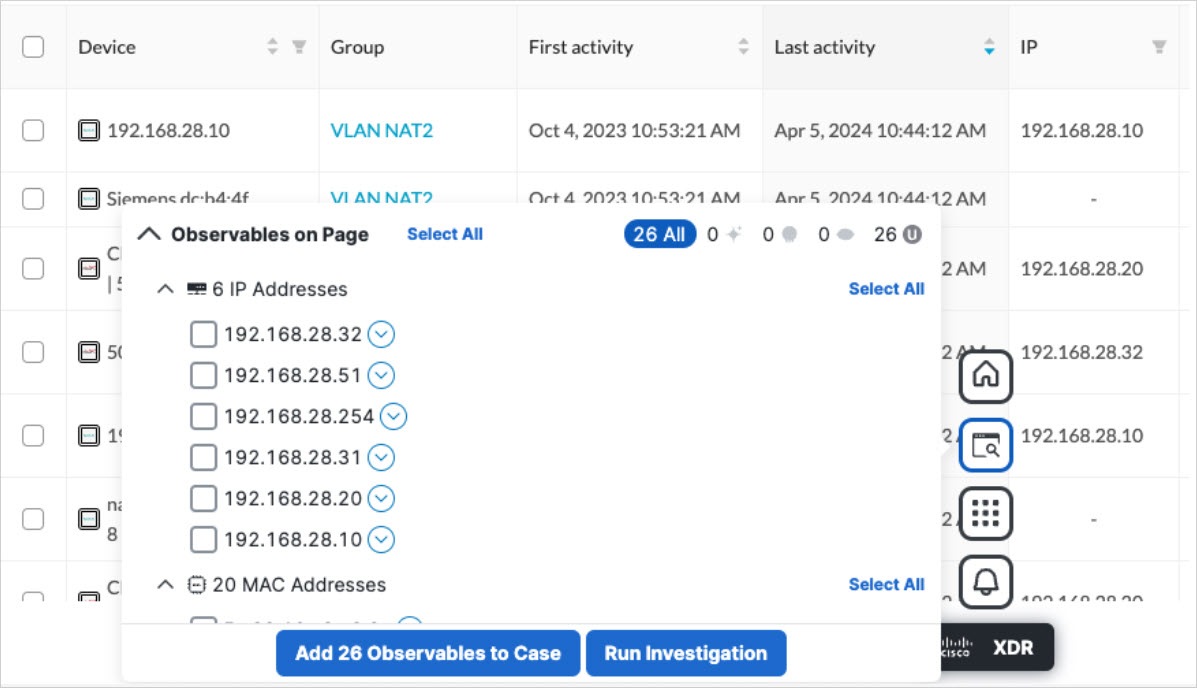
For example, to find observables and investigate them in XDR Threat Response, click the Find Observables icon like below:


XDR Event Integration

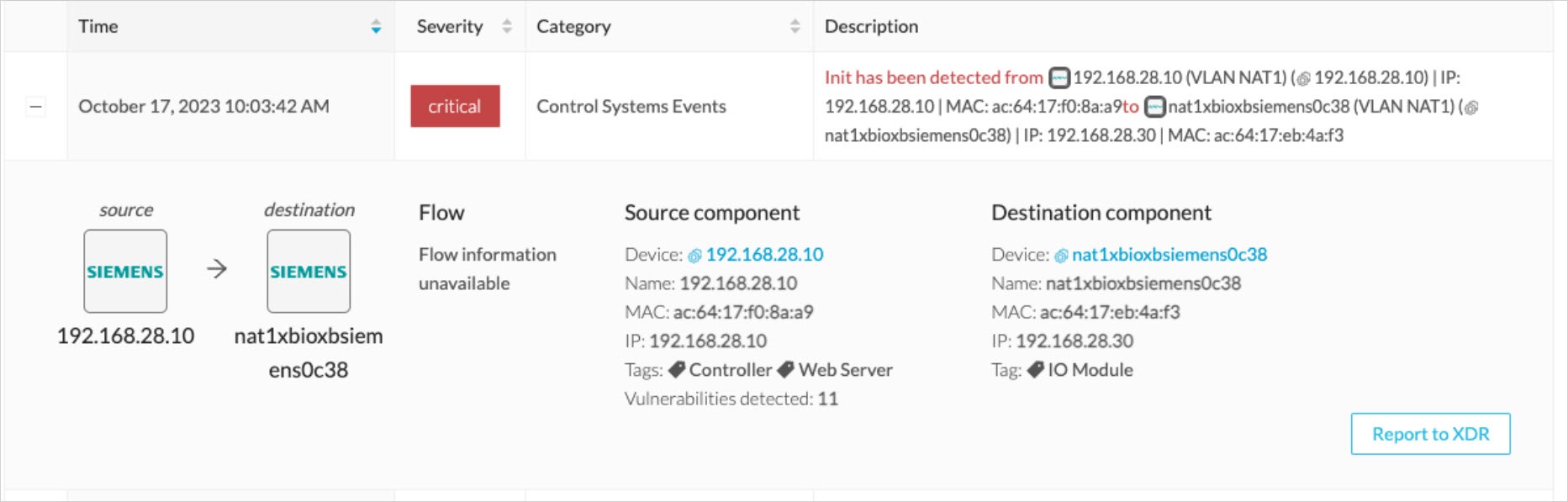
After configuring XDR in Cisco Cyber Vision, the Report to XDR button appears for some events on the event calendar page. Selecting this button sends the event to XDR and creates an incident.

The Report to XDR button is available for the following event categories:

  • Anomaly Detection

  • Control Systems Events

  • Signature Based Detection

Figure 1. Report to XDR button on a Control Systems Event

XDR component button

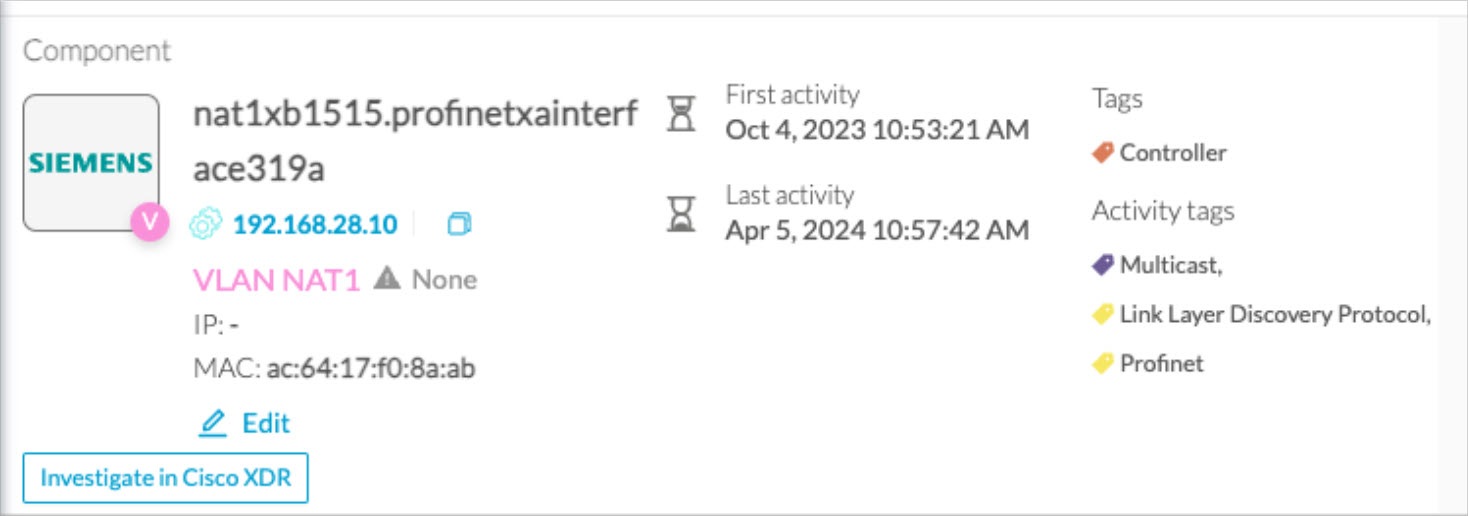
After you configure XDR in Cisco Cyber Vision, the Investigate in Cisco Threat Response button appears on the component’s technical sheet. If you use this button, XDR Threat Response investigates the component’s IP and MAC addresses.


External resources for XDR integration

Provides the necessary URLs for Cisco XDR integration across different geographic regions to facilitate secure communication.

Center:

North America

  • Cisco XDR Platform: https://visibility.amp.cisco.com/iroh/

  • Cisco XDR Private Intelligence: https://private.intel.amp.cisco.com/ctia/

  • Cisco XDR Automation: https://automate.us.security.cisco.com/api/

Europe

  • Cisco XDR Platform: https://visibility.eu.amp.cisco.com/iroh/

  • Cisco XDR Private Intelligence: https://private.intel.eu.amp.cisco.com/ctia/

  • Cisco XDR Automation: https://automate.eu.security.cisco.com/api/

Asia Pacific, Japan, and China

  • Cisco XDR Platform: https://visibility.apjc.amp.cisco.com/iroh/

  • Cisco XDR Private Intelligence: https://private.intel.apjc.amp.cisco.com/ctia/

  • Cisco XDR Automation: https://automate.apjc.security.cisco.com/api/

Web client:

  • conure.apjc.security.cisco.com

  • conure.us.security.cisco.com

  • conure.eu.security.cisco.com