Cisco Security Cloud Control: Network Devices with Generic SSH Access Management

PDF

Cisco Security Cloud Control: Network Devices with Generic SSH Access Management

Configure general settings

Want to summarize with AI?

Log in

Learn how to configure organization-wide settings that affect multiple managed devices and users in Security Cloud Control Firewall Management.


Use Administration > General Settings to manage organization-wide settings that affect multiple managed devices and users in your managed organization.

Note

You do not see toggle buttons for features that are not enabled for your managed organization.


Enable Change Request Tracking

Enabling change request tracking affects all users of your tenant. To enable change request tracking, perform these steps:

Procedure

1.

Choose Administration > General Settings.

2.

Turn on the Change Request Tracking toggle button.

Once confirmed, you see the Change Request toolbar appear in the lower left corner of the interface and the Change Request drop-down menu in the Change Log.


Enable AI Assistant for Firewall

AI Assistant is an AI-driven virtual companion that provides contextual guidance and insights to manage security policies, troubleshooting issues, and optimizing configurations. For more information, refer to Onboard with Cisco AI Assistant.

By default, the AI Assistant is enabled. When you enable or disable the AI Assistant, the change affects all users in your tenant .

Procedure

1.

Choose Administration > General Settings.

2.

Turn off the Enable AI Assistant for Firewall toggle button to disable the AI Assistant.


Enable the option to auto-accept device changes

When this setting is enabled, Security Cloud Control Firewall Management automatically accepts changes that users make directly on the device. If you leave this setting disabled, or disable it later, you must review each device conflict before you accept it.

Follow these steps to enable automatic acceptance of device changes:

Procedure

1.

Choose Administration > General Settings.

2.

Turn on the Enable the option to auto-accept device changes toggle button.


Enable Multicloud Defense SCC features

When you enable this feature, you can configure site-to-site IPsec VPN tunnels between Multicloud Defense and your ASA and Firewall Threat Defense devices that are managed by Security Cloud Control Firewall Management. After you enable the feature, you can establish and deploy VPN configurations between these managed devices to improve secure connectivity across your multicloud infrastructure.

Follow these steps to enable Multicloud Defense Security Cloud Control Firewall Management features:

Procedure

1.

Choose Settings > General Settings.

2.

Turn on the Enable Multicloud Defense SCC features toggle button.


Enable object sharing with Multicloud Defense

Enable this setting to share Multicloud Defense network objects from Security Cloud Control Firewall Management.

Follow these steps to enable object sharing with Multicloud Defense:

Procedure

1.

Choose Administration > General Settings.

2.

Turn on the Enable object sharing with Multicloud Defense toggle button.


Enable ASA health monitoring

You must enable Device Health Metrics at the tenant level. For ASA devices managed by Secure Device Connector, you must also enable the feature at the individual device level. These steps ensure health data is collected and made available for analysis within the dashboard.

You must have the Super Admin user role to enable this feature.

Follow these steps to enable ASA health monitoring for the managed organization:

Procedure

1.

Choose Administration > General Settings.

2.

Turn on the Enable ASA Health Monitoring toggle button to enable the Device Health Metrics feature for your tenant.

Device Type Considerations

  • For ASA devices managed by Cloud Device Gateway (CDG), health metrics are enabled when the Enable Device Health Metrics toggle in General Settings is enabled.

  • For ASA devices managed by Secure Device Connector (SDC), manually enable health metrics for each device:

    1. Choose Security Devices.

    2. Select the SDC-managed ASA device.

    3. In the Device Actions pane, choose Opt-in to Health Metrics.

      If the device is already opted in, you will see the option to Opt-out of Health Metrics instead.

Note

Each SDC can support health metrics collection for up to 50 ASA devices.


Set the default conflict detection interval

This interval determines the frequency at which Security Cloud Control polls onboarded devices for changes. The selection applies to all devices managed in this tenant. You can change this option at any time.

Note

This selection can be overridden via the Conflict Detection option available from the Security Devices page after you have selected one or multiple devices.

Follow these steps to set the default conflict detection interval:

Procedure

1.

Choose Administration > General Settings.

2.

From the Default conflict detection interval drop-down list, select a time value.


Enable scheduled automatic deployments

Enabling the option to schedule automatic deployments allows you to schedule future deployments at a date and time when it is convenient. Once you enable this option, you can schedule a single automatic deployment or set up recurring automatic deployments. To schedule an automatic deployment, see Schedule an Automatic Deployment.

Changes you make on Security Cloud Control for a device are not automatically deployed to the device if it has pending changes Pending changes.. If a device is not in the Synced state, such as Conflict Detected or Not Synced, scheduled deployments are not executed. The jobs page lists any instance where a scheduled deployment fails.

If you turn off Enable the Option to Schedule Automatic Deployments, all scheduled deployments are deleted.

If you use Security Cloud Control to create more than one scheduled deployment for a device, the new deployment overwrites the existing deployment. If you create more than one scheduled deployment for a device using the API, you must delete the existing deployment before scheduling the new deployment.

Follow these steps to enable scheduled automatic deployments:

Procedure

1.

Choose Administration > General Settings.

2.

Turn on the Enable the option to schedule automatic deployments toggle button to enable it.


Manage web analytics

Web analytics provides anonymous product usage information to Cisco based on page hits. The information includes pages viewed, the time spent on a page, browser versions, product version, and device hostname. This data helps Cisco determine feature usage patterns and improve the product. All usage data is anonymous and no sensitive data is transmitted.

Web analytics is enabled by default. To disable web analytics or re-enable it in the future, complete these steps:

Procedure

1.

Choose Administration > General Settings.

2.

Turn on the Web Analytics toggle button to enable it.


Auto onboard On-Prem FMCs from Cisco Security Cloud

Disabling the auto-onboarding functionality stops new on-premises Firewall Management Centers from being automatically added from your Cisco Security Cloud tenant.

Note

Only a Super Admin or Admin can enable or disable this functionality on Security Cloud Control.

Procedure

1.

Choose Administration > General Settings.

2.

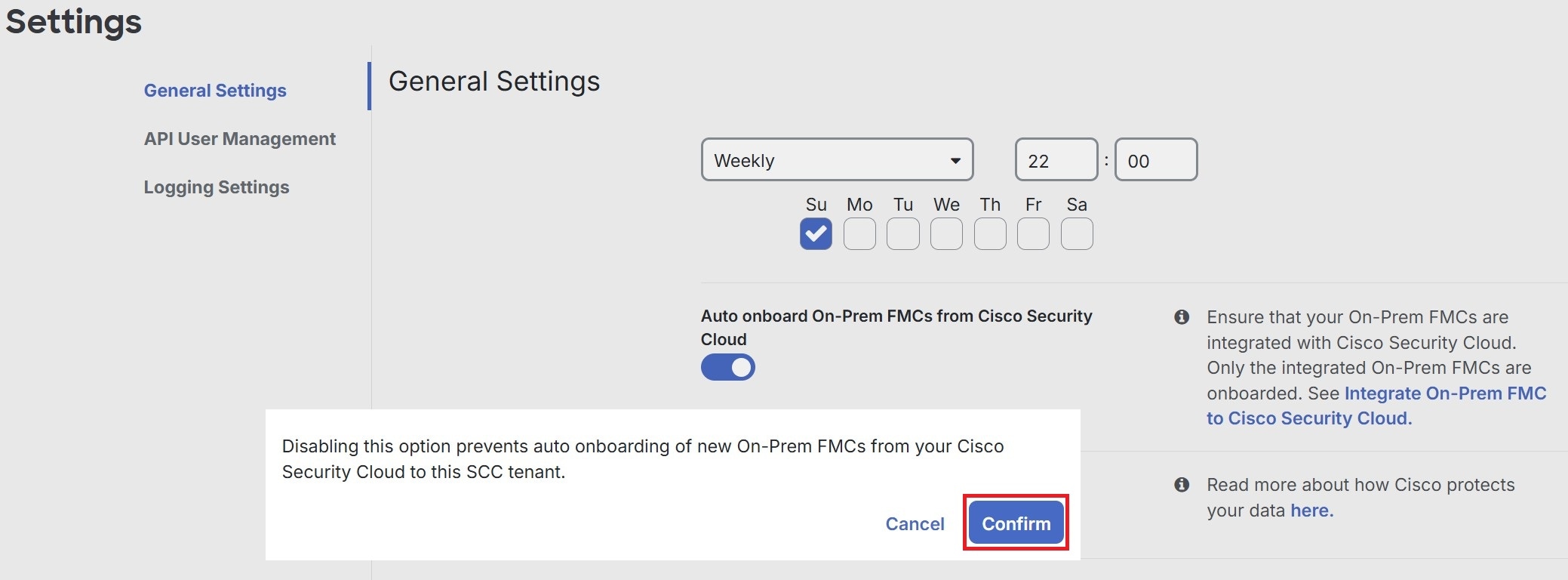
Turn off the Auto onboard On-Prem FMCs from Cisco Security Cloud toggle button to disable the auto-onboarding of on-premises Firewall Management Center.

3.

Click Confirm.

Confirmation dialog allows disabling automatic onboarding of On-Prem FMCs. The dialog appears in General Settings and provides the user a clear disable option.


Enable event data sharing with Talos

Share malicious event data from your device with Talos, Cisco's threat intelligence organization. Sharing event data allows Talos to improve threat detection and response capabilities, provide more targeted security updates for your network, and deliver better protection against emerging threats.

For more information about Talos, see the Cisco Talos product page.

Enabling the Enable event data sharing with Talos toggle button does not automatically activate the Talos Threat Hunting Telemetry feature in Cloud-Delivered Firewall Management Center. For the best results with this feature, also enable the Talos Threat Hunting Telemetry in Cloud-Delivered Firewall Management Center. For more information, see Set Intrusion Policy Preferences.

Sharing event data with Talos is enabled by default. To opt out, follow this procedure:

Procedure

1.

Choose Administration > General Settings.

2.

Turn off the Enable event data sharing with Talos toggle button to disable this setting.

Note

Sharing event data enables Talos to provide relevant security insights for your network. Disabling this setting might limit your ability to fully leverage Talos's capabilities and could affect your network's defense against evolving threats.


View firewall management instance details

Firewall Management Instance Details are helpful if you need to contact the Cisco Technical Assistance Center (TAC). You can copy these tenant details by clicking the copy icon.

  • Firewall Management Instance Name: The display name of the firewall management instance.

  • Firewall Management Instance ID: The system-generated unique identifier for the firewall management instance in Cisco Security Cloud Control.

  • Secure Services Exchange ID: The unique identifier for the firewall management instance in the Secure Services Exchange environment. Cisco uses this value for service integration and backend correlation across cloud services.

  • Security Cloud Control Organization ID: The unique identifier of the Security Cloud Control organization associated with the firewall management instance.


Use the Security Cloud Control Firewall Management platform navigator

The platform navigator is a nine-block applications cross-launcher () that appears on the top-right corner of Security Cloud Control. You can readily cross-launch to these Cisco networking and security applications:

Networking applications

  • Catalyst: Cisco Catalyst products include a wide variety of network switches, wireless controllers, wireless access points, and edge platforms and routers, supporting enterprise-class business needs to heavy-duty and rugged networking environments.

  • Intersight: Cisco Intersight is a cloud operations platform that consists of optional, modular capabilities of advanced infrastructure, workload optimization, and Kubernetes services. Cisco Intersight infrastructure services include the deployment, monitoring, management, and support of your physical and virtual infrastructure. It supports Cisco Unified Computing System (Cisco UCS), Cisco HyperFlex hyperconverged infrastructure (HCI), and other third-party Intersight-connected targets.

  • IoT Operations Dashboard: Cisco IoT Operations Dashboard is a cloud-based IoT services platform that empowers operations teams to securely connect, maintain, and gain insights from industrial networking devices and connected industrial assets at massive scale. With one comprehensive view of all their connected industrial assets, operations teams can uncover valuable insights that help them streamline operations and drive business continuity.

  • Meraki: Cisco Meraki is an IT and IoT cloud-managed platform that provides a centralized management platform for Cisco Meraki devices.

  • Spaces: Cisco Spaces is a cloud-based location services platform through which organizations can gain insights into how people and things move throughout their physical spaces. With these insights, they can deliver contextual engagements that are valuable and relevant. Besides looking at where people go, organizations can also drive operational efficiencies by monitoring the location, movement, and utilization of assets.

  • ThousandEyes: Cisco ThousandEyes is a cloud service suite that helps monitor and measure the availability and performance of web applications, services, and networks. It provides end-to-end visibility from any user to any application over any network, enabling enterprises to swiftly get to the source of issues, resolve them faster, and manage performance effectively.

  • Workflows: Cisco Workflows is a cloud-hosted automation application that is part of the larger Cisco Networking Cloud vision. It provides an entitlement to cross-domain automation capabilities for Cisco customers. It streamlines repetitive and error-prone tasks across both Cisco and third-party applications using custom and premade automation templates, as well as various adapter options that can be provided by Cisco or built independently, reaching targets in the cloud or on-premises.

Security applications

  • Duo Security: Cisco Duo is a user-centric zero-trust security platform with two-factor authentication to protect access to sensitive data for all users, devices, and applications. It offers features such as adaptive policies, single sign-on (SSO), and advanced endpoint visibility, making it a comprehensive solution for securing remote access and maintaining business continuity.

  • Secure Access: Cisco Secure Access simplifies IT operations through a single, cloud-managed console, unified client, centralized policy creation, and aggregated reporting. Extensive security capabilities converged in one solution (ZTNA, SWG, CASB, FWaaS, DNS security, RBI, and more) mitigate security risk by applying zero trust principles and enforcing granular security policies. Market leading Talos threat intelligence fuels unmatched threat blocking to mitigate risk and speed investigations.

  • Secure Endpoint: Cisco Secure Endpoint, formerly known as Cisco AMP for Endpoints, is a cloud-managed endpoint security solution designed to prevent breaches and rapidly detect, contain, and remediate threats. It instantly checks your files against a cloud-based scanner with advanced tracking features. These features enable security analysts to identify and isolate initial outbreak sources. The solution also provides retrospective quarantine for files found to be malicious.

  • Cisco Security Provisioning and Administration: Cisco Security Provisioning and Administration is a web application that provides centralized management of Cisco Secure product instances, user identity, and user access management across Cisco Security Cloud. Security Cloud Control administrators can create new Security Cloud enterprises, manage users in an enterprise, claim domains, and integrate their organization’s SSO identity provider, among other tasks.

  • XDR: Cisco Extended Detection and Response (XDR) is a cloud-based solution designed to simplify security operations and empower security teams to detect, prioritize, and respond to sophisticated threats. By integrating both Cisco and third-party security solutions into a unified platform, Cisco XDR offers a comprehensive approach to threat management. Integrated with the threat intelligence provided by Talos, Cisco XDR enriches incident data with additional context and asset insights, reducing false positives and enhancing overall threat detection, response, and forensic capabilities.