Learn how to contact Security Cloud Control support, export workflow details, open a Cisco TAC support ticket, and check the Security Cloud Control service status page.
This chapter covers the following sections:
Cisco Security Cloud Control: Cisco Meraki Management
Learn how to contact Security Cloud Control support, export workflow details, open a Cisco TAC support ticket, and check the Security Cloud Control service status page.
This chapter covers the following sections:
We strongly recommend exporting the workflow of a device that is experience issues prior to opening a support ticket. This additional information can help the support team expeditiously identify and correct any troubleshooting efforts.
Use the following procedure to export the workflow:
A customer using a 30-day trial or a licensed Security Cloud Control account can open a support ticket with Cisco's Technical Assistance Center (TAC).
This section explains how a customer using a licensed Security Cloud Control tenant can open a support ticket with Cisco's Technical Assistance Center (TAC).
Next to your tenant name, click the help button and select Contact Support.
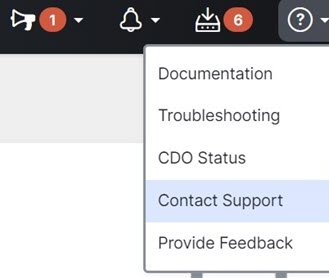
Select the category that best matches your request, and click Select.
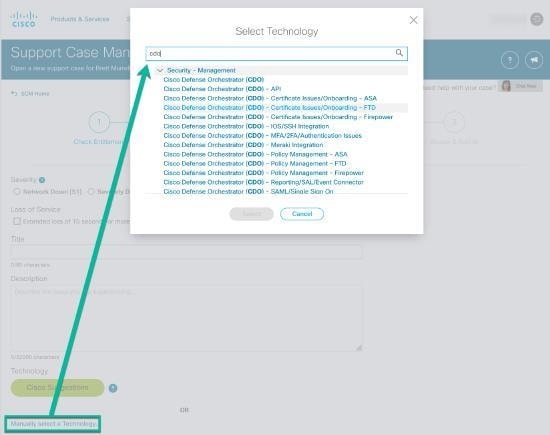
This section explains how a customer using a free trial of a Security Cloud Control tenant can open a support ticket with Cisco's Technical Assistance Center (TAC).
Next to your tenant and account name, click the help button and select Contact Support.
Security Cloud Control maintains a customer-facing service status page that shows you if the Security Cloud Control service is up and any service interruptions it may have had. You can view up-time information with daily, weekly, or monthly graphs.
You can reach the Security Cloud Control status page by clicking Security Cloud Control Status in the help menu on any page in Security Cloud Control.
On the status page, you can click the Subscribe to Updates to receive a notification if the Security Cloud Control service goes down.