Cisco Security Cloud Control: Cisco Meraki Management

PDF

Cisco Security Cloud Control: Cisco Meraki Management

Meraki management with Security Cloud Control

Want to summarize with AI?

Log in

Describes Cisco Meraki management in Security Cloud Control, including supported Meraki MX use cases and key setup and configuration tasks.


A Meraki management in Security Cloud Control is a management process that

  • uses the Meraki dashboard as the control point and does not communicate directly with the MX device

  • securely transfers configuration requests to the Meraki dashboard, which applies configuration changes to the device, and

  • provides tools to detect problems with objects and policies and suggest fixes for devices and templates.

Meraki management details

After you onboard a Meraki device to Security Cloud Control, Security Cloud Control communicates with the Meraki dashboard to manage that device. Security Cloud Control does not communicate directly with the MX device.

Security Cloud Control securely transfers configuration requests to the Meraki dashboard which then applies the new configuration to the device. For more information, refer to How Security Cloud Control and Meraki communicate.

Security Cloud Control provides tools to optimize your Meraki environment by detecting problems with objects and policies and suggesting possible fixes or alternative options. This applies to policies that are associated with both devices and templates. Use Security Cloud Control to:

  • Simultaneously manage policies on one or more Meraki devices.

  • Monitor and manage Meraki policies or templates along with your FTD and ASA devices in a comprehensive environment.

  • Use a Meraki template to manage multiple networks.

  • Customize access rules by using objects that are compatible with other supported platforms, such as FTD and ASA devices.

Before onboarding a device to Security Cloud Control, you must create an account with the Meraki dashboard and onboard your device or template to the dashboard. To generate an API token and communicate with Security Cloud Control, your organization must have an account in the Meraki dashboard.

You can onboard a Meraki MX device or a Meraki template to Security Cloud Control.

Handle Meraki MX log in credentials and permissions through the Security Cloud Control console. Without the correct credentials or permissions, Security Cloud Control cannot communicate with the Meraki device.

For more information, refer to Updating Meraki MX Credentials and Generate and Retrieve Meraki API Key.

At this time, Security Cloud Control supports Layer 3 firewall rules only. Layer 3 rules let you manage policy at the network layer of the OSI model. For more information, refer to Using Layer 3 Firewall Rules.

You can create Layer 3 outbound rules in the Meraki dashboard. When you onboard a device into Security Cloud Control, Security Cloud Control reads the Layer 3 rules that you have defined in the Meraki dashboard. You can then manage these rules in Security Cloud Control in the same way as you manage FTD or ASA rules. For more information, refer to Manage Meraki Access Control Policy.

You can optimize your new access control policy with objects. The Meraki dashboard uses protocols and groups of IP addresses or IP address ranges. In contrast, Security Cloud Control uses a variety of objects to manage rules. To understand how Security Cloud Control transfers Meraki protocols into objects, refer to Objects Associated with Meraki Devices. You can create these objects in Security Cloud Control, and they are translated into IP groups in the Meraki dashboard:

You can create Layer 3 outbound rules in the Meraki dashboard. Security Cloud Control reads in the Layer 3 rules you have defined in the Meraki dashboard when you onboard a device into Security Cloud Control. You can then manage these rules just as you would manage FTD or ASA rules in Security Cloud Control. For more information about Meraki access control policy, refer to Manage Meraki Access Control Policy.
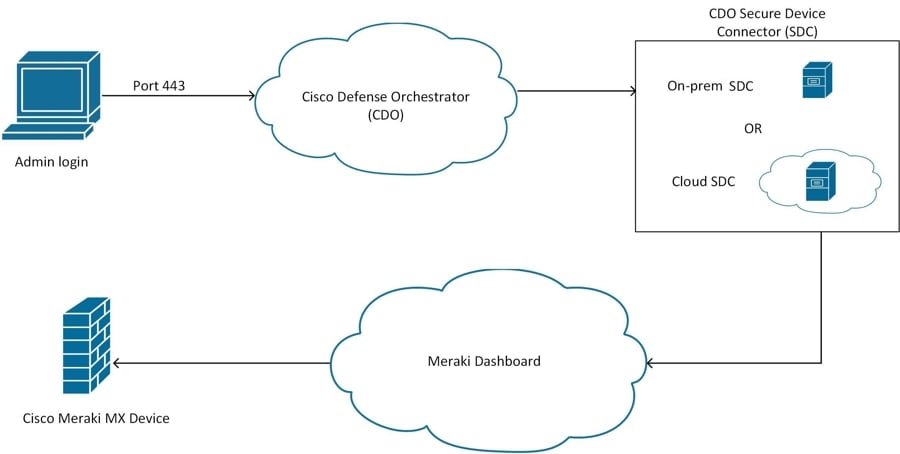

How Security Cloud Control and Meraki communicate

Deploy from Security Cloud Control to your Meraki device

Security Cloud Control does not deploy configuration changes directly to a Meraki MX device; deployment is a multistep process.

Configuration changes that you make in Security Cloud Control for a Meraki MX device are staged in Security Cloud Control until you deploy them. When you deploy the configuration changes, Security Cloud Control forwards them to the Meraki dashboard, which implements them on the Meraki MX device. Security Cloud Control manages firewall policies while Meraki dashboard manages the network the policies are applied to. Both operations affect the way the Meraki MX device manages and processes network traffic.

Some customers with older tenants may connect the Meraki MX device to Security Cloud Control through an SDC. If you are one of those customers, you can continue to use this method or you can remove the SDC by onboarding your Meraki MX again or updating the connection credentials. You do not need an SDC to connect Security Cloud Control to Meraki MX.

One difference between Security Cloud Control and the Meraki dashboard is the use of objects. For rules that are created on the Meraki dashboard, Security Cloud Control takes Meraki IP address groups or IP address ranges and turns them into objects that can be attached or associated to rules and the device policy. When you deploy objects that are created in Security Cloud Control to Meraki appliances, the Meraki dashboard translates those objects back into IP address groups or ranges. Objects in Security Cloud Control are unique and versatile because they are compatible with other device platforms. If you have other devices onboarded in Security Cloud Control, you may be able to create a single object for all your devices. For more information about objects associated with Meraki devices, refer to Objects associated with Meraki devices.

Summary

The key components involved in the communication between Security Cloud Control and Meraki are:

  • Security Cloud Control: Stages configuration changes and initiates deployment to Meraki environments.

  • Secure Device Connector (SDC) or Cisco Cloud SDC: Securely transfers configuration changes from Security Cloud Control to the Meraki dashboard.

  • Meraki dashboard: Implements changes and pushes them to the Meraki MX device.

  • Meraki MX device: Receives deployed changes and enforces policies in the network.

  • Communication service and API key: The API key is provided to the communication service; Security Cloud Control does not store keys, passwords, or credentials.

This process stages configuration changes in Security Cloud Control, transfers them through SDC or the communication service to the Meraki dashboard, and applies them to Meraki MX devices.

Workflow

The diagram illustrates the deployment process of configuration changes from the communication service to the Meraki dashboard and their application to Meraki MX devices.

This diagram shows the deployment process.

    • Prepare and review policy changes in the management interface.

    • Keep changes staged until deployment is initiated.

  1. When... And... Then... And...

    An SDC is configured for the tenant.

    Customers use an SDC or the Cisco Cloud SDC.

    Security Cloud Control pushes changes to the SDC.

    The SDC securely transfers changes to the Meraki dashboard.

    No SDC is used.

    The communication service is used for connectivity.

    Security Cloud Control forwards changes to the Meraki dashboard.

    The dashboard pushes changes to the Meraki MX device.

    Some customers with older tenants may have an existing SDC connection. They can continue to use it or remove the SDC by onboarding the Meraki MX again or updating connection credentials.

  2. When you deploy the configuration changes, Security Cloud Control forwards them to the Meraki dashboard, which implements them on the Meraki MX device.

    • The Meraki dashboard applies the configuration.

    • The Meraki MX device enforces the updated policies.

Result

Deployment ensures that Security Cloud Control manages firewall policies while the Meraki dashboard manages the network, and both influence how the Meraki MX device processes network traffic.