Rendezvous Point Selection Process by a PIM BSR

Feature history for RP selection process by a PIM BSR

This table describes the developments of this feature, by release.

Table 1. Feature History Table
Feature Name Release Information Description
Dynamic Rendezvous Point (RP) Selection by a PIM Boot Strap Router (BSR)

Cisco IOS XE Catalyst SD-WAN Release 17.5.1a

Cisco SD-WAN Release 20.5.1

This feature adds support for automatic selection of an RP candidate using a PIM BSR in an IPv4 multicast overlay. There is no single point of failure because every site has a local RP.

A Cisco IOS XE Catalyst SD-WAN device is selected as the RP, not a service-side device.

RP selection process by a PIM BSR

Summary

PIM uses a BSR to discover and announce RP-set information for each group prefix to all the routers in a PIM domain. This is the same function performed by Auto-RP, but a BSR is part of the PIM version 2 specification.

Cisco Auto-RP cannot co-exist with PIM BSR. Cisco Auto-RP mode must be disabled with spt-only mode.

Workflow

To avoid a single point of failure, you can configure several candidate BSRs in a PIM domain. A BSR is automatically selected from among the candidate BSRs. Bootstrap messages are used to determine which BSR has the highest priority. The router with the highest priority announces to all PIM routers in the domain that it is the BSR. Any router in the network can serve as a BSR candidate.

The elected BSR receives candidate-RP messages from all the candidate RPs in the domain. The bootstrap message sent by a BSR includes information about all of the candidate RPs.

An RP acts as the meeting place for sources and receivers of multicast data. In a PIM-SM network, sources must send their traffic to the RP. This traffic is then forwarded to receivers down a shared distribution tree. By default, when the receiver's first hop router learns about the source, it sends a join message directly to the source and creates a source-based distribution tree between the source and receiver. This source tree includes an RP only if the RP is within the shortest path between the source and receiver.

For a BSR to work for any multicast stream that spans across Cisco Catalyst SD-WAN sites, SPT-only mode is mandatory. For a BSR within a local-site multicast stream within a Cisco Catalyst SD-WAN site, it is not necessary to enable SPT-only mode.

If you have two Cisco IOS XE Catalyst SD-WAN devices in the same site, every Cisco IOS XE Catalyst SD-WAN device needs to be configured as a replicator for traffic to flow.

Benefits of PIM BSR

  • IPv4 support.

  • Dynamic rather than static selection of an RP.

  • Automatic failover if one RP is not available.

  • RP discovery is handled by a BSR.

  • Configuration of multiple RP candidates for the same group range.

  • Selection of a Cisco IOS XE Catalyst SD-WAN device as the RP.

Restrictions for PIM BSR

  • IPv6 is not supported.

  • Bidirectional PIM is not supported for IPv4.

  • BSR is not supported in a hub-and-spoke topology on Cisco IOS XE Catalyst SD-WAN devices.

Topology for RP selection by a PIM BSR

Summary

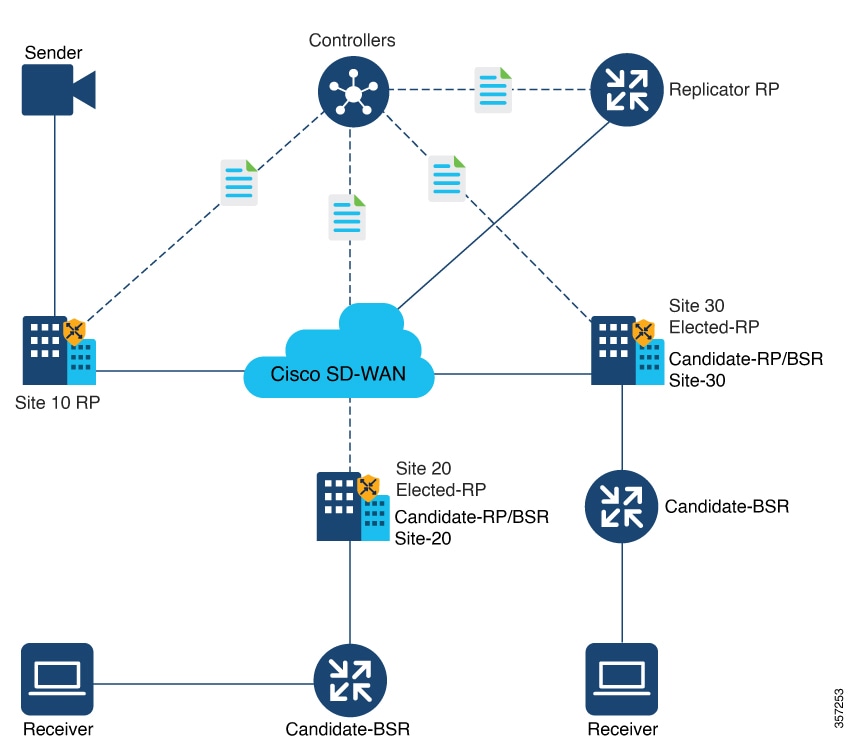
The following is a sample topology for RP selection by a PIM BSR on Cisco IOS XE Catalyst SD-WAN devices:

Workflow

Figure 1. Topology for PIM BSR Selection

Configure a PIM BSR

Before you begin

Every Cisco Catalyst SD-WAN site must have its own RP.

SPT-only mode must be enabled on all Cisco Catalyst SD-WAN sites.

For a BSR to work for any multicast stream that spans across Cisco Catalyst SD-WAN sites, SPT-only mode is mandatory. For a BSR within a local-site multicast stream within a Cisco Catalyst SD-WAN site, it is not necessary to enable SPT-only mode.

For a PIM BSR to elect the RP, configure the following in Cisco SD-WAN Manager:

Procedure


Step 1

Multicast feature template with SPT Only set to On for the selected Cisco IOS XE Catalyst SD-WAN device.

Step 2

PIM feature template with an interface.

Step 3

RP candidate.

Step 4

BSR candidate.


Configure Shortest-Path Tree mode for a multicast feature template

Before you begin

In Cisco SD-WAN Manager, configure SPT Only mode to ensure that the RPs can communicate with each other using the shortest-path tree.

When configuring a BSR, configuration of SPT Only mode is mandatory.

Procedure


Step 1

From the Cisco SD-WAN Manager menu, choose Configuration > Templates.

Step 2

Click Feature Templates.

In Cisco SD-WAN Release 20.7.x and earlier releases, Feature Templates is titled Feature.

Step 3

Click Add Template.

Step 4

From the Select Devices drop-down list, choose a Cisco IOS XE Catalyst SD-WAN device.

Step 5

In the Template Name field, enter a name containing up to 128 alphanumeric characters. In the Description field, enter a description containing up to 2048 alphanumeric characters.

Step 6

Under the Basic Configuration section for SPT Only, choose On.

Step 7

To enable the Local Replicator on the device, choose On (otherwise keep it set to Off).

Step 8

To configure a replicator, choose Threshold, and specify a value. (Optional, keep it set to the default value if you are not configuring a replicator).

Step 9

Click Save.


Configure a Cisco IOS XE Catalyst SD-WAN device as SPT-only using a CLI template

Procedure


Step 1

Configure a Cisco IOS XE Catalyst SD-WAN device as spt-only

Device(config)# sdwan multicast address-family ipv4 vrf 1 
spt-only 

Step 2

Use the show platform software sdwan multicast remote-nodes vrf command to verify that system IP addresses are configured with spt-only mode:

Device# show platform software sdwan multicast remote-nodes vrf 1                                         
Multicast SDWAN Overlay Remote Nodes (* - Replicator):                            
                                           Received                Sent           
                 SPT-Only               (X,G)      (S,G)      (X,G)      (S,G)    
 System IP       Mode         Label   Join/Prune Join/Prune Join/Prune Join/Prune 
 172.16.255.11   Yes          1003        0/0        0/0        0/0        0/0    
 172.16.255.14   Yes          1003        0/0        0/0        1/0      10/10    
 172.16.255.16   Yes          1003        0/0        0/0        0/0        0/0    
 172.16.255.21   Yes          1003        0/0        0/0        0/0        0/0    

Example:

Sample Multicast Configuration With SPT-Only

Device(config)# sdwan
Device(config)# multicast
Device(config)# address-family ipv4 vrf 1
Device(config)# spt-only
!

Configure a PIM feature template and add an interface

Configure a PIM feature template and add an interface for an RP and the BSR candidate.

Procedure


Step 1

From the Cisco SD-WAN Manager menu, choose Configuration > Templates.

Step 2

Click Feature Templates.

In Cisco SD-WAN Release 20.7.x and earlier releases, Feature Templates is titled Feature.

Step 3

Click Add Template.

Step 4

From the Select Devices drop-down list, choose a Cisco IOS XE Catalyst SD-WAN device.

Step 5

Under Other Templates, choose Cisco PIM.

Step 6

In the Template Name field, enter a name containing up to 128 alphanumeric characters. In the Description field, enter a description containing up to 2048 alphanumeric characters.

Step 7

Click Interface > New Interface. In the Interface Name field, specify an interface with a value.

Step 8

In the Query Interval (seconds) field, the field auto-populates. In the Join/Prune Interval (seconds) field, the field auto-populates.

Step 9

Click Add and then click Save.


Configure the RP candidate

Configure the same Cisco IOS XE Catalyst SD-WAN device as the candidate RP for all multicast groups or selective groups.

Procedure


Step 1

From the Cisco SD-WAN Manager menu, choose Configuration > Templates.

Step 2

Click Feature Templates.

In Cisco SD-WAN Release 20.7.x and earlier releases, Feature Templates is titled Feature.

Step 3

Edit the PIM feature template that you created by clicking ... and then clicking Edit.

Step 4

Click Basic Configuration.

Step 5

Click RP Candidate > New RP Candidate.

Step 6

From the Interface drop-down list, choose the interface that you used for configuring the PIM feature template.

  1. (Optional) In the Access List field, if you have configured the access list with a value, add the same value.

  2. (Optional) In the Interval field, if you have configured the interval with a value, add the same interval value.

Step 7

In the Priority field, specify a higher priority on the Cisco IOS XE Catalyst SD-WAN device than on the service-side device.

Step 8

Click Add.

Step 9

Click Update to save your configuration changes.


Configure the BSR candidate

Procedure


Step 1

Repeat Step 1 through Step 4 from the Configure the RP candidate section.

Step 2

Click BSR Candidate.

Step 3

In the BSR Candidate field, chose the same interface from the drop-down list that you used for configuring the PIM feature template.

Step 4

(Optional) In the Hash Mask Length field, specify the hash mask length. Valid values for hash mask length range from 0 – 32.

Step 5

In the Priority field, specify a higher priority on the Cisco IOS XE Catalyst SD-WAN device device than on the service-side device.

Step 6

(Optional) In the RP Candidate Access List field, if you have configured the RP candidate access list with a value, add the same value. An RP candidate uses a standard access control list (ACL) where you can enter the name for the access list.

Step 7

Click Update to save your configuration changes.


Verify VRRP-Aware PIM Using the CLI

Sample VRRP-aware PIM configuration on router 1:
interface Vlan13
no shutdown
arp timeout 1200
vrf forwarding 1
ip address 10.0.0.1 255.255.255.0
ip pim sparse-mode
ip pim redundancy 1 vrrp dr-priority 200
ip tcp adjust-mss 1350
ip mtu 1500
ip igmp version 3
vrrp 1 address-family ipv4
vrrpv2
address 10.0.0.3
priority 200
timers advertise 100
track omp shutdown
vrrs leader 1
exit

Sample VRRP-aware PIM configuration on router 2:

interface Vlan13
no shutdown
arp timeout 1200
vrf forwarding 1
ip address 10.0.0.2 255.255.255.0
ip pim sparse-mode
ip pim redundancy 1 vrrp dr-priority 200
ip tcp adjust-mss 1350
ip mtu 1500
ip igmp version 3
vrrp 1 address-family ipv4
vrrpv2
address 10.0.0.3
priority 200
timers advertise 100
track omp shutdown
vrrs leader 1
exit