Multicast Source Discovery Protocol

Feature history for MSDP

This table describes the developments of this feature, by release.

Table 1. Feature History
Feature Name Release Information Feature Description

Support for MSDP to Interconnect Cisco SD-WAN and Non-SD-WAN Domains

Cisco IOS XE Catalyst SD-WAN Release 17.11.1a

Cisco Catalyst SD-WAN Control Components Release 20.11.1

This feature enables Multicast Source Discovery Protocol (MSDP) interoperability between Cisco IOS XE Catalyst SD-WAN devices in Cisco Catalyst SD-WAN and the devices in a non-SD-WAN setup.

Note


This feature does not provide support for MSDP peers formed between Cisco IOS XE Catalyst SD-WAN devices in the overlay network.

MSDP Routing Protocol Support

A Multicast Source Discovery Protocol (MSDP) is a multicast routing protocol that:

  • facilitates interconnection of multiple Protocol Independent Multicast Sparse-Mode (PIM-SM) domains,

  • enables a rendezvous point (RP) in a PIM-SM domain to maintain MSDP peering relationships with MSDP-enabled routers in other domains, and

  • allows Cisco IOS XE Catalyst SD-WAN devices, from Cisco IOS XE Catalyst SD-WAN Release 17.11.1a, to interoperate with other devices by converting Source Active (SA) messages received from MSDP peers into OMP routes, and vice-versa.

MSDP enables multicast sources in one PIM-SM domain to be discovered by other PIM-SM domains through the exchange of SA messages between MSDP peers.

When MSDP is enabled on Cisco IOS XE Catalyst SD-WAN devices, a rendezvous point (RP) in a PIM-SM domain maintains MSDP peering relationships with MSDP-enabled routers in other domains. When configured for interoperability, these devices convert Source Active (SA) messages received from MSDP peers into OMP routes and vice-versa. For more information about MSDP, see MSDP.

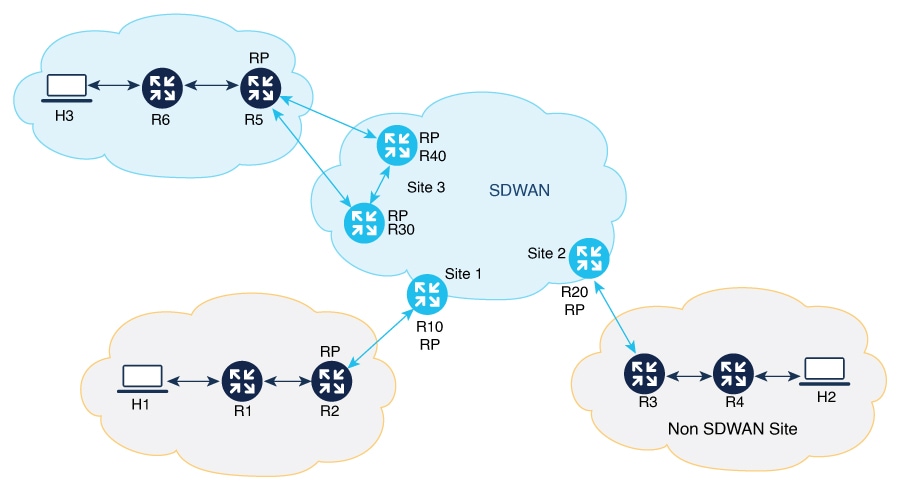
The following illustration depicts MSDP interoperability between Cisco IOS XE Catalyst SD-WAN devices in Cisco Catalyst SD-WAN and devices in a non-SD-WAN setup.

Figure 1. MSDP Interoperability

Single Homed Network

In the sample topology, the Cisco IOS XE Catalyst SD-WAN device R20 at site 2 has MSDP interoperability enabled. At the non-SD-WAN site, R3 serves as the rendezvous point (RP) for its PIM domain. MSDP peering is established between R3 and R20.

When source H2 sends multicast traffic to R4, R4 registers the data with R3. R3 then sends an MSDP Source Active (SA) message to R20. Because MSDP interoperability is enabled, R20 converts the received MSDP SA message into an OMP SA route and advertises it to all Cisco IOS XE Catalyst SD-WAN devices at other sites through the Cisco SD-WAN Controller.

When R10, a Cisco IOS XE Catalyst SD-WAN device at site 1, receives this OMP SA route, it converts the route into an MSDP SA message and advertises it to its MSDP peer R2 at the non-SD-WAN site. If R2 has receivers interested in the multicast group advertised in the MSDP SA message, it sends a (S,G) join towards the source. This process establishes an inter-domain source tree across the Cisco Catalyst SD-WAN.

As multicast packets arrive at R2 (the RP), R2 forwards them down its shared tree to group members within its domain. R20 withdraws the advertised OMP SA route only when the MSDP SA message expires.

Dual-Homed Network

A dual-homed network has two Cisco IOS XE Catalyst SD-WAN devices configured for MSDP interoperability. At the dual-homed Cisco Catalyst SD-WAN site 3, MSDP peering must be established among the Cisco IOS XE Catalyst SD-WAN devices R30, R40, and the non-SD-WAN device R5.

When the source registers its traffic with the RP R5, R5 sends an MSDP SA message to both R30 and R40. Upon receiving the MSDP SA message, R30 converts it into OMP SA routes and advertises these to all Cisco IOS XE Catalyst SD-WAN devices at other sites, as well as to R40 within site 3.

To prevent routing loops, an MSDP SA filter must be configured between R30 and R40 to drop SA messages that originate from other Cisco IOS XE Catalyst SD-WAN devices and sites via the Overlay Management Protocol (OMP).

At site 1, the Cisco IOS XE Catalyst SD-WAN device R10 receives two OMP SA routes for the same Source Group (S, G) and caches both routes. R10 then converts the OMP SA route into an MSDP SA message and advertises it to its MSDP peer R2 at the non-SD-WAN site. If R2 has receivers interested in the multicast group advertised in the MSDP SA message, it sends a (S, G) join towards the source. This sequence establishes an inter-domain source tree across the Cisco Catalyst SD-WAN.

MSDP supports the following scenarios where Cisco IOS XE Catalyst SD-WAN devices at the Cisco Catalyst SD-WAN sites are configured for MSDP interoperability with other devices located in the non-SD-WAN sites.

  • Source devices located at the Cisco Catalyst SD-WAN sites, and receivers at the Cisco Catalyst SD-WAN and non-SD-WAN sites.

  • Source devices located in the non-SD-WAN sites, and receivers at the Cisco Catalyst SD-WAN and non-SD-WAN sites.

  • In Dual border sites, where two devices are configured for MSDP interoperability in Cisco Catalyst SD-WAN where sources and receivers are located in the Cisco Catalyst SD-WAN sites.

  • In dual border sites, where two devices are configured for MSDP interoperability in non-SD-WAN, and where sources and receivers are located at the non-SD-WAN sites.

  • A Replicator can be any Cisco IOS XE Catalyst SD-WAN device located in the Cisco Catalyst SD-WAN site. For more information about Replicators, see the Replicators section in PIM.

Benefits of support for MSDP to interconnect Cisco SD-WAN and non-SD-WAN

Facilitates MSDP interoperability between devices located at the Cisco SD-WAN sites and devices at the non-SD-WAN sites.

Restrictions for support for MSDP to interconnect Cisco SD-WAN and Non-SD-WAN

  • Only one MSDP mesh group is supported per site in Cisco Catalyst SD-WAN.

  • The MSDP peer devices must be located at the same site and cannot be spread across sites.

Configure MSDP to interconnect Cisco SD-WAN and Non-SD-WAN using a CLI Template

Before you begin


Note


You cannot configure the MSDP interoperability using the feature template or the configuration groups in Cisco SD-WAN Manager.


Procedure


Step 1

Enable MSDP on Cisco IOS XE Catalyst SD-WAN device. For more information, see Configure MSDP Using a CLI Template.

Step 2

Configure MSDP interworking using a CLI template.

Note


By default, CLI templates execute commands in global config mode.

  1. Enable MSDP on a Cisco IOS XE Catalyst SD-WAN device. For more information, see Configure MSDP Using a CLI Template

  2. Configure a Cisco IOS XE Catalyst SD-WAN device for MSDP interoperability with other devices in the non-SD-WAN sites.

    multicast address-family ipv4 vrf vrf-name 
    spt-only 
    msdp-interworking 

    Example:

    The following is a complete configuration example to configure MSDP interoperability in Cisco Catalyst SD-WAN:

    sdwan                                                                                                                                  
     multicast address-family ipv4 vrf 1                                                                                            
      spt-only                                                                                                                                                                                                      
      msdp-interworking 

Verify MSDP configuration to interconnect Cisco SD-WAN and Non-SD-WAN

Procedure


The following is a sample output from the show platform software sdwan multicast remote-nodes vrf 1 command, which shows if MSDP interoperability is enabled or not.

Example:

Device# show platform software sdwan multicast remote-nodes vrf 1
            Multicast SDWAN Overlay Remote Nodes (* - Replicator, ^ - Delete Pending):
            Received                Sent
            SPT-Only MSDP             (X,G)      (S,G)      (X,G)      (S,G)
            System IP   Mode     I-Work Label  Join/Prune Join/Prune Join/Prune Join/Prune
            10.16.255.11 No       No     1003      0/0        0/0        0/0        1/0
            10.16.255.15 No       No     1003      1/0        1/0        0/0        0/0
            10.16.255.16 Yes      No     1003      1/0        1/0        0/0        0/0
            10.16.255.21 Yes      Yes    1003      0/0        0/0        0/0        0/0

Monitor MSDP configuration to interconnect Cisco SD-WAN and Non-SD-WAN

Procedure


Use the following show commands to monitor MSDP interoperability on Cisco IOS XE Catalyst SD-WAN devices:

Device# show ip msdp vrf 1 sa-cache
MSDP Source-Active Cache - 1 entries
(10.169.1.1, 12.169.1.1), RP 41.41.41.41, AS ?,6d20h/00:05:55, Peer 12.168.3.11
Device# show ip msdp vrf 1 count
SA State per Peer Counters, <Peer>: <# SA learned>
    12.168.3.11: 1
    12.168.11.15: 0
    12.168.12.12: 0
    12.168.14.14: 0
    12.168.5.24: 0
SA State per ASN Counters, <asn>: <# sources>/<# groups>
    Total entries: 1
    ?: 1/1
Device# show ip msdp vrf 1 summary
MSDP Peer Status Summary
Peer Address     AS    State    Uptime/  Reset SA    Peer Name
                                Downtime Count Count
12.168.3.11      ?     Up       17w6d    0     1     ?
12.168.11.15     ?     Up       17w6d    0     0     ?
12.168.12.12     ?     Up       17w6d    0     0     ?
12.168.14.14     ?     Up       17w6d    0     0     ?
12.168.5.24      ?     Up       17w6d    1     0     ?
Device# show ip msdp vrf 1 peer 12.168.15.19 advertised-SAs
MSDP SA advertised to peer 12.168.15.19 (?) from mroute table

MSDP SA advertised to peer 12.168.15.19 (?) from SA cache

MSDP SA advertised to peer 12.168.15.19 (?) from mvpn sact table

20.169.1.1      13.169.1.1 RP 41.41.41.41 (?) 6d20h ref: 2

In the output above, the entry MSDP SA advertised to peer 12.168.15.19 (?) from mvpn sact table provides information about SA cache messages advertised to a peer based on the OMP SA routes received.

Example:

Device# show ip msdp vrf 1 peer 12.168.21.29
MSDP Peer 12.168.21.29 (?), AS ?
  Connection status:
    State: Up, Resets: 0, Connection source: GigabitEthernet5 (12.168.21.28)
    Uptime(Downtime): 16w4d, Messages sent/received: 169100/169106
    Output messages discarded: 82
    Connection and counters cleared 16w4d    ago
    Peer is member of mesh-group site3
  SA Filtering:
    Input (S,G) filter: sa-filter, route-map: none
    Input RP filter: none, route-map: none
    Output (S,G) filter: none, route-map: none
    Output RP filter: none, route-map: none
  SA-Requests: 
    Input filter: none
  Peer ttl threshold: 0
  SAs learned from this peer: 0
  Number of connection transitions to Established state: 1
    Input queue size: 0, Output queue size: 0
  MD5 signature protection on MSDP TCP connection: not enabled
  Message counters:
    RPF Failure count: 0
    SA Messages in/out: 10700/10827
    SA Requests in: 0
    SA Responses out: 0
    Data Packets in/out: 0/10

Troubleshooting for MSDP

MSDP SA Cache Not Populated

Problem: MSDP SA cache is not populated on a Cisco IOS XE Catalyst SD-WAN device when a source in a site sends traffic.

Possible Cause: Check if there are any connectivity or configuration issues between the MSDP peers.

Solution:

  1. Check the MSDP peering status between the Cisco IOS XE Catalyst SD-WAN device and the device in non-SD-WAN.

  2. Verify that these commands msdp-interworking and spt-only are configured in the Cisco IOS XE Catalyst SD-WAN device.

Problem: A Cisco IOS XE Catalyst SD-WAN device does not advertise the OMP SA route when it receives a MSDP SA message from a MSDP peer.

Possible Cause: msdp-interworking configuration could be missing.

Solution: Configure the msdp-interworking command in the correct VRF.