Rehosting the Cisco CSR 1000v License

Voluntarily Rehosting the License to a New VM

The process for rehosting a license on the Cisco CSR 1000v is different compared to other Cisco platforms. Because the license is not mapped to a Cisco hardware device, additional steps may be necessary for rehosting the license.

If you plan to voluntarily rehost the Cisco CSR 1000v to a new VM and the router is operating properly, you can use the self-service rehosting process on the Cisco Software Licensing Tool.


Note


The self-service rehosting process is only available for permanent licenses on the Cisco CSR 1000v. If you have subscription term licenses installed, you must contact licensing@cisco.com for assistance.

SUMMARY STEPS

  1. Access the Cisco Software Licensing portal
  2. Click Continue to Product License Registration .
  3. On the Product License Registration page, choose Transfer > License for Transfer - Initiate .
  4. Specify the Source License.
  5. Specify the Target and Options for the rehost license.
  6. Review the license rehost information for accuracy. If the license information is valid, click Submit .

DETAILED STEPS


Step 1

Access the Cisco Software Licensing portal

Step 2

Click Continue to Product License Registration .

Step 3

On the Product License Registration page, choose Transfer > License for Transfer - Initiate .

See the "License to Initiate Transfer" figure below.
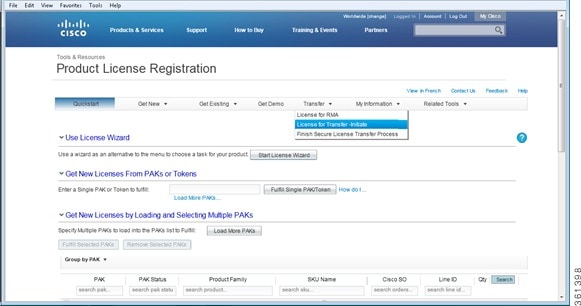
Figure 1. License to Initiate-Transfer Screen

Step 4

Specify the Source License.

Select the license with the original node-locked UDI for your system. See the "Source Rehost License" figure below .

Note

 
If you changed the virtual UDI on the Cisco CSR 1000v using the request license new-udi command, the original node-locked UDI is invalidated on the router. Use the show license udi history command to obtain the node-locked UDI for your license that is stored in the Cisco Software Licensing Tool records. You can also verify the original node-locked UDI with the Cisco email confirmation you received when the license was purchased.

Click Next .

Figure 2. Source Rehost License

Step 5

Specify the Target and Options for the rehost license.

Click Next .

Note

 
When specifying the Target rehost license, use the new vUDI.

Step 6

Review the license rehost information for accuracy. If the license information is valid, click Submit .

See the "License Reshot Review" figure below.
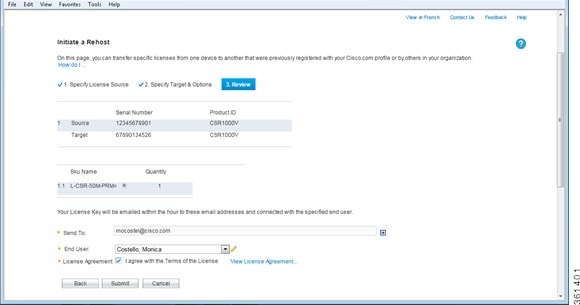
Figure 3. License Rehost Review

The license portal processes the license request. You will receive an email confirming the new rehost licenses.


Obtaining a Rehost License if the System Fails

There may be cases when the Cisco CSR 1000v is not accessible due to a system failure and you need to rehost the existing licenses to a replacement device. Examples of a system failure may include:

  • The VM instance that the Cisco CSR 1000v was installed on was removed.

  • The system server or host that the Cisco CSR 1000v VM instance was installed on experienced a hardware failure.

In this case, you need to obtain a rehost license and install it on a new VM. If you have a perpetual license, you can use the self-service rehosting process to obtain a rehost license.


Note


The self-service rehosting process is only available for permanent licenses on the Cisco CSR 1000v. If you have subscription term licenses installed, you must contact licensing@cisco.com for assistance.

The following caveats apply if you are rehosting a perpetual license:

  1. Do not select the Transfer > License for RMA option. The RMA option does not support licenses for the Cisco CSR 1000v . Use the Transfer > License for Transfer - Initiate option.

  2. If you have the original Cisco license email confirmation with the original node-locked UDI, you can use the rehost option on the Cisco Software Licensing portal.

  3. If you do not have the original Cisco license email confirmation with the original node-locked UDI, you must contact licensing@cisco.com for assistance. You will need to provide the PAK number from the original license purchase.

  4. If you changed the virtual UDI on the Cisco CSR 1000v using the request license new-udi command and the VM is lost due to a system failure, the installed licenses will be destroyed. You must contact Cisco for assistance. You will need to the provide the PAK number from the original license purchase.