Initialize or reimage the NCS 1004 system with the Open ROADM image using a USB boot drive.
Before you begin
Obtain a USB drive that has at least 8 GB of storage and a single partition.
Download the NCS 1004 software image from the Software Download page on the website.
Copy the compressed boot file (for example, ncs1004-usb-boot-7.1.3.zip) from the website to your local machine.
Plug the USB drive into the USB 0 port on NCS 1004.
The bootable USB drive is used to reimage NCS 1004 for system upgrade or to boot NCS 1004 in case of boot failure. A bootable USB drive is created by copying a compressed boot file to the drive. After you extract the contents of the compressed file, the USB drive becomes bootable.
You can complete this task using Windows, Linux, or macOS. The exact operation for each step depends on the operating system.
Procedure
|
1. |
Connect the USB drive to your local machine and format it with the FAT32 file system. |
|
2. |
Copy the compressed boot file to the USB drive. |
|
3. |
Verify that the copy is successful by comparing the file size and MD5 checksum at the source and destination. |
|
4. |
Extract the content of the compressed boot file directly into the root folder of the USB drive.
Note
Extract the EFI and boot directories directly to the root of the USB drive. If the unzipping application places the extracted files in a new subfolder, move EFI and boot to the root of the USB drive.
|
|
5. |
Insert the USB drive into one of the USB ports of NCS 1004. |
|
6. |
Reboot NCS 1004 using a power cycle or the console. |
|
7. |
Press Esc to enter BIOS. |
|
8. |
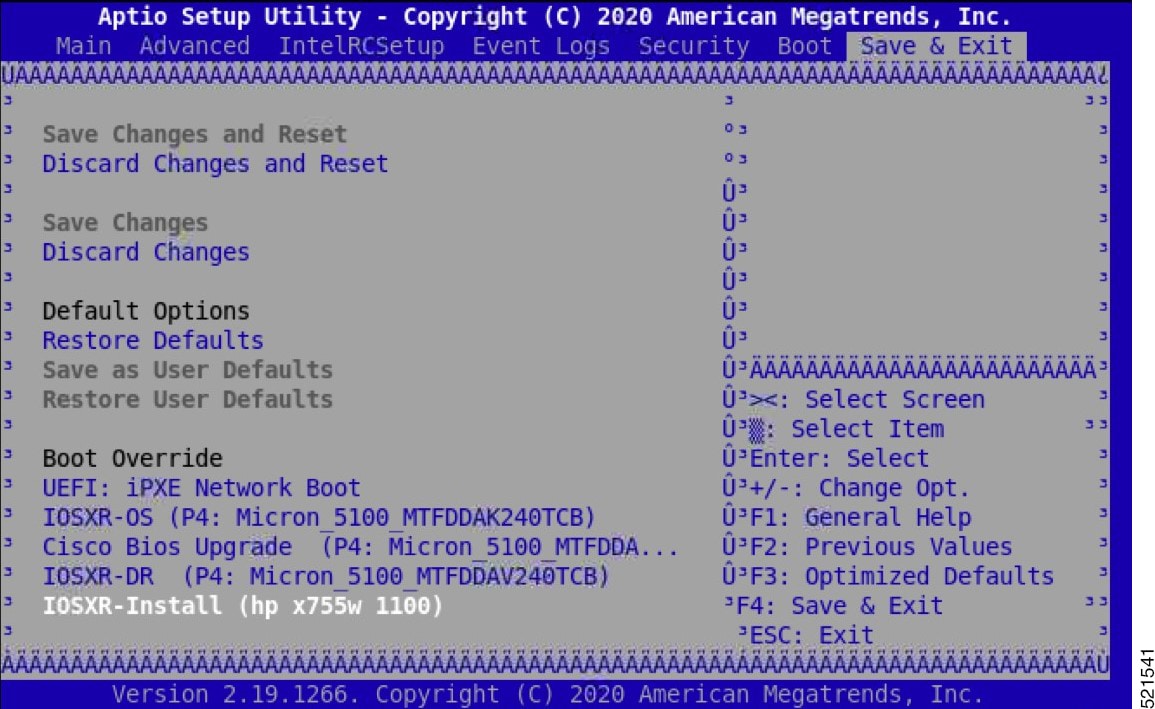
Select the Save & Exit tab in BIOS.
|
|
9. |
Choose IOS-XR Install.
The system detects the USB drive and boots the GISO image. The Open ROADM startup configuration is applied automatically on first boot.
TAM: Chip DB Verified
CiscoSec: Image Signature Verified
GNU GRUB version 2.00
Press F2 to goto grub Menu..
Booting from USB..
Loading Kernel..
Kernel Secure Boot Validation Result: PASSED
Loading initrd….
Initrd Secure Boot Validation Result: PASSED
Starting udev…..
Running postinst /etc/rpm-postinsts/100-dnsmasq...
Sun Mar  7 19:22:30 UTC 2021: pd_download_giso
Write at Address 0x7bbe000098 (mmap addr 0x7fe08ec87000(0x98)) value 0x1 len 4 width 4 byte
Write at Address 0x7bbe000098 (mmap addr 0x7f54fc88b000(0x98)) value 0x2 len 4 width 4 byte
 Watchdog timer reset done, next reset needed within 10 minutes
Golden ISO type = 1.1 and PKG_VER = 1.0
Current Boot: IOSXR-Install
Current Boot: USB…
 * First booting, filesystem will be relabeled...
Finished Calvados patch for lxc
Starting to prepare calvados logical volume---
 Create sub partition on /dev/panini_vol_grp/calvados_lv0
 Create data sub partition on /dev/panini_vol_grp/calvados_data_lv0
 File system creation on /dev/panini_vol_grp/calvados_lv0 took 6 seconds
 Install sysadmin-vm image on /dev/panini_vol_grp/calvados_lv0
 RP based installation
 Starting Calvados patch for lxc for sysadmin-vm
 Uninstalling rpm task-nxos-core
 Uninstalling rpm gdb
 Uninstalling rpm smartmontools
NCS1004: Complete Patch Calvados
Enable selinux to relabel filesystem from initramfs
Checking SELinux security contexts:
 * First booting, filesystem will be relabeled...
 Finished Calvados patch for lxc
 Installing sysadmin-vm image size of 1.9G took 53 seconds
---Starting to prepare repository---
 File system creation on /dev/cpu_disk2 took 3 seconds
 Check for unwanted iso and remove if required.
 Copying /iso/host.iso to repository /iso directory
 Copying /iso/ncs1004-sysadmin.iso to repository /iso directory
 Copy Sysadmin rpms to repository
 Copy XR rpms to repository
 Copy giso_info.txt to repository
 Copying /iso/ncs1004-xr.iso to repository /iso directory
 Copying all ISOs to repository took 12 seconds
 Install EFI on /dev/cpu_disk4
pd_notify_img_install_done
Checking disk error for: sdb
 Chassis disk smartctl -a output
 Chassis disk smartctl output done
 Disk model: Micron_5100_MTFDDAV240TCB
 No failures found in dmesg
 Checking Chassis disk mount failures.
 No mount failures found in Chassis disk /dev/sdb2
 No mount failures found in Chassis disk /dev/BHDisasterRecovery/golden_image
 Chassis disk partitions exist
 Install finished on cpu_disk
|
|
10. |
Remove the USB drive.
NCS 1004 reboots automatically.
Rebooting system after installation ...
[201.715171] reboot: Restarting system
ERROR: Class:0; Subclass:10000; Operation: 1004
NCS1004: Initializing Devices
Version 2.19.1266. Copyright (C) 2020 American Megatrends, Inc.
BIOS Date: 10/23/2020 09:03:42 Ver: 0ACHI470
Press <DEL> or <ESC> to enter setup
TAM: Chip DB
CiscoSec: Image Signature Verified
GNU GRUB version 2.00
Press F2 to goto grub Menu..
Booting from Disk..
Loading Kernel..
Kernel Secure Boot Validation Result: PASSED
Loading initrd..
Initrd Secure Boot Validation Result: PASSED
[3.836637] i8042: No controller found
Enable selinux to relabel filesystem from initramfs
Load IMA appraise policy: OK
Switching to new root and running init.
Sourcing /etc/sysconfig/udev
Starting udev: [  OK  ]
Starting udev
Running postinst /etc/rpm-postinsts/100-dnsmasq...
update-rc.d: /etc/init.d/run-postinsts exists during rc.d purge (continuing)
 Removing any system startup links for run-postinsts
  /etc/rcS.d/S99run-postinsts
Configuring network interfaces... done.
Starting system message bus: dbus.
Starting OpenBSD Secure Shell server: sshd
  generating ssh RSA key...
  generating ssh ECDSA key...
  generating ssh DSA key...
  generating ssh ED25519 key...
sshd start/running, process 3559
Starting rpcbind daemon...done.
Starting kdump:[  OK  ]
Starting random number generator daemon.
Starting system log daemon...0
Starting kernel log daemon...0
tftpd-hpa disabled in /etc/default/tftpd-hpa
Starting internet superserver: xinetd.
Starting S.M.A.R.T. daemon: smartd.
Starting Lighttpd Web Server: lighttpd.
Starting libvirtd daemon: [  OK  ]
Starting crond: OK
Starting cgroup-init
Network ieobc_br defined from /etc/init/ieobc_br_network.xml
Network local_br defined from /etc/init/local_br_network.xml
Network xr_local_br defined from /etc/init/xr_local_br_network.xml
Network ieobc_br started
Network local_br started
Network xr_local_br started
mcelog start/running, process 4647
diskmon start/running, process 4653
Creating default host password file
Start serial incoming on , Clearing ..
initctl: Unknown instance: /dev/ttyS0
Connecting to 'default-sdr--1' console
bootlogd: ioctl(/dev/pts/2, TIOCCONS): Device or resource busy
Running postinst /etc/rpm-postinsts/100-dnsmasq...
update-rc.d: /etc/init.d/run-postinsts exists during rc.d purge (continuing)
Removing any system startup links for run-postinsts ...
  /etc/rcS.d/S99run-postinsts
Configuring network interfaces... done.
Starting system message bus: dbus.
Starting OpenBSD Secure Shell server: sshd
  generating ssh RSA key...
  generating ssh ECDSA key...
  generating ssh DSA key...
  generating ssh ED25519 key...
sshd start/running, process 2197
Starting rpcbind daemon...done.
Starting random number generator daemon.
Starting system log daemon...0
Starting kernel log daemon...0
tftpd-hpa disabled in /etc/default/tftpd-hpa
Starting internet superserver: xinetd.
net.ipv4.ip_forward = 1
Libvirt not initialized for container instance
Starting crond: OK
SIOCADDRT: File exists
Start serial incoming on , Clearing ..
ios con0/RP0/CPU0 is now available
Press RETURN to get started.
This product contains cryptographic features and is subject to United
States and local country laws governing import, export, transfer and
use. Delivery of Cisco cryptographic products does not imply third-party
authority to import, export, distribute or use encryption. Importers,
exporters, distributors and users are responsible for compliance with
U.S. and local country laws. By using this product you agree to comply
with applicable laws and regulations. If you are unable to comply with
U.S. and local laws, return this product immediately.

A summary of U.S. laws governing Cisco cryptographic products may be
found at:
http://www.cisco.com/wwl/export/crypto/tool/stqrg.html

If you require further assistance please contact us by sending email to
export@cisco.com.
|
NCS 1004 boots from the USB drive and installs the Open ROADM image. Upon completion, the system reboots and applies the Open ROADM startup configuration, with confirmation messages indicating successful installation and startup.