Explains geo-redundant deployment, including the deployment context, dependencies, and operational behavior that affect Cisco Optical Network Controller installation or upgrade planning.
Geo-redundant deployment is a high-availability deployment model in which Cisco Optical Network Controller is deployed across geographically separate data centers to maintain service continuity during regional outages.
-
Uses multiple Kubernetes clusters connected as a single geo supercluster
-
Supports asynchronous replication between active and standby regions
-
Maintains service availability through automated failover mechanisms
Geo redundancy protects against large-scale failures such as natural disasters, power outages, or data center loss.
How geo-redundant deployment works
In a geo-redundant deployment, Cisco Optical Network Controller clusters are grouped into a geo supercluster that enables coordinated service operation across regions.
Key architectural components include:
-
Active node: Hosts operational Cisco Optical Network Controller services
-
Standby node: Maintains synchronized state and assumes control during failover
-
Arbitrator node: Participates in active node selection using the RAFT algorithm
The standard geo-redundant configuration is:
-
One active single-node worker
-
One standby single-node worker
-
One arbitrator node
Each region operates as an independent Kubernetes cluster while participating in the supercluster.
The arbitrator node runs only the operating system and system services. Cisco Optical Network Controller microservices do not run on the arbitrator.
The following figure illustrates a typical geo-redundant deployment:
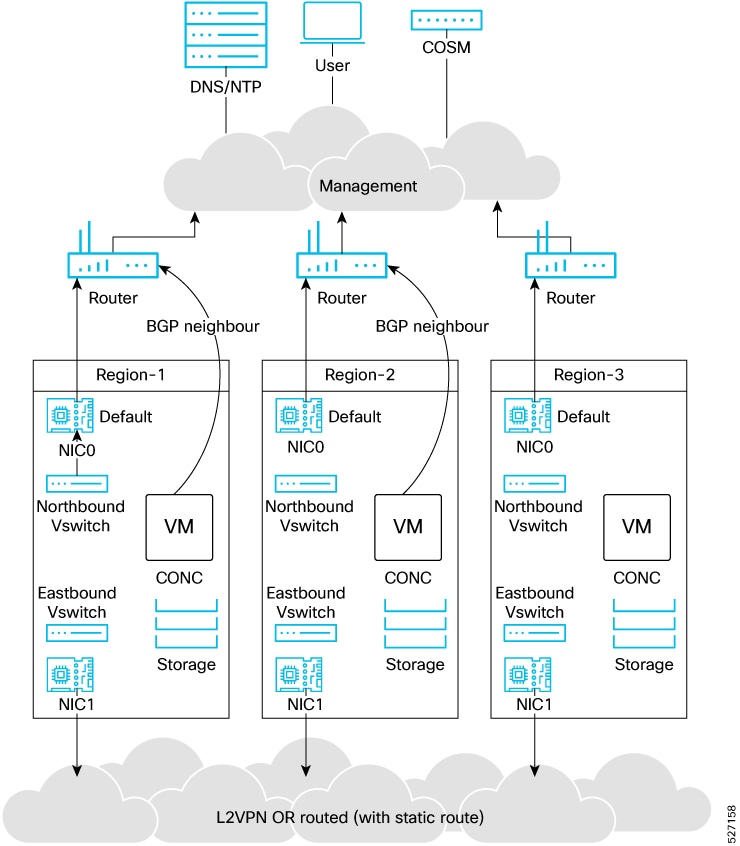
Use the following information to plan your geo-redundant deployment environment.
Infrastructure requirements include:
-
Platform: VMware ESXi 7.0 and later, and vCenter 7.0 and later.
Upgrade to VMware vCenter Server 8.0 U2 if you are using VMware vCenter Server 8.0.2 or VMware vCenter Server 8.0.1.
-
Virtual machines: Deploy three VMs (one per cluster) for a 1+1+1 supercluster.
-
One worker VM (active)
-
One worker VM (standby)
-
One arbitrator VM (witness)
-
-
Geographic separation: Cisco recommends placing the three VMs in three different zones or regions to avoid a single point of failure. At least two of the three VMs must be reachable for service continuity.
VM sizing profiles:
Choose a profile based on your scale requirements.
This table lists the minimum hardware requirements for the base profile in HA mode with daily retention only.
| Profile | Worker Node CPU (in cores) | Arbitrator Node CPU (in cores) | Worker Node Memory (GB) | Arbitrator Node Memory (GB) | Solid State Drive (SSDs) (TB) |
|---|---|---|---|---|---|
| XS | 16 vCPU | 8 | 64 | 32 | 1 |
| S | 32 vCPU | 8 | 128 | 32 | 2.5 |
| M | 48 vCPU | 8 | 256 | 32 | 6 |
This table lists the minimum hardware requirements for the extended profile in HA mode with weekly and monthly retention.
| Profile | Worker Node CPU (in cores) | Arbitrator Node CPU (in cores) | Worker Node Memory (GB) | Arbitrator Node Memory (GB) | Solid State Drive (SSDs) (TB) |
|---|---|---|---|---|---|
| XS | 16 vCPU | 8 | 64 | 32 | 1.5 |
| S | 32 vCPU | 8 | 128 | 32 | 5 |
| M | 48 vCPU | 8 | 256 | 32 | 12 |
Cisco Optical Network Controller supports only SSDs for storage.
vCPU to physical CPU core ratio: A ratio of 2:1 is supported when hyperthreading is enabled and supported by the hardware. Otherwise, use 1:1.
Network requirements:
A geo-redundant deployment uses three networks.
-
Control plane network: Internal communication within a cluster. In geo-redundant deployments, the control plane network is used only within a single cluster. You can use a dummy vSwitch for a cluster and apply the same configuration to each cluster.
-
Northbound (VM) network: Traffic between users and the cluster, including web UI access. Cisco Optical Network Controller uses this network to connect to Cisco Optical Site Manager devices using NETCONF/gRPC.
Bandwidth and latency requirements for the northbound network:
-
Web UI: 1 Gbps
-
Connection to optical nodes: 100 Mbps
-
Latency: less than 100 ms
-
-
Eastbound network: Internal communication across regions within the supercluster. Active and standby nodes use this network to replicate databases. Postgres is replicated between active and standby nodes. MinIO is replicated on the arbitrator.
Bandwidth and latency requirements for the eastbound network: 1 Gbps bandwidth and latency less than 100 ms.
You can configure the eastbound network as a flat Layer 2 network or an L2VPN where eastbound IP addresses are in the same subnet. If eastbound IP addresses are in different subnets, configure static routing between nodes for eastbound connectivity.
Do not configure the control plane, northbound, and eastbound networks in the same subnet or VLAN segment. Use separate subnets and VLAN segments.
Virtual IP routing: BGP is used to route traffic to the virtual IP from multiple locations. Configure the BGP router and add the nodes as neighbors. Coordinate with your network administrator to configure BGP.
Storage requirements: Use SSD storage that meets the disk write latency requirement of ≤ 100 ms.
Deployment constraints include:
-
You need three separate VMs with separate eastbound, northbound, and control plane network connectivity.
-
You cannot remove nodes from a cluster or change cluster roles after a cluster joins a supercluster.
Default port assignments:
This table lists the default port assignments.
|
Traffic type |
Port |
Description |
|---|---|---|
|
Inbound |
TCP 22 |
SSH remote management |
|
TCP 8443 |
HTTPS for UI access |
|
|
Outbound |
TCP 830 |
NETCONF to Cisco Optical Site Manager devices |
|
TCP 389 |
LDAP if using Active Directory |
|
|
TCP 636 |
LDAPS if using Active Directory |
|
|
Customer specific |
HTTP access to an SDN controller |
|
|
User specific |
HTTPS access to an SDN controller |
|
|
TCP 3082, 3083, 2361, 6251 |
TL1 to optical devices |
|
|
Eastbound |
TCP 10443 |
Supercluster join requests |
|
UDP 8472 |
VXLAN |
|
|
Syslog |
User specific |
TCP/UDP |
|
Control plane ports (internal, not exposed) |
TCP 443 |
Kubernetes |
|
TCP 6443 |
Kubernetes |
|
|
TCP 10250 |
Kubernetes |
|
|
TCP 2379 |
etcd |
|
|
TCP 2380 |
etcd |
|
|
UDP 8472 |
VXLAN |
|
|
ICMP |
Ping between nodes (optional) |
Installation files:
Cisco Optical Network Controller is released as a single VMware OVA distribution. The OVA includes an OVF descriptor and virtual disk files that contain the operating system and Cisco Optical Network Controller installation files. You can deploy the OVA using vCenter on ESXi hosts for standalone or supercluster deployments.
During OVF deployment, the deployment is aborted if there is an internet disconnection.