Overview
This process describes how the router duplicates Layer 3 traffic and directs it to a destination port for analysis. It explains the mechanism for capturing unicast packets that would otherwise bypass an analyzer, ensuring full visibility into network data streams for effective troubleshooting.
Traffic mirroring consists of these key operations:
-
copy traffic from Layer 3 interfaces or sub-interfaces.
-
send copied traffic to a destination for analysis.
-
use traffic mirroring ports configured to receive packet copies.
Traffic mirroring functions differently on switches and hubs due to a fundamental difference.
Summary
These are the key components involved in traffic mirroring:
-
Copying traffic: Duplicating network traffic from specified sources.
-
Source of traffic: Traffic is copied from Layer 3 interfaces or sub-interfaces.
-
Destination for analysis: The copied traffic is sent to a designated location . For example, a traffic analyzer for evaluation.
-
Traffic mirroring ports: Specific ports configured to receive these packet copies.
-
Unicast traffic capture: The process enables the capture of unicast traffic, which is particularly important for devices like switches and routers that typically direct unicast packets to specific ports.
Traffic mirroring copies network traffic from Layer 3 interfaces to designated ports for analysis, enabling the capture of unicast traffic. On hubs, all ports receive packet copies, allowing easy traffic capture. In contrast, switches and routers require traffic mirroring to analyze unicast traffic since they direct packets to specific ports based on MAC address learning. Configuring mirroring ports allows analyzers to evaluate network traffic effectively.
These stages describe traffic mirroring:
-
MAC address learning - the switch or router learns the MAC address of Host B.
-
Forwarding decision - the switch or router decides to forward unicast traffic from Host A to Host B based on the learned MAC address.
-
Traffic forwarding - the unicast traffic is forwarded to the specific port associated with Host B.
-
Traffic analyzer visibility - this unicast traffic escapes detection by the traffic analyzer because the traffic directs itself to a specific port and does not broadcast.
Consider this example, where, if you want to capture Ethernet traffic that is sent by host A to host B, and both are connected to a hub, attach a traffic analyzer to the hub. All other ports see the traffic between hosts A and B.
Workflow
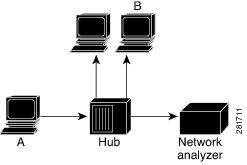
Consider this example, where, the traffic analyzer captures only traffic that is flooded to all ports.
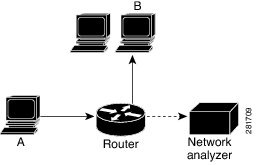
In this configuration, the traffic analyzer captures only traffic that is flooded to all ports, including:
-
broadcast traffic
-
multicast traffic with CGMP or Internet Group Management Protocol (IGMP) snooping disabled, and
-
unknown unicast traffic on a switch.
An extra feature is necessary that artificially copies unicast packets that host A sends. This extra feature is traffic mirroring. When traffic mirroring is enabled, the traffic analyzer is attached to a port that is configured to receive a copy of every packet that host A sends. This port is called a traffic mirroring port. The other sections of this document describe how you can fine tune the traffic mirroring feature.
| When... |
Then... |
|---|---|
| a hub receives a packet on one port |
the hub sends out a copy of that packet from all ports except the one where the packet was received. |
| a switch boots up |
the switch begins building a Layer 2 forwarding table based on the source MAC addresses of received packets. |
| the switch builds its Layer 2 forwarding table |
the switch forwards traffic destined for a MAC address directly to the corresponding port. |