This section explains how ERSPAN over GRE IPv6 enables the secure encapsulation and mirroring of IPv4 or IPv6 traffic.
The ERSPAN over GRE IPv6 is a traffic mirroring feature that
enables mirroring IPv4 or IPv6 traffic in your network
uses GRE IPv6 for secure encapsulation of mirrored data, and
sends mirrored traffic to remote analyzers for detailed examination.
Configuration guidelines for ERSPAN over GRE
These guidelines apply to ERSPAN over GRE:
Configuration commands use
Use the
cef proactive-arp-nd enable command to configure missing adjacency information for the next hop.
How ERSPAN over GRE works
Summary
The router encapsulates and mirrors traffic using ERSPAN over GRE IPv6 with the sequence number set to 0, sends it to a remote analyzer, and resolves the next-hop address for successful delivery.
The key components involved in the process are:
ERSPAN header: Used to encapsulate the mirrored traffic.
GRE IPv6 packet: Provides the tunneling mechanism for carrying ERSPAN traffic.
Sequence number: Set to 0 in the GRE header for ERSPAN packets.
Remote Traffic Analyzer: Receives and monitors the mirrored traffic.
Next-Hop address resolution: Ensures the router can deliver packets by resolving ARP or neighbor information for the GRE IPv6 tunnel.
Workflow
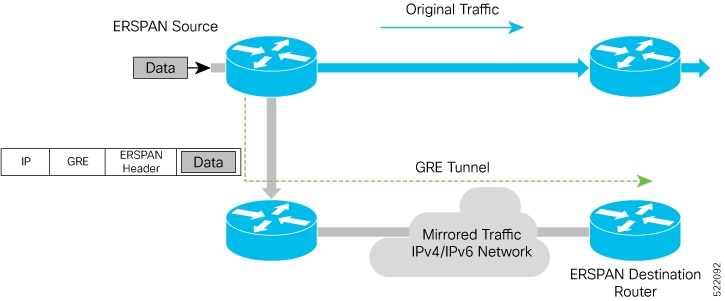
Figure 1. ERSPAN over GRE
These are the stages of how ERSPAN over GRE works:
The router encapsulates the trafficby adding an ERSPAN header inside the GRE IPv6 packet. The GRE header of the ERSPAN encapsulated packets has the sequence number set to 0.
The router sends the replicated traffic packet to the destination for monitoring through the GRE IPv6 channel for traffic mirroring.
The router sends the mirrored traffic to a remote traffic analyzer for monitoring.
The router must resolve the ARP or neighbor for ERSPAN GRE IPv6 tunnel next-hop. We recommend using the cef proactive-arp-nd enable command to configure missing adjacency information for the next hop.
Configure ERSPAN over GRE
Use these steps to configure ERSPAN over GRE IPv6: