Prepare for Installation

The following sections describe how to prepare for the installation of the router at your site:

General Precautions

Observe the following general precautions when using and working with your router:

  • Keep your system components away from radiators and heat sources and do not block cooling vents.

  • Do not spill food or liquids on your system components and never operate the product in a wet environment.

  • Do not push any objects into the openings of your system components. Doing so can cause fire or electric shock by shorting out interior components.

  • Position system cables and PEM cables carefully. Route system cables and the PEM cable and plug so that they cannot be stepped on or tripped over. Be sure that nothing else rests on your system component cables or power cable.

  • Do not modify power cables or plugs. Consult a licensed electrician or your power company for site modifications. Always follow your local and national wiring rules.

  • If you turn off your system, wait at least 30 seconds before turning it on again to avoid system component damage.

Compliance and Safety Information

The Cisco 8400 Series Routers are designed to meet the regulatory compliance and safety approval requirements. For detailed safety information, see Regulatory Compliance and Safety Information—Cisco 8400 Series Routers.


Note


An instructed person is someone who has been instructed and trained by a skilled person and takes the necessary precautions when working with equipment.

A skilled person or qualified personnel is someone who has training or experience in the equipment technology and understands potential hazards when working with equipment.


Warning


Ultimate disposal of this product should be handled according to all national laws and regulations.


Warning


To reduce risk of electric shock or fire, installation of the equipment must comply with local and national electrical codes.


Warning


Only a skilled person should be allowed to install, replace, or service this equipment. See statement 1089 for the definition of a skilled person.


Warning


Only an instructed person or skilled person should be allowed to install, replace, or service this equipment. See statement 1089 for the definition of an instructed or skilled person.


Warning


Blank faceplates and cover panels serve three important functions: they reduce the risk of electric shock and fire, they contain electromagnetic interference (EMI) that might disrupt other equipment, and they direct the flow of cooling air through the chassis. Do not operate the system unless all cards, faceplates, front covers, and rear covers are in place.


Laser Safety


Warning


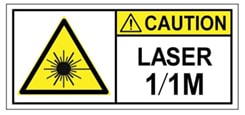
Invisible laser radiation may be emitted from disconnected fibers or connectors. Do not stare into beams or view directly with optical instruments.


Warning


Invisible laser radiation is present. Do not expose to users of telescopic optics. This applies to Class 1/1M laser products.


Warning


Pluggable optical modules comply with IEC 60825-1 Ed. 3 and 21 CFR 1040.10 and 1040.11 with or without exception for conformance with IEC 60825-1 Ed. 3 as described in Laser Notice No. 56, dated May 8, 2019.


Energy Hazard

The routers can be configured for a DC power source. Do not touch terminals while they are live. Observe the following warning to prevent injury.


Warning


Hazardous voltage or energy may be present on power terminals. To reduce the risk of electric shock, make sure the power terminal cover is in place when the power terminal is not being serviced. Be sure uninsulated conductors are not accessible when the cover is in place.


Preventing Electrostatic Discharge Damage

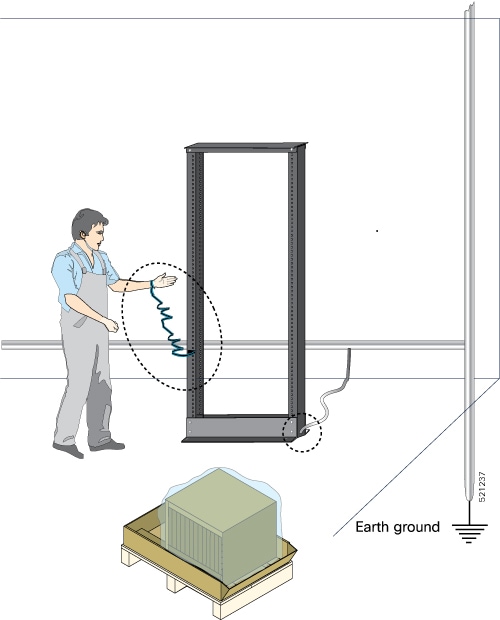
Many router components can be damaged by static electricity. Not exercising the proper electrostatic discharge (ESD) precautions can result in intermittent or complete component failures. To minimize the potential for ESD damage, always use an ESD-preventive antistatic wrist strap (or ankle strap) and ensure that it makes adequate skin contact.


Note


Check the resistance value of the ESD-preventive strap periodically. The measurement should be 1–10 megohms.

Before you perform any of the procedures in this guide, attach an ESD-preventive strap to your wrist and connect the leash to the chassis.

Cautions and regulatory compliance statements for NEBS

The NEBS-GR-1089-CORE regulatory compliance statements and requirements are discussed in this section.


Note


This equipment may be ESD sensitive. Always use an ESD ankle or wrist strap before handling equipment. Connect the equipment end of the ESD strap to an unfinished surface of the equipment chassis or to the ESD jack on the equipment if provided.


Warning


The intrabuilding port(s) of the equipment or subassembly, which is the management Ethernet port, must use shielded intrabuilding cabling/wiring that is grounded at both ends.


Warning


The intrabuilding port(s) of the equipment or subassembly, the management Ethernet port, is suitable for connection to intrabuilding or unexposed wiring or cabling only. The intrabuilding port(s) of the equipment or subassembly MUST NOT be metallically connected to interfaces that connect to the OSP or its wiring for more than 6 meters (approximately 20 feet). These interfaces are designed for use as intrabuilding interfaces only (Type 2, 4, or 4a ports as described in GR-1089) and require isolation from the exposed OSP cabling. The addition of primary protectors is not sufficient protection in order to connect these interfaces metallically to an OSP wiring system.


Note


This equipment is suitable for installations using the CBN.


Note


This equipment is suitable for installation in network telecommunications facilities.


Note


This equipment is suitable for installation in locations where the NEC applies.


PEM Considerations

Check the power at your site to ensure that you are receiving clean power (free of spikes and noise). Install a power conditioner if necessary.

Guidelines for DC PEM

Basic guidelines for DC PEM includes the following:

  • Each chassis PEM has its own dedicated input power source. The source must comply with the safety extra-low voltage (SELV) requirements in the UL 60950-1, UL 62368-1, CSA 60950-1, CSA 62368-1, EN 60950-1, EN 62368-1, IEC 60950-1, and IEC 62368-1 standards.

  • Protect the circuit by a dedicated two-pole DC circuit breaker. Ensure that the circuit breaker is sized according to the PEM input rating and local or national code requirements.

  • The circuit breaker is considered as the disconnect device and is easily accessible.

  • The system ground is the power supply and chassis ground.

  • Use the grounding lug to attach a wrist strap for ESD protection during servicing.

  • Do not connect the DC return wire to the system frame or to the system-grounding equipment.

  • Ensure that the DC return is grounded at the source side.

  • Ensure that each power feed of the equipment is connected to different power sources.

Prevent Power Loss

Use the following guidelines to prevent power loss to the device:

  • To prevent input power loss, ensure that the maximum load on each circuit supplying the power is within the current ratings of the wiring and breakers.

  • In some systems, you can use an UPS to protect against power failures at your site. Avoid UPS types that use ferroresonant technology. These UPS types can become unstable with systems such as the device, which can have substantial current-draw fluctuations due to bursty data traffic patterns.

Determining power requirements is useful for planning the power distribution system to support the device.

Safety Guidelines

Before you begin the installation of the router, review the safety guidelines in this chapter to avoid injuring yourself or damaging the equipment.

In addition, before replacing, configuring, or maintaining the router, review the safety warnings listed in Regulatory Compliance and Safety Information for the Cisco 8400 Series Routers.

Standard Warning Statements

To see translations of the warnings that appear in this publication, refer to the Regulatory Compliance and Safety Information document that accompanied this device.


Warning


To prevent bodily injury when mounting or servicing this unit in a rack, you must take special precautions to ensure that the system remains stable. The following guidelines are provided to ensure your safety: This unit should be mounted at the bottom of the rack if it is the only unit in the rack. When mounting this unit in a partially filled rack, load the rack from the bottom to the top with the heaviest component at the bottom of the rack. If the rack is provided with stabilizing devices, install the stabilizers before mounting or servicing the unit in the rack. Statement 1006


Warning


Ultimate disposal of this product should be handled according to all national laws and regulations. Statement 1040


Warning


To prevent the system from overheating, do not operate it in an area that exceeds the maximum recommended ambient temperature of 149°F (65°C). Statement 1047


Warning


The chassis should be mounted on a rack that is permanently affixed to the building. Statement 1049


Warning


Invisible laser radiation may be emitted from disconnected fibers or connectors. Do not stare into beams or view directly with optical instruments. Statement 1051


Warning


Class 1M laser radiation when open. Do not view directly with optical instruments. Statement 1053


Warning


Class I (CDRH) and Class 1M (IEC) laser products. Statement 1055


Warning


IMPORTANT SAFETY INSTRUCTIONS: This warning symbol means danger. You are in a situation that could cause bodily injury. Before you work on any equipment, be aware of the hazards involved with electrical circuitry and be familiar with standard practices for preventing accidents. Use the statement number provided at the end of each warning to locate its translation in the translated safety warnings that accompanied this device. Statement 1071


Warning


This is a Class A Device and is registered for EMC requirements for industrial use. The seller or buyer should be aware of this. If this type was sold or purchased by mistake, it should be replaced with a residential-use type. Statement 294


Warning


This is a class A product. In a domestic environment this product may cause radio interference in which case the user may be required to take adequate measures. Statement 340


Warning


This equipment is in compliance with the essential requirements and other relevant provisions of Directive 1999/5/EC.


Safety With Electricity


Warning


Before working on a chassis or working near power supplies, disconnect the power at the circuit breaker on DC units. Statement 12


Warning


Before working on equipment that is connected to power lines, remove jewelry (including rings, necklaces, and watches). Metal objects will heat up when connected to power and ground and can cause serious burns or weld the metal object to the terminals. Statement 43


Warning


Do not work on the system or connect or disconnect cables during periods of lightning activity. Statement 1001


Warning


Before performing any of the following procedures, ensure that power is removed from the DC circuit. Statement 1003


Warning


Read the installation instructions before connecting the system to the power source. Statement 1004


Warning


This product relies on the building’s installation for short-circuit (overcurrent) protection. For -48/-60 VDC installation, the wire shall be 6 AWG wire and 60A circuit breaker. Statement 1005


Warning


When you connect or disconnect the power and relay connector with power applied, an electrical arc can occur. This could cause an explosion in hazardous area installations. Be sure that power is removed from the switch and alarm circuit. Be sure that power cannot be accidentally turned on or verify that the area is nonhazardous before proceeding. Failure to securely tighten the power and relay connector captive screws can result in an electrical arc if the connector is accidentally removed. Statement 1058


Warning


Take care when connecting units to the supply circuit so that wiring is not overloaded. Statement 1018


Warning


The plug-socket combination must be accessible at all times, because it serves as the main disconnecting device. Statement 1019


Warning


To avoid electric shock, do not connect safety extra-low voltage (SELV) circuits to telephone-network voltage (TNV) circuits. LAN ports contain SELV circuits, and WAN ports contain TNV circuits. Some LAN and WAN ports both use RJ45 connectors. Use caution when connecting cables. Statement 1021


Warning


A readily accessible two-poled disconnect device must be incorporated in the fixed wiring. Statement 1022


Warning


To reduce the risk of fire, use only 26 AWG or larger telecommunication line cord. Statement 1023


Warning


This equipment must be grounded. Never defeat the ground conductor or operate the equipment in the absence of a suitably installed ground conductor. Contact the appropriate electrical inspection authority or an electrician if you are uncertain that suitable grounding is available. Statement 1024


Warning


Use copper conductors only. Statement 1025


Warning


This unit might have more than one power supply connection. All connections must be removed to de-energize the unit. Statement 1028


Warning


To prevent personal injury or damage to the chassis, never attempt to lift or tilt the chassis using the handles on modules (such as power supplies, fans, or cards); these types of handles are not designed to support the weight of the unit. Statement 1032


Warning


Do not use this product near water; for example, near a bath tub, wash bowl, kitchen sink or laundry tub, in a wet basement, or near a swimming pool. Statement 1035


Warning


Never install telephone jacks in wet locations unless the jack is specifically designed for wet locations. Statement 1036


Warning


Before opening the unit, disconnect the telephone-network cables to avoid contact with telephone-network voltages. Statement 1041


Warning


This equipment must be installed and maintained by service personnel as defined by AS/NZS 3260. Incorrectly connecting this equipment to a general-purpose outlet could be hazardous. The telecommunications lines must be disconnected 1) before unplugging the main power connector or 2) while the housing is open, or both. Statement 1043


Warning


This product requires short-circuit (overturned) protection, to be provided as part of the building installation. Install only in accordance with national and local wiring regulations. Statement 1045


Warning


When installing or replacing the unit, the ground connection must always be made first and disconnected last. Statement 1046


Warning


Never install an AC power module and a DC power module in the same chassis. Statement 1050


Warning


Failure to securely tighten the power and relay connector captive screws can result in an electrical arc if the connector is accidentally removed. Statement 1058


Warning


This equipment is intended to be grounded. Ensure that the host is connected to earth ground during normal use.


Warning


If you connect or disconnect the console cable with power applied to the switch or any device on the network, an electrical arc can occur. This could cause an explosion in hazardous location installations. Be sure that power is removed or the area is nonhazardous before proceeding. To verify switch operation, perform POST on the switch in a nonhazardous location before installation. Statement 1065


Warning


Installation of the equipment must comply with local and national electrical codes. Statement 1074


Warning


Hazardous voltage or energy may be present on DC power terminals. Always replace cover when terminals are not in service. Be sure uninsulated conductors are not accessible when cover is in place. Statement 1075


When working on equipment powered by electricity, follow these guidelines:

  • Locate the room’s emergency power-off switch. If an electrical accident occurs, you will be able to quickly turn off the power.

  • Before working on the system, turn off the DC main circuit breaker and disconnect the power terminal block cable.

  • Before doing the following, disconnect all power:

    • Working on or near power supplies

    • Installing or removing a router chassis or network processor module

    • Performing most hardware upgrades

  • Never install equipment that appears damaged.

  • Carefully examine your work area for possible hazards, such as moist floors, ungrounded power extension cables, and missing safety grounds.

  • Never assume that power is disconnected from a circuit; always check.

  • Never perform any action that creates a potential hazard to people or makes the equipment unsafe.

  • If an electrical accident occurs, proceed as follows:

    • Use caution, and do not become a victim yourself.

    • Turn off power to the router.

    • If possible, send another person to get medical aid. Otherwise, determine the condition of the victim, and then call for help.

    • Determine whether the person needs rescue breathing or external cardiac compressions; then take appropriate action.

Site Planning Checklist

Use the following checklist to perform and account for all the site planning tasks described in this chapter:

  • The site meets the environmental requirements.

  • The site’s air conditioning system can compensate for the heat dissipation of the router.

  • The floor space that the router occupies can support the weight of the system.

  • Electrical service to the site complies with the requirements.

  • The electrical circuit servicing the router complies with the requirements.

  • Consideration has been given to the console port wiring and limitations of the cabling involved, according to TIA/EIA-232F.

  • The router Ethernet cabling distances are within limitations.

  • The equipment rack in which you plan to install the router complies with requirements.

  • In selecting the location of the rack, careful consideration has been given to safety, ease of maintenance, and proper airflow.

Environmental Requirements

Environmental monitoring in the router protects the system and components from damage caused by excessive voltage and temperature conditions. To ensure normal operation and avoid unnecessary maintenance, plan and prepare your site configuration before installation. After installation, make sure that the site maintains the environmental characteristics described in the Cisco 8404-SYS-D Series Routers Datasheet.

For outside plant installation (cell site cabinet, hut, and so on), equipment must be protected against airborne contaminants, dust, moisture, insects, pests, corrosive gases, polluted air, or other reactive elements. Sealed equipment chamber with air-conditioning or a heat exchanger is recommended for OSP deployments. The equipment chamber must comply with the temperature and clearance requirements. Examples of such cabinets include IP 65/66 cabinets with heat exchanger complying with Telcordia GR487. Temperature must be maintained within –20ºC to +65ºC. The equipment shall be placed inside an enclosure (that is protected from direct outside weather and environmental stresses by the enclosure), and where the operating climate, as defined by Class 2 of GR-3108-CORE, is between: –40 to 149°F (–20 to +65°C) 5% and 85% RH.

For more information on Environmental properties and Regulatory standards, see the Cisco 8404-SYS-D datasheet

Temperature

Temperature extremes may cause a system to operate at reduced efficiency and cause various problems, including premature aging and failure of chips, and failure of mechanical devices. Extreme temperature fluctuations may also cause chips to become loose in their sockets.

Observe the following guidelines:

  • Ensure that the chassis has adequate ventilation.

  • Don’t place the chassis within a closed-in wall unit or on top of cloth, which can act as thermal insulation.

  • Don’t place the chassis where it receives direct sunlight, particularly in the afternoon.

  • Don’t place the chassis next to a heat source of any kind, including heating vents.

  • Adequate ventilation is important at high altitudes. Make sure that all the slots and openings on the system remain unobstructed, especially the fan vent on the chassis.

  • Clean the installation site at regular intervals to avoid the buildup of dust and debris, which may cause a system to overheat.

Failure to observe these guidelines may damage the chassis' internal components.

Site Planning

The following sections describe how to plan for the installation of the router.

General Precautions

Observe the following general precautions when using and working with your router:

  • Keep your system components away from radiators and heat sources and do not block cooling vents.

  • Do not spill food or liquids on your system components and never operate the product in a wet environment.

  • Do not push any objects into the openings of your system components. Doing so can cause fire or electric shock by shorting out interior components.

  • Position system cables and PEM cables carefully. Route system cables and the PEM cable and plug so that they cannot be stepped on or tripped over. Be sure that nothing else rests on your system component cables or power cable.

  • Do not modify power cables or plugs. Consult a licensed electrician or your power company for site modifications. Always follow your local and national wiring rules.

  • If you turn off your system, wait at least 30 seconds before turning it on again to avoid system component damage.
Site Planning Checklist

Use the following checklist to perform and account for all the site planning tasks described in this chapter:

  • The site meets the environmental requirements.

  • The site’s air conditioning system can compensate for the heat dissipation of the router.

  • The floor space that the router occupies can support the weight of the system.

  • Electrical service to the site complies with the requirements.

  • The electrical circuit servicing the router complies with the requirements.

  • Consideration has been given to the console port wiring and limitations of the cabling involved, according to TIA/EIA-232F.

  • The router Ethernet cabling distances are within limitations.

  • The equipment rack in which you plan to install the router complies with requirements.

  • In selecting the location of the rack, careful consideration has been given to safety, ease of maintenance, and proper airflow.

Air Flow Guidelines

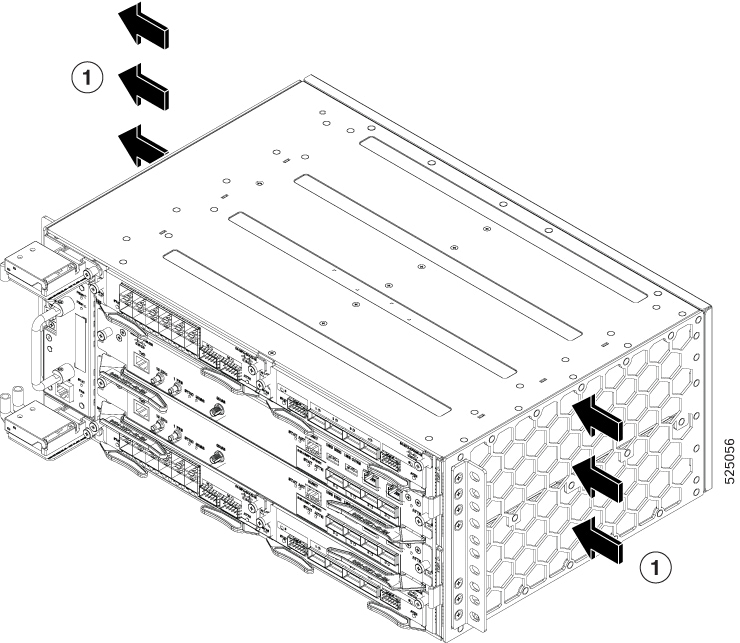
Cool air is circulated through the router by fan tray located along the left side of the router. Air flow is right to left, as shown in the figure below.

Figure 1. Cisco 8404-SYS-D Router Chassis Air Flow

1

Direction of air flow — from the right side of the router to the left side

The fan trays maintain acceptable operating temperatures for the internal components by drawing in cool air through the vents, and circulating the air through the chassis.

The following guidelines will help you plan your equipment rack configuration:

  • To ensure adequate air flow through the equipment rack, we recommend that you maintain a clearance of at least 80 mm (3.15 inches) on each side of the router at all times.

  • If airflow through the equipment rack and the routers that occupy it is blocked or restricted, or if the ambient air being drawn into the rack is too warm, an overtemperature condition can occur within the rack and the routers that occupy it.

  • The site should also be as dust-free as possible. Dust tends to clog the router fans, reducing the flow of cooling air through the equipment rack and the routers that occupy it, thus increasing the risk of an overtemperature condition.

  • Enclosed racks must have adequate ventilation. Ensure that the rack is not congested, because each router generates heat. An enclosed rack should have louvered sides and a fan to provide cooling air. Heat that is generated by the equipment near the bottom of the rack can be drawn upward into the intake ports of the equipment above.

  • When mounting a chassis in an open rack, ensure that the rack frame does not block the side intakes and the exhaust fans.

  • When rack-installed equipment fails, especially equipment in an enclosed rack, try operating the equipment by itself, if possible. Power off all other equipment in the rack (and in adjacent racks) to give the router maximum cooling air and clean power.

  • Avoid setting up the router in a location in which the router air intake vents may draw in the exhaust air from adjacent equipment. Consider how the air flows through the router; the airflow direction is side to side, with ambient air drawn in from the vents located on the front right of the router.

Air Flow Guidelines for Enclosed Rack Installation

To install a Cisco 8404-SYS-D Router in a 4-post enclosed cabinet, the front and rear doors of the cabinet must be removed or be perforated with a minimum of 65% open area (70% for 800mm racks).

If you are mounting the chassis in a 4-post enclosed cabinet, ensure that you have a minimum of 6 inches (15.24 cm) of clearance on each side of the chassis.

Site Power Guidelines

The chassis has specific power and electrical wiring requirements. Adhering to these requirements ensures the reliable operation of the system. Follow these precautions and recommendations when planning your site power for the chassis:

  • The redundant power option provides a second, identical power supply to ensure uninterrupted power supply.

  • Connect each power supply to a separate input power source. Otherwise, it results in a total power failure to the system due to a fault in the external wiring or a tripped circuit breaker.

  • To prevent loss of input power, ensure that the maximum load on each circuit is within the current ratings of the wiring and the breakers.

  • Circuit breaker specifications—a maximum of 60A for DC power feed is supported.

  • Check the power at your site before installation, and periodically after installation, to ensure that you are receiving clean power. If necessary, install a power conditioner.

  • Provide proper grounding to avoid personal injury and damage to the equipment due to power surges or lightning striking power lines. The chassis ground must be attached to a central office or other interior ground system.


Note


The chassis installation must comply with all the applicable codes, and is approved for use with only copper conductors. The ground bond-fastening hardware must be compatible and preclude loosening, deterioration, and electrochemical corrosion of hardware and joined material. Attachment of the chassis ground to a central office or other interior ground system must be made with a 6-AWG gauge wire copper ground conductor.


Caution


The DC PSU requires external surge protection devices for installations where electrical surges higher than 2KV common mode and 1KV differential mode are expected. Failure to do so can result in permanent damage to the product.


Electrical Circuit Requirements

Each Cisco router requires a dedicated electrical circuit. If you equip it with dual power feeds, provide a separate circuit for each power supply to avoid compromising the power redundancy feature.

The routers are powered only by a DC source. Ensure that equipment grounding is present and observe the power-strip ratings. Ensure that the total ampere rating of all the products plugged into the power strip does not exceed 80% of the rating.

Site Cabling Guidelines

This section contains guidelines for wiring and cabling at your site. When preparing your site for network connections to the Cisco 8404-SYS-D Router, consider the type of cable required for each component, and the cable limitations. Consider the distance limitations for signaling, electromagnetic interference (EMI), and connector compatibility. Possible cable types are fiber, thick or thin coaxial, foil twisted-pair, or unshielded twisted-pair cabling.

Also consider any additional interface equipment you need, such as transceivers, hubs, switches, modems, channel service units (CSU), or data service units (DSU).

Before you begin, read these important notes about cabling:

  • Shielded cables must be used to connect to the RJ-45 alarm connector on the fan tray in order to comply with FCC/EN55022/CISPR22 Class A emissions requirements.

Before you install the Cisco 8404-SYS-D Router, have all the additional external equipment and cables on hand. For information about ordering, contact a Cisco customer service representative.

The extent of your network and the distances between the network interface connections depend in part on the following factors:

  • Signal type

  • Signal speed

  • Transmission medium

The distance and rate limits referenced in the following sections are the IEEE-recommended maximum speeds and distances for signaling purposes. Use this information as a guideline in planning your network connections prior to installing the Cisco 8404-SYS-D Router.

If wires exceed the recommended distances, or if wires pass between buildings, give special consideration to the effect of a lightning strike in your vicinity. The electromagnetic pulse caused by lightning or other high-energy phenomena can easily couple enough energy into unshielded conductors to destroy electronic devices. If you have had problems of this sort in the past, you may want to consult experts in electrical surge suppression and shielding.

Asynchronous Terminal Connections

The Cisco 8404-SYS-D router provides a console port to connect a terminal or computer for local console access. The port has an RJ45 connector and supports RS-232 asynchronous data with distance recommendations specified in the IEEE RS-232 standard.

Interference Considerations

When wires are run for any significant distance, there is a risk that stray signals will be induced on the wires as interference. If interference signals are strong, they can cause data errors or damage to the equipment.

The following sections describe sources of interference and how to minimize its effects on the Cisco 8404-SYS-D router system.

Electromagnetic Interference

All equipment powered by AC current can propagate electrical energy that can cause EMI and possibly affect the operation of other equipment. The typical sources of EMI are equipment power cords and power service cables from electric utility companies.

Strong EMI can destroy the signal drivers and receivers in the Cisco 8404-SYS-D router and even create an electrical hazard by causing power surges through the power lines into installed equipment. These problems are rare but could be catastrophic.

To resolve these problems, you need specialized knowledge and equipment that could consume substantial time and money. However, you can ensure that you have a properly grounded and shielded electrical environment, paying special attention to the need for electrical surge suppression.

For information about the electro magnetic compliance standards supported on the Cisco 8404-SYS-D router, see Regulatory Compliance and Safety Information for the Cisco 8404-SYS-D Series Routers.

Radio Frequency Interference

When electromagnetic fields act over a long distance, radio frequency interference (RFI) may be propagated. Building wiring can often act as an antenna, receiving the RFI signals and creating more EMI on the wiring.

If you use twisted-pair cable in your plant wiring with a good distribution of grounding conductors, the plant wiring is unlikely to emit radio interference. If you exceed the recommended distances, use a high-quality twisted-pair cable with one ground conductor for each data signal.

Lightning and AC Power Fault Interference

If signal wires exceed the recommended cabling distances, or if signal wires pass between buildings, you should consider the effect that a lightning strike in your vicinity might have on the Cisco 8404-SYS-D router.

The electromagnetic pulse (EMP) generated by lightning or other high-energy phenomena can couple enough energy into unshielded conductors to damage or destroy electronic equipment. If you have previously experienced such problems, you should consult with RFI and EMI experts to ensure that you have adequate electrical surge suppression and shielding of signal cables in your Cisco 8404-SYS-D router operating environment.

Rack-Mounting Guidelines

The following sections provide guidelines for rack-mounting the Cisco8404-SYS-D Router:

Precautions for Rack-Mounting

The following rack-mount guidelines are provided to ensure your safety:

  • Do not move large racks by yourself. Due to the height and weight of a rack, a minimum of two people are required to accomplish this task.

  • Ensure that the rack is level and stable before extending a component from the rack.

  • Ensure that proper airflow is provided to the components in the rack.

  • Do not step on or stand on any component or system when servicing other systems or components in a rack.

  • When mounting the Cisco 8404-SYS-D router in a partially filled rack, load the rack from the bottom to the top, with the heaviest component at the bottom of the rack.

  • If the rack is provided with stabilizing devices, install the stabilizers before mounting or servicing the unit in the rack.

Rack Selection Guidelines

The Cisco 8404-SYS-D Router can be mounted in most two-post or four-post, EIA 19-inch, EIA 23-inch and ETSI equipment racks that comply with the Electronic Industries Association (EIA) standard for equipment racks. The rack must have at least two posts with mounting flanges to mount the chassis.


Caution


When mounting a chassis in any type of rack equipment, ensure that the inlet air to the chassis does not exceed 65 degrees C.


The distance between the center lines of the mounting holes on the two mounting posts must be 18.31 inches

± 0.06 inch (46.50 cm ± 0.15 cm). The rack-mounting hardware included with the chassis is suitable for most 19-inch equipment racks.

Consider installing the Cisco 8404-SYS-D Router in a rack with the following features:

  • Network Equipment Building System (NEBS) compliant, 19-inch (48.3 cm) wide rack.

  • EIA or European Telecommunications Standards Institute (ETSI) hole patterns in the mounting rails. The required mounting hardware is shipped with the Cisco 8404-SYS-D Router. If the rack that you plan to install the system in has metric-threaded rails, you must provide your own metric-mounting hardware.

  • Perforated top and open bottom for ventilation to prevent overheating.

  • Leveling feet for stability.


Note


The Cisco 8404-SYS-D Router should not be installed in an enclosed rack because the chassis requires an unobstructed flow of cooling air to maintain acceptable operating temperatures for its internal components. Installing the router in any type of enclosed rack—even with the side doors removed—could disrupt the air flow, trap heat next to the chassis, and cause an overtemperature condition inside the router. If you use an enclosed rack, ensure that there are air vents on all sides of the rack and there is proper ventilation.


Cabinet Selection Guidelines

Equipment that is intended for installation in controlled environmental space has average yearly levels of contamination. Ventilated cabinets or racks can be used if pollutant levels are maintained within allowable limits.

Equipment intended for installation in outside plant (OSP) areas must have sealed cabinets with heat exchanger that meet the IP66 or IP65 protection and low average yearly levels of concentration of contaminants inside the cabinet.


Note


Ventilated cabinets and racks are not recommended for OSP applications.


Table 1. Cabinet Type for Indoor and Outdoor Installation

Cabinet Type

Suitable for Indoor Installation?

Suitable for Outdoor Installation?

Open rack with no front and rear doors

Yes

No

Ventilated cabinets with normal air filter at intake and fans

Yes

No

Sealed cabinets with heat exchanger that meet NEMA -4 or protection

Yes

Yes

Sealed cabinets with air-conditioners that meet NEMA -4 or IP65 protection

Yes

Yes

Allowable limits for Environmental Pollutants

Concentration of pollutant levels in outdoor and indoor environment must be less than pollutant levels mentioned in Table 2.3 and Table 2.4 of NEBS GR-63-CORE Issue 5 Dec 2017, respectively. High concentrations of pollutants have a negative impact on the equipment life time.

Allowable Temperature and Humidity

Maximum allowable temperature and humidity levels must be within the values that are mentioned in the data sheets. Do not install in places where condensation may occur, or where equipment is exposed to high humidity for long time, such as near the sea, rivers, and large water bodies.

Installations in Highly-corrosive Environment

Installation in highly corrosive area is not recommended. Examples of highly corrosive areas are seashore, less than 10 meters from high traffics roadway, and areas having high industrial pollutants.

Periodic Measurement of Environmental Pollutants

We recommend that you check concentration of pollutants periodically. Necessary protection should be provided to ensure the equipment is not exposed to high concentration level of pollutants.

Equipment Rack Guidelines

The placement of the rack can affect personnel safety, system maintenance, and the system’s ability to operate within the environmental characteristics described in the Cisco 8404-SYS-D Routers Datasheet. Choose a proper location for the Cisco 8404-SYS-D router by following the guidelines listed below.

Locating for Safety

If the Cisco 8404-SYS-D Router is the heaviest or the only piece of equipment in the rack, consider installing it at or near the bottom to ensure that the rack’s center of gravity is as low as possible.

For additional information about the proper placement of electronic equipment, consult the document GR-63-CORE, Network Equipment Building System (NEBS) Requirements: Physical Protection.

Locating for Easy Maintenance

Keep at least three feet (36 inches) of clear space at the front and two feet (24 inches) at the back of the rack. This space ensures that you can remove the Cisco 8404-SYS-D Router components and perform routine maintenance and upgrades easily.

Avoid installing the Cisco 8404-SYS-D Router in a congested rack and consider how routing of cables from other pieces of equipment in the same rack could affect access to the router cards.

The sides of the chassis must remain unobstructed to ensure adequate airflow and prevent overheating inside the chassis.

Allow the following clearances for normal system maintenance:

  • At the top of the chassis—At least 3 inches (7.6 cm)

  • Sides of the chassis—3 to 4 ft (91.44 cm to 121.92 cm)

To avoid problems during installation and ongoing operations, follow these general precautions when you plan equipment locations and connections:

  • Use the show environment all command regularly to check the internal system status. The environmental monitor continually checks the interior chassis environment; it provides warnings about high temperature and creates reports on other potentially dangerous occurrences. If warning messages are displayed, take immediate action to identify the cause, and correct the problem.

  • Keep the Cisco 8404-SYS-D Router off the floor and out of areas that collect dust.

  • Follow ESD-prevention procedures to avoid damage to equipment. Damage from static discharge can cause immediate or intermittent equipment failure.

Locating for Proper Airflow

Ensure that the Cisco 8404-SYS-D Router location has enough airflow to keep the system operating within the environmental characteristics and the air temperature is sufficient to compensate for the heat dissipated by the system.

Rack Compatibility

We recommend that you follow these rack specifications.

Rack Types

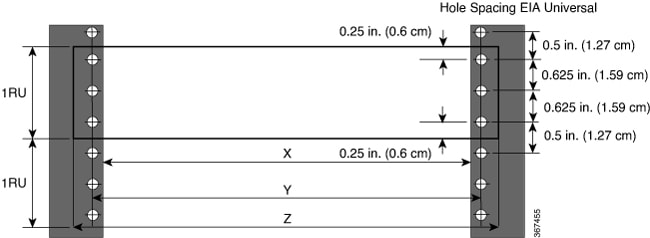
Figure 2. Rack specification EIA (19 inches and 23 inches)
Table 2. Rack specification EIA (19 inches and 23 inches) for the Cisco 8404-SYS-D Router

Post Type

Rack Type

Rack Front Opening (X)

Rack Mounting Hole Centre-Centre (Y)

Mounting Flange Dimension (Z)

4 Post

19 inches (48.3 centimeters)

450.8mm (17.75”)

465mm (18.312”)

482.6mm (19”)

2 Post

4 Post

23 inches (58.4 centimeters)

552.45mm (21.75”)

566.7mm (22.312”)

584.2mm (23”)

2 Post

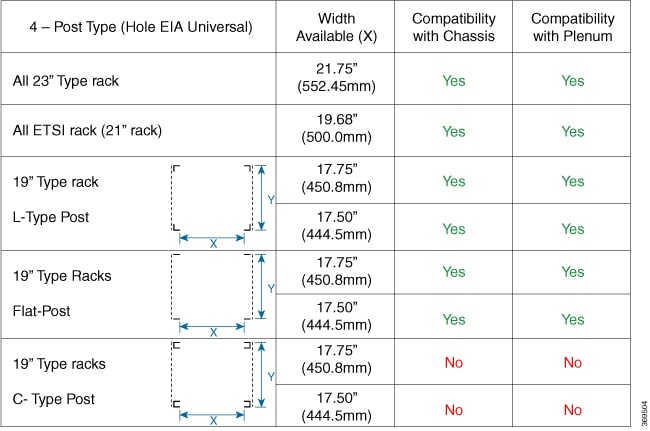
Figure 3. Four Post Rack Type
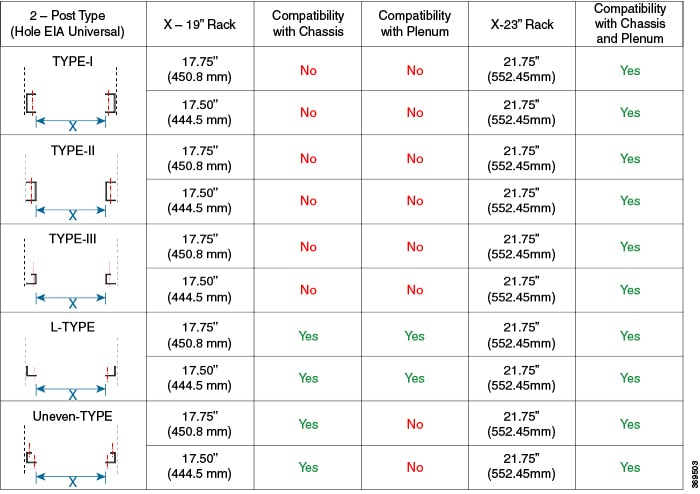
Figure 4. Two Post Rack Type

Installation Checklist

Use the Installation Checklist that is shown in the following table to provide a record of what was done by whom and when. Use this list to record the completion and verification of each procedure. After the checklist is completed, place it in your Site Log along with the other records pertaining to your new Cisco router.

Table 3. Installation Checklist

Task

Verified By

Date

Date on which chassis received

Chassis and all accessories unpacked

Types and numbers of interfaces verified

Safety recommendations and guidelines reviewed

Installation Checklist that is copied.

Site Log established and background information entered

Site power voltages verified

Site environmental specifications verified

Required passwords, IP addresses, device names, and so on, available

Required tools available

Network connection equipment available

Cable-management brackets that are installed (optional, but recommended).

DC power cables that are connected to DC sources and router.

Network interface cables and devices connected

System power that is turned on.

System boot completes (STATUS LED is on).

Correct software configuration that is displayed after system banner appears

Creating a Site Log

The Site Log provides a record of all the actions related to installing and maintaining the router. Keep it in an accessible place near the chassis so that anyone who performs tasks has access to it.

Create the Site Log prior to the installation. See the Site Log and Manufactures section for more information on the Site Log as well as a sample Site Log that can be used to make copies.

Chassis-Lifting Guidelines

The chassis is not intended to be moved frequently. Before you install the system, ensure that your site is properly prepared so that you can avoid having to move the chassis later to accommodate power sources and network connections.

Each time you lift the chassis, follow these guidelines:

  • Ensure that your footing is solid, and balance the weight of the chassis between your feet.

  • Lift the chassis slowly; never move suddenly or twist your body as you lift.

  • Keep your back straight and lift with your legs, not your back. If you must bend down to lift the chassis, bend at the knees, not at the waist, to reduce the strain on your back muscles.

  • Do not remove installed components from the chassis.

  • Always disconnect all external cables before lifting or moving the chassis.


Warning


To prevent personal injury or damage to the chassis, never attempt to lift or tilt the chassis using the handles on modules (such as power supplies, fans, or cards); these types of handles are not designed to support the weight of the unit. Lift the unit only by using handles that are an integral part of the chassis, or by grasping the chassis underneath its lower edge. Statement 163


Floor Loading Considerations

Ensure that the floor under the rack supporting the Cisco 8404-SYS-D routers are capable of supporting the combined weight of the rack and all the other installed equipment.

For additional information about floor loading requirements, consult GR-63-CORE, Network Equipment Building System (NEBS) Requirements: Physical Protection.

Tools and Equipment

You need the following tools and equipment to install and upgrade the router and its components:

  • ESD-preventive cord and wrist strap

  • Antistatic mat or antistatic foam

  • Number 1 and Number 2 Phillips-head screwdrivers

  • Flat-blade screwdrivers: Small 3/16-inch (0.476 cm) and medium 1/4-inch (0.625 cm):

    • To install or remove modules

    • To remove the cover if you are upgrading the memory or other components

  • #12-24 pan-head screws to secure the router to the equipment rack

  • Cables for connecting to the WAN and LAN ports (depending on the configuration)

  • Ethernet hub or switch or PC with a network interface card for connecting to the Ethernet ports

  • Console terminal (an ASCII terminal or a PC running terminal emulation software) that is configured for 115200 baud, 8 data bits, no parity, and two stop bits

  • Console cable for connecting to the console port

  • (Optional) Modem for connecting to the auxiliary port for remote administrative access

  • Auxiliary cable for connecting to the auxiliary port (you can supply this cable or order one)

  • Ratcheting torque screwdriver with a Phillips head that exerts up to 30 pound-force per square inch (in-lb) of pressure

  • Crimping tool as specified by the ground lug manufacturer

  • 8 AWG copper wire for the power cord

  • Wire-stripping tools for stripping both 6 AWG and 8 AWG wire

  • Tape measure and level


Warning


Only trained and qualified personnel should be allowed to install or replace this equipment. Statement 49


Prepare Your Location

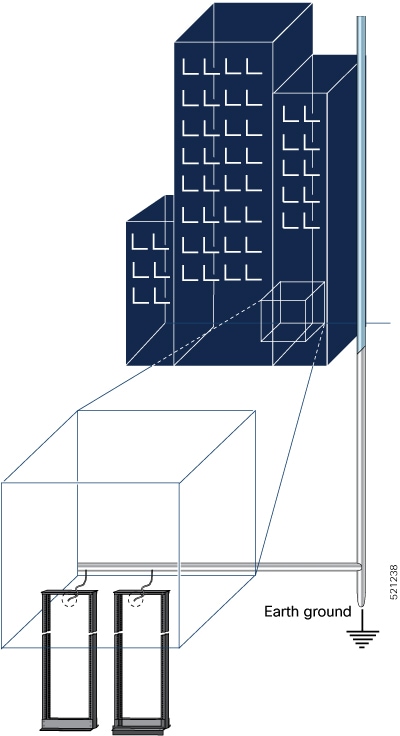
This section illustrates how the building that houses the chassis must be properly grounded to the earth ground.

Figure 5. Building with Rack Room Connected to Earth Ground
Building with Rack Room Connected to Earth Ground

Prepare Yourself

This section illustrates how to prepare yourself before removing the chassis from the sealed antistatic bag. The figures show how to wear the ESD strap around the wrist and how to connect the other end of the strap to the ground. ESD wrist straps are the primary means of controlling static charge on personnel.

Note: These images are for only representation purposes. The chassis' actual appearance and size would vary.

Figure 6. Wearing the ESD Strap
Wearing the ESD Strap