Cisco 8100 Series Routers Overview

Cisco 8100 Series Routers

The Cisco 8100 Series Routers utilizes Cisco’s new Router-on-Chip (RoC) model to deliver full routing functionality with a single ASIC per router. The RoC architecture is distinguished from System-on-Chip (SoC) switches by supporting large forwarding tables, deep buffers, more flexible packet operations, and enhanced programmability.

The Cisco 8100 series routers include the following variants:

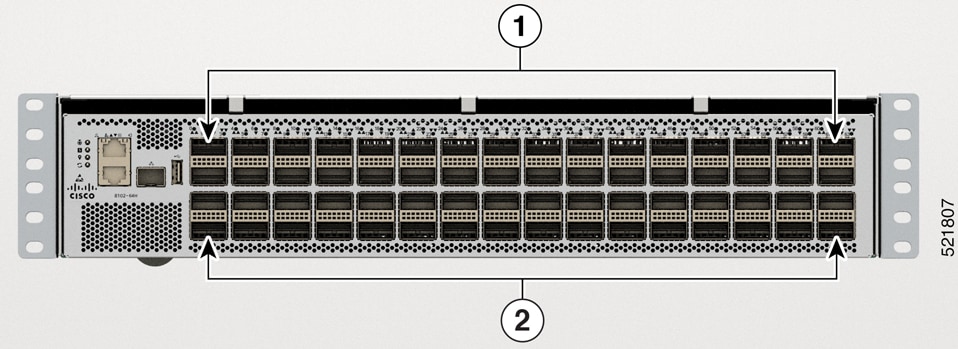
  • Cisco 8102-64H-O - It provides 6.4 Tbps of network bandwidth with dramatically lower power consumption than contemporary 10 Tbps systems. The Cisco 8102-64H-O Router is a fixed port, high density, two rack unit form-factor router. There are 64 QSFP28 ports on the router, each supporting 100GbE. The Cisco 8102-64H-O supports Cisco-qualified open-source network operating systems, such as SONiC (Software for Open Networking in the Cloud).

  • Cisco 8101-32FH-O - It provides 12.8Tbps of network bandwidth. The Cisco 8101-32FH-O Router is a fixed port, high density, one rack unit form-factor router. There are 32 QSFP-DD ports on the router, each supporting 400GbE. The Cisco 8101-32FH-O supports Cisco-qualified open-source network operating systems, such as SONiC (Software for Open Networking in the Cloud). The functionality and installation of this router is similar to that of Cisco 8201-32FH. The Hardware Installation Guide for Cisco 8201-32FH is available here.

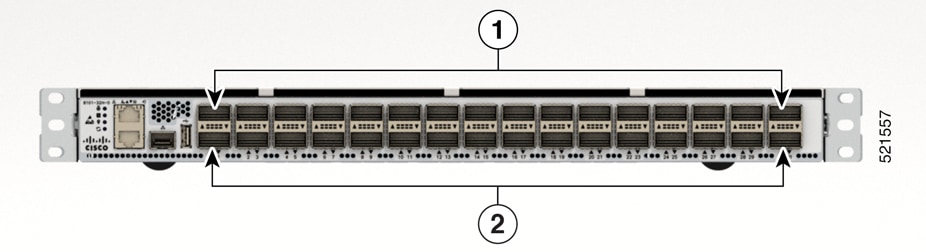
  • Cisco 8101-32H-O - It provides 3.2 Tbps of network bandwidth with dramatically lower power consumption than contemporary 10 Tbps systems. The Cisco 8101-32H-O Router is a fixed port, high density, one rack unit form-factor router. There are 64 QSFP28 ports on the router, each supporting 100GbE. This variant supports the Cisco-qualified open-source network operating system, such as SONiC (Software for Open Networking in the Cloud).

  • Cisco 8111-32EH-O - It provides 25.6Tbps of network bandwidth. The Cisco 8111-32EH-O Router is a fixed port, high density, one rack unit form-factor router. There are 32 QSFP-DD ports on the router, each supporting 800GbE. This variant supports the Cisco-qualified open-source network operating system, such as SONiC (Software for Open Networking in the Cloud).

  • Cisco 8122-64EH-O - It provides 51.2 Tbps of network bandwidth. The Cisco 8122-64EH-O Router is a fixed port, high density, two rack unit form-factor router. There are 64 QSFP-DD ports on the router, each supporting 800GbE. This variant supports the Cisco-qualified open-source network operating system, such as SONiC (Software for Open Networking in the Cloud).

  • Cisco 8102-28FH-DPU-O - This is a first-generation smart switch equipped with the Cisco Silicon One Q200L switching processor and an AMD DSC-200 Data Processing Unit (DPU), all housed in a two-rack unit form factor. It offers a total network bandwidth of 12.8Tbps, which includes 11.2Tbps for switching and 1.6Tbps for DPU processing, and it contains 28 QSFP-DD 400 GbE ports.

    The Cisco 8102-28FH-DPU-O supports Cisco-qualified open-source network operating systems, such as SONiC (Software for Open Networking in the Cloud).

  • Cisco 8122-64EHF-O - It provides 51.2 Tbps of network bandwidth operating on the Cisco G200 network processor. The Cisco 8122-64EHF Router is a fixed port, high density, two rack unit form-factor router specifically designed for hyperscale data centers. There are 64 OSFP800 ports on the router, each supporting 800GbE. This variant supports Cisco-qualified open-source network operating systems, such as SONiC (Software for Open Networking in the Cloud).

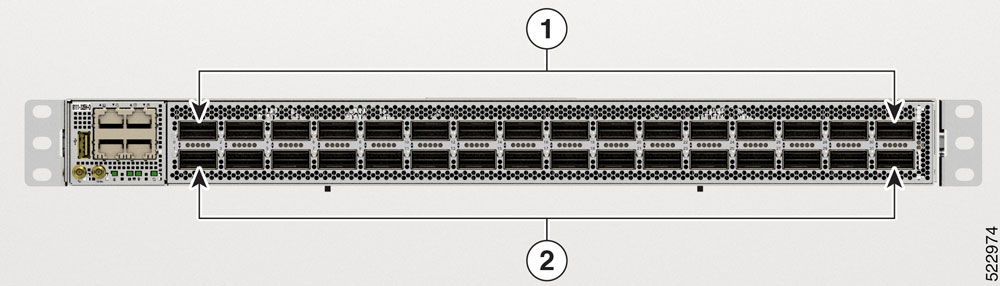
Cisco 8102-64H-O Router Front and Rear Panel View

Figure 1. Cisco 8102-64H-O Router—Front View

1

32 QSFP-DD ports

2

32 QSPF-DD ports

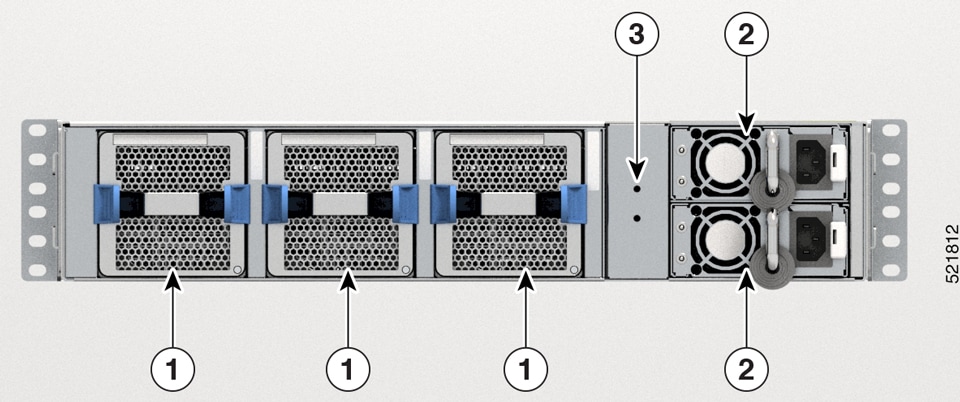
Figure 2. Cisco 8102-64H-O Router—Rear View

1

Fan Tray

Three Fans: FT0, FT1, and FT2

2

PSU-0 and PSU-1

3

Ground Lug Location

Cisco 8101-32H-O Router Front and Rear Panel View

Figure 3. Cisco 8101-32H-O Router—Front View

1

16 QSFP28 ports

2

16 QSPF28 ports

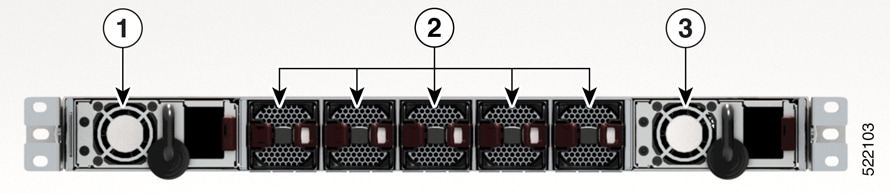
Figure 4. Cisco 8101-32H-O Router—Rear View

1

PSU-0

2

Fan Tray

Five Fans: FT0, FT1, FT2, FT3, and FT4

3

PSU-1

Cisco 8111-32EH-O Router Front and Rear Panel View

Figure 5. Cisco 8111-32EH-O Router—Front View

1

16 QSFP-DD ports. Supports 30W optics.

2

16 QSFP-DD ports. Supports 17W optics.

Figure 6. Cisco 8111-32EH-O Router—Rear View

1

PSU-0

2

Fan Tray

Six Fans: FT0, FT1, FT2, FT3, FT4, and FT5

3

PSU-1

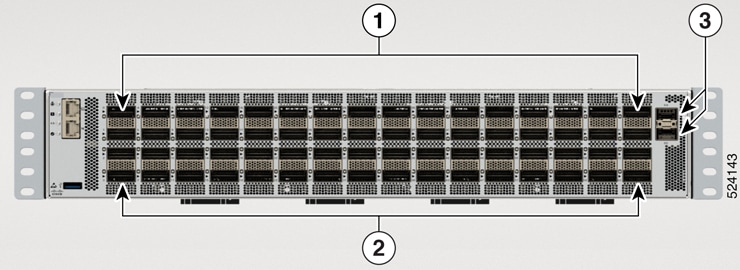
Cisco 8122-64EH-O Router Front and Rear Panel View

Figure 7. Cisco 8122-64EH-O Router-Front View

1

32 QSFP-DD ports

2

32 QSPF-DD ports

3

2 SFP28 ports

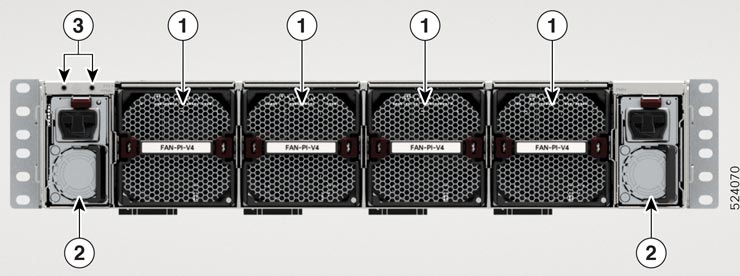
Figure 8. Cisco 8122-64EH-O Router—Rear View

1

Fan Tray

Four Fans: FT0, FT1, FT2, and FT3

2

PSU-0 and PSU-1

3

Ground Lug Location

Cisco 8102-28FH-DPU-O Smart Switch Front and Rear Panel View
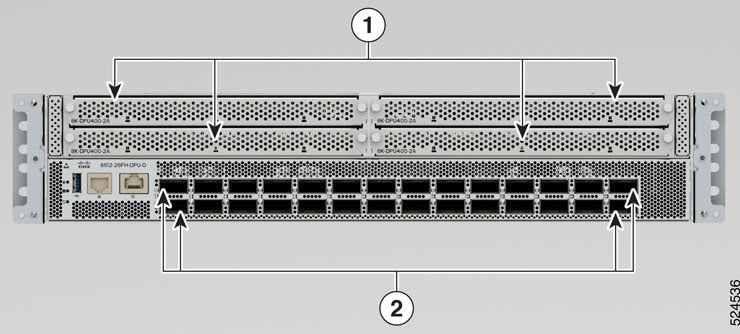
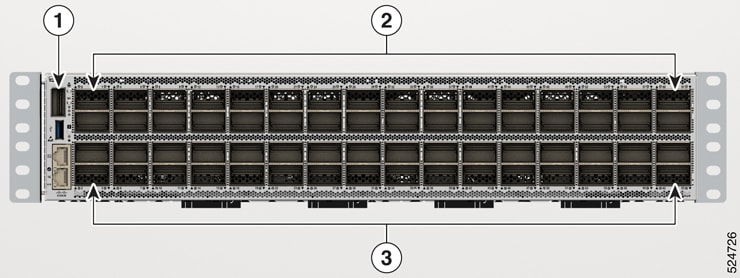
Figure 9. Cisco 8102-28FH-DPU-O—Front View

1

4 DPU adapters. 2 DPU complexes per adapter.

2

28 QSFP-DD 400 GbE

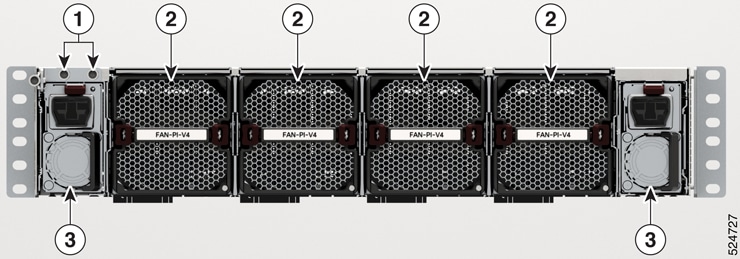
Figure 10. Cisco 8102-28FH-DPU-O—Rear View

1

Fan Modules

Four Fans: FT0, FT1, FT2 and FT3

2

PSU-0 and PSU-1

3

Ground Lug Location

Cisco 8122-64EHF-O Router Front and Rear Panel View

Figure 11. Cisco 8122-64EHF-O Router-Front View

1

QSFP28 port

2

32 OSFP800 ports

3

32 OSFP800 ports

Figure 12. Cisco 8122-64EHF-O Router—Rear View

1

Ground Lug Location

2

Fan Tray

Four Fans: FT0, FT1, FT2, and FT3

3

PSU-0 and PSU-1

Cisco 8102-28FH-DPU-O Smart Switch DPU Adapter

The Cisco 8102-28FH-DPU-O Smart Switch features four Data Processing Unit (DPU) adapters, which are responsible for managing data plane services. Each adapter contains two DPU complexes, resulting in a total of eight DPU complexes in the switch, providing a combined data processing bandwidth of 1.6Tbps. Each DPU complex comprises of AMD DPU chip, 32GB of on board DDR4 memory, 64GB of eMMC storage and a common power management CPLD (complex programmable logic device). Each DPU adapter offers 200Gbps of network bandwidth and supports a variety of network functionalities within the smart switch.
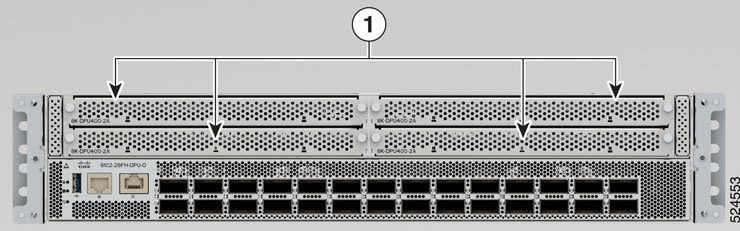
Figure 13. DPU - Cisco 8102-28FH-DPU-O
1

4 DPU adapters. 2 DPU complexes per DPU adapter.

Field Replaceable Units

The router has the following field replaceable units (FRUs):

  • Fan Module - The router features field-replaceable fan modules that are installed into the chassis from the rear. These fan modules are crucial for cooling the system and maintaining proper airflow. Designed with N+1 redundancy, the fan modules ensure reliable performance.

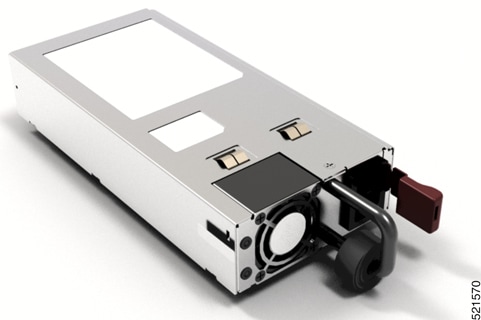
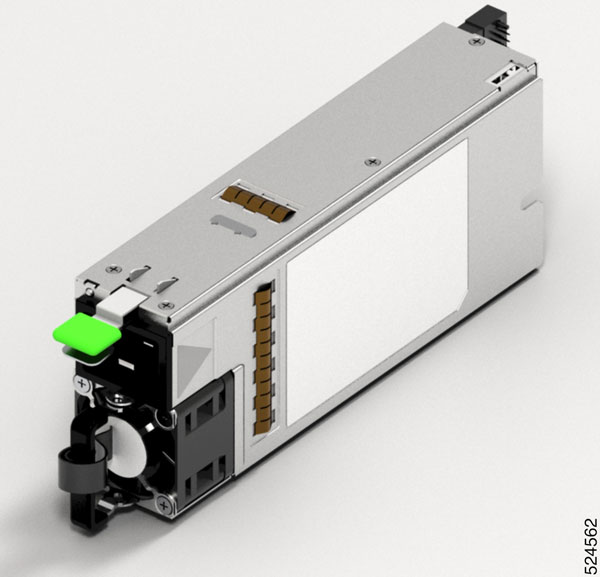
  • Power Supply Unit - The router is equipped with two power supply units (PSUs) that install into the chassis from the rear. These PSUs provide 12V power to the entire system and operate with 1+1 redundancy to ensure continuous and reliable power delivery.

Designed for easy installation and removal, the PSUs support Online Insertion and Removal (OIR) to minimize downtime and maintain system availability.

Fan Module View

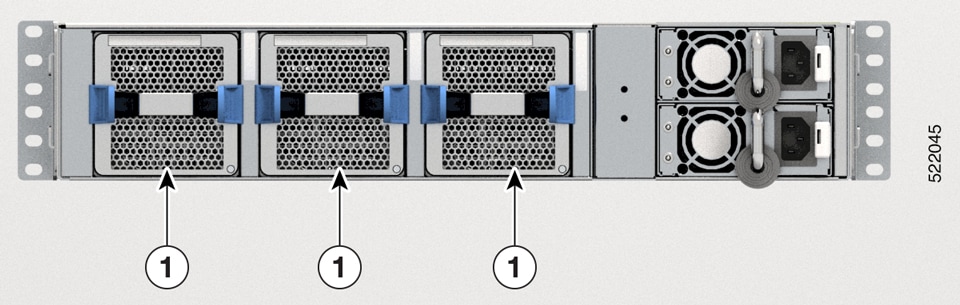
Figure 14. Fan Module - Cisco 8102-64H-O

1

Fan

The router has three latched fan modules that installs into the chassis from the rear. Fans cool the system and maintain proper airflow through the system. The fan modules work with N+1 redundancy.

Table 1. Fan Module PIDs

Configuration

Fan Module PID

Port-side Intake

FAN-2RU-PI-V2

The color of the fan module is Burgundy.

Port-side Exhaust

FAN-2RU-PE-V2

The color of the fan module is Blue.

Figure 15. Fan Module - Cisco 8101-32H-O

2

Fan

Table 2. Fan Module PIDs

Configuration

Fan Module PID

Port-side Intake

FAN-1RU-PI-V2

The color of the fan module is Burgundy.

Port-side Exhaust

FAN-1RU-PE-V2

The color of the fan module is Blue.

Figure 16. Fan Module - Cisco 8111-32EH-O


Note


The Cisco 8111-32EH-O router supports only port-side intake configuration.


2

Fan

Table 3. Fan Module PIDs

Configuration

Fan Module PID

Port-side Intake

FAN-1RU-PI-V2

The color of the fan module is Burgundy.
Figure 17. Fan Module - Cisco 8122-64EH-O

The router has four latched fan modules that installs into the chassis from the rear. Fans cool the system and maintain proper airflow through the system. The fan modules work with N+1 redundancy.

1

Fan

2

PSU

3

Ground lug location

Table 4. Fan Module PIDs

Configuration

Fan Module PID

Port-side Intake

FAN-2RU-PI-V3 or FAN-2RU-PI-V4

The color of the fan module is Burgundy.

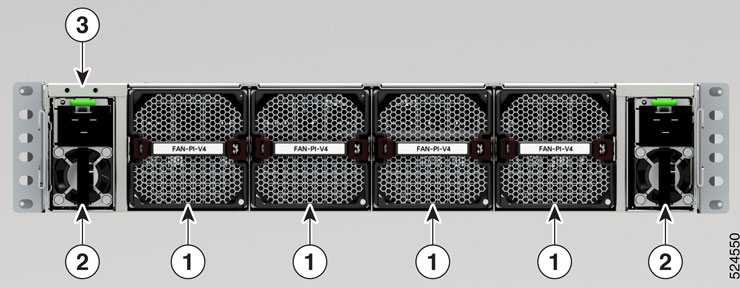
Figure 18. Fan Module - Cisco 8102-28FH-DPU-O

1

Fan

2

PSU

3

Ground lug location

Table 5. Fan Module PIDs

Configuration

Fan Module PID

Port-side Intake

FAN-PI-V4

The color of the fan module is Burgundy.

Figure 19. Fan Module - Cisco 8122-64EHF-O

The router has four latched fan modules that installs into the chassis from the rear. Fans cool the system and maintain proper airflow through the system. The fan modules work with N+1 redundancy.

1

Ground lug location

2

Fan

3

PSU

Table 6. Fan Module PIDs

Configuration

Fan Module PID

Port-side Intake

FAN-PI-V4

The color of the fan module is Burgundy.

Power Supply Unit

Table 7. PIDs for Power Supply Unit

Router

AC PID

DC PID

HVPI PID

Cisco 8102-64H-O and Cisco 8101-32H-O

  • PSU650W-ACPI

  • PSU650W-ACPE

  • PSU930W-DCPI

  • PSU930W-DCPE

Cisco 8111-32EH-O

  • PSU2KW-ACPI

  • PSU3KW-HVPI

  • PSU2KW-DCPI

  • PSU3KW-HVPI

Cisco 8122-64EH-O

PSU3KW-HVPI

NA

PSU3KW-HVPI

Cisco 8102-28FH-DPU-O

UCSC-PSU1-2300W

NA

Cisco 8122-64EHF-O

PSU3KW-HVPI

PSU3KW-DCPI-ORV3

PSU3KW-HVPI

Cisco 8101-32FH-O

PSU2KW-ACPI

  • PSU930W-DCPI

  • PSU930W-DCPE

PSU2KW-HVPI


Note


For Cisco 8111-32EH-O router, when all the 32 x QSFP-DD ports are being used and you want to use 1+1 redundancy, you must use the 3KW PSU.


Figure 20. Power Supply Unit - Cisco 8101-32H-O and Cisco 8102-64H-O
Figure 21. Power Supply Unit - UCSC-PSU1-2300W

SSD Card

The router has a removable Solid State Drive (SSD) card. We recommend to remove the SDD card before shipping the hardware for a Return Merchandise Authorization (RMA) request. Removal of the SSD card enforces customer data security while performing an RMA.

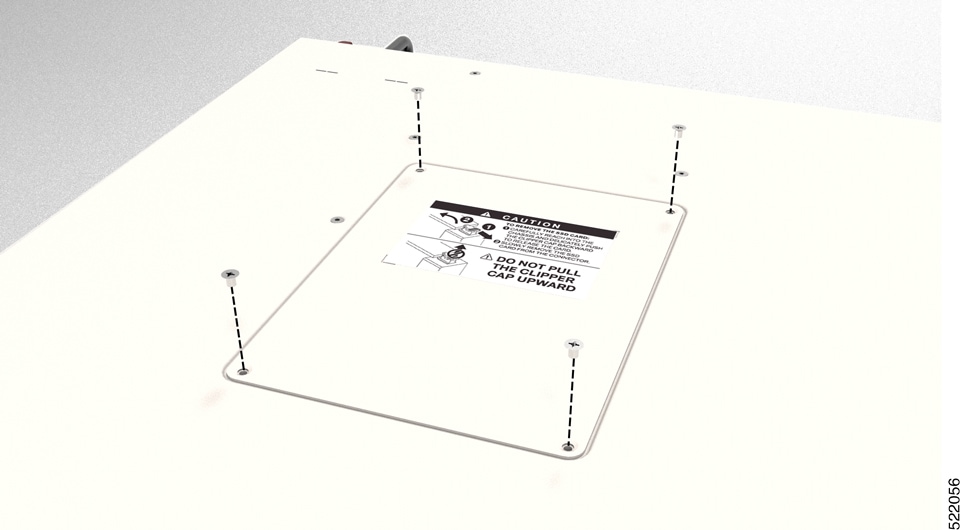
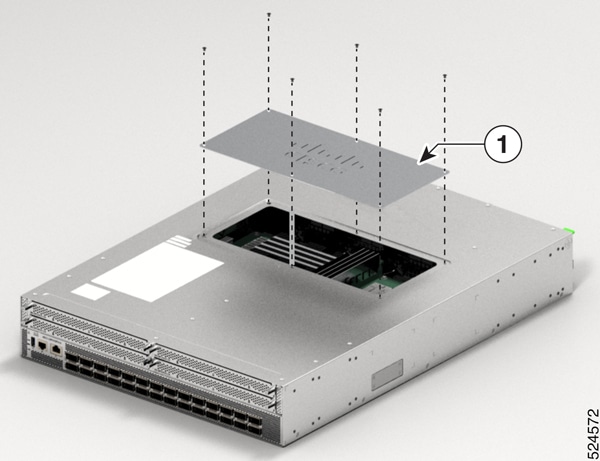
You can access the SSD card by using the hatch provided on the top panel. To remove the SSD card, follow the instructions mentioned on the printed label on the hatch.
Figure 22. Remove the Hatch

To remove the SSD card from the Cisco 8102-28FH-DPU-O smart switch, perform these steps:

  1. Remove the screws from the hatch present on the top panel.

    Figure 23. Cisco 8102-28FH-DPU-O- Remove the Hatch
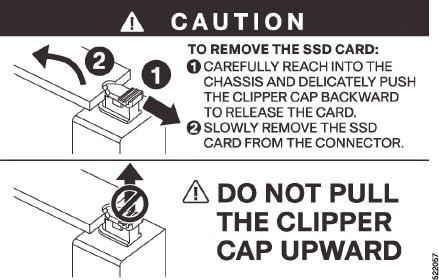
  2. Carefully reach into the chassis and delicately push the clipper cap backward to release the card.

    Figure 24. SSD Card Removal Instructions
  3. Slowly remove the SSD card from the connector.

Airflow Direction

The Cisco 8100 series routers support these configurations:

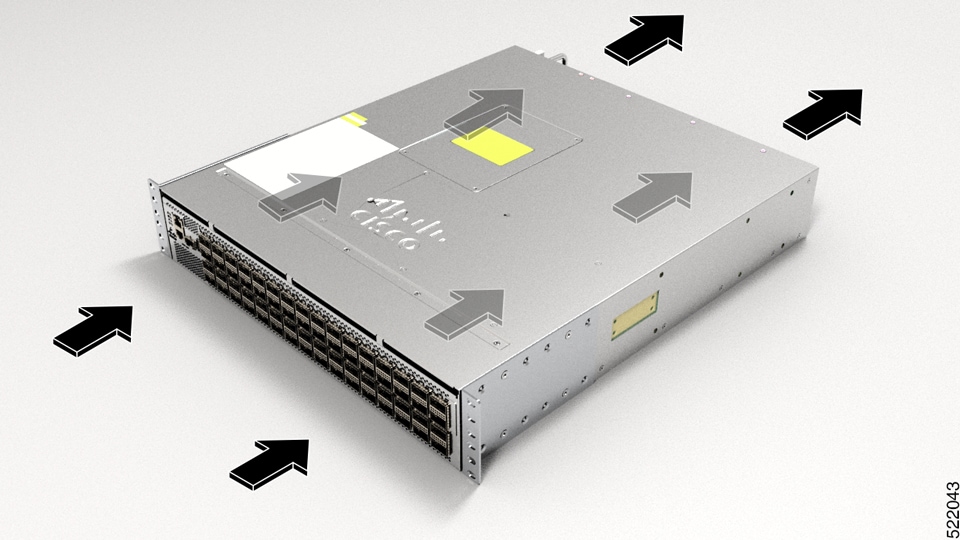
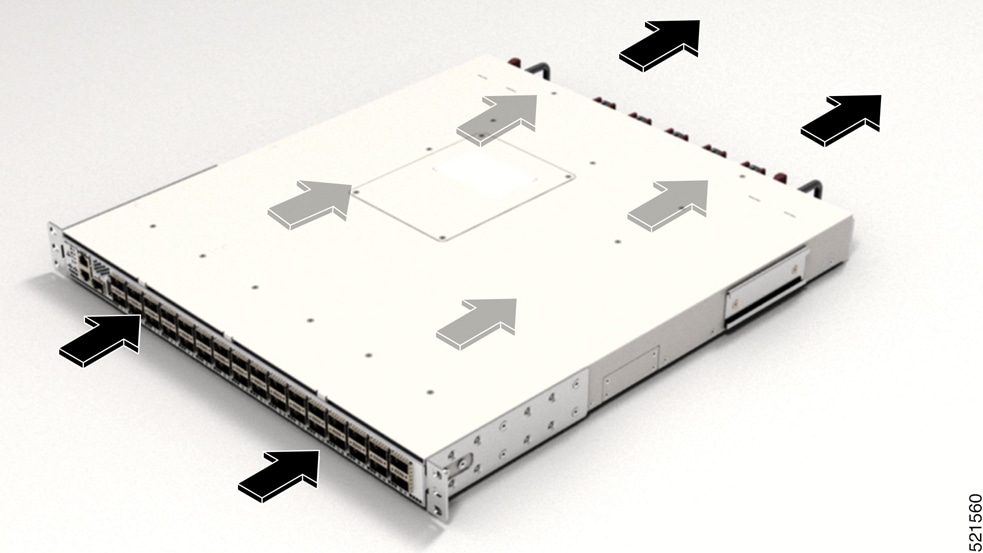
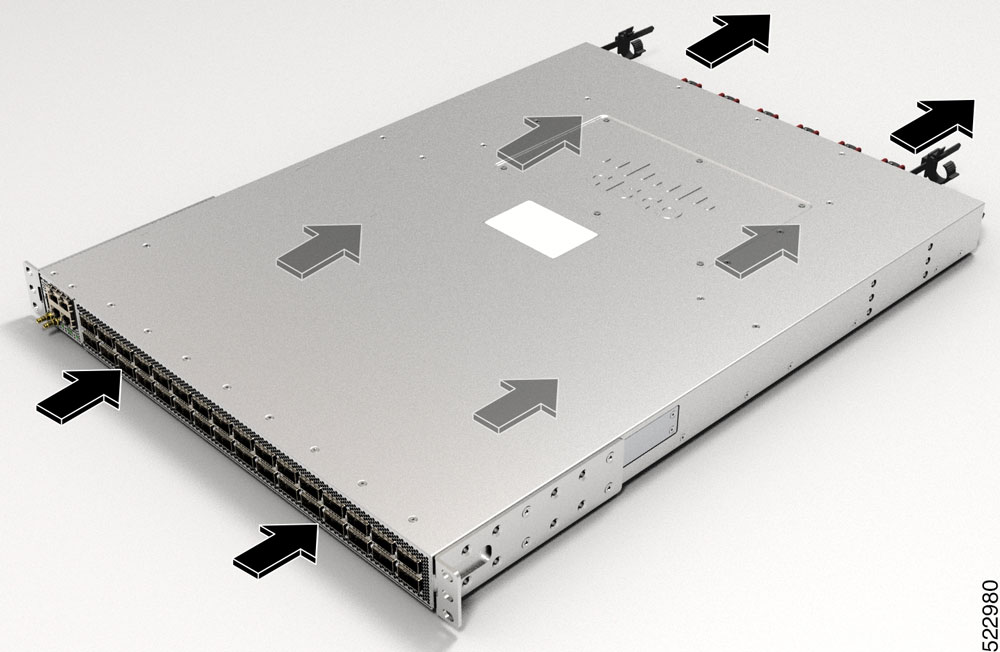
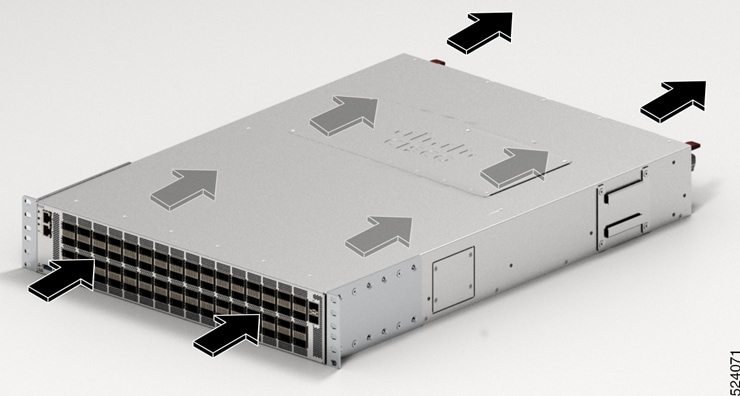
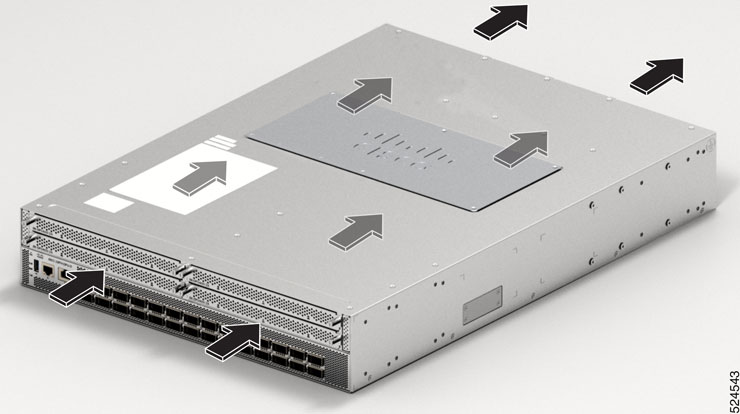
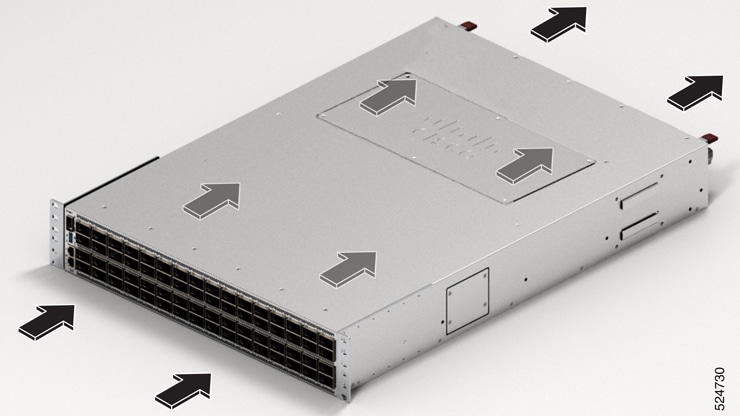
  • Post-Side Intake (PSI) configuration - the airflow through both the fan trays and power supplies is from the front-side to the rear-side. In PSI configuration, the power and fan modules are in Burgundy color.

  • Post-Side Exhaust (PSE) configuration - the airflow through both the fan trays and power supplies is from the rear-side to the front-side. In PSE configuration, the power and fan modules are in Cisco Safety Blue color.


Note


The PSE configuration is not supported on these routers:

  • Cisco 8111-32EH-O

  • Cisco 8122-64EH-O

  • Cisco 8102-28FH-DPU-O

  • Cisco 8122-64EHF-O


Note


The airflow direction must be the same for all power supply and fan modules in the chassis. Depending upon the required airflow direction, you can change the fan type. You must then also change the power supply.
Figure 25. Airflow Direction for Cisco 8102-64H-O Router
Figure 26. Airflow Direction for Cisco 8101-32H-O Router
Figure 27. Airflow Direction for Cisco 8111-32EH-O Router

Figure 28. Airflow Direction for Cisco 8122-64EH-O Router

Figure 29. Airflow Direction for Cisco 8102-28FH-DPU-O Router

Figure 30. Airflow Direction for Cisco 8122-64EHF-O Router