RV340 Product Family
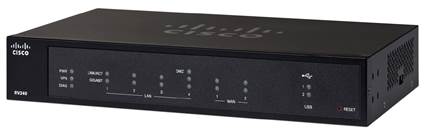
Small businesses are constantly exposed to Internet threats. The Cisco RV340, RV345, and RV345P Dual WAN Gigabit VPN Routers connect small businesses to the Internet and protect employees from unwanted content and malicious websites without compromising the online experience. The routers help boost employee productivity and overall network performance by limiting Internet surfing to appropriate site categories and eliminating unwanted network traffic. Users are automatically protected from malicious or compromised websites, regardless of site categorization. End devices and applications can be identified and treated according to user-defined policies for improved productivity and optimal network usage.
With an intuitive user interface, the RV340, RV345, and RV345P enable you to be up and running in minutes. These routers provide reliable, highly secure connectivity that is so transparent you will not know it is there.
-
Design
-
New to Cisco Business: How to Download and Upgrade Firmware on any Device
-
Cisco AnyConnect Secure Mobility Client Supported Features for Android Devices
-
Cisco AnyConnect Secure Mobility Client Supported Features for Apple iOS Devices
-
Use TheGreenBow VPN Client to Connect with RV34x Series Router
-
Get to Know the RV340W Dual WAN Gigabit VPN Router with Wireless
Install and Upgrade
-
RV34x: Install Cisco AnyConnect Secure Mobility Client on a Mac Computer
-
Installing and Using AnyConnect on Ubuntu Desktop using the User Interface
-
AnyConnect: Installing a Self-Signed Certificate as a Trusted Source
-
RV34x: Install Cisco AnyConnect Secure Mobility Client on a Windows Computer
-
VLAN Best Practices and Security Tips for Cisco Business Routers
Configure
-
Configure Basic Firewall Settings on the RV34x Series Router
-
Total Network Configuration: RV345P and Cisco Business Wireless using the Mobile Application
-
Total Network Configuration: RV345P and Cisco Business Wireless using the Web UI
-
Configuring Shrew Soft VPN client to connect to RV34X Series Router
-
Configure Port Forwarding/Port Triggering/NAT on RV34x Series Routers
-
Remote Authentication and Login Guidance Using Active Directory and RV34x Routers
-
Configure and Manage User Accounts on an RV34x Series Router
Maintain and Operate
-
-
Design
Cisco Tech Talk: EOS and EOL Announcements for Beginners | Understand Product Lifecycle & Support
In this Cisco Tech Talk, we break down the basics of End of Sale (EOS) and End of Life (EOL) announcements for beginners. Learn how to interpret these important product lifecycle milestones and how they impact your network planning, upgrades, and support decisions.
Cisco Tech Talk: How To Select the Right VPN Router for Your Small Business
Cisco offers a wide variety of VPN routers for small business applications, including the RV160, the RV260, and the RV340W. Learn which one is the right fit for your situation on this edition of Cisco Tech Talks.for additional support visit the Cisco Small Business Support Center at http://cs.co/9006Evp3K
Cisco Tech Talk: Load Balancing vs. WAN Failover on Cisco RV Series Routers
In this latest Cisco Tech Talks, we will see how WAN postedin RV340 series routerscan support the load balancing and failover functionality.
Cisco Tech Talk: Port Address Translation - What and How on RV345
Port Address Translation (PAT) works similarly to port forwarding, with the exception that PAT allows mapping of different external or internal ports in order to allow multiple devices on a LAN to be mapped to a single public IP address. Learn how to configure port address translation on RV345 routers.
Cisco Tech Talk: RV340 Series
See how the new series of Cisco RV340 routers can boost employee productivity and network performance for your small business. To learn more, visit the Cisco Small Business RV345 router support page: http://cs.co/6001DEvkc.
Cisco Tech Talk: RV345P and WAP581
Take a quick look at the Cisco RV345P and WAP581, the ultimate office solution for your small business. To learn more, visit the Cisco Small Business Support Community: http://cs.co/6000DEvpg.
Cisco Tech Talk: Tracking Cisco Business EOS/EOL Announcements Easily
In this Cisco Tech Talk, learn how to access and interpret Cisco’s End of Sale (EOS) and End of Life (EOL) announcements for business-class products.
Cisco Tech Talk: USB Port Functionality on the RV34x Series Router
In this latest Cisco Tech Talks, we’ll explain the USB port functionality in the Cisco RV340 series router and its two USB ports.
Cisco Tech Talk: What are Supported Routing Protocols On RV340 Series Routers
Routing Protocol are responsible for the creation, maintenance, and updating of the dynamic routing table in the dynamic routing. For additional support information, visit the Cisco Small Business Support Community: http://cs.co/9007DAEb1.
Install & Upgrade
How to Upgrade Firmware on Cisco RV34X Series Routers | Step-by-Step Guide
In this Cisco Tech Talk, we guide you through the process of upgrading the firmware on your Cisco RV34X Series router. Learn how to download the latest firmware, ensure compatibility, and perform the upgrade seamlessly to improve performance, security, and reliability.
Configuration
Change the Default DHCP Scope on Cisco RV Series Routers | Custom IP Address Management
In this Cisco Tech Talk, we show you how to change the default DHCP scope on Cisco RV Series routers. Adjusting the DHCP scope allows you to define a custom IP address range for your local network, manage device assignments, and avoid conflicts with existing network infrastructure.
Cisco Tech Talk: Access VPN From Android Mobile Devices to Cisco RV Series Routers
Learn how to set up RV series routers to support VPN Client services on Android Mobile devices. To learn more about small business VPN, visit the Cisco Small Business RV345 router support page: http://cs.co/9002ERLzQ.
Cisco Tech Talk: Antivirus and IPS settings on RV34x series routers
In this edition of Tech Talk, we’ll talk about how to set up threat and IPS settings on an RV340 router.
Cisco Tech Talk: Application Control configuration on RV340 series routers
If you’re ever looking for more productivity in the workplace and maximized bandwidth, Application Control is an additional security feature that can further enhance secure networks.
Cisco Tech Talk: Cisco Umbrella Integration on RV34x Series Routers
In this edition of Tech Talk, we’ll walk through how Cisco Umbrella integrates with your RV340 series routers to enhance your security.
Cisco Tech Talk – Configure a WLAN Using a DSTP QoS Rewrite on a Cisco RV34x Series Router
In this edition of Cisco Tech Talk, I’ll show you how to configure a Wide Area Local Network (WLAN) using DSTP QoS rewrite on a Cisco RV34x series router.
Cisco Tech Talk: Configure Class of Service
Learn how to configure Class of Service (CoS). For more, visit http://cs.co/nr0427b.
Cisco Tech Talk: Configuring DHCP Option 66 and 150 on RV Series Routers
Cisco phone IP addresses can be assigned manually or by using DHCP. To request information from the DHCP server, we’ll need to use option 150 or 66. Learn how to configure DHCP Option 66 and 150 on RV Series Routers.
Cisco Tech Talk: Configuring Dual WAN for Load Balancing on RV340 Series Routers
This video provides assistance in configuring your WAN ports to support dual-WAN load balancing. For more support help, visit http://cs.co/nr0920a.
Cisco Tech Talk: Configuring Dual WAN for Precedence
Learn how to configure dual WAN for precedence and prioritization.
Cisco Tech Talk: Configuring Generic VLAN Registration Protocol (GVRP) on Cisco RV345
GVRP (Generic VLAN Registration Protocol) is a protocol that facilitates control of virtual local area networks (VLANs) within a larger network. GVRP conforms to the IEEE 802.1Q specification. Learn how to configure GVRP on SMB series Switches.
Cisco Tech Talk: Configuring IPS and Antivirus
Cisco’s RV340 Series routers offer a wide array of security and protection features. Learn more about anti-virus and IPS Connect on RV340 series routers here. for additional information visit http://cs.co/9004E0xV4
Cisco Tech Talk: Configuring PPPoE on Cisco RV340 Series Routers
Learn how to set up PPPoE on RV Series Routers. For additional support information, visit the Cisco Small Business Support Community: http://cs.co/9006DAD8m.
Cisco Tech Talk: Configuring Remote Access VPN from Apple Laptops
Learn how to set up and configure Remote VPN From Apple Laptops using an RV340 Series Routers. For more information and support, visit the Cisco Small Business Support Community at http://cs.co/9004ErT4A.
Cisco Tech Talk: Configuring Site-to-Site VPN on RV340 Series Routers
Learn how to configure site-to-site VPN on Cisco Small Business RV340 Series routers. For more, visit http://cs.co/nr0308d.
Cisco Tech Talk: Configuring VPN Failover on a Multi-LAN Router
Learn how to configure VPN failover on a RV340 Series router multi-LAN environment. To learn more, visit http://cs.co/9002Dgp8O.
Cisco Tech Talk: Configuring WAN Interfaces and VLAN Tagging
VLAN tagging helps network managers identify packets traveling through trunk links by adding a VLAN tag to the VLAN’s frame. Learn how to configure WAN settings and VLAN tagging on a Cisco RV340 router here. For additional support visit http://cs.co/9009EFKph
Cisco Tech Talk: Enabling MAC VPN Client on RV340 Series Routers
Learn how to configure MAC VPN Client in VPN settings on RV340 Series Routers. For additional support information, visit the Cisco Small Business Support Community: http://cs.co/9005DfIZB.
Cisco Tech Talk: How to Access VPN on an iPhone and iPad
Learn how to set up and configure RV340 Series Router. For additional support information please visit the Cisco Small Business Support Community at http://cs.co/9008ErpBj.
Cisco Tech Talk: How to Connect RV340 as a Network Using Umbrella
Cisco Umbrella uses the internet’s infrastructure to block malicious destinations before a connection is ever established. Learn how to connect an RV340 router to your Umbrella account. For additional support visit http://cs.co/9009E5JTD
Cisco Tech Talk: IP Source Guard configuration on RV34x
In this edition of Tech Talk, we’ll discuss the IP Source Guard on RV340 series routers.
Cisco Tech Talk: PnP Service on RV260 & RV340 Routers: Manual Plug-and-Play Connect Options
Plug-and-Play, often referred to as “PnP,” is a service that works together with enabled devices to allow for firmware and configuration to be managed centrally. Learn more about configuring manual PnP on Rv260 and RV340 Routers here. Find additional support for Pnp on RV series Routers here http://cs.co/9002E23eE
Cisco Tech Talk: Reach Multiple Sites with VPNs and RV34x Routers
In this edition of Cisco Tech Talk, I will show the configurations necessary for a client to connect to two different sites via a client-to-site VPN using the RV340W router.
Cisco Tech Talk: Restricting Internet bandwidth for a group of users in RV34x Router
In this edition of Tech Talk, we’ll talk about how to set up internet bandwidth management using QoS on the RV340 router.
Cisco Tech Talk: RV34x DSCP QoS Rewrite WAN1 Example
In this Cisco Tech Talk, we’re going to create an example performing a DSCP Quality of Service rewrite on WAN1 for a Cisco RV34x Series Router.
Cisco Tech Talk: Setting Up An Email Server Behind Cisco RV Series Routers
Learn how to Set up and Configure Router Settings to Support an Email server using an RV Series router. For additional information on this and other support materials, please visit the Cisco Small Business Support Community: http://cs.co/9004ERhF2.
Cisco Tech Talk: Setting up Router Policies for Facebook on RV340 Series Router
It can be tempting to check Facebook during the day, however, using your RV340 series router, you can set policies to limit access to certain websites. Learn how to set up policies for traffic management on RV340 Series Routers.
Cisco Tech Talk: Setting up WAN Configurations on RV340 Series Routers
Learn how to configure WAN settings on RV Series routers. For more support information, visit the Cisco Small Business Support Community: http://cs.co/9004D2dGQ.
Cisco Tech Talk: Site-to-Site Failover on RV34x Series Routers
In this latest Cisco Tech Talks, we’ll discuss the VPN failover option available in Cisco Small Business RV Series Routers and how the VPN failover option provides flexibility to switch over the WAN connectivity automatically on the same VPN tunnel.
Cisco Tech Talk: Static Routing Configuration on Cisco RV Series Routers
In this latest Cisco Tech Talks, we’ll discuss static routing configuration in Cisco Small Business RV Series routers.
Cisco Tech Talk: Unlock Content & Web Filtering on Cisco RV340 Routers
Learn how to optimize your network security and productivity with content and web filtering on Cisco RV340 Series Routers! This step-by-step guide explains how to block unwanted websites, manage access policies, and configure advanced filtering options tailored to your business needs.
Cisco Tech Talk: Unlock Split Tunnel VPN on Windows 10 with Cisco RV340 Router
Struggling with bandwidth issues or unnecessary VPN traffic? Learn how to configure a split tunnel VPN on Windows 10 with a Cisco RV340 series router!
Cisco Tech Talk: Unlock VLAN Security: Configuring Targeted ACLs on Cisco RV34x Routers
Enhance your network security with targeted access rules! In this Cisco Tech Talk, we walk you through configuring inter-VLAN routing and Access Control Lists (ACLs) on Cisco Small Business RV34x routers.
Cisco Tech Talk: Update Time Using NTP Server in RV34x Series Router
This video will teach you how to update the time settings in the Cisco small business RV series router.
Configuring Router on a Stick & InterVLAN Routing on RV340 Router and CBS350 Switch
In this video, we’ll configure Router on a Stick and InterVLAN Routing using the Cisco RV340 Router and CBS350 Switch. Learn how to set up a single router interface to route traffic between multiple VLANs, allowing for efficient network segmentation and communication across different VLANs.
How to Configure ACLs on Cisco RV340 Routers | Access Control Made Easy
In this Cisco Tech Talk, we walk through how to configure access control lists (ACLs) on RV340 Series routers. ACLs are crucial for filtering traffic, improving security, and controlling network flow. Learn to build, apply, and test ACLs using the RV340 web interface.
How to Configure AnyConnect VPN on Cisco RV340 Series Routers | Step-by-Step Guide
In this Cisco Tech Talk, we walk you through configuring AnyConnect VPN on Cisco RV340 Series Routers, ensuring secure remote access for your devices. Learn the setup process and key considerations for a successful VPN deployment.
How to Configure GreenBow Client-to-Site VPN on Cisco RV34x Series Routers
In this video, we walk you through the process of configuring GreenBow Client-to-Site VPN on Cisco RV34x Series Routers. Learn how to set up secure, reliable VPN connections for remote users using GreenBow, providing encrypted communication for your network.
How to Configure Hardware DMZ Settings on Cisco RV34x Series Routers | Tutorial
In this video, we walk you through the process of configuring Hardware DMZ (Demilitarized Zone) settings on the Cisco RV34x Series Routers. Learn how to set up a DMZ to isolate your internal network from external traffic while securely allowing access to services like web servers or email servers.
How to Configure IGMP Proxy on Cisco RV34x Series Routers | Guide
In this video, we demonstrate how to configure IGMP (Internet Group Management Protocol) Proxy on Cisco RV34x Series Routers. Learn how to enable and configure IGMP Proxy to manage multicast traffic efficiently across your network.
How to Configure IPv6 DHCP Server on Cisco RV34x Series Router | Guide
In this video, we demonstrate how to configure an IPv6 DHCP server on Cisco RV34x Series Routers. Learn the step-by-step process for setting up IPv6 DHCP to assign IP addresses to your network devices, ensuring smooth communication across your IPv6-enabled network.
How to Configure L2TP VPN Server on Cisco RV340 Router
In this video, we demonstrate how to configure the L2TP VPN server on the Cisco RV340 Router. Learn how to set up a secure, reliable L2TP VPN connection, providing remote users with encrypted access to your network.
How to Configure L2TP VPN with RADIUS on RV34x Router and Windows 2019 Server
In this Cisco Tech Talk, learn how to configure L2TP VPN with RADIUS on the RV34x Router and a Windows 2019 Server. This step-by-step guide covers the process of setting up secure remote access for your network users, ensuring that L2TP VPN connections are authenticated securely with RADIUS.
How to Configure NSD on Cisco RV340 Routers | Network Service Detection Setup Guide
In this Cisco Tech Talk, we walk through how to configure Network Service Detection (NSD) on Cisco RV340 Series routers.
How to Configure QoS for VPN on Cisco RV34X Series Routers | Step-by-Step Guide
In this video, we guide you through the process of configuring Quality of Service (QoS) for VPN on Cisco RV34X Series Routers. Learn how to prioritize VPN traffic, ensuring stable and high-performance connectivity for remote users.
How to Configure RADIUS Server on Cisco RV340 Series Routers | Walkthrough
In this video, we walk you through the process of configuring a RADIUS server on Cisco RV340 Series Routers. Learn how to set up RADIUS authentication for secure network access and manage user authentication and authorization efficiently.
How to Configure SSL VPN Settings on Cisco RV34x Series Routers | Walkthrough
In this video, we demonstrate how to configure SSL VPN settings on Cisco RV34x Series Routers. Learn how to set up SSL VPN to securely connect remote users to your network, enabling access to resources from anywhere.
How to Configure VLANs on Cisco RV Series Routers | Network Segmentation Guide
In this Cisco Tech Talk, we show you how to configure VLANs on Cisco RV Series routers to segment your network for improved performance, security, and manageability. Whether you're supporting guest access, VoIP, or separating departments, VLANs help you structure traffic with precision.
How to Configure Windows 11 L2TP VPN on RV340 Series Routers | Secure Your Remote Access
In this Cisco Tech Talk, learn how to configure an L2TP VPN on the RV340 Series Routers for Windows 11. This video walks you through the steps to ensure secure remote access for your devices using Cisco’s robust VPN solutions.
How to Create a Client-to-Site L2TP VPN with RV340 Router and Windows Built-in Client
In this Cisco Tech Talk, we guide you through setting up a Client-to-Site L2TP VPN using a Cisco RV340 Router and the Windows built-in VPN client. This video shows you how to configure secure remote access for users, ensuring seamless connectivity from any location.
How to Create a Client-to-Site VPN on RV34X Router Using an Android Device
In this Cisco Tech Talk, learn how to configure a Client-to-Site VPN on the RV34X Router using an Android device. This video provides a step-by-step guide on setting up and connecting to a secure VPN from your mobile device, ensuring that you can access your network remotely, anytime, anywhere.
How to Create a Site-to-Site VPN on RV34x Router | Guide
In this Cisco Tech Talk, learn how to create a Site-to-Site VPN on a Cisco RV34x Router. This video walks you through the steps to establish a secure connection between two networks, ensuring seamless and encrypted communication across sites.
How to Restrict Bandwidth with QoS on RV340 Routers | Optimize Network Performance
In this Cisco Tech Talk, we walk you through configuring Quality of Service (QoS) on RV340 Series routers to restrict bandwidth and optimize network performance. Learn how to prioritize traffic, manage network resources effectively, and ensure seamless communication across your network.
How to Set Up AnyConnect VPN on Cisco RV34x Routers with macOS | Secure Remote Access Guide
In this Cisco Tech Talk, we walk you through the process of setting up a Cisco AnyConnect VPN on RV34x Series routers using a Mac computer.
How to Set Up L2TP IPSec Client-to-Site VPN on Cisco RV340x for Windows 10
In this Cisco Tech Talk, we’ll show you how to configure a Client-to-Site L2TP IPSec VPN on the Cisco RV340x router for Windows 10 PCs. Learn how to securely connect remote users to your network using L2TP with IPSec, providing a reliable and encrypted VPN connection.
How to Set Up One-to-One NAT on Cisco RV34x Routers | Step-by-Step Configuration Guide
In this Cisco Tech Talk, we’ll walk you through how to configure one-to-one NAT (Network Address Translation) on the Cisco RV34x series routers. This technique allows you to map a public IP address to a private IP address, enabling access to internal devices from the external network.
Maintain & Operate
How to Backup and Restore RV340 Series Router Configuration | Reliable Network Recovery
In this Cisco Tech Talk, we guide you through the process of backing up and restoring configurations on Cisco RV340 Series routers. Learn how to safeguard your router’s settings and restore them quickly in case of network changes or failures to minimize downtime and maintain network reliability.
Troubleshooting
Cisco Tech Talk – L2TP VPN Behind NAT Router
In this edition Cisco Tech Talk, I’ll help you re-establish your connection with your L2TP VPN on Windows, when your RV34x is behind your NAT device.
How to Configure WAN2 Routing on Cisco RV34x and Troubleshoot Common Issues
In this Cisco Tech Talk, we’ll show you how to configure WAN2 routing on the Cisco RV34x series routers, including a detailed troubleshooting guide to resolve common issues.
How to Troubleshoot VPN Issues Using Router Logs on Cisco RV34X Series Routers
In this video, we guide you through the process of troubleshooting VPN issues on Cisco RV34X Series routers using router logs. Learn how to access and analyze the logs to identify potential problems with your VPN setup, and discover troubleshooting tips to quickly resolve common issues.
How to Use the Packet Capture Tool on Cisco RV340 Routers | Traffic Analysis Tutorial
In this Cisco Tech Talk, learn how to use the built-in Packet Capture tool on Cisco RV340 Series routers to analyze traffic, troubleshoot issues, and monitor network behavior. This step-by-step tutorial walks you through capturing packets directly from the router interface—no external tools required.
Troubleshoot Cisco RV340 Routers with AnyConnect | VPN Connectivity Diagnostic Guide
In this Cisco Tech Talk, learn how to troubleshoot Cisco RV340 Series routers using the Cisco AnyConnect Secure Mobility Client. We walk through how to diagnose VPN connectivity issues, verify client configurations, and resolve common problems to ensure secure remote access works smoothly for your users.
 Feedback