Configuring Local and Wide Area Bonjour Domains

Cisco DNA Service for Bonjour Solution Overview

Restrictions for Cisco DNA service for Bonjour solution

Review platform compatibility requirements before deployment. Cisco Service Discovery Gateway (SDG) and Wide Area Bonjour gateway function is supported on Cisco Catalyst Switch and Cisco ISR 4000 series routers. See Solution components for the complete list of supporting platforms, software versions and license levels.

  • Use the new mdns-sd gateway method for Bonjour configuration policies. Cisco IOS supports classic and new method of building local Bonjour configuration policies. The classic method is based on service-list mdns-sd CLI whereas the new method is based on mdns-sd gateway . We recommend using the new mdns-sd gateway method since the classic configuration support will be deprecated in near future releases.

  • Plan for manual migration when converting from classic to new method CLI. The classic to new method CLI migration is manual procedure to convert the configuration.

  • Understand that Bonjour service policies on Cisco SDG Gateways are effective between local VLANs. In addition to these, a specific egress policy controls the type of services to be exported to the controller. The Layer 2 Multicast-DNS Bonjour communication between two end-points on same broadcast domain is transparent to gateway.

  • Disable mDNS Snooping on Cisco WLC controller for wireless networks. To enable end-to-end Wide Area Bonjour solution on Wireless networks, the Cisco WLC controller must not enable mDNS Snooping function. The upstream IP gateway on the dedicated Cisco Catalyst switch must have the Bonjour gateway function enabled for wireless clients.

  • Enable AP Multicast with unique Multicast group on Cisco Wireless LAN Controller. Cisco Wireless LAN Controller must enable AP Multicast with unique Multicast group. Without AP joining WLC Multicast group the mDNS messages will not be processed between client and gateway switch. Multicast on Client SSID or VLAN is optional for other multicast applications and not mandatory or required for Bonjour solution.

  • Note the limitations of Cisco Catalyst 9800 WLC as mDNS Gateway. Cisco Catalyst 9800 WLC can be configured as mDNS Gateway. In this mode, the Cisco Catalyst 9800 WLC supports Local-Area Bonjour gateway solution limited to Wireless only networks. Cisco Catalyst 9800 does not support Wide Area Bonjour. For end-to-end Wired and Wireless Bonjour support, we recommend using upstream Cisco Catalyst Switch as IP and Bonjour gateway.

How Cisco Wide Area Bonjour services work

The Cisco Wide Area Bonjour solution follows a client-server model. The SDG Agent functions as a client and the Cisco Wide Area Bonjour application Cisco Catalyst Center functions as a server.

Summary

The key components involved in the Cisco Wide Area Bonjour service workflow are:

  • Endpoint devices (Source): Send service announcements to the SDG Agent specifying what services they offer

  • SDG Agent: Functions as a client, listens to announcements and matches them against configured policies

  • Endpoint device (Receiver): Sends Bonjour queries to discover available services using mDNS protocol

  • Cisco Wide Area Bonjour application: Functions as a server for service routing and distribution

Workflow

These stages describe the workflow of service announcement and discovery in the IP network:

  1. Endpoint devices announce services to the network through the SDG Agent.
    • The endpoint devices (Source) in the Local Area Bonjour domain send service announcements to the SDG Agent and specify what services they offer. For example, _airplay._tcp.local, _raop._tcp.local, _ipp._tcp.local, and so on.
    • The SDG Agent listens to these announcements and matches them against the configured Local Area SDG Agent policies. If the announcement matches the configured policies, the SDG Agent accepts the service announcement and routes the service to the controller.
  2. Endpoint devices discover services available in the network through the SDG Agent.
    • The endpoint device (Receiver) connected to the Local Area SDG Agent sends a Bonjour query to discover the services available, using the mDNS protocol.
    • If the query conforms to configured policies, SDG Agent responds with the services obtained from appropriate service routing via the Wide Area Bonjour Controller.
  3. Wide Area Bonjour multi-tier policies control the service announcements and queries. The various policies that can be used to control the Bonjour announcements and queries are classified as these:
    • Local Area SDG Agent Filters: Enforced on the SDG Agent in Layer-2 Network Domain. These bi-directional policies control the Bonjour announcements or queries between the SDG Agents and the Bonjour endpoints.
    • Wide Area SDG Agent Filters: Enforced on the SDG Agent for export control to the Controller. This egress unidirectional policy controls the service routing from the SDG Agent to the controller.
    • Cisco Wide Area Bonjour Policy: Enforced on Controller for global service discovery and distribution. Policy enforcement, between the controller and the IP network is bi-directional.

Cisco wide area Bonjour supported network design

Traditional wired and wireless networks

Traditional wired and wireless networks are enterprise network architectures that

  • support various LAN network designs commonly deployed in the enterprise with Cisco DNA Service for Bonjour

  • utilize SDG Agents that provide Bonjour gateway functions as IP gateways for endpoints, and

  • enable consistent Bonjour gateway functions across both wired and wireless network deployments.

Network deployment modes

The SDG Agent providing Bonjour gateway functions is typically an IP gateway for wired end-points that could be residing in the distribution layer in multilayer network designs, or in the access layer in routed access network designs.

The following figure shows various topologies which are explained further in the section.
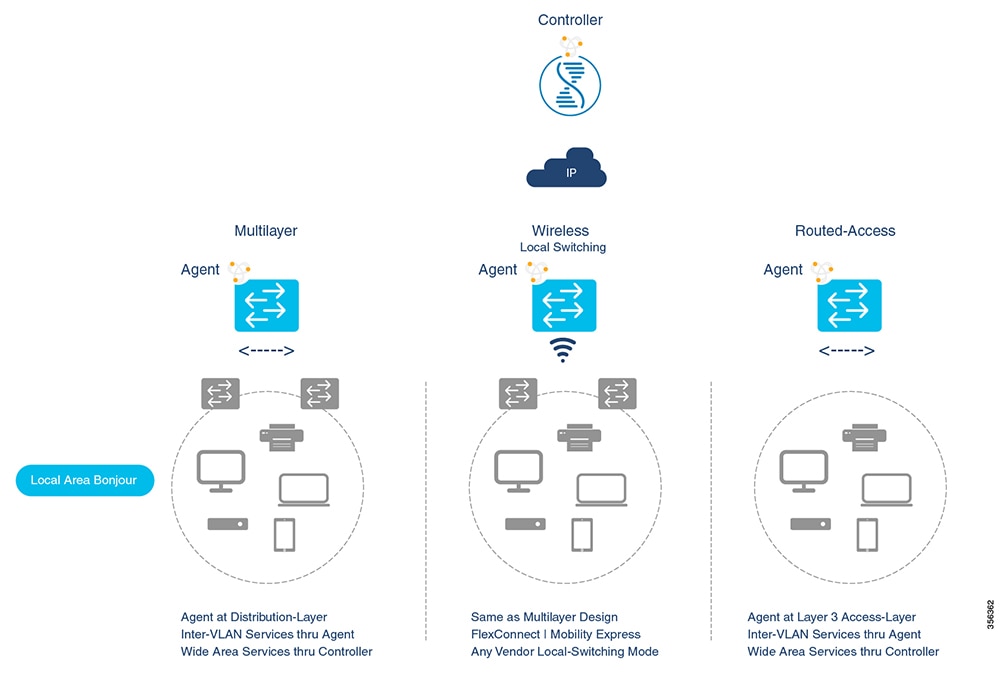
The figure illustrates various network topologies for enabling Bonjour gateway functions in both wired and wireless deployments, highlighting the roles of the SDG Agent in different network layers.

Cisco DNA Service for Bonjour supports these network deployment modes:

  • Multilayer LAN: In this deployment mode, the Layer 2 Access switch provides the transparent bridging function of Bonjour services to Distribution-layer systems that act as the IP gateway and SDG Agent. There is no additional configuration or new requirement to modify the existing Layer-2 trunk settings between the Access and Distribution Layer Cisco Catalyst Switches.

  • Routed Access: In this deployment mode, the first-hop switch is an IP gateway boundary and therefore, it must be combined with the SDG Agent role.

The Cisco DNA Service for Bonjour also supports various Wireless LAN network designs commonly deployed in the Enterprise. The SDG Agent provides consistent Bonjour gateway functions for the wireless endpoints as in wired networks. In general, the IP gateway of the wireless clients is also a Bonjour gateway. However, the placement of the SDG Agent may vary depending on the Wireless LAN deployment mode.

Cisco SD Access wired and wireless networks

Cisco SD Access wired and wireless networks are fabric-enabled network architectures that

  • configure the Fabric Edge switch as the SDG Agent for both wired and wireless endpoints

  • require Wide Area Bonjour policies to align with SD-Access network policies regarding Virtual Networks and SGT policies, and

  • enable service discovery communication through fabric underlay while maintaining data communication through fabric overlay.

Wide Area Bonjour logical components

Wide Area Bonjour uses two logical components in a network:

  • SDG Agent: The Fabric Edge switch is configured as the SDG Agent, and the configuration is added only after the SD-Access is configured.

  • Wide Area Bonjour Controller: The Wide Area Bonjour application in the Cisco Catalyst Center acts as the Controller.

The Wide Area Bonjour communication between the SDG Agent and the Controller takes place through the network underlay. The SDG Agent forwards the endpoint announcements or queries to the Controller through the fabric underlay. After discovering a service, a Bonjour-enabled application establishes direct unicast communication with the discovered device through the fabric overlay. This communication is subject to any configured routing and SDG policies.
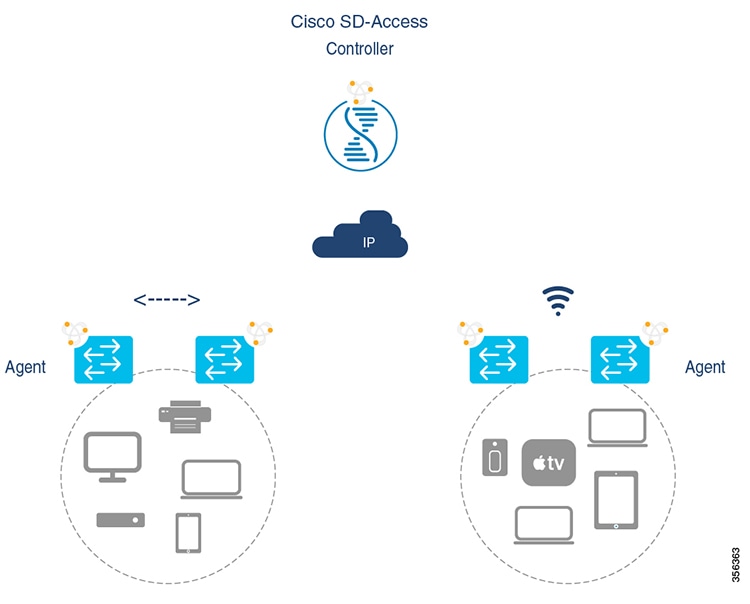
The Wide Area Bonjour Controller facilitates communication between the SDG Agent and the Controller, enabling endpoint announcements and queries to be forwarded through the network underlay. This process allows Bonjour-enabled applications to establish direct communication with discovered devices via the fabric overlay.

Local and wide area Bonjour policies

A Cisco Wide Area Bonjour policy is a network configuration mechanism that

  • enables policy-based Bonjour services discovery and distribution in two-tier domains

  • divides functionality into four unique functions for comprehensive service management, and

  • allows network administrators to identify Bonjour services and set discovery boundaries limited to local or global based on requirements.

Policy enforcement points

The policy enforcement occurs at the SDG Agent level and in Cisco Catalyst Center Wide Area Bonjour application. This illustration shows enforcement point and direction of all four types of Bonjour policies:
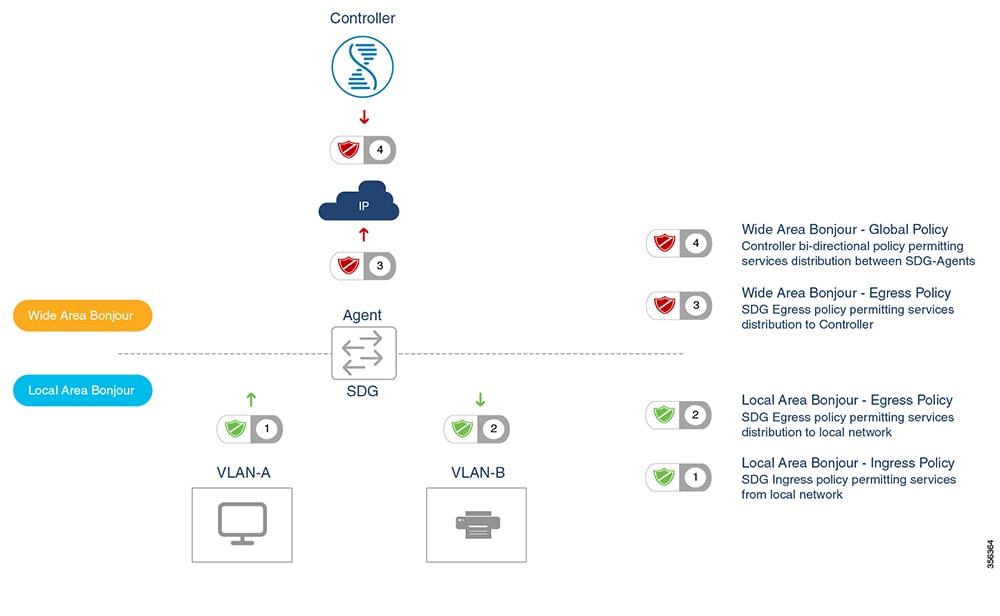
The illustration depicts the enforcement points and directions of the four types of Bonjour policies, highlighting how network administrators can manage service discovery boundaries for local and wide area networks.

Local area Bonjour policies

A local area Bonjour policy is a network configuration framework that

  • enables service distribution with intuitive user-friendly service-types instead of individual mDNS PoinTeR (PTR) records types

  • provides built-in service-types for common Enterprise services and allows custom service-type creation for network administrators, and

  • requires a mandatory three-step configuration process for Local Area Bonjour domain management.

Local area Bonjour policy configuration

The Cisco IOS Bonjour policy structure is greatly simplified and scalable with the new configuration mode. The services can be enabled with intuitive user-friendly service-type instead individual mDNS PoinTeR (PTR) records types, for example select AirPlay that automatically enables video and audio service support from Apple TV or equivalent capable devices. Several common types of services in Enterprise can be enabled with built-in service-types. If built-in service type is limited, network administrator can create custom service-type and enable the service distribution in the network.

The policy configuration for the Local Area Bonjour domain is mandatory, and is a three step process. This illustration shows the step-by-step procedure to build the Local-Area Bonjour policy, and apply to enable the gateway function on selected local networks:

Figure 1. Local Area Bonjour Policy Hierarchy
The illustration outlines the three-step procedure for configuring Local Area Bonjour policies, including enabling mDNS globally and configuring the mDNS gateway on the interface.

To configure local area bonjour policies, enable mDNS globally. For the device to receive mDNS packets on the interface, configure mDNS gateway on the interface. Create a service-list by using filter options within IT allow services into or OUT of a device or interface. After enabling mDNS gateway globally and on the interface, you can apply filters (IN-bound filtering or OUT-bound filtering) on service discovery information by using service-policy commands.

Built-in service lists

The Cisco IOS software includes built-in list of services that may consist of one more Bonjour service-type. A single service-list may contain more than one service-type entries with default rule to accept service announcement from service-provider and the service query request from receiver end-points. If selected service-type contains more than one Bonjour service-types (PTR), then a service announcement or a service query is honored when the announcement/query is for any one of these included Bonjour service-types. For example, Apple Time Capsule Data service-type consists of both_adisk and _afpovertcp built-in PTRs, however if any end-point announces or requests for only _afpovertcp service, then SDG Agent will successfully classify and process the announcement or request. The service-list contains implicit-deny for all un-defined built-in or custom services entries.

This table illustrates complete list of built-in Bonjour services that can be used to create policies in local area Bonjour.

Table 1. Cisco IOS Built-In Bonjour Service Database

Service

Service Name

mDNS PTRs

Airplay

airplay

_airplay._tcp.local

Apple TV

apple-tv

_airplay._tcp.local

_raop._tcp.local

Audinate

audinate

_dante-safe._udp.local

_dante-upgr._udp.local

_netaudio-arc._udp.local

_netaudio-chan._udp.local

_netaudio-cmc._udp.local

_netaudio-dbc._udp.local

AirServer Mirroring Service

airserver

_airplay._tcp.local

_airserver._tcp.local

Apple AirTunes

airtunes

_raop._tcp.local

Amazon Fire TV

amazon-fire-tv

_amzn-wplay._tcp.local

Apple AirPrint

apple-airprint

_ipp._tcp.local

_universal._sub._ipp._tcp.local

Apple TV 2

apple-continuity

_companion-link._tcp.local

Apple File Share

apple-file-share

_afpovertcp._tcp.local

Apple HomeKit

apple-homekit

_homekit._ipp.local

_hap._tcp.local

Apple iTunes Library

apple-itunes-library

_atc._tcp.local

Apple iTunes Music

apple-itunes-music

_daap._tcp.local

Apple iTunes Photo

apple-itunes-photo

_dpap._tcp.local

Apple KeyNote Remote Control

apple-keynote

_keynotecontrol._tcp.local

_keynotepair._tcp.local

Apple Remote Desktop

apple-rdp

_afpovertcp._tcp.local

_net-assistant._tcp.local

Apple Remote Event

apple-remote-events

_eppc._tcp.local

Apple Remote Login

apple-remote-login

_sftp-ssh._tcp.local

_ssh._tcp.local

Apple Screen Share

apple-screen-share

_rfb._tcp.local

Google Expeditions

google-expeditions

_googexpeditions._tcp.local

Apple Time Capsule Data

apple-timecapsule

_adisk._tcp.local

_afpovertcp._tcp.local

Apple Time Capsule Management

apple-timecapsule-mgmt

_airport._tcp.local

Apple MS Window File Share

apple-windows-fileshare

_smb._tcp.local

Fax

fax

_fax-ipp._tcp.local

Google ChromeCast

google-chromecast

_googlecast._tcp.local

_googlerpc._tcp.local

_googlezone._tcp.local

Apple HomeSharing

homesharing

_home-sharing._tcp.local

Apple iTunes Data Sync

itune-wireless-devicesharing2

_apple-mobdev2._tcp.local

Multifunction Printer

multifunction-printer

_ipp._tcp.local

_scanner._tcp.local

_fax-ipp._tcp.local

Phillips Hue Lights

phillips-hue-lights

_hap._tcp.local

Printer – Internet Printing Protocol

printer-ipp

_ipp._tcp.local

Printer – IPP over SSL

printer-ipps

_ipps._tcp.local

Linux Printer – Line Printer Daemon

printer-lpd

_printer._tcp.local

Printer Socket

printer-socket

_pdl-datastream._tcp.local

Roku Media Player

roku

_rsp._tcp.local

Scanner

scanner

_scanner._tcp.local

Spotify Music Service

spotify

_spotify-connect._tcp.local

Web-Server

web-server

_http._tcp.local

WorkStation

workstation

_workstation._tcp.local

Service Status Timer Management

The Bonjour service-provider end-points may announces one or more services in the network combining mDNS records and time-to-live (TTL) service timers for each record. The TTL value provides assurance of end-point availability and serviceability in the network. The SDG Agents ensures that IT contains up to date information in its local and updates global services in Controller based on TTL and other events in Local Area Bonjour domain. The network administrator must configure the service status timer where service-provider endpoint discovery is permitted.

Wide Area Bonjour policies

A Wide Area Bonjour policy is a network service control mechanism that

  • requires controller bound service export policy to control routing local services and discover remote services from Cisco Catalyst Center

  • enables SDG-Agent to build trusted communication channels with remote service responses implicitly permitted, and

  • operates unidirectionally requiring only egress service policy towards the controller.

Policy structure and configuration

The Wide Area Bonjour policy hierarchy and structure is identical as described in Local Area Bonjour Policy structure section. This section provides step-by-step reference configuration to build and enforce the policy to enable the successful communication with Wide Area Bonjour App in Cisco Catalyst Center.

Policy configuration components:

  • Service List: Network administrators must create new controller bound egress service lists for the Wide Area Bonjour domain. In most common network deployment models, the Wide Area Bonjour service list may contain same service-types as the Local Area Bonjour to implement common services between both domains. Based on requirements, certain services can be limited to Local Area and prevent routed in Wide Area Domain, then by default only allowed service list entries are permitted and rest are dropped with implicit deny rule.

  • Ingress Policy Direction: The ingress service policy for Wide Area Bonjour domain is not required and cannot be associated to the controller.

  • Egress Policy Direction: The Bonjour policy structure between Local Area and Wide Area is consistent, however the enforcement point is different. Cisco recommends configuring separate Service-List and Service-Policy for Wide Area Bonjour domain as this helps building unique policy sets for each domain.

  • Conditional Egress Service List: The Wide Area Bonjour egress service list configuration can be customized to conditionally route the service or query request to the Cisco Catalyst Center. With this alternative configuration setting, network administrators can route the service or query the request in Wide Area Bonjour domain from specific local source VLAN networks instead globally from the entire system.

Service timer management:

The Cisco Catalyst Center centralizes services information from large scale distributed SDG-Agents across the network. To maintain scale and performance of the controller, services routing information is transmitted and synchronized periodically by each SDG-Agent network device. To protect system and network performance, the scheduler base service information exchange allows graceful and reliable way to discover and distribute Bonjour services across Wide Area Bonjour domain.


Note


In most large-scale network environments, the default Bonjour service timers on SDG-Agents are fine-tuned and may not need any further adjustments. Cisco recommends retaining the interval timer values to default and adjust only based on any user experience issue and consider modified parameters do not introduce scale and performance impact.


Default mDNS service configurations

Default mDNS service configurations are an intuitive approach to configuring mDNS services that

  • accelerates solution adoption, increases user productivity, and reduces operation overhead through a default service policy

  • creates a service list with default service-types that is automatically enforced in the ingress or egress direction, and

  • allows you to define a custom policy and service list with custom-defined service types.

Default mDNS service configurations details

Starting with Cisco IOS XE Bengaluru 17.6.1, the default mDNS service configuration is introduced. The default service configuration contains a default service policy that creates a service list with default service-types that is automatically enforced in the ingress or egress direction.

Additionally, you can define a custom policy and service list with custom-defined service types, and enforce it in the ingress or egress direction.
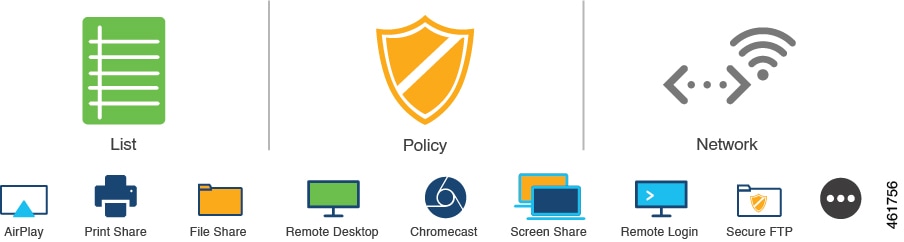
Figure 2. Default mDNS service configurations
The default mDNS service configurations illustrate the service policy and service list created in Cisco IOS XE Bengaluru 17.6.1, highlighting the automatic enforcement of default service types in network traffic.

HSRP-aware mDNS service-routing

HSRP-Aware mDNS Service-Routing is a network protocol feature that

  • maintains uninterrupted service-routing sessions between Service Peers and SDG agents during primary SDG agent failures

  • enables automatic establishment of sessions with new primary SDG agents and cache information resyncing during changeouts, and

  • uses HSRP virtual IP addresses on management VLANs to provide automatic gateway selection and rapid switchover capabilities.

HSRP-Aware mDNS Service-Routing configuration

Starting from Cisco IOS XE Bengaluru 17.6.1, Hot Standby Router Protocol-aware (HSRP-aware) mDNS Service-Routing is supported between Service Peers and SDG agents in a multilayer network. During a changeover, that is when the primary SDG agent fails and the secondary SDG agent becomes the new primary, the service-routing session between the Service Peer and the SDG agent remains uninterrupted. The new primary SDG agent establishes a session with the Service Peer and cache information is resynced.

The HSRP virtual IP address of the management VLAN is enabled on the SDG agent using the standby group_number IP ip_address command. The HSRP virtual IP address needs to configured on the Service Peer as the IP address of the SDG agent.


Note


The HSRP virtual IP address must be reachable and in active state during a changeover.


This figure illustrates a wired and wireless network that supports HSRP-aware mDNS Service-Routing:
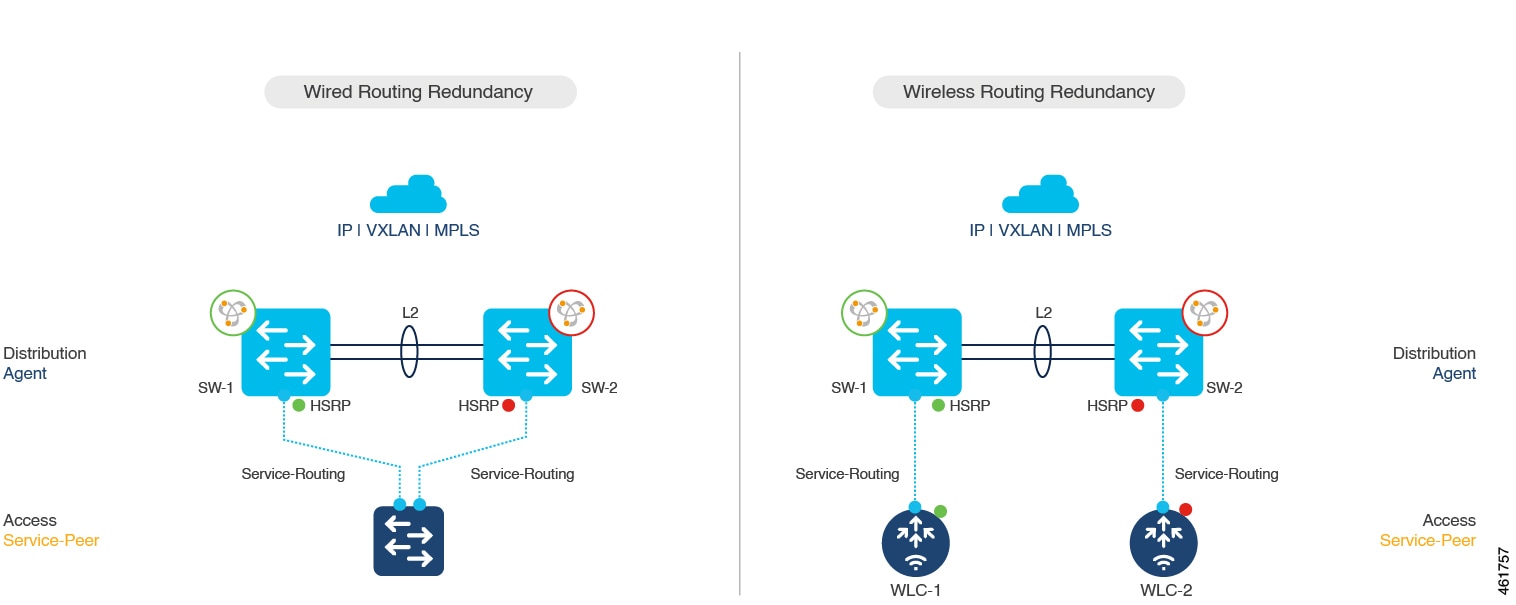
Figure 3. HSRP-Aware mDNS Service-Routing
This figure illustrates a wired and wireless network configuration that supports HSRP-aware mDNS Service-Routing, highlighting the integration of HSRP for automatic gateway selection and rapid switchover.

The HSRP offers these advantages:

  • Automatic gateway selection.

  • Rapid switchover.

  • Reduces service convergence.

mDNS service-gateway SSO support

mDNS service-gateway SSO support is a high availability feature that

  • enables mDNS Stateful Switchover (SSO) on network devices configured in Service Peer role

  • synchronizes cache information between active and standby devices, and

  • ensures continuous mDNS service discovery when the active device fails.

Service-gateway SSO operation

Starting from Cisco IOS XE Bengaluru 17.6.1, mDNS Stateful Switchover (SSO) is supported on network devices configured in Service Peer role. In SSO-enabled devices, one device is selected as an active device and the other as a standby device. The cache information learnt by the active device is synced with the standby device. When the active device fails, the standby device becomes the new active device and continues the mDNS service discovery process.
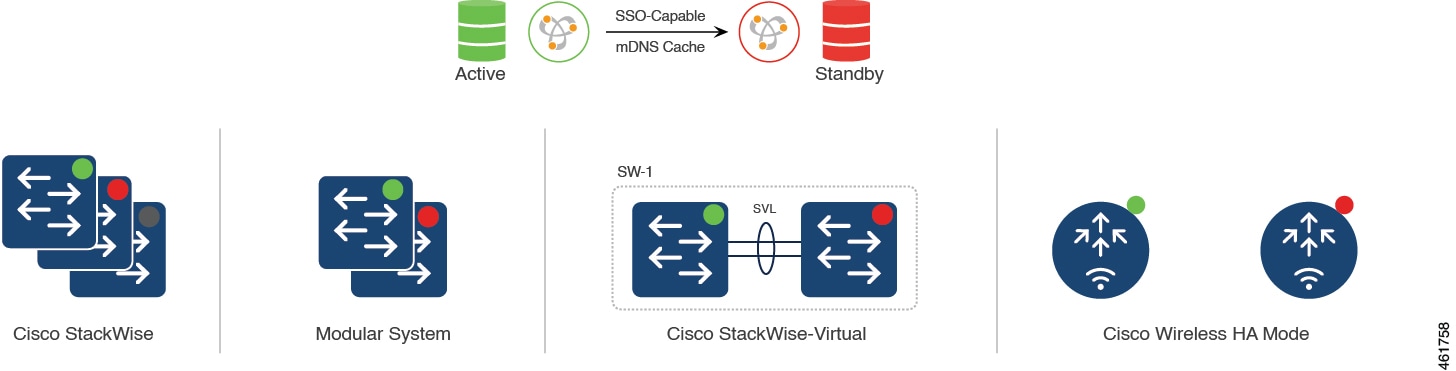
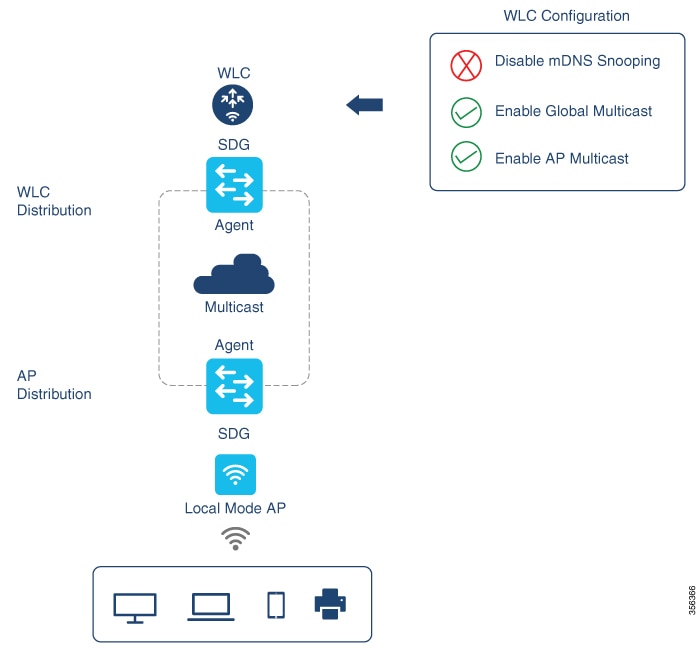
Figure 4. MDNS Service-Gateway SSO
The MDNS Service-Gateway SSO diagram illustrates the process of mDNS Stateful Switchover, showing the roles of active and standby devices in maintaining continuous service discovery during device failure.

Configure local and wide area Bonjour domains

How to configure multicast DNS mode for LAN and wired networks

This section provides information about how to configure Local Area Bonjour in multicast DNS mode.

Enable mDNS gateway on the device

Enable mDNS gateway functionality on the device to allow multicast DNS service discovery across network segments.

mDNS gateway enables devices to discover and communicate with services across different network segments using multicast DNS protocols.

Before you begin

Follow these steps to configure mDNS on the device:

Procedure


Step 1

enable

Example:

Device> enable

Enables privileged EXEC mode.

Enter your password, if prompted.

Step 2

configure terminal

Example:

Device# configure terminal

Enters global configuration mode.

Step 3

mdns-sd gateway

Example:

Device(config)# mdns-sd gateway

Enables mDNS on the device and enters mDNS gateway configuration mode.

Enter the following commands in mDNS gateway configuration mode to enable the respective functionalities:

  • air-print-helper : Enables IOS devices like iPADs to discover and use older printers that support Bonjour

  • cache-memory-max : Configures the percentage memory for cache

  • ingress-client : Configures Ingress Client Packet Tuners

  • rate-limit : Enables rate limiting of incoming mDNS packets

  • service-announcement-count : Configures maximum service advertisement count

  • service-announcement-timer : Configures advertisements announce timer periodicity

  • service-query-count : Configures maximum query count

  • service-query-timer : Configures query forward timer periodicity

The following CLIs are effective only in service-peer mode:

  • query-response

  • sdg-agent

  • service-announcement-count

  • service-announcement-timer

  • service-mdns-query

  • service-query-count

  • service-query-timer

  • service-receiver-purge

  • active-response

Note


For cache-memory-max , ingress-client , rate-limit , service-announcement-count , service-announcement-timer , service-query-count , and service-query-timer commands, you can retain the default value of the respective parameter for general deployments. Configure a different value, if required, for a specific deployment.

Step 4

exit

Example:

Device(config-mdns-sd)# exit

Exits mDNS gateway configuration mode.


mDNS gateway is now enabled on the device and ready to facilitate multicast DNS service discovery across network segments.

Create custom service definition (GUI)

Create a custom service definition to define specific mDNS services that can be discovered and used within your network environment.

Custom service definitions allow you to specify particular service types that devices on your network can advertise and discover through mDNS (multicast Domain Name System). This is useful for managing which services are available for discovery in your network infrastructure.

Before you begin

Follow these steps to create custom service definition using GUI:

Procedure


Step 1

Choose Configuration > Services > mDNS > Service Policy > Service Definition.

Step 2

Click Add.

Step 3

Enter the Service Definition Name and Description.

Step 4

Enter the Service Type and click the + icon.

Step 5

Click Apply to Device.


The custom service definition is created and applied to the device. The new service definition will be available for use in mDNS service policies and can be discovered by devices on the network.

Create custom service definition

Create a custom service definition to provide an admin-friendly name to one or more mDNS service types or PTR Resource Record Names.

Service definition is a construct that provides an admin friendly name to one or more mDNS service types or PTR Resource Record Name. By default, a few built-in service definitions are already predefined and available for admin to use. In addition to built-in service definitions, admin can also define custom service definitions.

Procedure


Step 1

enable

Example:

Device> enable

Enables privileged EXEC mode.

Enter your password, if prompted.

Step 2

configure terminal

Example:

Device# configure terminal

Enters global configuration mode.

Step 3

mdns-sd service-definition service-definition-name

Example:

Device(config)# mdns-sd service-definition CUSTOM1

Configures mDNS service definition.

Note


All the created custom service definitions are added to the primary service list. Primary service list comprises of a list of custom and built-in service definitions.

Step 4

service-type string

Example:

Device(config-mdns-ser-def)# service-type _custom1._tcp.local

Configures mDNS service type.

Step 5

Repeat step 4 to configure more than one service type in the custom service definition.

Step 6

exit

Example:

Device(config-mdns-ser-def)# exit

Exit mDNS service definition configuration mode.


The custom service definition is created and added to the primary service list, making it available for use in mDNS configurations.

Create a service list (GUI)

Create service lists to control mDNS service discovery by specifying which services are allowed or denied in the network.

Service lists provide a mechanism to filter mDNS services based on service types and message types, helping you manage service discovery traffic in your network.

Procedure


Step 1

Choose Configuration > Services > mDNS > Service Policy > Service List.

Step 2

Click Add.

Step 3

Enter the Service List Name and choose the direction from the Direction drop-down list.

Step 4

Click Add Service.

Step 5

Choose the service from the Available Services drop-down list and the message type from the Message Type drop-down list.

Step 6

Click Save.

Step 7

Click Apply to Device.


The service list is created and applied to the device, enabling mDNS service filtering based on your configured parameters.

Create service list

Create an mDNS service list to organize service definitions and control service discovery traffic.

mDNS service list is a collection of service definitions. Use service lists to manage which services are allowed IN or OUT of specific network segments.

Before you begin

Follow these steps to create a service list:

Procedure


Step 1

enable

Example:

Device> enable

Enables privileged EXEC mode.

Enter your password, if prompted.

Step 2

configure terminal

Example:

Device# configure terminal

Enters global configuration mode.

Step 3

mdns-sd service-list service-list-name {IN | OUT}

Example:

Device(config)# mdns-sd service-list VLAN100-list in

Configures mDNS service list.

Step 4

match service-definition-name [message-type {any | announcement | query}]

Example:

Device(config-mdns-sl-in)# match PRINTER-IPPS message-type announcement

Matches the service to the message type. Here, service-definition-name refers to the names of services, such as, airplay, airserver, airtunes, and so on.

Note


To add a service, the service name must be part of the primary service list.

If the mDNS service list is set to IN, the applicable command syntax is: match service-definition-name [message-type {any | announcement | query}] .

If the mDNS service list is set to OUT, the applicable command syntax is: match service-definition-name [message-type {any | announcement | query}] [location-filter location-filter-name] [source-interface {mDNS-VLAN-number | mDNS-VLAN-range}] .

Step 5

exit

Example:

Device(config-mdns-sl-in)# exit

Exits mDNS service list configuration mode.


The mDNS service list is created and configured with the specified service definitions and message types.

Create service policy (GUI)

Create a service policy to manage mDNS services and control service discovery between network segments.

Service policies define how mDNS services are handled across different network locations by specifying input and output service lists.

Procedure


Step 1

Choose Configuration > Services > mDNS > Service Policy > Service Policy.

Step 2

Click Add.

Step 3

Enter the Service Policy Name.

Step 4

Choose the service list input from the Service List Input drop-down list.

Step 5

Choose the service list output from the Service List Output drop-down list.

Step 6

Choose the location from the Location drop-down list.

Step 7

Click Apply to Device.


The service policy is created and applied to the device. The mDNS service discovery is now controlled according to the configured policy parameters.

Create service policy

Create a service policy to specify allowed Bonjour service announcements or queries that should be processed IN ingress or egress directions.

A Service Policy that is applied to an interface specifies the allowed Bonjour service announcements or the queries of specific service types that should be processed, IN ingress direction or egress direction or both. For this, the service policy specifies two service-lists, one each for ingress and egress directions. IN the Local Area Bonjour domain, the same service policy can be attached to one or more Bonjour client VLANs; however, different VLANs may have different service policies.

Before you begin

Follow these steps to configure service policy with service lists:

Procedure


Step 1

enable

Example:

Device> enable

Enables privileged EXEC mode.

Enter your password, if prompted.

Step 2

configure terminal

Example:

Device# configure terminal

Enters global configuration mode.

Step 3

mdns-sd service-policy service-policy-name

Example:

Device(config)# mdns-sd service-policy mdns-policy1

Configures mDNS service policy.

Step 4

service-list service-list-name {IN | OUT}

Example:

Device(config-mdns-ser-pol)# service-list VLAN100-list in
Device(config-mdns-ser-pol)# service-list VLAN300-list out

Configures service lists for IN and OUT directions.

Step 5

exit

Example:

Device(config-mdns-ser-pol)# exit

Exits mDNS service policy configuration mode.


The mDNS service policy is created and configured with service lists for ingress and egress directions.

Associate service policy to an interface

Associate a service policy to an interface to enable mDNS (multicast DNS) functionality and govern Bonjour announcements and queries.

mDNS configuration on the device requires associating service policies to interfaces to control Bonjour service behavior on VLANs.

Before you begin

Follow these steps to configure mDNS on the device:

Procedure


Step 1

enable

Example:

Device> enable

Enables privileged EXEC mode.

Enter your password, if prompted.

Step 2

configure terminal

Example:

Device# configure terminal

Enters global configuration mode.

Step 3

interface interface-name

Example:

Device(config)# interface Vlan 601

Enters interface mDNS configuration mode and enables interface configuration.

Step 4

mdns-sd gateway

Example:

Device(config-if)# mdns-sd gateway

Configures mDNS gateway on the interface.

Enter these commands in the interface mDNS gateway configuration mode to enable the respective functionalities:

  • active-query : Sets the time interval for SDG agent to refresh the active status of connected Bonjour client services. The timer value ranges from 60 to 3600 seconds.

    Note


    This configuration is mandatory only on VLANs whose Bonjour policy is configured to accept Bonjour service announcements from connected Bonjour clients. If the VLAN is configured to only accept Bonjour queries but not Bonjour service announcements, this configuration is optional.

  • service-instance-suffix (Optional) : Appends the service instance suffix to any announced service name that is forwarded to the controller.

  • service-mdns-query [ PTR | all] : Configures mDNS query request message processing for the specified query types. This command is applicable when the controller is in service-peer mode.

    Note


    By default, the service-mdns-query command allows only PTR queries. If you need to respond to all (PTR, SRV, and TXT) queries, you need to execute this command:

    service-mdns-query all

  • service-policy policy-name : Attaches the specified service policy to the VLAN. Bonjour announcements, and queries received by and sent from the VLAN are governed by the policies configured in the service policy. This configuration is mandatory for all VLANs.

    Note


    Service policies can only be attached at interface level.

  • transport [ all | ipv4 | ipv6] (Optional): Configures BCP parameter.

    It is recommended to use transport ipv4 command, except in those networks where the Bonjour clients send only IPv6 announcements and queries.

Step 5

exit

Example:

Device(config-if-mdns-sd)# exit

Exits mDNS gateway configuration mode.


The mDNS gateway is configured on the interface with the service policy attached. The interface can now process Bonjour announcements and queries according to the configured policies.

Local area Bonjour in multicast DNS mode for wireless networks

Local area Bonjour in multicast DNS mode is a service discovery framework that relies on mDNS messages transmitted over UDP port 5353 to facilitate communication between network endpoints.

  • Operates using service announcements and queries sent to mDNS IPv4 address 224.0.0.251 and IPv6 address FF02::FB.

  • Functions as a Layer 2 protocol, requiring clients to reside within the same Layer 2 domain for service discovery.

  • Requires transparent mDNS transmission support from intermediate WLCs to bridge wireless endpoints and SDG Agents.

Wireless Network Configuration Requirements

To enable mDNS communication between wireless endpoints and a Cisco Catalyst switch acting as an SDG Agent, perform the following configuration steps:

  1. Disable mDNS Snooping on Cisco AireOS based WLCs.

  2. Enable the mDNS Gateway feature on Cisco Catalyst 9800 series WLCs.

  3. Set the AP Multicast Mode to Multicast.

The following figure illustrates the prerequisite configuration for wireless networks to enable communication between SDG-Agent switches and wireless endpoints.

Figure 5. Wireless Network Prerequisite Configuration

The configuration of local area Bonjour on a switch that acts as the SDG Agent in a wireless network involves the same set of procedures that are used to configure local area Bonjour on a switch that acts as the SDG Agent in a wired network.

The Bonjour protocol operates on service announcements and queries. Each query or advertisement is sent to the mDNS IPv4 address 224.0.0.251 and IPv6 address FF02::FB. The mDNS messages are carried over well-known industry standard UDP port 5353, over both Layer 3 transport types.

The Layer 2 address used by the Bonjour protocol is link-local multicast address and therefore it’s only forwarded to the same Layer 2 network. As multicast DNS (mDNS) is limited to a Layer 2 domain, for a client to discover a service, it has to be a part of the same Layer 2 domain. This isn’t always possible in a large-scale deployment or enterprise.

To enable mDNS communication between Wireless endpoints and Cisco Catalyst switch that acts as an SDG Agent, the intermediate WLC must transparently allow the network to transmit and receive mDNS messages.

Hence, for a Multicast DNS Mode Wireless network deployment, disable the mDNS Snooping on Cisco AireOS based WLC and enable mDNS Gateway feature on Cisco Catalyst 9800 series WLC and set the AP Multicast Mode to Multicast.

The Cisco WLC and Access Points by default prevent the forwarding of Layer 2 or Layer 3 Multicast frames between Wireless and Wired network infrastructure. The forwarding is supported with stateful capabilities enabled using AP Multicast. The network administrator must globally enable Multicast and configure a unique Multicast Group to advertise in the network. This multicast group is only required for Cisco Access Points to enable Multicast over Multicast (MCMC) capabilities across the LAN network. The Bonjour solution doesn’t require any Multicast requirements on Wireless Client VLAN; thus, it’s optional and applicable only for other Layer 3 Multicast applications.

The core network must be configured with appropriate Multicast routing to allow the Access Points to join WLC Multicast Group. The Multicast configuration must be enabled on Cisco WLC management VLAN and on the Cisco Access Points of their respective distribution layer switch.

Associate service policy with wireless profile policy

This task allows you to override the default mDNS service policy with a custom service policy of your choice.

A default mDNS service policy is already attached once the wireless profile policy is created. Use this procedure to override the default mDNS service policy with any of your service policy.

Before you begin

Follow these steps to associate service policy with wireless profile policy:

Procedure


Step 1

enable

Example:

Device> enable

Enables privileged EXEC mode.

Enter your password, if prompted.

Step 2

configure terminal

Example:

Device# configure terminal

Enters global configuration mode.

Step 3

wireless profile policy profile-policy-name

Example:

Device(config)# wireless profile policy default-policy-profile

Configures wireless profile policy.

Step 4

mdns-sd service-policy custom-mdns-service-policy

Example:

Device(config-wireless-policy)# mdns-sd service-policy custom-mdns-service-policy

Associates an mDNS service policy with the wireless profile policy.

The default mDNS service policy name is default-mdns-service-policy .

Step 5

exit

Example:

Device(config-wireless-policy)# exit

Exits wireless profile policy configuration mode.


The custom mDNS service policy is now associated with the wireless profile policy, overriding the default service policy.

Configure wide area Bonjour domain

The Wide Area Bonjour domain configuration specifies the parameters of the controller, that is the Wide Area Bonjour Application running on Cisco Catalyst Center, as well as the service types that need to be exported to it from the SDG Agent. Configuring Wide Area Bonjour Domain involves creating service-lists and service policy similar to those created in Local Area Bonjour configuration; however, only egress policy from SDG Agent to controller is applicable.

Associate service policy with the controller in wide area Bonjour domain

This task enables the association of service policies with controllers in Wide Area Bonjour domains to manage service discovery and distribution across the network.

In Wide Area Bonjour, the service policy is configured globally and does not get associated with a VLAN as in the case of Local Area Bonjour.

Before you begin

Follow these steps to configure service policy globally:

Procedure


Step 1

enable

Example:

Device> enable

Enables privileged EXEC mode.

Enter your password, if prompted.

Step 2

configure terminal

Example:

Device# configure terminal

Enters global configuration mode.

Step 3

service-export mdns-sd controller controller name

Example:

Device(config)# service-export mdns-sd controller Cisco Catalyst Center-BONJOUR-CONTROLLER

Specifies a name for the controller and enters service-export mode

Step 4

controller-address ipv4-address

Example:

Device(config-mdns-sd-se)# controller-address 199.245.1.7

Specifies the controller address.

Step 5

controller-port port-number

Example:

Device(config-mdns-sd-se)# controller-port 9991

Specifies the port number on which the controller is listening.

Step 6

controller-source-interface interface-name

Example:

Device(config-mdns-sd-se)# controller-source-interface Loopback0

Specifies the source-interface for the controller.

Step 7

controller-service-policy service-policy-name OUT

Example:

Device(config-mdns-sd-se)# controller-service-policy policy1 OUT

Specifies the service policy to be used by the controller.

Note


Only OUT policy is applicable for Wide Area Bonjour.

Step 8

exit

Example:

Device(config-mdns-sd)# exit

Exits controller service export configuration mode.

Step 9

mdns-sd gateway

Example:

Device(config)# mdns-sd gateway

Enters mDNS gateway configuration mode.

Step 10

ingress-client query-suppression enable

Example:

Device(config-mdns-sd)# ingress-client query-suppression enable

Enables ingress query suppression for better scale and performance.

Step 11

exit

Example:

Device(config-mdns-sd)# exit

Exits mDNS gateway configuration mode.


The service policy is successfully associated with the controller in the Wide Area Bonjour domain, enabling global service discovery management and ingress query suppression.

Configure HSRP-aware mDNS service-routing on service-peer

Configure HSRP-aware mDNS service-routing on service-peer to enable multicast DNS gateway functionality with hot standby router protocol awareness.

Use this procedure when you need to configure mDNS gateway in service-peer mode with HSRP awareness to provide redundancy and high availability for mDNS services.

Before you begin

Follow these steps to configure hot standby router protocol-aware mDNS service-routing on service-peer:

Procedure


Step 1

configure terminal

Example:

Device# configure terminal

Enters global configuration mode.

Step 2

mdns-sd gateway

Example:

Device(config)# mdns-sd gateway

Enables mDNS on the device and enters mDNS gateway configuration mode.

Step 3

mode service-peer

Example:

Device(config-mdns-sd)# mode service-peer

Enables mDNS gateway in service-peer mode.

Step 4

source-interface vlan vlan-interface-number

Example:

Device(config-mdns-sd)# source-interface vlan 23

Configures source interface to communicate between SDG Agent and service-peer.

Note


vlan-interface-number- The valid range is from1 to 4094.

Step 5

SDG-agent IP-address

Example:

Device(config-mdns-sd)# sdg-agent 9.6.16.10

Configures SDG agent IPv4 or IPv6 address.

Note


The IP-address refers to the HSRP-enabled IP address.

Step 6

end

Example:

Device(config-mdns-sd)# end

Exits server group configuration mode and enters privileged EXEC mode.


The device is configured with HSRP-aware mDNS service-routing on service-peer mode, enabling multicast DNS gateway functionality with hot standby router protocol support.

Verify local area bonjour in multicast DNS mode for LAN and wireless networks

This section shows how to verify Local Area Bonjour in Multicast DNS mode for LAN and Wireless networks.

Verify SDG-agent status

Use the sample outputs to verify SDG-agent status and understand the command output format for various mDNS service discovery commands.

This is a sample output of the show mdns-sd service-listservice-list-name {in | out} command.


Name           Direction  Service    Message-Type     Source
============================================================
VLAN100-list    In         Printer   Announcement      -
                In         Airplay   Query             -
                In         CUSTOM1   Any               -
VLAN300-list    Out        Printer   Announcement     Vl200

This is a sample output of the show mdns-sd service-definitionservice-definition-nameservice-type {custom | built-in} command.


Service                PTR                        Type
=========================================================================
apple-tv               _airplay._tcp.local         Built-In
                        _raop._tcp.local
apple-file-share      _afpovertcp._tcp.local      Built-In
CUSTOM1               _custom1._tcp.local         Custom
CUSTOM2               _customA._tcp.local         Custom
                      _customA._tcp.local		

This is a sample output of the show mdns-sdservice-policy-nameinterfaceinterface-name command.


Name			Service-List-In			Service-List-Out	
==================================================
mdns-policy-1		VLAN100-list			VLAN300-list		
mdns-policy-2		VLAN400-list			VLAN400-list	

This is a sample output of the show mdns-sd summary command.


mDNS Gateway: Enabled
Mode: Service Peer
Service Announcement Periodicity(in seconds): 30
Service Announcement Count: 50
Service Query Periodicity(in seconds): 15
Service Query Count: 50
Active Response Timer (in seconds): Disabled
ANY Query Forward: Disabled
SDG Agent IP: 9.8.57.10
Active Query Periodicity (in minutes): 30
mDNS Query Type: PTR only
Transport Type: IPv4
mDNS AP service policy: default-mdns-service-policy

This is a sample output of the show mdns-sd sp-SDG statistics command.


mDNS SP Statistics
last reset time: 07/27/21 15:36:33
Messages sent:
Query : 122
ANY query : 35
Advertisements : 12
Advertisement Withdraw : 1
Service-peer cache clear : 0
Resync response : 3
Srvc Discovery response : 0
Keep-Alive : 2043
Messages received:
Query response : 0
ANY Query response : 0
Cache-sync : 9
Get service-instance : 0
Srvc Discovery request : 0
Keep-Alive Response : 2042

Verify wide area Bonjour controller status

Verify wide area Bonjour controller status using show commands to display controller summary, export summary, statistics, and detailed information.

This is a sample output of the show mdns controller summary command.

Device# show mdns controller summary

Controller Summary
=====================================
 Controller Name  :   Cisco Catalyst Center-BONJOUR-CONTROLLER
 Controller IP    :   10.104.52.241
 State            :   UP
 Port             :   9991
 Interface        :   Loopback0
 Filter List      :   policy1
 Dead Time        :   00:01:00 

This is a sample output of the show mdns controller export-summary command.

Device# show mdns controller export-summary

Controller Export Summary
=========================
 Controller IP    :   10.104.52.241
 State            :   UP
 Filter List      :   policy1
 Count            :   100
 Delay Timer      :   30 seconds
 Export           :   300
 Drop             :   0
 Next Export      :   00:00:01 

This is a sample output of the show mdns controller statistics command.

Device# show mdns controller statistics

Total BCP message sent           : 47589
  Total BCP message received       : 3
  Interface WITHDRAW messages sent : 0
  Clear cache messages sent        : 0
  Total RESYNC state count         : 0
  Last successful RESYNC           : Not-Applicable

  Service Advertisements:
   IPv6 advertised                 : 0
   IPv4 advertised                 : 300
   Withdraws sent                  : 0
   Advertisements Filtered         : 0
   Total service resynced          : 0

  Service Queries:
   IPv6 queries sent               : 0
   IPv6 query responses received   : 0
   IPv4 queries sent               : 0
   IPv4 query responses received   : 0

This is a sample output of the show mdns controller detail command.

Device# show mdns controller detail

Controller : Cisco Catalyst Center-BONJOUR-CONTROLLER
 IP : 10.104.52.241, Dest Port : 9991, Src Port : 0, State : UP
 Source Interface : Loopback0, MD5 Disabled
 Hello Timer 0 sec, Dead Timer 0 sec, Next Hello 00:00:00
 Uptime 00:00:00
Service Announcement :
 Filter : policy1
 Count 100, Delay Timer 30 sec, Pending Announcement 0, Pending Withdraw 0
 Total Export Count 300, Next Export in 00:00:16
Service Query :
 Query Suppression Disabled
 Query Count 50, Query Delay Timer 15 sec, Pending 0
 Total Query Count 0, Next Query in 00:00:01

Verify mDNS cache configurations

This reference helps you verify mDNS cache configurations using show commands that display cache information from both Active and Standby devices.

These show commands display cache from both Active and Standby devices using the chassis option:


Device# show mdns-sd cache chassis active R0
 
------------------------------------------------------------- PTR Records -----------------------------------------------------------------
RECORD-NAME                                    TTL      TYPE      ID    CLIENT-MAC       RR-RECORD-DATA                                      
-------------------------------------------------------------------------------------------------------------------------------------------
_home-sharing._tcp.local                       4500     WLAN      1     0205.2c23.0001   AP6B8B4567-sta00001._home-sharing._tcp.local        
 
------------------------------------------------------------- SRV Records -----------------------------------------------------------------
RECORD-NAME                                    TTL      TYPE      ID    CLIENT-MAC       RR-RECORD-DATA                                      
-------------------------------------------------------------------------------------------------------------------------------------------
AP6B8B4567-sta00001._home-sharing._tcp.local   4500     WLAN      1     0205.2c23.0001   0 0 5353 AP6B8B4567-sta00001.local                  
 
------------------------------------------------------------ A/AAAA Records ---------------------------------------------------------------
RECORD-NAME                                    TTL      TYPE      ID    CLIENT-MAC       RR-RECORD-DATA                                      
-------------------------------------------------------------------------------------------------------------------------------------------
AP6B8B4567-sta00001.local                      4500     WLAN      1     0205.2c23.0001   9.2.57.106                                          
 
------------------------------------------------------------- TXT Records -----------------------------------------------------------------
RECORD-NAME                                    TTL      TYPE      ID    CLIENT-MAC       RR-RECORD-DATA                                      
-------------------------------------------------------------------------------------------------------------------------------------------
AP6B8B4567-sta00001._home-sharing._tcp.local   4500     WLAN      1     0205.2c23.0001   [14]'model=MacMini'                                 
 

Note


Alternatively, you can issue the show mdns-sd cache command to display the cache from the Active controller.


Device# show mdns-sd cache chassis standby R0
 
------------------------------------------------------------- PTR Records -----------------------------------------------------------------
RECORD-NAME                                    TTL      TYPE      ID    CLIENT-MAC       RR-RECORD-DATA                                      
-------------------------------------------------------------------------------------------------------------------------------------------
_home-sharing._tcp.local                       4500     WLAN      1     0205.2c23.0001   AP6B8B4567-sta00001._home-sharing._tcp.local        
 
------------------------------------------------------------- SRV Records -----------------------------------------------------------------
RECORD-NAME                                    TTL      TYPE      ID    CLIENT-MAC       RR-RECORD-DATA                                      
-------------------------------------------------------------------------------------------------------------------------------------------
AP6B8B4567-sta00001._home-sharing._tcp.local   4500     WLAN      1     0205.2c23.0001   0 0 5353 AP6B8B4567-sta00001.local                  
 
------------------------------------------------------------ A/AAAA Records ---------------------------------------------------------------
RECORD-NAME                                    TTL      TYPE      ID    CLIENT-MAC       RR-RECORD-DATA                                      
-------------------------------------------------------------------------------------------------------------------------------------------
AP6B8B4567-sta00001.local                      4500     WLAN      1     0205.2c23.0001   9.2.57.106                                          
 
------------------------------------------------------------- TXT Records -----------------------------------------------------------------
RECORD-NAME                                    TTL      TYPE      ID    CLIENT-MAC       RR-RECORD-DATA                                      
-------------------------------------------------------------------------------------------------------------------------------------------
AP6B8B4567-sta00001._home-sharing._tcp.local   4500     WLAN      1     0205.2c23.0001   [14]'model=MacMini' 

Verify additional mDNS cache configurations

This reference provides commands to verify mDNS cache configurations from both Active and Standby database states.

Commands for Active DB verification

To verify the cache from the Active DB, use these commands:


show mdns-sd cache ap-mac 0a0b.0cf0.000e chassis active R0
show mdns-sd cache client-mac 0269.fe06.0023 chassis active R0
show mdns-sd cache detail chassis active R0
show mdns-sd cache glan-id <> chassis active R0
show mdns-sd cache glan-id <> detail chassis active R0
show mdns-sd cache location-group <> chassis active R0
show mdns-sd cache location-group <> detail chassis active R0
show mdns-sd cache mdns-ap <> detail chassis active R0
show mdns-sd cache mdns-ap <> chassis active R0
show mdns-sd cache rlan-id <> detail chassis active R0
show mdns-sd cache rlan-id <> chassis active R0
show mdns-sd cache type TXT chassis active R0
show mdns-sd cache type A-AAAA detail chassis active R0
show mdns-sd cache wired chassis active R0
show mdns-sd cache wired detail chassis active R0
show mdns-sd cache wlan-id 10 chassis active R0
show mdns-sd cache wlan-id 1 detail chassis active R0
      

Commands for Standby DB verification

To verify the cache from the Standby DB, use these commands:


show mdns-sd cache ap-mac <> chassis standby R0
show mdns-sd cache client-mac <> chassis standby R0
show mdns-sd cache detail chassis standby R0
show mdns-sd cache glan-id <> chassis standby R0
show mdns-sd cache glan-id <> detail chassis standby R0
show mdns-sd cache location-group <> chassis standby R0
show mdns-sd cache location-group <> detail chassis standby R0
show mdns-sd cache mdns-ap <> detail chassis standby R0
show mdns-sd cache mdns-ap <> chassis standby R0
show mdns-sd cache rlan-id <> detail chassis standby R0
show mdns-sd cache rlan-id <> chassis standby R0
show mdns-sd cache type [A-AAAA|PTR|SRV|TXT] chassis standby R0
show mdns-sd cache type [A-AAAA|PTR|SRV|TXT] detail chassis standby R0
show mdns-sd cache wired chassis standby R0
show mdns-sd cache wired detail chassis standby R0
show mdns-sd cache wlan-id <> chassis standby R0
show mdns-sd cache wlan-id <> detail chassis standby R0
      

Verify local area Bonjour configuration for LAN and wireless networks

This reference provides sample output of the show run command to verify local area Bonjour configuration for LAN and wireless networks.


mdns-sd gateway                         
 
mdns-sd service-definition custom1     
 service-type _airplay._tcp.local      
 service-type _raop._tcp.local          
 
        
mdns-sd service-list list1 IN           
 match custom1
mdns-sd service-list list2 OUT
 match custom1
 
 
mdns-sd service-policy policy1
service-list list1 IN
service-list list2 OUT
 
 
service-export mdns-sd controller Cisco Catalyst Center-CONTROLLER-POLICY 
controller-address 99.99.99.10
controller-service-policy policy1 OUT
controller-source-interface Loopback0

Additional references for DNA Service for Bonjour

This reference provides additional resources for DNA service for Bonjour, including related documentation and MIB information.

Related Topic

Document Title

CISCO Wide Area Bonjour Application on Cisco Catalyst Center User Guide

CISCO Wide Area Bonjour Application on Cisco Catalyst Center User Guide, Release 1.3.1.0

MIBs

MIB

MIBs Link

CISCO-SDG-MDNS-MIB

This MIB module defines objects describing the statistics of 63 local area and wide area MDNS SDG agent. Statistics could be 64 either global or per interface specific.

Feature history for Cisco DNA service for Bonjour

This table provides release information about the feature or features described in this module. This table lists only the software release that introduced support for a given feature in a given software release train. Unless noted otherwise, subsequent releases of that software release train also support that feature.

Release

Modification

Cisco IOS 15.2(6) E2

Cisco DNA Service for Local Area Bonjour and Wide Area Bonjour was introduced on the following platforms:

  • Cisco Catalyst 2960-X Series Switches

  • Cisco Catalyst 2960-XR Series Switches

Cisco IOS 15.5(1)SY4

Cisco DNA Service for Local Area Bonjour and Wide Area Bonjour was introduced on Cisco Catalyst 6800 Series Switches.

Cisco IOS XE 3.11.0 E

Cisco DNA Service for Local Area Bonjour and Wide Area Bonjour was introduced on the following platforms:

  • Cisco Catalyst 4500-E Series Switches

  • Cisco Catalyst 4500-X Series Switches

Cisco IOS XE Gibraltar 16.11.1

Cisco DNA Service for Local Area Bonjour and Wide Area Bonjour was introduced on the following platforms:

  • Cisco Catalyst 3650 Series Switches

  • Cisco Catalyst 3850 Series Switches

  • Cisco Catalyst 9300 Series Switches

  • Cisco Catalyst 9400 Series Switches

  • Cisco Catalyst 9500 Series Switches

  • Cisco Catalyst 9500 Series Switches - High Performance

  • Cisco Catalyst 9600 Series Switches

  • Cisco Catalyst 9800 Series Wireless Controllers

  • Cisco 5500 Series Wireless Controllers

  • Cisco 8540 Wireless Controllers

  • Cisco 4000 Series Integrated Services Routers (ISR)

Cisco IOS XE Amsterdam 17.1.1

Cisco DNA Service for Local Area Bonjour and Wide Area Bonjour was introduced on Cisco Catalyst 9200 Series Switches.

Cisco IOS XE Amsterdam 17.2.1

Introduced Cisco DNA Service for Bonjour support for the following:

  • SD-Access network

  • Unicast mode for LAN network

Cisco IOS XE Amsterdam 17.3.2a

Introduced Cisco DNA Service for Bonjour support for the following:

  • Multilayer networks

  • Location grouping in wired networks

  • mDNS AP group in wireless networks

Cisco IOS XE Bengaluru 17.6.1

Introduced support for the following features for Local Area Bonjour in Unicast Mode for LAN networks:

  • Default mDNS Service Configurations

  • HSRP-Aware mDNS Service-Routing

  • mDNS Service-Gateway SSO Support