Overview

This chapter contains the following topics:

Overview

The Cisco UCS X10c Pass Through Controller for E3.S drives (UCSX-X10C-PTE3) is a passive PCIe Gen 5 front mezzanine option for Cisco UCS X-Series compute nodes, including the Cisco UCS X210c M8 Compute Node and the Cisco UCS X215c M8 Compute Node.

Each Cisco UCS X10c Pass Through Controller consists of E3.S 1T PCIe Gen5 drives.

  • A maximum of nine E3.S drives is supported when the UCSX-X10C-PTE3 is installed on the Cisco UCS X210c M8 Compute Node

  • A maximum of eight E3.S drives is supported when the UCSX-X10C-PTE3 is installed on the Cisco UCS X215c M8 Compute Node
Front Mezzanine E3.S Module

The E3.S front mezzanine module supports a varying number of E3.S PCIe drives.

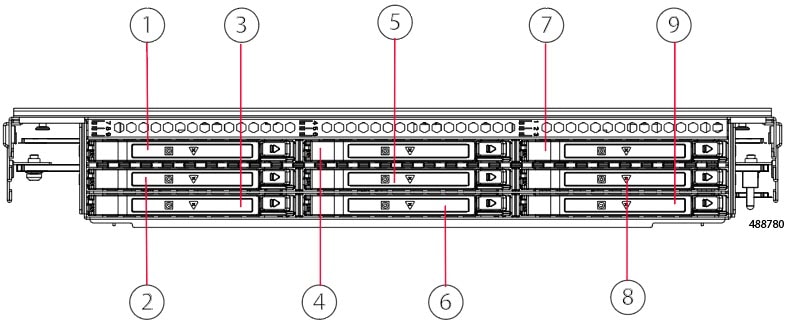
  • When the UCSX-X10C-PTE3 front mezzanine module is instaled on the Cisco UCS X210c M8 Compute Node, the module supports up to nine drives, as shown in the illustration.

  • When the UCSX-X10C-PTE3 front mezzanine module is instaled on the Cisco UCS X215c M8 Compute Node, the module supports up to eight drives.

The following illustration shows the location of the drives. Drive slot numbering is the same regardless of which X Series M8 Compute Node the UCSX-X10C-PTE3 front mezzanine module is installed on.

1

E3.S drive slot 1

2

E3.S drive slot 2

3

E3.S drive slot 3

4

E3.S drive slot 4

5

E3.S drive slot 5

Note


On a Cisco UCS X215c M8 Compute Node only, this drive slot cannot be populated with an E3.S SSD. The slot must be covered with a drive slot filler panel (UCSC-E3S1T-F)

6

E3.S drive slot 6

7

E3.S drive slot 7

8

E3.S drive slot 8

9

E3.S drive slot 9

Drive Bays

Each front mezzanine ES.3 module has a front mezzanine can support a maximum of nine 7.5mm E3.S 1TB PCIe5 drives. A drive blank panel (UCSC-E3S1T-F) must cover any empty drive bays.

Drives and Drive LEDs

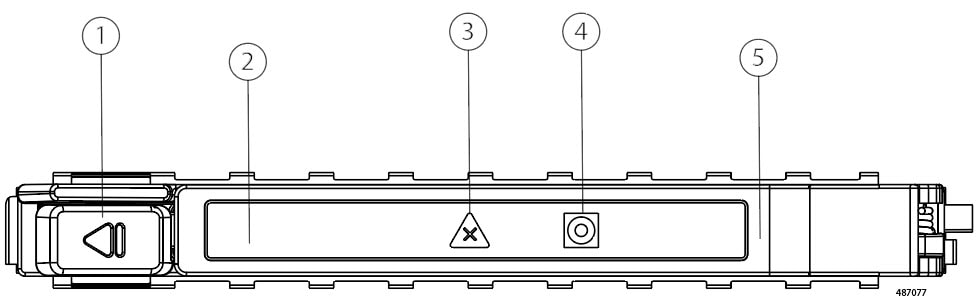
Each E3.S drive is a front-loading drive that slides into and out of the front mezzanine module's storage cage.

1

Ejector Button

2

E3.S Drive

3

Drive Status LED

4

Drive Activity LED

5

E3.S Drive Carrier

Each E3.S drive also has LEDs that indicate drive health and activity.

Table 1. Drive LEDs, NVMe (VMD Enabled)

Green Activity/Presence LED

Amber Blue

Status/Fault LED

Description

Off

Off

Drive not present or drive powered off

On

Off

Drive present, but no activity

4HZ

Off

Drive present and drive activity

On

Blue, 4HZ

Drive Locate indicator or drive prepared for physical removal

On

Amber ON

Failed or faulty drive

On

Amber, 1Hz

Drive Rebuild