Storage Controller Considerations

This appendix contains the following topics:

Supported Storage Controllers and Cables

This server supports a single, PCIe-style, SAS RAID or HBA controller that plugs into a dedicated internal socket.


Note


NVMe PCIe SSDs cannot be controlled by a SAS/SATA RAID controller.

This server supports the RAID and HBA controller options and cable requirements shown in the following table.

Storage Adapter (PID)

Product Name

Supported Server

Maximum Number of Drives Supported

Supported RAID Type

Cache Size (GB)

UCSC-RAID-SD-D

UCSC-C240-M7 SFF servers

Up to 24 drives total

Front-loading HDDs: Up to 24 SAS drives (Gen3) and up to four non-RAID NVMe Gen4 x4 drives in slots 1 through 4)

Plus, Rear-loading HDDs: up to 4 SAS HDDs (Gen3) or up to 4 Gen4 x4 NVMe drives (direct-attach).

RAID

No NVMe HW RAID Support

4

UCSC-SAS-T-D, Two

UCSC-C240-M7 SFF servers

20

Front-loading HDDs: Up to 24 SAS drives (Gen3) and up to four non-RAID NVMe Gen4 x4 drives in slots 1 through 4)

Plus, Rear-loading HDDs: up to 4 SAS HDDs (Gen3) or up to 4 Gen4 x4 NVMe drives (direct-attach).

RAID

No NVMe HW RAID Support

NA

UCSC-RAID-HP, Two

Cisco UCSC 24G Trim-Mode RAID Controller with 4GB FBWC (16 drives each)

UCSC-C240-M7 SFF servers

24

Front-loading HDDs: Up to 24 SAS drives (Gen4, 24 Gbps). No direct-attach NVMe drive support.

Plus, Rear-loading HDDs: up to 4 SAS HDDs (Gen4, 24 Gbps) or up to 4 Gen4 x4 NVMe drives.

Two controllers, each manages 14 drives

Controller 1: Slots 1-12 plus 103 and 104

Controller 2: Slots 13-24 plus 101 and 102

RAID

NVMe HW RAID support for both front loading and rear-loading

4

UCSC-RAID-M1L32

UCSC-C240-SFF

24

Front-loading HDDs: Up to 24 SAS drives (Gen4, 24 Gbps) with up to 4 Gen4 x4 NVMe drives in slots 1 through 4.

Plus, Rear-loading HDDs: up to 4 SAS HDDs (Gen424 Gbps)

RAID

4

UCSC-HBA-M1L16, Two

Cisco 12G SAS HBA (16 Drives)

UCSC-C220-M6S

24

Front-loading HDDs: Up to 24 SAS drives (Gen4, 24 Gbps), with support for up to four NVMe SSDs (direct attach in slots 1 through 4)

Plus, Rear-loading HDDs: up to 4 SAS HDDs (Gen4, 24 Gbps) or up to 4 Gen4 x4 NVMe drives.

Two controllers, each manages 16 drives

Controller 1: Slots 1-12 plus 103 and 104

Controller 2: Slots 13-24 plus 101 and 102

Plus, Rear-loading HDDs: up to 4 SAS HDDs (Gen4, 24 Gbps) or up to 4 Gen4 x4 NVMe drives.

SAS HBA

NA

UCSC-9500-8E-D

Cisco 9500-8e 12G SAS HBA for external JBOD attach

All models of UCS C220 M7 and UCS C240 M7 server

NA

SAS HBA

NA

Storage Controller Card Firmware Compatibility

Firmware on the storage controller (RAID or HBA) must be verified for compatibility with the current Cisco IMC and BIOS versions that are installed on the server. If not compatible, upgrade or downgrade the storage controller firmware using the Host Upgrade Utility (HUU) for your firmware release to bring it to a compatible level.


Note


For servers running in standalone mode only: After you replace controller hardware (UCSC-RAID-SD-D, UCSC-SAS-T-D, or UCSC-RAID-HP-D), you must run the Cisco UCS Host Upgrade Utility (HUU) to update the controller firmware, even if the firmware Current Version is the same as the Update Version. Running HUU is necessary to program any controller specific values to the storage controller for the specific server. If you do not run HUU, the storage controller may not be discovered..


See the HUU guide for your Cisco IMC release for instructions on downloading and using the utility to bring server components to compatible levels: HUU Guides.

RAID Backup (Supercap)

This server supports installation of one Supercap unit. The unit mounts to a bracket in-line with the fan modules.

The optional SCPM provides approximately three years of backup for the disk write-back cache DRAM in the case of a sudden power loss by offloading the cache to the NAND flash.

For Supercap unit replacement instructions, see Replacing the Supercap (RAID Backup).

Mixing Drive Types in RAID Groups

For the best performance follow these guidelines:

  • Use either all SAS or all SATA drives in a RAID group.

  • Use the same capacity for each drive in the RAID group.

  • Never mix HDDs and SSDs in the same RAID group.

Storage Controller Cable Connectors and Backplanes

This section describes cabling for the storage controllers and backplanes. The SAS/SATA/U.3 cables are factory-installed and are used for all supported internal controllers.

This section also contains diagrams that show the cable-to-drive mapping.

NVMe Connections

The servers can support up to four NVMe drives in slots 1 through 4. NVMe connections are not supported directly through the RAID or HBA controller. To connect those drives, cable as follows:

  • Connect one end of CBL-NVME-C240M7 to the P-2 connector on the motherboard.

  • Connect the other end of the cable to the HBPLN connector for slots 1-2 on the drive backplane.

  • Connect the one end of CBL-FNVME-C240M7 to the P-4 connector on the motherboard.

  • Connect the other end of the cable to the BP connector for slots 3-4 on the drive backplane.

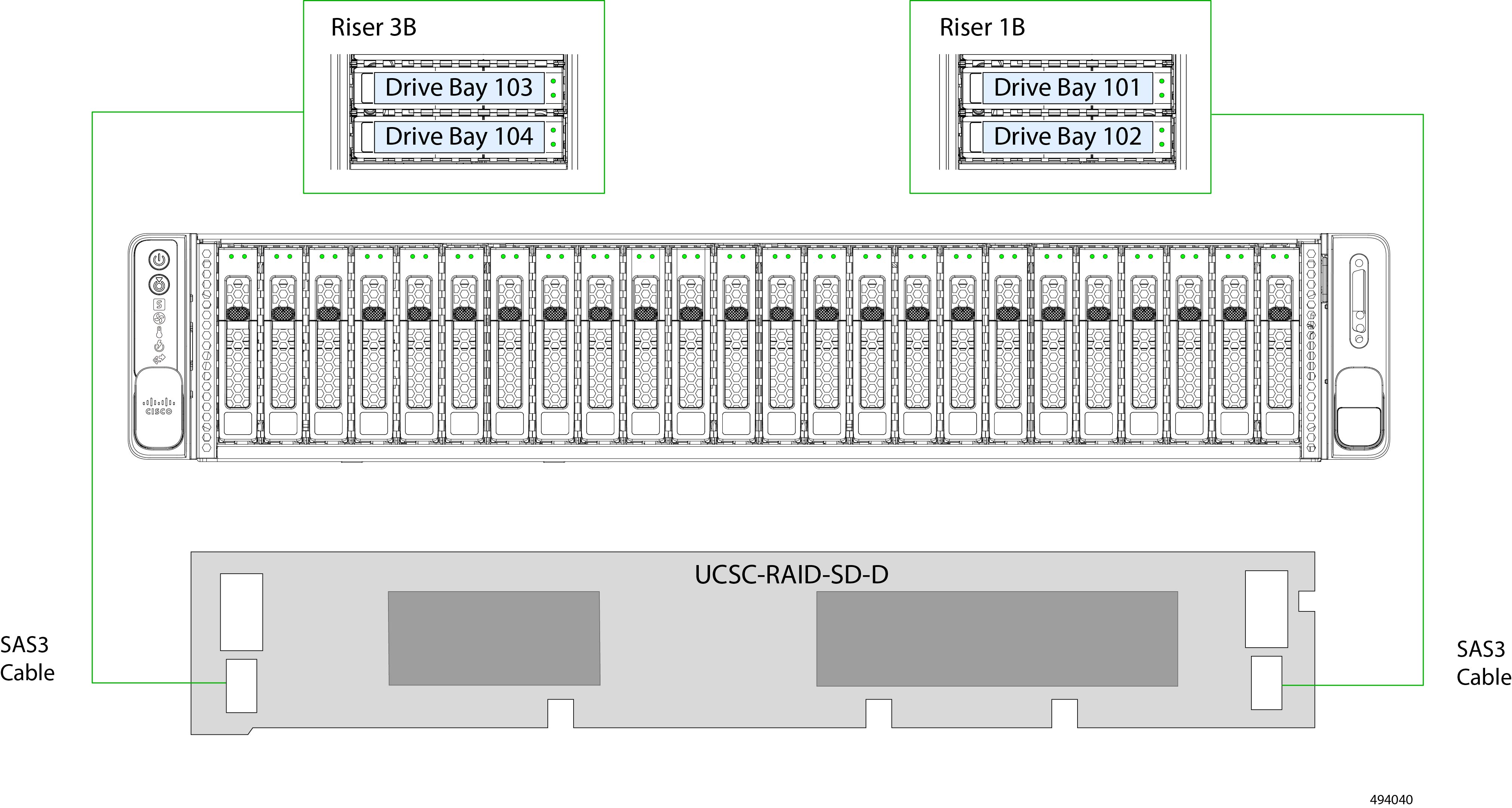
Cisco UCSC-RAID-SD-D

This section describes connections for the Cisco UCS-RAID-SD-D card. A single, double-width RAID card supports the front and rear drives. This section also contains diagrams that show the cable-to-drive mapping.

This RAID card is supported on the UCS-C240M7-SX version of the server. The RAID card can support up to 24 SAS/SATA/NVMe drives in the front and up to 4 SAS/SATA/NVMe drives in the rear risers, two drives per riser cage.

  1. Connect a SAS3 cable (CBL-RSASR3B-240-D) to the J32 connector on the left side of the RAID card.

  2. Connect the other end of the cable to the Riser 3B connector on the PCIe Riser 3 cage.

  3. Connect a SAS3 cable (CBL-R1B-SD-240-D) to the J32 connector on the right side of the RAID card.

  4. Connect the other end of the cable to the Riser 1B connector on the PCIe Riser 1 cage.

  5. Connect the C240 M7 SAS cable (CBL-SDSAS-C240M7) from the RAID card to the P-1 connector at the base of CPU1 (not shown).

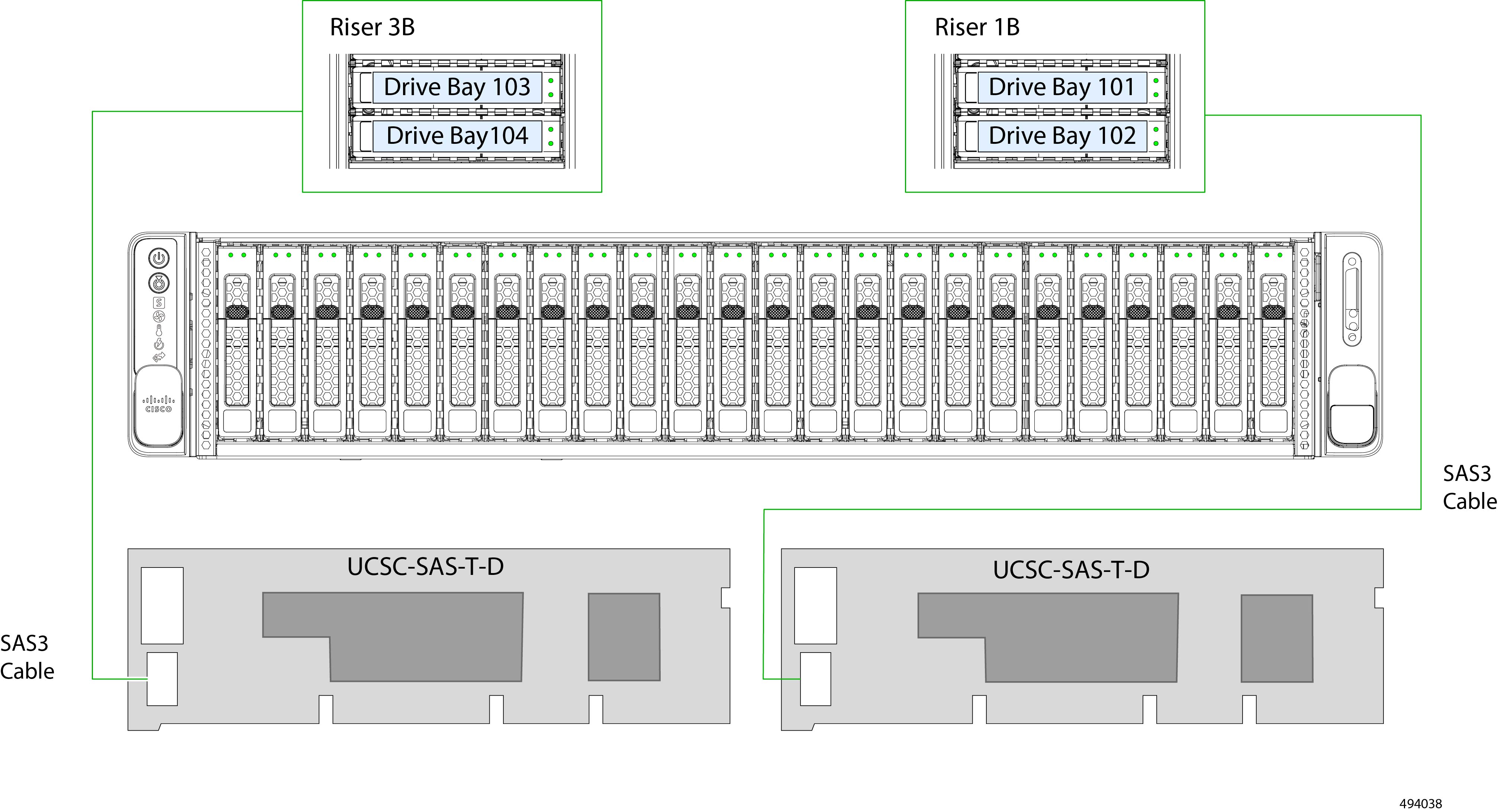
Cisco 12G Modular SAS RAID Controller or HBA For Up To 28 Drives (UCSC-SAS-T-D)

This section describes connections for the Cisco UCS-SAS-T-D card. Two storage controller cards support the front and rear drives. This section also contains diagrams that show the cable-to-drive mapping.

This controller is supported only in the SFF 24-drive SAS/SATA version of the server.

Two of these HW RAID or HBA options can control up to 24 front-loading SAS/SATA drives in this server version, plus 4 rear-loading SAS/SATA drives.

  1. Connect a SAS/SATA cable (CBL-RSASR3B-240-D) from the small Slimline connector (J20) on the left RAID card.

  2. Connect a SAS/SATA cable to the Riser 3B connector on the PCE Riser 3 cage.

  3. Connect a SAS/SATA cable (CBL-RSASR1B-240-D) from the second small Slimline connector (J20) on the RAID card.

  4. Connect a SAS/SATA cable to the Riser 1B connector on the PCE Riser 1 cage.

  5. Connect the C240 M7 SAS cable (CBL-SAS12-C240M7) from the RAID card to the P-1 connector at the base of CPU1.

  6. Connect the C240 M7 SAS cable (CBL-SAS24-C240M7) from the RAID card to the P-2 connector at the base of CPU1 and the HDD1 and HDD2 connectors on the drive backplane (not shown).

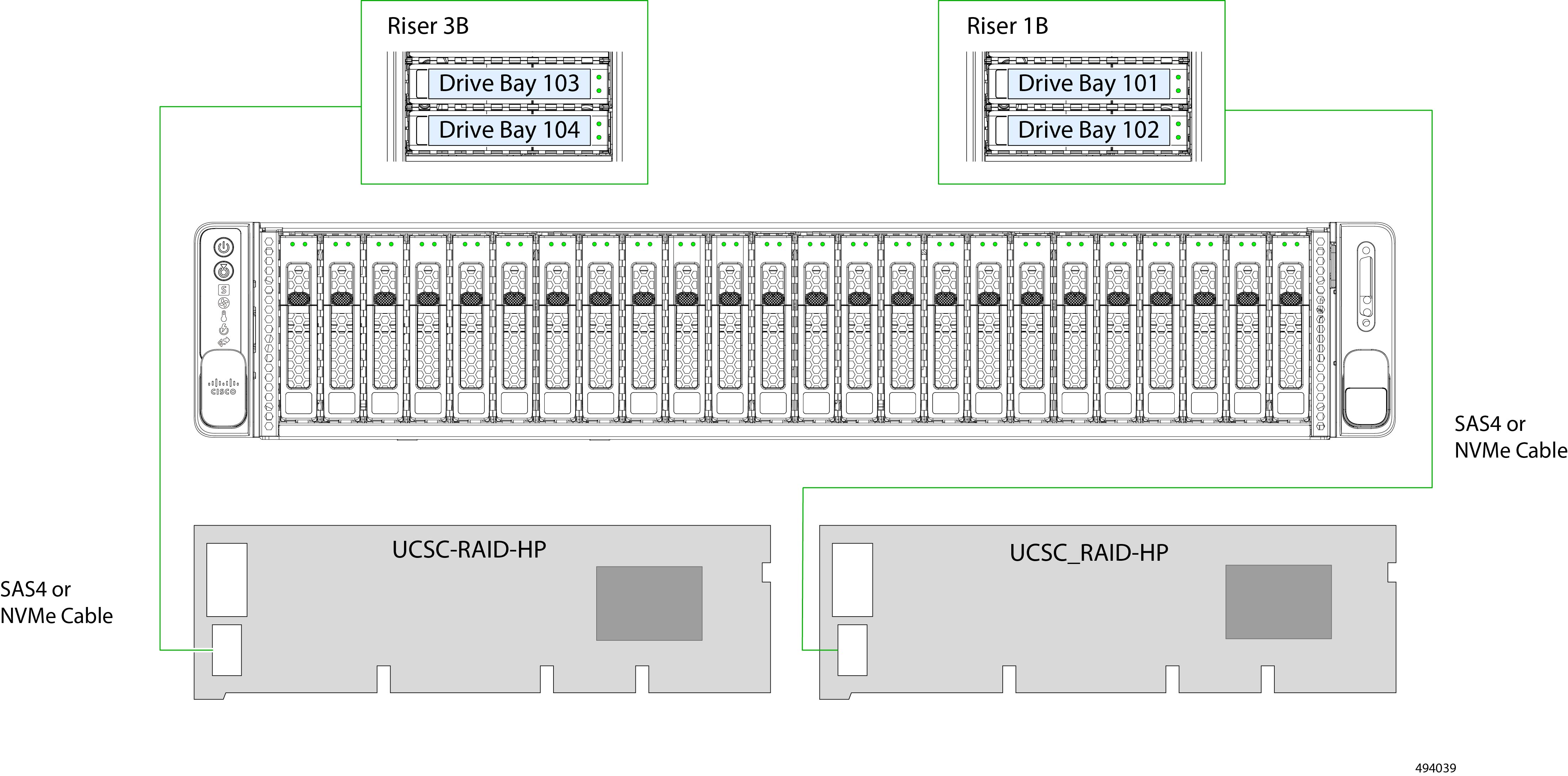
Cisco UCSC-RAID-HP

This section describes connections for the Cisco UCS-RAID-HP RAID card. Two separate RAID cards support the front and rear drives. This section also contains diagrams that show the cable-to-drive mapping.

These controllers are supported in the UCS-C240-SX version of the server.

Two of these RAID cards can control up to 24 front-loading SAS/SATA drives in this server version, plus 4 rear-loading SAS/SATA or NVMe Gen 4 drives. No front-loading NVMe drives are supported. These RAID cards support NVMe HW RAID.

  1. Connect a SAS4 or NVMe cable (CBL-SASR3B-C24XM7) from the small Slimline connector (J1) on the left RAID card.

  2. Connect the other end of the cable to the Riser 3B connector on the PCE Riser 3 cage.

  3. Connect a SAS4 or NVMe cable (CBL-SASR1B-C24XM7) from the small Slimline connector (J2) on the right RAID card.

  4. Connect the other end of the cable to the Riser 1B connector on the PCE Riser 1 cage.

  5. Connect two of the C240 M7 SAS Y cables (CBL-SAS-Y-C240M7) from the RAID card to the motherboard (not shown).

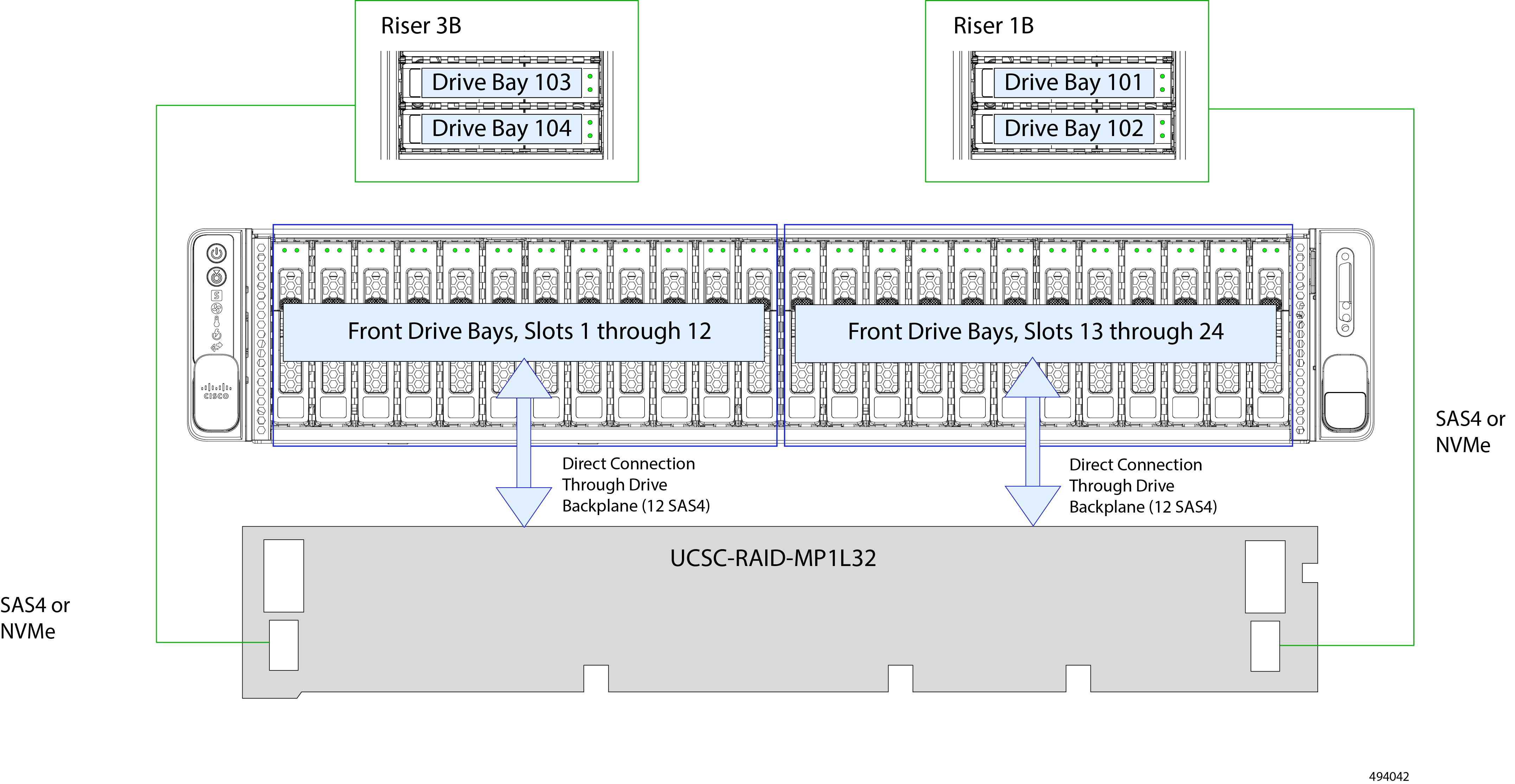
Cisco UCSC-RAID-MP1L32

This section describes connections for the Cisco UCS-RAID-MP1L32 RAID card. A single, double-width RAID card supports the front and rear drives. This section also contains diagrams that show the cable-to-drive mapping.

This RAID card is supported on UCS-C240-SX version of the server.

This RAID card can support up to 24 SAS/SATA/NVMe drives in the front and up to 4 SAS/SATA/NVMe drives in the rear risers, two drives per riser cage.

  1. Connect a SAS4 or NVMe cable (CBL-SASR1B-C24XM7) to the PCIe 1 connector on the right side of the RAID card.

  2. Connect the other end of the cable to the Riser 1B connector on the PCIe Riser 1 cage.

  3. Connect a SAS4/NVMe cable (CBL-SASR3B-C24XM7) to the PCIe 2 connector on the left side of the RAID card.

  4. Connect the other end of the cable to the Riser 3B connector on the PCIe Riser 3 cage.

  5. Connect two of the C240 M7 SAS Y cables (CBL-SAS-Y-C240M7) from the RAID card to the motherboard.(not shown).

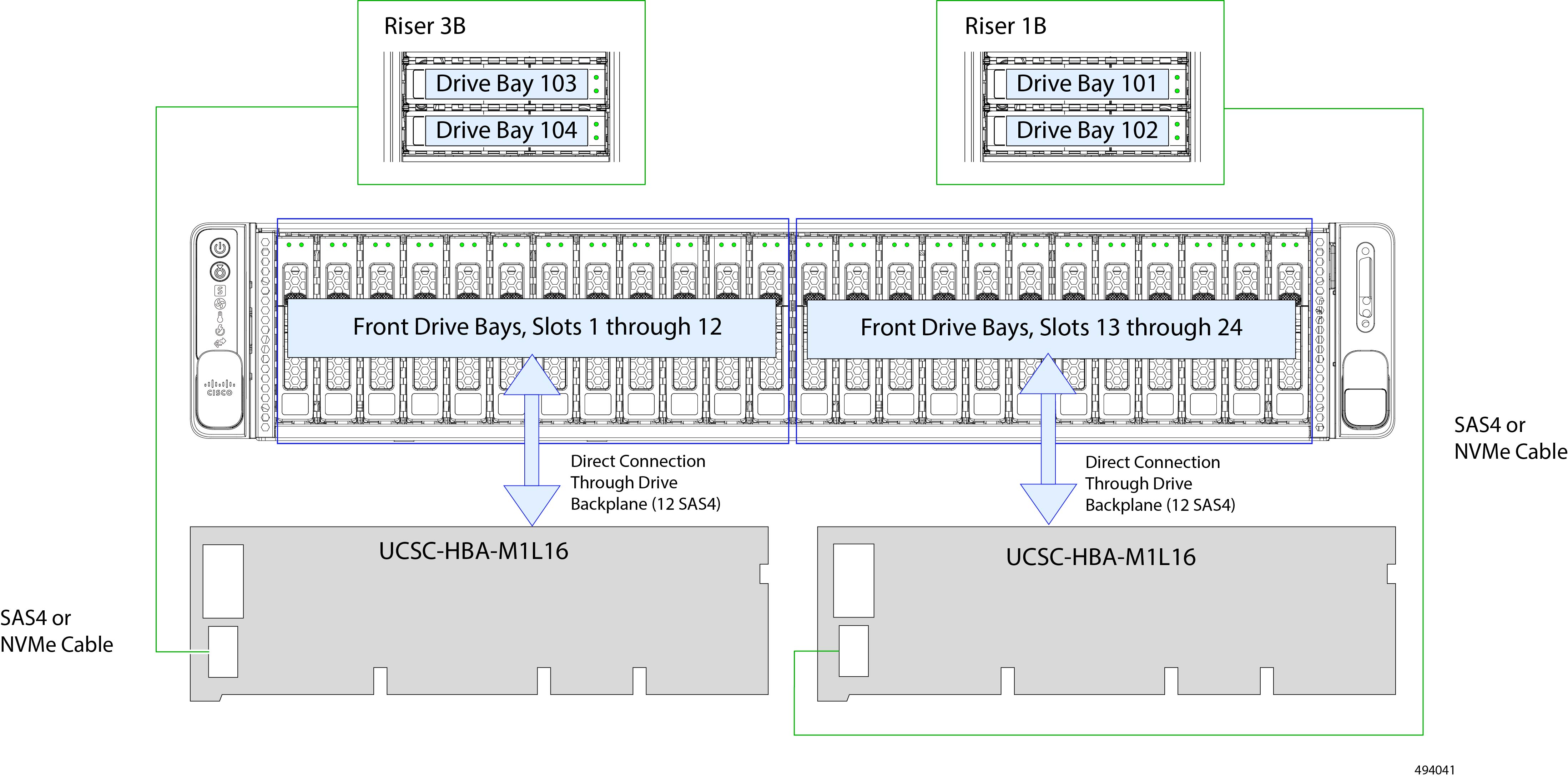
Cisco UCSC-HBA-M1L16 in a Dual CPU Server

This section describes connections for the Cisco UCS-RAID-HBA-M1L16 storage controller. Two separate cards support the front and rear drives.

These controllers are supported in the UCS-C240-SX version of the server.

Two of these HBA or HW RAID cards can control up to 24 front-loading SAS/SATA drives in this server version, plus 4 rear-loading SAS/SATA or NVMe Gen 4 drives. Front-loading Gen 4 NVMe drives are supported in slots 1 through 4. These RAID cards support NVMe HW RAID.

  1. Connect a SAS4 or NVMe cable (CBL-SASR3B-C24XM7) from the small Slimline connector (J1) on the left RAID card.

  2. Connect the other end of the cable to the Riser 3B connector on the PCE Riser 3 cage.

  3. Connect a SAS4/NVMe cable (CBL-SASR1B-C24XM7) from the small Slimline connector (J2) on the right RAID card.

  4. Connect the other end of the cable to the Riser 1B connector on the PCE Riser 1 cage.

  5. Connect two of the C240 M7 SAS Y cables (CBL-SAS-Y-C240M7) from the RAID card to the motherboard.(not shown).

Cisco UCSC-HBA-M1L16 in a Single CPU Server

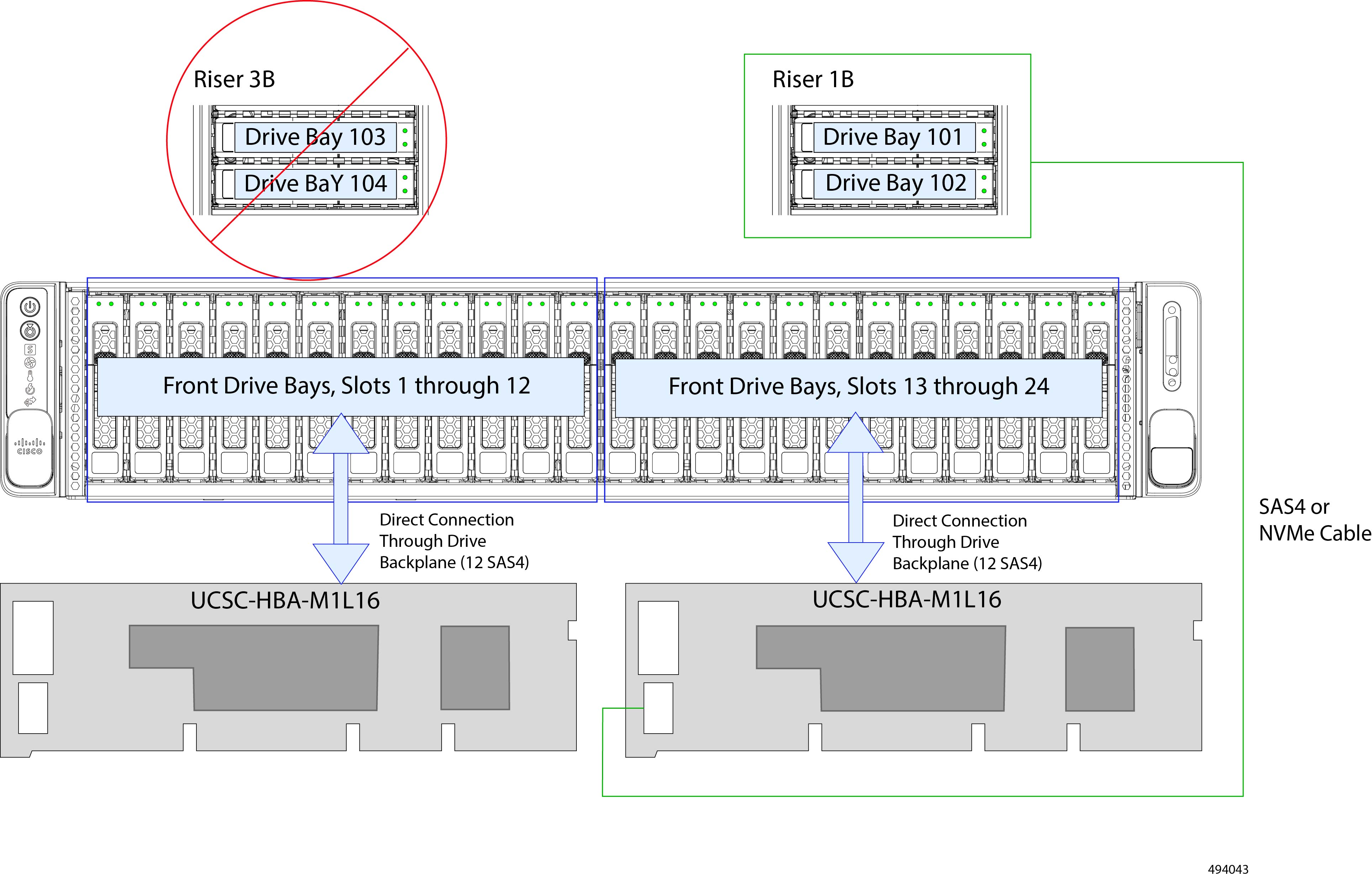
This section describes connections for the Cisco UCS-RAID-HBA-M1L16 storage controller when used in a server with only one CPU. This configuration requires that the CPU is installed in CPU socket. Also, this configuration supports only Riser 1. In this configuration, two separate cards support the front and rear drives.

These controllers are supported in the UCS-C240-SX version of server:

Two of these HBA or HW RAID cards can control up to 24 front-loading SAS/SATA drives in this server version, plus two rear-loading NVMe Gen 4 drives. Front-loading Gen 4 NVMe drives are supported in slots 1 through 4. These RAID cards support NVMe HW RAID.

  1. Connect a SAS4 or NVMe cable (CBL-SAS24-C240M7) from the small Slimline connector (J1) on the left RAID card.

  2. Connect the other end of the cable to the P-2 connector at the base of CPU1 and the HDD1 and HDD2 connector on the drive backplane.

  3. Connect the a SAS4 or NVM3 cable (CBL-SAS12-C240M7) from the connector on the RAID card to the P-2 connector at the base of CPU2.

  4. Connect a SAS4 or NVMe cable (SASR1B-C24XM7) from the small Slimline connector (J2) on the right RAID card.

  5. Connect the other end of the cable to the Riser 1B connector on the PCE Riser 1 cage.

  6. Connect the other end of the cable to the Riser 1B connector on the PCE Riser 1 cage.

For More RAID Utility Information

Cisco RAID Information

  • The Cisco UCS C Series M7 storage adapter supports SAS/SATA/U.3 drives. Tri-mode RAID support is supported.

  • For basic information about RAID and for using the utilities for the RAID controller cards that are supported in Cisco servers, see the Cisco UCS Servers RAID Guide.

Broadcom RAID Information