- Auto Anchor SSID between Wireless LAN Controllers acting as MC
- Enabling Central Web Authentication on ISE
- Configuring Auto Anchor and Mobility Groups on Wireless Services
- Configuring Wireless Multicast on Wireless LAN Controllers
- Converged Access Consolidated Quick Reference Templates for Wireless LAN
- Converged Access Controller AP Join Issue Troubleshoot with Traces
- Converged Access Controllers MAC Address Entry for Network Mobility Service Protocol
- Configuration Example: Converged Access Management through Prime Infrastructure with SNMP v2 and v3
- Converged Access Path Maximum Transmission Unit Discovery
- Third-Party Certificate Installation on Converged Access Wireless LAN Controllers
- Configuration Example: Converged Access for WLC EAP-FAST with Internal RADIUS Server
- Converged Access and WLC Local EAP Authentication Configuration Example
- Configuration Example: Custom Web Authentication with Local Authentication
- Dynamic VLAN Assignment with Converged Access and ACS 5.2 Configuration Example
- Configuration Example: External RADIUS Server EAP Authentication
- External Web Authentication on Converged Access
- Installing Wireless Services
- Local Web Authentication with External RADIUS Authentication
- Local Web Authentication on Converged Access
- PEAP Authentication with Microsoft NPS Configuration
- QoS on Converged Access Controllers and Lightweight Access Points
- Configuration Example: TACACS Administrator Access to Converged Access Wireless LAN Controllers
- Configuration Example: Unified Access WLC Guest Anchor with Converged Access
- VideoStream Troubleshooting
- Custom Web Authentication Locally Hosted on WLC or an External Server
- Wireless Converged Access Chromecast Configuration Example
- Web Passthrough Configuration Example
- Configuration Examples: WPA2-PSK and Open Authentication
VideoStream Troubleshooting
This document describes how to troubleshoot VideoStream issues on Wireless LAN Controllers(WLC).
Prerequisites
We recommend that you have knowledge on Cisco Aironet 3600 Series Access Point (AP).
 Note | Refer to the Configuring VideoStream GUI section of the VideoStream Configuration Guide Cisco IOS XE Release 3SE Cisco 3850 Series Catalyst Switch for more information about VideoStream configuration. |
Supported Platforms and Releases
This document is based on Cisco Aironet 3600 Series Access Point (AP) that runs in lightweight mode.
Note | The information in this document was created from the devices in a specific lab environment. All of the devices used in this document started with a cleared (default) configuration. If your network is live, make sure that you understand the potential impact of any command. |
Overview of the VideoStream flow through WLC
This section describes an overview of the VideoStream flow through WLC and its present limitations.
VideoStream Limitations
VideoStream enables the wireless architecture to deploy multicast video streaming across the enterprise to wireless clients. The present multicast video delivery mechanism has two limitations:
-
Video packets are sent at much lower data rate, though multicast packets have highest data rate (802.11n data rate).
-
Multicast packets are not acknowledged since there are multiple recipients and it is not scalable to receive acknowledgements from every client.
In order to overcome above listed limitations, VideoStream sends the video multicast packets as unicast packets over the air. With this process, an AP can use the individual data rate for each client and allows the client to acknowledge any packets that are not received
VideoStream Flow Through the WLC
The following network diagram illustrates the VideoStream flow through the WLC:
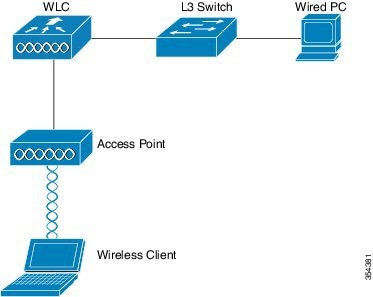
Topology information for this setup are:
-
The client MAC address is 0017.7c2f.b86e
-
The multicast video IP address is 198.51.100.10
-
Multicast with unicast is used as the multicast delivery mechanism to the AP.
The following steps describes flow of VideoStream:
-
The client sends an Internet Group Management Protocol (IGMP) join message where the WLC intercepts.
-
A WLC then creates a Mapping Group Identification (MGID) entry in order to map the flow with the client request and associated VLAN.
-
One of the main aspects of VideoStream that differs from regular multicast traffic is that, a WLC checks with AP to verify it has enough bandwidth required to serve the flow of VideoStream by sending Radio Resource Control (RRC) messages.
-
The RRC response from an AP informs the WLC, the availability of AP's bandwidth and other related statistics.
-
Based on the response from an AP, the WLC decides to admit the flow and sends the IGMP join message upstream. You can configure the WLC in such a way that, it forwards the flow of video streams even if there is not enough bandwidth on the AP. However, WLC marks the flow of video stream for the best effort queue or may use default action, which will not allow the stream and drop the IGMP join message.
-
The WLC tells the AP that the flow is acknowledged and indicates the amount of bandwidth that must be reserved for flow.
-
The WLC also informs the AP about WLAN-MGID mapping for the client.
-
The AP then keeps track of the amount of bandwidth utilized by client and bandwidth remains for each radio. This information is used when we add further streams.
-
When the WLC receives the multicast traffic that is destined to the client, it verifies that the VideoStream is configured and there is an MGID entry already created.
-
If both configuration of VideoStream and MGID entry are satisfied, then WLC forwards the streams to all of the APs that have clients which requested flow. Depending on the delivery mechanism configured, the WLC delivers the multicast streams to the APs with either Multicast with Unicast or Multicast with Multicast.
-
The AP replaces the destination address with a unicast address and sends the stream via unicast to each client that requests the flow. The packets include an AF41 DSCP mark (802.1p value of 4) and are sent at the data rate that is used for each individual client.
Troubleshooting the Videostream Issues
Follow the information on this section to troubleshoot the VideoStream flow through the WLC.
- Verify that Multicast Direct is Enabled
- Enable Debugging on the WLC
- Verify the MGID Entries on the WLC
- Troubleshooting of Video Quality on the AP
- Flow Denied by the WLC
Verify that Multicast Direct is Enabled
To verify the multicast direct is enabled on the WLC, enter the following command:
Device# show wireless media-stream multicast-direct state
Multicst-direct State: Enabled
You can also use the show wireless media-stream group summary command in order to verify whether a specific multicast address is enabled:
Device# show wireless media-stream group summary
Number of Groups : 1

Stream Name   Start IP     End IP        Status
------------------------------------------------
video_stream  198.51.100.10    198.51.100.10     Enabled
Note | You must enable mutlicast-direct globally on both WLC and Wireless LAN (WLAN). |
Enable Debugging on the WLC
To verify the RRC is negotiated correctly and the media stream is allowed, enable debugging on the WLC. The following are the most useful debug commands:
-
debug media-stream errors- Command provides information about any errors that occur in the media stream process.
-
debug media-stream event - Command provides information about the various state changes that occur.
-
debug media-stream rrc - Command provides information about the RRC messages that are exchanged.
-
debug call-admission wireless all - Command provides information with respect to Command Access Card (CAC) debugs.
-
debug ip igmp group_address - Command provides information about the join process.
Example Debug Command Outputs
-
The controller initially creates an MGID entry for the client once it sends an IGMP join message:
*May 7 22:42:23.632: %IOSXE-7-PLATFORM: 1
process wcm: mscbApMac = dca5.f4ec.df30 client_mac_addr = 0017.7c2f.b86e
slotId = 0 vapId = 2 mgid = 4161 numOfSGs = 2
rrc_status = 3
*May 7 22:42:23.632: %IOSXE-7-PLATFORM: 1
process wcm: 0017.7c2f.b86e mc2uc update client 0017.7c2f.b86e radio dca5.f4ec.df30
destIp 198.51.100.10 srcIp 0.0.0.0 mgid 4161 slot 0 vapId 2 vlan 12
-
Once complete, the WLC understands that this particular multicast IP address is configured for media-streaming and begins the RRC process:
*May 7 22:42:23.632: %IOSXE-7-PLATFORM: 1
process wcm: msPolicyGetRrcQosSupport 1 4 4
*May 7 22:42:23.632: %IOSXE-7-PLATFORM: 1 process wcm:
 msPolicyPlatform not AP 1100
*May 7 22:42:23.632: %IOSXE-7-PLATFORM: 1 process wcm:
 0017.7c2f.b86e mc2uc qos admit 1 qos 4 pri 4
*May 7 22:42:23.632: %IOSXE-7-PLATFORM: 1 process wcm:
 0017.7c2f.b86e mc2uc submit client client
 0017.7c2f.b86eradio dca5.f4ec.df30 destIp
 198.51.100.10 mgid 4161vapId 2 vlan 12
*May 7 22:42:23.632: %IOSXE-7-PLATFORM: 1 process wcm:
 0017.7c2f.b86e FindRequestByClient not found dest
 239.1.1.1 client 0017.7c2f.b86e radio dca5.f4ec.df30
 source 0.0.0.0 slot 0
*May 7 22:42:23.632: %IOSXE-7-PLATFORM: 1 process wcm:
 dca5.f4ec.df30 Creating request 3611 for radio
 dca5.f4ec.df30
*May 7 22:42:23.632: %IOSXE-7-PLATFORM: 1 process wcm:
 0017.7c2f.b86e Creating request 3611 for client
 0017.7c2f.b86e
-
The WLC then sends the RRC request:
*May 7 22:42:23.632: %IOSXE-7-PLATFORM: 1 process wcm:
 rrcEngineInsertAdmitRequest dest 239.1.1.1 mgid 4161
 request 3611
*May 7 22:42:23.632: %IOSXE-7-PLATFORM: 1 process wcm:
 0017.7c2f.b86e rrcEngineSendMeasureMetricsRequest sent
 request 3611 to radio dca5.f4ec.df30,
 minRate = 6000, maxRetryPercent = 80
Note
Output shows that the WLC specifies the metrics that are necessary for the flow.
-
The AP and the WLC now perform various checks before the stream is permitted. This check is performed in order to verify whether the maximum number of streams are reached or not:
*May 7 22:42:23.637: %IOSXE-7-PLATFORM: 1 process wcm:
 rrcEngineFindRequest look for request 3611
*May 7 22:42:23.637: %IOSXE-7-PLATFORM: 1 process wcm:
 rrcEngineFindRequest found request 3611
*May 7 22:42:23.638: %IOSXE-7-PLATFORM: 1 process wcm:
 dca5.f4ec.df30 rrcEngineProcessRadioMetrics start
 radio dca5.f4ec.df30 request 3611
*May 7 22:42:23.638: %IOSXE-7-PLATFORM: 1 process wcm:
 dca5.f4ec.df30 done rrcEngineProcessRadioMetrics
 radio dca5.f4ec.df30 request 3611
*May 7 22:42:23.643: %IOSXE-7-PLATFORM: 1 process wcm:
 rrcEngineRemoveAdmitRequest request 3611
*May 7 22:42:23.643: %IOSXE-7-PLATFORM: 1 process wcm:
 p_video = 0, p_voice = 0, pb = 476, video_qo = 0,
 video_l_r_ratio = 0, video_no = 0
*May 7 22:42:23.643: %IOSXE-7-PLATFORM: 1 process wcm:
 video_delay_hist_severe = 0, video_pkt_loss_discard =
 0, video_pkt_loss_fail = 0
*May 7 22:42:23.643: %IOSXE-7-PLATFORM: 1 process wcm:
 radio_tx_q_max_size = 1, radio_tx_q_limit = 5684,
 vi_tx_q_max_size = 0, current_rate = 52
*May 7 22:42:23.643: %IOSXE-7-PLATFORM: 1 process wcm:
 msPolicyGetStreamParameters streamName video_stream
 bandwidth 1000 pakSize 1200
*May 7 22:42:23.643: %IOSXE-7-PLATFORM: 1 process wcm:
 0017.7c2f.b86e Admit video: number of streams on
 radio is 0, number of streams on client is 0
-
The following check is performed in order to verify whether the packet loss for the video queue has crossed the threshold or not:
*May 7 22:42:23.643: %IOSXE-7-PLATFORM: 1 process wcm:
 0017.7c2f.b86e Checking Link Stats for AP
 dca5.f4ec.df30(0) : pkt_loss = 0, video_pps = 0
*May 7 22:42:23.643: %IOSXE-7-PLATFORM: 1 process wcm:
 0017.7c2f.b86e pkt_discard = 0, num_video_streams = 0
*May 7 22:42:23.643: %IOSXE-7-PLATFORM: 1 process wcm:
 0017.7c2f.b86e Link Stats Criteria PASSED for AP
 dca5.f4ec.df30(0)
-
Verification of bandwidth on the AP is performed by following check
*May 7 22:42:23.643: %IOSXE-7-PLATFORM: 1 process wcm:
 0017.7c2f.b86e Requested Video Media Time for AP
 dca5.f4ec.df30(0) : cfg_stream_bw = 1000 kbps
*May 7 22:42:23.643: %IOSXE-7-PLATFORM: 1 process wcm:
 0017.7c2f.b86e current_rate = 26 Mbps, new_stream_pps
 = 104 pps, video_pkt_size = 1200 bytes => req_mt
 = 3354 MT
*May 7 22:42:23.643: %IOSXE-7-PLATFORM: 1 process wcm:
 0017.7c2f.b86e RRC Video BW Check for AP
 dca5.f4ec.df30(0) : current chan/voice/video MT =
 14875/0/0 MT
*May 7 22:42:23.643: %IOSXE-7-PLATFORM: 1 process wcm:
 0017.7c2f.b86e mt remain 16375 readmit_bias 0
 current_video_mt 0 media_time_req 3354
 video_mt_limit 15625
-
Once all of the criteria are passed, then stream is admitted. The SNMP admit trap is sent in order to inform that the media stream is permitted, which is useful in cases where the SNMP is used to monitor the streams that are allowed.
*May 7 22:42:23.643: %IOSXE-7-PLATFORM: 1 process wcm:
 0017.7c2f.b86e Video Stream Admitted: passed all
 the checks
*May 7 22:42:23.643: %IOSXE-7-PLATFORM: 1 process wcm:
 0017.7c2f.b86e Mapping wme code 1 to history code 0
*May 7 22:42:23.643: %IOSXE-7-PLATFORM: 1 process wcm:
 0017.7c2f.b86e Admit video: request 3611 radio
 dca5.f4ec.df30, decision 1 admission 2
*May 7 22:42:23.643: %IOSXE-7-PLATFORM: 1 process wcm:
 mStreamBandMc2ucAdmit besteffort 1
*May 7 22:42:23.643: %IOSXE-7-PLATFORM: 1 process wcm:
 0017.7c2f.b86e Approve Admission on radio
 dca5.f4ec.df30 request 3611 vlan 12 destIp
 198.51.100.10 decision 1 qos 4 admitBest 1
*May 7 22:42:23.643: %IOSXE-7-PLATFORM: 1 process wcm:
 0017.7c2f.b86e RRC Admission: Add history record with
 cause code 0 destIp 198.51.100.10
*May 7 22:42:23.643: %IOSXE-7-PLATFORM: 1 process wcm:
 0017.7c2f.b86e Sending SNMP admit trap
-
The stream information is now added to the WLC database, and the Quality of Service (QoS) value is set for the video stream:
*May 7 22:42:23.643: %IOSXE-7-PLATFORM: 1 process wcm:
 bcastRrcHandleClientStatus: group = 239.1.1.1
 clientmac = 0017.7c2f.b86eapmac = dca5.f4ec.df30
 vlanId = 12 status = 2 qos = 4 mgid = 4161
*May 7 22:42:23.643: %IOSXE-7-PLATFORM: 1 process wcm:
 0017.7c2f.b86e RRC clientRecord add clientMac
 0017.7c2f.b86e #of streams 1
*May 7 22:42:23.643: %IOSXE-7-PLATFORM: 1 process wcm:
 0017.7c2f.b86e RadioInsertStreamRecord # of streams
 is 1 on radio dca5.f4ec.df30
*May 7 22:42:23.643: %IOSXE-7-PLATFORM: 1 process wcm:
 0017.7c2f.b86e Recording request 3611 destIp
 198.51.100.10 qos 4 vlan 12 violation-drop 1 priority 4
 sourceIp 0.0.0.0 client 0017.7c2f.b86e radio
 dca5.f4ec.df30 slotId 0
*May 7 22:42:23.643: %IOSXE-7-PLATFORM: 1 process wcm:
 0017.7c2f.b86e done rrcEngineProcessClientMetrics
 client 0017.7c2f.b86e radio dca5.f4ec.df30 request
 3611
*May 7 22:42:23.643: %IOSXE-7-PLATFORM: 1 process wcm:
 locking mgid Tree in file bcast_process.c line 1988
*May 7 22:42:23.643: %IOSXE-7-PLATFORM: 1 process wcm:
 unlocking mgid Tree in file bcast_process.c line 2096
*May 7 22:42:23.643: %IOSXE-7-PLATFORM: 1 process wcm:
 spamLradSendMgidInfo: ap = dca5.f4ec.df30 slotId = 0,
 apVapId = 2, numOfMgid = 1 mc2ucflag = 1, qos = 4
-
The WLC forwards the IGMP join message upstream and updates the other components:
*May 7 22:42:23.645: (l2mcsn_process_report) Allocating MGID for Vlan:
 12 (S,G): :239.1.1.1
*May 7 22:42:23.645: (l2mcast_wireless_alloc_mcast_mgid) Vlan: 12 Source:
 0.0.0.0 Group: 239.1.1.1
*May 7 22:42:23.645: (l2mcast_wireless_alloc_mcast_mgid) Source: 0.0.0.0
 Group: 239.1.1.1 Vlan: 12 Mgid: 4161
*May 7 22:42:23.645: (l2mcast_wireless_track_and_inform_client) Protocol:
 IGMPSN Client-address: 10.105.132.254 (S,G,V): 0.0.0.0 239.1.1.1 12 Port:
 Ca0, MGID: 4161 Add: Add
*May 7 22:42:25.399: IGMP(0): Set report delay time to 0.2 seconds for
 239.1.1.1 on Vlan12
Verify the MGID Entries on the WLC
-
Enter the following show wireless multicast group summary command in order to verify the MGID entries that form:
Device# show wireless multicast group summary

IPv4 groups
-------------
MGID    Source     Group           Vlan
----------------------------------------
4160     0.0.0.0  198.51.100.10     12
-
In order to receive more details about the clients that are associated with a specific MGID entry, enter the show wireless multicast group group_address vlan vlan_id command:
Device# show wireless multicast group 239.1.1.1 vlan 12
Source : 0.0.0.0
Group : 239.1.1.1
Vlan : 12
MGID : 4160

Number of Active Clients : 1
  Client List
 -------------

Client MAC Client IP Status
--------------------------------------------
0017.7c2f.b86e 10.105.132.254 MC2UC_ALLOWED
-
In order to verify the specific MGID information on the AP, enter the show capwap mcast mgid id 4161 command:
Device# show capwap mcast mgid id 4161
 rx pkts = 6996
 tx packets:
 wlan : 0 1 2 3 4 5 6 7 8 9 10 11 12 13 14 15
 slots0 : 0 6996 0 0 0 0 0 0 0 0 0 0 0 0 0 0
 slots1 : 0 0 0 0 0 0 0 0 0 0 0 0 0 0 0 0
 slots2 : 0 0 0 0 0 0 0 0 0 0 0 0 0 0 0 0

Normal Mcast Clients:
Reliable Mcast Clients:
 Client: 0017.7c2f.b86e --- SlotId: 0 WlanId: 1 --- Qos User Priority: 4
 State: ADMITTED
 History - Retry Pct: 6 5 13 10 Rate (500 Kbps): 116 116 116 116
Note
This output shows that the client is added to the Reliable Mcast Clients list with a QoS priority of 4.
Troubleshooting of Video Quality on the AP
When video quality issues are reported, you can verify following data on the AP in order to troubleshoot:
-
Enter the show controller dot11radio 0 txq command in order to view the video transmit queue statistics on the AP:
Device# show controller dot11radio 0 txq
(Output clipped)
        ---- Active ------ In-Progress --------------- Counts ----
Cnt       Quo Bas Max Cl Cnt Quo Bas Sent Discard Fail Retry Multi
Uplink     0   64  0   0  0   0   5     0   0      0      0     0
Voice      0  512  0   0  0  60   0  3350   0      2      6     0
Video      0 1024  0   0  0   0 200 50406   0      0    878  2589
Best       0 1024  0   0  0 200   0 126946  0      0  20780  5170
It is important to take note of the video queue statistics. You must compare the number of packets that are transmitted with the number of packets that are retried due to failed transmissions.
-
Enter the show controller dot11radio 0 client command in order to view the parameters for a specific client
Device# show controller dot11radio 0 client

RxPkts KBytes Dup Dec Mic TxPkts KBytes Retry RSSI SNR
0017.7c2f.b86e  99600 24688 1276  0   0  168590 157253   341   46  46
-
With the show controller dot11radio 0 command output, you can also view the video transmission metrics. Take note of the number of successful and failed transmissions and Q-drops that appear in each sampling period:
Dot11 Current Video Transmission Metrics:
Arrivals:106 Q-Drops:0 Tries:129 Agg:129 Success:106 Fail:0

Dot11 5-second Video Transmission Metrics:
 Arrivals:147 Tries:195 Agg:195 Success:147 Fail:0
 Radio-Q-Peak:9 Video-Q-Peak:32 Video-Q-Drops:0
 Delay - Tot Msec:1392 10/20/40/40+ Msec:136/15/12/6

Dot11 1-second Video Transmission Metrics:
 Q-util:71 max-tx-time:22 p-chan:483 p-video:8 L/r:18911
Flow Denied by the WLC
This section describes the process that occurs when there is insufficient bandwidth to permit a stream. The WLC verifies the stream requirement against the configured limits and denies the stream:
May 8 10:29:36.890: %IOSXE-7-PLATFORM: 1 process wcm: 0017.7c2f.b86e
 RRC Video BW Check for AP dca5.f4ec.df30(0) : current
 chan/voice/video MT = 16563/0/0 MT
May 8 10:29:36.890: %IOSXE-7-PLATFORM: 1 process wcm: 0017.7c2f.b86e
 mt remain 14687 readmit_bias 0 current_video_mt 0 media_time_req
 2392 video_mt_limit 1562
May 8 10:29:36.890: %IOSXE-7-PLATFORM: 1 process wcm: 0017.7c2f.b86e
 RRC Video BW Check Failed: Insufficient Video BW for AP
 dca5.f4ec.df30(0)
May 8 10:29:36.890: %IOSXE-7-PLATFORM: 1 process wcm: 0017.7c2f.b86e
 Video Stream Rejected. Bandwidth constraint.
May 8 10:29:36.890: %IOSXE-7-PLATFORM: 1 process wcm: 0017.7c2f.b86e
 Mapping wme code 8 to history code 1
May 8 10:29:36.890: %IOSXE-7-PLATFORM: 1 process wcm: 0017.7c2f.b86e
 Deny Admission on radio dca5.f4ec.df30 request 3633 destIp
 198.51.100.10 vlan 12
Note | For test purposes, the maximum bandwidth allowed for video streaming is changed to 1,000 Kbps in this example. Similar messages appear when the flow is denied due to any other reason, and the WLC also sends an SNMP trap: May 19 10:29:36.890: %IOSXE-7-PLATFORM: 1 process wcm: 0017.7c2f.b86e Sending SNMP deny trap |
 Feedback