- Auto Anchor SSID between Wireless LAN Controllers acting as MC
- Enabling Central Web Authentication on ISE
- Configuring Auto Anchor and Mobility Groups on Wireless Services
- Configuring Wireless Multicast on Wireless LAN Controllers
- Converged Access Consolidated Quick Reference Templates for Wireless LAN
- Converged Access Controller AP Join Issue Troubleshoot with Traces
- Converged Access Controllers MAC Address Entry for Network Mobility Service Protocol
- Configuration Example: Converged Access Management through Prime Infrastructure with SNMP v2 and v3
- Converged Access Path Maximum Transmission Unit Discovery
- Third-Party Certificate Installation on Converged Access Wireless LAN Controllers
- Configuration Example: Converged Access for WLC EAP-FAST with Internal RADIUS Server
- Converged Access and WLC Local EAP Authentication Configuration Example
- Configuration Example: Custom Web Authentication with Local Authentication
- Dynamic VLAN Assignment with Converged Access and ACS 5.2 Configuration Example
- Configuration Example: External RADIUS Server EAP Authentication
- External Web Authentication on Converged Access
- Installing Wireless Services
- Local Web Authentication with External RADIUS Authentication
- Local Web Authentication on Converged Access
- PEAP Authentication with Microsoft NPS Configuration
- QoS on Converged Access Controllers and Lightweight Access Points
- Configuration Example: TACACS Administrator Access to Converged Access Wireless LAN Controllers
- Configuration Example: Unified Access WLC Guest Anchor with Converged Access
- VideoStream Troubleshooting
- Custom Web Authentication Locally Hosted on WLC or an External Server
- Wireless Converged Access Chromecast Configuration Example
- Web Passthrough Configuration Example
- Configuration Examples: WPA2-PSK and Open Authentication
Configuration Example: Converged Access Management through Prime Infrastructure with SNMP v2
and v3
The Converged Access Management through Prime Infrastructure with SNMP v2 and v3 document describes how to add Converged Access (Cisco Catalyst 3850 Series and Cisco Catalyst 3650 Series Switches) to Prime Infrastructure with Simple Network Management Protocol (SNMP) v2 and v3.
 Note | For more information on the commands used in this section, refer to Command Lookup Tool (Registered customers only). |
- Prerequisites
- Configuring Converged Access Management
- Verifying Converged Access Management Configuration
- Troubleshooting Converged Access Management Configuration Issues
Prerequisites
We recommend that you have knowledge on the following topics:
Supported Platforms and Releases
Note | The information in this document was created from the devices in a specific lab environment. All of the devices used in this document started with a cleared (default) configuration. If your network is live, make sure that you understand the potential impact of any command.
|
Configuring Converged Access Management
Configuring SNMP v2 on a Switch using CLI
To configure SNMP v2, use the following commands:
Device# configure terminal Device(config)# snmp-server community V2Community RW |
Configuring SNMP v2 on a Switch using GUI
Perform the following steps to configure SNMP v2:
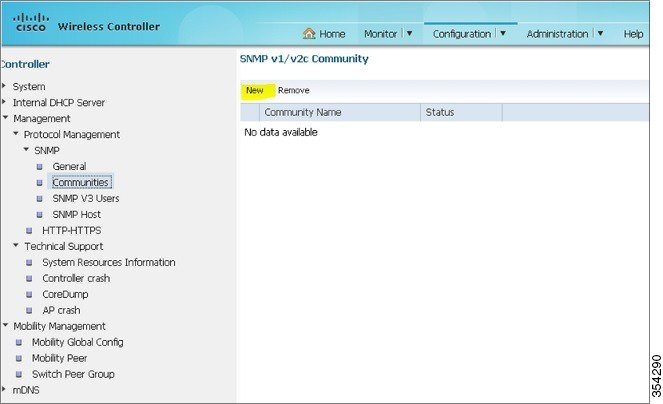
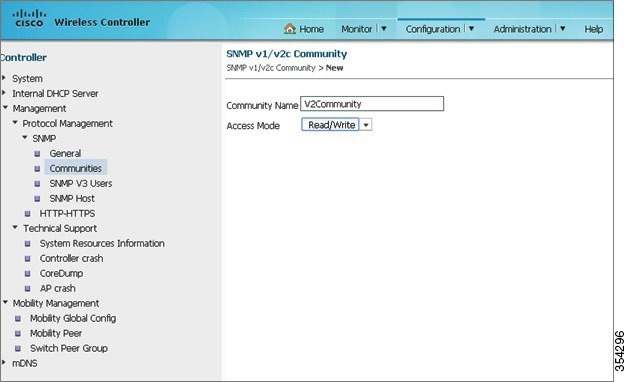
Configuring SNMP v3 on a Switch using CLI
To configure SNMP v3, use the following commands:
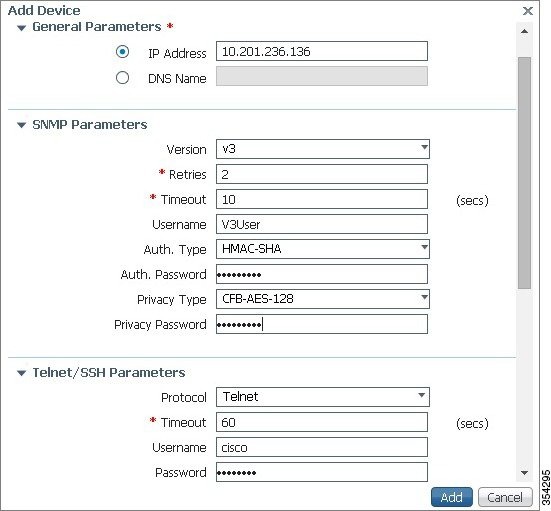
Configuring on Prime Infrastructure
Perform the following tasks to configure SNMP v2 and SNMP v3 on Prime Infrastructure:
Note | Use the Lifecycle view.
|
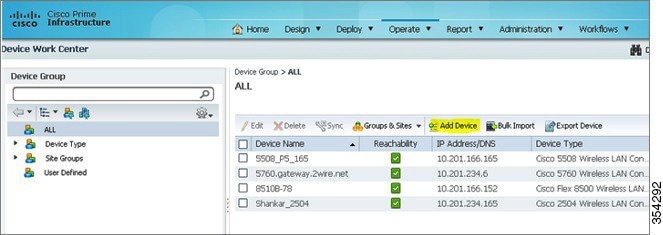
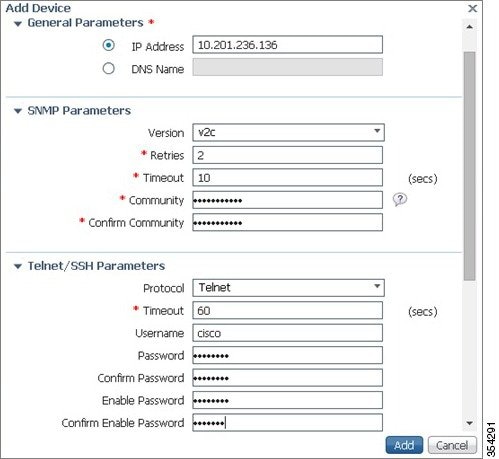
Verifying Converged Access Management Configuration
Verifying SNMP v2 Configuration on a Switch
To verify SNMP v2 configuration on the switch, use the following commands:
Device# show snmp community Community name: V2Community Community Index: V2Community Community SecurityName: V2Community storage-type: nonvolatile active |
Verifying SNMP v3 Configuration on a Switch
To verify SNMP v3 configuration on a switch, use the following commands:
Device# show snmp user User name: V3User Engine ID: 80000009030068BC0C5A8F80 storage-type: nonvolatile active Authentication Protocol: SHA Privacy Protocol: AES128 Group-name: V3Group Device# show snmp group groupname: V3Group security model:v3 auth contextname: <no context specified> storage-type: nonvolatile readview : V3Read writeview: V3Write notifyview: <no notifyview specified> row status: active |
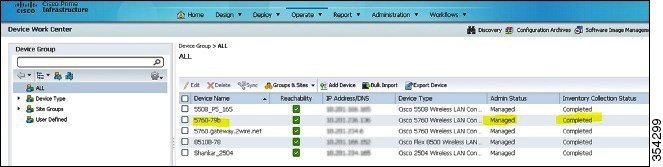
Verifying Configuration on Prime Infrastructure
Troubleshooting Converged Access Management Configuration Issues
There is currently no specific troubleshooting information available for this configuration.
 Feedback