- Auto Anchor SSID between Wireless LAN Controllers acting as MC
- Enabling Central Web Authentication on ISE
- Configuring Auto Anchor and Mobility Groups on Wireless Services
- Configuring Wireless Multicast on Wireless LAN Controllers
- Converged Access Consolidated Quick Reference Templates for Wireless LAN
- Converged Access Controller AP Join Issue Troubleshoot with Traces
- Converged Access Controllers MAC Address Entry for Network Mobility Service Protocol
- Configuration Example: Converged Access Management through Prime Infrastructure with SNMP v2 and v3
- Converged Access Path Maximum Transmission Unit Discovery
- Third-Party Certificate Installation on Converged Access Wireless LAN Controllers
- Configuration Example: Converged Access for WLC EAP-FAST with Internal RADIUS Server
- Converged Access and WLC Local EAP Authentication Configuration Example
- Configuration Example: Custom Web Authentication with Local Authentication
- Dynamic VLAN Assignment with Converged Access and ACS 5.2 Configuration Example
- Configuration Example: External RADIUS Server EAP Authentication
- External Web Authentication on Converged Access
- Installing Wireless Services
- Local Web Authentication with External RADIUS Authentication
- Local Web Authentication on Converged Access
- PEAP Authentication with Microsoft NPS Configuration
- QoS on Converged Access Controllers and Lightweight Access Points
- Configuration Example: TACACS Administrator Access to Converged Access Wireless LAN Controllers
- Configuration Example: Unified Access WLC Guest Anchor with Converged Access
- VideoStream Troubleshooting
- Custom Web Authentication Locally Hosted on WLC or an External Server
- Wireless Converged Access Chromecast Configuration Example
- Web Passthrough Configuration Example
- Configuration Examples: WPA2-PSK and Open Authentication
Configuration Example: Converged Access for WLC EAP-FAST with Internal RADIUS Server
This document describes how to configure the Cisco Converged Access Wireless LAN Controllers (WLCs), Cisco Catalyst 3850 Series, and Cisco Catalyst 3650 Series Switches to act as RADIUS servers that perform Cisco Extensible Authentication Protocol-Flexible Authentication via Secure Protocol (EAP-FAST, in this example) for client authentication.
An external RADIUS server is usually used to authenticate users, which in some cases is not a feasible solution. In situations where the RADIUS server is not a feasible solution to authenticate users, a Converged Access WLC can act as a RADIUS server, where users are authenticated against the local database that is configured in the WLC. The previously explained feature is called a Local RADIUS Server feature.
- Prerequisites
- Configuring Converged Access WLC as RADIUS Server
- Verifying Configuration for Converged Access
- Troubleshooting the Configuration for Converged Access
Prerequisites
We recommend that you have knowledge of the following topics before starting the configuration:
Supported Platform and Releases
-
Cisco 3602 Series Lightweight Access Point (AP)
-
Microsoft Windows XP with Intel PROset Supplicant
-
Cisco Catalyst 3560 Series Switches
 Note | The information in this document was created from the devices in a specific lab environment. All of the devices used in this document started with a specific (default) configuration. If your network is live, make sure that you understand the potential impact of any command. |
Configuring Converged Access WLC as RADIUS Server
Network Diagram for Converged Access
The following figure describes the network diagram of converged access:
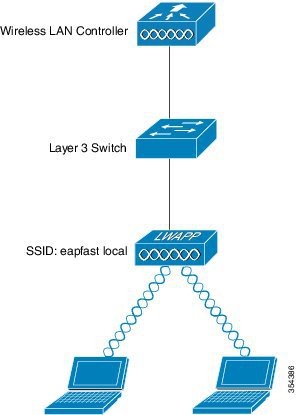
Configuring Converged Access
Configuring Converged Access WLC as RADIUS Server is based on the following steps:
Configuring WLC with CLI
Perform the following tasks to configure the WLC with the CLI:
-
To enable the AAA model on the WLC, use the following commands:
aaa new-model
-
To define authentication and authorization, use the following commands:
aaa local authentication eapfast authorization eapfast
aaa authentication dot1x eapfast local
aaa authorization credential-download eapfast local
aaa authentication dot1x default local
-
To configure the local EAP profile and the method, use the following commands (EAP-FAST is used in the following example):
eap profile eapfast
	method fast
!
-
To configure advanced EAP-FAST parameters, use the following commands:
eap method fast profile eapfast
 description test
 authority-id identity 1
 authority-id information 1
 local-key 0 cisco123
-
To configure WLAN and to map the local authorization profile to the WLAN, use the following commands:
wlan eapfastlocal 13 eapfastlocal
 client vlan VLAN0020
 local-auth eapfast
 session-timeout 1800
 no shutdown
-
To configure infrastructure to support the client connectivity, use the following commands:
ip dhcp snooping vlan 12,20,30,40,50
ip dhcp snooping
!
ip dhcp pool vlan20
 network 203.0.113.0 255.255.255.0
 default-router 203.0.113.251
 dns-server 203.0.113.251

interface TenGigabitEthernet1/0/1
 switchport trunk native vlan 12
 switchport mode trunk
 ip dhcp relay information trusted
 ip dhcp snooping trust
Configuring the WLC with the GUI
Perform the following tasks to configure the WLC with the GUI:
-
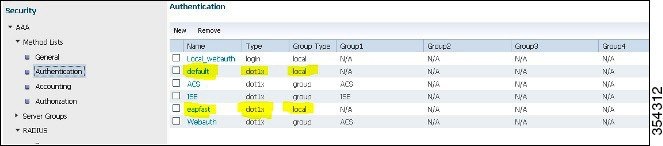
To configure the method list of Authentication, perform the following:
-
To configure the method list for Authorization, perform the following:
-
Configure the Local EAP profile.
Figure 4. EAP Profile 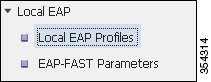
-
Create a new profile and choose the EAP type.
Figure 5. Local EAP Profiles 
The Profile Name is eapfast and the chosen EAP type is EAP-FAST as shown in the following figure:
Figure 6. Local EAP Profiles 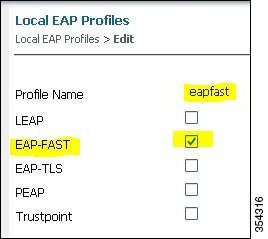
-
Configure the EAP-FAST Method Parameters:
Figure 7. EAP-FAST Method Parameters 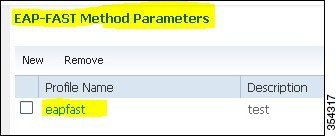
The Server Key is configured as Cisco123.
Figure 8. EAP-FAST Method Profile 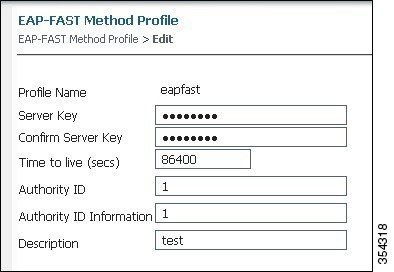
-
Check the Dot1x System Auth Control check box and choose eapfast for the Method Lists. Selecting Dot1x System Auth control and eapfast Method Lists helps you to perform the local EAP authentication.
Figure 9. Security 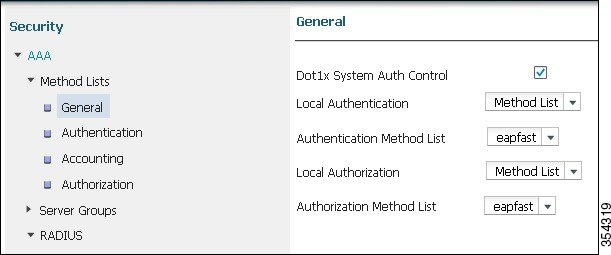
-
Configure the WLAN for WPA2 AES encryption.
Figure 10. WLAN 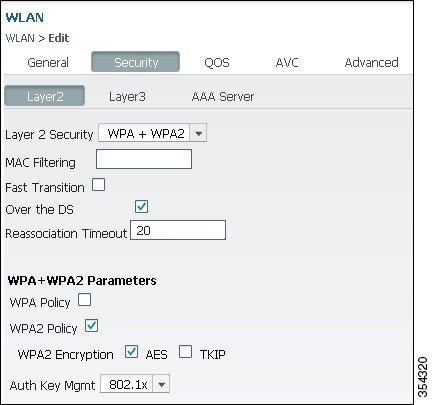
-
On the AAA Server tab, map the EAP Profile Name eapfast to the WLAN:
Figure 11. WLAN 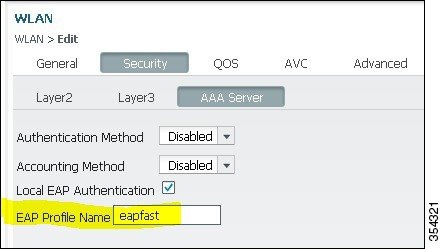

Verifying Configuration for Converged Access
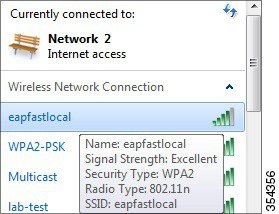
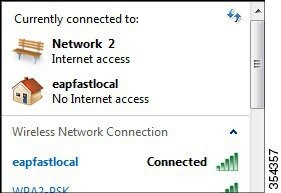
Perform the following steps to verify the configuration:
Troubleshooting the Configuration for Converged Access
We recommend that you use traces to troubleshoot wireless issues. Traces are saved in the circular buffer and are not processor intensive.
To enable the traces to obtain the Layer 2 (L2) auth logs, use the following commands:
- set trace group-wireless-secure level debug
- set trace group-wireless-secure filter mac0021.6a89.51ca
To enable these traces to obtain the DHCP events logs, use the following commands:
The following output is an example of a successful trace:
[04/10/14 18:49:50.719 IST 3 8116] 0021.6a89.51ca Association received from
 mobile on AP  c8f9.f983.4260

[04/10/14 18:49:50.719 IST 4 8116] 0021.6a89.51ca qos upstream policy is
 unknown and downstream policy is unknown
[04/10/14 18:49:50.719 IST 5 8116] 0021.6a89.51ca apChanged 1 wlanChanged 0
 mscb ipAddr 20.20.20.6, apf RadiusOverride 0x0, numIPv6Addr=0
[04/10/14 18:49:50.719 IST 6 8116] 0021.6a89.51ca Applying WLAN policy on MSCB.
[04/10/14 18:49:50.719 IST 7 8116] 0021.6a89.51ca Applying WLAN ACL policies
 to client

[04/10/14 18:49:50.719 IST 9 8116] 0021.6a89.51ca Applying site-specific IPv6
 override for station  0021.6a89.51ca  - vapId 13, site 'default-group',
 interface 'VLAN0020'
[04/10/14 18:49:50.719 IST a 8116] 0021.6a89.51ca Applying local bridging
 Interface Policy for station  0021.6a89.51ca  - vlan 20, interface 'VLAN0020'
[04/10/14 18:49:50.719 IST b 8116] 0021.6a89.51ca STA - rates (8):
 140 18 152 36 176 72 96 108 48 72 96 108 0 0 0 0

[04/10/14 18:49:50.727 IST 2f 8116] 0021.6a89.51ca Session Manager Call Client
 57ca4000000048, uid 42, capwap id 50b94000000012,Flag 4, Audit-Session ID
 0a6987b253468efb0000002a, method list

[04/10/14 18:49:50.727 IST 30 22] ACCESS-CORE-SM-CLIENT-SPI-NOTF:
 [0021.6a89.51ca, Ca3] Session update from Client[1] for 0021.6a89.51ca,
 ID list 0x00000000
[04/10/14 18:49:50.727 IST 31 22] ACCESS-CORE-SM-CLIENT-SPI-NOTF:
 [0021.6a89.51ca, Ca3]  (UPD): method: Dot1X, method list: none, aaa id:
 0x0000002A
[04/10/14 18:49:50.727 IST 32 22] ACCESS-CORE-SM-CLIENT-SPI-NOTF:
 [0021.6a89.51ca, Ca3]  (UPD): eap profile: eapfast

[04/10/14 18:49:50.728 IST 4b 278] ACCESS-METHOD-DOT1X-DEB:[0021.6a89.51ca,Ca3]
 Posting AUTH_START for 0xF700000A
[04/10/14 18:49:50.728 IST 4c 278] ACCESS-METHOD-DOT1X-DEB:[0021.6a89.51ca,Ca3]
 0xF700000A:entering request state
[04/10/14 18:49:50.728 IST 4d 278] ACCESS-METHOD-DOT1X-NOTF:[0021.6a89.51ca,Ca3]
 Sending EAPOL packet
[04/10/14 18:49:50.728 IST 4e 278] ACCESS-METHOD-DOT1X-INFO:[0021.6a89.51ca,Ca3]
 Platform changed src mac  of EAPOL packet
[04/10/14 18:49:50.728 IST 4f 278] ACCESS-METHOD-DOT1X-INFO:[0021.6a89.51ca,Ca3]
 EAPOL packet sent to client 0xF700000A
[04/10/14 18:49:50.728 IST 50 278] ACCESS-METHOD-DOT1X-DEB:[0021.6a89.51ca,Ca3]
 0xF700000A:idle request action
[04/10/14 18:49:50.761 IST 51 8116] 0021.6a89.51ca 1XA: Received 802.11 EAPOL
 message (len 5) from mobile
[04/10/14 18:49:50.761 IST 52 8116] 0021.6a89.51ca 1XA: Received EAPOL-Start
 from mobile
[04/10/14 18:49:50.761 IST 53 8116] 0021.6a89.51ca 1XA:  EAPOL-Start -
 EAPOL start message from mobile as mobile is in Authenticating state, restart
 authenticating

[04/10/14 18:49:50.816 IST 95 278] ACCESS-METHOD-DOT1X-DEB:[0021.6a89.51ca,Ca3]
 0xF700000A:entering response state
[04/10/14 18:49:50.816 IST 96 278] ACCESS-METHOD-DOT1X-NOTF:[0021.6a89.51ca,Ca3]
 Response sent to the server from 0xF700000A
[04/10/14 18:49:50.816 IST 97 278] ACCESS-METHOD-DOT1X-DEB:[0021.6a89.51ca,Ca3]
 0xF700000A:ignore response action
[04/10/14 18:49:50.816 IST 98 203] Parsed CLID MAC Address = 0:33:106:137:81:202
[04/10/14 18:49:50.816 IST 99 203] AAA SRV(00000000): process authen req
[04/10/14 18:49:50.816 IST 9a 203] AAA SRV(00000000): Authen method=LOCAL

[04/10/14 18:49:50.846 IST 11d 181] ACCESS-CORE-SM-CLIENT-SPI-NOTF:
 [0021.6a89.51ca, Ca3] Session authz status notification sent to Client[1] for
 0021.6a89.51ca with handle FE000052, list 630007B2
[04/10/14 18:49:50.846 IST 11e 181]ACCESS-METHOD-DOT1X-NOTF:[0021.6a89.51ca,Ca3]
 Received Authz Success for the client 0xF700000A (0021.6a89.51ca)
[04/10/14 18:49:50.846 IST 11f 271] ACCESS-METHOD-DOT1X-DEB:[0021.6a89.51ca,Ca3]
 Posting AUTHZ_SUCCESS on Client 0xF700000A
[04/10/14 18:49:50.846 IST 120 271] ACCESS-METHOD-DOT1X-DEB:[0021.6a89.51ca,Ca3]
 0xF700000A:entering authenticated state
[04/10/14 18:49:50.846 IST 121 271]ACCESS-METHOD-DOT1X-NOTF:[0021.6a89.51ca,Ca3]
 EAPOL success packet was sent earlier.

[04/10/14 18:49:50.846 IST 149 8116] 0021.6a89.51ca 1XA:authentication succeeded
[04/10/14 18:49:50.846 IST 14a 8116] 0021.6a89.51ca 1XK: Looking for BSSID
 c8f9.f983.4263  in PMKID cache
[04/10/14 18:49:50.846 IST 14b 8116] 0021.6a89.51ca 1XK: Looking for BSSID
 c8f9.f983.4263  in PMKID cache
[04/10/14 18:49:50.846 IST 14c 8116] 0021.6a89.51ca Starting key exchange with
 mobile - data forwarding is disabled
[04/10/14 18:49:50.846 IST 14d 8116] 0021.6a89.51ca 1XA: Sending EAPOL message
 to mobile, WLAN=13 AP WLAN=13
[04/10/14 18:49:50.858 IST 14e 8116] 0021.6a89.51ca 1XA: Received 802.11 EAPOL
 message (len 123) from mobile
[04/10/14 18:49:50.858 IST 14f 8116] 0021.6a89.51ca 1XA: Received EAPOL-Key from
 mobile
[04/10/14 18:49:50.858 IST 150 8116] 0021.6a89.51ca 1XK: Received EAPOL-key in
 PTK_START state (msg 2) from mobile
[04/10/14 18:49:50.858 IST 151 8116] 0021.6a89.51ca 1XK: Stopping retransmission
 timer
[04/10/14 18:49:50.859 IST 152 8116] 0021.6a89.51ca 1XA: Sending EAPOL message
 to mobile, WLAN=13 AP WLAN=13
[04/10/14 18:49:50.862 IST 153 8116] 0021.6a89.51ca 1XA: Received 802.11 EAPOL
 message (len 99) from mobile
[04/10/14 18:49:50.862 IST 154 8116] 0021.6a89.51ca 1XA: Received EAPOL-Key from
 mobile
[04/10/14 18:49:50.862 IST 155 8116] 0021.6a89.51ca 1XK: Received EAPOL-key in
 PTKINITNEGOTIATING state (msg 4) from mobile

[04/10/14 18:49:50.863 IST 172 338] [WCDB] wcdb_ffcp_cb: client (0021.6a89.51ca)
 client (0x57ca4000000048): FFCP operation (UPDATE) return code (0)
[04/10/14 18:49:50.914 IST 173 273] dhcp pkt processing routine is called for pak
 with SMAC = 0021.6a89.51ca and SRC_ADDR = 0.0.0.0
[04/10/14 18:49:50.914 IST 174 219] sending dhcp packet outafter processing with
 SMAC = 0021.6a89.51ca and SRC_ADDR = 0.0.0.0
[04/10/14 18:49:50.914 IST 175 256] DHCPD: address 20.20.20.6 mask 203.0.113.1
[04/10/14 18:49:54.279 IST 176 273] dhcp pkt processing routine is called for pak
 with SMAC = 0021.6a89.51ca and SRC_ADDR = 20.20.20.6
[04/10/14 18:49:54.279 IST 177 219] sending dhcp packet outafter processing with
 SMAC = 0021.6a89.51ca and SRC_ADDR = 20.20.20.6
 Feedback