- Auto Anchor SSID between Wireless LAN Controllers acting as MC
- Enabling Central Web Authentication on ISE
- Configuring Auto Anchor and Mobility Groups on Wireless Services
- Configuring Wireless Multicast on Wireless LAN Controllers
- Converged Access Consolidated Quick Reference Templates for Wireless LAN
- Converged Access Controller AP Join Issue Troubleshoot with Traces
- Converged Access Controllers MAC Address Entry for Network Mobility Service Protocol
- Configuration Example: Converged Access Management through Prime Infrastructure with SNMP v2 and v3
- Converged Access Path Maximum Transmission Unit Discovery
- Third-Party Certificate Installation on Converged Access Wireless LAN Controllers
- Configuration Example: Converged Access for WLC EAP-FAST with Internal RADIUS Server
- Converged Access and WLC Local EAP Authentication Configuration Example
- Configuration Example: Custom Web Authentication with Local Authentication
- Dynamic VLAN Assignment with Converged Access and ACS 5.2 Configuration Example
- Configuration Example: External RADIUS Server EAP Authentication
- External Web Authentication on Converged Access
- Installing Wireless Services
- Local Web Authentication with External RADIUS Authentication
- Local Web Authentication on Converged Access
- PEAP Authentication with Microsoft NPS Configuration
- QoS on Converged Access Controllers and Lightweight Access Points
- Configuration Example: TACACS Administrator Access to Converged Access Wireless LAN Controllers
- Configuration Example: Unified Access WLC Guest Anchor with Converged Access
- VideoStream Troubleshooting
- Custom Web Authentication Locally Hosted on WLC or an External Server
- Wireless Converged Access Chromecast Configuration Example
- Web Passthrough Configuration Example
- Configuration Examples: WPA2-PSK and Open Authentication
Dynamic VLAN Assignment with Converged Access and ACS 5.2 Configuration Example
This document describes the concept of dynamic VLAN assignment and how to configure wireless LAN controller (WLC) and a RADIUS server to assign a wireless LAN (WLAN) clients to a specific VLAN dynamically. In this document, the RADIUS server is an Access Control Server (ACS) that runs Cisco Secure Access Control System Version 5.2.oduction
- Prerequisites
- Dynamic VLAN Assignment
- Configuring Dynamic VLAN Assignment
- Verifying the Dynamic VLAN Assignment with Converged Access Configuration
- Troubleshooting the Dynamic VLAN Assignment Configuration Issues
Prerequisites
We recommend that you have basic and functional knowledge on following topics:
Supported Platforms and Releases
-
Cisco Catalyst 3850 series Switches Wireless LAN Controller with Cisco IOS® XE Software Release 3.2.2
-
Cisco Aironet 3600 Series Lightweight Access Point
-
Microsoft Windows XP with Intel Proset Supplicant
-
Cisco Secure Access Control System Version 5.2
-
Cisco Catalyst 3500 Series Switches
 Note | The information in this document was created from the devices in a specific lab environment. All of the devices used in this document started with a cleared (default) configuration. If your network is live, make sure that you understand the potential impact of any command. |
Dynamic VLAN Assignment
In most WLAN systems, each WLAN has a static policy that applies to all clients associated with a Service Set Identifier (SSID), or WLAN in the controller terminology. Although this static policy is powerful, it has some limitations since it requires clients to associate with different SSIDs in order to inherit different QoS and security policies.
Cisco WLAN solution supports identity networking that allows the network to advertise a single SSID, only for specific users to inherit different QoS, VLAN attributes, and/or security policies based on the user credentials.
Dynamic VLAN assignment is one such feature that places a wireless user into a specific VLAN, based on the credentials supplied by the user. This task of user assignment to a specific VLAN is handled by a RADIUS authentication server, i.e. a Cisco Secure ACS. This feature can be used, for example, in order to allow the wireless host to remain on the same VLAN as it moves within a campus network.
As a result, when a client attempts to associate to a LAP registered with a controller, the LAP passes the credentials of the user to the RADIUS server for validation. Once the authentication is successful, the RADIUS server passes certain Internet Engineering Task Force (IETF) attributes to the user. These RADIUS attributes decide the VLAN ID that should be assigned to the wireless client. The SSID of the client (the WLAN, in terms of the WLC) does not matter because the user is always assigned to this predetermined VLAN ID.
The RADIUS user attributes used for the VLAN ID assignment are:
-
IETF 64 (Tunnel Type) - Set to VLAN.
-
IETF 65 (Tunnel Medium Type) - Set to 802.
-
IETF 81 (Tunnel-Private-Group-ID) - Set to the VLAN ID.
-
The VLAN ID is 12 bits and takes a value between 1 and 4094 (inclusive of both 1 and 4094). The Tunnel-Private-Group-ID is of type string for use with IEEE 802.1X. Therefore, the VLAN ID integer value is encoded as a string. When these tunnel attributes are sent, it is necessary to fill in the Tag field.
As noted in RFC2868, section 3.1—The Tag field is one octet in length and is intended to provide a means of grouping attributes in the same packet which refer to the same tunnel.
Valid values for the Tag field are 0x01 through 0x1F, inclusive. If the Tag field is unused, it must be zero (0x00). Refer to RFC 2868 for more information on all RADIUS attributes.
Configuring Dynamic VLAN Assignment
Configuring dynamic VLAN assignment is a two-step process which includes:
- Network Diagram of Dynamic VLAN Assignment
- Configuring WLC (CLI)
- Configuring WLAN (GUI)
- Configuring RADIUS Server on WLC (GUI)
- Configuring RADIUS Server
Network Diagram of Dynamic VLAN Assignment
The following figure shows the network setup of Dynamic VLAN Assignment with Converged Access and ACS 5.2
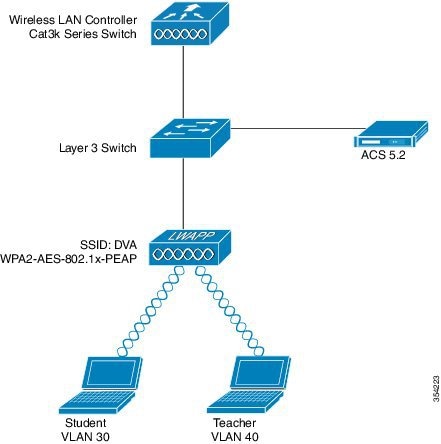
Security mechanism used in this document is 802.1X with Protected Extensible Authentication Protocol (PEAP).
Make sure the following tasks are completed before you starts with configuration:
Configuring WLC (CLI)
This section shows configuring WLAN, RADIUS Server and DHCP Pool for Client VLAN.
Configuring WLAN
The following example shows how WLAN is configured with the SSID of DVA:
wlan DVA 3 DVA
aaa-override
client vlan VLAN0020
security dot1x authentication-list ACS
session-timeout 1800
no shutdown
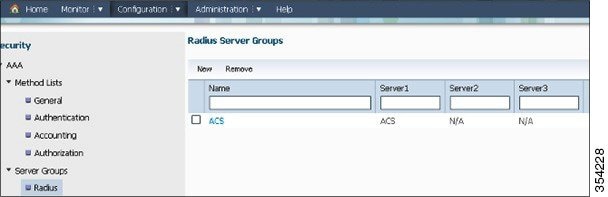
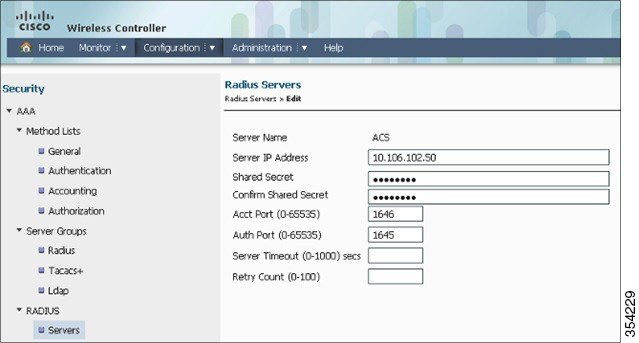
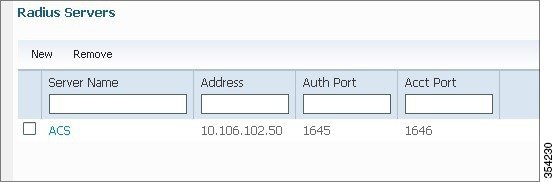
Configuring RADIUS Server on WLC
Configuring the RADIUS server on WLC is shown in the below example:
aaa new-model
!
!
aaa group server radius ACS
server name ACS
!
aaa authentication dot1x ACS group ACS

radius server ACS
address ipv4 10.106.102.50 auth-port 1645 acct-port 1646
key Cisco123

dot1x system-auth-control
Configuring DHCP Pool for Client VLAN
This is an example to configure DHCP pool for the client VLAN 30 and VLAN 40:
interface Vlan30
ip address 30.30.30.1 255.255.255.0
!
interface Vlan40
ip address 40.40.40.1 255.255.255.0

ip dhcp pool vla30
network 30.30.30.0 255.255.255.0
default-router 30.30.30.1
!
ip dhcp pool vlan40
network 40.40.40.0 255.255.255.0
default-router 40.40.40.1

ip dhcp snooping vlan 30,40
ip dhcp snooping
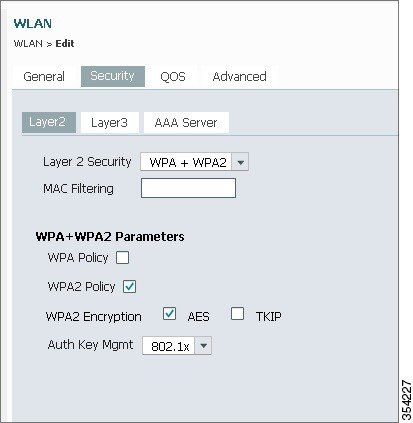
Configuring WLAN (GUI)
Perform the following tasks to configure WLAN.
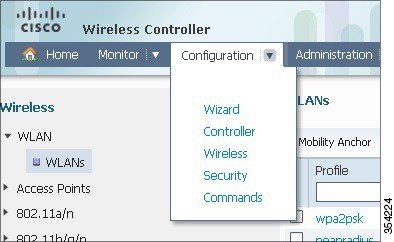
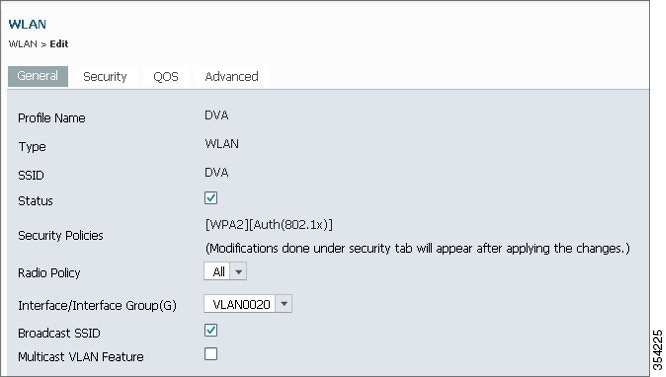
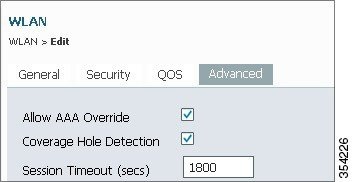
Configuring RADIUS Server on WLC (GUI)
The following section describes how to configure RADIUS server on WLC.
Configuring RADIUS Server
Perform the following tasks to configure the RADIUS server.
| Step 1 |
On the RADIUS server, navigate to Users and Identity Stores > Internal Identity Stores > Users. |
| Step 2 |
Create the appropriate User Names and Identity Groups. In this example, student and teacher are created as Usernames and similarly All Groups:Students, and AllGroups:Teachers are created as Identity Groups. 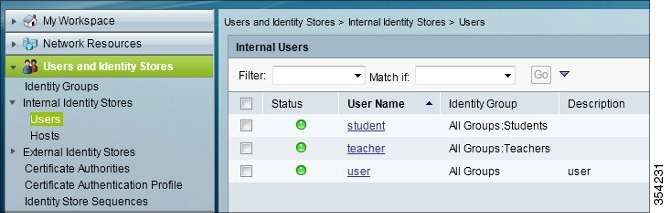 |
| Step 3 |
Create the Authorization Profiles for AAA override by navigating to Policy Elements > Authorization and Permissions > Network Access > Authorization Profiles. 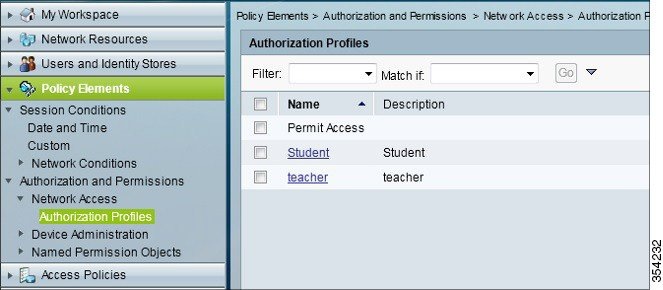 |
| Step 4 |
Edit the Authorization Profile for Student. 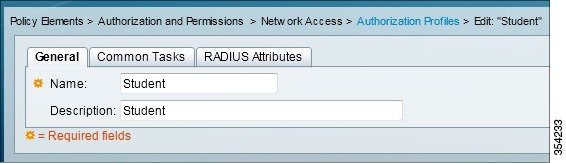 |
| Step 5 |
Set the VLAN ID/Name as Static using drop-down list and a Value of30 (VLAN 30) for student. 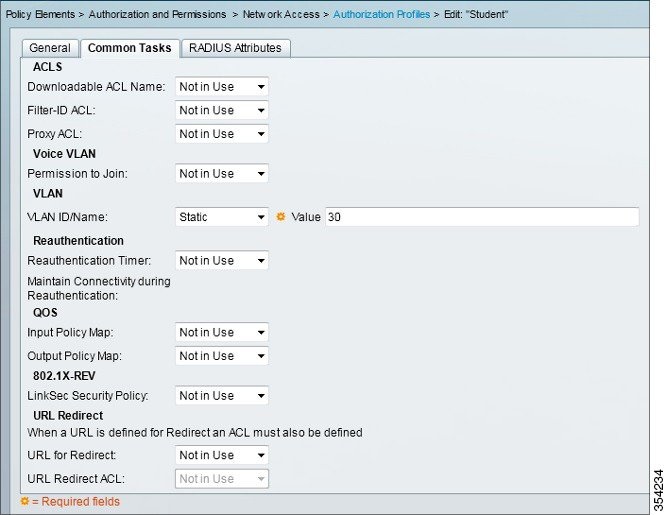 |
| Step 6 |
Similarly, edit the Authorization Profile for Teacher. |
| Step 7 |
Set the VLAN ID / Name as Static from drop-down list and a Value of 40 (VLAN 40) for teacher. |
| Step 8 |
Navigate to Access Policies > Access Services > Default Network Access, and click the Allowed Protocols. Check the Allow PEAP checkbox. 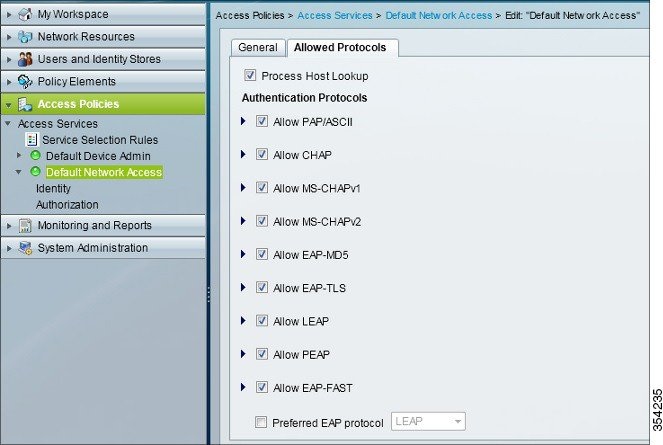 |
| Step 9 |
Define the rules in order to allow PEAP users by navigating to Identity. |
| Step 10 |
Map Student and Teacher to the Authorization Policy by navigating to Authorization. In this configuration we mapped Student for VLAN30 and Teacher for VLAN 40. |
Verifying the Dynamic VLAN Assignment with Converged Access Configuration
Perform the following task in order to verify Dynamic VLAN assignment with Converged Access configuration.
| Step 1 |
Monitor the page on the ACS that shows which clients are authenticated. |
| Step 2 |
Connect to the DVA WLAN with Student Group, and review the client WiFi Connection Utility. 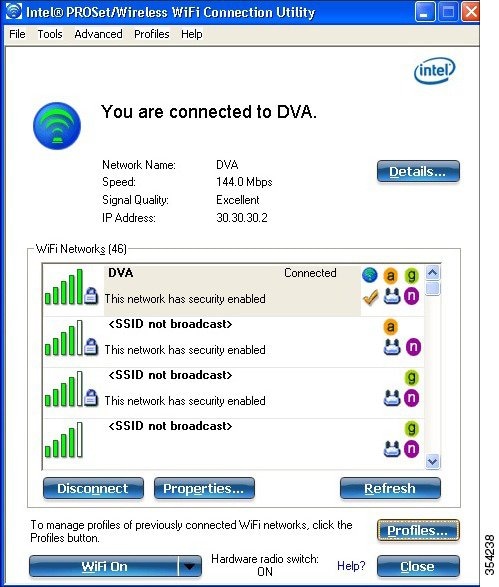 |
| Step 3 |
Similarly, connect to the DVA WLAN with the Teacher Group, and review the client WiFi Connection Utility. |
Troubleshooting the Dynamic VLAN Assignment Configuration Issues
This section provides troubleshoot information of Dynamic VLAN Assignment with Converged Access configuration.
Note | Refer to Important Information on Debug Commands before you use debug commands. |
Useful debugs include debug client mac-address mac, as well as the following Converged Access trace commands:
-
set trace group-wireless-client level debug
-
set trace group-wireless-client filter mac xxxx.xxxx.xxxx
-
show trace sys-filtered-traces
The Converged Access trace does not include dot1x/AAA, so use this entire list of combined traces for dot1x/AAA:
-
set trace group-wireless-client level debug
-
set trace wcm-dot1x event level debug
-
set trace wcm-dot1x aaa level debug
-
set trace aaa wireless events level debug
-
set trace access-session core sm level debug
-
set trace access-session method dot1x level debug
-
set trace group-wireless-client filter mac xxxx.xxxx.xxxx
-
set trace wcm-dot1x event filter mac xxxx.xxxx.xxxx
-
set trace wcm-dot1x aaa filter mac xxxx.xxxx.xxxx
-
set trace aaa wireless events filter mac xxxx.xxxx.xxxx
-
set trace access-session core sm filter mac xxxx.xxxx.xxxx
-
set trace access-session method dot1x filter mac xxxx.xxxx.xxxx
-
show trace sys-filtered-traces
When dynamic VLAN assignment is working correctly, you should see following type of output from the debugs as follows:
09/01/13 12:13:28.598 IST 1ccc 5933] 0021.5C8C.C761 1XA: Received Medium tag (0)
   Tunnel medium type (6) and Tunnel-Type tag (0) and Tunnel-type (13)
   Tunnel-Private-Id (30)
[09/01/13 12:13:28.598 IST 1ccd 5933] 0021.5C8C.C761 Tunnel-Group-Id is 30
[09/01/13 12:13:28.598 IST 1cce 5933] 0021.5C8C.C761 Checking Interface
   Change - Current VlanId: 40 Current Intf: VLAN0040 New Intf: VLAN0030 New
   GroupIntf:  intfChanged: 1
[09/01/13 12:13:28.598 IST 1ccf 5933] 0021.5C8C.C761 Incrementing the
   Reassociation Count 1 for client (of interface VLAN0040)
 --More--         [09/01/13 12:13:28.598 IST 1cd0 5933] 0021.5C8C.C761
   Clearing Address 40.40.40.2 on mobile
[09/01/13 12:13:28.598 IST 1cd1 5933] 0021.5C8C.C761 Applying new AAA override
   for station  0021.5C8C.C761
[09/01/13 12:13:28.598 IST 1cd2 5933] 0021.5C8C.C761 Override values (cont..)
   dataAvgC: -1, rTAvgC: -1, dataBurstC: -1, rTimeBurstC: -1
    vlanIfName: 'VLAN0030', aclName: ''

[09/01/13 12:13:28.598 IST 1cd3 5933] 0021.5C8C.C761 Clearing Dhcp state for
   station  ---
[09/01/13 12:13:28.598 IST 1cd4 5933] 0021.5C8C.C761 Applying WLAN ACL policies
   to client
[09/01/13 12:13:28.598 IST 1cd5 5933] 0021.5C8C.C761 No Interface ACL used for
   Wireless client in WCM(NGWC)
[09/01/13 12:13:28.598 IST 1cd6 5933] 0021.5C8C.C761 Inserting AAA Override
   struct for mobile
    MAC:  0021.5C8C.C761 , source 4

[09/01/13 12:13:28.598 IST 1cd7 5933] 0021.5C8C.C761 Inserting new RADIUS
   override into chain for station  0021.5C8C.C761
[09/01/13 12:13:28.598 IST 1cd8 5933] 0021.5C8C.C761 Override values (cont..)
   dataAvgC: -1, rTAvgC: -1, dataBurstC: -1, rTimeBurstC: -1
    vlanIfName: 'VLAN0030', aclName: ''

 --More--         [09/01/13 12:13:28.598 IST 1cd9 5933] 0021.5C8C.C761
   Applying override policy from source Override Summation:

[09/01/13 12:13:28.598 IST 1cda 5933] 0021.5C8C.C761 Override values (cont..)
   dataAvgC: -1, rTAvgC: -1, dataBurstC: -1, rTimeBurstC: -1
    vlanIfName: 'VLAN0030', aclName: ''

[09/01/13 12:13:28.598 IST 1cdb 5933] 0021.5C8C.C761 Applying local bridging
   Interface Policy for station  0021.5C8C.C761  - vlan 30, interface 'VLAN0030'
[09/01/13 12:13:28.598 IST 1cdc 5933] 0021.5C8C.C761 1XA: Setting reauth timeout
   to 1800 seconds from WLAN config
[09/01/13 12:13:28.598 IST 1cdd 5933] 0021.5C8C.C761 1XA: Setting reauth timeout
   to 1800 seconds
[09/01/13 12:13:28.598 IST 1cde 5933] 0021.5C8C.C761 1XK: Creating a PKC PMKID
   Cache entry (RSN 1)
[09/01/13 12:13:28.598 IST 1cdf 5933] 0021.5C8C.C761 1XK: Set Link Secure: 0


[09/01/13 12:08:59.553 IST 1ae1 5933] 0021.5C8C.C761 1XA: Received Medium tag (0)
   Tunnel medium type (6) and Tunnel-Type tag (0) and Tunnel-type (13)
   Tunnel-Private-Id (40)
[09/01/13 12:08:59.553 IST 1ae2 5933] 0021.5C8C.C761 Tunnel-Group-Id is 40
 --More--         [09/01/13 12:08:59.553 IST 1ae3 5933] 0021.5C8C.C761
   Checking Interface Change - Current VlanId: 20 Current Intf: VLAN0020 New Intf:
   VLAN0040 New GroupIntf:  intfChanged: 1
[09/01/13 12:08:59.553 IST 1ae4 5933] 0021.5C8C.C761 Applying new AAA override for
   station  0021.5C8C.C761
[09/01/13 12:08:59.553 IST 1ae5 5933] 0021.5C8C.C761 Override values (cont..)
   dataAvgC: -1, rTAvgC: -1, dataBurstC: -1, rTimeBurstC: -1
    vlanIfName: 'VLAN0040', aclName: ''

[09/01/13 12:08:59.553 IST 1ae6 5933] 0021.5C8C.C761 Clearing Dhcp state for
   station  ---
[09/01/13 12:08:59.553 IST 1ae7 5933] 0021.5C8C.C761 Applying WLAN ACL policies
   to client
[09/01/13 12:08:59.553 IST 1ae8 5933] 0021.5C8C.C761 No Interface ACL used for
   Wireless client in WCM(NGWC)
[09/01/13 12:08:59.553 IST 1ae9 5933] 0021.5C8C.C761 Inserting AAA Override struct
   for mobile
    MAC:  0021.5C8C.C761 , source 4

[09/01/13 12:08:59.553 IST 1aea 5933] 0021.5C8C.C761 Inserting new RADIUS override
   into chain for station  0021.5C8C.C761
[09/01/13 12:08:59.553 IST 1aeb 5933] 0021.5C8C.C761 Override values (cont..)
   dataAvgC: -1, rTAvgC: -1, dataBurstC: -1, rTimeBurstC: -1
    vlanIfName: 'VLAN0040', aclName: ''
 --More--
[09/01/13 12:08:59.553 IST 1aec 5933] 0021.5C8C.C761 Applying override policy
   from source Override Summation:

[09/01/13 12:08:59.553 IST 1aed 5933] 0021.5C8C.C761 Override values (cont..)
   dataAvgC: -1, rTAvgC: -1, dataBurstC: -1, rTimeBurstC: -1
    vlanIfName: 'VLAN0040', aclName: ''

[09/01/13 12:08:59.553 IST 1aee 5933] 0021.5C8C.C761 Applying local bridging
   Interface Policy for station  0021.5C8C.C761  - vlan 40, interface 'VLAN0040'
[09/01/13 12:08:59.553 IST 1aef 5933] 0021.5C8C.C761 1XA: Setting reauth timeout
   to 1800 seconds from WLAN config
[09/01/13 12:08:59.553 IST 1af0 5933] 0021.5C8C.C761 1XA: Setting reauth timeout
   to 1800 seconds
[09/01/13 12:08:59.553 IST 1af1 5933] 0021.5C8C.C761 1XK: Creating a PKC PMKID
   Cache entry (RSN 1)
 Feedback