- Auto Anchor SSID between Wireless LAN Controllers acting as MC
- Enabling Central Web Authentication on ISE
- Configuring Auto Anchor and Mobility Groups on Wireless Services
- Configuring Wireless Multicast on Wireless LAN Controllers
- Converged Access Consolidated Quick Reference Templates for Wireless LAN
- Converged Access Controller AP Join Issue Troubleshoot with Traces
- Converged Access Controllers MAC Address Entry for Network Mobility Service Protocol
- Configuration Example: Converged Access Management through Prime Infrastructure with SNMP v2 and v3
- Converged Access Path Maximum Transmission Unit Discovery
- Third-Party Certificate Installation on Converged Access Wireless LAN Controllers
- Configuration Example: Converged Access for WLC EAP-FAST with Internal RADIUS Server
- Converged Access and WLC Local EAP Authentication Configuration Example
- Configuration Example: Custom Web Authentication with Local Authentication
- Dynamic VLAN Assignment with Converged Access and ACS 5.2 Configuration Example
- Configuration Example: External RADIUS Server EAP Authentication
- External Web Authentication on Converged Access
- Installing Wireless Services
- Local Web Authentication with External RADIUS Authentication
- Local Web Authentication on Converged Access
- PEAP Authentication with Microsoft NPS Configuration
- QoS on Converged Access Controllers and Lightweight Access Points
- Configuration Example: TACACS Administrator Access to Converged Access Wireless LAN Controllers
- Configuration Example: Unified Access WLC Guest Anchor with Converged Access
- VideoStream Troubleshooting
- Custom Web Authentication Locally Hosted on WLC or an External Server
- Wireless Converged Access Chromecast Configuration Example
- Web Passthrough Configuration Example
- Configuration Examples: WPA2-PSK and Open Authentication
Converged Access Controller AP Join Issue Troubleshoot with Traces
This document describes about trace commands that are used to troubleshoot Access Point (AP) join issues on converged access controllers and some of the common reasons for AP join failure.
- Prerequisites
- AP Join Sequence and Troubleshoot
- Common Reasons for AP Join Failure
- General Technical Tips on Trace Commands
Prerequisites
You should have basic knowledge on following topics:
Supported Platforms and Releases
The information in this document is based on a Cisco Catalyst 3850 Series Switch that runs software Version 3.3.0 SE.
-
Lightweight Access Point Protocol (LWAPP) / Control and Provisioning of Wireless Access Points (CAPWAP).
-
Lightweight Access Point (LAP) and Wireless LAN Controller (WLC) configurations for basic operation.
 Note | The information in this document was created from the devices in a specific lab environment. All of the devices used in this document started with a cleared (default) configuration. If your network is live, make sure that you understand the potential impact of any command. |
Associated Products
The following listed products are applicable to all converged access controllers:
AP Join Sequence and Troubleshoot
AP Join Sequence
The following figure depicts the join sequences between an Access Point and Wireless Control Module (WCM).
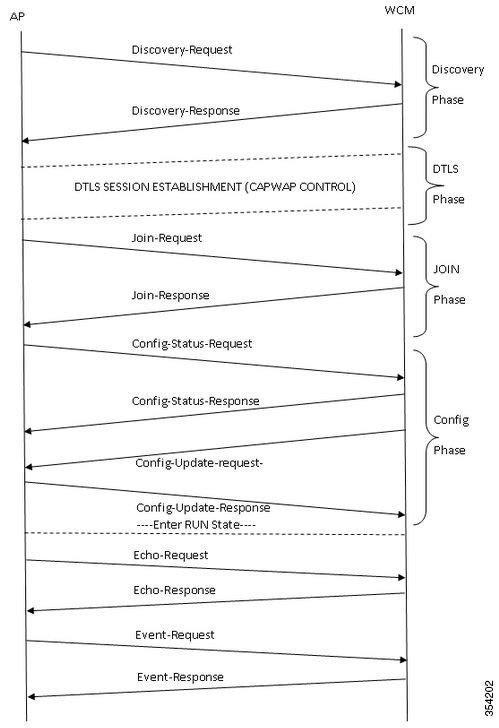
Troubleshoot
Basic Steps
Perform the following task to troubleshoot the AP join issues on converged access controllers:
-
First, confirm that the AP is able to pull an IP address.
-
From the switch where the AP is plugged in, enter the following command: # show cdp neighbor <port_id> detail
Note
The AP should be connected to the Cisco Catalyst 3850 Series Switch and the switchport must be configured as:
Interface gig <>
Switchport mode access
Switchport access vlan x
(Where x is the wireless management interface and vlan x configured on the Cisco Catalyst 3850 Series Switch)
-
Make sure that the WLC can ping the IP address and vice versa.
-
To verify that a wireless mobility controller (MC) is configured on the network, enter the following command: #show wireless mobility summary
Note
If you logged into a Mobility Agent, ensure that the tunnel mobility controller is active.
-
Confirm the AP license is enabled on the MC: #show license right-to-use summary
-
Authorize the correct country code is enabled: #show wireless country configured
Traces from Controller
Based on the review of trace outputs, the group-ap traces provides more significant output to troubleshoot the AP join. Hence this trace (unfiltered) is discussed in detail.
Refer to the General Technical Tips on Trace Commands section for more information about filtering options and limitations on this trace.
Note | Sample output (filtered and unfiltered) for capwap and capwap ap is included for reference. |
Default settings of the group-ap
To view the default settings of the group-ap trace, enter the following command:
#show trace settings group-ap

Buffer Properties:
Feature Name                                   Size         Level
--------------------------------------------------------------------
capwap/ap/event                                 0           warning
dtls/ap/event                                   0           warning
iosd-wireless/capwap                            0           warning

Feature-Name: capwap/ap/event
      Filters: None
Feature-Name: dtls/ap/event
      Filters: None
Feature-Name: iosd-wireless/capwap
      Filters: None
Note | By default, there are no filters set on any of the traces. |
Clearing the group-ap
#set trace control group-ap clear
Setting the trace level group-ap
Enter the following command to set the trace level for the group-ap:
#set trace group-ap level ?
 debug    Debug-level messages (7)
  default  Unset Trace Level Value
  err      Error conditions (3)
  info     Informational (6)
  warning  Warning conditions (4)
Note | Use the #set trace group-ap level debug to debug while you troubleshoot the issues. |
Verifying the tracing level
To verify the tracing level, enter the following command:
#show trace settings group-ap

Buffer Properties:
Feature-Name                                   Size        Level
------------------------------------------------------------------
capwap/ap/event                                 0          debug
dtls/ap/event                                   0          debug
iosd-wireless/capwap                            0          debug

Feature-Name: capwap/ap/event
      Filters: None
Feature-Name: dtls/ap/event
      Filters: None
Feature-Name: iosd-wireless/capwap
      Filters: None
Viewing trace output of group-ap
To view the trace output of group-ap, enter the following command:
# show trace messages group-ap
Discovery-Request / Response
[11/14/13 14:50:17.484 UTC 702f4a 8528] f84f.57ca.3860 Discovery Request from
10.201.234.24:18759

[11/14/13 14:50:17.484 UTC 702f4b 8528] f84f.57ca.3860 Discovery apType = 0,
apModel = AIR-CAP2602I-A-K9, Discovery supportedRadios = 0, incomingRadJoinPriority
= 1, Discovery versionNum = 167863296

[11/14/13 14:50:17.484 UTC 702f4c 8528] f84f.57ca.3860 Join Priority Processing
status =0, Incoming Ap's Priority 1, MaxLrads = 50, joined Aps =0

[11/14/13 14:50:17.484 UTC 702f4d 8528] f84f.57ca.3860 Validated Discovery request
with dest ip : 255.255.255.255 from AP  10.201.234.24. Response to be sent using
ip : 10.201.234.4

[11/14/13 14:50:17.484 UTC 702f4e 8528] Encode static AP manager 10.201.234.4,
AP count 0

[11/14/13 14:50:17.484 UTC 702f4f 8528] acEncodeMwarTypePayload encode mwarType = 0
in capwapMwarTypePayload.

[11/14/13 14:50:17.484 UTC 702f50 8528] f84f.57ca.3860 Discovery Response sent to
10.201.234.24:18759

[11/14/13 14:50:27.484 UTC 57 8528] Connection not found in hash table - Table empty.
DTLS-Handshake
[11/14/13 14:50:27.484 UTC 702f51 8528] DTLS connection not found, creating new
connection for 10:201:234:24 (18759) 10:201:234:4 (5246)

[11/14/13 14:50:27.484 UTC 702f52 8528] acDtlsCallback: entering...

[11/14/13 14:50:27.484 UTC 702f53 8528] acDtlsCallback: cb->code 10

[11/14/13 14:50:27.484 UTC 58 8528] Certificate installed for PKI based
authentication.

[11/14/13 14:50:27.484 UTC 59 8528] Incremented concurrent handshaking count 1

[11/14/13 14:50:27.484 UTC 5a 8528] f84f.57ca.3860 record=Handshake epoch=0
seq=0

[11/14/13 14:50:27.484 UTC 5b 8528] f84f.57ca.3860   msg=ClientHello len=44 seq=0
frag_off=0 frag_len=44

[11/14/13 14:50:27.485 UTC 5c 8528] f84f.57ca.3860 Handshake in progress...

[11/14/13 14:50:27.489 UTC 5d 8528] f84f.57ca.3860 record=Handshake epoch=0 seq=1

[11/14/13 14:50:27.489 UTC 5e 8528] f84f.57ca.3860   msg=ClientHello len=76
seq=1 frag_off=0 frag_len=76 (with cookie)

[11/14/13 14:50:27.490 UTC 5f 8528] f84f.57ca.3860 Handshake in progress...

[11/14/13 14:50:27.670 UTC 60 8528] f84f.57ca.3860 record=Handshake epoch=0 seq=2

[11/14/13 14:50:27.670 UTC 61 8528] f84f.57ca.3860   msg=Certificate len=1146
seq=2 frag_off=0 frag_len=519

[11/14/13 14:50:27.670 UTC 62 8528] f84f.57ca.3860 Handshake in progress...

[11/14/13 14:50:27.670 UTC 63 8528] f84f.57ca.3860 record=Handshake epoch=0 seq=3

[11/14/13 14:50:27.670 UTC 64 8528] f84f.57ca.3860   msg=Certificate len=1146
seq=2 frag_off=519 frag_len=519

[11/14/13 14:50:27.670 UTC 65 8528] f84f.57ca.3860 Handshake in progress...

[11/14/13 14:50:27.670 UTC 66 8528] f84f.57ca.3860 record=Handshake epoch=0 seq=4

[11/14/13 14:50:27.670 UTC 67 8528] f84f.57ca.3860   msg=Certificate len=1146
seq=2 frag_off=1038 frag_len=108

[11/14/13 14:50:27.671 UTC 702f54 8528] acDtlsCallback: entering...

[11/14/13 14:50:27.671 UTC 702f55 8528] acDtlsCallback: cb->code 3

[11/14/13 14:50:27.672 UTC 68 8528] Verify X.509 certificate from wtp
7c69.f604.9460

[11/14/13 14:50:27.673 UTC 702f56 8528] acDtlsCallback Cert validation PENDING

[11/14/13 14:50:27.673 UTC 69 8528] f84f.57ca.3860 Certificate verification -
pending...

[11/14/13 14:50:27.673 UTC 6a 8528] f84f.57ca.3860 Handshake in process..
awaiting certificate verification result..

[11/14/13 14:50:27.673 UTC 6b 8528] f84f.57ca.3860 record=Handshake epoch=0 seq=5

[11/14/13 14:50:27.673 UTC 6c 8528] f84f.57ca.3860   msg=ClientKeyExchange
len=130 seq=3 frag_off=0 frag_len=130

[11/14/13 14:50:27.673 UTC 702f57 8528] acDtlsCallback: entering...

[11/14/13 14:50:27.673 UTC 702f58 8528] acDtlsCallback: cb->code 3

[11/14/13 14:50:27.674 UTC 6d 8528] Verify X.509 certificate from wtp
7c69.f604.9460

[11/14/13 14:50:27.675 UTC 702f59 8528] acDtlsCallback Cert validation PENDING

[11/14/13 14:50:27.675 UTC 6e 8528] f84f.57ca.3860 Certificate verification -
pending...

[11/14/13 14:50:27.675 UTC 6f 8528] f84f.57ca.3860 Handshake in process..
awaiting certificate verification result..

[11/14/13 14:50:27.675 UTC 70 8528] f84f.57ca.3860 record=Handshake epoch=0 seq=6

[11/14/13 14:50:27.675 UTC 71 8528] f84f.57ca.3860   msg=CertificateVerify
len=258 seq=4 frag_off=0 frag_len=258

[11/14/13 14:50:27.675 UTC 702f5a 8528] acDtlsCallback: entering...

[11/14/13 14:50:27.675 UTC 702f5b 8528] acDtlsCallback: cb->code 3

[11/14/13 14:50:27.676 UTC 72 8528] Verify X.509 certificate from wtp 7c69.f604.9460

[11/14/13 14:50:27.676 UTC 702f5c 8528] acDtlsCallback Cert validation PENDING

[11/14/13 14:50:27.676 UTC 73 8528] f84f.57ca.3860 Certificate verification -
pending...

[11/14/13 14:50:27.676 UTC 74 8528] f84f.57ca.3860 Handshake in process..
awaiting certificate verification result..

[11/14/13 14:50:27.677 UTC 75 8528] f84f.57ca.3860 record=ChangeCipherSpec
epoch=0 seq=7

[11/14/13 14:50:27.677 UTC 702f5d 8528] acDtlsCallback: entering...

[11/14/13 14:50:27.677 UTC 702f5e 8528] acDtlsCallback: cb->code 3

[11/14/13 14:50:27.677 UTC 76 8528] Verify X.509 certificate from wtp 7c69.f604.9460

[11/14/13 14:50:27.678 UTC 702f5f 8528] acDtlsCallback Cert validation PENDING

[11/14/13 14:50:27.678 UTC 77 8528] f84f.57ca.3860 Certificate verification -
pending...

[11/14/13 14:50:27.678 UTC 78 8528] f84f.57ca.3860 Handshake in process..
awaiting certificate verification result..

[11/14/13 14:50:27.678 UTC 79 8528] f84f.57ca.3860 record=Handshake epoch=1 seq=0

[11/14/13 14:50:27.678 UTC 7a 8528] f84f.57ca.3860   msg=Unknown or Encrypted

[11/14/13 14:50:27.679 UTC 702f60 8528] acDtlsCallback: entering...

[11/14/13 14:50:27.679 UTC 702f61 8528] acDtlsCallback: cb->code 3

[11/14/13 14:50:27.679 UTC 7b 8528] Verify X.509 certificate from wtp 7c69.f604.9460

[11/14/13 14:50:27.680 UTC 702f62 8528] acDtlsCallback Cert validation PENDING

[11/14/13 14:50:27.680 UTC 7c 8528] f84f.57ca.3860 Certificate verification -
pending...

[11/14/13 14:50:27.680 UTC 7d 8528] f84f.57ca.3860 Handshake in process..
awaiting certificate verification result..

[11/14/13 14:50:27.681 UTC 7e 8528] Tickling the connection:  10.201.234.4:5246
<-> 10.201.234.24:18759.

[11/14/13 14:50:27.681 UTC 702f63 8528] acDtlsCallback: entering...

[11/14/13 14:50:27.681 UTC 702f64 8528] acDtlsCallback: cb->code 3

[11/14/13 14:50:27.682 UTC 7f 8528] Verify X.509 certificate from wtp
7c69.f604.9460  >> AP Ethernet mac

[11/14/13 14:50:27.683 UTC 702f65 8528] acDtlsCallback Cert  validation SUCCESS.

[11/14/13 14:50:27.683 UTC 80 8528] f84f.57ca.3860 Certificate verification -
passed!

[11/14/13 14:50:27.706 UTC 81 8528] f84f.57ca.3860 Connection established!

[11/14/13 14:50:27.706 UTC 702f66 8528] acDtlsCallback: entering...

[11/14/13 14:50:27.706 UTC 702f67 8528] acDtlsCallback: cb->code 0

[11/14/13 14:50:27.706 UTC 82 8528] f84f.57ca.3860 DTLS Connection 0x5789a5e0
established on local port 5246

[11/14/13 14:50:27.706 UTC 83 8528] f84f.57ca.3860 Setting DTLS MTU for link to
peer 10.201.234.24:18759

[11/14/13 14:50:27.706 UTC 84 8528] Load Balancer: Platform Not supported,
Exiting from ctrl_tunnel_lb

[11/14/13 14:50:27.706 UTC 85 8528] Capwap Control DTLS key plumbing: Get SA
resources from LB for AP IP 10.201.234.24, rc = 4

[11/14/13 14:50:27.706 UTC 86 8528] Plumbing DTLS keys for local 10.201.234.4:5246
and peer 10.201.234.24:18759, anc_sw_id 0, anc_asic_id 0, res_sw_id 0, res_asic_id 0

[11/14/13 14:50:27.706 UTC 87 8528] Created CAPWAP control DTLS engine session
10.201.234.4:5246 <-> 10.201.234.24:18759.

[11/14/13 14:50:27.706 UTC 88 8528] f84f.57ca.3860 Sending Finished using epoch 1

[11/14/13 14:50:27.706 UTC 702f68 8528] DTLS Session established server
(10.201.234.4:5246), client (10.201.234.24:18759)

[11/14/13 14:50:27.706 UTC 702f69 8528] Starting wait join timer for AP:
10.201.234.24:18759

[11/14/13 14:50:27.707 UTC 30e2 267] %DTLS: entering dtls_add_dtls_session_db_entry

[11/14/13 14:50:27.707 UTC 30e3 267] %DTLS: sip = 0xac9ea04 dip = 0xac9ea18
sport =5246 dport=18759

[11/14/13 14:50:27.707 UTC 30e4 267] %DTLS: dtls_add_dtls_session_db_entry:
anchor_port iifd : 1088ec00000003b : capwap_iifd : 0 : session type : 0 :
sw_num : 0 : asic : 0

[11/14/13 14:50:27.707 UTC 30e5 267] %DTLS: bk_sw_num : 0 bk_asic : 0

[11/14/13 14:50:27.710 UTC 89 8528] Received DTLS engine action feedback for
CAPWAP connection

[11/14/13 14:50:27.711 UTC 8a 8528] DTLS Engine Add Success received for
connection 10.201.234.4:5246 / 10.201.234.24:18759

[11/14/13 14:50:27.711 UTC 8b 8528]  Key plumb succeeded

[11/14/13 14:50:27.711 UTC 8c 8528] Decrement concurrent handshaking count 0

[11/14/13 14:50:27.711 UTC 8d 8528]  Updating state for wtp f84f.57ca.3860 ip
10.201.234.24

[11/14/13 14:50:27.711 UTC 8e 8528] CAPWAP WTP entry not yet created.

[11/14/13 14:50:27.712 UTC 702f6a 8528] Unable to find the First RCB index.
Return Value: 2
Note | The above output is from the AP point of view, therefore only messages sent by AP are seen. |
Join Request-Response
[11/14/13 14:50:27.712 UTC 702f6b 8528] f84f.57ca.3860 Join Request from
10.201.234.24:18759

[11/14/13 14:50:27.712 UTC 702f6c 8528] f84f.57ca.3860 For phy port iif id
0x01088ec00000003b, control session - anc sw id 0, anc asic id 0, res sw id 0,
res asic id 0 in RCB for AP 10.201.234.24

[11/14/13 14:50:27.712 UTC 8f 8528] Creating WTP 0x3823a0f0 for AP f84f.57ca.3860
with hardware encryption flag = TRUE

[11/14/13 14:50:27.712 UTC 702f6d 8528] f84f.57ca.3860 Deleting AP entry
10.201.234.24:18759 from temporary database.

[11/14/13 14:50:27.712 UTC 702f6e 8528] CAPWAP Interface-Name CAPWAP  WCM Client
f84f57ca3860 used for IIF ID allocation

[11/14/13 14:50:27.712 UTC 702f6f 8528] CAPWAP IIF ID Allocation Successful!
ID:0x00d2a98000000796 for AP 10.201.234.24, AP hash 1 [This indicates generation
of a capwapx interface seen in show ip interface brief]

[11/14/13 14:50:27.712 UTC 702f70 8528] Adding Node to AVL Tree with IIF
Id:0xd2a98000000796

[11/14/13 14:50:27.712 UTC 702f71 8528] WTP IIF ID Type: 0

[11/14/13 14:50:27.712 UTC 702f72 8528] Timer created successfully for WTP
IIF ID: 0xd2a98000000796

[11/14/13 14:50:27.712 UTC 702f73 8528] Added IIF ID to AVL Tree Database
0xd2a98000000796

[11/14/13 14:50:27.712 UTC 702f74 8528] f84f.57ca.3860 Join Version: =
167863296

[11/14/13 14:50:27.712 UTC 702f75 8528] Encode static AP manager 10.201.234.4,
AP count 0

[11/14/13 14:50:27.712 UTC 702f76 8528] f84f.57ca.3860 Join resp: CAPWAP Maximum
Msg element len = 87

[11/14/13 14:50:27.712 UTC 702f77 8528] f84f.57ca.3860 Join Response sent to
10.201.234.24:18759

[11/14/13 14:50:27.712 UTC 702f78 8528] f84f.57ca.3860 CAPWAP State: Join

[11/14/13 14:50:27.712 UTC 702f79 8528] f84f.57ca.3860 capwap_ac_platform.c:767 -
Operation State 0 ===> 4

[11/14/13 14:50:27.713 UTC 702f7a 8528] f84f.57ca.3860 Register LWAPP event for AP
f84f.57ca.3860  slot 0

[11/14/13 14:50:27.713 UTC 702f7b 8528] capwap_iif_client_action_func: myid = 1,
myid_len=1

[11/14/13 14:50:27.713 UTC 702f7c 8528] CAPWAP Interface ID Acked
Id-0x00d2a98000000796 by IIF - IIF status = 0x1001, for AP 10.201.234.24,
rcb->ap_registered = 1

[11/14/13 14:50:27.713 UTC 702f7d 8528] f84f.57ca.3860 Not ready to send
Config Status Response to AP 10.201.234.24 as SPI ACK is not received

[11/14/13 14:50:27.713 UTC 702f7e 8528] Unable to find entry for PhyIifId:
0x1088ec00000003b from AVL Tree

[11/14/13 14:50:27.713 UTC 702f7f 8528] Adding Node to Physical Iif Id AVL Tree
with PhyIifId:0x1088ec00000003b

[11/14/13 14:50:27.713 UTC 702f80 8528] Unable to find entry for PhyIifId:
0x1088ec00000003b from AVL Tree

[11/14/13 14:50:27.713 UTC 702f81 8528] f84f.57ca.3860 Register LWAPP event for
AP  f84f.57ca.3860  slot 1

[11/14/13 14:50:27.713 UTC 702f82 8528] Added PhyIifId: 0x1088ec00000003b to AVL
Tree Database

[11/14/13 14:50:27.714 UTC 702f83 8528] Get the Interface name from the
Phy-Port-IIF-ID:0x1088ec00000003b

[11/14/13 14:50:27.714 UTC 702f84 8528]

---Phy-IIF-ID = 0x1088ec00000003b------

[11/14/13 14:50:27.714 UTC 702f85 8528] f84f.57ca.3860 Not ready to send Config
Status Response to AP 10.201.234.24 as SPI ACK is not received

[11/14/13 14:50:27.714 UTC 702f86 8528] CSM-SPAM:Input monitor name after copying
from vapcb to vap data is wireless-avc-basic

[11/14/13 14:50:27.714 UTC 702f87 8528] CSM-SPAM:Output monitor name after copying
from vapcb to vapdata is wireless-avc-basic

[11/14/13 14:50:27.714 UTC 702f88 8528] CSM-SPAM:Input monitor name after copying
from vapcb to vap data is wireless-avc-basic

[11/14/13 14:50:27.714 UTC 702f89 8528] CSM-SPAM:Output monitor name after copying
from vapcb to vapdata is wireless-avc-basic

[11/14/13 14:50:27.714 UTC 702f8a 8528] RSN Capabilities: (26)

[11/14/13 14:50:27.714 UTC 702f8b 8528]      [0000] 30 18 01 00 00 0f ac 02 02
00 00 0f ac 02 00 0f

[11/14/13 14:50:27.714 UTC 702f8c 8528]      [0016] ac 04 01 00 00 0f ac 02 28 00

[11/14/13 14:50:27.714 UTC 702f8d 8528] WARP IEs: (12)

[11/14/13 14:50:27.714 UTC 702f8e 8528]      [0000] dd 0a 00 c0 b9 01 00 00
00 08 01 01

[11/14/13 14:50:27.714 UTC 702f8f 8528] f84f.57ca.3860 Not ready to send Config
Status Response to AP 10.201.234.24 as SPI ACK is not received

[11/14/13 14:50:27.715 UTC 702f90 8528] Physical interface Info: IIF-ID =
0x1088ec00000003b, Message Code = 0x802, Interface Name ->gigabitethernet1/0/24,
Interface Type = 0x92, Client N<truncated>

[11/14/13 14:50:27.715 UTC 702f91 8528] Updated AVL entry for phyIifid:
0x1088ec00000003b macAddr:f84f.57ca.3860, phyIfName: gigabitethernet1/0/24 Number
of APs on this Phy <truncated>

[11/14/13 14:50:27.725 UTC 702f92 8528] capwap opaque data f84f.57ca.3860
length = 0

[11/14/13 14:50:27.725 UTC 702f93 8528] No update; will insert f84f.57ca.3860
Configuration Status Request-Response/Update Request-Response
[11/14/13 14:50:27.869 UTC 702f94 8528] f84f.57ca.3860 Configuration Status
from 10.201.234.24:18759

[11/14/13 14:50:27.870 UTC 702f95 8528] f84f.57ca.3860 CAPWAP State: Configure

[11/14/13 14:50:27.870 UTC 702f96 8528] f84f.57ca.3860 New unsupported Payload
254 in message from AP f84f.57ca.3860, Return SUCCESS

[11/14/13 14:50:27.870 UTC 702f97 8528] f84f.57ca.3860 Decoding new unsupported
Payload 254 in message from AP f84f.57ca.3860, Return SUCCESS

[11/14/13 14:50:27.870 UTC 702f98 8528] Invalid channel 11 spacified for the AP
AP2602I-1, slotId = 0

[11/14/13 14:50:27.870 UTC 702f99 8528] Invalid channel 56 spacified for the AP
AP2602I-1, slotId = 1

[11/14/13 14:50:27.870 UTC 702f9a 8528] f84f.57ca.3860 Updating IP info for AP
f84f.57ca.3860  -- static 0, 10.201.234.24/255.255.255.224, gtw 10.201.234.2

[11/14/13 14:50:27.870 UTC 702f9b 8528] f84f.57ca.3860 Updating IP
10.201.234.24 ===> 10.201.234.24 for AP  f84f.57ca.3860

|

[11/14/13 14:50:27.870 UTC 702fab 8528] f84f.57ca.3860 LWAPP message validation
failed for SPAM Vendor Specific Payload(104) in message of len=7 from AP
f84f.57ca.3860

[11/14/13 14:50:27.870 UTC 702fac 8528] f84f.57ca.3860 Failed to validate vendor
specific message element

[11/14/13 14:50:27.871 UTC 702fad 8528] f84f.57ca.3860 Setting MTU to 1485

[11/14/13 14:50:27.871 UTC 702fae 8528] f84f.57ca.3860 Platform not Supported,
exiting Load Balancer function

[11/14/13 14:50:27.871 UTC 702faf 8528] load balancer rc=4 for AP 10.201.234.24,
IIF ID:0x00d2a98000000796

[11/14/13 14:50:27.871 UTC 702fb0 8528] opaque data size 0 with capwap interface
create f84f.57ca.3860

[11/14/13 14:50:27.871 UTC 702fb1 8528] spiCapwapParams->
data_tunnel.opaque_data.opaque_data_len: 0

[11/14/13 14:50:27.871 UTC 702fb2 8528] f84f.57ca.3860 Data Tunnel Create timer
started for 240 seconds timeout

[11/14/13 14:50:27.871 UTC 702fb3 8528] f84f.57ca.3860 Data Tunnel created -
tunnel type NON_CRYPTO, load balancer support Not supported, tunnel mtu 1449,

    anc_sw_id 0, anc_asic_id 0, res_sw_id 0, res_asic_id 0

    anc_wp_iif_id 0x0000000000000000, res_wp_iif_id 0x0000000000000000

[11/14/13 14:50:27.871 UTC 702fb4 8528] f84f.57ca.3860 Not ready to send Config
Status Response to AP 10.201.234.24 as SPI ACK is not received

[11/14/13 14:50:27.871 UTC 702fb5 8528] f84f.57ca.3860 AP f84f.57ca.3860
associated. Last AP failure was due to Configuration changes,reason:
controller reboot command

[11/14/13 14:50:27.871 UTC 30e6 260] [CAPWAP]: CAPWAP data tunnel create message.

[11/14/13 14:50:27.871 UTC 30e7 260] [CAPWAP]: capwap_data_tunnel_create called

[11/14/13 14:50:27.871 UTC 30e8 260] [CAPWAP]: Data tunnel id = 0xd2a98000000796

[11/14/13 14:50:27.871 UTC 30e9 260] [CAPWAP]: Tunnel Entry not found for AP
(10.201.234.24, 18759)

[11/14/13 14:50:27.873 UTC 30ea 260] [CAPWAP]: CAPWAP IDB init complete

[11/14/13 14:50:27.882 UTC 30eb 260] [CAPWAP]: capwap_interface_status_update:
tunnel 0xd2a98000000796 status 0

[11/14/13 14:50:27.882 UTC 30ec 260] [CAPWAP]: csb pd flag 0 opaque_data_len 0
attr opaque_data 0x00000000

[11/14/13 14:50:27.882 UTC 30ed 260] [CAPWAP]: Send capwap_data_tunnel_status_update
0 Slot-Unit 1 Unit 1 for iif_id 0xd2a98000000796 to WCM.

[11/14/13 14:50:27.882 UTC 30ee 260] [CAPWAP]: (capwap_process_fed_results) CAPWAP
FED result (0) for IIF ID: 0xd2a98000000796

[11/14/13 14:50:27.882 UTC 702fb6 8528

Received CAPWAP Tunnel SPI update opaque size 0

[11/14/13 14:50:27.882 UTC 702fb7 8528] opaque data len 0 with capwap server update

[11/14/13 14:50:27.883 UTC 702fb8 8528] f84f.57ca.3860 SPI ACK : Capwap Data
Tunnel create successful for iifid:0x00d2a98000000796 AP:10.201.234.24

[11/14/13 14:50:27.883 UTC 702fb9 8528]

Received CAPWAP interface update opaque len 0

[11/14/13 14:50:27.883 UTC 702fba 8528] SPI IifId ACK: Capwap Data Tunnel Created
Successfully for IifId: 0x00d2a98000000796 AP: 10.201.234.24

[11/14/13 14:50:27.883 UTC 702fbb 8528] f84f.57ca.3860 OK to send Config Status
Response to AP 10.201.234.24

[11/14/13 14:50:27.888 UTC 30ef 260] [CAPWAP]: Notify PM (done).

[11/14/13 14:50:27.888 UTC 30f0 260] [CAPWAP]: SNMP Register: Ca1 HWIDB 32f44570

[11/14/13 14:50:27.888 UTC 30f1 260] [CAPWAP]: capwap_port_hashitem added: slot 1
slotunit 24 vlan 1104

[11/14/13 14:50:27.888 UTC 30f2 260] [CAPWAP]: 7c69.f604.9460 is AP's mac addr

[11/14/13 14:50:27.932 UTC 702fbc 8528] Sending multicast payload to ap AP2602I-1,
mcast_mode 0, mcast group 0.0.0.0

[11/14/13 14:50:27.933 UTC 702fbd 8528] f84f.57ca.3860 Config status response sent
to 10.201.234.24:18759

[11/14/13 14:50:27.933 UTC 702fbe 8528] f84f.57ca.3860 Configuration Status
Response sent to 10:201:234:24

[11/14/13 14:50:27.933 UTC 702fbf 8528] f84f.57ca.3860 Configuration update
request for Band Select Cfg sent to 10.201.234.24:18759

[11/14/13 14:50:27.933 UTC 702fc0 8528] f84f.57ca.3860 Configuration update
request for HaConfig message sent to 10.201.234.24:18759

[11/14/13 14:50:27.934 UTC 702fc1 8528] f84f.57ca.3860 Configuration update
request for AP NGWC Qos sent to 10.201.234.24:18759

[11/14/13 14:50:28.121 UTC 702fc2 8528] f84f.57ca.3860 Change State Event
Request from 10.201.234.24:18759

[11/14/13 14:50:28.122 UTC 702fc3 8528] f84f.57ca.3860 Received LWAPP Up event
for AP  f84f.57ca.3860  slot 0!

[11/14/13 14:50:28.122 UTC 702fc4 8528] f84f.57ca.3860 Radio state change for
slot: 0 state: 2 cause: 0 detail cause: 0

[11/14/13 14:50:28.122 UTC 702fc5 8528] f84f.57ca.3860 Change State Event
Response sent to 10.201.234.24:18759

[11/14/13 14:50:28.122 UTC 702fc6 8528] f84f.57ca.3860 CAPWAP State: Run

[11/14/13 14:50:28.122 UTC 702fc7 8528] f84f.57ca.3860 Sending the remaining
config to AP 10.201.234.24:18759

[11/14/13 14:50:28.122 UTC 702fc8 8528] f84f.57ca.3860 AP Going to RUN
10.201.234.24: ConcurrentJoins: 0

 [11/14/13 14:50:28.122 UTC 702fc9 8528] f84f.57ca.3860 Configuration update
request for Init VAP-DATA for slot 1 sent to 10.201.234.24:18759

[11/14/13 14:50:28.122 UTC 702fca 8528] f84f.57ca.3860 Configuration update
request for configuring association limit params sent to 10.201.234.24:18759

[11/14/13 14:50:28.122 UTC 702fcb 8528] f84f.57ca.3860 Configuration update
request for Band Select Cfg sent to 10.201.234.24:18759

[11/14/13 14:50:28.122 UTC 702fcc 8528] f84f.57ca.3860 Configuration update
request for HaConfig message sent to 10.201.234.24:18759

[11/14/13 14:50:28.123 UTC 702fcd 8528] CAPWAP: No update, will insert
f84f.57ca.3860

[11/14/13 14:50:28.123 UTC 702fce 8528] capwap opaque data f84f.57ca.3860
length = 0

[11/14/13 14:50:28.124 UTC 702fcf 8528] CAPWAP HA insert f84f.57ca.3860

[11/14/13 14:50:28.124 UTC 702fd0 8528] CAPWAP HA insert f84f.57ca.3860

[11/14/13 14:50:28.124 UTC 702fd1 8528] f84f.57ca.3860 Configuration update
request for PHY payload sent to 10:201:234:24

[11/14/13 14:50:28.126 UTC 702fd2 8528] f84f.57ca.3860 Configuration Update
Response from 10.201.234.24:18759

[11/14/13 14:50:28.126 UTC 702fd3 8528] f84f.57ca.3860 Configuration update
request for RrmInterferenceCtrl payload sent to 10:201:234:24

[11/14/13 14:50:28.126 UTC 702fd4 8528] f84f.57ca.3860 Configuration update
request for RrmNeighbourCtrl payload sent to 10.201.234.24

[11/14/13 14:50:28.126 UTC 702fd5 8528] f84f.57ca.3860 Configuration update
request for RrmReceiveCtrl payload sent to 10:201:234:24

[11/14/13 14:50:28.126 UTC 702fd6 8528] f84f.57ca.3860 Configuration update
request for CcxRmMeas payload sent to 10.201.234.24

[11/14/13 14:50:28.132 UTC 702fd7 8528] f84f.57ca.3860 Change State Event
Request from 10.201.234.24:18759

[11/14/13 14:50:28.132 UTC 702fd8 8528] f84f.57ca.3860 Radio state change
for slot: 1 state: 2 cause: 0 detail cause: 0

[11/14/13 14:50:28.132 UTC 702fd9 8528] f84f.57ca.3860 Change State Event
Response sent to 10.201.234.24:18759

[11/14/13 14:50:28.132 UTC 702fda 8528] f84f.57ca.3860 CAPWAP State: Run

[11/14/13 14:50:28.132 UTC 702fdb 8528] f84f.57ca.3860 Sending the remaining
config to AP 10.201.234.24:18759

[11/14/13 14:50:28.133 UTC 702fdc 8528] f84f.57ca.3860 Configuration update
request for qos pm payload payload sent to 10.201.234.24:18759

[11/14/13 14:50:28.133 UTC 702fdd 8528] f84f.57ca.3860 Received LWAPP Up
event for AP  f84f.57ca.3860  slot 1!

[11/14/13 14:50:28.133 UTC 702fde 8528] f84f.57ca.3860 Configuration update
request for PHY payload sent to 10:201:234:24

[11/14/13 14:50:28.133 UTC 702fdf 8528] f84f.57ca.3860 Configuration update
request for RrmInterferenceCtrl payload sent to 10:201:234:24

[11/14/13 14:50:28.133 UTC 702fe0 8528] f84f.57ca.3860 Configuration update
request for RrmNeighbourCtrl payload sent to 10.201.234.24

[11/14/13 14:50:28.134 UTC 702fe1 8528] f84f.57ca.3860 Configuration update
request for RrmReceiveCtrl payload sent to 10:201:234:24

[11/14/13 14:50:28.134 UTC 702fe2 8528] f84f.57ca.3860 Configuration update
request for CcxRmMeas payload sent to 10.201.234.24

[11/14/13 14:50:28.188 UTC 702fe3 8528] f84f.57ca.3860 Configuration Update
Response from 10.201.234.24:18759

[11/14/13 14:50:28.188 UTC 702fe4 8528] f84f.57ca.3860 Change State Event
Request from 10.201.234.24:18759

[11/14/13 14:50:28.188 UTC 702fe5 8528] f84f.57ca.3860 Change State Event
Response sent to 10.201.234.24:18759

[11/14/13 14:50:28.188 UTC 702fe6 8528] f84f.57ca.3860 CAPWAP State: Run

[11/14/13 14:50:28.188 UTC 702fe7 8528] f84f.57ca.3860 Sending the remaining
config to AP 10.201.234.24:18759

[11/14/13 14:50:28.194 UTC 702fe8 8528] f84f.57ca.3860 Configuration Update
Response from 10.201.234.24:18759

[11/14/13 14:50:28.194 UTC 702fe9 8528] f84f.57ca.3860 WTP Event Request
from 10.201.234.24:18759

[11/14/13 14:50:28.194 UTC 702fea 8528] f84f.57ca.3860 WTP Event Response
sent to 10.201.234.24:18759
Common Reasons for AP Join Failure
This section describes about common causes of AP join failures.
Problem 1: The AP on the Cisco Catalyst 3850 Series Switch is not in the wireless management VLAN
#show run interface Gigabitethernet 1/0/22
interface GigabitEthernet 1/0/22
description AP
switchport access vlan 25
switchport mode access
#show run | inc wireless
wireless mobility controller
wireless management interface Vlan1104
#show log
*%CAPWAP-3-DISC_WIRELESS_INTERFACE_ERR1: 1 wcm:  Unable to process discovery
request from AP 0019.0737.f630 , VLAN (25) scrIp (10.10.25.13) dstIp
(255.255.255.255), could not get wireless interface belonging to this network
The AP is in VLAN 25, and there is no wireless management interface configuration for VLAN 25.
Problem 2: The AP model is unsupported
Following portion of command shows test of AP1131.
#show log
*%CAPWAP-3-JOIN_UNSUPP_AP: 1 wcm:  Received a join request from an unsupported AP
0019.0737.f630 AP8-1131AG-eb:66 (model AIR-AP1131AG-A-K9)
Problem 3: The AP count license is not enabled on the controller
#show license right-to-use summ
License Name    Type     Count   Period left

-----------------------------------------------

  ipservices   permanent   N/A      Lifetime

  apcount      base        0        Lifetime

  apcount      adder       0        Lifetime

--------------------------------------------

License Level In Use: ipservices

License Level on Reboot: ipservices

Evaluation AP-Count: Disabled

Total AP Count Licenses: 0

AP Count Licenses In-use: 0

AP Count Licenses Remaining: 0
#show log
*%LWAPP-3-AP_LICENSE_REQUEST_ERR: 1 wcm:  License request failed for AP
0c:68:03:eb:9b:20 - Check for Controller Licenses

*%CAPWAP-3-AP_DB_ALLOC: 1 wcm:  Unable to alloc AP entry in database for
10.201.234.xx:29817
Problem 4: The regulatory domain is mismatched
#show wireless country configured
Configured Country...................: BE  - Belgium

Configured Country Codes

BE  - Belgium : 802.11a Indoor,Outdoor/ 802.11b / 802.11g
#show log
*%LWAPP-3-RD_ERR8: 1 wcm:  Country code (US ) not configured for AP 0c:68:03:eb:9b:20

*%LWAPP-3-RD_ERR4: 1 wcm:  Invalid regulatory domain 802.11bg:-E
802.11a:-E for AP 0c:68:03:eb:9b:20
Problem 5: The wireless mobility controller is not defined
#show wireless mobility summary
Mobility Agent Summary:
Mobility Role                                   : Mobility Agent
Mobility Protocol Port                          : 16666
Mobility Switch Peer Group Name                 :
Multicast IP Address                            : 0.0.0.0
DTLS Mode                                       : Enabled
Mobility Domain ID for 802.11r                  : 0xac34
Mobility Keepalive Interval                     : 10
Mobility Keepalive Count                        : 3
Mobility Control Message DSCP Value             : 0
Switch Peer Group Members Configured            : 0

Link Status is Control Link Status : Data Link Status
The status of Mobility Controller:
IP              Public IP            Link Status
------------------------------------------------
0.0.0.0         0.0.0.0              -    : -
#show log
*%LWAPP-3-AP_LICENSE_REQUEST_ERR: 1 wcm:  License request failed for AP
0c:68:03:eb:9b:20 - AP License Request timedout, ensure MC link is up, Resettting AP
Problem 6: The AP has mesh code on it
The following message does not indicate any current issue but it is quite generic. Examine the AP console log for further diagnosis until additional logging is added.
*%CAPWAP-3-SPI_TUNNEL_CREATE_ACK_NOT_REC: 1 wcm:  Dropping  discovery request from AP
0c68.03eb.9b20 - SPI Tunnel Create Ack not received[...It occurred 3 times/sec!.]
Problem 7: The AP3700 is connected to a Cisco Catalyst 3850 Series Switch that runs 3.3.0SE
#show log
*%CAPWAP-3-DISC_UNSUPPORTED_AP: 1 wcm:  Rejecting discovery request from unsupported AP
08cc.68b4.4780 [...It occurred 2 times/sec!.]
Problem 8: The controller time is outside the AP certificate validity interval
#show clock
*00:14:59.459 GMT0:0 Thu Jan 1 1970
#show log
*Jan  1 00:05:51.338: %PKI-3-CERTIFICATE_INVALID_NOT_YET_VALID: Certificate chain
validation has failed.  The certificate (SN: 17978AAD00000036823E) is not yet valid
Validity period starts on 04:25:46 GMT0:0 Jun 8 2013

*Jan  1 00:05:51.344: *%DTLS-4-BAD_CERT: 1 wcm:  Certificate verification failed.
Peer IP: 10.201.234.21

*Jan  1 00:05:51.344: *%DTLS-3-HANDSHAKE_FAILURE: 1 wcm:  Failed to complete DTLS handshake
with peer 10.201.234.21  Reason: no certificate returned
Problem 9: The AP authorization list is enabled on the WLC; the AP is not in the authorization list
#show ap auth-list
Authorize MIC APs against AAA                 : Enabled

Authorize LSC APs against Auth-List           : Disabled


APs Allowed to Join:

AP with Manufacturing Installed Certificate : Enabled

AP with Self-Signed Certificate             : Disabled

AP with Locally Significant Certificate     : Disabled
#show log
*%LWAPP-3-RADIUS_ERR: 1 wcm: Could not send join reply, AP authorization failed;
AP:0c:68:03:eb:9b:20

*%CAPWAP-3-DATA_TUNNEL_DELETE_ERR2: 1 wcm:  Failed to delete CAPWAP data tunnel
with interface id: 0x0 from internal database. Reason: AVL database entry not found
Problem 10: The MIC AP Policy is disabled
#show ap auth-list
Authorize MIC APs against AAA                 : Disabled
Authorize LSC APs against Auth-List           : Disabled

APs Allowed to Join:

AP with Manufacturing Installed Certificate : Disabled

AP with Self-Signed Certificate             : Disabled

AP with Locally Significant Certificate     : Disabled
#show log
*%LOG-3-Q_IND: 1 wcm:  Validation of SPAM Vendor Specific Payload failed - AP
f8:4f:57:3b:8c:d0
*%CAPWAP-3-ALREADY_IN_JOIN: 1 wcm:  Dropping join request from AP f84f.573b.8cd0 -
AP is already in joined state
*%CAPWAP-3-DATA_TUNNEL_DELETE_ERR2: 1 wcm:  Failed to delete CAPWAP data tunnel
with interface id: 0x0 from internal database. Reason: AVL database entry not found
#show trace messages group-ap
|

MIC AP is not allowed to join by config

|
General Technical Tips on Trace Commands
This section provides some helpful tips on filtering options and limitations on trace commands.
-
Before you begin with troubleshoot procedure, clear all previously collected traces for the specific feature. In this case, capwap, group-ap, and all filtered traces.
-
AP join on converged access controllers makes use of the radio MAC address of the AP. So, when you set a filter for the trace, make use of the radio or base MAC address of the AP.
Enter the show ap join stats summary command to find the radio MAC address of the AP.
-
Issues with certificates are handled by IOSd and require the use of debugs, not traces. For further diagnosis use the following debugs:
 Feedback