- Auto Anchor SSID between Wireless LAN Controllers acting as MC
- Enabling Central Web Authentication on ISE
- Configuring Auto Anchor and Mobility Groups on Wireless Services
- Configuring Wireless Multicast on Wireless LAN Controllers
- Converged Access Consolidated Quick Reference Templates for Wireless LAN
- Converged Access Controller AP Join Issue Troubleshoot with Traces
- Converged Access Controllers MAC Address Entry for Network Mobility Service Protocol
- Configuration Example: Converged Access Management through Prime Infrastructure with SNMP v2 and v3
- Converged Access Path Maximum Transmission Unit Discovery
- Third-Party Certificate Installation on Converged Access Wireless LAN Controllers
- Configuration Example: Converged Access for WLC EAP-FAST with Internal RADIUS Server
- Converged Access and WLC Local EAP Authentication Configuration Example
- Configuration Example: Custom Web Authentication with Local Authentication
- Dynamic VLAN Assignment with Converged Access and ACS 5.2 Configuration Example
- Configuration Example: External RADIUS Server EAP Authentication
- External Web Authentication on Converged Access
- Installing Wireless Services
- Local Web Authentication with External RADIUS Authentication
- Local Web Authentication on Converged Access
- PEAP Authentication with Microsoft NPS Configuration
- QoS on Converged Access Controllers and Lightweight Access Points
- Configuration Example: TACACS Administrator Access to Converged Access Wireless LAN Controllers
- Configuration Example: Unified Access WLC Guest Anchor with Converged Access
- VideoStream Troubleshooting
- Custom Web Authentication Locally Hosted on WLC or an External Server
- Wireless Converged Access Chromecast Configuration Example
- Web Passthrough Configuration Example
- Configuration Examples: WPA2-PSK and Open Authentication
Configuration Example: Unified Access WLC Guest Anchor with Converged Access
The Unified Access WLC Guest Anchor with Converged Access document describes how to configure the Cisco 5500 Series Wireless Controllers and the Cisco Catalyst 3850 Series Switch for the wireless client Guest Anchor in the new mobility deployment setup, where the Cisco 5500 Series Wireless Controller acts as the Mobility Anchor, and the Cisco Catalyst 3850 Series Switch acts as a Mobility Foreign Controller for the clients.
Additionally, the Cisco Catalyst 3850 Series Switch acts as a Mobility Agent to a Cisco Catalyst 3850 Series Switch, which acts as a Mobility Controller from where the Cisco Catalyst 3850 Series Switch acquires the Access Point (AP) license.
- Prerequisites
- Unified Access WLC Guest Anchor with Converged Access
- Verifying the Unified WLC Guest Anchor with Converged Access Configuration
- Client-side Packet Capture
- Troubleshooting Unified WLC Guest Anchor with Converged Access Configuration Issues
Prerequisites
We recommend that you have basic knowledge on the following topics before you start.
Supported Platforms and Releases
 Note | The information in this document refers to the devices in a customized lab environment. The devices have default configuration If you are on a live network, you must understand the potential impact of all the commands. |
Unified Access WLC Guest Anchor with Converged Access
The following figure shows a Cisco 5500 Series Wireless Controller acting as an Anchor Controller and a Cisco Catalyst 3850 Series Switch acting as Foreign Controller and a Mobility Agent which obtains the license from Cisco Catalyst 3850 Series Switch acting as a Mobility Controller.
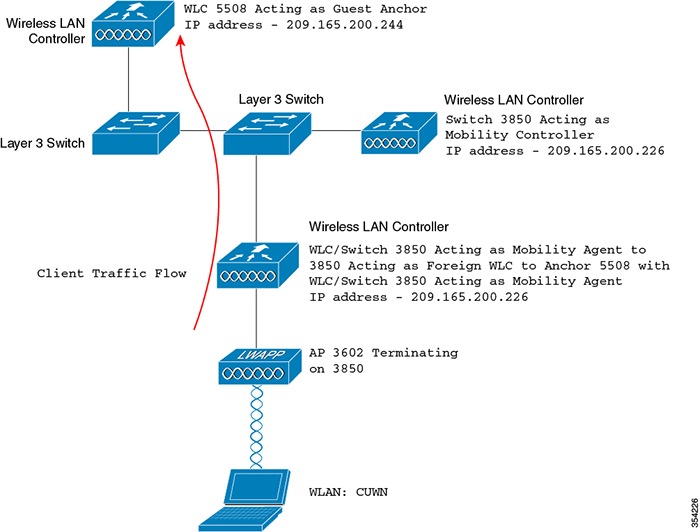
Note | In the network diagram, the Cisco 5500 Series Wireless Controller acts as the Anchor Controller and the Cisco Catalyst 3850 Series Switch acts as the Mobility Agent, Mobility Controller, and Foreign WLC. |
At any point in time, the Anchor Controller for the Cisco Catalyst 3850 Series Switch is Cisco 5500 Series Wireless Controller and double anchoring is not supported.
Configuring Unified Access WLC includes:
- Network Diagram
- Part 1: Configuring on the Cisco 5500 Series Anchor Wireless Controller
- Part 2: Configuring Converged Access Mobility between the Cisco 5500 Series Wireless Controller and Cisco Catalyst 3850 Series Switch
- Part 3 - Configuring on the Foreign Catalyst 3850 Series Switch
Network Diagram
Part 1: Configuring on the Cisco 5500 Series Anchor Wireless Controller
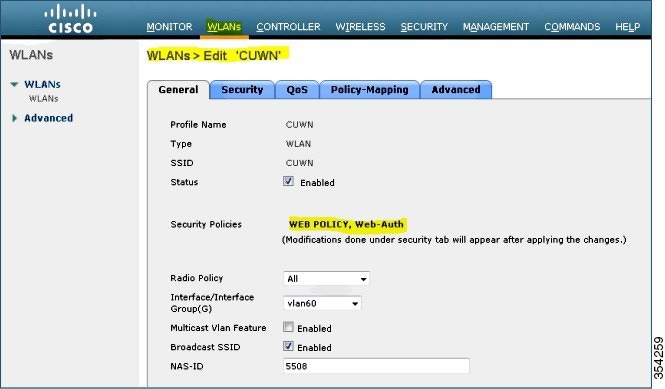
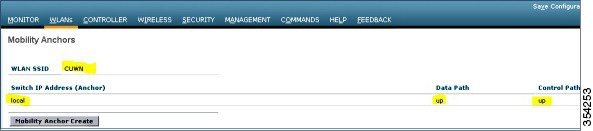
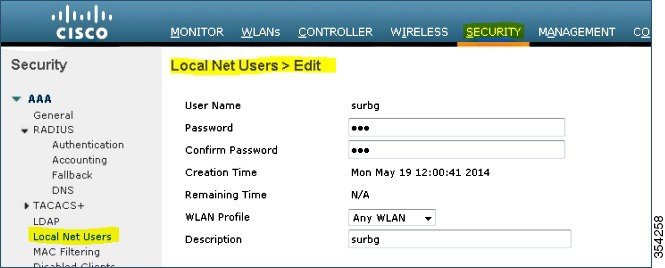
Part 2: Configuring Converged Access Mobility between the Cisco 5500 Series Wireless Controller and Cisco Catalyst 3850 Series Switch
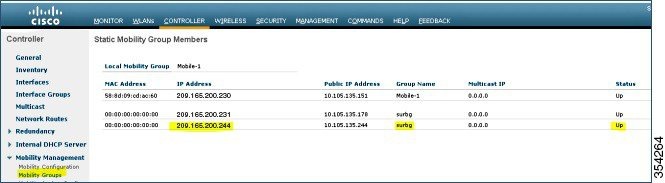
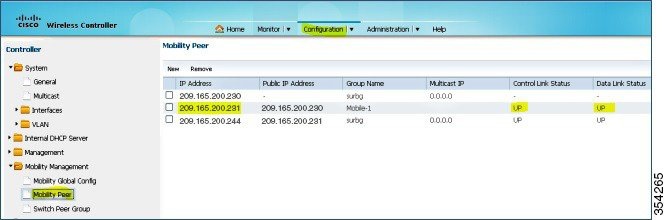
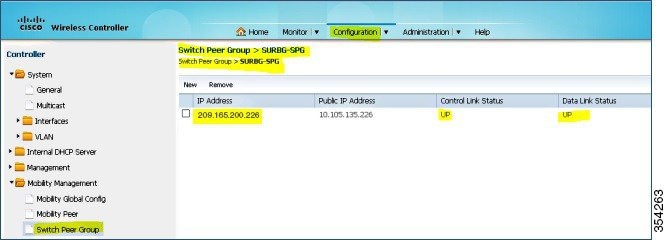
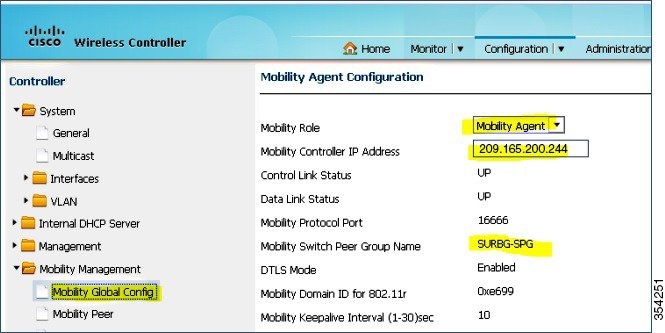
Part 3 - Configuring on the Foreign Catalyst 3850 Series Switch
| Step 1 |
To configure the exact SSID or WLAN on the Cisco Catalyst 3850 Series Switch, navigate to GUI > Configuration > Wireless > WLAN > New. 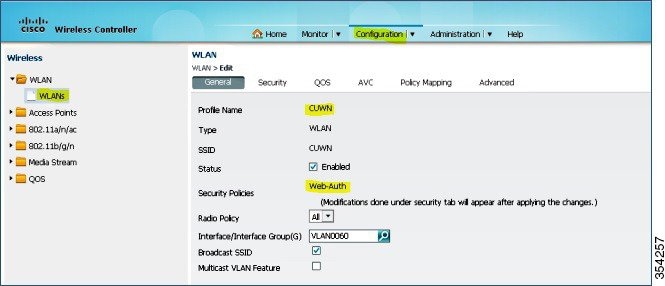 |
| Step 2 | To configure Layer 3 Security, navigate to WLAN > WLAN Edit > Security > Layer 3 enabled Web-authentication. 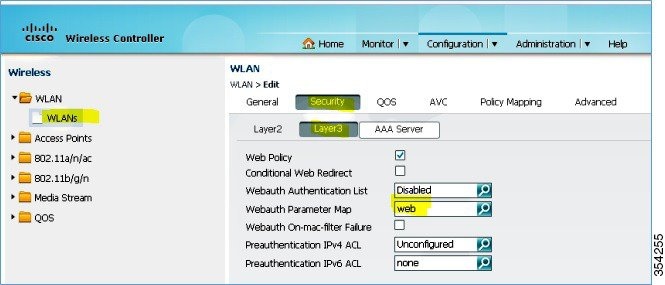 |
| Step 3 | Add the Cisco 5500 Series Wireless Controller IP address as the Anchor under the WLAN Mobility Anchor configuration. 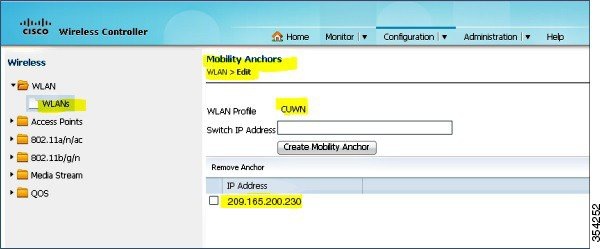 |
Verifying the Unified WLC Guest Anchor with Converged Access Configuration
Perform the following steps to verify the unified WLC Guest Anchor with converged access configuration:
| Step 1 |
Connect to the WLAN Cisco Unified Wireless Network (CUMN). |
| Step 2 | Once you receive the IP address, open a browser and try accessing any website. The first TCP packet sent is intercepted by the Cisco 5500 Series Wireless Controller. Then, the Cisco 5500 Series Wireless Controller intercepts and sends the WebAuth page. |
| Step 3 | If the DNS is properly configured, you will receive the WebAuth page. |
| Step 4 |
Provide the username and password to get authenticated. |
| Step 5 |
After successful authentication, you will be redirected to the original access page. |
| Step 6 |
Provide the correct credentials for successful authentication. |
Client-side Packet Capture
The following steps describe the client-side packet capture:
| Step 1 |
You will receive a IP address as described in the following figure: |
| Step 2 | Open a browser and type www.facebook.com. |
| Step 3 | The Cisco 5500 Series Wireless Controller intercepts the client's first TCP packet and pushes its virtual IP address and the internal WebAuth page. |
| Step 4 |
After the successful web authentication, the rest of the work flow completes. |
Troubleshooting Unified WLC Guest Anchor with Converged Access Configuration Issues
To troubleshoot configuration, use the following commands on the Cisco 5500 Series Wireless Controller acting as a Guest Anchor:
Debug Client client mac addr
Debug web-auth redirect enable mac client mac addr
Device# show debug

MAC Addr 1.................................. 00:17:7C:2F:B6:9A

Debug Flags Enabled:
  dhcp packet enabled.
  dot11 mobile enabled.
  dot11 state enabled
  dot1x events enabled.
  dot1x states enabled.
  FlexConnect ft enabled.
  pem events enabled.
  pem state enabled.
  CCKM client debug enabled.
  webauth redirect enabled.

*mmMaListen: May 19 13:36:34.276: 00:17:7c:2f:b6:9a Adding mobile on Remote AP
00:00:00:00:00:00(0)
*mmMaListen: May 19 13:36:34.277: 00:17:7c:2f:b6:9a override for default ap group,
marking intgrp NULL
*mmMaListen: May 19 13:36:34.277: 00:17:7c:2f:b6:9a Applying Interface policy on
Mobile, role Unassociated. Ms NAC State 2 Quarantine Vlan 0 Access Vlan 0

*mmMaListen: May 19 13:36:34.277: 00:17:7c:2f:b6:9a Re-applying interface policy
for client

*mmMaListen: May 19 13:36:34.277: 00:17:7c:2f:b6:9a 0.0.0.0 START (0) Changing IPv4
ACL 'none' (ACL ID 255) ===> 'none' (ACL ID 255) --- (caller apf_policy.c:2219)
*mmMaListen: May 19 13:36:34.277: 00:17:7c:2f:b6:9a 0.0.0.0 START (0) Changing IPv6
ACL 'none' (ACL ID 255) ===> 'none' (ACL ID 255) --- (caller apf_policy.c:2240)
*mmMaListen: May 19 13:36:34.277: 00:17:7c:2f:b6:9a apfApplyWlanPolicy: Apply WLAN
Policy over PMIPv6 Client Mobility Type
*mmMaListen: May 19 13:36:34.277: 00:17:7c:2f:b6:9a override from intf group to an
intf for roamed client - removing intf group from mscb


*mmMaListen: May 19 13:36:34.277: 00:17:7c:2f:b6:9a 0.0.0.0 AUTHCHECK (2) Change
state to L2AUTHCOMPLETE (4) last state AUTHCHECK (2)

*mmMaListen: May 19 13:36:34.277: 00:17:7c:2f:b6:9a 0.0.0.0 L2AUTHCOMPLETE (4)
Change state to DHCP_REQD (7) last state L2AUTHCOMPLETE (4)

*mmMaListen: May 19 13:36:34.277: 00:17:7c:2f:b6:9a Resetting web IPv4 acl from
255 to 255

*mmMaListen: May 19 13:36:34.277: 00:17:7c:2f:b6:9a Resetting web IPv4 Flex acl
from 65535 to 65535

*mmMaListen: May 19 13:36:34.277: 00:17:7c:2f:b6:9a Stopping deletion of Mobile
Station: (callerId: 53)
*mmMaListen: May 19 13:36:34.277: 00:17:7c:2f:b6:9a 0.0.0.0 DHCP_REQD (7) Adding
Fast Path rule   type = Airespace AP - Learn IP address
  on AP 00:00:00:00:00:00, slot 0, interface = 1, QOS = 0
  IPv4 ACL ID = 255, IPv
*mmMaListen: May 19 13:36:34.277: 00:17:7c:2f:b6:9a 0.0.0.0 DHCP_REQD (7) Fast Path
rule (contd...) 802.1P = 0, DSCP = 0, TokenID = 15206  Local Bridging Vlan = 60,
Local Bridging intf id = 13
*mmMaListen: May 19 13:36:34.277: 00:17:7c:2f:b6:9a 0.0.0.0 DHCP_REQD (7)
Successfully plumbed mobile rule (IPv4 ACL ID 255, IPv6 ACL ID 255, L2 ACL ID 255)
*mmMaListen: May 19 13:36:34.278: 00:17:7c:2f:b6:9a 0.0.0.0 DHCP_REQD (7) State
Update from Mobility-Incomplete to Mobility-Complete, mobility role=ExpAnchor,
client state=APF_MS_STATE_ASSOCIATED
*mmMaListen: May 19 13:36:34.278: 00:17:7c:2f:b6:9a 0.0.0.0 DHCP_REQD (7)
Change state to DHCP_REQD (7) last state DHCP_REQD (7)

*mmMaListen: May 19 13:36:34.278: 00:17:7c:2f:b6:9a 0.0.0.0 DHCP_REQD (7)
pemAdvanceState2 5807, Adding TMP rule
*mmMaListen: May 19 13:36:34.278: 00:17:7c:2f:b6:9a 0.0.0.0 DHCP_REQD (7)
Replacing Fast Path rule
  type = Airespace AP - Learn IP address
  on AP 00:00:00:00:00:00, slot 0, interface = 1, QOS = 0
  IPv4 ACL ID = 255,
*mmMaListen: May 19 13:36:34.278: 00:17:7c:2f:b6:9a 0.0.0.0 DHCP_REQD (7)
Fast Path rule (contd...) 802.1P = 0, DSCP = 0, TokenID = 15206  Local
Bridging Vlan = 60, Local Bridging intf id = 13
*mmMaListen: May 19 13:36:34.278: 00:17:7c:2f:b6:9a 0.0.0.0 DHCP_REQD (7)
Successfully plumbed mobile rule (IPv4 ACL ID 255, IPv6 ACL ID 255, L2 ACL ID 255)
*pemReceiveTask: May 19 13:36:34.278: 00:17:7c:2f:b6:9a Set bi-dir guest tunnel
for 00:17:7c:2f:b6:9a as in Export Anchor role
*pemReceiveTask: May 19 13:36:34.278: 00:17:7c:2f:b6:9a 0.0.0.0 Added NPU entry
of type 9, dtlFlags 0x4
*pemReceiveTask: May 19 13:36:34.278: 00:17:7c:2f:b6:9a Sent an XID frame
*pemReceiveTask: May 19 13:36:34.278: 00:17:7c:2f:b6:9a Set bi-dir guest tunnel
for 00:17:7c:2f:b6:9a as in Export Anchor role
*pemReceiveTask: May 19 13:36:34.278: 00:17:7c:2f:b6:9a 0.0.0.0 Added NPU entry
of type 9, dtlFlags 0x4
*IPv6_Msg_Task: May 19 13:36:34.281: 00:17:7c:2f:b6:9a Pushing IPv6 Vlan Intf
ID 13: fe80:0000:0000:0000:6c1a:b253:d711:0c7f , and MAC: 00:17:7C:2F:B6:9A ,
Binding to Data Plane. SUCCESS !! dhcpv6bitmap 0
*IPv6_Msg_Task: May 19 13:36:34.281: 00:17:7c:2f:b6:9a Calling mmSendIpv6AddrUpdate
for addition of IPv6: fe80:0000:0000:0000:6c1a:b253:d711:0c7f , for MAC:
00:17:7C:2F:B6:9A
*IPv6_Msg_Task: May 19 13:36:34.281: 00:17:7c:2f:b6:9a mmSendIpv6AddrUpdate:4800
Assigning an IPv6 Addr fe80:0000:0000:0000:6c1a:b253:d711:0c7f  to the client in
Anchor state update the foreign switch 10.105.135.226
*IPv6_Msg_Task: May 19 13:36:34.281: 00:17:7c:2f:b6:9a Link Local address fe80::
6c1a:b253:d711:c7f updated to mscb. Not Advancing pem state.Current state: mscb
in apfMsMmInitial mobility state and client state APF_MS_STATE_AS
*mmMaListen: May 19 13:36:34.298: 00:17:7c:2f:b6:9a 0.0.0.0 DHCP_REQD (7)
Replacing Fast Path rule
  type = Airespace AP - Learn IP address
  on AP 00:00:00:00:00:00, slot 0, interface = 1, QOS = 0
  IPv4 ACL ID = 255,
*mmMaListen: May 19 13:36:34.298: 00:17:7c:2f:b6:9a 0.0.0.0 DHCP_REQD (7)
Fast Path rule (contd...) 802.1P = 0, DSCP = 0, TokenID = 15206  Local Bridging
Vlan = 60, Local Bridging intf id = 13
*mmMaListen: May 19 13:36:34.298: 00:17:7c:2f:b6:9a 0.0.0.0 DHCP_REQD (7)
Successfully plumbed mobile rule (IPv4 ACL ID 255, IPv6 ACL ID 255, L2 ACL ID 255)
*pemReceiveTask: May 19 13:36:34.298: 00:17:7c:2f:b6:9a Set bi-dir guest tunnel for
00:17:7c:2f:b6:9a as in Export Anchor role
*pemReceiveTask: May 19 13:36:34.298: 00:17:7c:2f:b6:9a 0.0.0.0 Added NPU entry of
type 9, dtlFlags 0x4
*dtlArpTask: May 19 13:36:34.564: 00:17:7c:2f:b6:9a Static IP client associated to
interface vlan60 which can support client subnet.
*dtlArpTask: May 19 13:36:34.564: 00:17:7c:2f:b6:9a 60.60.60.11 DHCP_REQD (7)
Change state to WEBAUTH_REQD (8) last state DHCP_REQD (7)

*dtlArpTask: May 19 13:36:34.564: 00:17:7c:2f:b6:9a 60.60.60.11 WEBAUTH_REQD (8)
pemAdvanceState2 6717, Adding TMP rule
*dtlArpTask: May 19 13:36:34.564: 00:17:7c:2f:b6:9a 60.60.60.11 WEBAUTH_REQD (8)
Replacing Fast Path rule
  type = Airespace AP Client - ACL passthru
  on AP 00:00:00:00:00:00, slot 0, interface = 1, QOS = 0
  IPv4 ACL
*dtlArpTask: May 19 13:36:34.564: 00:17:7c:2f:b6:9a 60.60.60.11 WEBAUTH_REQD (8)
Fast Path rule (contd...) 802.1P = 0, DSCP = 0, TokenID = 15206  Local Bridging
Vlan = 60, Local Bridging intf id = 13
*dtlArpTask: May 19 13:36:34.564: 00:17:7c:2f:b6:9a 60.60.60.11 WEBAUTH_REQD (8)
Successfully plumbed mobile rule (IPv4 ACL ID 255, IPv6 ACL ID 255, L2 ACL ID 255)
*dtlArpTask: May 19 13:36:34.564: 00:17:7c:2f:b6:9a Plumbing web-auth redirect rule
due to user logout
*dtlArpTask: May 19 13:36:34.564: 00:17:7c:2f:b6:9a apfAssignMscbIpAddr:1148
Assigning an Ip Addr 60.60.60.11 to the client in Anchor state update the foreign
switch 10.105.135.226
*dtlArpTask: May 19 13:36:34.565: 00:17:7c:2f:b6:9a Assigning Address 60.60.60.11
to mobile
*pemReceiveTask: May 19 13:36:34.565: 00:17:7c:2f:b6:9a Set bi-dir guest tunnel for
00:17:7c:2f:b6:9a as in Export Anchor role
*pemReceiveTask: May 19 13:36:34.565: 00:17:7c:2f:b6:9a 60.60.60.11 Added NPU entry
of type 2, dtlFlags 0x4
*pemReceiveTask: May 19 13:36:34.565: 00:17:7c:2f:b6:9a Pushing IPv6:
fe80:0000:0000:0000:6c1a:b253:d711:0c7f , and MAC: 00:17:7C:2F:B6:9A , Binding to
Data Plane. SUCCESS !!
*pemReceiveTask: May 19 13:36:34.565: 00:17:7c:2f:b6:9a Sent an XID frame

(5508-MC) >
(5508-MC) >
(5508-MC) >*DHCP Socket Task: May 19 13:36:44.259: 00:17:7c:2f:b6:9a DHCP received
op BOOTREQUEST (1) (len 314,vlan 0, port 1, encap 0xec07)
*DHCP Socket Task: May 19 13:36:44.259: 00:17:7c:2f:b6:9a DHCP (encap type 0xec07)
mstype 3ff:ff:ff:ff:ff:ff
*DHCP Socket Task: May 19 13:36:44.259: 00:17:7c:2f:b6:9a DHCP selecting relay 1 -
control block settings:
            dhcpServer: 0.0.0.0, dhcpNetmask: 0.0.0.0,
            dhcpGateway: 0.0.0.0, dhcpRelay: 0.0.0.0  VLAN: 0
*DHCP Socket Task: May 19 13:36:44.259: 00:17:7c:2f:b6:9a DHCP selected relay 1 -
60.60.60.251 (local address 60.60.60.2, gateway 60.60.60.251, VLAN 60, port 1)
*DHCP Socket Task: May 19 13:36:44.260: 00:17:7c:2f:b6:9a DHCP transmitting DHCP
REQUEST (3)
*DHCP Socket Task: May 19 13:36:44.260: 00:17:7c:2f:b6:9a DHCP   op: BOOTREQUEST,
htype: Ethernet, hlen: 6, hops: 1
*DHCP Socket Task: May 19 13:36:44.260: 00:17:7c:2f:b6:9a DHCP   xid: 0xad00ada3
(2902502819), secs: 3072, flags: 0
*DHCP Socket Task: May 19 13:36:44.260: 00:17:7c:2f:b6:9a DHCP   chaddr:
00:17:7c:2f:b6:9a
*DHCP Socket Task: May 19 13:36:44.260: 00:17:7c:2f:b6:9a DHCP   ciaddr: 0.0.0.0,
yiaddr: 0.0.0.0
*DHCP Socket Task: May 19 13:36:44.260: 00:17:7c:2f:b6:9a DHCP   siaddr: 0.0.0.0,
giaddr: 60.60.60.2
*DHCP Socket Task: May 19 13:36:44.260: 00:17:7c:2f:b6:9a DHCP   requested ip:
60.60.60.11
*DHCP Socket Task: May 19 13:36:44.260: 00:17:7c:2f:b6:9a DHCP sending REQUEST to
60.60.60.251 (len 358, port 1, vlan 60)
*DHCP Socket Task: May 19 13:36:44.260: 00:17:7c:2f:b6:9a DHCP selecting relay 2 -
control block settings:
            dhcpServer: 0.0.0.0, dhcpNetmask: 0.0.0.0,
            dhcpGateway: 0.0.0.0, dhcpRelay: 60.60.60.2  VLAN: 60
*DHCP Socket Task: May 19 13:36:44.260: 00:17:7c:2f:b6:9a DHCP selected relay 2 -
NONE (server address 0.0.0.0,local address 0.0.0.0, gateway 60.60.60.251, VLAN 60,
port 1)
*DHCP Socket Task: May 19 13:36:44.260: 00:17:7c:2f:b6:9a DHCP received op BOOTREPLY
(2) (len 308,vlan 60, port 1, encap 0xec00)
*DHCP Socket Task: May 19 13:36:44.261: 00:17:7c:2f:b6:9a DHCP setting server from ACK
(server 60.60.60.251, yiaddr 60.60.60.11)
*DHCP Socket Task: May 19 13:36:44.261: 00:17:7c:2f:b6:9a DHCP transmitting DHCP
ACK (5)
*DHCP Socket Task: May 19 13:36:44.261: 00:17:7c:2f:b6:9a DHCP   op: BOOTREPLY, htype:
Ethernet, hlen: 6, hops: 0
*DHCP Socket Task: May 19 13:36:44.261: 00:17:7c:2f:b6:9a DHCP   xid: 0xad00ada3
(2902502819), secs: 0, flags: 0
*DHCP Socket Task: May 19 13:36:44.261: 00:17:7c:2f:b6:9a DHCP   chaddr:
00:17:7c:2f:b6:9a
*DHCP Socket Task: May 19 13:36:44.261: 00:17:7c:2f:b6:9a DHCP   ciaddr: 0.0.0.0,
yiaddr: 60.60.60.11
*DHCP Socket Task: May 19 13:36:44.261: 00:17:7c:2f:b6:9a DHCP   siaddr: 0.0.0.0,
giaddr: 0.0.0.0
*DHCP Socket Task: May 19 13:36:44.261: 00:17:7c:2f:b6:9a DHCP   server id:
192.168.200.1  rcvd server id: 60.60.60.251
*webauthRedirect: May 19 13:36:47.678: 0:17:7c:2f:b6:9a- received connection

*webauthRedirect: May 19 13:36:47.680: captive-bypass detection disabled, Not
checking for wispr in HTTP GET, client mac=0:17:7c:2f:b6:9a
*webauthRedirect: May 19 13:36:47.680: 0:17:7c:2f:b6:9a- Preparing redirect
URL according to configured Web-Auth type
*webauthRedirect: May 19 13:36:47.680: 0:17:7c:2f:b6:9a- Checking custom-web
config for WLAN ID:4
*webauthRedirect: May 19 13:36:47.680: 0:17:7c:2f:b6:9a- unable to get the hostName
for virtual IP, using virtual IP =192.168.200.1
*webauthRedirect: May 19 13:36:47.680: 0:17:7c:2f:b6:9a- Global status is enabled,
checking on web-auth type
*webauthRedirect: May 19 13:36:47.680: 0:17:7c:2f:b6:9a- Web-auth type Internal,
no further redirection needed. Presenting defualt login page to user
*webauthRedirect: May 19 13:36:47.680: 0:17:7c:2f:b6:9a- http_response_msg_body1
is <HTML><HEAD><TITLE> Web Authentication Redirect</TITLE><META http-equiv=
"Cache-control" content="no-cache"><META http-equiv="Pragma" content="n
*webauthRedirect: May 19 13:36:47.680: 0:17:7c:2f:b6:9a- http_response_msg_body2
is "></HEAD></HTML>

*webauthRedirect: May 19 13:36:47.680: 0:17:7c:2f:b6:9a-  parser host is
www.facebook.com
*webauthRedirect: May 19 13:36:47.680: 0:17:7c:2f:b6:9a- parser path is /
*webauthRedirect: May 19 13:36:47.680: 0:17:7c:2f:b6:9a- added redirect=,
URL is now https://192.168.200.1/login.html?
*webauthRedirect: May 19 13:36:47.680: 0:17:7c:2f:b6:9a- str1 is now
https://192.168.200.1/login.html?redirect=www.facebook.com/
*webauthRedirect: May 19 13:36:47.680: 0:17:7c:2f:b6:9a- clen string is
Content-Length: 312


*webauthRedirect: May 19 13:36:47.680: 0:17:7c:2f:b6:9a- Message to be sent is
 HTTP/1.1 200 OK
Location: https://192.168.200.1/login.html?redirect=www.facebook.com/
Content-Type: text/html
Content-Length: 312

<HTML><HEAD
*webauthRedirect: May 19 13:36:47.680: 0:17:7c:2f:b6:9a- send data length=448
*webauthRedirect: May 19 13:36:47.680: 0:17:7c:2f:b6:9a- Web-auth type External,
but unable to get URL
*webauthRedirect: May 19 13:36:47.681: 0:17:7c:2f:b6:9a- received connection

*emWeb: May 19 13:36:48.731: SSL Connection created for MAC:0:17:7c:2f:b6:9a

*webauthRedirect: May 19 13:36:51.795: 0:17:7c:2f:b6:9a- received connection

*webauthRedirect: May 19 13:36:51.795: captive-bypass detection disabled, Not
checking for wispr in HTTP GET, client mac=0:17:7c:2f:b6:9a
*webauthRedirect: May 19 13:36:51.795: 0:17:7c:2f:b6:9a- Preparing redirect URL
according to configured Web-Auth type
*webauthRedirect: May 19 13:36:51.796: 0:17:7c:2f:b6:9a- Checking custom-web
config for WLAN ID:4
*webauthRedirect: May 19 13:36:51.796: 0:17:7c:2f:b6:9a- unable to get the hostName
for virtual IP, using virtual IP =192.168.200.1
*webauthRedirect: May 19 13:36:51.796: 0:17:7c:2f:b6:9a- Global status is enabled,
checking on web-auth type
*webauthRedirect: May 19 13:36:51.796: 0:17:7c:2f:b6:9a- Web-auth type Internal,
no further redirection needed. Presenting defualt login page to user
*webauthRedirect: May 19 13:36:51.796: 0:17:7c:2f:b6:9a- http_response_msg_body1
is <HTML><HEAD><TITLE> Web Authentication Redirect</TITLE><META http-equiv=
"Cache-control" content="no-cache"><META http-equiv="Pragma" content="n
*webauthRedirect: May 19 13:36:51.796: 0:17:7c:2f:b6:9a- http_response_msg_body2
is "></HEAD></HTML>

*webauthRedirect: May 19 13:36:51.796: 0:17:7c:2f:b6:9a-  parser host is
www.facebook.com
*webauthRedirect: May 19 13:36:51.796: 0:17:7c:2f:b6:9a- parser path is
/favicon.ico
*webauthRedirect: May 19 13:36:51.796: 0:17:7c:2f:b6:9a- added redirect=, URL is
now https: //192.168.200.1 /login.html?
*webauthRedirect: May 19 13:36:51.796: 0:17:7c:2f:b6:9a- str1 is now
https: //192.168.200.1 /login.html?redirect=www.facebook.com/favicon.ico
*webauthRedirect: May 19 13:36:51.796: 0:17:7c:2f:b6:9a- clen string is
Content-Length: 323


*webauthRedirect: May 19 13:36:51.796: 0:17:7c:2f:b6:9a- Message to be sent is
 HTTP/1.1 200 OK
Location: https: // 192.168.200.1 /login.html?redirect=www.facebook.com/favicon.ico
Content-Type: text/html
Content-Length: 323

*webauthRedirect: May 19 13:36:51.796: 0:17:7c:2f:b6:9a- send data length=470
*webauthRedirect: May 19 13:36:51.796: 0:17:7c:2f:b6:9a- Web-auth type External,
but unable to get URL
*DHCP Socket Task: May 19 13:37:03.905: 00:17:7c:2f:b6:9a DHCP received op
BOOTREQUEST (1) (len 308,vlan 0, port 1, encap 0xec07)
*DHCP Socket Task: May 19 13:37:03.905: 00:17:7c:2f:b6:9a DHCP (encap type 0xec07)
mstype 3ff:ff:ff:ff:ff:ff
*DHCP Socket Task: May 19 13:37:03.905: 00:17:7c:2f:b6:9a DHCP selecting relay 1 -
control block settings:
            dhcpServer: 60.60.60.251, dhcpNetmask: 255.255.255.0,
            dhcpGateway: 60.60.60.251, dhcpRelay: 60.60.60.2  VLAN: 60


*emWeb: May 19 13:38:35.187:
ewaURLHook: Entering:url=/login.html, virtIp = 192.168.200.1, ssl_connection=1,
secureweb=1


*emWeb: May 19 13:38:35.199: WLC received client 0:17:7c:2f:b6:9a request for
Web-Auth page /login.html
*emWeb: May 19 13:38:35.199: WLC received client 0:17:7c:2f:b6:9a request for
Web-Auth page /login.html
*emWeb: May 19 13:38:47.215:
ewaURLHook: Entering:url=/login.html, virtIp = 192.168.200.1, ssl_connection=1,
secureweb=1

*ewmwebWebauth1: May 19 13:38:47.216: 00:17:7c:2f:b6:9a Username entry (surbg)
created for mobile, length = 5
*ewmwebWebauth1: May 19 13:38:47.216: 00:17:7c:2f:b6:9a Username entry (surbg)
created in mscb for mobile, length = 5
*ewmwebWebauth1: May 19 13:38:47.216: 00:17:7c:2f:b6:9a 60.60.60.11 WEBAUTH_REQD
(8) Change state to WEBAUTH_NOL3SEC (14) last state WEBAUTH_REQD (8)

*ewmwebWebauth1: May 19 13:38:47.216: 00:17:7c:2f:b6:9a apfMsRunStateInc
*ewmwebWebauth1: May 19 13:38:47.216: 00:17:7c:2f:b6:9a 60.60.60.11 WEBAUTH_NOL3SEC
(14) Change state to RUN (20) last state WEBAUTH_NOL3SEC (14)

*ewmwebWebauth1: May 19 13:38:47.216: 00:17:7c:2f:b6:9a Session Timeout is 0 -
not starting session timer for the mobile
*ewmwebWebauth1: May 19 13:38:47.216: 00:17:7c:2f:b6:9a 60.60.60.11 RUN (20)
Reached PLUMBFASTPATH: from line 6605
*ewmwebWebauth1: May 19 13:38:47.216: 00:17:7c:2f:b6:9a 60.60.60.11 RUN (20)
Replacing Fast Path rule
  type = Airespace AP Client
  on AP 00:00:00:00:00:00, slot 0, interface = 1, QOS = 0
  IPv4 ACL ID = 255, IPv6 ACL ID =
 Feedback