Access control policies
An access control policy is a hierarchical policy that allows you to specify, inspect, and log network traffic. You can use the characteristics of each connection to allow, trust, block, or monitor the connection.
Each managed device can be assigned to one access control policy. The data that the policy's assigned (also known as targeted) devices collect about your network traffic can be used to filter and control that traffic based on:
-
simple, easily determined transport and network layer characteristics: source and destination, port, protocol, and so on
-
the latest contextual information on the traffic, including characteristics such as reputation, risk, business relevance, application used, or URL visited
-
realm, user, user group, or ISE attribute
-
custom Security Group Tag (SGT)
-
characteristics of encrypted traffic; you can also decrypt this traffic for further analysis
-
whether unencrypted or decrypted traffic contains a prohibited file, detected malware, or intrusion attempt
-
time and day (on supported devices)
Each type of traffic inspection and control occurs where it makes the most sense for maximum flexibility and performance. For example, reputation-based blocking uses simple source and destination data, so it can block prohibited traffic early in the process. In contrast, detecting and blocking intrusions and exploits is a last-line of defense.
Access control policy components
This list describes the main components of an access control policy.
-
Name and description: Each access control policy must have a unique name. A description is optional.
-
Inheritance settings: Policy inheritance allows you to create a hierarchy of access control policies. A parent (or base) policy defines and enforces default settings for its descendants. A policy's inheritance settings allow you to select its base policy. You can also lock settings in the current policy to force any descendants to inherit them. Descendant policies can override unlocked settings.
-
Policy assignment: Every access control policy identifies which devices use it. Each device can use only one access control policy.
-
Rules: Access control rules provide a granular method of handling network traffic. Rules are numbered, starting at 1, including rules inherited from ancestor policies. The system matches traffic to rules from the top down, ascending by rule number.
Traffic is handled by the first rule for which all conditions match. Conditions can be simple or complex, and often depend on licensing.
-
Default action: The default action determines how the system handles and logs traffic that is not handled by any other access control configuration. It can block or trust all traffic without further inspection, or inspect traffic for intrusions and discovery data. Although an access control policy can inherit its default action from an ancestor policy, you cannot enforce this inheritance.
-
Security Intelligence: This feature acts as the first line of defense against malicious internet content. It enables blocking of connections based on IP address, URL, and domain name reputation intelligence. To ensure continual access to vital resources, you can override block list entries with custom do not block list entries.
-
HTTP responses: When a user's website request is blocked, you can display either a generic response page or a custom page. Alternatively, you can warn users but allow them to proceed to the requested site.
-
Logging: Logging settings enable configuration of default syslog destinations for the policy. These settings apply to the policy and all included decryption, prefilter, and intrusion policies unless overridden in individual rules or policies.
-
Advanced access control options: Advanced policy settings typically require little modification, and defaults are often suitable. Modifiable options include traffic preprocessing, decryption, identity, and various performance configurations.
Access control policy default actions
The default action is the access control policy configuration that determines how the system handles and logs traffic that is not handled by any other access control configuration. The default action can block or trust all traffic without further inspection, or inspect traffic for intrusions and discovery data.
In a simple access control policy, the default action specifies how a device handles all traffic. In a more complex policy, the default action handles traffic that:
-
is not fast pathed by the prefilter policy
-
is not on a Security Intelligence block list
-
is not blocked by the decryption policy (encrypted traffic only)
-
matches none of the rules in the policy (except monitor rules, which match and log—but do not handle or inspect—traffic)
 Note |
You cannot perform file or malware inspection on traffic handled by the default action. Logging of connections handled by the default action is initially disabled but can be enabled. |
If you are using policy inheritance, the default action for the lowest-level descendant determines how traffic is handled. An access control policy can inherit its default action from the base policy, but this inheritance is not enforced.
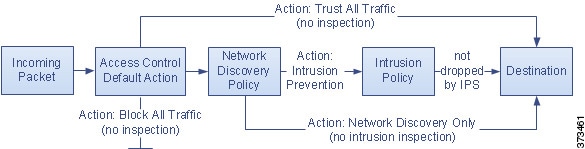
This table describes the types of inspection you can perform on traffic handled by each default action.
|
Default action |
Effect on traffic |
Inspection type and policy |
|---|---|---|
|
Access Control: Block All Traffic |
Block without further inspection. |
None. |
|
Access Control: Trust All Traffic |
Trust (allow to its final destination without further inspection). |
None. |
|
Intrusion Prevention |
Allow, as long as it is passed by the intrusion policy you specify. |
Intrusion, using the specified intrusion policy and associated variable set. Discovery, using the network discovery policy. |
|
Network Discovery Only |
Allow. |
Discovery only, using the network discovery policy. |
|
Inherit from base policy |
Defined in base policy. |
Defined in base policy. |
This diagram illustrates the table.
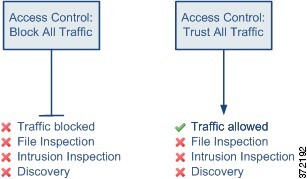
This diagram illustrates the Block All Traffic and Trust All Traffic default actions.
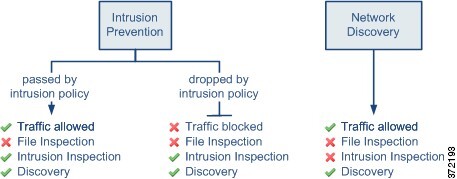
This diagram illustrates the Intrusion Prevention and Network Discovery Only default actions.
Note |
The purpose of Network Discovery Only is to improve performance in a discovery-only deployment. Different configurations can disable discovery if you are only interested in intrusion detection and prevention. |
Access control policy inheritance
Access control policy inheritance is a hierarchical policy-based implementation that allows child policies to inherit rules and settings from ancestor or base policies. This structure ensures that mandatory rules defined in parent policies are consistently enforced, while providing the flexibility for child policies to selectively override default configurations.
Access control policy hierarchy structure
You can nest access control policies, where each policy inherits the rules and settings from an ancestor policy. You can enforce this inheritance, or allow lower-level policies to override their ancestors.
Just as you create a domain hierarchy, you can create a corresponding hierarchy of access control policies. A descendant, or child, access control policy inherits rules and settings from its direct parent, or base, policy. That base policy may have its own parent policy from which it inherits rules and settings, and so on.
An access control policy's rules are nested between its parent policy's Mandatory and Default rule sections. This implementation enforces Mandatory rules from ancestor policies, but allows the current policy to write rules that preempt Default rules from ancestor policies.
You can lock these settings to enforce them in all descendant policies:
-
Security Intelligence—Connections that are allowed or blocked based on the latest reputation intelligence for IP addresses, URLs, and domain names.
-
HTTP response pages—Displaying a custom or system-provided response page when you block a user's website request.
-
Advanced settings—Specifying associated subpolicies, network analysis settings, performance settings, and other general options.
When using policy inheritance, the default action for the lowest-level descendant determines final traffic handling. Although an access control policy can inherit its default action from an ancestor policy, you cannot enforce this inheritance.
Policy inheritance and multitenancy
Access control's hierarchical policy-based implementation complements multitenancy.
In a typical multidomain deployment, access control policy hierarchy corresponds to domain structure, and you apply the lowest-level access control policy to managed devices. This implementation allows selective access control enforcement at a higher domain level, while lower-level domain administrators can tailor deployment-specific settings. (You must use roles, not policy inheritance and enforcement alone, to restrict administrators in descendant domains.)
For example, as a Global domain administrator for your organization, you can create an access control policy at the Global level. You can then require that all your devices, which are divided into subdomain by function, use that Global-level policy as a base policy.
When subdomain administrators log into the Secure Firewall Management Center to configure access control, they can deploy the Global-level policy as-is. Or, they can create and deploy a descendant access control policy within the boundaries of the Global-level policy.
Note |
Although the most useful implementation of access control inheritance and enforcement complements multitenancy, you can create a hierarchy of access control policies within a single domain. You can also assign and deploy access control policies at any level. |
Rule and other policy warnings
Policy and rule editors use icons to mark configurations that could adversely affect traffic analysis and flow. Depending on the issue, the system may warn you when you deploy or prevent you from deploying entirely.
Note |
Move your pointer over an icon to read the warning, error, or informational text. |
|
Icon |
Description |
Example |
|---|---|---|
|
Errors ( |
If a rule or configuration has an error, you cannot deploy until you correct the issue, even if you disable any affected rules. |
A rule that performs category and reputation-based URL filtering is valid until you assign a device that does not have a URL Filtering license. At that point, an error icon appears next to the rule, and you cannot deploy until you edit or delete the rule, unassign the device, or enable the license. |
|
Warning ( |
You can deploy a policy that displays rule or other warnings. However, misconfigurations marked with warnings have no effect. If you disable a rule with a warning, the warning icon disappears. It reappears if you enable the rule without correcting the underlying issue. |
Preempted rules or rules that cannot match traffic due to misconfiguration have no effect. This includes conditions using empty object groups, application filters that match no applications, excluded LDAP users, invalid ports, and so on. However, if a warning icon marks a licensing error or model mismatch, you cannot deploy until you correct the issue. |
|
Information ( |
Information icons convey helpful information about configurations that may affect the flow of traffic. These issues do not prevent you from deploying. |
The system might skip matching the first few packets of a connection against some rules, until the system identifies the application or web traffic in that connection. This allows connections to be established so that applications and HTTP requests can be identified. |
|
Rule Conflict ( |
When you enable rule conflict analysis, this icon appears in the rule table for rules that have conflicts. |
Conflicts include redundant rules, redundant objects, and shadowed rules. Redundant and shadowed rules do not match traffic because previous rules would already match the criteria. Redundant objects make your rules unnecessarily complex. |
 )
)
 )
) )
)




 Feedback