Migrate Your Management Center

Migrate Management Centers

The Management Center migration wizard allows you to migrate from one Management Center model to another Management Center model. The wizard simplifies your migration experience. After the migration, configurations and events from the source Management Center are available in the target Management Center.

There are two methods of migrating a Management Center:

  • Connected mode: Connect to the source Management Center for migration. Use this method when the source and target Management Centers can connect to each other over HTTPS.

  • Migration bundle mode: Create a migration bundle in the source Management Center and upload it to the target Management Center. Use this method when the source and target Management Centers cannot connect to each other over HTTPS.

Benefits of Using the Management Center Migration Wizard

  • Simplified migration: Migrate the Management Center seamlessly using an intuitive wizard.

  • Uninterrupted source Management Center: Ensures that the source Management Center is unaffected, whether the migration succeeds or fails.

  • Comprehensive readiness checks: Ensures compatibility between the models to minimize errors.

  • Realtime monitoring: Tracks the progress of the migration using the user interface.

  • Extensive licensing support: Provides support for all licensing modes such as evaluation, connected, and Specific License Reservation (SLR).

Supported Migration Paths

To migrate Management Center 1000/2500/4500/1600/2600/4600 to a Cloud-Delivered Firewall Management Center (cdFMC), see the chapter "Migrate On-Prem Management Center Managed Secure Firewall Threat Defense to Cloud-Delivered Firewall Management Center" in Managing Firewall Threat Defense with Cloud-delivered Firewall Management Center in Cisco Security Cloud Control.

The table lists the supported target Management Center models that you can migrate to from your source Management Center model.

Max. Managed Devices Source Model

Target Model

FMC 1600 FMC 2600 FMC 4600 Management Center 1700 Management Center 2700 Management Center 4700 Management Center 1800 Management Center 2800 Management Center 4800 FMCv300 (VMware) FMCv300 (AWS) FMCv300 (Azure)
2 FMCv2 (VMware) Yes Yes Yes

Yes

10 FMCv10 (VMware) Yes Yes Yes

Yes

25 FMCv25 (VMware) Yes Yes Yes

Yes

25

FMCv25 (Azure)

Yes

50 FMC 1000 Yes Yes Yes

Yes

Yes

Yes

Yes

50 FMC 1600 Yes Yes

Yes

Yes

Yes

Yes

Yes

Yes

Yes

250 FMC 2000 Yes Yes

Yes

300 FMC 2500 Yes Yes

Yes

Yes

Yes

300 FMC 2600 Yes

Yes

Yes

Yes

Yes

Yes

300 FMCv300 (VMware) Yes Yes

750 FMC 4000 Yes

750 FMC 4500 Yes

Yes

750

FMC 4600

Yes

Yes

Yes

Yes

Yes

50

Management Center 1700

Yes

Yes

300

Management Center 2700

Yes

1000

Management Center 4700

50

Management Center 1800

Yes

Yes

300

Management Center 2800

Yes

2000

Management Center 4800


Note


To migrate within the same model of Management Center 1800, 2800, or 4800, use back up and restore data.


Prerequisites for Migration

Supported Versions

  • Source Management Center must be 10.0.

  • Target Management Center must be Version 10.0.

  • Managed Threat Defense devices must be Version 7.3 and later.

General Prerequisites

  • See Supported Migration Paths to determine which target model you can migrate to from your source model.

  • Ensure that the target Management Center does not have managed devices.​

  • Ensure that the target Management Center has the same number of interfaces as your source Management Center.

  • Manually correct the UTC time of the source or target Management Center.

  • Verify that the target Management Center and source Management Center have same versions of Vulnerability Database (VDB), Lightweight Security Package (LSP), and Snort Rule Update (SRU).

  • Complete all pending deployments successfully.

License Prerequisites

  • Use one of these licensing modes: Evaluation, Connected, and Specific License Reservation (SLR).

  • Verify the Threat Defense entitlements in Cisco Smart Software Manager (CSSM).

  • Obtain required licenses for additional Threat Defense devices to migrate a Management Center to a higher platform and manage more Threat Defense devices.

  • Obtain a license for Management Center virtual (FMCv) if your target Management Center is virtual.

Prerequisites for Using Connected Mode

  • We recommend that both source and target Management Centers are in the same subnet because the target Management Center will take the original IP address of the source Management Center.

  • Ensure that the source Management Center is reachable from the target Management Center over HTTPS (port 443). If it is not reachable, use the migration bundle mode of migration.

  • Ensure that you have two users—one for logging into the source Management Center UI and an admin user for performing model migration.

  • Ensure that REST API is enabled (Administration > Configuration > REST API Preferences > Enable REST API).

Prerequisites for Using Migration Bundle Mode

To migrate the Management Center using a migration bundle file, you must create it.

  1. In the source Management Center, run the sudo fmc_model_migration_cli.pl​ script in the expert mode.

    The script creates the migration bundle file source_database_content.tgz at /var/log/sf. Don't change the file format of the migration bundle.​

  2. Download the migration bundle.

We recommend that both source and target Management Centers are in the same subnet because the target Management Center will take the original IP address of the source Management Center.

Prerequisites for High Availability

  • Ensure that you meet all the HA requirements. For more information, see Requirements for Management Center High Availability.

  • If the source Management Center is part of HA, you must connect to the active Management Center.

  • Ensure that the target Management Center is not part of an HA pair.

Prerequisites for Management Center Virtual Migration

  • When you migrate a Management Center virtual (FMCv) to another Management Center virtual within a public cloud, we recommend the following:

    • Use reserved static public IP addresses instead of default public IP addresses.

    • Use FQDN or DNS name because it can be moved across the public IP addresses.

    • Run the following command in the Threat Defense device CLI if you do not want to update the public IP address of the target Management Center virtual:

      configure manager add DONTRESOLVE any_key any_key_for_nat_field_input

      Before you run the above command, ensure that the Management Center virtual can connect to the Threat Defense device.

    • Update the Management Center virtual IP address on the Threat Defense device using the following command in the Threat Defense device CLI if you do not perform the above operations:

      configure manager edit fmc_uuid displayname fmc_ipaddress

    • When you migrate from Management Center 4600 to Management Center Virtual 300 (FMCv300) for Azure:

      • Update the network configuration of Management Center Virtual 300 to match the Azure networking requirements.

      • SSH to each managed Threat Defense and update the Management Center manager address using the configure manager edit command.

Prerequisites for Migrating Management Center 1600, 2600, or 4600 to Management Center 1700, 2700, or 4700

Upgrade Management Center 1600, 2600, or 4600 to 7.4.x or 7.6.x. For more information about upgrade, see Cisco Secure Firewall Threat Defense Upgrade Guide for Management Center.

Prerequisites for Migrating Management Center 4600 to Management Center Virtual 300 (FMCv300) for AWS or VMware

  • Note that Management Center Virtual 300 has lower limits than Management Center 4600. We recommend that you review Table 1 before the migration.

    Table 1. Compatibility Check for Migrating Management Center 4600 to Management Center Virtual 300 for AWS or VMware

    Performance and Functionality

    Management Center 4600 (Current Configuration)

    Management Center Virtual 300 (Maximum Limit)

    Overall size (Event Storage Space) 3.2 TB 2 TB
    Total devices 750 300
    Maximum IPS events 300 million 60 million
    Memory 128 GB 64 GB
    CPU Two Intel Xeon 4214 processors 32 vCPUs
    Maximum network map size (hosts/users) 600,000/600,000 150,000/150,000
    Maximum event rate (events per second) 20,000 eps 12,000 eps
  • For migrating Management Center 4600 to Management Center Virtual 300 (FMCv300) for AWS or VMware:

    • Ensure that the source Management Centers are Versions 7.4.x or 7.6.x.

    • Ensure that Management Center Virtual 300 for AWS or VMware has a license that you must apply after the migration.

Migrate a Management Center Using the Connected Mode

Before you begin

Ensure that the source Management Center is reachable from the target Management Center.

Procedure


Step 1

Choose Administration > Advanced > Migrate Management Center.

Step 2

Under Choose migration method:

  1. In the Source Firewall Management Center IP address field, enter the IP address or FQDN of the source Management Center.

    You can use an IPv4 or IPv6 address.

  2. In the Username and Password fields, enter the credentials.

  3. Click Connect.

    After you connect to the source Management Center, its certificate is displayed.

Step 3

Under Prepare and start migration:

The wizard runs a compatibility check to ensure that the Management Center is prepared for migration. If any issues are found, errors, warnings, or both are displayed.

  1. Review the errors and warnings and take the required actions on the device.

  2. (Optional) Check the Migrate events check box, if required.

    Note that migrating events can take a long time depending on the size of the events database.

  3. Click Start migration.

Step 4

Under View migration status:

The migration proceeds in four main stages:

  1. Migration initiation on source Management Center

  2. Migration bundle generation

  3. Migration bundle transfer

  4. Migration initiation on target Management Center

A temporary user interface is displayed after the first three migration stages are completed successfully.

  1. Log into the target Management Center web interface.

  2. In the Username and Password fields, enter your credentials.

  3. Click Log In.

A progress bar indicates the progress of the migration. Click Show logs to view the migration logs.

Step 5

After the migration is complete, click Reboot to restart the target Management Center.

Note


Before you click Reboot, unregister the source Management Center from Smart Licensing and shut it down.

Step 6

Register the target Management Center in Smart Licensing after the reboot.


What to do next

Perform the Recommendations for Post Migration Activities.

Migrate a Management Center Using a Migration Bundle

Before you begin

Create and download a migration bundle file. For more information, see Prerequisites for Using Migration Bundle Mode.

Procedure


Step 1

Choose Administration > Advanced > Migrate Management Center.

Step 2

Under Choose migration method:

  1. Click Upload migration bundle.

  2. Click Browse in the Upload migration bundle dialog box.

  3. Select the migration bundle from the local drive and click Open.

    By default, the maximum file size of the migration bundle is 100 GB.

    (Optional) To upload a migration bundle that exceeds 100 GB, you must increase the file size limit by using a command. Run the /usr/local/sf/bin/update_max_upload_limit.sh command in the target Management Center to increase the file size limit.

Step 3

Under Prepare and start migration:

The wizard runs a compatibility check to ensure that the Management Center is prepared for migration. If any issues are found, errors, warnings, or both are displayed.

  1. Review the errors and warnings and take the required actions on the device.

  2. (Optional) Check the Migrate events check box, if required.

    Note that migrating events can take a long time depending on the size of the events database. This check box is disabled if the bundle does not have any events.

  3. Click Start migration.

Step 4

Under View migration status:

The migration proceeds in four main stages:

  1. Migration initiation on source Management Center

  2. Migration bundle generation

  3. Migration bundle transfer

  4. Migration initiation on target Management Center

The wizard skips the first three steps because you uploaded the migration bundle. A temporary user interface is displayed after the fourth stage.

  1. Log into the target Management Center web interface.

  2. In the Username and Password fields, enter your credentials.

  3. Click Log In.

A progress bar indicates the progress of the migration. Click Show logs to view the migration logs.

Step 5

After the migration is complete, perform these steps:

  1. Unregister the source Management Center from Smart Licensing.

  2. Shut down the source Management Center.

  3. Click Reboot.

Step 6

After the reboot, register the target Management Center in Smart Licensing.


What to do next

Perform the Recommendations for Post Migration Activities.

Migrating High-Availability Management Center Models

You can migrate your Management Center HA setup by using the Management Center model migration wizard.

When the source Management Center is in an HA configuration, we recommend that you initiate the migration from the active peer. The source Management Center promotes the standby Management Center to the active unit.​

Summary

This section explains the different migration stages of Management Centers in an HA setup.

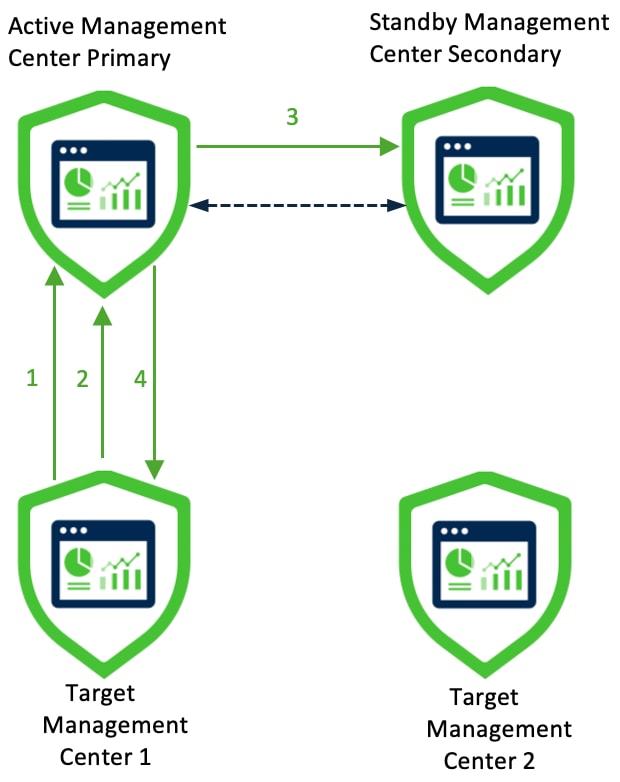
Figure 1. Source and Target Management Centers in an HA Setup
Source and target Management Centers in an HA setup

In Figure 1, active Management Center primary and standby Management Center secondary are the source Management Centers.


Note


You must unregister the source Management Centers from Smart Licensing. Shut down the Management Centers before rebooting them.


After the migration:

  • Target Management Center 1 becomes active Management Center primary.

  • Target Management Center 2 becomes active Management Center secondary.

These stages describe how active Management Center primary migrates to target Management Center 1:

  1. Target Management Center 1 connects to the active source Management Center.

  2. Target Management Center 1 initiates migration bundle generation.

  3. Active Management Center promotes the standby Management Center to active state.

  4. Target Management Center 1 downloads the migration bundle and initiates migration.

Workflow

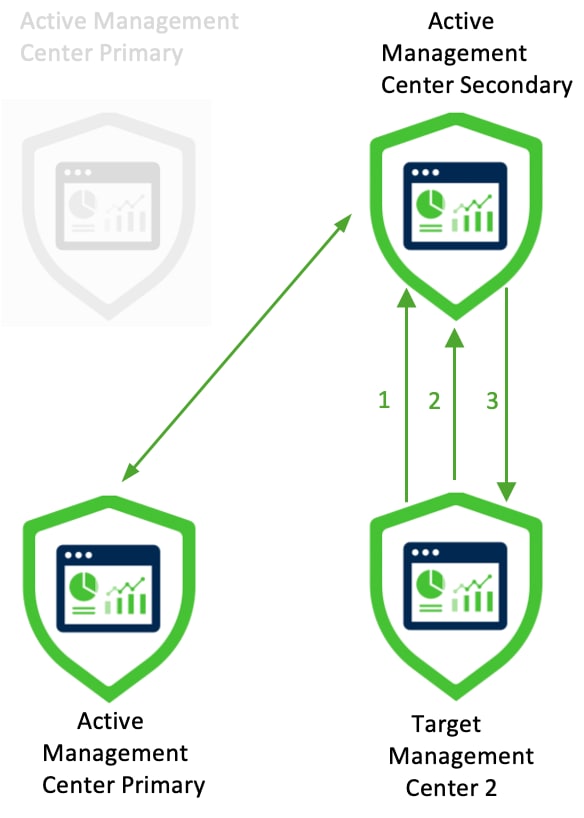
Figure 2. Migration of Active Management Center Secondary
Migration of active Management Center secondary

In Figure 2, after the first migration, target Management Center 1 is the active Management Center primary.

Start the migration of the source active Management Center secondary to the target Management Center 2. These stages describe this migration:

  1. Target Management Center 2 connects to the active source Management Center.

  2. Target Management Center 2 initiates migration bundle generation.

  3. Target Management Center 2 downloads migration bundle and initiates migration.

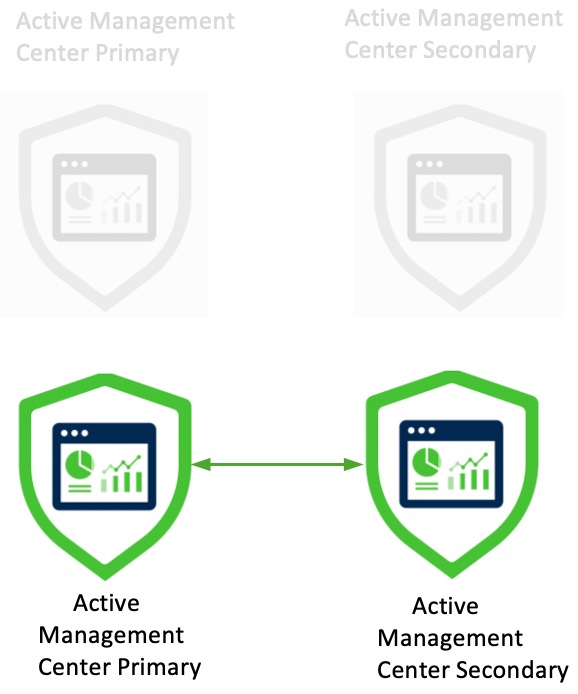
Figure 3. Migrated Management Centers
Migrated Management Centers in split-brain state

In Figure 3, after migration, both the target Management Centers will be active and automatically connect to each other.


Note


The HA enters a 'split-brain' state where both peers become active units. To resolve this state, designate one as active, while the other becomes the standby unit.


Figure 4. Final State of Migrated Management Centers
Migrated Management Centers

Recommendations for Post Migration Activities

After a successful migration, we recommend some best practices and additional tasks:

  • You must update the following parameters:

    • (Optional) IP address of the target Management Center. By default, after migration the target Management Center gets the IP address of the source Management Center.

    • Manager details in all the managed Threat Defense devices. For more information, see Update the Management Center IP Address or Hostname on a Firewall Threat Defense Device. If the IP address of the Management Center changes, ensure that you edit the manager in the Threat Defense devices. This is not required if the Management Center can reach the Threat Defense device.

  • After migration, to manage a different group of Threat Defense devices in the source Management Center:

    • Ensure that source Management Center cannot reach the stale Threat Defense devices.

    • Delete the stale devices that are now managed by the target Management Center from the source Management Center.


    Note


    If the source Management Center can reach the stale devices, these devices will be deregistered from the target Management Center.


  • If the source Management Center is part of HA, after migration you must configure the Management Center as the active or standby Management Center.

License-Related Activities

  • Smart Licensing: Deregister the licenses from the source Management Center and register the licenses in the target Management Center.

  • Evaluation license: If the source Management Center has an evaluation license, after migration, the target Management Center will have an evaluation license.​

  • For virtual Management Centers, ensure that the virtual Management CenterManagement Center has a license. For example, when you migrate from FMCv25 to FMCv300, you should apply a FMCv300 license post migration.​

Cisco Secure Dynamic Attributes Connector Activities

After migration, the values of Cisco Secure Dynamic Attributes Connector (CSDAC) or dynamic objects are removed. You must download the IP addresses associated with that object and reconfigure the values.

Security Certifications Compliance

If the source Management Center is Unified Capabilities Approved Products List (UCAPL) compliant or Common Criteria (CC) compliant, after migration, the target Management Center will also be UCAPL or CC compliant.

Troubleshooting

  • If your migration fails when using the migration bundle mode, do not reuse the bundle when you retry the migration. Generate a new migration bundle.

  • If your migration fails and you cannot log in to the target Management Center’s UI, you must reimage the target Management Center.

Update the Management Center IP Address or Hostname on a Firewall Threat Defense Device

After migration, if the network configuration of the target Firewall Management Center is different from that of the source Firewall Management Center, you must update the IP address or hostname of the Firewall Management Center on each Firewall Threat Defense device.

Procedure


Step 1

From the Firewall Threat Defense CLI, run the show managers command to get the unique identifier of the Firewall Management Center:

Example:

> show managers
Type                      : Manager
Host                      : xx.xx.x.x
Display name              : xx.xx.x.x
Identifier                : f7ffad78-bf16-11ec-a737-baa2f76ef602
Registration              : Completed
Management type           : Configuration and analytics
 

Step 2

Run the configure manager command to update the Firewall Management Center IP address or hostname:

configure manager edit fmc_uuid hostname fmc_ipaddress

Example:

> configure manager edit f7ffad78-bf16-11ec-a737-baa2f76ef602 hostname xx.xx.x.x
Updating hostname from xx.xx.x.x to xx.xx.x.x
Manager hostname updated.

Step 3

Run the configure manager command to update the Firewall Management Center display name:

configure manager edit fmc_uuid displayname fmc_ipaddress

Example:

> configure manager edit f7ffad78-bf16-11ec-a737-baa2f76ef602 displayname xx.xx.x.x
Updating displayname from xx.xx.x.x to xx.xx.x.x
Manager displayname updated.

Step 4

Run the show managers command again to verify the updated Firewall Management Center configuration.