Monitor Dashboards

Data Integrity Dashboard

The Data Integrity dashboard serves as a centralized hub for monitoring the health and flow of data from the inputs that you have created. The dashboard provides you with a comprehensive view of the statistics and status of each application's data, ensuring that you have the insights that are needed to maintain the integrity and reliability of your security environment.
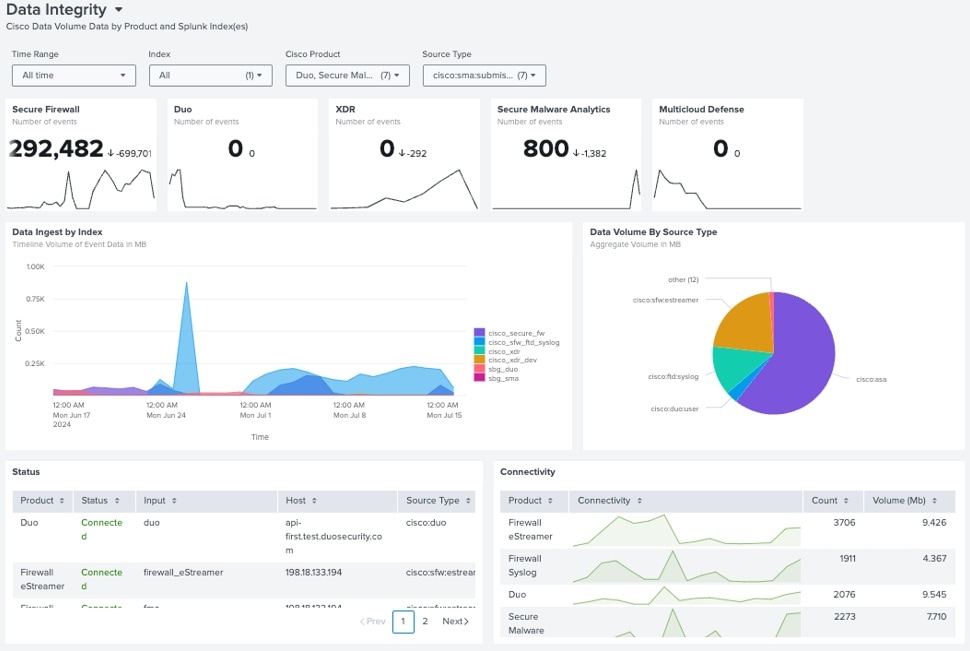
Figure 1. Data Integrity Dashboard

Data Integrity Dashboard Specifics

  • You can filter data using the Time Range, Index, Cisco Product, or Source Type filters:

    1. Time Range: defines the time for which you would like to see data. Works with all tiles on the dashboard.

    2. Index: indexes that you’ve used while creating inputs on the Configuration Application pages. The filter works only with the Event count cards located at the top of the page. It shows “0” on all other cards.

    3. Cisco Product: allows to filter data by Product Name. Works with all tiles on the dashboard, except Event count cards.

    4. Source Type: source types that were used while creating inputs on the Configuration Application pages. Works with all tiles on the dashboard, except Event count cards.

  • The Data Integrity dashboard is XML-based.

To edit the dashboard, click the Edit button.


Note


This action will only affect the existing user.


Resource Utilization Dashboard

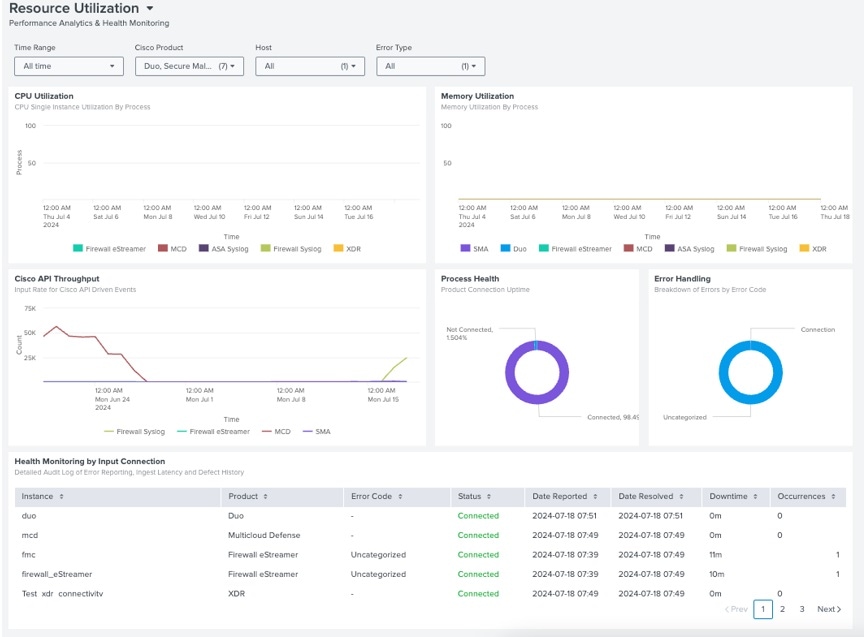
The Resource Utilization dashboard is a vital component of Security Cloud App. It provides a detailed account of the performance and monitors the health of the inputs that you have created. Resource Utilization dashboard is instrumental in ensuring that your security infrastructure is running optimally and that resources are being used effectively.

Figure 2. Resource Utilization Dashboard

Resource Utilization dashboard Specifics

  • You can filter data using the Time Range, Cisco Product, Host and Error type filters:

    1. Time Range: defines the time for which you would like to see data.

    2. Cisco Product: allows to filter data by Product Name.

    3. Host: allows to filter data by Host.

    4. Error type: allows to filter data by the type of error.

  • The Resource Utilization dashboard is XML-based.

To edit the dashboard, click the Edit button.


Note


This action will only affect the existing user.


Alerts and Detection Dashboard

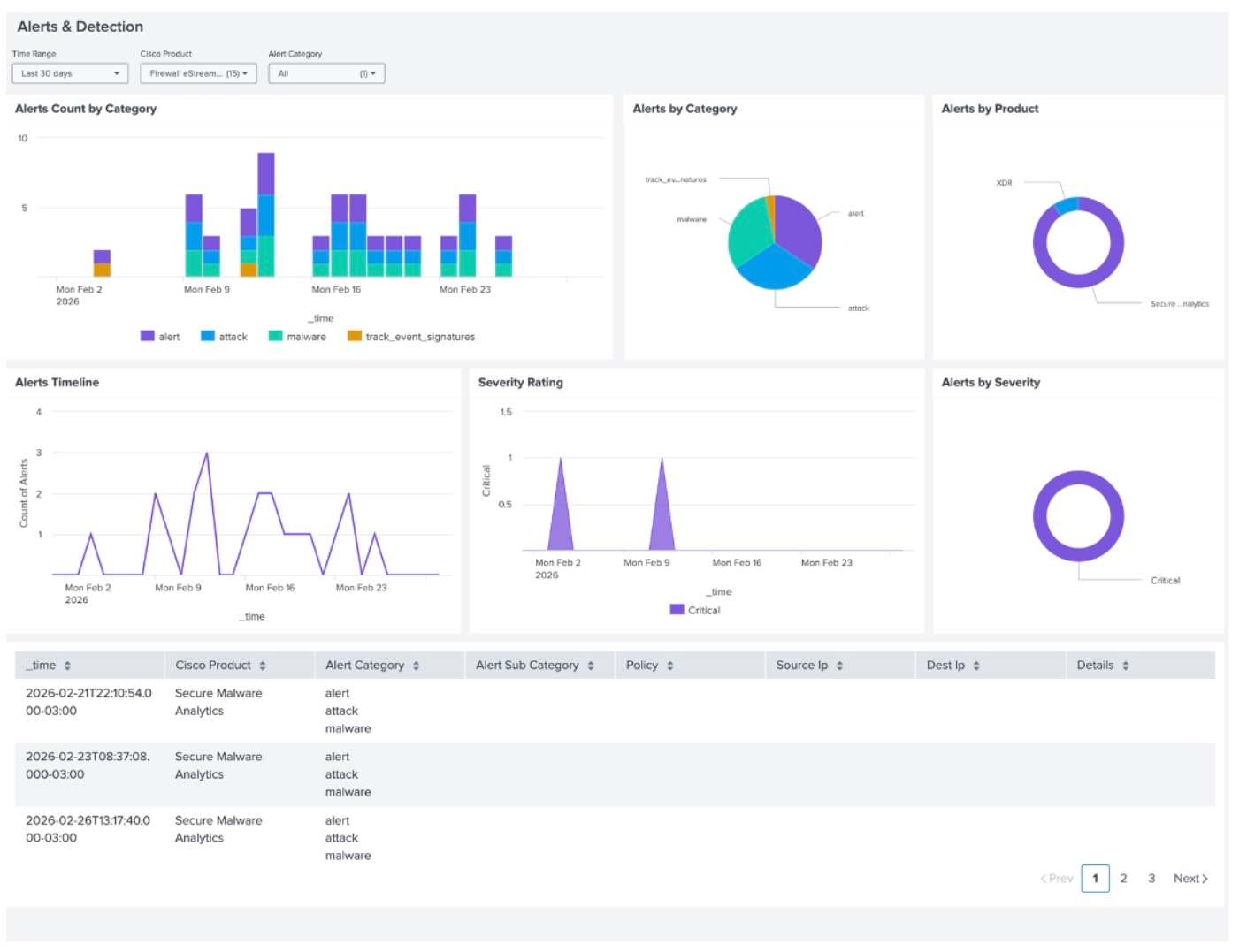
The Alerts & Detection dashboard provides a centralized interface for monitoring high-priority security events across the network. By querying the unified Alert model, the dashboard aggregates disparate data types into a single view, enabling security analysts to identify and remediate threats efficiently.

Figure 3. Image of Alerts and Detection Dashboard

The dashboard is built on an XML-based architecture. Changes made to the XML are user-specific and will only persist for the current user profile.

The dashboard populates data from the following sources based on specific filtering criteria:

You can refine the displayed data using the following global filters:

  • Time Range: Constrains the data set to a specific historical window.

  • Cisco Product: Filters the view to show alerts from a specific security appliance or service.

  • Alert Category: Organizes events by threat type, such as Attack, Alert, Error, or Malware.

Alerts model includes:

Product Event Type
Firewall eStreamer

FileEvent and SHA_Disposition = Malware or Unknown

IntrusionEvent

Firewall ftd syslog

Messages with specific rec type:

rec_type: 430001, 430005

Firewall asa syslog

Messages with specific message ids:

message_id: 400032,106016, 106017, 110003, 405001

Secure Network Analytics All events that have a field: alarmId
Secure Malware Analytics

High score events:

analysis.threat_score > 70

Email Threat Defense

Events with a specific category:

Verdict.category: BEC, Scam, Phishing, Malicious

Secure Endpoint

Threat Quarantined, Retrospective Detection, Threat Detected, Quarentine Failure, IOS Network Detection, DFC Threat Detected, Exploit Prevention

event_type_id: 553648143, 553648147, 1090519054, 2164260880, 1090519102, 1090519084, 1090519103

XDR Incidents events
Cisco AI Defense All events by default
Cisco Identity Intelligence All events by default
Cisco Secure Workload All events by default