Cisco Security Cloud Control: Cisco Meraki Management

PDF

Cisco Security Cloud Control: Cisco Meraki Management

Overview of Cloud-Delivered Firewall Management Center

Want to summarize with AI?

Log in

An overview of Cloud-Delivered Firewall Management Center, including Threat Defense management, migration, onboarding, high availability, security analytics, and licensing.


Cloud-Delivered Firewall Management Center is a software-as-a-service product that manages Secure Firewall Threat Defense devices through Security Cloud Control Firewall Management. It provides many of the same functions as an On-Premises Firewall Management Center.

Cloud-Delivered Firewall Management Center has the same appearance and behavior as an On-Premises Firewall Management Center and uses the same FMC API.

Because it is a SaaS product, the Security Cloud Control Firewall Management operations team deploys and maintains the Cloud-Delivered Firewall Management Center software. As new features are introduced, the operations team updates the Cloud-Delivered Firewall Management Center in your Security Cloud Control Firewall Management organization.

Migration and onboarding details

A migration wizard is available to help you migrate Threat Defense devices from an On-Premises Firewall Management Center to Cloud-Delivered Firewall Management Center.

Devices must run one of these Threat Defense software releases before you migrate them:

  • Minimum On-Premises Firewall Management Center: 7.2

  • Minimum Threat Defense: 7.2.x (not supported for Version 7.1)

Threat Defense 7.1 releases are not supported for migration.

You onboard Threat Defense devices in Security Cloud Control Firewall Management by using familiar methods, such as entering the serial number or using a CLI command that includes a registration key.

After onboarding:

  • The device appears in both Security Cloud Control Firewall Management and Cloud-Delivered Firewall Management Center.

  • You configure the device in Cloud-Delivered Firewall Management Center.

  • In Security Cloud Control Firewall Management, you can review device information such as version, configuration status, connectivity, health status, and node status.

  • When you click the health status in Security Cloud Control Firewall Management, the platform opens the device health monitoring page in the Cloud-Delivered Firewall Management Center user interface.

Availability and Security Analytics

Security Cloud Control Firewall Management supports high availability for the Threat Defense devices that it manages through the data interface. This feature is supported for devices that run software version 7.2 or later.

You can analyze security events from onboarded threat defense devices by using either Security Analytics and Logging (SaaS) or Security Analytics and Logging (On-Premises):

  • Security Analytics and Logging (SaaS) stores events in the cloud, and you view those events in Security Cloud Control Firewall Management.

  • Security Analytics and Logging (On-Premises) stores events on an on-premises Secure Network Analytics appliance, and analysis occurs in the On-Premises Firewall Management Center.

In both cases, you can still send logs directly from firewalls to a log collector of your choice.

Licenses

The license for Cloud-Delivered Firewall Management Center is a per-device-managed license and there is no license required for the Cloud-Delivered Firewall Management Center itself. Existing Secure Firewall Threat Defense devices re-use their existing smart licenses and new Secure Firewall Threat Defense devices provision new smart licenses for each feature implemented on the Secure Firewall Threat Defense For more information, see Cloud-Delivered Firewall Management Center license.

Existing customers can continue to use Security Cloud Control for managing other device types like, the Secure Firewall ASA, Meraki, Cisco IOS devices, Umbrella, and AWS virtual private clouds. If you use Security Cloud Control to manage a Secure Firewall Threat Defense device configured for local management with Firepower Device Manager, you can continue to manage them with Security Cloud Control as well.

To learn how to have a Cloud-Delivered Firewall Management Center provisioned on your tenant, see Enable Cloud-delivered Firewall Management Center on Your Security Cloud Control Tenant.

See Managing Cisco Secure Firewall Threat Defense with Cloud-delivered Firewall Management Center for the complete administrator guide to the Cloud-Delivered Firewall Management Center.
Enable Cloud-Delivered Firewall Management Center

If you want to manage your Secure Firewall Threat Defense devices, you can enable the Cloud-Delivered Firewall Management Center on your tenant. You need to have an admin or a super admin user role to perform this task.

Procedure

1.

From the Security Cloud Control Home page, click Firewall.

2.

From the Security Cloud Control menu, click Administration > Integrations > Firewall Management Center and click Enable Cloud-Delivered FMC.

Security Cloud Control starts provisioning a Cloud-Delivered Firewall Management Center instance in the background; it typically takes 15 to 30 minutes for this to be complete. You can track the provisioning progress on the Status column of Cloud-Delivered FMC.

After the provisioning is complete, the status changes to Active. In addition, you get a Cloud-Delivered Firewall Management Center is Ready notification on the Security Cloud Control notifications panel and on the applications on which you have configured incoming webhooks. See Notification Settings for more information.

Note

After you receive the Cloud-Delivered Firewall Management Center is Ready notification, ensure that you log out of and log in back to your tenant once, to see the Cloud-Delivered FMC right pane options, such as Actions, Management, and System.

What to do next

  1. Register Cloud-Delivered Firewall Management Center with Cisco Smart Software Manager (CSSM) to activate smart license. For detailed steps, refer to Register the Cloud-Delivered Firewall Management Center with the Smart Software Manager.

  2. Onboard your Firewall Threat Defense devices to the Cloud-Delivered Firewall Management Center and manage them.


Determine the Cloud-Delivered Firewall Management Center Version in Security Cloud Control Firewall Management

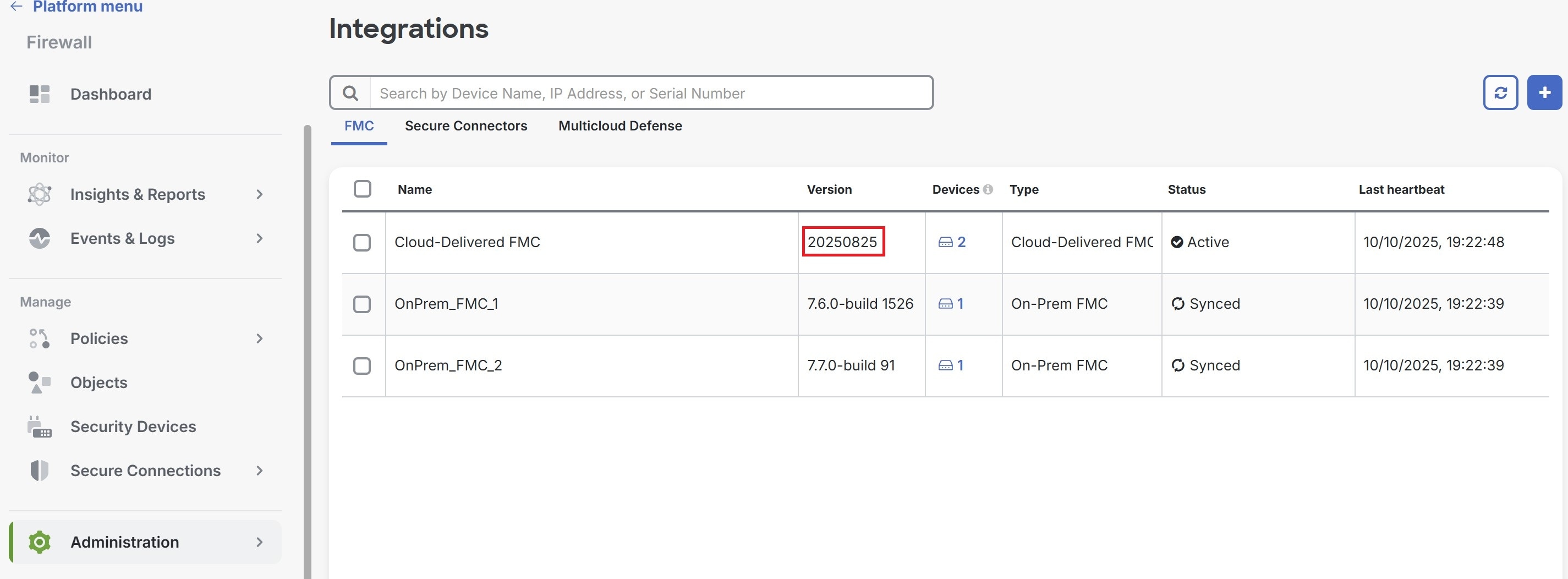
Information about the Cloud-Delivered Firewall Management Center version is required primarily for migration planning, feature support verification, troubleshooting, licensing, and operational management.

Use this procedure to determine the current version of your Cloud-Delivered Firewall Management Center in Security Cloud Control Firewall Management.

Before you begin

Enable Enable Cloud-Delivered Firewall Management Center in your organzation.

Procedure

SUMMARY STEPS

  1. From the Security Cloud Control Home page, click Firewall.
  2. In the left pane, click Administration > Integrations > Firewall Management Center.
  3. Under the FMC tab, the version is displayed under the Version column.

DETAILED STEPS

1.

From the Security Cloud Control Home page, click Firewall.

2.

In the left pane, click Administration > Integrations > Firewall Management Center.

3.

Under the FMC tab, the version is displayed under the Version column.

For more information about Cloud-Delivered Firewall Management Center versions, see Release Notes for Cloud-Delivered Firewall Management Center.

Cloud-Delivered Firewall Management Center licensing and registration

Register Cloud-Delivered Firewall Management Center with Cisco Smart Licensing the same way you would for On-Premises Firewall Management Center.

Overview

Cloud-Delivered Firewall Management Center is included with the base subscription and trial for Security Cloud Control Firewall Management. You do not need to purchase a separate license for Cloud-Delivered Firewall Management Center. The base subscription or trial covers Cloud-Delivered Firewall Management Center, enabling you to manage Firewall Threat Defense devices through the cloud.

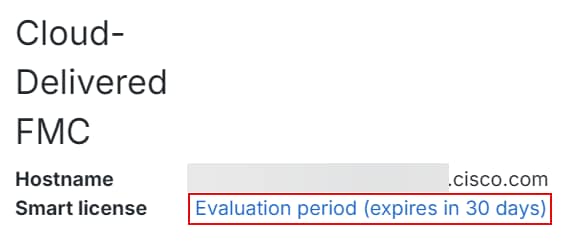
Cloud-Delivered Firewall Management Center is provisioned with a 90-day evaluation license upon deployment.

We strongly recommend registering Cloud-Delivered Firewall Management Center with Cisco Smart Software Manager immediately after deployment to access all features, including those requiring export encryption such as RAVPN and SSL VPN. Early registration prevents feature limitations and deployment interruptions.

Evaluation license

  • Features requiring export encryption, such as Remote Access VPN, SSL VPN, and other encryption-dependent options, remain disabled until you register Cloud-Delivered Firewall Management Center with Cisco Smart Software Manager (CSSM).

  • After the 90-day evaluation period ends, you can continue onboarding Firewall Threat Defense devices, but manually triggered or scheduled deployments are blocked until registration with CSSM is completed.

  • Security Cloud Control Firewall Management sends alert notifications as the evaluation license nears expiration.

    Note

    The Smart license field displays a warning when the evaluation license is expiration.

    When the evaluation period ends, Cloud-Delivered Firewall Management Center is unregistered. Registering Cloud-Delivered Firewall Management Center with Cisco Smart Software Manager converts from evaluation mode to a fully licensed state.

    Click the evaluation warning link to open the smart licensing registration page and register Cloud-Delivered Firewall Management Center with Cisco Smart Software Manager.

Registration with Cisco Smart Software Manager (CSSM)

  • Connect Cloud-Delivered Firewall Management Center to your smart licensing account, following the same process as On-Premises Firewall Management Center. The high-level procedure is provided in this section.

  • No separate license purchase is needed for Cloud-Delivered Firewall Management Center; the license is automatically applied upon registration.

  • Registering with smart licensing enables encryption export features.

  • Registration ensures compliance and prevents deployment issues.

To learn how to get a Cloud-Delivered Firewall Management Center provisioned on your Security Cloud Control tenant, see Request a Cloud-Delivered Firewall Management Center for your Security Cloud Control Tenant.

Licensing for Firewall Threat Defense devices

  • No separate license purchase is needed for Cloud-Delivered Firewall Management Center.

  • Each Firewall Threat Defense device managed by Cloud-Delivered Firewall Management Center requires an individual license.

  • After registering Cloud-Delivered Firewall Management Center with CSSM, an administrator may apply feature licenses to security devices.

Step-by-step registration

A high-level procedure is provided here. For detailed steps, see Register the Management Center with the Smart Software Manager.

  1. Create or Access Your Smart Account:

    Ensure you have a Cisco Smart Software Manager account. If you do not have one, create it at Smart Software Manager.

  2. Generate a Registration Token or Use a Registration Token:

    In the Smart Software Manager, use an existing valid registration token or generate a registration token for the virtual account to which you want to register the Cloud-Delivered Firewall Management Center.

    1. Navigate to Inventory > New Token.

    2. Enter a description and set an expiration (Cisco recommends 30 days).

    3. Create and copy the token.

  3. Register Cloud-Delivered Firewall Management Center with the Token:

    1. Log in to the Cloud-Delivered Firewall Management Center interface.

    2. Navigate to System > Licenses > Smart Licenses.

    3. Click Register and paste the registration token into the Product Instance Registration Token field.

    4. Ensure there are no extra spaces or blank lines before or after the token.

    5. Click Apply Changes.

  4. Verify Registration:

    After registration, verify the license status under System > Licenses > Smart Licenses to confirm successful registration, license application, and that “Export-Controlled Features” are enabled.


Cloud-Delivered Firewall Management Center Maintenance Schedule

Customers who have a Cloud-Delivered Firewall Management Center deployed on their organization are notified approximately 1 week before Security Cloud Control updates the Cloud-Delivered Firewall Management Center environment.

Super Admin and Admin users of the tenant are notified by email. Security Cloud Control also displays a banner on its home page notifying all users of upcoming updates.

Note
  • During the maintenance period of the Cloud-Delivered Firewall Management Center, refrain from creating or deploying configurations to the devices it manages.

  • If there is any issue that stops Security Cloud Control or Cloud-Delivered Firewall Management Center from communicating, that failure is addressed on all affected tenants as quickly as possible, even if it is outside the maintenance window.