Cisco Catalyst SD-WAN Application Management Guide, Releases 26.x and Later

PDF

Application catalog

Want to summarize with AI?

Log in

Describes the application catalog in Cisco SD-WAN Manager that provides visibility and control of applications in a Cisco Catalyst SD-WAN environment and uses Cisco SD-AVC for cloud-sourced updates and application coverage.


The application catalog is a feature that

  • provides visibility and control of applications in a Cisco Catalyst SD-WAN environment, powered by the Cisco SD-AVC component

  • centralizes operational tasks such as updating applications and cloud SaaS feeds, creating custom applications, grouping applications, and creating application lists

  • optimizes network connectivity based on the specific requirements of different Kubernetes services.

Application catalog features

The application catalog includes applications ranging from business productivity apps like Office 365 or Google Workspace to social media platforms, cloud platforms, and customer-created applications.

Cisco Catalyst SD-WAN support more than 4000 applications, 2500 Cloud Sourced applications through SD-AVC in addition to the existing 1500 applications supported by NBAR2.

Note

You can use custom applications in the same way as any other protocol when configuring policies using policy groups or using centralized policies. For more information on configuring policies using Policy Groups refer to the Objects and Profiles section in the Cisco Catalyst SD-WAN Policy Groups Configuration Guide.

The Application Catalog tab includes these features:

  • Overview

  • Applications

  • Application Source Settings

  • Discovered Application

  • Application List

  • Configure SD-AVC

  • Configure Cloud Connection

  • Cloud Sourced Applications


Cloud-sourced applications

Cloud-sourced applications are applications that

  • Cisco Catalyst SD-WAN sources from the Cisco SD-AVC component, and

  • can be used in Cisco SD-WAN Manager security policies, centralized policies, and Cloud OnRamp for SaaS.

Cisco SD-AVC uses cloud-based sources to continuously update its network applications database. The dynamic database regularly adds new applications and updates information about existing applications.

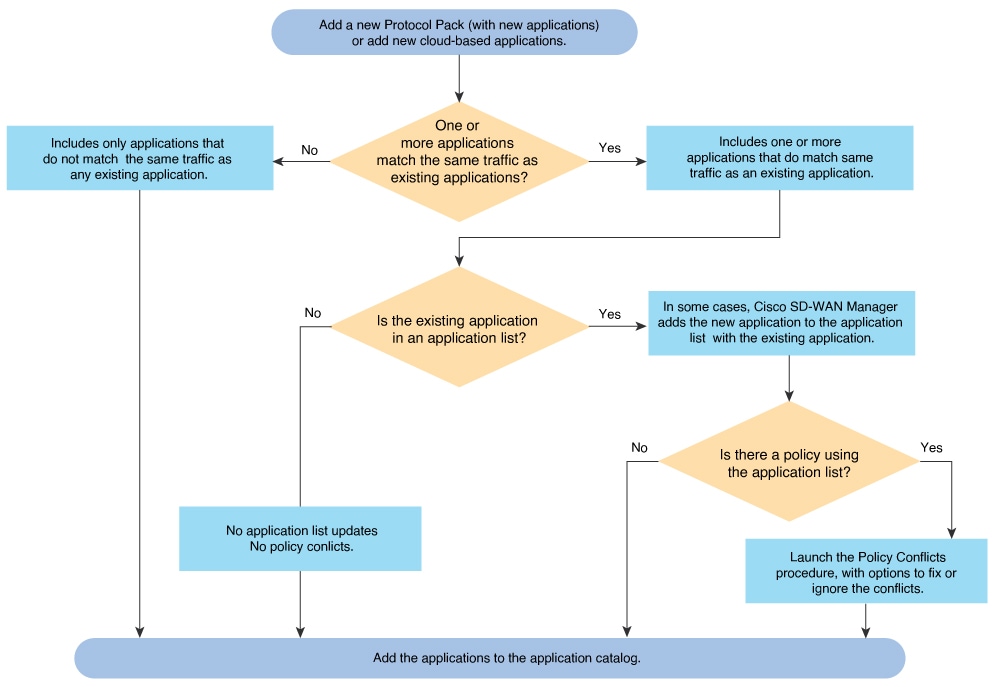
A cloud-sourced application may match some of the same traffic as an existing application. In some cases, Cisco SD-WAN Manager prompts you to take action to resolve any conflicts.

Figure 1. Logic to add an application to the catalog
The diagram illustrates the process for adding an application to the catalog, highlighting the steps involved in integrating cloud-sourced applications into the existing network applications database.

Applications in registry

The applications in registry chart shows the distribution of applications in the Cisco SD-WAN Manager application registry.

The chart includes these application categories:

Category

Description

Built in

Applications that are built-in or pre-installed in the system.

Discovered

Applications that are discovered or detected by the system.

Custom

Custom-built applications specifically developed for the system.

Each chart segment represents an application category. The segment size indicates the relative proportion of applications in that category.

Use this chart to gain insights into the application landscape and understand the composition of applications in the system. This chart illustrates the applications in the Cisco SD-WAN Manager application registry. The device application registry is updated after pushing a configuration to the devices. For example, when a new custom application is created, it is not updated in the device application registry until a policy with that custom application is pushed to the device, however, it will be counted in the custom application on this chart since Cisco SD-WAN Manager already has the definition in its registry. All the custom applications created are seen in the Applications tab and in the chart as custom apps.


Top applications observed in network

The Top applications observed in network doughnut chart shows the top application categories observed in network traffic.

Each chart segment represents an application category. The segment size indicates the relative presence or frequency of that category in the observed network traffic.

Use this chart to understand which application categories are prominent in the network and how application traffic is distributed.

You can view application details by timestamp, such as Last 1 Hour or Last 3 Hours. The maximum selectable time period is 24 hours.


Benefits of Kubernetes clusters and Kubernetes services

  • Unified network management: Cisco SD-WAN Manager gives the ability to add Kubernetes clusters and it discovers any applications running on them.

  • Enhanced visibility: The Cisco SD-WAN Manager and Kubernetes clusters integration provides complete visibility over both network infrastructure and application definitions, making it easier to identify and resolve issues.

  • Improved performance: Cisco Catalyst SD-WAN’s ability to optimize network traffic, combined with direct visibility over Kubernetes resources, results in improved application performance.

  • Greater efficiency: The network management based on application requirements and Kubernetes services leads to greater operational efficiency.

  • Advanced security: The Cisco SD-WAN Manager and Kubernetes clusters integration provides more robust security for both network and application layers.


Benefits of cloud SaaS feeds

  • Cloud SaaS feeds provide real-time data on cloud application classification. Cisco SD-WAN Manager uses this information to make intelligent decisions about routing and optimizing traffic to ensure the best possible performance for these applications.

  • The Application classification is enhanced and up-to-date with latest Cloud SaaS feeds.