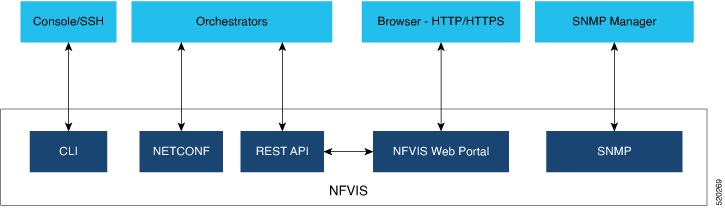
The NFVIS portal is a web-based graphical user interface that
-
displays information about NFVIS
-
presents users with an easy means to configure and monitor NFVIS over HTTPS, and
-
eliminates the need to know the NFVIS CLI and API.
Session management
The stateless nature of HTTP and HTTPS requires a method of uniquely tracking users through the use of unique session IDs and cookies.
NFVIS encrypts the user's session. The AES-256-CBC cipher is used to encrypt the session contents with an HMAC-SHA-256 authentication tag. A random 128-bit Initialization Vector is generated for each encryption operation.
An Audit record is started when a portal session is created. Session information is deleted when the user logs out or when the session times out.
The default idle timeout for portal sessions is 15 minutes. However, this can be configured for the current session to a value between 5 and 60 minutes on the Settings page. Auto-logout will be initiated after this period. Multiple sessions are not permitted in a single browser. The Maximum number of concurrent sessions are set to 30.
The NFVIS portal utilizes cookies to associate data with the user. It uses these cookie properties for enhanced security:
-
ephemeral to ensure the cookie expires when the browser is closed
-
httpOnly to make the cookie inaccessible from JavaScript
-
secureProxy to ensure the cookie can only be sent over SSL.
Even after authentication, attacks such as Cross-Site Request Forgery (CSRF) are possible. In this scenario, an end user might inadvertently execute unwanted actions on a web application in which they're currently authenticated. To prevent this, NFVIS uses CSRF tokens to validate every REST API that is invoked during each session.
URL Redirection
In typical web servers, when a page is not found on the web server, the user gets a 404 message; for pages that exist, they get a login page. The security impact of this is that an attacker can perform a brute force scan and easily detect which pages and folders exist.
To prevent this on NFVIS, all non-existent URLs prefixed with the device IP are redirected to the portal login page with a 301 status response code. This means that irrespective of the URL requested by an attacker, they will always get the login page to authenticate themselves.
All HTTP server requests are redirected to HTTPS and have these headers configured:
Portal Disablement
The NFVIS portal access is enabled by default. If you are not planning to use the portal, it is recommended to disable portal access using this command:
Configure terminal
System portal access disabled
commit