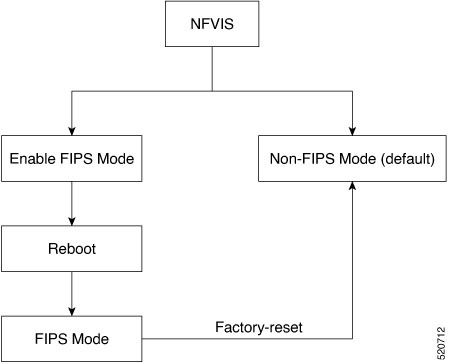
Explains the Federal Information Processing Standards (FIPS) mode implementation on NFVIS devices for government compliance.
FIPS mode on NFVIS is a security compliance mechanism that
-
implements Federal Information Processing Standards (FIPS) Publication 140-3 for United States federal government and contractor use
-
attempts to prevent the use of non-FIPS compatible algorithms on the device, and
-
requires manual configuration to ensure only FIPS approved algorithms are used.
FIPS mode behavior
In FIPS mode, certain functions may fail silently if they attempt to use non-compliant algorithms. You must ensure that the device is configured to use only FIPS-approved algorithms. FIPS mode is enabled by default on BExK platforms.
Disable FIPS mode
To disable FIPS mode, you must first perform a factory reset. After the reset, disable FIPS mode and reboot the device. The same steps apply when re-enabling FIPS mode.