- Preface
- Product Overview
- Basic Router Configuration
- Configuring Ethernet CFM and Y.1731 Performance Monitoring on Layer 3 Interfaces
- Configuring Power Management
- Configuring Security Features
- Configuring Secure Storage
- Configuring Backup Data Lines and Remote Management
- Configuring Ethernet Switches
- Configuring Voice Functionality
- Configuring the Serial Interface
- Configuring Wireless Devices
- Configuring PPP over Ethernet with NAT
- Configuring PPP over ATM with NAT
- Environmental and Power Management
- Configuring a LAN with DHCP and VLANs
- Configuring a VPN Using Easy VPN and an IPSec Tunnel
- Configuring Cisco Multimode G.SHDSL EFM/ATM
- Configuring VDSL2 Bonding and Single-Wire Pair
- Configuring Cisco IOx
- Deployment Scenarios
- Troubleshooting Cisco 800 Series Routers
- Cisco IOS Software Basic Skills
- Concepts
- ROM Monitor
- Index
Configuring a LAN with DHCP and VLANs
The Cisco 819, Cisco 860 and Cisco 880 Integrated Services Routers (ISRs) support clients on both physical LANs and virtual LANs (VLANs).
Configuring a LAN with DHCP and VLANs
The Cisco 819, Cisco 860 and Cisco 880 Integrated Services Routers (ISRs) support clients on both physical LANs and virtual LANs (VLANs). The routers can use the Dynamic Host Configuration Protocol (DHCP) to enable automatic assignment of IP configurations for nodes on these networks.
The figure below shows a typical deployment scenario with two physical LANs connected by the router and two VLANs.
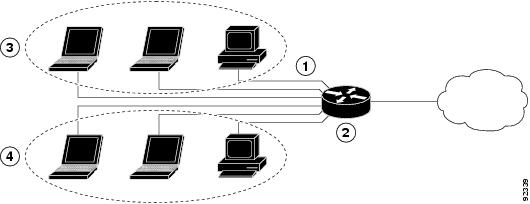
|
1 |
Fast Ethernet LAN (with multiple networked devices) |
|
2 |
Router and DHCP server—Cisco 819, Cisco 860, or Cisco 880 ISR—connected to the Internet |
|
3 |
VLAN 1 |
|
4 |
VLAN 2 |
DHCP
DHCP, which is described in RFC 2131, uses a client/server model for address allocation. As an administrator, you can configure your Cisco 800 series router to act as a DHCP server, providing IP address assignment and other TCP/IP-oriented configuration information to your workstations. DHCP frees you from having to manually assign an IP address to each client.
When you configure a DHCP server, you must configure the server properties, policies, and DHCP options.
 Note | Whenever you change server properties, you must reload the server with the configuration data from the Network Registrar database. |
Note | Cisco 800 Series Routers do not support DHCP snooping. |
VLANs
The Cisco 819, Cisco 860 and Cisco 880 routers support four Fast Ethernet ports on which you can configure VLANs.
VLANs enable networks to be segmented and formed into logical groups of users, regardless of the user’s physical location or LAN connection.
Configuring DHCP and VLANs
Note | The procedures in this chapter assume you have already configured basic router features, as well as PPPoE or PPPoA with NAT. If you have not performed these configurations tasks, see the Basic Router Configuration and Configuring a VPN Using Easy VPN and an IPSec Tunnel as appropriate for your router. |
Configuring DHCP
Perform these steps to configure your router for DHCP operation, beginning in global configuration mode:
1.
ip
domain
name
name
2.
ip
name-server
server-address1
[server-address2...server-address6]
3.
ip
dhcp
excluded-address
low-address
[high-address]
4.
ip
dhcp
pool
name
5.
network
network-number
[mask
|
prefix-length]
6.
import
all
7.
default-router
address
[address2...address8]
8.
dns-server
address
[address2...address8]
9.
domain-name
domain
10.
exit
DETAILED STEPS
Configuration Example: DHCP
The following configuration example shows a portion of the configuration file for the DCHP configuration described in this chapter:
ip dhcp excluded-address 192.168.9.0
!
ip dhcp pool dpool1
   import all
   network 10.10.0.0 255.255.255.0
   default-router 10.10.10.10
   dns-server 192.168.35.2
   domain-name cisco.com
!
ip domain name smallbiz.com
ip name-server 192.168.11.12
Verifying Your DHCP Configuration
Use the following commands to view your DHCP configuration:
- show ip dhcp import—Displays the optional parameters imported into the DHCP server database.
- show ip dhcp pool—Displays information about the DHCP address pools.
- show ip dhcp server statistics—Displays the DHCP server statistics, such as the number of address pools, bindings, and so forth.
Router# show ip dhcp import
Address Pool Name: dpool1
Router# show ip dhcp pool
Pool dpool1 :
 Utilization mark (high/low)    : 100 / 0
 Subnet size (first/next)       : 0 / 0
 Total addresses                : 254
 Leased addresses               : 0
 Pending event                  : none
 1 subnet is currently in the pool :
 Current index        IP address range                    Leased addresses
 10.10.0.1            10.10.0.1        - 10.10.0.254       0
Router# show ip dhcp server statistics
Memory usage         15419
Address pools        1
Database agents      0
Automatic bindings   0
Manual bindings      0
Expired bindings     0
Malformed messages   0
Secure arp entries   0
Message              Received
BOOTREQUEST          0
DHCPDISCOVER         0
DHCPREQUEST          0
DHCPDECLINE          0
DHCPRELEASE          0
DHCPINFORM           0
Message              Sent
BOOTREPLY            0
DHCPOFFER            0
DHCPACK              0
DHCPNAK              0
Router#
Configuring VLANs
Perform these steps to configure VLANs on your router, beginning in global configuration mode:
1.
vlan
vlan_id
2.
exit
DETAILED STEPS
| Command or Action | Purpose |
|---|
Assigning a Switch Port to a VLAN
Perform these steps to assign a switch port to a VLAN, beginning in global configuration mode:
1.
interface
switch port
id
2.
switchport
access
vlan
vlan-id
3.
end
DETAILED STEPS
Verifying Your VLAN Configuration
Use the following commands to view your VLAN configuration.
- show—Entered from VLAN database mode. Displays summary configuration information for all configured VLANs.
- show vlan-switch—Entered from privileged EXEC mode. Displays detailed configuration information for all configured VLANs.
Router# vlan database
Router(vlan)# show
  VLAN ISL Id: 1
    Name: default
    Media Type: Ethernet
    VLAN 802.10 Id: 100001
    State: Operational
    MTU: 1500
    Translational Bridged VLAN: 1002
    Translational Bridged VLAN: 1003
  VLAN ISL Id: 2
    Name: VLAN0002
    Media Type: Ethernet
    VLAN 802.10 Id: 100002
    State: Operational
    MTU: 1500
  VLAN ISL Id: 3
    Name: red-vlan
    Media Type: Ethernet
    VLAN 802.10 Id: 100003
    State: Operational
    MTU: 1500
  VLAN ISL Id: 1002
    Name: fddi-default
    Media Type: FDDI
    VLAN 802.10 Id: 101002
    State: Operational
    MTU: 1500
    Bridge Type: SRB
    Translational Bridged VLAN: 1
    Translational Bridged VLAN: 1003
  VLAN ISL Id: 1003
    Name: token-ring-default
    Media Type: Token Ring
    VLAN 802.10 Id: 101003
    State: Operational
    MTU: 1500
    Bridge Type: SRB
    Ring Number: 0
    Bridge Number: 1
    Parent VLAN: 1005
    Maximum ARE Hop Count: 7
    Maximum STE Hop Count: 7
    Backup CRF Mode: Disabled
    Translational Bridged VLAN: 1
    Translational Bridged VLAN: 1002
  VLAN ISL Id: 1004
    Name: fddinet-default
    Media Type: FDDI Net
    VLAN 802.10 Id: 101004
    State: Operational
    MTU: 1500
    Bridge Type: SRB
    Bridge Number: 1
    STP Type: IBM
  VLAN ISL Id: 1005
    Name: trnet-default
    Media Type: Token Ring Net
    VLAN 802.10 Id: 101005
    State: Operational
    MTU: 1500
    Bridge Type: SRB
    Bridge Number: 1
    STP Type: IBM
Router# show vlan-switch
VLAN Name                             Status    Ports
---- -------------------------------- --------- -------------------------------
1    default                          active    Fa0, Fa1, Fa3
2    VLAN0002                         active    Fa2
1002 fddi-default                     active
1003 token-ring-default               active
1004 fddinet-default                  active
1005 trnet-default                    active
VLAN Type  SAID       MTU   Parent RingNo BridgeNo Stp  BrdgMode Trans1 Trans2
---- ----- ---------- ----- ------ ------ -------- ---- -------- ------ ------
1    enet  100001     1500  -      -      -        -    -        1002   1003
2    enet  100002     1500  -      -      -        -    -        0      0
1002 fddi  101002     1500  -      -      -        -    -        1      1003
1003 tr    101003     1500  1005   0      -        -    srb      1      1002
1004 fdnet 101004     1500  -      -      1        ibm  -        0      0
1005 trnet 101005     1500  -      -      1        ibm  -        0      0
 Feedback