Release Notes for Cisco IoT FND Release 26.2.1
Available Languages
Bias-Free Language
The documentation set for this product strives to use bias-free language. For the purposes of this documentation set, bias-free is defined as language that does not imply discrimination based on age, disability, gender, racial identity, ethnic identity, sexual orientation, socioeconomic status, and intersectionality. Exceptions may be present in the documentation due to language that is hardcoded in the user interfaces of the product software, language used based on RFP documentation, or language that is used by a referenced third-party product. Learn more about how Cisco is using Inclusive Language.
- US/Canada 800-553-2447
- Worldwide Support Phone Numbers
- All Tools
 Feedback
 Feedback
Cisco IoT Field Network Director (FND), Release 26.2.1............. 3
New software features............................................................. 3
New hardware features............................................................ 7
Changes in behavior................................................................ 8
Resolved issues....................................................................... 9
Open issues............................................................................ 9
Known issues........................................................................ 10
Compatibility......................................................................... 11
Scalability............................................................................. 13
Supported hardware.............................................................. 14
Related resources.................................................................. 17
Legal information................................................................... 17
Cisco IoT Field Network Director (FND), Release 26.2.1
Cisco IoT FND Release 26.2.1 adds secure certificate administration, direct execution of supported Cisco IOS XE commands, insecure-command detection, a redesigned user interface, FND Labs, a limited-beta FND AI Assistant, Audit Trail search, GPS-enriched mesh routing-tree exports, additional cellular-modem details, Cisco 5G Reduced Capability module and Cisco IR1001-G2 support, and higher-scale deployments. This document summarizes the released features, behavior changes, compatibility information, and software issues.
Table 1. Updates to release notes
| Date |
Description |
| September 15, 2026 |
Initial release of the Cisco IoT FND Release 26.2.1 release notes. |
This section provides a brief description of the new software features introduced in Cisco IoT FND Release 26.2.1.
Table 2. New software features for Cisco IoT Field Network Director, Release 26.2.1
|
Product Impact |
Feature |
Description |
| Security |
Upload a custom web certificate through the Cisco IoT FND user interface and. Restart the Cisco IoT FND service after an upload or restore to apply the certificate. |
|
| Ease of use |
Use the Troubleshoot tab to run supported, nonconfigurative Cisco IOS XE EXEC commands on supported routers without signing in to the device CLI. Cisco IoT FND displays command output or errors and records the execution in the audit log. |
|
| Security |
Cisco IoT FND detects deprecated insecure CLI commands in router templates and configuration-push workflows, displays warnings, and lets you review the detected commands. |
|
| Scalability |
Cisco IoT FND supports high-availability virtual-machine deployments with PostgreSQL for router management at scales up to 50,000 routers. |
|
| Scalability |
Support for AMI deployments with up to 10,000 routers and 10,000,000 endpoints |
Cisco IoT FND supports Advanced Metering Infrastructure deployments with up to 10,000 routers and 10,000,000 endpoints. |
| Administration |
Adds server-setting controls for applicable utility deployments. |
|
| Ease of use |
Adds search functionality to the Audit Trail page so that administrators can quickly locate specific records in large audit datasets. |
|
| Better visibility |
Adds device latitude and longitude coordinates to mesh routing-tree data exported through the Cisco IoT FND user interface and northbound API. |
|
| Better visibility |
Displays the cellular modem device model ID, PRI version, carrier PRI version, and OEM PRI version on the Device Info page. |
New Cisco IoT FND user interface
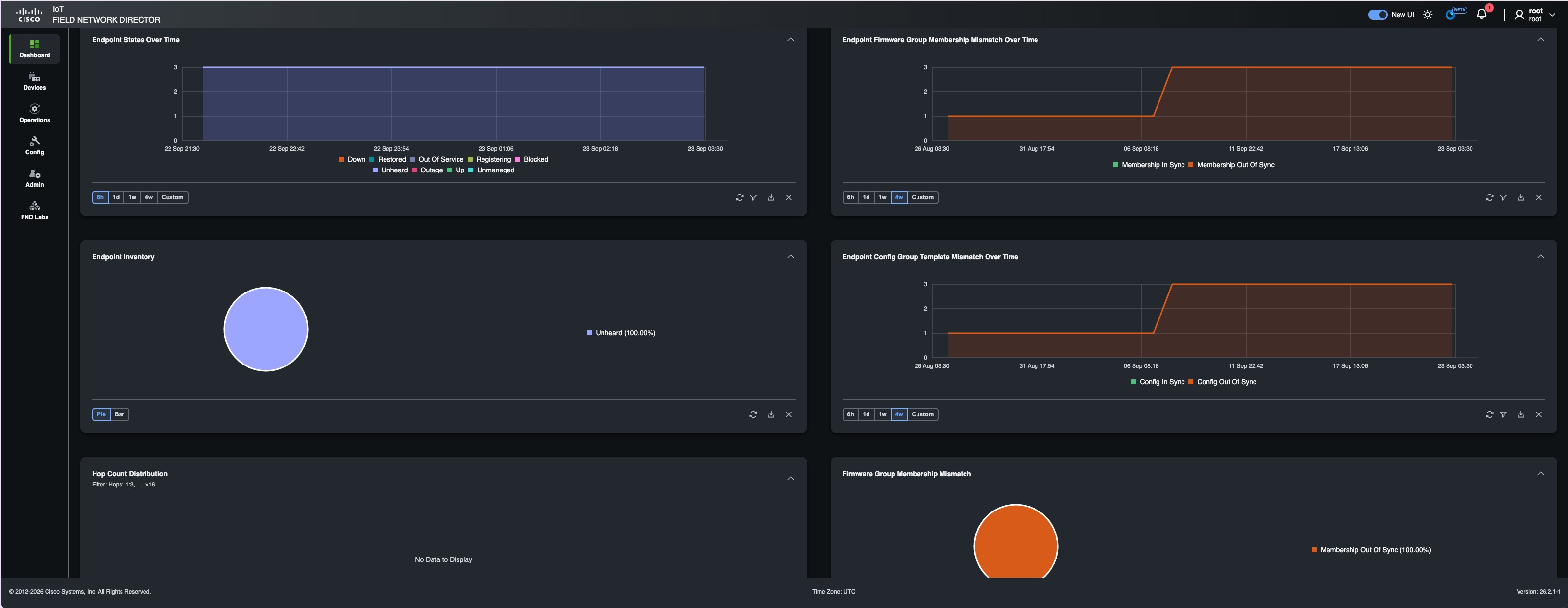
Cisco IoT FND Release 26.2.1 introduces a redesigned user interface for common monitoring, device-management, operations, configuration, and administration workflows. Use the New UI toggle in the application header to switch between the new and classic interfaces. Functions that are not yet available in the new interface remain accessible from the classic interface.
FND AI Assistant limited beta
FND AI Assistant is available as a limited beta in Cisco IoT FND Release 26.2.1. It provides guided workflows that help administrators investigate issues and work with Cisco IoT FND information. FND AI Assistant provides these capabilities:
● Check router configurations to support compliance reviews.
● Analyze Cisco IoT FND server logs to accelerate investigations.
● Guide troubleshooting through runbook workflows.
● Answer natural-language questions about available Cisco IoT FND information.
FND AI Assistant requires a separate OVA installation. After installation, enable FND AI Assistant in Preferences and complete the setup.
For more information or to provide feedback, contact ask-fnd-pm-external@cisco.com.
FND Labs
FND Labs is a repository for read-only beta features under development for Cisco IoT FND. It provides early access to emerging capabilities so that users can evaluate them, provide feedback, and help influence product direction.
For more information or to provide feedback about FND Labs innovations, contact ask-fnd-pm-external@cisco.com.
This section describes the new hardware support introduced in Cisco IoT FND Release 26.2.1.
Table 3. New hardware features for Cisco IoT Field Network Director, Release 26.2.1
|
Product Impact |
Feature |
Description |
| Hardware support |
Cisco IoT FND adds management support for the Cisco P-5GS6-RC-GL pluggable interface module and the Cisco IRMH-5GS6-RC-GL universal interface module. |
|
| Hardware support |
Cisco IoT FND provides centralized application management for the Cisco IR1001-G2 Rugged Series Secure Router. |
Table 4. Changes in behavior, Release 26.2.1
| Change |
Description |
| Thales Luna HSM client |
Cisco IoT FND Release 26.2.1 supports Thales Luna HSM client version 10.9.3. The supported HSM software version remains 7.4. |
| Bare-metal certificate workflow |
The bare-metal deployment guidance now consolidates the procedures for creating Microsoft CA certificate templates, generating and exporting the TPS Proxy certificate, creating and populating the cgms_keystore, and configuring Cisco IoT FND and TPS Proxy to use the keystore. |
This table lists the resolved issues in this software release.
Note: This software release may contain bug fixes first introduced in other releases. Click a bug ID to open the Cisco Bug Search Tool.
Table 5. Resolved issues for Cisco IoT Field Network Director, Release 26.2.1
| Bug ID |
Description |
| CPU usage spikes occur on Cisco IoT FND PostgreSQL OVA deployments during periodic router updates. |
|
| The hashfileinfo value does not reset in Cisco IoT FND. |
|
| CSV device upload fails with ORA-01438 when the AUDIT_TRAIL_ID sequence exceeds the supported column precision. |
|
| Northbound queries that use search-client fail with a NoClassDefFoundError for org/json/JSONObject. |
|
| The Firmware tab reports no data to export for selected devices in user-created endpoint and router groups. |
|
| Outage events are not sent to the subscribed WSDL in scale deployments. |
|
| Users with Asset Management permissions cannot view asset details. |
|
| Cisco IR8140 ShowWpanPacketCount metrics are not persisted to the database. |
|
| Users cannot change configuration-group properties. |
|
| Cisco IoT FND cannot push StackMode Time to supported mesh endpoints. |
|
| Adding Itron meters through the northbound API succeeds for local users but fails for remote or LDAP accounts. |
|
| Raw-socket communication does not work on Cisco IR1101, IR1800, or IR8100 routers. |
|
| The Devices list displays bandwidth values in a non-human-readable format. |
|
| The Error Message column is difficult to read and resize. |
|
| A variable name is incorrect after a router template is exported from the UI and imported again. |
|
| Running jboss-cli.sh fails because the setDefaultModularJvmOptions command is not found. |
|
| A log-file message contains the misspelling “temparory.” |
This table lists the open issues in this software release. Click a bug ID to open the Cisco Bug Search Tool.
Table 6. Open issues for Cisco IoT Field Network Director, Release 26.2.1
| Bug ID |
Description |
| During an upgrade from Cisco IoT FND 5.1.0-152 to Release 26.2.1-110, a Fog Director configuration PUT request can take approximately 10 minutes. |
|
| Configuration and firmware membership synchronization fails for generic endpoint devices. |
This table lists known issues for this release. Click a bug ID to open the Cisco Bug Search Tool.
Table 7. Known issues for Cisco IoT Field Network Director, Release 26.2.1
| Bug ID |
Description |
| After upgrading a PostgreSQL-based OVA deployment to Cisco IoT FND Release 26.2.1, the Fog Director listener might not start. Application information for devices that use IOx or edge-compute applications might then be missing or display an incorrect IP address. Complete the documented post-upgrade checks and restart the listener as directed. |
|
| When upgrading to Cisco IoT FND Release 26.2.1, follow the documented procedure to preserve and restore custom web certificates. |
This section lists compatibility information for Cisco IoT FND Release 26.2.1.
Validated browsers
Cisco IoT FND supports these browsers:
● Microsoft Edge
● Mozilla Firefox
Supported deployment methods
● Bare metal with Oracle Database
● Oracle database deployments through RPM upgrade
● OVA with PostgreSQL and InfluxDB, with or without TPS Proxy
● QCOW2 with PostgreSQL and InfluxDB
OpenSSH version
Cisco IoT FND is supported on multiple Red Hat Enterprise Linux (RHEL) releases, and the OpenSSH package supplied with a particular release might contain known security vulnerabilities. Keep OpenSSH current. For an initial installation, upgrade the OpenSSH package on the Cisco IoT FND server to the version supplied with RHEL 8.8 or a later supported RHEL release.
Supported RHEL versions
Cisco IoT FND Release 26.2.1 supports these RHEL versions:
● RHEL 8.8
● RHEL 9.8
Supported PostgreSQL versions
Cisco IoT FND Release 26.2.1 supports integrated PostgreSQL 16.7 for these deployments:
● Fresh installations running RHEL 9.8
● Upgraded virtual machines running RHEL 8.x or later
Note: PostgreSQL 12.12 cannot be upgraded when the base operating system is RHEL 7.x.
System requirements
For high-availability deployments with up to 50,000 routers, provision the following resources:
Table 8. PostgreSQL high-availability deployments
| Component |
Requirement |
| Cisco IoT FND application servers |
Two active application servers in separate data centers. |
| Resources for each Cisco IoT FND application server |
24 virtual CPU cores (six sockets with four cores per socket), 96 GB RAM, and 800 GB disk space. |
| EnterpriseDB PostgreSQL 16 |
Use Postgres Distributed, PostgreSQL data nodes, a witness node, and a PGD Proxy for each data node. Provision these components on separate virtual machines or bare-metal servers. The standalone OVA is not used for high-availability deployments. |
Table 9. Mesh deployment using bare metal with Oracle: Cisco IoT FND application servers
| Nodes (routers/endpoints) |
Application servers |
CPU (virtual cores) |
Memory (RAM GB) |
Disk Space (GB) |
| 500/50,000 |
1 |
4 |
16 |
250 |
| 1,000/1,000,000 |
1 |
8 |
16 |
250 |
| 2,000/2,000,000 |
1 |
8 |
16 |
500 |
| 6,000/6,000,000 |
3 |
8 |
16 |
500 |
| 8,000/8,000,000 |
4 |
8 |
32 |
500 |
| 10,000/10,000,000 |
5 |
8 |
46 |
500 |
Table 10. Mesh deployment using bare metal with Oracle: Oracle database server
| Nodes (routers/endpoints) |
Database servers |
CPU (virtual cores) |
Memory (RAM GB) |
Disk Space (GB) |
| 500/50,000 |
1 |
8 |
32 |
500 |
| 1,000/1,000,000 |
1 |
12 |
48 |
1000 |
| 2,000/2,000,000 |
1 |
16 |
64 |
1000 |
| 6,000/6,000,000 |
1 |
20 |
96 |
1000 |
| 8,000/8,000,000 |
1 |
32 |
160 |
2000 |
| 10,000/10,000,000 |
1 |
48 |
128 |
5000 |
Table 11. Mesh deployment using virtual machines with Oracle
| Nodes (routers/endpoints) |
CPU (virtual cores) |
Memory (RAM GB) |
Disk Space (GB) |
| 2,000/2,000,000 |
24 |
96 |
1500 |
Table 12. Router-only deployment using bare metal with Oracle: Cisco IoT FND application server
| Nodes (routers/endpoints) |
CPU (virtual cores) |
Memory (RAM GB) |
Disk Space (GB) |
| 10,000 |
16 |
48 |
500 |
| 25,000 |
32 |
64 |
500 |
Table 13. Router-only deployment using bare metal with Oracle: Oracle database server
| Nodes (routers/endpoints) |
CPU (virtual cores) |
Memory (RAM GB) |
Disk Space (GB) |
| 10,000 |
16 |
96 |
1000 |
| 25,000 |
32 |
96 |
1000 |
Table 14. Router-only deployment using virtual machines with PostgreSQL
| Nodes (routers/endpoints) |
CPU (virtual cores) |
Memory (RAM GB) |
Disk Space (GB) |
| 15,000 |
16 |
64 |
500 |
| 25,000 |
24 (cores per socket: 4; sockets: 6) |
96 |
800 |
| 50,000 |
24 (cores per socket: 4; sockets: 6) |
96 |
800 |
Table 15. Router-only deployment using KVMs with PostgreSQL
| Nodes (routers/endpoints) |
CPU (virtual cores) |
Memory (RAM GB) |
Disk Space (GB) |
| 15,000 |
16 |
64 |
500 |
| 25,000 |
24 (cores per socket: 4; sockets: 6) |
96 |
800 |
| 50,000 |
24 (cores per socket: 4; sockets: 6) |
96 |
600 |
Cisco IoT FND Release 26.2.1 supports high-availability virtual-machine deployments with PostgreSQL at scales up to 50,000 routers deployments at scales up to 10,000 routers and 10,000,000 endpoints. Use the system-requirements tables to plan server resources.
Table 16. Release upgrade matrix
| Current release |
Target release |
| Cisco IoT FND 5.1-series and 5.0-series releases |
Cisco IoT FND 26.2.1-120 |
| 5.0.0-117, 4.12.0-56 (OVA), and 4.12.0-56 (ISO) |
5.1.0-155 |
| 4.12.0-56 (OVA), 4.12.0-56 (ISO), 4.11.0-69 (OVA), and 4.11.0-69 (ISO) |
5.0.0-117 |
| 4.11.0-69 (OVA), 4.11.0-69 (ISO), 4.10.0-45 (OVA), and 4.10.0-46 (ISO) |
4.12.0-56 |
The target release supports upgrades from the two prior major releases and their maintenance releases unless a maintenance release was published after the target release. If the current release is older, complete each required intermediate upgrade and verify that you can sign in before continuing.
Hardware Security Module compatibility
Table 17. Supported Hardware Security Module versions
| Release |
HSM client |
HSM software |
| 26.2.1 |
10.9.3 |
7.4 |
| 5.1.0 |
10.2 with Thales patch version 630-000694-001 |
7.4 |
| 5.0.0 |
10.2 with Thales patch version 630-000694-001 |
7.4 |
| 4.7.x to 4.12.x |
10.2 |
7.4 |
This table lists the device types and software releases supported by Cisco IoT FND Release 26.2.1.
Table 18. Supported device types and versions
| Device type |
Release |
|
| FARs |
||
|
● Cisco IOS XE Release 26.2.1 or later
|
||
|
● Cisco IOS XE Release 17.18.4
● Cisco IOS XE Release 17.18.1a
● Cisco IOS XE Release 17.17.1
● Cisco IOS XE Release 17.16.1
● Cisco IOS XE Release 17.15.3
● Cisco IOS XE Release 17.12.6
● Cisco IOS XE Release 17.9.8
● Cisco IOS XE Release 17.9.5b
|
||
|
● Cisco IOS XE Release 17.18.4
● Cisco IOS XE Release 17.18.1a
● Cisco IOS XE Release 17.17.1
● Cisco IOS XE Release 17.16.1
● Cisco IOS XE Release 17.15.3
● Cisco IOS XE Release 17.12.6
● Cisco IOS XE Release 17.9.8
● Cisco IOS XE Release 17.9.5b
|
||
|
● Cisco IOS XE Release 17.18.4
● Cisco IOS XE Release 17.18.1a
● Cisco IOS XE Release 17.17.1
● Cisco IOS XE Release 17.16.1
● Cisco IOS XE Release 17.15.3
● Cisco IOS XE Release 17.12.6
● Cisco IOS XE Release 17.9.8
● Cisco IOS XE Release 17.9.5b
|
||
| HERs |
||
|
● C8000V: Cisco IOS XE 17.15.03a, Cisco IOS XE 17.18.1a
● C8500L: Cisco IOS XE 17.15.03a , Cisco IOS XE 17.18.1a
|
||
|
● Cisco IOS XE Release 17.15.03a
● Cisco IOS XE Release 17.18.1a
|
||
| Cisco ASR 1001 or 1002 Aggregation Services Router (ASR) serving as a head-end router |
Cisco IOS XE Release 17.6.7 (MD) |
|
| Cisco IOS XE Release 17.3.4a(MD) |
||
|
● 1.5.1
● 1.4.2
|
||
| Mesh Endpoints |
● Wi-SUN firmware version 6.8.0
● Dual stack supported version 6.2.47 (MR)
● Non-Wi-SUN firmware version 5.6.42
|
|
| Cisco 500 Series Wireless Personal Area Network (WPAN) Industrial Routers (IR500) |
The firmware versions supported for the following router series are:
● Cisco IR510 (DA Gateway device) — 6.8.0 and 6.2.35 (MR)
● Cisco IR530 (Range Extender) — 6.8.0 and 6.2.35 (MR)
|
|
● Cisco IoT Field Network Director User Guide, Release 26.2.1
● Cisco IoT Field Network Director Bare Metal Deployment Handbook
● Cisco IoT Field Network Director Data Sheet
Cisco and the Cisco logo are trademarks or registered trademarks of Cisco and/or its affiliates.
Copyright 2026 Cisco Systems, Inc. All rights reserved.