Install XGS-PON ONT

This chapter provides installation information for the XGS-PON ONT.

Safety instructions for installation

To minimize the risk of explosion or electric shock, ensure that the following safety instructions are met:

  • Install and use the ONT in indoor area where the ambient temperature does not exceed the operating temperature range of the hardware. For temperature ranges, refer to the section Technical specifications.

  • Connect the ONT to an appropriate power outlet that conforms to the required voltage range indicated on the power supply adapter.

  • Disconnect all power sources before moving the ONT.

  • Do not look into the ends of the optical fibers as it may expose you to invisible laser radiations.

  • Use an optical power meter to check whether the optical source is disabled or not before handling the optical fibers.

  • Turn off all power sources when opening the unit.
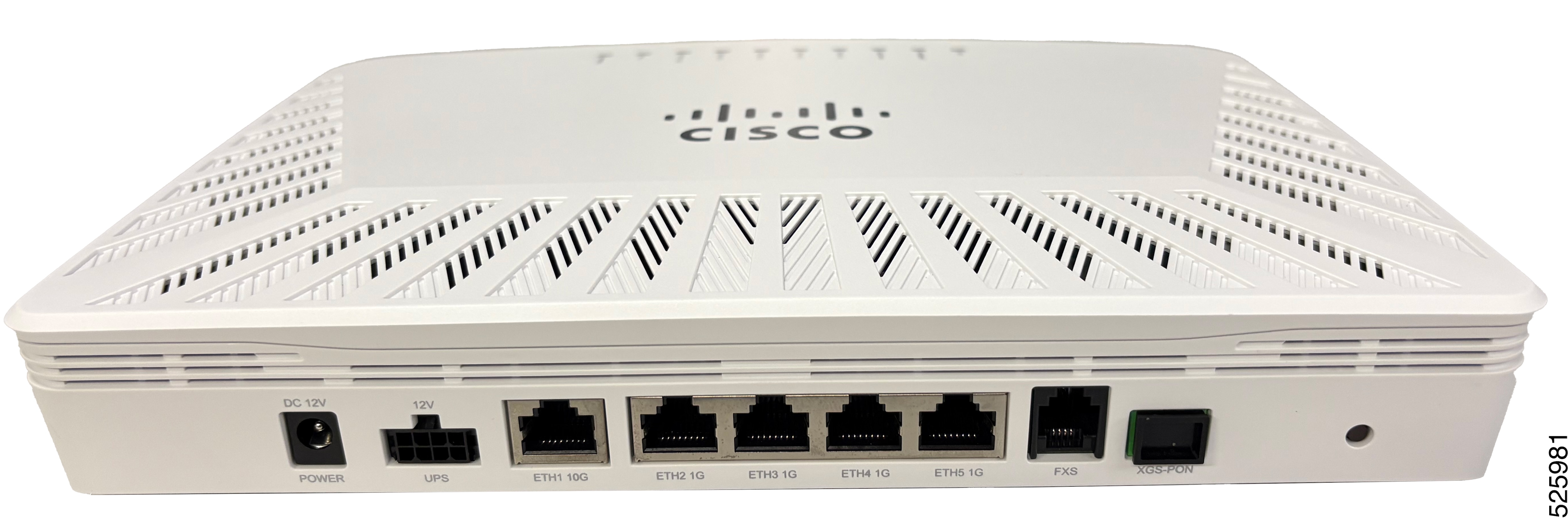
Install the device on a desktop

Install the device on a desktop as required by the site plan.

Before you begin

Ensure that the device is placed on a non-combustible surface.

Procedure


Place the device on a desktop. Ensure that adequate space is provided for cable management.

Figure 1. ONT desktop placement

Mount the ONT on a wall

Install the ONT on a wall according to the site plan.

Before you begin

Requirements

  • Two screws or anchors appropriate for the mounting surface.

    • Head Diameter: 6.0~6.4mm

    • Head Thickness: 2.0~2.5mm

    • Thread Length: >25mm

  • Ensure that the hardware used includes proper fasteners and anchors required to support the weight of the ONT.

  • The reinforced mounting surface must be capable of supporting combined weight of the ONT and cables.

  • Drill machine.

Procedure


Step 1

Select an appropriate flat mounting surface that will support the weight of the ONT when fully loaded.

Step 2

Mark the location of the left and right mounting holes. Holes should be X=7.48 in. (19 cm) apart, center to center.

Step 3

Drill the left and right mounting holes into the mounting surface using a drill bit appropriate for the customer-supplied screws/anchors.

Step 4

Install the customer supplied screws into the mounting holes using appropriate screwdriver. Maintain the gap of ~2.4mm between the wall and the screw head.

Step 5

Align the ONT with ports facing down, to the mounting screws on the wall, ensuring it is appropriately secured to the wall and does not fall. Orient the ONT so that the side with the Ciena logo is facing toward you and the ports are facing to the bottom.


Mount the ONT inside the Primex enclosure

Mount the XGS-PON ONT inside the third-party Primex enclosure using the mounting kit.


Note


This procedure is only applicable for ENC-10G-ONT-01PR XGS-PON ONT.


Before you begin

  • One of the mounting brackets in mounting kit for Primex P1500FG-RFOG enclosure.

  • An appropriate flat, reinforced mounting surface that will support the weight of the enclosure, and all its components.

  • The reinforced mounting surface must be capable of supporting the combined weight of the enclosure, ONT, and cables.

  • Use cable ties to dress and secure the cables using local practices.

Procedure


Step 1

Secure the mounting bracket to the upper part of the enclosure using the two screws provided to the customer. Tightened them using a size 2 Phillips screwdriver.

Step 2

Align the grooves on the back of ONT to the hooks on the mounting bracket, ensuring the ports appear at the bottom and LEDs at top after mounting.

Step 3

To ensure that the ONT remains intact in its position and does not fall, tighten the screw on the top of the mounting bracket using a Phillips screwdriver.

Note


Note:Tounmount the chassis, loosen the screw on the top of the mounting bracket using a Phillips screwdriver followed by pressing the two tabs on the top and moving the ONT upwards.


Mount the ONT inside the Corning enclosure

Mount the XGS-PON ONT inside the third-party Corning enclosure using the mounting kit, which works with Corning FNI enclosures.


Note


This procedure is only applicable for ENC-10G-ONT-01PR XGS-PON ONT.


Before you begin

  • One of the mounting brackets in 170-0488-900 Ciena 3806 mounting kit for Corning FNI-NG enclosure.

  • An appropriate flat, reinforced mounting surface that will support the weight of the enclosure, and all its components.

  • The reinforced mounting surface must be capable of supporting the combined weight of the enclosure, ONT, and cables.

  • Use cable ties to dress and secure the cables using local practices.

Procedure


Step 1

Secure the mounting bracket to the upper part of the enclosure using the two screws provided to the customer. Tightened them using a size 2 Phillips screwdriver.

Step 2

Align the grooves on the back of ONT to the hooks on the mounting bracket, ensuring the ports appear at the bottom and LEDs at top after mounting.

Step 3

To ensure that the ONT remains intact in its position and does not fall, open the ONT lid and tighten the two screws- one on the top-left and another on the bottom-right of the mounting bracket, using a Phillips screwdriver.