Explains the benefits of policy-based routing by allowing administrators to define routing policies using parameters such as IP address, port number, or protocol. It supports granular traffic control and optimization through features like flow-tag and forward-class.
Policy-based routing is a routing technique that
-
lets administrators define routing policies by using parameters such as IP address, port number, or protocol
-
makes routing decisions based on criteria other than the destination IP address, and
-
supports granular traffic control and optimization by using features such as flow-tag, forward-class, and access-group.
| Feature Name |
Release Information |
Feature Description |
|---|---|---|
| Policy-Based Routing byte count |
Release 26.1.1 | Introduced in this release on: Fixed Systems (8200 [ASIC: P100, P200], 8700 [ASIC: P100, K100], 8010 [ASIC: A100])(select variants only); Modular Systems (8800 [LC ASIC: P100]) (select variants only*) The bytes count enables the router to accurately track and display the total number of bytes matched by each policy-based routing (PBR) rule. This provides enhanced visibility into traffic volume, allowing you to better monitor and analyze network usage. The byte count in the show pbr stats counters policy <policy_name> command now supports additional PIDs. *This feature is supported on:
|
| Policy-Based Routing |
Release 25.4.1 | Introduced in this release on: Fixed Systems (8010 [ASIC: A100]) (select variants only*) *This feature is supported on:
|
| Policy-Based Routing |
Release 25.1.1 | Introduced in this release on: Fixed Systems (8010 [ASIC: A100]) (select variants only*) *This feature is supported on Cisco 8011-4G24Y4H-I routers. |
| Policy-Based Routing |
Release 24.4.1 | Introduced in this release on: Fixed Systems (8700 [ASIC: K100]) (select variants only*) *This feature is supported on Cisco 8712-MOD-M routers. |
| Policy-Based Routing |
Release 24.2.11 | Introduced in this release on: Fixed Systems (8200 [ASIC: P100], 8700 [ASIC: P100]) (select variants only*); Modular Systems (8800 [LC ASIC: P100]) (select variants only*) You can now create customized routing policies based on different parameters such as IP address, port numbers, or protocols. With policy-based routing (PBR), you can enhance your network security by steering sensitive data away from potentially vulnerable network segments. Also, by allowing you to distribute traffic across multiple paths, PBR can help prevent traffic congestion in your network. *This feature is supported on:
|
Policy-based routing (PBR) lets you route packets by configuring a policy for traffic flows. This reduces reliance on routing protocols. PBR allows you to prioritize and provide a specific routing path for certain types of traffic, such as VoIP and video conferencing, based on the service-level agreement (SLA).
Unlike traditional routing, which relies solely on the destination IP address, PBR enables you to route packets based on various parameters, such as IP address, port numbers, or protocols. For instance, you can implement routing policies to permit or deny traffic paths based on the identity of a specific end system, an application protocol, or packet size.
Flow-tag support
A provider edge (PE) router directs traffic toward the core through learned routes and installs policies on your interfaces based on your profiles. You must manually scan route tables and install Access Control Lists (ACLs) on your interfaces for proper traffic forwarding. As the scale of route prefix lists increases, the hardware resources required to program policies also increase. Whenever route updates occur, you must manually update these policies. You can apply route policies per prefix list but cannot select them for each interface to associate policies for each customer. This limitation may require additional planning.
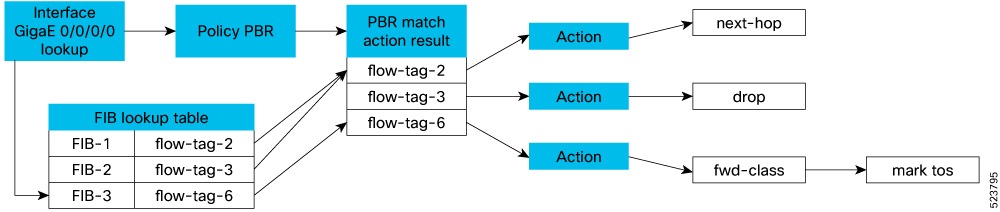
To simplify policy management and improve scalability, you can classify the traffic early in the routing domain as routes are learned, and mark them with metadata or a tag in the Forwarding Information Base (FIB). Forwarding-path rules can be defined against this flow-tag value, reducing manual updates and improving scalability.
The system sets and distributes the flow tag via the Routing Information Base (RIB) as a policy attribute of the Forwarding Information Base (FIB) entry in the FIB lookup table. Use the Route Policy Language (RPL) set operation to create flow tags. The PBR policy then refers to the flow tag and associates it with specific actions or policy rules for its value.
Forward-class support
Use the PBR class-map to define matching criteria for a particular type of traffic. Use the forward-class to specify the forwarding path for packets. After you associate a class-map with a forwarding-class in the policy map, all matching packets are forwarded as specified in the policy map.
Use Traffic Engineering (TE) tunnels to direct traffic along specific network paths. Associate TE tunnels with a forward-class to determine the forwarding path for packets.
The use of the auto-route command allows the TE interface to be exported to the routing protocol module, associating the route in the Forwarding Information Base (FIB) database with these tunnels.
The system can support up to eight forward-classes with eight TE tunnels each, allowing a maximum of 32 TE tunnels to be associated with the destination route.
Guideline for forward-class implementation
When you configure match tcp-flag, also configure match protocol tcp to ensure correct traffic classification.
Access-group support
PBR supports matching on an ACL group ID. You can specify large prefix lists and long lists of specific permit or deny lists. The prefix lists filter routing updates, while the permit or deny lists determine the action taken when a match occurs.
-
Permit - Stop processing ACL, and if
-
the type of class is “match-any”, proceed to take policy-map action
-
the type of class is “match-all”, proceed to the next ACL or “match” statement in the class-map considering that you already have a match (true) for an existing ACL.
-
-
Deny - Stop processing ACL and if
-
the type of class is “match-any”, proceed to the next ACL (or “match”) statement in the class-map if there is no match for the existing ACL.
-
the type of class is “match-all”, exit the class. No policy action is taken, and the next class is processed as per the specified order.
-
When the ACE is a MISS, that is, it did not match any permit or deny statement, these actions are performed:
-
Proceed to the next "match" statement.
-
If the “match” statement does not provide a match, then skip that class. No policy action is taken for that class, and proceed to check the packet against the next class in order, or proceed to L3 forwarding lookup.
An explicit deny entry is not supported in ACL groups that are embedded in class-maps.
Policy-based routing example
For example, you can implement a policy to route VoIP traffic through a dedicated path to ensure quality of service, while video conferencing traffic can be prioritized using a specific SLA. PBR can also be used to steer sensitive data away from vulnerable network segments, and distribute traffic across multiple paths to prevent congestion.