Routing Configuration Guide for Cisco 8000 Series Routers, Cisco IOS XR Release

PDF

Static routes

Want to summarize with AI?

Log in

Use this topic to learn about static route functional overview.


A static route is a manually configured route that

  • defines an explicit path between networking devices without using dynamic routing protocols

  • does not update automatically when the network topology changes, and

  • reduces bandwidth and CPU use while providing controlled routing behavior.

Static routes are not automatically updated and must be manually reconfigured if the network topology changes. They can be redistributed into dynamic routing protocols, but dynamic routes cannot be redistributed into the static routing table.

Table 1. Feature History Table

Feature Name

Release Information

Feature Description

Conditional Static Anycast Route Advertisement

Release 25.4.1

Introduced in this release on: Fixed Systems (8700 [ASIC: K100])(select variants only*)

*This feature is supported on Cisco 8711-48Z-M routers.

Conditional Static Anycast Route Advertisement

Release 25.1.1

Introduced in this release on: Fixed Systems (8010 [ASIC: A100])(select variants only*)

*This feature is supported on Cisco 8011-4G24Y4H-I routers.

Conditional Static Anycast Route Advertisement

Release 24.4.1

Introduced in this release on: Fixed Systems (8200 [ASIC: P100], 8700 [ASIC: P100, K100])(select variants only); Modular Systems (8800 [LC ASIC: P100])(select variants only*)

*This feature is supported on:

  • 8212-48FH-M

  • 8711-32FH-M

  • 8712-MOD-M

  • 88-LC1-36EH

  • 88-LC1-12TH24FH-E

  • 88-LC1-52Y8H-EM

Conditional Static Anycast Route Advertisement

Release 7.3.15

This feature enables you to to detect core isolation and improve network convergence. The conditional installation of static route in routing table (RIB) based on object state functionality has been enhanced to use event driven notification, instead of the polling mechanism used earlier. This event driven approach allows faster detection and notification of object state changes. This feature along with BGP Neighbor address-family tracking, allows users to detect network faults quicker and take corrective action faster.

This feature improves network convergence and reduces, and in some cases, eliminates traffic outages in the event of certain network faults, such as either link or node failures or both. Without this new feature, it will take longer to detect network faults and increase the duration of network outage.

Use static routes if your network has only one path to an outside network. You can also use static routes to control certain types of traffic or to secure specific links in a larger network. Most networks use dynamic routing protocols for communication, but you may configure one or two static routes for specific situations.

Prerequisites for implementing static routes

You must be in a user group associated with a task group that includes the proper task IDs. The command reference guides include the task IDs required for each command. If you suspect user group assignment is preventing you from using a command, contact your AAA administrator for assistance.


Restrictions for implementing static routes

If your next hop is part of a local subnet, configure static routes in the global table and specify the egress interface as the next hop. To prevent packet loss, configure static routes in the global table and set the next hop IP address as the next hop.

In most cases, a route is learned from the AIB in the global table and is installed in the FIB. This process does not apply to leaked prefixes, which may cause inconsistencies in forwarding.


Default administrative distance

The default administrative distance is a route preference value that

  • determines how the system prefers static routes relative to dynamic routes

  • uses a default value of 1 for static routes, and

  • allows dynamic routes to override static routes when you configure a higher administrative distance for the static route.


Default VRF

You must always associate a static route with a VPN routing and forwarding (VRF) instance. You can use the default VRF or specify another VRF. To configure a static route for a particular VRF, use the vrfvrf-name command to enter VRF configuration mode. If you do not specify a VRF, the static route is configured for the default VRF.

Note

When you configure a static route for IPv4 or IPv6 in any VRF, it works the same as a static route in the default VRF. Each VRF supports both the IPv4 and IPv6 address families.


IPv4 and IPv6 static VRF routes

An IPv4 or IPv6 static VRF route is a static route configured within a specific VRF, operating in the same way as a static route for the default VRF.


Directly connected routes

A directly connected route is a static route that

  • points only to an output interface

  • is treated by the routing table as directly attached, and

  • becomes a candidate for insertion only when the referenced interface is valid, up, and has IPv4 or IPv6 enabled.

Advertisement of directly connected routes

Directly connected routes are advertised by IGP routing protocols when the interface is configured for the protocol.

If you create a static route that points to an interface, the system considers it directly connected. The routing protocol treats the destination as directly attached to the specified interface.


Configure a directly connected static route

Procedure

1.

In static route configuration mode, specify the address family.

Example:


Router# configure
Router(config)# router static 
Router(config-static)# address-family ipv6 unicast
Router(config-static-afi)# 
2.

Define the address prefix and output interface.

This example shows how to specify that all destinations with address prefix 2001:0DB8::/32 are directly reachable through interface FourHundredGigE 0/0/0/0.

Example:

Router(config-static-afi)# 2001:0DB8::/32 FourHundredGigE 0/0/0/0
Router(config-static-afi)#commit

Fully specified static routes

A fully specified static route is a static route configuration that

  • specifies the output interface

  • explicitly identifies the next-hop address, and

  • requires the next hop to be directly attached to the specified output interface.

Route validity

A fully specified route is valid when the specified interface, IPv4 or IPv6, is enabled and up.


Configure a fully specified static route

Procedure

1.

In static route configuration mode, specify the address family.

Example:


Router# configure
Router(config)# router static 
Router(config-static)# address-family ipv6 unicast
Router(config-static-afi)# 
2.

Configure the fully specified static route with the destination prefix, outgoing interface, and next-hop address.

Example:

Router(config-static-afi)# 2001:0DB8::/32 FourHundredGigE 0/0/0/0 2001:0DB8:3000::1
Router(config-static-afi)#commit

Recursive static routes

A recursive static route is a static route that

  • specifies only the next-hop address

  • derives the output interface by resolving that next hop, and

  • is withdrawn from the routing table if the system detects self-recursion.

Recursive static route behavior and self-recursion

In a recursive static route, only the next hop is specified. The output interface is derived from the next hop. A recursive static route is valid only when the specified next hop resolves, either directly or indirectly, to a valid output interface, provided the route does not self-recurse and the recursion depth does not exceed the maximum IPv6 forwarding recursion depth.

  • A route self-recurses if it is itself used to resolve its own next hop.

  • If a static route becomes self-recursive, RIB sends a notification to static routes to withdraw the recursive route.

  • It is not normally useful to manually configure a self-recursive static route, although it is not prohibited.

  • A recursive static route that has been inserted in the routing table may become self-recursive as a result of some transient change in the network learned through a dynamic routing protocol.

  • If this occurs, the static route is removed from the routing table, although not from the configuration. A subsequent network change may cause the static route to no longer be self-recursive, in which case it is re-inserted in the routing table.

Recursive static route example

This example shows how to specify that all destinations with address prefix 2001:0DB8::/32 are reachable through the host with address 2001:0DB8:3000::1:


Router# configure
Router(config)# router static 
Router(config-static)# address-family ipv6 unicast
Router(config-static-afi)# 2001:0DB8::/32 2001:0DB8:3000::1

Self-recursive static route example

A static route is self-recursive when the next hop depends on another route, which ultimately points to the original static route.

For example, assume:

  • A BGP route: 2001:DB8:3000::/48 with next hop 2001:DB8::104
  • A static route:

    2001:DB8::/32 → 2001:DB8:3000::1
If the next hop of the static route (2001:DB8:3000::1) is reached through the BGP route, and the BGP next hop (2001:DB8::104) is reached through the static route, a recursive loop occurs. As a result, the IPv6 RIB does not install the static route.

Floating static routes

A floating static route is a static route that

  • uses a higher administrative distance than the dynamic route

  • acts as a backup for dynamic routes, and

  • is used only when the dynamic route is unavailable.

Administrative distance and route preference

By default, the router uses static routes over dynamic routes because static routes have smaller administrative distances.


Dynamic ECMP

Dynamic ECMP is a routing feature that

  • dynamically selects from 1 to 64 equal-cost paths for IGP prefixes

  • supports dynamic ECMP for nonrecursive prefixes, and

  • enables hardware load balancing across egress links.


IPv4 multicast static routes

IPv4 multicast static routes are multicast routing entries that

  • let multicast packets use paths that differ from unicast paths

  • support networks where multicast and unicast topologies do not match, and

  • allow static multicast source configuration independent of the unicast routing table.

Use multicast static routes when multicast and unicast traffic require different network paths, such as when you need to create a tunnel because some network segments do not support multicast.

  • Multicast static routes remain local on your router; they are not advertised or redistributed to other routers.

  • You can use multicast static routes with GRE tunnels to bypass network segments that do not support multicast routing.

Key attributes of multicast static routes

Key attributes of multicast static routes include their local scope, use in RPF checks, and ability to separate multicast from unicast routing decisions.

  • Local to the router

  • Used for RPF checks

  • Not advertised or redistributed

Table 2. Comparison of multicast and unicast routing paths

Attributes

Multicast static route

Unicast route

Path selection

Configured by user, can use tunnels

Determined by routing table

Scope

Local to router

Network-wide

Table 3. Router Types and Supported Traffic

Router type

Unicast support

Multicast support

Unicast router

Yes

No

Multicast router

No

Yes

Note

Multicast static routes are not propagated to other routers and must be configured on each device as needed.

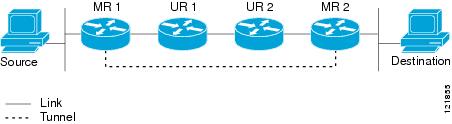
This figure illustrates the use of a GRE tunnel for multicast packets when the unicast path does not support multicast routing.

Figure 1. Tunnel for multicast packets
tunnel-for-multicast-packets

Multicast static routes with GRE tunnels

In your network, if there are two routers that only handle unicast traffic and two routers that support multicast, you can configure a GRE tunnel between the multicast routers so multicast packets traverse the tunnel. Unicast packets continue using the standard unicast path. With this setup, multicast traffic reaches its destination even when the unicast path does not support multicast routing.


Configure multicast static routes

Procedure

1.

Enable the static routing process.

Example:


Router# configure
Router(config)# router static 
Router(config-static)#
2.

Configure the IPv4 address-family for the unicast topology with destination prefixes.

Example:


Router(config-static)# address family ipv4 unicast
Router(config-static-afi)# 10.1.1.0/24 198.51.100.1
Router(config-static-afi)# 223.255.254.254/32 203.0.113.1
Router(config-static-afi)# exit
3.

Configure the IPv4 address-family for the multicast topology with destination prefixes.

Example:


Router(config-static)# address-family ipv4 multicast
Router(config-static-afi)# 198.51.100.20/32 209.165.201.0 
Router(config-static-afi)# 192.0.2.10/32 209.165.201.0
Router(config-static-afi)# exit
4.

Enable IPv4 multicast and IPv6 multicast address families on the next-hop interface.

Example:


Router(config)# interface FourHundredGigE 0/0/0/0
Router(config-if)# address-family ipv4 multicast
Router(config-if)# address-family ipv6 multicast
Router(config-if)# commit
5.

Verify the IPv4 multicast routes.

Example:

show route ipv4 multicast
Codes: C - connected, S - static, R - RIP, B - BGP, (>) - Diversion path
O - OSPF, IA - OSPF inter area
N1 - OSPF NSSA external type 1, N2 - OSPF NSSA external type 2
E1 - OSPF external type 1, E2 - OSPF external type 2, E - EGP
 i - ISIS, L1 - IS-IS level-1, L2 - IS-IS level-2
 ia - IS-IS inter area, su - IS-IS summary null, * - candidate default
 U - per-user static route, o - ODR, L - local, G  - DAGR, l - LISP
 A - access/subscriber, a - Application route
 M - mobile route, r - RPL, t - Traffic Engineering, (!) - FRR Backup path
Gateway of last resort is 10.1.1.20 to network 0.0.0.0
i*L1 0.0.0.0/0 [115/10] via 10.1.1.20, 00:41:12, FourHundredGigE0/0/0/6
C    10.1.1.0/24 is directly connected, 00:41:12, FourHundredGigE0/0/0/0
L    10.1.1.10/32 is directly connected, 00:41:12, FourHundredGigE0/0/0/0
S    172.16.2.10/32 [1/0] via 198.51.100.20, 00:41:12
i L1 172.16.3.1/32 [115/20] via 198.51.100.20, 00:41:12, FourHundredGigE0/0/0/12
i L1 192.0.2.1/24 [115/20] via 198.51.100.20, 00:41:12, FourHundredGigE0/0/0/1

Cross address-family static routing

Cross address-family static routing is a routing feature that

  • supports IPv4 static routes with IPv6 next hops

  • allows IPv4 traffic to travel over an IPv6 network, and

  • extends static routing across address families.

Table 4. Feature History Table

Feature Name

Release Information

Feature Description

Cross address-family static routing

Release 26.1.1

With the introduction of this feature, you can now configure IPv4 prefixes with IPv6 next hops. The router programs these routes into the routing table once the Routing Information Base (RIB) confirms the next hop is reachable. This feature allows IPv4 traffic to traverse IPv6-capable infrastructure, providing a scalable solution for network management.

This feature introduces these changes:

CLI :

YANG Data Model :

Cisco-IOS-XR-um-router-static-cfg

(see GitHub , YANG Data Models Navigator )


Restrictions for cross address-family static routes

  • You can configure IPv4 static routes using an IPv6 next hop. IPv6 over IPv4 is not supported. If you attempt to configure an IPv4 next hop for an IPv6 route, you receive an 'Invalid Address Family' error.

  • You cannot use Bidirectional Forwarding Detection (BFD) for cross address-family next hops.

  • You cannot configure a v4-over-v6 route using only an interface; an IPv6 next hop must be specified.


Configuration guidelines for cross address-family static routes

  • You can configure routes within a VRF. If your destination is in a different routing table, the show route command lists the associated VRF.

  • You can configure recursive next-hop routes or paths that include both an interface and a next hop.


Configure cross address-family static routes

Follow these steps to configure cross address-family static routes. Use this task to configure an IPv4 prefix with an IPv6 next hop.

Procedure

1.

Enter the static router configuration mode and specify the IPv4 address family.

Example:


Router#configure
Router(config)# router static
Router(config-static)# address-family ipv4 unicast
Router(config-static-afi)#
2.

Configure the Cross-Address Family Identifier (AFI) static route. You can configure this using either a recursive next-hop or a next-hop through a specific interface.

  • Recursive IPv6 next hop

    Use this option when the IPv6 next hop is reachable through another route in the routing table.

Example:

Router(config-static-afi)# 1.1.0.0/16 1:1:1::1
Router(config-static-afi)# commit
  • IPv6 next hop through an interface

    Use this option to specify exactly which interface must be used to reach the IPv6 next hop.

Example:

Router(config-static-afi)# 1.1.0.0/16 GigabitEthernet0/0/0/0 1:1:1::1
Router(config-static-afi)# commit

Verify the cross address-family static routes configuration

Use this task to confirm the route is correctly programmed and the next hop is resolved.

Procedure

1.

Check the routing table (RIB) and verify that the IPv4 prefix is present and shows the IPv6 next hop.

Example:

Router# show route ipv4 unicast 1.1.0.0/16
 S 1.1.0.0/16 [1/0] via 1:1:1::1 ...
2.

Verify if the static routing process has successfully resolved the IPv6 next hop. Look for the status Resolved next to the IPv6 address.

Example:

Router# show static vrf default ipv4 next-hops
3.

Check interface tracking (if Option B is used). Ensure the interface state is Up and tracked for cross-afi traffic.

Example:

Router# show static interfaces