Explains how unequal-cost multipath load balancing distributes traffic proportionally across paths with different costs, and describes UCMP concepts, weighted forwarding behavior, BGP and IS-IS configuration methods, scaling enhancements, and verification of normalized load-sharing in the forwarding table.
Unequal cost multipath load balancing is a forwarding capability that
-
load balances traffic proportionally across multiple paths with different costs
-
installs multiple paths to the same destination in the forwarding information base with an associated load metric or weight, and
-
uses the load metric or weight to determine how much traffic each higher-bandwidth or lower-bandwidth path carries.
|
Feature Name |
Release Information |
Feature Description |
|---|---|---|
|
Implementing UCMP |
Release 25.1.1 |
Introduced in this release on: Fixed Systems (8010 [ASIC: A100])(select variants only*) *This feature is supported on Cisco 8011-4G24Y4H-I routers. |
|
Implementing UCMP |
Release 24.4.1 |
Introduced in this release on: Fixed Systems (8200 [ASIC: P100], 8700 [ASIC: P100, K100])(select variants only); Modular Systems (8800 [LC ASIC: P100])(select variants only*) UCMP enhances routing efficiency by allowing traffic distribution across multiple paths with different cost metrics. It effectively uses available bandwidth by distributing traffic proportionally based on path cost, optimizing network resource utilization. UCMP supports dynamic traffic load balancing, reducing congestion and improving overall network performance. This feature seamlessly integrates with existing routing protocols, providing a flexible and robust solution for complex network environments. *This feature is supported on:
*Previously this feature was supported on Q200 and Q100. |
UCMP load-balancing lets you distribute traffic across multiple paths according to their cost. Generally, higher bandwidth paths have lower Interior Gateway Protocol (IGP) metrics configured, so that they form the shortest IGP paths.
When UCMP load-balancing is enabled, you can configure protocols to use lower bandwidth or higher cost paths for traffic and install them in the forwarding information base (FIB). You can install multiple paths to the same destination in FIB, and each path will have a 'load metric/weight' associated with it. FIB uses the load metric/weight to determine how much traffic is sent on each path.
Sample topology
In this example, router E has three paths to network X.
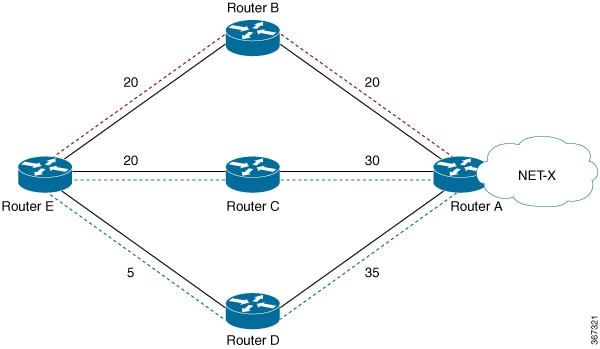
This table outlines the cost associated with each path from router E to network X.
|
Paths |
Cost from router E to network X |
|---|---|
|
E-B-A |
40 |
|
E-C-A |
50 |
|
E-D-A |
40 |
IGP selects the lowest-cost links, E-B-A and E-D-A. The E-C-A path is not used for load balancing because its cost is higher. The cost of the E-D link (5) does not break ties; only the total cost to network X matters.
ECMP and UCMP load balancing
Describes how ECMP distributes traffic evenly across equal-cost paths and how UCMP applies path weights to better match traffic distribution to link capacity.
UCMP minimum integer ratios
Introduces UCMP minimum integer ratios and explains the core idea and technical context. Highlights the main characteristics and usage guidance needed before configuration.
BGP 256-way UCMP
Describes how BGP supports up to 256 UCMP next hops, allocates hash buckets by path weight, and improves bandwidth use and load distribution across parallel paths.
Configure BGP with weights
Teaches you how to apply bandwidth-based route policies in BGP and verify weight-driven UCMP distribution in CEF.
Configure IS-IS with weight
Teaches you how to configure IS-IS interface weights and verify normalized load distribution across multiple paths.
Configure IS-IS with metric
Teaches you how to configure IS-IS metrics for UCMP and verify resulting path weights and normalized bucket distribution.