Describes how remote LFA tunnels traffic to a precomputed backup node more than one hop away to minimize loss during failures and speed recovery.
The fast reroute with remote loop-free alternate (FRR Remote LFA) is a resiliency feature that
-
enables rapid traffic redirection during link or router failures
-
uses precomputed alternate next hops to bypass failed network segments, and
-
supports recovery for failures that are more than one hop away from the point of local repair.
| Feature Name | Release Information | Feature Description |
|---|---|---|
| Fast Reroute with Remote Loop-Free Alternate | Release 25.1.1 |
Introduced in this release on: Fixed Systems (8010 [ASIC: A100])(select variants only*) *This feature is supported on Cisco 8011-4G24Y4H-I routers. |
| Fast Reroute with Remote Loop-Free Alternate | Release 24.4.1 |
Introduced in this release on: Fixed Systems (8200 [ASIC: P100], 8700 [ASIC: P100, K100])(select variants only); Modular Systems (8800 [LC ASIC: P100])(select variants only*) This feature minimizes traffic loss by rerouting packets around failed links quickly. It precomputes repair paths using the IS-IS routing protocol, allowing routers to switch immediately to these paths when a failure occurs, reducing transition time to under 50 milliseconds. *This feature is supported on:
|
Routing transition and convergence
When a link or router fails, distributed routing protocols must compute new paths. During this routing transition, traffic to affected destinations can be interrupted until the routers converge. Standard IGP or BGP convergence can take several hundred milliseconds. FRR remote LFA reduces this interruption by letting the router switch immediately to a precomputed repair path when it detects the failure.
FRR remote LFA with ring topology
Consider this ring topology for FRR remote LFA.
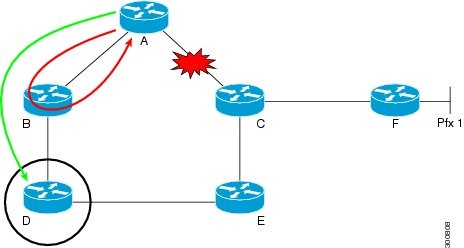
Device A sends traffic for destination F through next-hop B. Device B cannot serve as a loop-free alternate (LFA) for prefixes that nodes C and F advertise. The actual LFA is node D, but node D is not directly connected to the protecting node, A. To protect prefixes that node C advertises, node A must tunnel the packet around the failed A-to-C link to node D, as long as the tunnel does not use the failed link.
FRR remote LFA lets you tunnel a packet around a failed link to a remote loop-free alternate that is more than one hop away. The feature automatically creates the tunnel to avoid looping.