Important.
Results generated by AI. Before using results, verify accuracy and completeness.
Copy
Guides you through configuring IS-IS overload handling using the max-metric feature, including interface setup, address family configuration, link metric adjustment, verification of routing and database changes, and ensuring routers remain reachable without becoming preferred transit nodes.
Use this procedure to configure IS-IS overload handling with the max-metric feature.
IS-IS overload handling provides a way to make routers participate in routing without forwarding transit traffic. Setting the overload bit removes the router from transit, but can lead to reachability issues. Using max-metric allows the router to remain reachable as the last-resort transit node while advertising maximum link metrics.
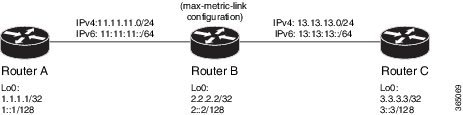
Figure 1. IS-IS overload handling topology
Before you begin
Ensure that you are familiar with configuring router interfaces for a given topology.
Procedure
Configure Routers A, B, and C according to your network topology.
These are sample IP addresses:
Router A Loopback0: 1.1.1.1/32 and 1::1/128
Router A to Router B: 11.11.11.2/24 and 11:11:11::2/64
Router B Loopback0: 2.2.2.2/32 and 2::2/128
Router B to Router A: 11.11.11.1/24 and 11:11:11::1/64
Router B to Router C: 13.13.13.1/24 and 13:13:13::1/64
Router C Loopback0: 3.3.3.3/32 and 3::3/128
Router C to Router B: 13.13.13.2/24 and 13:13:13::2/64
Configure IS-IS and the corresponding NET addresses on Routers A, B, and C.
Example:
! Router A
RouterA(config)# router isis ring
RouterA(config-isis)# net 00.0000.0000.0001.00
RouterA(config-isis)# address-family ipv4 unicast
RouterA(config-isis)# metric-style wide
RouterA(config-isis-af)# exit

! Router B
RouterB(config)# router isis ring
RouterB(config-isis)# net 00.0000.0000.0002.00
RouterB(config-isis)# address-family ipv4 unicast
RouterB(config-isis-af)# exit

! Router C
RouterC(config)# router isis ring
RouterC(config-isis)# net 00.0000.0000.0003.00
RouterC(config-isis)# address-family ipv4 unicast
RouterC(config-isis)# metric-style wide
RouterC(config-isis-af)# exit
Configure IPv4 and IPv6 address families on the loopback interfaces of Routers A, B, and C.
Confirm the route prefixes on Routers A, B, and C before enabling overload handling.
Example:
! Router A sample output
RouterA# show route
L    1.1.1.1/32 is directly connected, Loopback0
i L1 2.2.2.2/32 [115/20] via 11.11.11.2, GigabitEthernet0/0/0/0
i L1 3.3.3.3/32 [115/30] via 11.11.11.2, GigabitEthernet0/0/0/0
i L1 13.13.13.0/24 [115/20] via 11.11.11.2, GigabitEthernet0/0/0/0
i L1 15.15.15.0/24 [115/30] via 11.11.11.2, GigabitEthernet0/0/0/0

RouterA# show route ipv6
L 1::1/128 is directly connected, Loopback0
i L1 2::2/128 [115/20] via fe80::e9:45ff:fe22:5326, GigabitEthernet0/0/0/0
i L1 3::3/128 [115/30] via fe80::e9:45ff:fe22:5326, GigabitEthernet0/0/0/0
i L1 13:13:13::/64 [115/20] via fe80::e9:45ff:fe22:5326, GigabitEthernet0/0/0/0
i L1 15:15:15::/64 [115/30] via fe80::e9:45ff:fe22:5326, GigabitEthernet0/0/0/0
Confirm the link metrics on Router B before configuring max-metric.
Example:
RouterB# show isis database
RouterB.00-00
 Metric: 10 IS RouterB.01
 Metric: 10 IS RouterA.00
 Metric: 10 IP 2.2.2.2/32
 Metric: 10 IP 11.11.11.0/24
 Metric: 10 IP 13.13.13.0/24
 MT (IPv6 Unicast) IPv6 2::2/128 Metric: 10
 MT (IPv6 Unicast) IPv6 11:11:11::/64 Metric: 10
 MT (IPv6 Unicast) IPv6 13:13:13::/64 Metric: 10
Configure max-metric on Router B.
Example:
RouterB(config)# router isis ring
RouterB(config-isis)# max-metric
RouterB(config-isis)# exit
Confirm the change in link metrics on Router B.
Example:
RouterB# show isis database
RouterB.00-00
 Metric: 63 IS RouterB.01
 Metric: 63 IS RouterA.00
 Metric: 63 IP 2.2.2.2/32
 Metric: 63 IP 11.11.11.0/24
 Metric: 63 IP 13.13.13.0/24
 MT (IPv6 Unicast) IPv6 2::2/128 Metric: 16777214
 MT (IPv6 Unicast) IPv6 11:11:11::/64 Metric: 16777214
 MT (IPv6 Unicast) IPv6 13:13:13::/64 Metric: 16777214
Optional: verify the route changes on Routers A and C.
Example:
! Router A sample output after max-metric
RouterA# show route
i L1 2.2.2.2/32 [115/73] via 11.11.11.2, GigabitEthernet0/0/0/0
i L1 3.3.3.3/32 [115/83] via 11.11.11.2, GigabitEthernet0/0/0/0
i L1 13.13.13.0/24 [115/73] via 11.11.11.2, GigabitEthernet0/0/0/0
i L1 15.15.15.0/24 [115/83] via 11.11.11.2, GigabitEthernet0/0/0/0

RouterA# show route ipv6
i L1 2::2/128 [115/16777224] via fe80::e9:45ff:fe22:5326, GigabitEthernet0/0/0/0
i L1 3::3/128 [115/16777234] via fe80::e9:45ff:fe22:5326, GigabitEthernet0/0/0/0
i L1 13:13:13::/64 [115/16777224] via fe80::e9:45ff:fe22:5326, GigabitEthernet0/0/0/0
i L1 15:15:15::/64 [115/16777234] via fe80::e9:45ff:fe22:5326, GigabitEthernet0/0/0/0
The output shows the higher route costs caused by the maximum metric configuration.