IS-IS Configuration Guide for Cisco 8000 Series Routers, Cisco IOS XR Release

PDF

ISIS link group

Want to summarize with AI?

Log in

Describes ISIS link group features, offering instructions for configuring link group profiles and associating interfaces with link groups to improve network resilience and control.


A ISIS link group is a routing feature that

  • enables you to define a group of links for metric management

  • adjusts the ISIS metric for remaining active links when the number of active links drops below a configured minimum, and

  • restores the original metric when the link group is reestablished.

Additional details about ISIS link groups

The ISIS link group feature lets you optimize network routing by associating a set of links as a group. When the number of active IS-IS adjacencies within the group falls below the minimum threshold, a metric offset is applied to the remaining links. This dynamic adjustment influences route selection, helping traffic avoid degraded paths. Once links are restored to the threshold, ISIS removes the offset and returns metrics to their original values.

ISIS link group metric adjustment
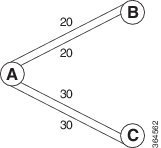
Router A connects to both Router B and Router C. Between A and B, there are two layer 3 links with an ISIS metric of 20 each; between A and C, there are links with a metric of 30. Normally, traffic prefers the lower metric path (A→B). If one link between A and B fails and ISIS link groups are not configured, traffic still goes through B. With ISIS link group settings—using an offset of 20 and minimum-members of 2—when a link fails the metric rises to 40 (original 20 + offset 20), and traffic reroutes through C. Similar logic can apply for the path between A and C.


Define and activate an IS-IS link group profile that specifies metric offsets and member requirements, supporting robust routing configurations.

A link-group profile is only active when both minimum-members and metric-offset values are set. If revert-members is not configured, the router defaults to using the minimum-members value for reverting the link group state.

Procedure

1.

Enter IS-IS configuration mode, define the link group and set the metric offset.

Example:

Router# configure
Router(config)# router isis purple
Router(config-isis)# link-group foo metric-offset 100

The supported range for metric-offset is 1–16777214. Practical default for narrow metrics is 1–63).

2.

Set the minimum number of active members required for the link group.

Example:

Router(config-isis)# link-group foo minimum-members 2

The supported range is 2 to 64 members.

3.

(Optional) Configure the revert-members value if you want the router to revert the link group only after a specific member threshold is reached.

Example:

Router(config-isis)# link-group foo revert-members 4

The supported range is 2 to 64 members.

4.

Use the show isis interface command to review the link group state and metric offset.

Example:

Router# show isis interface gig 0/0/0/1

Link-Group (L1/L2): Configured/Configured
Metric-Offset (L1/L2): 100/100
5.

Use the show isis lsp command to verify the updated metric value in the advertised LSP data.

Example: Link group profile configuration

This example shows a link-group profile configuration.

router isis 1
 is-type level-2-only
 net 49.1111.0000.0000.0006.00
 link-group foo
  metric-offset 100
  revert-members 4
  minimum-members 2
 address-family ipv4 unicast
  metric-style wide
 interface GigabitEthernet0/0/0/1
  point-to-point
  address-family ipv4 unicast
   link-group foo


Associate an IS-IS interface address family with a preconfigured link group to facilitate IS-IS protocol enhancements.

Each IS-IS interface and address family can specify only one link group association. By default, the association applies to both IS-IS levels unless restricted.

Before you begin

IS-IS routing must be enabled and the required link group must exist.

Procedure

1.

Associate the interface address family with the link group:

Example:

Router# configure
Router(config)# router isis purple
Router(config-isis)# interface GigabitEthernet 0/1/0/3
Router(config-isis-if)# address-family ipv4 unicast
Router(config-isis-if-af)# link-group access level 1

Specify "level" only if you want to restrict the association to a single IS-IS level.

2.

(Optional) Use the show isis interface command to verify the link group association.

Example:

Router# show isis interface