Explains the Smart Switch architecture and workflow, showing how the NPU handles routing and switching while Hypershield-managed DPUs inspect traffic and enforce security policies.
Summary
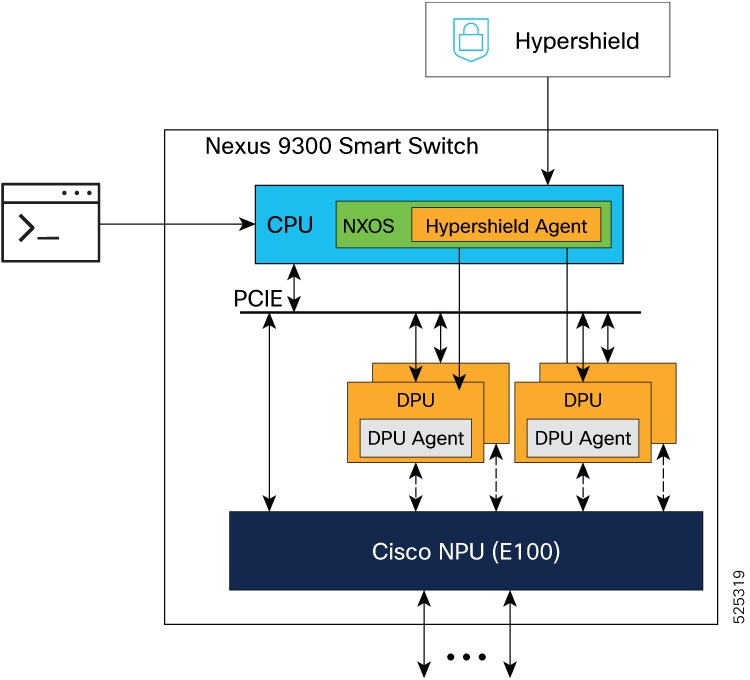
The Smart Switch architecture integrates several key components to manage and process network traffic. At the core is the Network Processing Unit (NPU) to perform routing and switching, and the Data Processing Units (DPUs) for traffic filtering. The CPU runs NX-OS and hosts the Hypershield Agent, which connects to the external Hypershield system. Management of networking configuration is performed using the NX-OS command line interface or Nexus Dashboard. The configuration of security policies is performed from Hypershield.
The Hypershield Agent in the N9300 Series Smart Switch establishes connectivity to the Hypershield system through the front panel ports and uses the IP address of a loopback interface as the source-interface.
Workflow
This flow describes how the N9300 Smart Switch works.
-
When a security administrator configures a security policy in the Hypershield system, this is pushed to the Hypershield agent in the N9300 Smart switch. The Hypershield agent programs it on the DPUs.
-
The NPU performs routing and switching like any other NX-OS device. It is connected with links (for example 200G, based on the platform) to multiple DPUs (for example, the N9324C-SE1U supports 4 DPUs).
-
When you enable the required configuration on the NPU, it redirects the traffic to the DPUs, for traffic inspection. After traffic inspection, traffic is forwarded as usual by the NPU.
This architecture allows the DPU to accelerate the data plane processing for traffic filtering.
The N9300 Smart Switch works both as a network device and a security device as it includes:
-
NPU, which provides the N9000 routing and switching functions that is managed using the command line interface, programmability, or Nexus Dashboard.
-
DPU, which provides security functions that are managed using Hypershield.