Smart Switch
Smart Switch is a category of N9000 Series Switches that provides:
-
embedded security with Hypershield
-
advanced segmentation and connectivity, and
-
hardware-accelerated architecture.
Embedded security with Hypershield—The N9300 Series Smart Switches provide service-accelerated performance and simplifies security architecture by integrating directly into the network, eliminating the need for separate Layer 4 stateful firewalls.
Advanced segmentation and connectivity—These switches facilitate secure segmentation and communication between security zones across the data center, interconnects, and cloud environments.
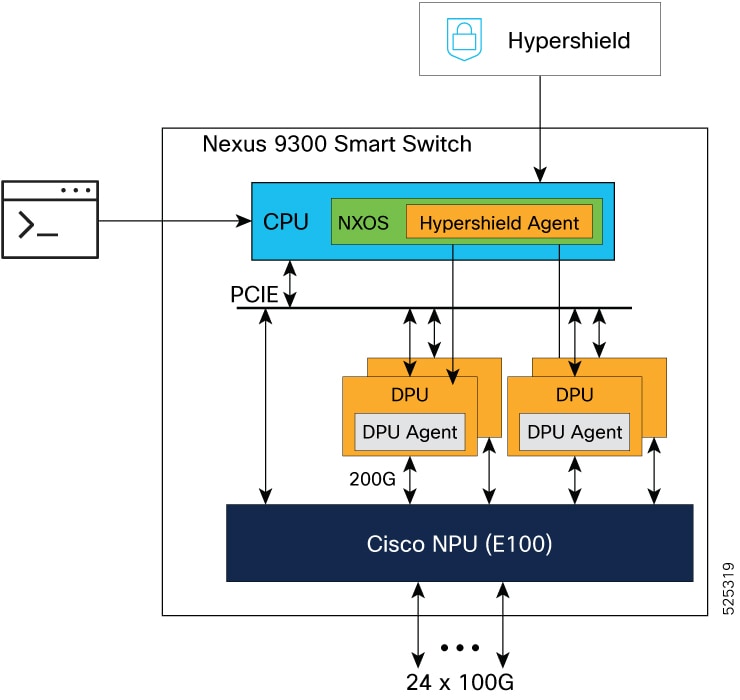
Hardware-accelerated architecture—Smart Switch integrates Data Processing Units (DPUs) with networking ASICs to enhance both data center networking throughput and security processing capabilities.
The Smart Switches that are currently available are the N9300 Series Smart Switches:
-
N9324C-SE1U from 10.6(2)F
-
N9348Y2C6D-SE1U from 10.6(2)F
The N9300 Series Smart Switches deliver an integrated solution for scalable, secure, and efficient data center operations, by combining advanced networking and security features with hardware acceleration and software flexibility.
The N9300 Series Smart Switches offer converged switching and routing services. These switches operate in network mode and DPU security mode. In the DPU security mode, features related to the network mode are also available.
The N9300 Smart Switches NX-OS Release 10.6(3s)F maintain functional parity with the N9000 Series NX-OS Release 10.6(3)F and additionally provides the capability to enable the DPU feature that inspects IP traffic. For more information on the software features supported in network mode, refer to Cisco Nexus 9000 Series NX-OS Release Notes of versions 10.6(2)F and 10.6(3)F and Configuration Guides for Cisco NX-OS 10.6(x). For more information about DPU security mode, refer to Cisco Nexus 9000 Series NX-OS Release Notes, Release 10.6(3s)F and this document.
Concepts
A few key concepts related to the architecture of the N9300 Smart Switch include:
-
CPU—Central Processing Unit (CPU)—Controls and manages the switch; handles general control-plane tasks such as operating system processes, managing the device, routing protocols, logging, and system coordination.
-
NPU—Network Processing Unit (NPU)—High-speed packet-forwarding engine; optimized for network traffic processing such as switching, routing, filtering, and traffic handling.
-
DPU—Data Processing Unit (DPU)—Specialized programmable data processing engine; hosts services such as security, telemetry more efficiently.
-
Modes—Two modes that the Smart Switch operates in, network and DPU security mode. The default mode is network mode. To use the DPU security mode, you need to enable feature service acceleration.
-
Hypershield—A controller application designed to protect modern datacenters. Hypershield is a distributed security architecture that provides hardware-accelerated security policy enforcement using DPU technology. Hypershield centrally manages and distributes policies across all enforcement points, ensuring consistent security across the entire network.
The N9300 Smart switch serves as a Network-Based Enforcer for implementing and managing security policies across the network. You can view the N9300 Smart switch in Hypershield under Network-based enforcers in Hypershield. For more information, refer to the Cisco Hypershield User Documentation.
-
Hypershield Agent—A containerized agent that receives Security configurations and policies from Hypershield and pushes them to the DPU complex that in-turn configures security rules on DPUs. The Hypershield Agent constructs flow logs and exports them.
-
Network Security Operations administrator role—A specialized role (netsecops-admin) available only on the N9300 Smart Switches that has the privileges to execute the commands within the DPU and the Hypershield agent container. For more information, refer to User Accounts and RBAC for Smart Switches.
-
DPU security mode—The N9300 Smart Switch DPU security mode differs from the Security Firewall product as well as the network security features in N9000 Series Switches. The Smart Switch, when used in DPU security mode, provides a distributed, stateful Layer-4 segmentation and DPU security enforcement directly within the switch using embedded Data Processing Units (DPUs).
To use the DPU security mode, you need to enable feature service acceleration. When the DPU is in a powered-on state, the switch works in both network and DPU security modes. When the DPU is in a powered-off state, the switch works in a network-only mode.
NX-OS and Hypershield
You can use the NX-OS command line interface or Nexus Dashboard and Hypershield to manage the operations on the N9300 Series Smart Switch.
From the NX-OS command line interface you can:
-
manage the traffic redirection to the DPU
-
configure network policies, and
-
observe network analytics, and topology.
From the Hypershield, you can:
-
manage and monitor security policies
-
orchestrate the usage of security policies, and
-
observe security policies and ensure security compliance.
References
The documents related to Smart Switches that provide additional references include:
-
Cisco N9324C-SE1U NX-OS-Mode Switch Hardware Installation Guide
-
Cisco N9348Y2C6D-SE1U NX-OS Mode Switch Hardware Installation Guide
-
For Optics support on the N9300 Series Smart Switches, refer to Cisco Optics-to-Device Compatibility Matrix
-
For network mode support features documentation, refer to Cisco Nexus 9000 Series Switches

 Feedback