Micro-segmentation for VXLAN fabrics using group policy option (GPO)

Micro-segmentation

Micro-segmentation is a network security feature that allows you to

  • logically group network resources based on specific criteria such as application attributes, and

  • create and enforce tailored, application-centric security policies between these groups, called Security Groups (SGs), using Security Group Access Control Lists (SGACLs), regardless of the underlying network topology.

In traditional data center environments, the application or workload security is often implemented at the perimeter or the north-south boundary where users enter from the outside of the data center. This is often implemented using perimeter firewalls and other security inspection devices. However, this approach is not effective against the advanced nature of the latest attacks. The attack surface spans the entire data center including the east-west and north-south flows.

Micro-segmentation along with security groups and SGACLs can provide an effective security solution to the users of NX-OS platforms. Micro-segmentation provides more flexibility and lower complexity than traditional general purpose Access Control Lists (ACLs). With micro-segmentation, organizations can provide specific policies that dictate how the application workloads communicate regardless of where these applications reside within the network.

GPO

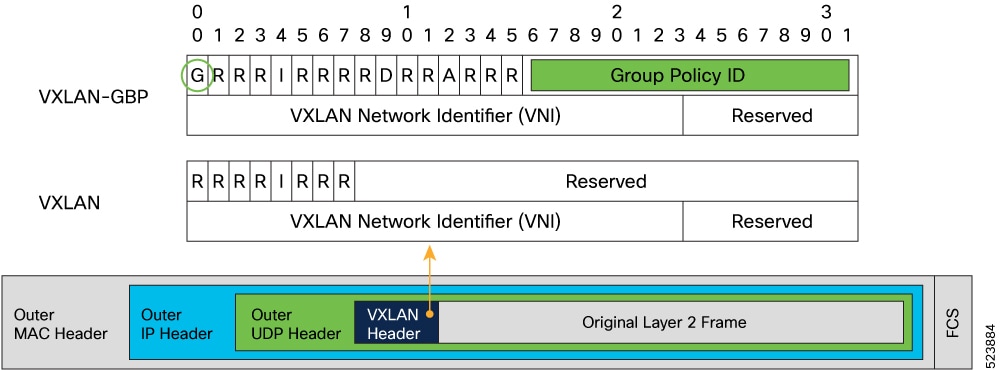
Group Policy Option (GPO) is a backward-compatible extension to VXLAN that adds a Security Group Tag (SGT) to the VXLAN header for security policy enforcement purposes.

Figure 1. Security Group Tags on VXLAN Header

In a GPO enabled VXLAN network, you can create Security Groups in the VXLAN EVPN fabrics to define segmentation. By defining smaller, isolated application segments, you can deploy micro-segmentation policies. These micro-segmentation allows you to have better control over the flow of network traffic among the application tiers and across applications. Micro-segmentation ensures that security policies are applied only where they are needed, improving application and workload security, thereby improving the security posture.

You can classify network resources to a Security Group tag based on multiple attributes. Traffic between Security Groups can be controlled by Security Group Access Control Lists (SGACLs) also known as Security Contracts. SGACLs match source and destination Security Groups using Security Group tags.

Terminology

Security group (SG)

A Security Group is a logical entity that contains a collection of physical or virtual network endpoints that are classified based on attributes or selectors.

Security group is also known as endpoint security group (ESG). On this document, SG and ESG are used interchangeably.

Source security group tags (S-SGT)

Tags derived from source attributes are called Source Security Group Tags.

Destination security group tags (D-SGT)

Tags derived from destination attributes are called Destination Security Group Tags.

Security group access control list (SGACL)

An SGACL uses Security Tags for enforcing specific security rules (L4 filters) between different Security Groups. The Tags are derived from IP, VLAN, and VM Attributes. SGACL allows to enforce security policies between SGs. An SGACL is also known as a Contract. In some parts of the document, SGACL is referred to as contract.

VRF level enforcement

The security group selectors define which endpoints and external IPs belong to the Security Group. Security Groups can contain endpoints, which are part of different VRFs. If endpoints part of different VRFs are associated to the same SG, communication between them would be possible only after applying the required VRF route-leaking configuration.

By default, a newly defined Tenant VRF has policy enforcement set to Unenforced. This means that even if classification criteria and SGACLs between secure groups were to be provisioned, no policy enforcement would be possible. To enable SGACL enforcement in the VRF, the VRF needs to be explicitly configured in Enforced mode.

When you configure the VRF in enforced mode, you can define the default behavior to be either of the following:

  • Deny: All unicast traffic flows are dropped unless permitted by an Allowlist.

  • Permit: All unicast traffic flows are allowed unless denied by a Denylist.

Hosts within a SG can communicate freely without explicit SGACLs. SGACLs create security rules, only.

Guidelines and limitations

  • All supported N9000 platforms require a minimum system memory of 24GB to support this feature.

  • GPO and SGACL support varies by NX-OS release and platform, with specific features and limitations introduced in each release.

  • SGACLs are supported only in the context of a VXLAN EVPN deployment and are not applicable to BUM and multicast traffic.

The following guidelines and limitations apply to GPO and SGACL features across supported Cisco NX-OS releases and platforms:

  • Beginning with Cisco NX-OS Release 10.4(3)F, GPO is supported on the following platforms:

    • 9300-FX3

    • 9300-GX

    • 9300-GX2

  • SGACLs are supported only in the context of a VXLAN EVPN deployment. SGACL cannot be deployed on non-VXLAN enabled VRFs.

  • SGACLs are not applicable to BUM and multicast traffic. System generated default permit policies exist for BUM and multicast traffic.

  • You cannot configure VLAN-based Security Group selectors with a VLAN part of system reserved-vlan-range values.

  • If VLAN-based Security Group selectors are already configured, system-reserved-vlan-range cannot be modified to include VLAN values used in the SG selectors.

  • GPO is not supported on a site that has policy-aware and policy-unaware nodes. GPO is supported on policy-aware sites or a mix of policy-aware and policy-unaware sites.

  • Unicast Reverse Path Forwarding (URPF) is not supported with routing profile template-security-groups (system routing template-security-groups ).

Configuring micro-segmentation using GPO

Enable GPO

Perform the following steps to enable the micro-segmentation feature. The first time you enable the feature, the routing template should be configured to system routing template-security-groups .


Warning


  • This routing template is required for feature security-group . Ensure the feature is enabled after applying the template mode.

  • This routing template requires extended SSD re-partitioning. This can be achieved by executing the copy running-config startup-config and system flash sda resize extended commands.


Note


We recommend backing up contents within bootflash, logflash, and running configuration prior to proceeding. For more information see Cisco Nexus 9000 Series NX-OS Fundamentals Configuration Guide, Release 10.4(x).


Subsequent disabling and re-enabling of the feature security-group can be done without requiring a switchreload.

Procedure


Step 1

Use the configure terminal command to global configuration mode.

Example:

switch# configure terminal
                    

Step 2

Use the system routing template-security-groups command to switch routing profile.

Example:

switch(config-if)# system routing template-security-groups
                    

Note


The routing template should be configured to system routing template-security-groups . Routing template requires extended SSD partitioning executed through system flash sda resize which will initiate a reload.

Step 3

Use the copy running-config startup-config command to copy the running configuration to the startup configuration.

Example:

switch(config-if)# copy running-config startup-config
                    

Step 4

Use the system flash sda resize extended command to increase storage space.

Example:

switch(config-if)# system flash sda resize extended
                        !!!! WARNING !!!!
                        
                        Attempts will be made to preserve drive contents during
                        the resize operation, but risk of data loss does exist.
                        Backing up of bootflash, logflash, and running configuration
                        is recommended prior to proceeding.
                        
                        !!!! WARNING !!!!
                        
                        
                        current scheme is
                        sda           8:0    0 119.2G  0 disk
                        |-sda1        8:1    0   512M  0 part
                        |-sda2        8:2    0    32M  0 part /mnt/plog
                        |-sda3        8:3    0   128M  0 part /mnt/pss
                        |-sda4        8:4    0 110.5G  0 part /bootflash
                        |-sda5        8:5    0    64M  0 part /mnt/cfg/0
                        |-sda6        8:6    0    64M  0 part /mnt/cfg/1
                        `-sda7        8:7    0     8G  0 part /logflash
                        
                        
                        target scheme is
                        sda           8:0    0 120GB|250GB  0 disk
                        |-sda1        8:1    0   512M       0 part
                        |-sda2        8:2    0    32M       0 part /mnt/plog
                        |-sda3        8:3    0   128M       0 part /mnt/pss
                        |-sda4        8:4    0    rem       0 part /bootflash
                        |-sda5        8:5    0   1.0G       0 part /mnt/cfg/0
                        |-sda6        8:6    0   1.0G       0 part /mnt/cfg/1
                        |_sda7        8:7    0    39G       0 part /logflash
                        
                        Continue? (y/n)  [n] y
                        A module reload is required for the resize operation to proceed
                        Please, do not power off the module during this process.

Step 5

Use the [no] feature security-group command enable the group policy option (GPO) feature.

Example:

switch(config-if)# feature security-group

Use the no prefix to disable the feature. The GPO feature can be disabled or enabled in runtime.

Step 6

Use the show nve peers detail command to verify that the group policy option is enabled for peer device.

Example:

switch(config-if)# show nve peers detail
                        Details of nve Peers:
                        ----------------------------------------
                        Peer-Ip: 1.1.1.1
                        NVE Interface       : nve1
                        Peer State          : Up
                        Peer Uptime         : 1d12h
                        Router-Mac          : 5292.ca60.1b08
                        Peer First VNI      : 101
                        Time since Create   : 1d12h
                        Configured VNIs     : 100-101,200-201
                        Provision State     : peer-add-complete
                        Learnt CP VNIs      : 100-101,200-201
                        vni assignment mode : SYMMETRIC
                        Peer Location       : FABRIC
                        Group policy option : yes
                        ----------------------------------------
                    

Create a security group

Perform the following steps to create or update a Security Group and to configure member selection criteria. To select group members, you can specify any combination of the following attributes:

  • IPv4 address or subnet for connected-endpoints and external-subnets.

  • IPv6 address or subnet for connected-endpoints and external-subnets.

  • Match VLAN at the switch level.

Procedure


Step 1

Use the configure terminal command to enter global configuration mode.

Example:

switch# configure terminal
                        switch(config)# 

Step 2

Use the security-group sg-id name sg-name command to create (or selects an existing) security group whose unique ID is sg-id and whose name is sg-name.

Example:

switch(config)# security-group 100 name webservers
                        switch(config-security-group)# 

Step 3

Us the [no] match {connected-endpoints | external-subnets} vrf vrf-name [ipv4|ipv6] ip-prefix command to select IPv4-VRF or IPv6-VRF for a host (connected-endpoints) or external (external-subnets) resource.

Example:

switch(config-security-group)# match connected-endpoints vrf vrf_blue ipv4 61.1.1.141/32
                        switch(config-security-group)# match external-subnets vrf vrf_blue ipv4 10.0.0.0/8
                        switch(config-security-group)# match connected-endpoints vrf vrf_blue ipv6 61:1:1:2:1::141/128
                        switch(config-security-group)# match external-subnets vrf vrf_blue ipv6 10:11:12:13::/64
                        

Use the no prefix to disable the specific classification.

Step 4

Use the [no] match vlan vlan-id command to configure VLAN selector at the switch level.

Example:

switch(config-security-group)# match vlan 10 

Step 5

Use the show security-group id sg-id command to verify the group policy selectors.

Example:

switch(config-if)# show security-group id all
                        Security Group ID 100 , Name webservers, Type Layer4-7 Service
                        Selector Type : External IPv4 Subnets
                        VRF-Name                            IPv4-Address/mask-len                    
                        vrf_blue                            10.0.0.0/8                               
                        Selector Type : Connected IPv4 Endpoints
                        VRF-Name                            IPv4-Address/mask-len                    
                        vrf_blue                            61.1.1.141/32                            
                        Selector Type : External IPv6 Subnets
                        VRF-Name                            IPv6-Address/mask-len                    
                        vrf_blue                            10:11:12:13::/64                         
                        Selector Type : Connected IPv6 Endpoints
                        VRF-Name                            IPv6-Address/mask-len                    
                        vrf_blue                            61:1:1:2:1::141/128                      
                        Selector Type : Vlan
                        VLAN-Id                              
                        Vlan10                                   
                        Vlan11                                   
                        Vlan12                                   
                        Vlan13                                   
                        Vlan14                                   
                        Vlan15                                   
                        Vlan16                                   
                        Vlan17                                   
                        Vlan18                                   
                        Vlan19                                   
                        Vlan20                                   
                        Vlan30                                   
                        Vlan35                                   
                        Vlan40                                   
                        Vlan41                                   
                        Vlan42                                   
                        Vlan43                                   
                        Vlan44                                   
                        Vlan45                                   
                        Selector Type : Interface
                        Interface                            
                        Vlan10
                    

Creating a Security Class-Map

A Class-Map classifies network traffic based on various match criteria configured within a class map. Perform the following steps to create a Security Class-Map to define the filters identifying specific traffic flows.

SUMMARY STEPS

  1. configure terminal
  2. class-map type security match-any web-class
  3. match [default | ip | ipv4 | ipv6]

DETAILED STEPS

  Command or Action Purpose

Step 1

configure terminal

Example:

switch# configure terminal
switch(config)#

Enters global configuration mode.

Step 2

class-map type security match-any web-class

Example:

switch(config)# class-map type security match-any web-class2

Create a security class-map to identify specific traffic flows.

Step 3

match [default | ip | ipv4 | ipv6]

Example:

switch(config-cmap-sec)# match ipv4 udp sport 399 to 402 dport 400 to 403
switch(config-cmap-sec)# match ipv6 udp sport 399 to 402 dport 400 to 403

Configures the security class by matching based on traffic type.

Create a security policy-map

A policy map defines a policy stating what happens to traffic that is classified using class maps and ACLs. Perform the following steps to create a Security Policy-Map to define the action (permit, deny, log) traffic flows identified by the previously created security class-map.

Procedure


Step 1

Use the configure terminal command to enter global configuration mode.

Example:

switch# configure terminal
                        switch(config)#

Step 2

Use the policy-map type security policy-map command to create a security policy-map.

Step 3

Use the class web-class command to specify a security class-map to be associated with the policy-map to define the traffic the rule will be applied to.

Step 4

Use the [no] [permit | deny | log] command to define action to be taken on matching traffic.

  • Deny: Deny the matching traffic.

  • Log: Log the matching traffic.

  • Permit: Permit the matching traffic.

Permit is the default action if none specified. Log action can be set with permit or deny. Matching traffic is logged under show logging ip access-list cache [detail] .

Step 5

Use the [no] service-chain <svc-chain> command to configure service-chain for match class-maps to enable service redirection for the contract.

SGACL with service-chain can only be enabled with permit action. This is applicable for service redirection. For more details about service redirection, see Cisco Nexus 9000 Series NX-OS ePBR Configuration Guide.


Configure security contracts between security groups

Before you begin

  • Creating a Security Group

  • Creating a Security Class-Map

  • Creating a Security Policy-Map

This procedure creates an SGACL (contract) to enforce a security policy between Security Groups.

Procedure


Step 1

Use the configure terminal to enter global configuration mode.

Example:

switch# configure terminal

Step 2

Use the vrf context vrf-name to enter configuration mode for the specified VRF.

Example:

switch(config)# vrf context blue

Step 3

Use the security enforce tag sg-id default [permit | deny] command to move the VRF to enforced mode.

Example:

switch(config-vrf)# security enforce tag 100 default deny
  • sg-id: defines the security group tag for the tenant VRF on which the default options are added.

  • default deny: Denies all traffic within the VRF without explicit security contracts.

  • default permit: Allows all traffic within the VRF without explicit security contracts.

Step 4

Use the security contract source [sg-id | any] destination [sg-id | any] policy policy-map-name [ bidir | unidir] command to apply the previously defined security policy map, with the corresponding action, between the specified security groups.

Example:

switch(config-vrf)# security contract source 100 destination 200 policy policyMap1 bidir

The default option is bidir if no direction is specified. Default option bidir applies the SGACL to traffic in both direction (in example, 100 to 200 and 200 to 100).

For example, if you create a security rule between SG 100 and SG 200 with a filter that specifies destination port 80, the use of bidir ensures that a rule is also applied for communication between SG 200 and SG 100 with source port 80 so that the two-ways communication can be successfully established.


Configuration examples for GPO

Configuration examples for GPO demonstrate the step-by-step process to enable and configure Group Policy Objects (GPO) for security groups on switches.

  • Enables GPO on switches.

  • Creates security class-maps and policy maps to identify and permit specific traffic flows.

  • Defines security groups, applies enforcement, and contracts between groups using policy maps.

Configuration steps for GPO

The following steps outline the configuration process for enabling and applying GPO on switches, including creating security groups and applying contracts.

  • Enable GPO on Switch1 and Switch2.

  • Create a security class-map to identify specific traffic flows.

  • Create a security policy map.

  • Create security groups and define endpoint and subnet matches.

  • Move VRF to enforce mode.

  • Apply contract between security groups using the policy map.

  1. Step 1: Enabling GPO.
    Switch1# configure terminal
     Switch1(config)# system routing template-security-groups
     Switch1(config)#feature security-group
     
     Switch2# configure terminal
     Switch2(config)# system routing template-security-groups
     Switch2(config)#feature security-group
                                                    
  2. Step 2: Creating a security class-map to identify specific traffic flows.
    Switch1(config)#class-map type security match-any web-class
     match ipv4 tcp dport 443
     match ipv4 tcp dport 80	
     
     Switch2(config)#class-map type security match-any web-class
     match ipv4 tcp dport 443
     match ipv4 tcp dport 80 
                                                    
  3. Step 3: Creating a security policy map
     
     Switch1(config)#policy-map type security policyMap1
     class web-class
     permit           
     Switch2(config)#policy-map type security policyMap1
     class web-class
     permit            
                                                    
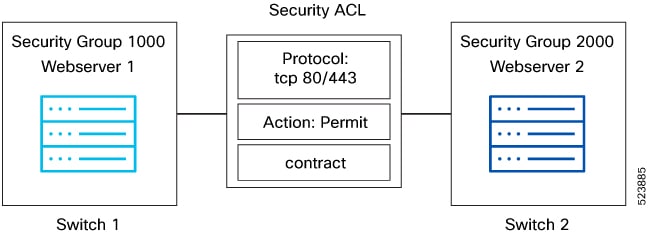
  4. Step 4: Creating security group.
    switch1(config)security-group 1000 name webserver1
     switch1(config-security-group)# match connected-endpoints vrf vrf_blue ipv4 61.1.1.141/32
     switch1(config-security-group)# match external-subnets vrf vrf_blue ipv4 10.0.0.0/8
     switch1(config-security-group)# match connected-endpoints vrf vrf_blue ipv6 61:1:1:2:1::141/128
     switch1(config-security-group)# match external-subnets vrf vrf_blue ipv6 10:11:12:13::/64
     switch1(config-security-group)# match connected-endpoints vrf vrf_red ipv4 100.5.150.125/32 
     switch1(config-security-group)# match connected-endpoints vrf vrf_red ipv6 100:1:1:495::125/128 
     switch1(config-security-group)# match external-subnets vrf vrf_red ipv4 11.0.0.0/8
     switch1(config-security-group)# match vlan 10
     
     switch2(config)security-group 2000 name webserver2
     switch2(config-security-group)# match connected-endpoints vrf vrf_blue ipv4 61.1.1.142/32
     switch2(config-security-group)# match external-subnets vrf vrf_blue ipv4 20.0.0.0/8
     switch2(config-security-group)# match connected-endpoints vrf vrf_blue ipv6 61:1:1:2:1::142/128
     switch2(config-security-group)# match external-subnets vrf vrf_blue ipv6 20:11:12:14::/64
     switch2(config-security-group)# match connected-endpoints vrf vrf_red ipv4 100.5.150.126/32 
     switch2(config-security-group)# match connected-endpoints vrf vrf_red ipv6 100:1:1:495::126/128 
     switch2(config-security-group)# match external-subnets vrf vrf_red ipv4 21.0.0.0/8
     switch2(config-security-group)# match vlan 10
                                                    
  5. Step 5: Moving VRF to enforce mode
    switch1(config)# vrf context vrf_blue
     switch1(config-vrf)# security enforce tag 100 default deny
     switch2(config)# vrf context vrf_red
     switch2(config-vrf)# security enforce tag 101 default deny
                                                    
  6. Step 6: Apply contract
    switch1(config-vrf-blue)# security contract source 1000 destination 2000 policy policyMap1   
     switch1(config-vrf-red)# security contract source 1000 destination 2000 policy policyMap1  
     
     switch2(config-vrf-blue)# security contract source 1000 destination 2000 policy policyMap1   
     switch2(config-vrf-red)# security contract source 1000 destination 2000 policy policyMap1 
                                                    
Figure 2. Creating Security Group

Verify GPO

Use these show commands to verify and display GPO contracts, security-group configurations, and contract details in the switch.

These are the show commands associated with GPO configuration:


        show contracts
      

Displays all the contracts applied in the switch for all the vrfs.

switch(config)# show contracts
        
        VRF              SGT   DGT   Policy           Dir    Stats        Class            Action       OperSt
        --------------------------------------------------------------------------------------------------------
        vrf_blue             1000   2000 policyMap1        bidir  350370       web-class        permit,log   enabled
        vrf_red              1000   2000 policyMap1        bidir  373270       web-class        permit,log   enabled
      

        show run security-group
      

Displays all the security-group related configurations in the switch.

switch1(config)# show run security-group 
        !Command: show running-config security-group
        !Running configuration last done at: Fri Dec  8 12:23:52 2023
        !Time: Fri Dec  8 12:27:09 2023
        version 10.4(2) Bios:version 05.50 
        feature security-group
        security-group 1000 name webserver1
        match connected-endpoints vrf vrf_blue ipv4 61.1.1.141/32
        match external-subnets vrf vrf_blue ipv4 10.0.0.0/8
        match connected-endpoints vrf vrf_blue ipv6 61:1:1:2:1::141/128
        match external-subnets vrf vrf_blue ipv6 10:11:12:13::/64
        match connected-endpoints vrf vrf_red ipv4 100.5.150.125/32 
        match connected-endpoints vrf vrf_red ipv6 100:1:1:495::125/128 
        match external-subnets vrf vrf_red ipv4 11.0.0.0/8
        match vlan 10
        
        class-map type security match-any web-class
        match ip udp
        match ip tcp
        
        policy-map type security policyMap1
        class web-class
        
        vrf context vrf_blue
        security contract source 1000 destination 2000 policy policyMap1 
        security enforce tag 100 default deny
        
        vrf context vrf_red
        security contract source 1000 destination 2000 policy policyMap1 
        security enforce tag 101 default deny
      

        show contracts detail
      

Displays all the contracts details applied in the switch includes class-map and policy-map details.

switch1(config)# show contracts detail
        
        VRF: vrf_blue
        Contract source group any dest group 2000
        Policy: policyMap1 Direction: bidir
        Stats: 350370
        Class: web-class
        match ip udp
        match ip tcp
        Action: permit,log
        OperSt: enabled
        
        VRF: vrf_red
        Contract source group any dest group 2000
        Policy: policyMap1 Direction: bidir
        Stats: 373270
        Class: web-class
        match ip udp
        match ip tcp
        Action: permit,log
        OperSt: enabled
      

        show contracts policy policyMap1
      

Displays contracts based on policy name.

Switch1(config)show contracts policy policyMap1
        VRF              SGT   DGT   Policy           Dir    Stats        Class            Action       OperSt
        
        --------------------------------------------------------------------------------------------------------
        
        vrf_blue             1000  2000   policyMap1       bidir  0            web-class       permit       enabled 
        vrf_red              1000  2000   policyMap1       bidir  0            web-class       permit       enabled 
      

        show contracts vrf vrf_blue
      

Displays contracts based on vrf.

switch1(config)show contracts vrf vrf_blue
        VRF              SGT   DGT   Policy           Dir    Stats        Class            Action       OperSt
        --------------------------------------------------------------------------------------------------------
        vrf_blue         1000  2000   policyMap1       bidir  0            web-class       permit       enabled 
      

        show contracts sgt 1000
      

Displays contract based on a given SGT.

switch1(config)# show contracts sgt 1000
        
        VRF              SGT   DGT   Policy           Dir    Stats        Class            Action       OperSt
        --------------------------------------------------------------------------------------------------------
        vrf_blue     1000  2000  policyMap1        bidir  0            web-class          permit,log   enabled
        vrf_red      1000  2000  policyMap1        bidir  0            web-class          permit,log   enabled
      

        show contracts dgt 2000
      

Displays contract based on a given DGT.

switch1(config)# show contracts dgt 2000
        
        VRF              SGT   DGT   Policy           Dir    Stats        Class            Action       OperSt
        --------------------------------------------------------------------------------------------------------
        vrf_blue     1000  2000  policyMap1        bidir  0            web-class         permit,log   enabled
        vrf_red      1000  2000  policyMap1        bidir  0            web-class         permit,log   enabled
      

        show contracts sgt 1000 dgt 2000
      

Displays contract based on a given SGT and DGT.

switch1(config)# show contracts sgt 1000 dgt 2000
        
        VRF              SGT   DGT   Policy           Dir    Stats        Class            Action       OperSt
        --------------------------------------------------------------------------------------------------------
        vrf_blue     1000  2000  policyMap1        bidir  0            web-class         permit,log   enabled
        vrf_red      1000  2000  policyMap1        bidir  0            web-class         permit,log   enabled
      

Use these show commands to see the contracts with service-redirection.

switch1(config)# show contracts policy ipv4tcp
        VRF     SGT   DGT     Policy   Dir   Stats   Class    Action   OperSt
        --------------------------------------------------------------------------------------------------------
        ixia    2004  3004   ipv4tcp   bidir   0    ipv4tcp   redir    enabled
        
        switch1(config)# show contracts policy ipv4tcp detail
        VRF: ixia
        Contract source group 2004 dest group 3004
        Policy: ipv4tcp Direction: bidir
        Stats: 0
        Class: ipv4tcp
        match ipv4 tcp
        Action: redir-1node2arm
        OperSt: enabled
        
        switch1(config)# show contracts sgt 2004 dgt 3004
        VRF    SGT    DGT    Policy    Dir    Stats   Class     Action   OperSt
        --------------------------------------------------------------------------------------------------------
        ixia   2004   3004   ipv4tcp   bidir   0      ipv4tcp   redir    enabled
      

VXLAN multi-site and GPO interoperability

VXLAN multi-site and GPO interoperability refers to the ability of policy-aware and policy-unaware VXLAN EVPN fabrics to coexist and enforce security policies using SG and SGACLs within the same Multi-Site domain.

  • Supports SG and SGACLs on VXLAN EVPN fabrics in the same Multi-Site domain starting with Cisco NX-OS Release 10.4(3)F.

  • Allows deployment of both policy-aware and policy-unaware fabrics within a Multi-Site domain, with interoperability for route advertisement and security enforcement.

  • Enables Anycast Border Gateways (BGWs) and vPC BGWs to support SGACL features, and allows SGs to be stretched and SGACLs to be applied between locally defined SGs on separate fabrics.

Interoperability details and behavioral information

Beginning with Cisco NX-OS Release 10.4(3)F, SG and SGACLs are supported on VXLAN EVPN fabrics that are part of the same Multi-Site domain. Policy-aware and policy-unaware fabrics can be deployed together, and Anycast Border Gateways (BGWs) and vPC BGWs are supported with the SGACL feature. Border-Gateway nodes in a policy-aware site can establish Multi-Site EVPN connectivity with both policy-aware and policy-unaware sites. SGACLs can be applied between SGs locally defined on separate fabrics, and it is possible to stretch a SG across multiple fabrics.

All EVPN routes from policy-unaware sites are distributed into policy-aware sites and installed with a reserved security group tag value 15. To allow workload communication between policy-unaware and policy-aware sites, explicit contracts with tag 15 and the intended destination tag must be created.

When a remote prefix is learned with multiple next-hops from both policy-unaware and policy-aware fabrics, the next-hop(s) of policy-aware fabrics are preferred. If all next-hops are from policy-unaware fabrics, the received prefix route is installed and re-originated inside the policy-aware fabric with the policy-unaware tag.

In Anycast BGW setups, there are no SVI configurations for L2VNIs by default. To support GPO for L2 Bridged IP traffic, configure an SVI for the L2VNIs on the Anycast BGWs under the Tenant VRF (no IP address or "ip forward" command required). This is needed to derive Tenant VRF information for Host-IP lookup and provide SGT & DGT tags for security policy enforcement.

The following figures illustrate the interoperability and behavioral flows:

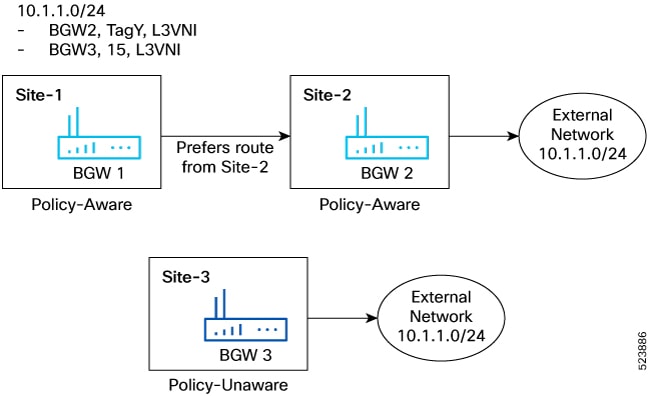
Figure 3. Policy-Aware and Policy-Unaware Tag Next-Hop Preference

In the figure, BGW 1 and BGW 2 are part of policy-aware sites and BGW 3 belongs to a policy-unaware site. External network 10.1.1.0/24 is advertised from Site 3 and Site 2 to Site 1. Since Site-2 is policy-aware, Route 10.1.1.0/24 is advertised with “TagY”, which is configured on Site2. Site-3 is policy-unaware, so the route advertised from BGW3 would not carry any policy information and would be locally assigned to have the default Policy-unaware tag which is ‘15’ when received by BGW1.

On BGW1, the Route would have overlay ECMP of BGW2 and BGW3 with tags of TagY and ‘15’ respectively. Since TagY is a valid tag from the policy-aware site, 10.1.1.0/24 is programmed with Tag ‘TagY’. When BGW1 re-originates the route to a leaf in Site-1, it adds the tag ‘TagY’ to the route.

Policy aware fabrics in a multi-site domain

This section describes how route advertisement and packet movement occur between two hosts in a policy-aware Multi-Site domain.

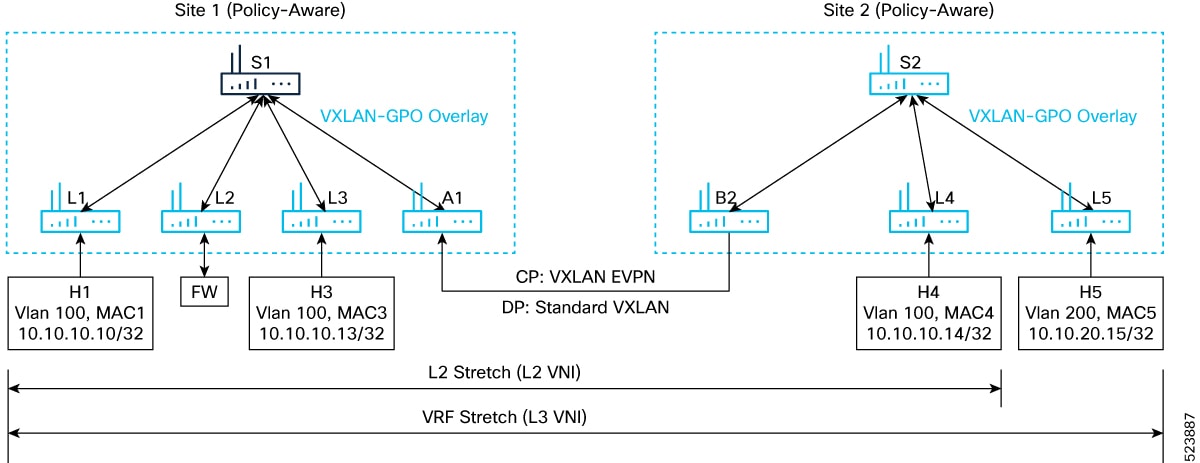
Figure 4. Policy-Aware Multi-site

In the above topology, site 1 and site 2 are policy aware.

Route-advertisement of Host H1 from Leaf L1 to Leaf L5

When a host route H1 is advertised from L1, site 1 to L5 site 2, the route advertisement flow is as follows:

  1. Next-hop Router L1 advertises the route with L1 next-hop and source group tag (TagX) as configured by the policy on router L1.

  2. Router A1, which is the BGW in Site-1, re-originates the route with the Multi-Site VIP of the BGW as next-hop, retaining the SGT tag (TagX) received from L1.

  3. Router B2 (BGW in Site-2) re-originates the route H1 inside the local fabric with the Multi-Site VIP of B2 BGW as next-hop and the same SGT tag (TagX).

  4. L5 receives the route from router B2 and installs it in the forwarding table with the associated security tag “TagX”. The tag from the originator leaf is retained across the entire multi-site domain.

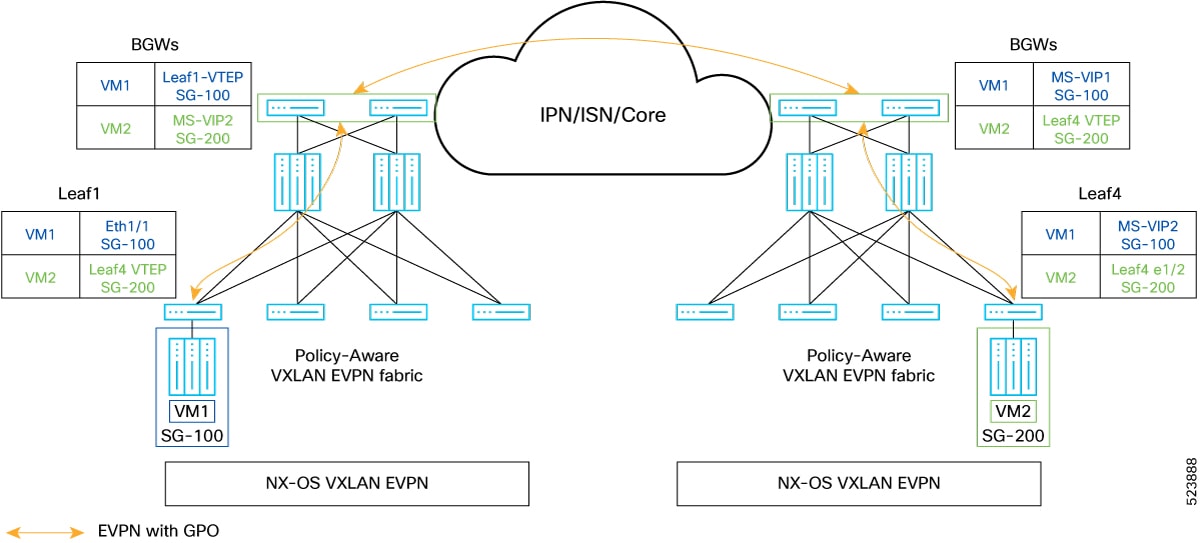
Refer to the following figure to know about the learned endpoint information on the various nodes.

Figure 5. Route Advertisement in a Policy Aware Multi-Site

Packet-Flow from Host H5 to Host H1

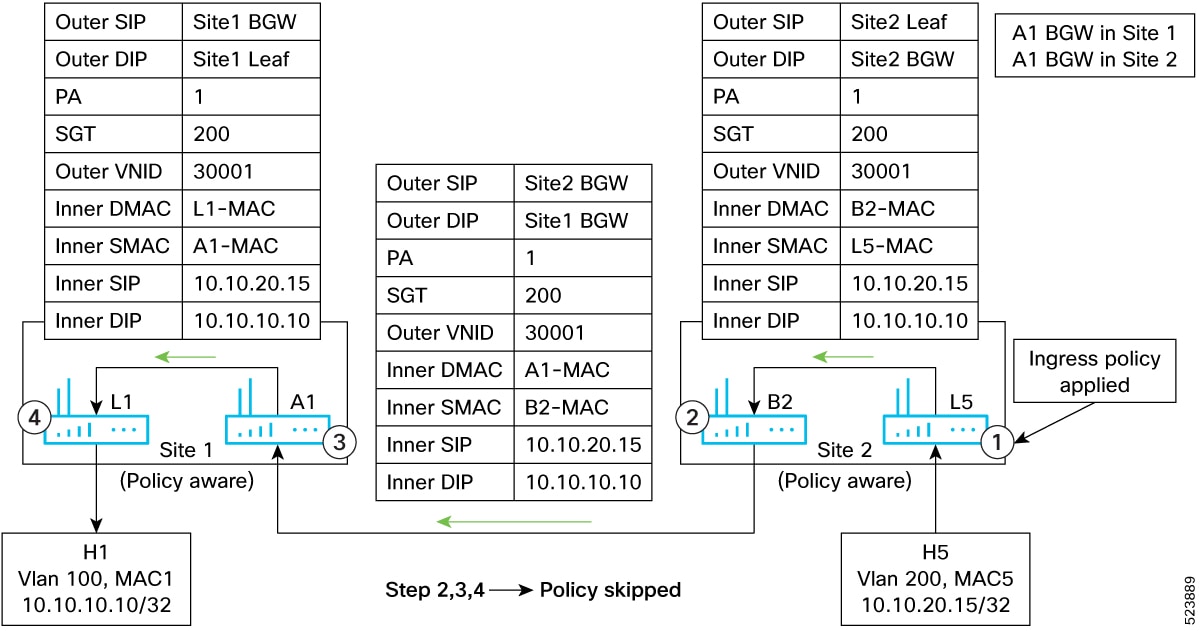
Figure 6. Packet-Flow from Host H5 to Host H1

The packet flow between the hosts H5 and H1 would be as follows.

  1. Router L5 receives the traffic from host H5. Since both SRC and DST tags are available, L5 applies the security policy. If the policy-action is permitted, it sets the policy-applied (PA) bit in the VXLAN-GPO header and sends the traffic to BGW router B2, representing the next-hop to reach the destination host H1.

  2. The PA bit setting is retained in the VXLAN GPO header. B2, on seeing the PA bit set in the VXLAN header, does not reapply the policy, and just decapsulates and re-encapsulates the traffic, sending it to BGW A1, site 1, representing the next-hop to reach the destination host H1.

  3. BGW A1 takes a similar action as BGW B2 and forwards the traffic to router L1.

  4. Router L1 does not apply Policy as the PA bit is set and forwards the traffic to the destination host H1.

Policy aware and policy unaware fabrics in a multi-site domain

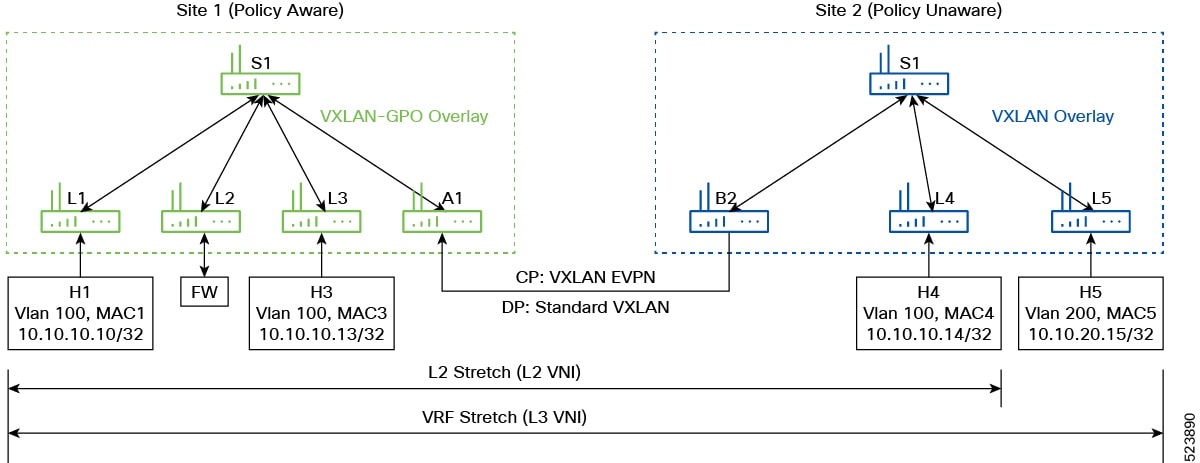
Figure 7. Policy-Aware Policy Unaware Multi-Site

In the above picture, Site-1 is a policy-aware site and Site-2 is a policy-unaware site.

Route advertisement of Host H1 from Router L1 to Router L5

The route advertisement of Host H1 from router L1 to router L5 would be as follows.

  1. Router L1 advertises the route H1 with next-hop as L1 and SGT Tag (TagY) based on the configuration on L1.

  2. Router A1 locally installs the route with next-hop L1 (and associated tag TagY) and re-originates the route to the remote BGW B2 with next-hop as A1 Multi-Site VIP and the same SGT Tag (TagY).

  3. BGW B2, upon receiving the route with SGT Tag (TagY), locally installs the route with A1 as next-hop and ignores the SGT Tag as it is policy-unaware. It then re-originates the route to router L5 with next-hop as B2 Multi-Site VIP.

  4. Router L5 installs the route H1.

Route advertisement of Host H5 from Router L5 to Router L1

The route advertisement of Host H5 from router L5 to router L1 would be as follows.

  1. Router L5 advertises the route for host H5 with next-hop as L5.

  2. BGW B2 locally installs the route with L5 as next-hop and re-originates the prefix with next-hop as B2 Multi-Site VIP.

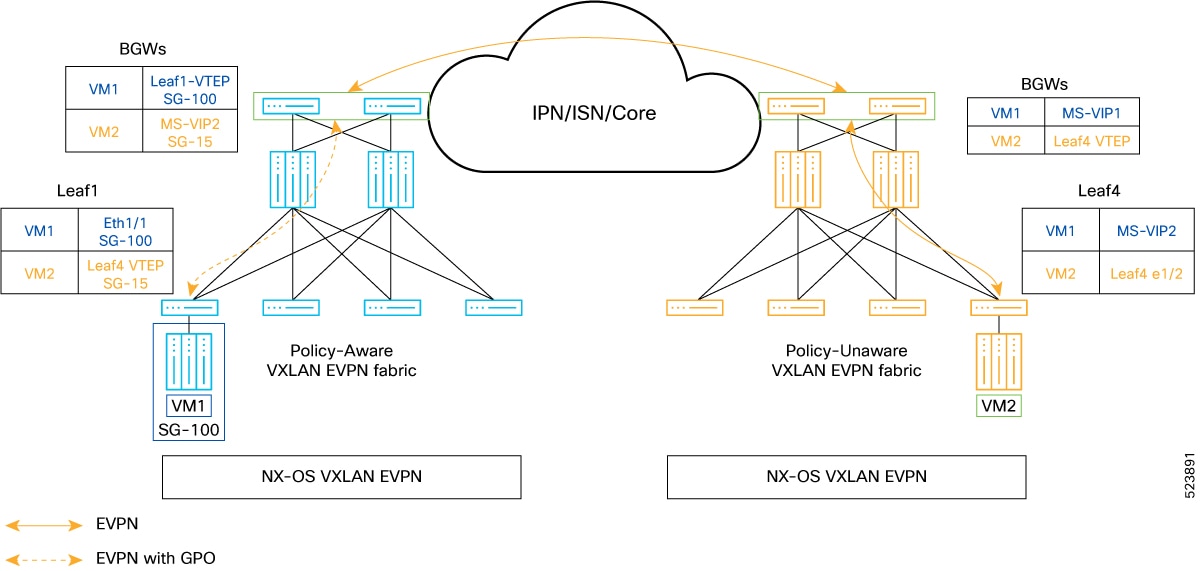
  3. Since A1 is in a policy-aware site and received the route from a policy-unaware fabric, A1 installs the route with the Default Tag for Policy-unaware sites, Tag ‘15’.

  4. BGW router A1 re-originates the route to L1 with next-hop as A1 Multi-Site VIP and Tag 15.

  5. Router L1 installs the route with SGT TAG 15 and next-hop as A1 Multi-Site VIP.

Refer to the following figure to know about the learned endpoint information on the various nodes.

Figure 8. Route Advertisement from a Policy Unaware to Aware Site

Packet flow from Host H5 to Host H1

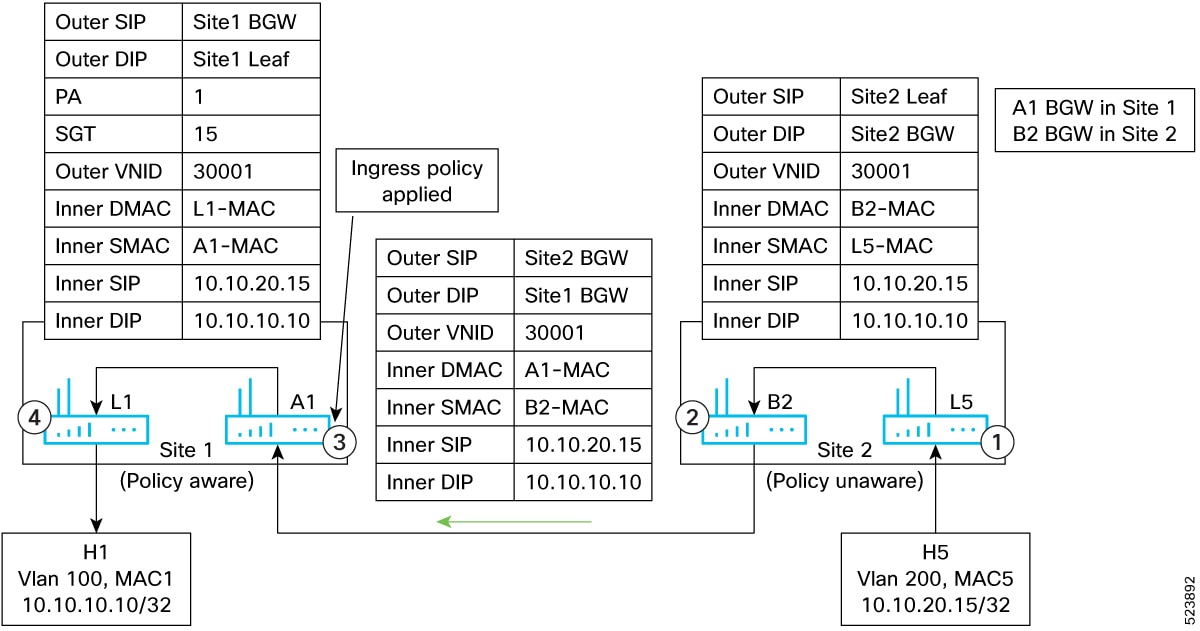
Figure 9. Packet flow from Host H5 to Host H1

The packet flow between the hosts H5 and H1 would be as follows.

  1. Router L5 receives the traffic from host H5 and routes the traffic to B2 with standard VXLAN header.

  2. B2 decapsulates and re-capsulates in a standard VXLAN header.

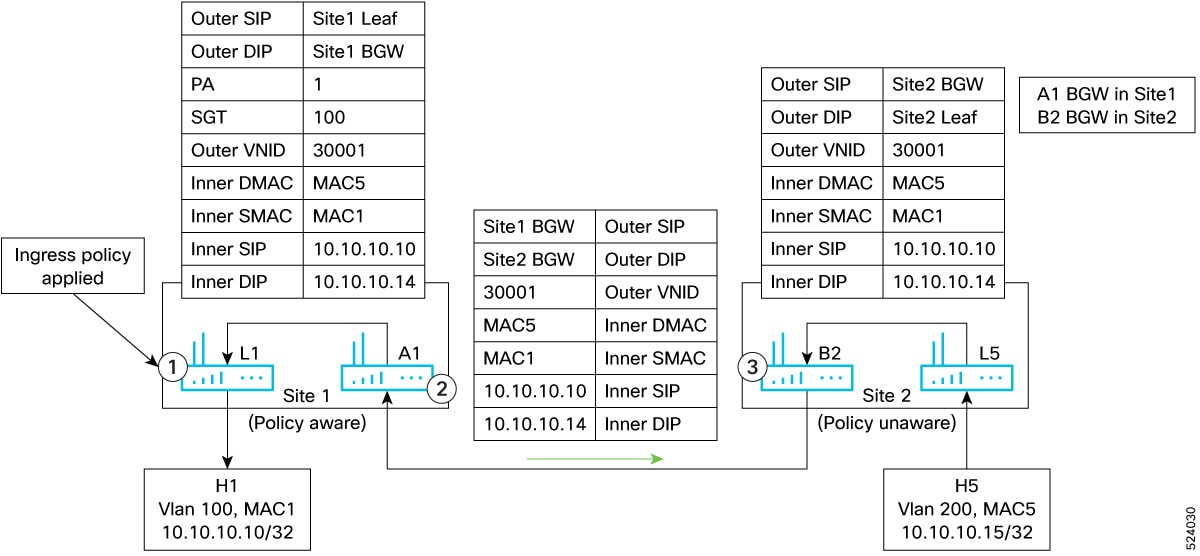
  3. A1 decapsulates the traffic, applies the policy based on source Tag “15” and destination “Tag Y”. Based on the policy, traffic is forwarded to L1 with VXLAN GPO tunnel and policy-applied bit set.

  4. L1 decapsulates the traffic and since PA bit is set, policy is not applied again and forwarded to H1.

Packet flow from Host H1 to Host H5

Figure 10. Packet flow from Host H1 to Host H5

Packet flow from host H1 to host H5 would be as follows.

  1. Router L1 receives the traffic from H1, applies the policy based on the source Tag ‘TagY’, destination Tag ‘15’. Based on the policy result, L1 routes the traffic to A1 with VXLAN GPO Tunnel with policy-applied (PA) bit set.

  2. A1 decapsulates and since PA bit is set, it does not reapply the policy and forwards the traffic to B2 in a standard VXLAN Tunnel.

  3. Traffic flow from B2 to H5 is similar to any Multi-Site deployment.

With the help of micro-segmentation and GPO, NX-OS users can create smaller and isolated segments within a network and enforce security policies. This allows users to have better control over the traffic flow and apply security policies only where they are needed.

Related documents

VXLAN multi-site and GPO interoperability

For example, in a deployment where Site-1 is policy-aware and Site-2 is policy-unaware, routes and security tags are exchanged as described above, and packet flows are handled according to the policy-aware and policy-unaware fabric behaviors. The figures in the reference section illustrate these flows and configurations.