Configuring BGP EVPN Filtering

This chapter contains these sections:

About BGP EVPN Filtering

This feature describes the requirements for route filtering and attributes handling, arising from the implementation of BGP NLRIs of address family L2VPN EVPN.

  • EVPN routes are quite different from regular IPv4 and IPv6 routes in NLRI format. They contain many fields and carry attributes specific to EVPN. Using route maps, we can filter routes on the basis of these attributes. The following route-filtering options are available for the routes belonging to the EVPN address family:

Route-filtering options for EVPN address family

The following route-filtering options are available for the routes belonging to the EVPN address family:

  • Matching based on the EVPN route type: Six types of NLRIs are available in EVPN. Matching is based on the type specified in the route-map match statement.

  • Matching based on the IP address in the NLRI: This option can be used to filter based on IP address information in type-2 and type-5 NLRIs.

  • Matching based on the MAC address in the NLRI: This option is similar to matching based on the IP address embedded in the NLRI. EVPN type-2 routes contain a MAC address along with an IP address. This option can be used to filter such routes.

  • Matching based on the RMAC extended community: EVPN type-2 and type-5 routes carry the router MAC (RMAC) extended community, which carries a MAC address. The RMAC is advertised as part of the update message to the neighbor along with other extended community information. It specifies the MAC address of the remote next hop of a route. This option allows matching against this RMAC extended community.

  • Setting the RMAC extended community: This option allows you to change the RMAC extended community value of an EVPN NLRI.

  • Setting the EVPN next-hop IP address: This option sets the next-hop IP address of the EVPN route once the match condition has been met. Setting the next-hop IP address for EVPN routes should be accompanied by setting the RMAC extended community to ensure correctness in forwarding.

  • Setting the gateway IP address for route type-5: The gateway IP address encodes an overlay IP index for the IP prefixes that form the type-5 EVPN routes. It gets advertised as part of the EVPN NLRI in the update message. The default value is 0.0.0.0. When it's set to any other value, the next hop on the route in the VRF context changes to the gateway IP address specified.

  • Using table maps: You can configure table maps to filter MAC routes downloaded to the Layer 2 Routing Information Base (L2RIB).

The rest of this chapter provides information on configuring and applying these options.

Guidelines and Limitations for BGP EVPN Filtering

The following are the guidelines and limitations for BGP EVPN filtering:

Cisco Nexus 9000 Series switches support BGP EVPN filtering.

The following match and set options are available for filtering an EVPN address family of routes:

  • Matching based on the route type

  • Matching based on the MAC address in the NLRI

  • Matching based on the RMAC extended community

  • Setting the RMAC extended community

  • Setting the EVPN next-hop IP address—If more than one next-hop IP address is configured, only the first one is used and processed if using for EVPN. IPv4 and IPv6 can be used as next-hop addresses.

  • Setting the gateway IP address for a route type-5—You can set an IPv4 gateway IP address using the route-map command.

  • Using table maps—A table map for filtering MAC routes is downloaded to the Layer 2 Routing Information Base (L2RIB).

Configuring BGP EVPN Filtering

To perform route filtering for the EVPN address-family routes, you can perform the following tasks:

To configure the table map, you can perform the following tasks:

Configuring the Route Map with Match and Set Clauses

You can use the existing route-map configuration along with the match and set clauses to decide the kind of filtering that you need.

Matching Based on EVPN Route Type

Procedure

Step 1

Use the configure terminal command to enter global configuration mode.

Example:
switch# configure terminal

Step 2

Use the route-map route-map-name command to create a route map.

Example:
switch(config)# route-map ROUTE_MAP_1

Step 3

Use the match evpn route-type {1 | 2 | 2-mac-ip | 2-mac-only | 3 | 4 | 5 | 6} command to match BGP EVPN routes.

Example:
switch(config-route-map)# match evpn route-type 6

Matching Based on MAC Address in the NLRI

Procedure

Step 1

Use the configure terminal command to enter global configuration mode.

Example:
switch# configure terminal

Step 2

Use the mac-list list-name [seq seq-number] {deny | permit} mac-address [mac-mask] command to build a MAC list.

Example:
switch(config)# mac-list MAC_LIST_1 permit E:E:E

Step 3

Use the route-map route-map-name command to create a route map.

Example:
switch(config)# route-map ROUTE_MAP_1

Step 4

Use the match mac-list mac-list-name command to match entries of MAC lists.

Example:
switch(config-route-map)# match mac-list MAC_LIST_1

The maximum length is 63 characters.


Matching Based on RMAC Extended Community

Procedure

Step 1

Use the configure terminal command to enter global configuration mode.

Example:
switch# configure terminal

Step 2

Use the ip extcommunity-list standard list-name seq 5 {deny | permit} rmac mac-addr command to add an extcommunity list entry.

Example:
switch(config)# ip extcommunity-list standard EXTCOMM_LIST_RMAC seq 5 permit rmac a8b4.56e4.7edf

The list-name argument must not exceed 63 characters.

Step 3

Use the route-map route-map-name command to create a route map.

Example:
switch(config)# route-map ROUTE_MAP_1

Step 4

Use the match extcommunity list-name command to match the extended community list name.

Example:
switch(config-route-map)# match extcommunity EXTCOMM_LIST_RMAC

Set the RMAC Extended Community

Procedure

Step 1

Use the configure terminal command to enter global configuration mode.

Example:
switch# configure terminal

Step 2

Use the route-map route-map-name command to create a route map .

Example:
switch(config)# route-map ROUTE_MAP_1

Step 3

Use the set extcommunity evpn rmac mac-address command to set the BGP RMAC extcommunity attribute .

Example:
switch(config-route-map)# set extcommunity evpn rmac EEEE.EEEE.EEEE

Set the EVPN Next-Hop IP Address

Procedure

Step 1

Use the configure terminal command to enter global configuration mode.

Example:
switch# configure terminal

Step 2

Use the route-map route-map-name command to create a route map.

Example:
switch(config)# route-map ROUTE_MAP_1

Step 3

Use the set ip next-hop next-hop command to set the IP address of the EVPN IP next hop.

Example:
switch(config-route-map)# set ip next-hop 209.165.200.226

Step 4

Use the set ipv6 next-hop next-hop command to set the IPv6 next-hop address.

Example:
switch(config-route-map)# set ipv6 next-hop 2001:0DB8::1

Set the Gateway IP Address for Route Type-5

Procedure

Step 1

Use the configure terminal command to enter global configuration mode.

Example:
switch# configure terminal

Step 2

Use the route-map route-map-name command to create a route map.

Example:
switch(config)# route-map ROUTE_MAP_1

Step 3

Use the set evpn gateway-ip gw-ip-address command to set the gateway IP address.

Example:
switch(config-route-map)# set evpn gateway-ip 209.165.200.227

Applying the Route Map at the Inbound or Outbound Level

Once you've configured the route map with match and set clauses based on your requirements, use this procedure to apply the route map at the inbound or outbound level.

Procedure


Step 1

Use the configure terminal command to enter global configuration mode.

Example:

switch# configure terminal

Step 2

Use the router bgp as-num command to enable a routing process .

Example:

switch(config)# router bgp 100

The range of as-num is from 1 to 65535.

Step 3

Use the neighbor address command to configure a BGP neighbor .

Example:

switch(config-router)# neighbor 1.1.1.1

Step 4

Use the address-family l2vpn evpn command to configure the L2VPN address family .

Example:

switch(config-router-neighbor)# address-family l2vpn evpn

Step 5

Use the route-map route-map {in | out} command to apply the route map to the neighbor .

Example:

switch(config-router-neighbor-af)# route-map ROUTE_MAP_1 in

BGP EVPN Filtering Configuration Examples

This section provides example configurations for filtering EVPN routes.

The following example shows how to filter EVPN type-2 routes and set the RMAC extended community as 52fc.c310.2e80.

Procedure


Step 1

Use the show bgp l2vpn evpn command to display the routes in the EVPN table and a type-2 EVPN MAC route before the route map is applied.

Example:

leaf1(config)# show bgp l2vpn evpn
BGP routing table information for VRF default, address family L2VPN EVPN
BGP table version is 12, Local Router ID is 1.1.1.1
Status: s-suppressed, x-deleted, S-stale, d-dampened, h-history, *-valid, >-best
Path type: i-internal, e-external, c-confed, l-local, a-aggregate, r-redist, I-injected
Origin codes: i - IGP, e - EGP, ? - incomplete, | - multipath, & - backup, 2 - best2

Network            Next Hop            Metric     LocPrf     Weight Path
Route Distinguisher: 1.1.1.1:32868    (L2VNI 101)
*>i[2]:[0]:[0]:[48]:[aaaa.aaaa.aaaa]:[32]:[101.0.0.3]/272
33.33.33.33                       100          0 i

Route Distinguisher: 3.3.3.3:3
*>i[2]:[0]:[0]:[48]:[52fc.d83a.1b08]:[0]:[0.0.0.0]/216
33.33.33.33                       100          0 i
*>i[5]:[0]:[0]:[24]:[101.0.0.0]/224
3.3.3.3                  0        100          0 ?

Route Distinguisher: 3.3.3.3:32868
*>i[2]:[0]:[0]:[48]:[aaaa.aaaa.aaaa]:[32]:[101.0.0.3]/272
33.33.33.33                       100          0 i

Route Distinguisher: 1.1.1.1:3    (L3VNI 100)
*>i[2]:[0]:[0]:[48]:[52fc.d83a.1b08]:[0]:[0.0.0.0]/216
33.33.33.33                       100          0 i
*>i[2]:[0]:[0]:[48]:[aaaa.aaaa.aaaa]:[32]:[101.0.0.3]/272
33.33.33.33                       100          0 i
*>l[5]:[0]:[0]:[24]:[10.0.0.0]/224
1.1.1.1                  0        100      32768 ?
*>l[5]:[0]:[0]:[24]:[100.0.0.0]/224
1.1.1.1                  0        100      32768 ?
*>i[5]:[0]:[0]:[24]:[101.0.0.0]/224
3.3.3.3                  0        100          0 ?

leaf1(config)# show bgp l2vpn evpn aaaa.aaaa.aaaa
BGP routing table information for VRF default, address family L2VPN EVPN
Route Distinguisher: 1.1.1.1:32868    (L2VNI 101)
BGP routing table entry for [2]:[0]:[0]:[48]:[aaaa.aaaa.aaaa]:[32]:[101.0.0.3]/2
72, version 12
Paths: (1 available, best #1)
Flags: (0x000212) (high32 00000000) on xmit-list, is in l2rib/evpn, is not in HW

Advertised path-id 1
Path type: internal, path is valid, is best path, no labeled nexthop, in rib
Imported from 3.3.3.3:32868:[2]:[0]:[0]:[48]:[aaaa.aaaa.aaaa]:[32]:
[101.0.0.3]/272 
AS-Path: NONE, path sourced internal to AS
33.33.33.33 (metric 81) from 101.101.101.101 (101.101.101.101)
Origin IGP, MED not set, localpref 100, weight 0
Received label 101 100
Extcommunity: RT:100:100 RT:100:101 SOO:33.33.33.33:0 ENCAP:8
Router MAC:52fc.d83a.1b08
Originator: 3.3.3.3 Cluster list: 101.101.101.101 

Path-id 1 not advertised to any peer

Route Distinguisher: 3.3.3.3:32868
BGP routing table entry for [2]:[0]:[0]:[48]:[aaaa.aaaa.aaaa]:[32]:[101.0.0.3]/2
72, version 8
Paths: (1 available, best #1)
Flags: (0x000202) (high32 00000000) on xmit-list, is not in l2rib/evpn, is not in HW

Advertised path-id 1
Path type: internal, path is valid, is best path, no labeled nexthop
Imported to 3 destination(s)
Imported paths list: vni100 default default
AS-Path: NONE, path sourced internal to AS
33.33.33.33 (metric 81) from 101.101.101.101 (101.101.101.101)
Origin IGP, MED not set, localpref 100, weight 0
Received label 101 100
Extcommunity: RT:100:100 RT:100:101 SOO:33.33.33.33:0 ENCAP:8
Router MAC:52fc.d83a.1b08
Originator: 3.3.3.3 Cluster list: 101.101.101.101 

Path-id 1 not advertised to any peer

Route Distinguisher: 1.1.1.1:3    (L3VNI 100)
BGP routing table entry for [2]:[0]:[0]:[48]:[aaaa.aaaa.aaaa]:[32]:[101.0.0.3]/2
72, version 11
Paths: (1 available, best #1)
Flags: (0x000202) (high32 00000000) on xmit-list, is not in l2rib/evpn, is not in HW

Advertised path-id 1
Path type: internal, path is valid, is best path, no labeled nexthop
Imported from 3.3.3.3:32868:[2]:[0]:[0]:[48]:[aaaa.aaaa.aaaa]:[32]:
[101.0.0.3]/272 
AS-Path: NONE, path sourced internal to AS
33.33.33.33 (metric 81) from 101.101.101.101 (101.101.101.101)
Origin IGP, MED not set, localpref 100, weight 0
Received label 101 100
Extcommunity: RT:100:100 RT:100:101 SOO:33.33.33.33:0 ENCAP:8
Router MAC:52fc.d83a.1b08
Originator: 3.3.3.3 Cluster list: 101.101.101.101 

Path-id 1 not advertised to any peer

Step 2

Use the show run rpm command to display the route-map configuration.

Example:

leaf1(config)# show run rpm

!Command: show running-config rpm
!Running configuration last done at: Thu Sep  3 22:32:23 2020
!Time: Thu Sep  3 22:32:31 2020

version 9.3(5) Bios:version
route-map FILTER_EVPN_TYPE2 permit 10
    match evpn route-type 2 
    set extcommunity evpn rmac 52fc.c310.2e80
route-map allow permit 10

Step 3

Use the show run bgp command to display how to apply the route map to the EVPN peer as an inbound route map.

Example:

leaf1(config-router-neighbor-af)# show run bgp

!Command: show running-config bgp
!Running configuration last done at: Mon Aug  3 18:08:24 2020
!Time: Mon Aug  3 18:08:28 2020

version 9.3(5) Bios:version  
feature bgp

router bgp 100
  event-history detail size large
  neighbor 101.101.101.101
    remote-as 100
    update-source loopback0
    address-family l2vpn evpn
      send-community extended
      route-map FILTER_EVPN_TYPE2 in
  vrf vni100
    address-family ipv4 unicast
      advertise l2vpn evpn
      redistribute direct route-map allow

Step 4

Use the show bgp l2vpn evpn command to display the routes in the EVPN table and a type-2 EVPN MAC route after the route map is applied.

Example:

leaf1(config)# show bgp l2vpn evpn
BGP routing table information for VRF default, address family L2VPN EVPN
BGP table version is 19, Local Router ID is 1.1.1.1
Status: s-suppressed, x-deleted, S-stale, d-dampened, h-history, *-valid, >-best
Path type: i-internal, e-external, c-confed, l-local, a-aggregate, r-redist, I-injected
Origin codes: i - IGP, e - EGP, ? - incomplete, | - multipath, & - backup, 2 - best2

Network            Next Hop            Metric     LocPrf     Weight Path
Route Distinguisher: 1.1.1.1:32868    (L2VNI 101)
*>i[2]:[0]:[0]:[48]:[aaaa.aaaa.aaaa]:[32]:[101.0.0.3]/272
                      33.33.33.33                       100          0 i

Route Distinguisher: 3.3.3.3:3
*>i[2]:[0]:[0]:[48]:[52fc.d83a.1b08]:[0]:[0.0.0.0]/216
                      33.33.33.33                       100          0 i

Route Distinguisher: 3.3.3.3:32868
*>i[2]:[0]:[0]:[48]:[aaaa.aaaa.aaaa]:[32]:[101.0.0.3]/272
                      33.33.33.33                       100          0 i

Route Distinguisher: 1.1.1.1:3    (L3VNI 100)
*>i[2]:[0]:[0]:[48]:[52fc.d83a.1b08]:[0]:[0.0.0.0]/216
                      33.33.33.33                       100          0 i
*>i[2]:[0]:[0]:[48]:[aaaa.aaaa.aaaa]:[32]:[101.0.0.3]/272
                      33.33.33.33                       100          0 i
*>l[5]:[0]:[0]:[24]:[10.0.0.0]/224
                      1.1.1.1                  0        100      32768 ?
*>l[5]:[0]:[0]:[24]:[100.0.0.0]/224
                      1.1.1.1                  0        100      32768 ?

leaf1(config)# show bgp l2vpn evpn aaaa.aaaa.aaaa
BGP routing table information for VRF default, address family L2VPN EVPN
Route Distinguisher: 1.1.1.1:32868    (L2VNI 101)
BGP routing table entry for [2]:[0]:[0]:[48]:[aaaa.aaaa.aaaa]:[32]:[101.0.0.3]/2
72, version 19
Paths: (1 available, best #1)
Flags: (0x000212) (high32 00000000) on xmit-list, is in l2rib/evpn, is not in HW

Advertised path-id 1
Path type: internal, path is valid, is best path, no labeled nexthop, in rib
Imported from 3.3.3.3:32868:[2]:[0]:[0]:[48]:[aaaa.aaaa.aaaa]:[32]:
[101.0.0.3]/272 
AS-Path: NONE, path sourced internal to AS
33.33.33.33 (metric 81) from 101.101.101.101 (101.101.101.101)
Origin IGP, MED not set, localpref 100, weight 0
Received label 101 100
Extcommunity: RT:100:100 RT:100:101 SOO:33.33.33.33:0 ENCAP:8
Router MAC:52fc.c310.2e80
Originator: 3.3.3.3 Cluster list: 101.101.101.101 
Path-id 1 not advertised to any peer

Route Distinguisher: 3.3.3.3:32868
BGP routing table entry for [2]:[0]:[0]:[48]:[aaaa.aaaa.aaaa]:[32]:[101.0.0.3]/2
72, version 15
Paths: (1 available, best #1)
Flags: (0x000202) (high32 00000000) on xmit-list, is not in l2rib/evpn, is not in HW

Advertised path-id 1
Path type: internal, path is valid, is best path, no labeled nexthop
Imported to 3 destination(s)
Imported paths list: vni100 default default
AS-Path: NONE, path sourced internal to AS
33.33.33.33 (metric 81) from 101.101.101.101 (101.101.101.101)
Origin IGP, MED not set, localpref 100, weight 0
Received label 101 100
Extcommunity: RT:100:100 RT:100:101 SOO:33.33.33.33:0 ENCAP:8
Router MAC:52fc.c310.2e80
Originator: 3.3.3.3 Cluster list: 101.101.101.101 

Path-id 1 not advertised to any peer

Route Distinguisher: 1.1.1.1:3    (L3VNI 100)
BGP routing table entry for [2]:[0]:[0]:[48]:[aaaa.aaaa.aaaa]:[32]:[101.0.0.3]/2
72, version 18
Paths: (1 available, best #1)
Flags: (0x000202) (high32 00000000) on xmit-list, is not in l2rib/evpn, is not in HW

Advertised path-id 1
Path type: internal, path is valid, is best path, no labeled nexthop
Imported from 3.3.3.3:32868:[2]:[0]:[0]:[48]:[aaaa.aaaa.aaaa]:[32]:
[101.0.0.3]/272 
AS-Path: NONE, path sourced internal to AS
33.33.33.33 (metric 81) from 101.101.101.101 (101.101.101.101)
Origin IGP, MED not set, localpref 100, weight 0
Received label 101 100
Extcommunity: RT:100:100 RT:100:101 SOO:33.33.33.33:0 ENCAP:8
Router MAC:52fc.c310.2e80
Originator: 3.3.3.3 Cluster list: 101.101.101.101

Path-id 1 not advertised to any peer

Step 5

Use the show bgp l2 e 11.11.11.11 and show ip route 11.11.11.11 commands to display the best path to reach 11.11.11.11 before route-map changes.

Example:

bl1(config)# show bgp l2 e 11.11.11.11
BGP routing table information for VRF default, address family L2VPN EVPN
Route Distinguisher: 1.1.1.1:3
BGP routing table entry for [5]:[0]:[0]:[32]:[11.11.11.11]/224, version 15
Paths: (1 available, best #1)
Flags: (0x000002) (high32 00000000) on xmit-list, is not in l2rib/evpn, is not in HW

Advertised path-id 1
Path type: internal, path is valid, is best path, no labeled nexthop
    Imported to 2 destination(s)
    Imported paths list: evpn-tenant-0002 default
Gateway IP: 0.0.0.0
AS-Path: 150 , path sourced external to AS
  1.1.1.1 (metric 81) from 101.101.101.101 (101.101.101.101)
    Origin incomplete, MED 0, localpref 100, weight 0
    Received label 3003002
    Extcommunity: RT:1:3003002 ENCAP:8 Router MAC:5254.0074.caf5
    Originator: 1.1.1.1 Cluster list: 101.101.101.101 

Path-id 1 not advertised to any peer

Route Distinguisher: 2.2.2.2:4
BGP routing table entry for [5]:[0]:[0]:[32]:[11.11.11.11]/224, version 79
Paths: (1 available, best #1)
Flags: (0x000002) (high32 00000000) on xmit-list, is not in l2rib/evpn, is not in HW

Advertised path-id 1
Path type: internal, path is valid, is best path, no labeled nexthop
    Imported to 2 destination(s)
    Imported paths list: evpn-tenant-0002 default
Gateway IP: 0.0.0.0
AS-Path: 150 , path sourced external to AS
  2.2.2.2 (metric 81) from 101.101.101.101 (101.101.101.101)
    Origin incomplete, MED 0, localpref 100, weight 0
    Received label 3003002
    Extcommunity: RT:1:3003002 ENCAP:8 Router MAC:5254.0090.433e
    Originator: 2.2.2.2 Cluster list: 101.101.101.101 

Path-id 1 not advertised to any peer

Route Distinguisher: 3.3.3.3:3    (L3VNI 3003002)
BGP routing table entry for [5]:[0]:[0]:[32]:[11.11.11.11]/224, version 80
Paths: (2 available, best #2)Flags: (0x000002) (high32 00000000) on xmit-list, is not in l2rib/evpn, is not in HW

Path type: internal, path is valid, not best reason: Router Id, no labeled nexthop
    Imported from 2.2.2.2:4:[5]:[0]:[0]:[32]:[11.11.11.11]/224 
Gateway IP: 0.0.0.0
AS-Path: 150 , path sourced external to AS
  2.2.2.2 (metric 81) from 101.101.101.101 (101.101.101.101)    
    Origin incomplete, MED 0, localpref 100, weight 0
    Received label 3003002
    Extcommunity: RT:1:3003002 ENCAP:8 Router MAC:5254.0090.433e
    Originator: 2.2.2.2 Cluster list: 101.101.101.101 

Advertised path-id 1
Path type: internal, path is valid, is best path, no labeled nexthop
    Imported from 1.1.1.1:3:[5]:[0]:[0]:[32]:[11.11.11.11]/224
Gateway IP: 0.0.0.0
AS-Path: 150 , path sourced external to AS
  1.1.1.1 (metric 81) from 101.101.101.101 (101.101.101.101)
    Origin incomplete, MED 0, localpref 100, weight 0
    Received label 3003002
    Extcommunity: RT:1:3003002 ENCAP:8 Router MAC:5254.0074.caf5
    Originator: 1.1.1.1 Cluster list: 101.101.101.101 

Path-id 1 not advertised to any peer

Route Distinguisher: 3.3.3.3:4    (L3VNI 3003003)
BGP routing table entry for [5]:[0]:[0]:[32]:[11.11.11.11]/224, version 24
Paths: (1 available, best #1)
Flags: (0x000002) (high32 00000000) on xmit-list, is not in l2rib/evpn

Advertised path-id 1
Path type: local, path is valid, is best path, no labeled nexthop
Gateway IP: 0.0.0.0
AS-Path: 150 , path sourced external to AS
  3.3.3.3 (metric 0) from 0.0.0.0 (3.3.3.3)
    Origin incomplete, MED 0, localpref 100, weight 0
    Received label 3003003
    Extcommunity: RT:1:3003003 ENCAP:8 Router MAC:5254.006a.435b
    Originator: 1.1.1.1 Cluster list: 101.101.101.101 

Path-id 1 advertised to peers:
101.101.101.101

bl1(config)# show ip route 11.11.11.11
IP Route Table for VRF "default"
'*' denotes best ucast next-hop
'**' denotes best mcast next-hop
'[x/y]' denotes [preference/metric]
'%<string>' in via output denotes VRF <string>

11.11.11.11/32, ubest/mbest: 1/0
*via 1.1.1.1, [200/0], 00:02:51, bgp-1, internal, tag 150 (evpn) segid: 3003
002 tunnelid: 0x1010101 encap: VXLAN

Step 6

Use the show run rpm command to display the route-map configuration for redirecting traffic to the other VTEP leaf-2 by setting the next hop and RMAC on the 11.11.11.11/32 route.

Example:

bl1(config-route-map)# show run rpm

Command: show running-config rpm
!Running configuration last done at: Wed Mar 27 00:12:14 2019
!Time: Wed Mar 27 00:12:17 2019

version 9.2(3) Bios:version
ip prefix-list PFX_LIST1_1 seq 5 permit 11.11.11.11/32
route-map TEST_SET_IP_NEXTHOP permit 10
    match ip address prefix-list PFX_LIST1_1
    set ip next-hop 2.2.2.2
    set extcommunity evpn rmac 5254.0090.433e

Step 7

Use the show bgp l2 e 11.11.11.11 and show ip route 11.11.11.11 commands to display the route outputs for 11.11.11.11/32 after applying the route map at the inbound level at BL1.

Example:

bl1(config-router-neighbor-af)# show bgp l2 e 11.11.11.11
BGP routing table information for VRF default, address family L2VPN EVPN
Route Distinguisher: 1.1.1.1:3
BGP routing table entry for [5]:[0]:[0]:[32]:[11.11.11.11]/224, version 81
Paths: (1 available, best #1)
Flags: (0x000002) (high32 00000000) on xmit-list, is not in l2rib/evpn, is not in HW

Advertised path-id 1
Path type: internal, path is valid, is best path, no labeled nexthop
    Imported to 2 destination(s)
    Imported paths list: evpn-tenant-0002 default
Gateway IP: 0.0.0.0
AS-Path: 150 , path sourced external to AS
  2.2.2.2 (metric 81) from 101.101.101.101 (101.101.101.101)
    Origin incomplete, MED 0, localpref 100, weight 0
    Received label 3003002
    Extcommunity: RT:1:3003002 ENCAP:8 Router MAC:5254.0090.433e
    Originator: 1.1.1.1 Cluster list: 101.101.101.101 

Path-id 1 not advertised to any peer

Route Distinguisher: 2.2.2.2:4
BGP routing table entry for [5]:[0]:[0]:[32]:[11.11.11.11]/224, version 79
Paths: (1 available, best #1)
Flags: (0x000002) (high32 00000000) on xmit-list, is not in l2rib/evpn, is not in HW

Advertised path-id 1
Path type: internal, path is valid, is best path, no labeled nexthop
    Imported to 2 destination(s)
    Imported paths list: evpn-tenant-0002 default
Gateway IP: 0.0.0.0
AS-Path: 150 , path sourced external to AS  
  2.2.2.2 (metric 81) from 101.101.101.101 (101.101.101.101)
    Origin incomplete, MED 0, localpref 100, weight 0
    Received label 3003002
    Extcommunity: RT:1:3003002 ENCAP:8 Router MAC:5254.0090.433e
    Originator: 2.2.2.2 Cluster list: 101.101.101.101 

Path-id 1 not advertised to any peer

Route Distinguisher: 3.3.3.3:3    (L3VNI 3003002)
BGP routing table entry for [5]:[0]:[0]:[32]:[11.11.11.11]/224, version 82
Paths: (2 available, best #2)
Flags: (0x000002) (high32 00000000) on xmit-list, is not in l2rib/evpn, is not in HW

Path type: internal, path is valid, not best reason: Router Id, no labeled nexthop
    Imported from 2.2.2.2:4:[5]:[0]:[0]:[32]:[11.11.11.11]/224
Gateway IP: 0.0.0.0
AS-Path: 150 , path sourced external to AS
  2.2.2.2 (metric 81) from 101.101.101.101 (101.101.101.101)
    Origin incomplete, MED 0, localpref 100, weight 0
    Received label 3003002
    Extcommunity: RT:1:3003002 ENCAP:8 Router MAC:5254.0090.433e
    Originator: 2.2.2.2 Cluster list: 101.101.101.101 

Advertised path-id 1
Path type: internal, path is valid, is best path, no labeled nexthop
    Imported from 1.1.1.1:3:[5]:[0]:[0]:[32]:[11.11.11.11]/224
Gateway IP: 0.0.0.0
AS-Path: 150 , path sourced external to AS
  2.2.2.2 (metric 81) from 101.101.101.101 (101.101.101.101)
    Origin incomplete, MED 0, localpref 100, weight 0
    Received label 3003002
    Extcommunity: RT:1:3003002 ENCAP:8 Router MAC:5254.0090.433e
    Originator: 1.1.1.1 Cluster list: 101.101.101.101 

Path-id 1 not advertised to any peer

Route Distinguisher: 3.3.3.3:4    (L3VNI 3003003)
BGP routing table entry for [5]:[0]:[0]:[32]:[11.11.11.11]/224, version 24
Paths: (1 available, best #1)
Flags: (0x000002) (high32 00000000) on xmit-list, is not in l2rib/evpn

Advertised path-id 1
Path type: local, path is valid, is best path, no labeled nexthop
Gateway IP: 0.0.0.0
AS-Path: 150 , path sourced external to AS
  3.3.3.3 (metric 0) from 0.0.0.0 (3.3.3.3)
    Origin incomplete, MED 0, localpref 100, weight 0
    Received label 3003003
    Extcommunity: RT:1:3003003 ENCAP:8 Router MAC:5254.006a.435b
    Originator: 1.1.1.1 Cluster list: 101.101.101.101 

Path-id 1 advertised to peers:
101.101.101.101


bl1(config-router-neighbor-af)# show ip route 11.11.11.11
IP Route Table for VRF "default"
'*' denotes best ucast next-hop
'**' denotes best mcast next-hop
'[x/y]' denotes [preference/metric]
'%<string>' in via output denotes VRF <string>

11.11.11.11/32, ubest/mbest: 1/0
*via 2.2.2.2, [200/0], 00:02:37, bgp-1, internal, tag 150 (evpn) segid: 3003
002 tunnelid: 0x2020202 encap: VXLAN


Configuring a Table Map

Perform these tasks to configure and apply a table map:

Configuring a MAC List and a Route Map that Matches the MAC List

Procedure

Step 1

Use the configure terminal command to enter global configuration mode.

Example:
switch# configure terminal

Step 2

Use the mac-list list-name [seq seq-number] {deny | permit} mac-address [mac-mask] command to build a MAC list.

Example:
switch(config)# mac-list MAC_LIST_1 permit E:E:E

Step 3

Use the route-map route-map-name command to create a route map.

Example:
switch(config)# route-map ROUTE_MAP_1

Step 4

Use the match mac-list mac-list-name command to match entries of MAC lists.

Example:
switch(config-route-map)# match mac-list MAC_LIST_1

The maximum length is 63 characters.


Apply the table map

Procedure

Step 1

Use the configure terminal command to enter global configuration mode.

Example:
switch# configure terminal

Step 2

Use the evpn command to enter EVPN configuration mode.

Example:
switch(config)# evpn

Step 3

Use the vni vni-id l2 command to configure the Ethernet VPN ID.

Example:
switch(config-evpn)# vni 101 l2

Step 4

Use the table-map route-map-name [filter] command to apply table maps at the EVPN VNI configuration level.

Example:
switch(config-evpn-evi)# table-map ROUTE_MAP_1 filter

Apply table maps at the EVPN VNI configuration level. If the filter option is specified, any route that gets denied by the route-map validation isn't downloaded into the L2RIB.


Configure and Verify Table Map Filtering for MAC Routes

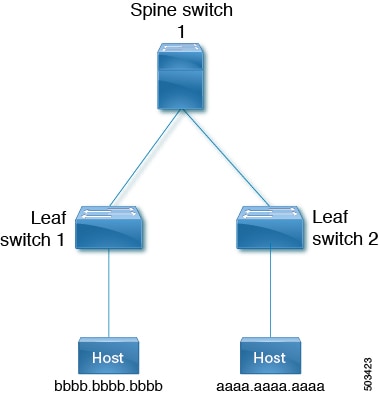
The following steps show how to filter MAC route aaaa.aaaa.aaaa from being downloaded into the L2RIB using a table-map configuration, and how to verify the results before and after applying the filter.

Procedure

SUMMARY STEPS

  1. Use the show bgp l2vpn evpn command to display the EVPN table and MAC routes in the L2RIB before the route map is applied.
  2. Use the show run rpm command to display the configuration for filtering MAC route aaaa.aaaa.aaaa with a route map.
  3. Use the show run bgp | section evpn command to verify the route map is applied at the BGP EVPN level.
  4. Use the show bgp l2vpn evpn command to display the EVPN table and MAC routes in the L2RIB after the table map is configured.

DETAILED STEPS


Step 1

Use the show bgp l2vpn evpn command to display the EVPN table and MAC routes in the L2RIB before the route map is applied.

Example:

leaf1(config)# show bgp l2vpn evpn
BGP routing table information for VRF default, address family L2VPN EVPN
BGP table version is 25, Local Router ID is 1.1.1.1
Status: s-suppressed, x-deleted, S-stale, d-dampened, h-history, *-valid, >-best
Path type: i-internal, e-external, c-confed, l-local, a-aggregate, r-redist, I-injected
Origin codes: i - IGP, e - EGP, ? - incomplete, | - multipath, & - backup, 2 - best2

Network            Next Hop            Metric     LocPrf     Weight Path
Route Distinguisher: 1.1.1.1:32868    (L2VNI 101)
*>i[2]:[0]:[0]:[48]:[aaaa.aaaa.aaaa]:[32]:[101.0.0.3]/272
33.33.33.33                       100          0 i

Route Distinguisher: 3.3.3.3:3
*>i[2]:[0]:[0]:[48]:[52fc.d83a.1b08]:[0]:[0.0.0.0]/216
33.33.33.33                       100          0 i

Route Distinguisher: 3.3.3.3:32868
*>i[2]:[0]:[0]:[48]:[aaaa.aaaa.aaaa]:[32]:[101.0.0.3]/272
33.33.33.33                       100          0 i

Route Distinguisher: 1.1.1.1:3    (L3VNI 100)
*>i[2]:[0]:[0]:[48]:[52fc.d83a.1b08]:[0]:[0.0.0.0]/216
33.33.33.33                       100          0 i
*>i[2]:[0]:[0]:[48]:[aaaa.aaaa.aaaa]:[32]:[101.0.0.3]/272
33.33.33.33                       100          0 i
*>l[5]:[0]:[0]:[24]:[10.0.0.0]/224
1.1.1.1                  0        100      32768 ?
*>l[5]:[0]:[0]:[24]:[100.0.0.0]/224
1.1.1.1                  0        100      32768 ?

leaf1(config)# show l2route evpn mac all

Flags -(Rmac):Router MAC (Stt):Static (L):Local (R):Remote (V):vPC link
(Dup):Duplicate (Spl):Split (Rcv):Recv (AD):Auto-Delete (D):Del Pending
(S):Stale (C):Clear, (Ps):Peer Sync (O):Re-Originated (Nho):NH-Override
(Pf):Permanently-Frozen, (Orp): Orphan

Topology  Mac Address     Prod  Flags  Seq No  Next-Hops
--------- -----------     ----  -----  ------- ----------
100       52fc.d83a.1b08  VXLAN  Rmac  0       33.33.33.33
101       aaaa.aaaa.aaaa  BGP    Spl   0       33.33.33.33 (Label: 101)

leaf1(config-evpn-evi)# show mac address-table vlan 101
Legend: * - primary entry, G - Gateway MAC, (R) - Routed MAC, O - Overlay MAC
age - seconds since last seen,+ - primary entry using vPC Peer-Link,
(T) - True, (F) - False, C - ControlPlane MAC, ~ - vsanVLAN     MAC Address
Type      age     Secure NTFY Ports
---------+-----------------+--------+---------+------+----+------------------
C  101     aaaa.aaaa.aaaa   dynamic  0         F      F    nve1(33.33.33.33)
G  101     521d.7cef.1b08   static   -         F      F    sup-eth1(R)

Step 2

Use the show run rpm command to display the configuration for filtering MAC route aaaa.aaaa.aaaa with a route map.

Example:

leaf1(config)# show run rpm

!Command: show running-config rpm
!Running configuration last done at: Thu Sep  3 21:47:48 2020
!Time: Thu Sep  3 22:27:57 2020

version 9.4(1) Bios:version
mac-list FILTER_MAC_AAA seq 5 deny aaaa.aaaa.aaaa ffff.ffff.ffff
route-map TABLE_MAP_FILTER permit 10
  match mac-list FILTER_MAC_AAA

Step 3

Use the show run bgp | section evpn command to verify the route map is applied at the BGP EVPN level.

Example:

leaf1(config-evpn-evi)# show run bgp | section evpn
evpn
    vni 101 l2
      table-map TABLE_MAP_FILTER filter
      rd auto
      route-target import auto
      route-target export auto
      route-target both auto evpn

Step 4

Use the show bgp l2vpn evpn command to display the EVPN table and MAC routes in the L2RIB after the table map is configured.

Example:

leaf1(config-evpn-evi)# show bgp l2vpn evpn
BGP routing table information for VRF default, address family L2VPN EVPN
BGP table version is 26, Local Router ID is 1.1.1.1
Status: s-suppressed, x-deleted, S-stale, d-dampened, h-history, *-valid, >-best
Path type: i-internal, e-external, c-confed, l-local, a-aggregate, r-redist, I-injected
Origin codes: i - IGP, e - EGP, ? - incomplete, | - multipath, & - backup, 2 - best2
Network            Next Hop            Metric     LocPrf     Weight Path
Route Distinguisher: 1.1.1.1:32868    (L2VNI 101)
*>i[2]:[0]:[0]:[48]:[aaaa.aaaa.aaaa]:[32]:[101.0.0.3]/272
33.33.33.33                       100          0 i

Route Distinguisher: 3.3.3.3:3
*>i[2]:[0]:[0]:[48]:[52fc.d83a.1b08]:[0]:[0.0.0.0]/216
33.33.33.33                       100          0 i

Route Distinguisher: 3.3.3.3:32868
*>i[2]:[0]:[0]:[48]:[aaaa.aaaa.aaaa]:[32]:[101.0.0.3]/272
33.33.33.33                       100          0 i

Route Distinguisher: 1.1.1.1:3    (L3VNI 100)
*>i[2]:[0]:[0]:[48]:[52fc.d83a.1b08]:[0]:[0.0.0.0]/216
33.33.33.33                       100          0 i
*>i[2]:[0]:[0]:[48]:[aaaa.aaaa.aaaa]:[32]:[101.0.0.3]/272
33.33.33.33                       100          0 i
*>l[5]:[0]:[0]:[24]:[10.0.0.0]/224
1.1.1.1                  0        100      32768 ?
*>l[5]:[0]:[0]:[24]:[100.0.0.0]/224
1.1.1.1                  0        100      32768 ?

leaf1(config-evpn-evi)# show l2route evpn mac all

Flags -(Rmac):Router MAC (Stt):Static (L):Local (R):Remote (V):vPC link
(Dup):Duplicate (Spl):Split (Rcv):Recv (AD):Auto-Delete (D):Del Pending
(S):Stale (C):Clear, (Ps):Peer Sync (O):Re-Originated (Nho):NH-Override
(Pf):Permanently-Frozen, (Orp): Orphan

Topology    Mac Address    Prod   Flags  Seq No  Next-Hops
----------- -------------- ------ ------ ------- ------------
100         52fc.d83a.1b08 VXLAN  Rmac   0       33.33.33.33

leaf1(config-evpn-evi)# show mac address-table vlan 101
Legend: 
* - primary entry, G - Gateway MAC, (R) - Routed MAC, O - Overlay MAC
age - seconds since last seen,+ - primary entry using vPC Peer-Link,
(T) - True, (F) - False, C - ControlPlane MAC, ~ - vsan
VLAN     MAC Address      Type      age     Secure NTFY Ports
---------+-----------------+--------+---------+------+----+------------------
G  101     521d.7cef.1b08   static   -         F      F    sup-eth1(R)


Verify BGP EVPN Filtering

To display the status of the BGP EVPN Filtering configuration, use the following commands.

Procedure

SUMMARY STEPS

  1. Use the show mac-list command to display MAC lists.
  2. Use the show route-mapname command to display information about a route map.
  3. Use the show running-config bgp command to display the BGP configuration.
  4. Use the show running-config rpm command to display all Route Policy Manager (RPM) information.
  5. Use the show bgp l2vpn evpn aaaa.aaaa.aaaa command to view detailed information about EVPN route aaaa.aaaa.aaaa.

DETAILED STEPS


Step 1

Use the show mac-list command to display MAC lists.

Example:

switch(config)# show mac-list
mac-list list1: 5 entries
   seq 5 deny 0000.836d.f8b7 ffff.ffff.ffff
   seq 6 deny 0000.836d.f8b5 ffff.ffff.ffff
   seq 7 permit 0000.0422.6811 ffff.ffff.ffff
   seq 8 deny 0000.836d.f8b1 ffff.ffff.ffff
   seq 10 permit 0000.0000.0000 0000.0000.0000
mac-list list2: 3 entries
   seq 5 deny 0000.836e.f8b6 ffff.ffff.ffff
   seq 8 deny 0000.0421.6818 ffff.ffff.ffff
   seq 10 permit 0000.0000.0000 0000.0000.0000
mac-list list3: 2 entries
   seq 5 deny 0000.836d.f8b6 ffff.ffff.ffff
   seq 10 permit 0000.836d.f8b7 ffff.ffff.ffff

Step 2

Use the show route-mapname command to display information about a route map.

Example:

switch# show route-map pol10
route-map pol10, permit, sequence 10
  Match clauses:
    mac-list: list2
  Set clauses:
    ip next-hop 6.6.6.1 3.3.3.10
    ipv6 next-hop 303:304::1

Step 3

Use the show running-config bgp command to display the BGP configuration.

Example:

switch# show running-config bgp | beg "5000"
vni 5000 l2
table-map pol1 filter
rd auto
route-target import auto
route-target export auto
vni 5001 l2
rd auto
route-target import auto
route-target export auto

Step 4

Use the show running-config rpm command to display all Route Policy Manager (RPM) information.

Example:

switch# show running-config rpm
!Running configuration last done at: Thu May 23 13:58:31 2019
!Time: Thu May 23 13:58:47 2019

version 9.3(1) Bios:version 07.65
feature pbr

mac-list list1 seq 5 permit 0001.0001.0001 ffff.ffff.ffff
mac-list mclist seq 5 permit 0001.0001.0001 ffff.ffff.ffff
route-map test permit 10
match evpn route-type 5
set evpn gateway-ip 1.1.1.2

Step 5

Use the show bgp l2vpn evpn aaaa.aaaa.aaaa command to view detailed information about EVPN route aaaa.aaaa.aaaa.

Example:

switch(config-evpn-evi)# show bgp l2 e aaaa.aaaa.aaaa

BGP routing table information for VRF default, address family L2VPN EVPN
Route Distinguisher: 1.1.1.1:32868 (L2VNI 101)
BGP routing table entry for [2]:[0]:[0]:[48]:[aaaa.aaaa.aaaa]:[32]:[101.0.0.3]/2
72, version 11
Paths: (1 available, best #1)
Flags: (0x000202) (high32 00000000) on xmit-list, is not in l2rib/evpn, table-ma
p filtered, is not in HW
 
Advertised path-id 1
Path type: internal, path is valid, is best path, remote nh not installed, no 
labeled nexthop
Imported from 3.3.3.3:32868:[2]:[0]:[0]:[48]:[aaaa.aaaa.aaaa]:[32]:
[101.0.0.3]/272 
AS-Path: NONE, path sourced internal to AS
33.33.33.33 (metric 81) from 101.101.101.101 (101.101.101.101)
Origin IGP, MED not set, localpref 100, weight 0
Received label 101 100
Extcommunity: RT:100:100 RT:100:101 SOO:33.33.33.33:0 ENCAP:8
Router MAC:5254.009b.4275
Originator: 3.3.3.3 Cluster list: 101.101.101.101 
 
Path-id 1 not advertised to any peer