Troubleshoot Common Issues with Certificate Renewal in CUCM
Available Languages
Introduction
This document describes common issues after regenerate certificates in Cisco Unified Communications Manager (CUCM) and how to resolve them.
Prerequisites
Requirements
Cisco recommends that you have knowledge of these topics:
- CUCM certificate renewal process
- CUCM GUI interface
- Expressway servers
- Device registration with CUCM process
- Certificate Authority Proxy Function
- Security Guide for Cisco Unified Communications Manager
Components Used
The information in this document is based on these software and hardware versions:
- CUCM version 15
The information in this document was created from the devices in a specific lab environment. All of the devices used in this document started with a cleared (default) configuration. If your network is live, ensure that you understand the potential impact of any command.
Business Impact
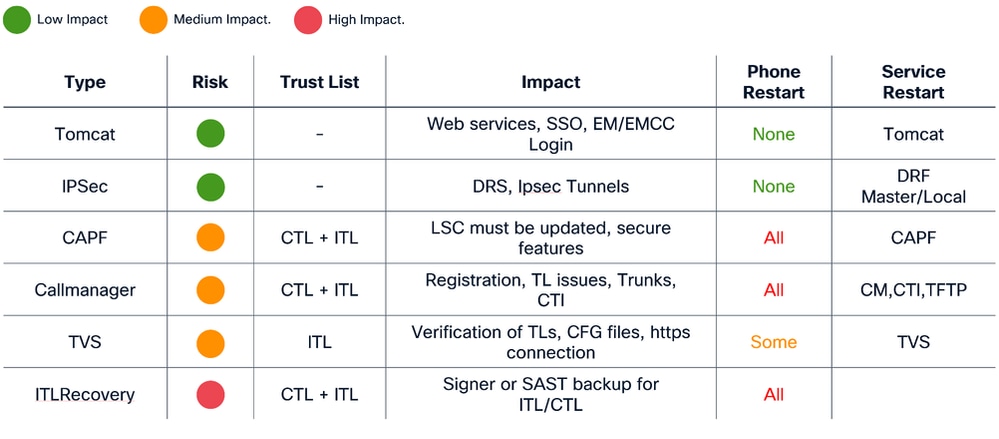
This table displays the business impact of each certificate renewal in your operation. Review the information carefully. Renew required certificates after hours or in quiet periods, based on the risk level of each certificate.
Scenario 1: Phones Not Register after Call Manager, TVS and ITL Certificate Renewal

Note: This scenario apply to deployments under CUCM mixed-mode and non-secure clusters, in addition, applies to the self-signed certificates and CA certificates.
When Call Manager , TVS and ITL certificates expired and they were renewed at the same time, It causes to have all our phones in an unregistered state thta causes a major Impact on the system, this is an expected behaviours as we trigger the phones to not trust in the CUCM.
Verification
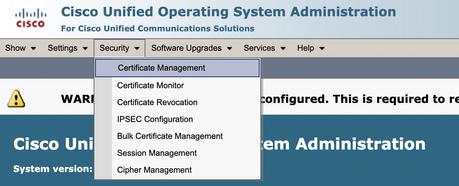
1. Ensure the certificates are already expired under Cisco Unified OS Administration >Security > Certificate Management
2. Search by Callmanager, TVS or ITL under the filter at the top of the page and use the contains or begins with options:
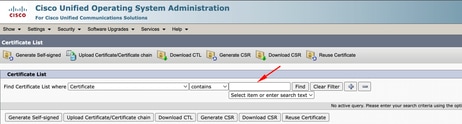
3. The certificates must see up to date and vefiry under the Expiration column (same for TVS and ITL certificates)

4. Once verified everything is good after the certificate renewal, the phones are shown as Unregistered state.

Solution
There is 2 options to fix the issue:
- Perform a factory reset of the phone that allows the phone erase the currently security settings and allow the phone to grab the new certificates
- Update the ITL and CTL certificates from CLI on the publisher node an use the command utils itl reset localkey.
This step affects all phones including registered phones, make sure to perform this after hours.

Scenario 2: Single sign-on does not work after Tomcat certificate renewal
Note: This scenario can apply to deployments that uses cluster-wide or per-node agreement for single sign-on configuration
Login within CUCM with Single Sign-on (SSO) it displays an error message ¨Error while processing saml response¨ or ¨Error while processing saml response Failed to decrypt the secret key¨
Verification
- Ensure all nodes contains a valid tomcat certificate if self-signed or contains the new multi-san tomcat certificate associated.
- Use set samltrace level debug in all CUCM nodes via CLI in order to activate SSO logs on debug level
- Recreate the issue by login again to CUCM and use SSO method.
- Collect Tomcat SSO logs after the incident, and verify you get this message:
-
2026-01-10 06:06:31,274 ERROR [http-nio-81-exec-157]  cpi.sso.saml.sp.security.authentication.SAMLAuthenticator - Error while processing saml response Failed to decrypt the secret key.
com.sun.identity.saml2.common.SAML2Exception: Failed to decrypt the secret key.
              at com.sun.identity.saml2.xmlenc.FMEncProvider.getEncryptionKey(FMEncProvider.java:724) ~[?:?]
              at com.sun.identity.saml2.xmlenc.FMEncProvider.decrypt(FMEncProvider.java:607) ~[?:?]
              at com.sun.identity.saml2.assertion.impl.EncryptedAssertionImpl.decrypt(EncryptedAssertionImpl.java:112) ~[?:?]
...
-
Solution
Export of CUCM metadata after Tomcat certificate renewal and import to the Idendity Provider Server to ensure they have the new tomcat certificate for this communication.
Procedure to renew tomcat with SSO deployment enabled:

Caution: Techinical Assistance Center (TAC) recommends the next steps in order to prevent any issue after the renew of Tomcat certificate, recommend to perform this procedure after hours.

1. Disable SSO in all CUCM nodes

- Access to CM administration > System > SAML Single Sign-on
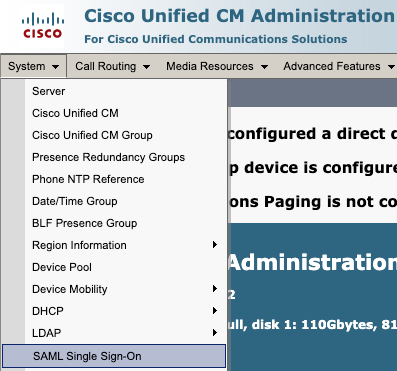
- Select Disable SAML SSO
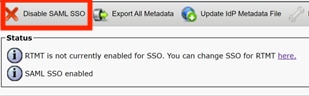
- This process needs to be performed in all the rest of the nodes via GUI if per-node agreement is used.
2. Renew Tomcat certificate in CUCM cluster

Overall procedure to renew Tomcat multi-san certificate in CUCM cluster:
- Navigate to OS administration > Security > Certificate management.
- Select Generate CSR

- Select Tomcat in Certificate Porpuse.
- Select Multi-SAN in Distribution.
- Ensure all nodes in the cluster are listed under Auto-populated Domains.
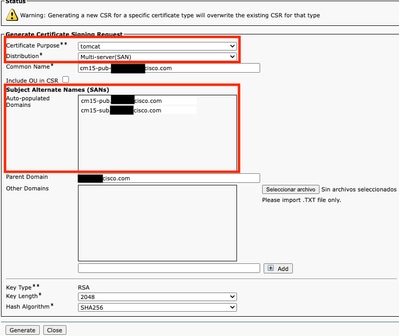
- Select Generate. Ensure CSR is created in all the nodes in the cluster.
- Download the generated CSR from CUCM publisher and sign it with a Certificate Authority (CA) server.
- Go to OS administration > Security > Certificate management. Select Upload certificate/Certificate chain.
- Upload CA certificates as Tomcat-trust.
- Repeat step 6 and now upload the Tomcat signed certificate as Tomcat.
- Once completed and verified all nodes have the new tomcat certificate applied, restart Tomcat service through CLI in all the nodes in the cluster with this command utils service restart Cisco Tomcat.
For more information refer to the this documentation:
3. Export Service Provider (SP) metadata

- Go to CM administration > System > Single Sign-On
- Configure SSO options (In this case cluster wide on SSO mode and Use tomcat certificate on certificate is configured as an example) then select export all metadata
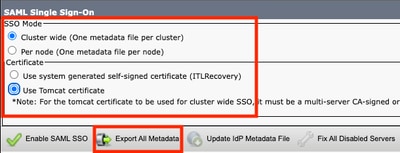
-
Import SP metadata to the Identity Provider (IdP) server. For more information, refer to Configure SAML SSO on Identity Provider
4. Enable SSO in CUCM cluster

- Go to CM administration > System > Single Sign-On
- With same SSO options selected while the export of CUCM metadata, select Enable SAML SSO and select continue.
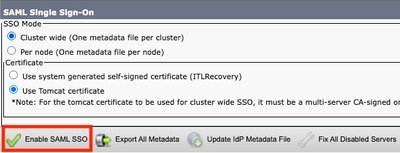
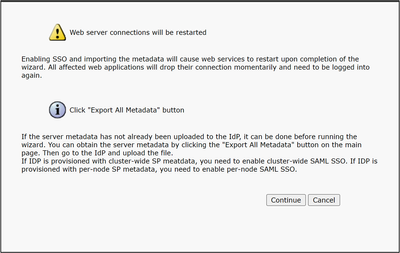
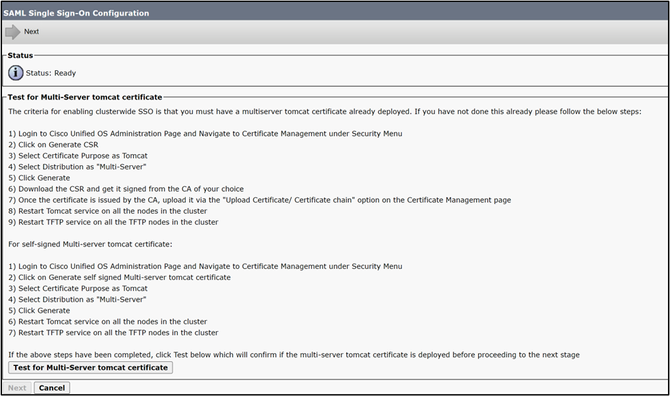
- If cluster-wide, this step is available to check multi-san certificate in all the nodes, select Test for multi-server tomcat certificate. once completed, select Next.
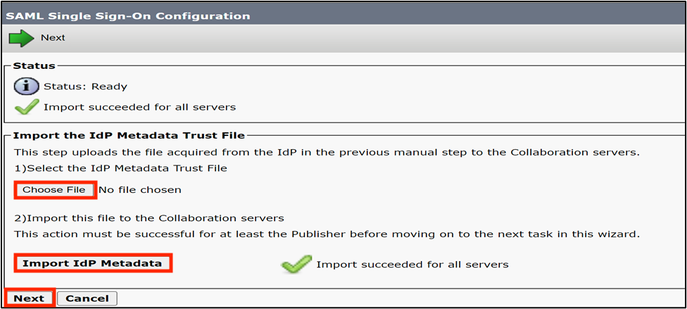
- Upload IdP metadata, select Import IdP Metadata and once complete, select Next
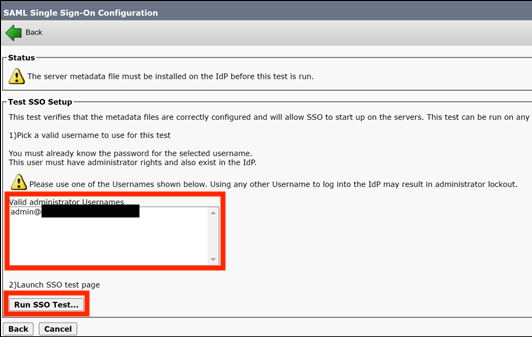
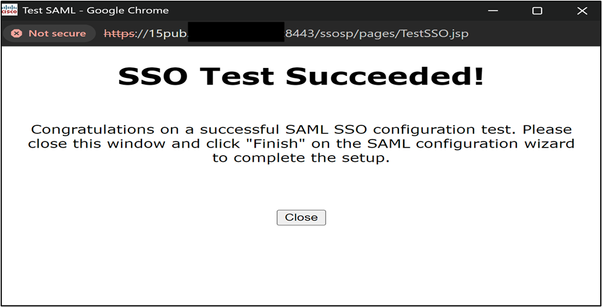
- On Test SSO Setup select an user with Standard CCM Super Users group assigned, and select Run SSO Test until get success.
4. Restart required services after SSO enabled.

- Enablement of SSO restart the tomcat service.
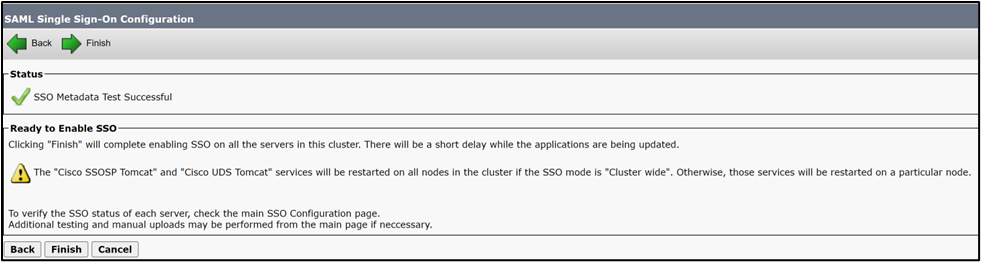
However, TAC recommend to restart Tomcat (utils service restart Cisco Tomcat) and UDS Tomcat (utils service restart CiscoUDSTomcat) service manually in all the nodes after SSO enablement process.
Scenario 3: Mobility and Remote Access registration issues after certificate renewal
Webex app unable to register with CUCM via Mobility and Remote Access (MRA) after Call manager, Tomcat and Expressway C certificates renew on mixed-mode deployments.
Verification
- CUCM Call manager and Tomcat certificate are CA signed certificates.
- CUCM and Expressway deployment runs on mixed-mode (TLS).
- inspect Expressway-C logs shows "SSL routines:ssl3_read_bytes:tlsv1 alert unknown ca".
2026-01-29T14:01:16.974-05:00 exp-c traffic_server[2030]: UTCTime="2026-01-29 19:01:16,974" Module="network.http.trafficserver" Level="DEBUG": Detail="Sending Request" Txn-id="3028" TrackingID="fxxxxxxx-86f6-4030-8259-0b768c07723e" Dst-ip="xxx.xxx.xxx.xxx" Dst-port="6972"
HTTPMSG:
|GET /CSFmarcoalh.cnf.xml HTTP/1.1
 Host: expc.cisco.com:6972
 Accept: */*
 Cookie:<CONCEALED>
 User-Agent: WebEx/0.0.0.0
 TrackingID: fxxxxxxx-86f6-4030-8259-0b768c07723e
 Client-ip: xxx.xxx.xxx.xxx
 X-Forwarded-For: xxx.xxx.xxx.xxx, 127.0.0.1
 Via: https/1.1 vcs[0fxxxxxx-c853-xxxx-aa16-0a290bf56fc8] (ATS), http/1.1 vcs[5xxxxxxx-7feb-4xxx-91e0-757d251d9116] (ATS)

 |

2026-01-29T14:01:16.974-05:00 exp-c traffic_server[2030]:[ET_NET 1]ERROR:SSL connection failed for 'expc.cisco.com':error:14094418:SSL routines:ssl3_read_bytes:tlsv1 alert unknown ca
Solution
Export and import certificates between CUCM and Expressway-C to ensure trust relation.
Caution: TAC recommend to perform this after hours as this procedure requires services restart. Business Impact is

- Procedure to complete trust relation between CUCM and Expressway with CA signed certificates

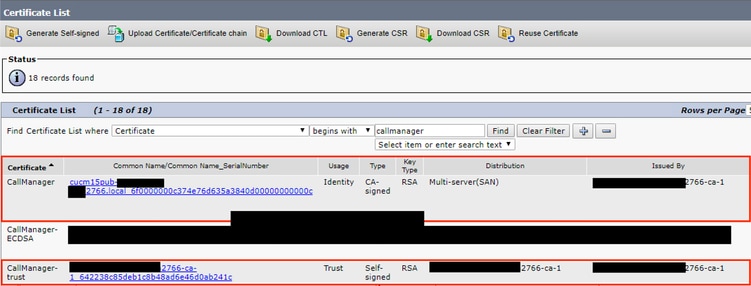
Navigate to OS administration > Security > Certificate management and download the root CA certificate and intermediate (if any) that signs Call Manager and Tomcat certificate.
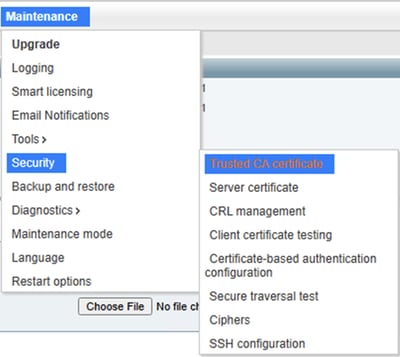
Then navigate to Expressway-C > Maintenance > Security > Trusted CA certificate and upload the CA certificate of Call Manager and Tomcat certificate.


Note: In scenarios with Call Manager and Tomcat certificate as self-signed, download the actual Call Manager and Tomcat certificate and upload it to Expressway.

Navigate to Expressway-C > Maintenance > Security > Trusted CA certificate > Show all (PEM file)
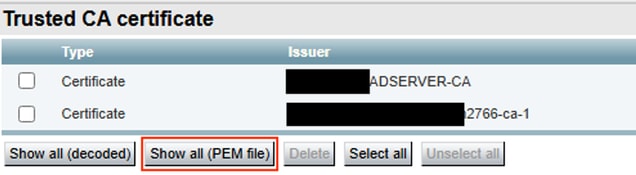
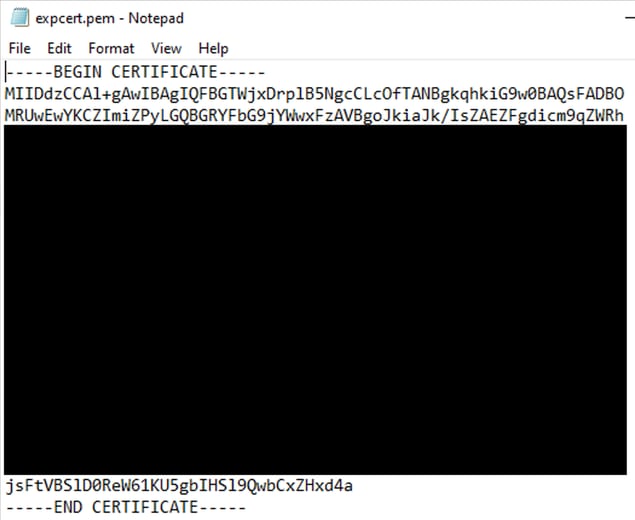
Copy the PEM value of the CA certificate that signs Expressway-C and save it in a txt file.
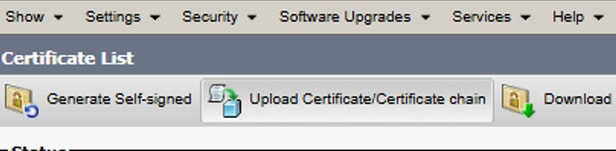
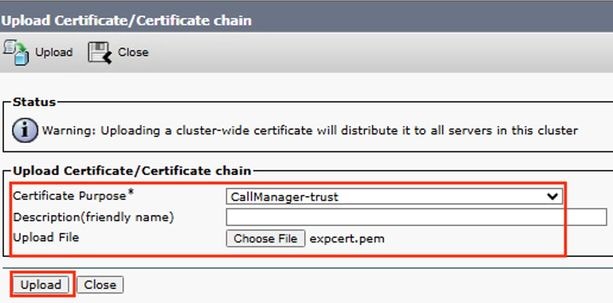
Navigate to OS administration > Security > Certificate management and select Upload Certificate/Certificate Chain and upload the expressway-C CA cert as Tomcat-trust and Call Manager-trust

Restart required services in CUCM cluster:
- Navigate to Cisco Unified Serviceability > Tools > Control Center - Feature Services and restart Cisco CallManager service in all the nodes that runs it.
- Navigate to Cisco Unified Serviceability > Tools > Control Center - Feature Services and restart Cisco TFTP service in all the nodes that runs it.
- Restart Tomcat service in all the nodes in the cluster via CLI with the command utils service restart Cisco Tomcat.
- Restart Cisco HAproxy service in all the nodes in the cluster via CLI with the command utils service restart Cisco HAProxy.
Scenario 4: Renew of Certificate Authority Proxy Function certificate cause
Scenario 4.1: 802.1x authentication failed
Phone do not authenticate with ASA after regenerate Certificate Authority Proxy Function(CAPF) certificate on CUCM publisher.
Verification
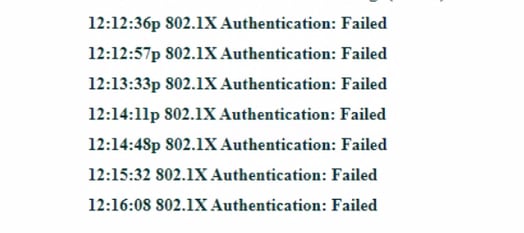
- Phone status messages shows "802.1x Authentication: Failed"
- Inspect phone logs of affected server and find "SSL_ERROR_WANT_READ"
4592 NOT Feb 17 11:01:25.041733 (349-349) PAE: -Secure Connection Handshake in progress - status SSL_ERROR_WANT_READ.
4593 NOT Feb 17 11:01:25.041826 (349-349) PAE: -EV_REQUEST_REC, ST_AUTHENTICATING->ST_AUTHENTICATING
++ EAP-Failure
4594 NOT Feb 17 11:01:25.041898 (349-349) PAE: -send EAP-Resp/TLS - id 9
4595 NOT Feb 17 11:01:25.042032 (349-349) PAE: -authWhile timer set: 30 sec
4596 NOT Feb 17 11:01:27.061822 (349-349) PAE: -[0001-0] 08-cc-a7-1c-bb-ae vid=0xfff=4095 static=0 pri=0
4597 NOT Feb 17 11:01:27.061950 (349-349) PAE: -port=0
4598 NOT Feb 17 11:01:27.062009 (349-349) PAE: -cprCdpGetPort address:  8:CC:A7:1C:BB:AE  Phyport=0 appPort=0
4599 NOT Feb 17 11:01:27.062068 (349-349) PAE: - >>>>>>>>>>>>> port obtained = 0 for mac macAddress 08:cc:a7:1c:bb:ae
4600 NOT Feb 17 11:01:27.062134 (349-349) PAE: -rcvd EAP-Failure
4601 NOT Feb 17 11:01:27.062189 (349-349) PAE: -EV_FAILURE, ST_AUTHENTICATING->ST_HELD
4602 WRN Feb 17 11:01:27.062462 (349-349) PAE: -802.1X auth FAILED
4603 NOT Feb 17 11:01:27.062550 (349-349) PAE: -paeInfoToInetd: PAE info sent to NETSD
4604 NOT Feb 17 11:01:27.062717 (1786-1880) JAVA-Calling handleNetSDEvent
4605 WRN Feb 17 11:01:27.062953 (1786-1880) JAVA-Thread-11|cip.sec.Security:? - Security: Received a propertyChanged() for device.settings.security.notify
4606 DEB Feb 17 11:01:27.063039 (1786-1880) JAVA-openQue(): que->/tmp/pae_msg_que, key->0x101019ab
4607 DEB Feb 17 11:01:27.063069 (1786-1880) JAVA-openQue(): que->/tmp/pae_rsp_que, key->0x10101c4c
4608 DEB Feb 17 11:01:27.063091 (1786-1880) JAVA-getpaeinfo: send pae info message paeCmd.mtype=1880, paeCmd.cmd=82, paeCmd.qname=/tmp/pae_rsp_que
4609 DEB Feb 17 11:01:27.063121 (1786-1880) JAVA-getpaeinfo: recv pae info resp ret=-1, errno=No message of desired type
4610 NOT Feb 17 11:01:27.063306 (349-349) PAE: -paeInfoToInetd: Netsd event NETSD_EV_PAE sent to NETSD
4611 NOT Feb 17 11:01:27.063370 (349-349) PAE: - PAE RE-AUTH, not sending SEC_DOWN Netsd event for CDP
4612 NOT Feb 17 11:01:27.063423 (349-349) PAE: -paeSetLastSupStatus: LastSupStatus 0
4613 NOT Feb 17 11:01:27.063475 (349-349) PAE: -heldWhile timer set: 60 sec
4614 NOT Feb 17 11:01:27.064074 (349-349) PAE: -paeNetsdRcvMsg(349): PAE event: status: FAIL : Resource temporarily unavailable
Solution
Download the CAPF certificate from CUCM publisher and upload to the authentication server, bypass 802.1x to allow registration and install LSC certificate on affected phones.
Scenario 4.2: Phones not register with CUCM that uses security profile on TLS mode.
Phones show "Phone is registering" after regenerate CAPF certificate on CUCM publisher.
Verification
- Affected Phones contains security profile with TLS mode enabled.
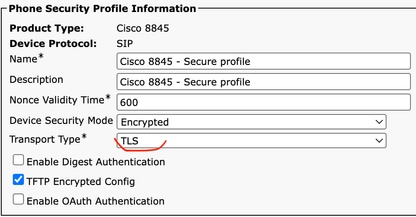
- Affected phones have LSC certificated installed.
- Ensure CAPF certificate is up to date.

- Login to CUCM publisher and use the command show ctl that shows old CAPF certificate serial number.
- Then change the phone security profile to non secure.
Solution
Regenerate CTL file on CUCM and restart required services to ensure phones gets the new CTL file with CAPF file.
Caution: TAC recommend to perform this after hours as this procedure requires services restart. Business Impact is

Procedure to ensure renew of CAPF sucessfully.


Update CTL file after CAPF regeneration. Log into the CLI of the Publisher and enter the command utils ctl update CTLFile.

- Navigate to Cisco Unified Serviceability > Tools > Control Center - Feature Services in CUCM publisher and restart CAPF service.
- Navigate to Cisco Unified Serviceability > Tools > Control Center - Network Services and restart Cisco Trust Verification Service in all the nodes that runs it.
- Navigate to Cisco Unified Serviceability > Tools > Control Center - Feature Services and restart Cisco TFTP Service in all the nodes that runs it

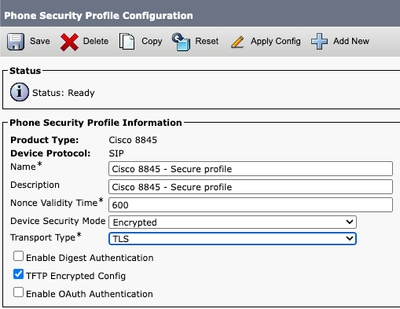
- Navigate to CM administration > System > Security > Phone Security Profile.
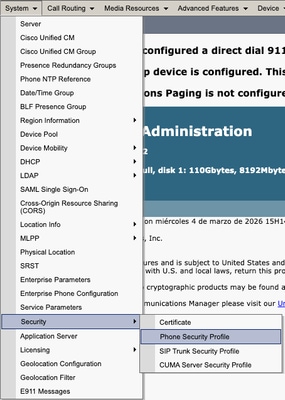
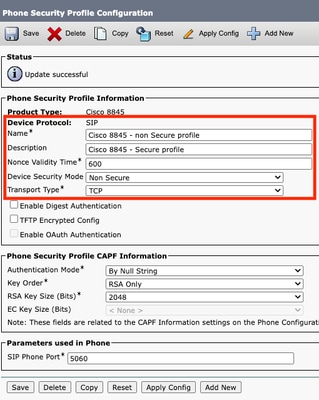
- Copy the current phone security profile assigned to the required phones.

- Change Name and Device Security Mode to Non Secure and select Save and Apply Config to apply this change to all the required phones.
-
Apply the created Device Security Profile to required phones configuration, select Save and Apply Config.
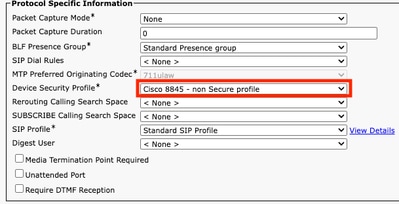

Use CAPF information section in device configuration of affected phones to install LSC certificate in the required phones.
- In CAPF information, select Install/Upgrade in Certificate Operation.
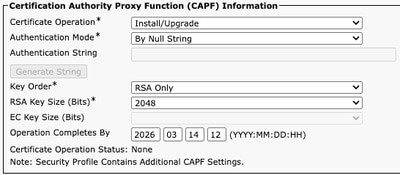
- Select Save and Apply Config.
- Wait until Certificate Operation Status shows Operation completed.

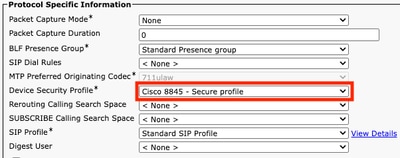
In Protocol Specific Information section on Phone Configuration, select the Security profile with TLS enabled that was created.
Related Information
- https://www.cisco.com/c/en/us/support/docs/unified-communications/unified-communications-manager-callmanager/214231-certificate-regeneration-process-for-cis.html
- https://www.cisco.com/c/en/us/support/docs/unified-communications/unified-communications-manager-callmanager/217138-regeneration-of-cucm-ca-signed-certifica.html
- https://www.cisco.com/c/en/us/support/docs/content-networking/certificates/213295-how-to-install-an-lsc-on-a-cisco-ip-phon.html
- https://www.cisco.com/c/en/us/td/docs/voice_ip_comm/expressway/config_guide/X15-2/mra/exwy_b_mra-deployment-guide-x152.html
Revision History
| Revision | Publish Date | Comments |
|---|---|---|
1.0 |
16-Apr-2026
|
Initial Release |

 Feedback
Contact Cisco
- Open a Support Case

- (Requires a Cisco Service Contract)