Cisco Catalyst Center 3.1.6 Data Sheet
Available Languages
Bias-Free Language
The documentation set for this product strives to use bias-free language. For the purposes of this documentation set, bias-free is defined as language that does not imply discrimination based on age, disability, gender, racial identity, ethnic identity, sexual orientation, socioeconomic status, and intersectionality. Exceptions may be present in the documentation due to language that is hardcoded in the user interfaces of the product software, language used based on RFP documentation, or language that is used by a referenced third-party product. Learn more about how Cisco is using Inclusive Language.
Cisco® Catalyst® Center is an on-premises, self-hosted management dashboard for enterprise campus and branch networks. It simplifies how organizations design, deploy, secure, and operate Cisco switching and wireless environments.
Purpose-built for organizations that require local control, data residency, and enterprise-grade governance, Catalyst Center provides end-to-end lifecycle management for Cisco campus infrastructure, including Software-Defined Access (SDA).
With centralized operations and scalable automation to reduce Mean Time to Repair (MTTR), Catalyst Center helps enterprises maximize the value of their Cisco network investments.
Catalyst Center enables organizations to:
● Accelerate operations with agentic capabilities: Leverage Cisco AI Assistant to autonomously guide troubleshooting, recommend actions, and accelerate issue resolution across complex global deployments
● Strengthen security and governance: Enforce segmentation, role-based access, and compliance policies across distributed campus and branch environments
● Automate campus network lifecycle management: Streamline design, deployment, and configuration of network infrastructure through policy-driven workflows that reduce manual configuration
● Extend network capabilities through open integrations: Use APIs and ecosystem integrations to automate workflows and connect existing network operations with broader IT systems
Catalyst Center combines AI-driven insights with automation to help you monitor network health, diagnose problems, identify remediation steps, and validate performance across campus and branch environments.
Cisco AI Assistant
Ask questions, analyze issues, and take action across your network with Cisco AI Assistant in Catalyst Center; also accelerate troubleshooting, surface insights, and reduce time to resolution through AI-powered responses.
Use AI Assistant to interact with your network using natural language across key use cases:
● Monitoring: check network, device, and client performance. For example, ask AI Assistant as follows: “Show me all the switches that rebooted today in this network.”
● Troubleshooting: analyze issues and identify root causes with data-driven guidance. For example, ask AI Assistant as follows: “Troubleshoot the authentication issue impacting wired client.”
● Documentation: streamline documentation information. For example, ask AI Assistant as follows: “How do I push configuration using CLI templates?”
AI-enhanced Radio-Resource Management (RRM)
AI-enforced radio-resource management uses AI to boost wireless network performance and user experience by proactively learning the network's trends and patterns to enhance how wireless endpoints operate over time.
Cisco AI Network Analytics
Using AI and machine learning, Cisco AI Network Analytics helps you improve performance and issue resolution accurately and effectively by identifying issues, trends, anomalies, and root causes.
● AI-driven personalized baselining: The AI-driven baseline for your network’s unique performance parameters continuously adapts as your network evolves. This personalized baseline enables the AI analytics engine (on-premises and in the Cisco cloud), to accurately distinguish normal behavior from anomalies.
● AI-driven anomaly detection: detect performance issues and ignore harmless network anomalies to reduce noise. AI-driven predictive analytics and proactive insights allow you to anticipate and prevent failures, including predicting increases in Wi-Fi interference, onboarding delays, office traffic load, etc.
● AI-driven accelerated remediation: identify the most critical variables related to the root cause of a given problem. Perform complex root cause analysis using a machine-reasoning engine and quickly execute corrective actions for greater productivity.
● AI Network Analytics: proactively identify underlying issues that can have a sitewide impact on user experience. AI Network Analytics gives you a single view of customizable KPIs to understand the health of devices, users, and applications.
Catalyst Center Assurance capabilities
Catalyst Center Assurance lets you gain end-to-end visibility and insights to monitor network health, troubleshoot issues, and optimize performance across your environment.
Monitoring
1. Network health
| Feature |
Description |
| Network and client health dashboards |
Gain visibility into network device and client health for wired and wireless environments with Assurance dashboards, highlighting the top 10 global issues and enabling a drill-down by site, device list, client list, or topology. Identify performance issues faster with suggested remediation and customizable health scores. |
| Wireless network services analytics |
View the overall health of critical services in one place across Cisco and third-party servers, including authentication, Authorization, and Accounting (AAA) and Dynamic Host Configuration Protocol (DHCP) services for wireless devices. See impacted servers, sites, and users to reduce troubleshooting time and ticket volume. |
| Reporting |
Derive network insights from a set of pre-built and customizable reports with flexible scheduling and configuration options. Example use cases include:
●
Capacity planning: understand how devices in your network are being utilized.
●
Change of pattern: track how usage pattern trends change in the network. Usage pattern trends may include clients, devices, bands, or applications.
●
Operational reporting: review reports about network operations, such as upgrade completions or provisioning failures.
●
Network health: determine the overall health of your network through reports.
|
2. Client health
| Feature |
Description |
| Client 360 |
Gain visibility into client connectivity and more, to quickly identify issues affecting user access, understand impact, and troubleshoot issues with suggested remediation and resolved issue lists. |
| Connectivity analytics |
Gain detailed analytics and insights for Apple iOS, Samsung, and Intel® devices from the device’s point of view, without installing an agent on the device. |
3. Device health
| Feature |
Description |
| Device 360 |
Gain visibility into device health, including memory or CPU utilization, connectivity, and more. Quickly identify problems and troubleshoot issues with suggested remediation and resolved issue lists. |
| Intelligent capture |
Gain direct access to packet capture data, access point and client statistics, and spectrum data from access points. This enables deeper wireless diagnostics beyond controller-level visibility. |
| Multivendor device visibility |
Gain visibility into third-party devices, including reachability and topology. |
4. Application health
| Feature |
Description |
| Application health dashboard |
Provides a comprehensive view of the health of all network applications, including quality metrics for Webex® and Microsoft Teams. Highlights business-relevant applications with identified issues and suggested remediation. Tracks performance of predefined “critical business applications” to enable rapid troubleshooting of core business issues. |
| Application QoS (quality of service) support for industrial switches |
Push QoS policies to Cisco Catalyst IE3300 and IE3400 Rugged Series Switches from Catalyst Center’s Application QoS. Applies default QoS trust settings as well as queuing settings based on Cisco Validated Designs, or writes a custom QoS policy for these devices. This removes the complexity of pushing a QoS policy and ensures a good experience for end users in industrial environments. |
Troubleshooting
| Feature |
Description |
| Machine-Reasoning Engine (MRE) |
Analyze complex multi-step tasks, such as finding and fixing potentially crippling routing loops that require a careful analysis spanning multiple devices. Save time by automating complex, tedious workflows. |
| Wireless 3D analyzer |
Enable granular analysis of millions of spatial Radio-Frequency (RF) data points and visualize wireless coverage to quickly pinpoint and resolve WLAN performance issues. Identify the areas most affected by RF strengths and view client locations. Plus, simulate different RF environments in a virtual office space where you can move an access point, and conduct spatial planning, such as creating an imaginary wall to see the impact on Wi-Fi signal propagation. |
| Global assurance event viewer |
Gain a consolidated view of events across devices, plus search and filter by important events. Using AI Network Analytics, you can identify, correlate, and troubleshoot network issues and quickly get to the root cause. |
Sustainability
| Feature |
Description |
| Energy management and Power Over Ethernet (PoE) analytics |
Optimize energy usage and PoE capacity with energy reporting and monitoring power consumption on any switch for quick installation of IoT endpoint devices. Identify high-consumption devices, prevent overload, and access detailed energy usage reports to reduce costs and support sustainability. |
Roles and privileges
Catalyst Center supports site-based Role-Based Access Control (RBAC) for secure and scalable access management.
Site-based RBAC allows you to create granular permissions through access groups, which combine specific roles with specific network sites. Teams can use pre-defined or custom roles to align access with operational responsibilities, ensuring users only manage the parts of the network relevant to them.
Note: Multiple access groups can be assigned to a user. Learn how to configure site-based RBAC.
Table 1. Pre-defined access groups
| Role |
Privilege |
| NW-Admin_Global |
Access group for global access to the role NW-ADMIN |
| OBSERVER_Global |
Access group for global access to the role OBSERVER |
| SUPER-ADMIN_Global |
Access group for global access to the role SUPER-ADMIN |
Security capabilities
| Rogue management and aWIPS |
Supports the detection of rogue and Cisco Adaptive Wireless Intrusion Prevention System (aWIPS) threats on your network. The Rogue and aWIPS dashboard provides detailed threat analysis and a global view of all rogue access points detected in the network, with insight into the highest priority threats so that they can be quickly identified. The Threat 360 view on this dashboard provides details on any specific threat, including a map view for quick location, and all affected clients. |
| SNMPv3 authentication support for SHA256 |
Catalyst Center supports SHA256 as an SNMPv3 authentication type, providing a stronger authentication mechanism compared to older algorithms. |
| Rogue AP floor map: location and threat level |
View the precise location and threat level of all rogue Access Points (APs) on a floor map for the past hour. Enables quick identification and assessment of rogue AP threats by location and severity, improving network security monitoring. |
| Traffic steering policies |
Supports configuration of traffic steering policies to redirect required traffic to firewalls, enhancing security service insertion and traffic control. |
| Security service insertion for Cisco SD-Access |
Enhances security for Cisco SD-Access fabric networks by steering traffic through firewalls based on predefined policies. Supports both wired and wireless deployments and is compatible with Cisco and third-party firewalls. Provides a zero-trust security solution by automating traffic redirection to firewalls, improving network security posture. |
Certifications
Catalyst Center has achieved several security certifications that provide compliance. For more information, including on downloading security certificates, visit the Cisco Trust Portal.
| Certification |
Description |
| ISO/IEC 27001:2022 |
ISO 27001 is an international standard designed to help organizations keep information assets secure. It specifies the requirements for establishing, implementing, maintaining, and continually improving an Information Security Management System (ISMS). |
| P&C SOC 2 Type 2 |
SOC 2, or Service Organization Control 2, is a framework designed to provide a platform for specific North American security requirements for sectors like healthcare, finance, and e-commerce where data-security is of the utmost importance. SOC 2 demonstrates trustworthiness to North American customers and many industry verticals, and can be an important validation to additional and broader security conformance. |
| FIPS 140-2 and FIPS 140-3 |
FIPS-140-2 and FIPS 140-3-compliant cryptography modules ensure that only strong NIST-approved ciphers are used, and enables deployment in security-conscious verticals such as public sector, finance, and healthcare. During installation, you can choose to enable FIPS, which will ensure only NIST-approved ciphers are used for data encryption. |
Cisco SD-Access features
Table 2. Cisco SD-Access features and benefits
| Feature |
Description |
| Enhanced visibility into endpoints and traffic patterns |
The endpoint analytics application in Catalyst Center identifies and classifies endpoint devices on a campus network with the use of AI/ML. Through the use of various profiling methods, including Deep Packet Inspection (DPI), it establishes visibility into what is on the network so that new endpoints can be authenticated and assigned an appropriate policy for network usage, security, and segmentation. Group-based policy analytics simplify the delivery of segmentation policies. It uses analytical models to visualize the activity between endpoint profiles, scalable groups, and host groups in order to verify that the network policies are optimizing performance and security. The feature provides a way for users and endpoints to be identified and categorized, and for granular access privileges to be provided to the resources that each endpoint requires, while segmenting them from everything else. |
| Granular multilevel segmentation |
Cisco SD-Access, through Catalyst Center, creates virtual overlays over the underlying physical infrastructure and segments the network without regard to its topology. SD-Access also segments at a micro level by enforcing group-based policies through the network infrastructure. The resulting granular segmentation controls traffic flows without using complex firewalls and Access Control Lists (ACLs), which can be difficult and costly to maintain. Benefits of fabric infrastructure optimizations:
● Automates VRF configurations (lines of business, departments, etc.) and creates overlay virtual networks.
● Onboards users with 802.1X, MAB, active directory, and static authentication. With an option to move users in a critical VLAN when Cisco Identity Services Engine (ISE) is unavailable.
● Includes a resilient control-plane architecture using LISP pub/sub that allows for dynamic path optimization toward available internet services. It simplifies fabric site design, routing convergence, and troubleshooting tasks.
● Simplifies network operations with a standard, error-free underlay network using LAN automation.
● Uses Encrypted Traffic Analytics (ETA) to further enhance analysis of traffic through AVC and NetFlow.
Ease of migration to Cisco SD-Access fabric:
● Layer-2 handoff at borders is a key capability, allowing hosts in a Cisco SD-Access fabric to communicate with the traditional network at Layer 2.
● Fabric provides support for end hosts that require Layer-2 flooding; for example, building management systems, audio-visual equipment, etc.
● Cisco SD-Access introduces the support of existing access VLANs, allowing users to retain their existing access VLAN IDs when creating macro segments in the fabric. Customers can retain existing access VLAN IDs when connecting directly to the SD-Access fabric edge to simplify and speed up their SD-Access segmentation journey.
● Macrosegmentation without Cisco ISE capability is suited for deployments that have fabric at the distribution layer connecting downstream to an external Layer-2 switching domain. Customers can deploy an automated network fabric and use macrosegmentation with virtual networks without ISE.
Deployment flexibility with Cisco SD-Access fabric:
● Cisco SD-Access offers a distributed campus design with automated intersite connectivity with end-to-end policy and segmentation.
● Cisco Fabric in a Box allows the border node, control plane node, and edge node to run on the same fabric node, simplifying fabric deployment for a small site or a branch.
● Cisco SD-Access extended nodes extend the enterprise network by providing connectivity to non-carpeted spaces of an enterprise. This allows network connectivity and management of IoT devices and the deployment of traditional enterprise end devices in outdoor and non-carpeted environments, such as distribution centers, warehouses, or campus parking lots.
● Cisco SD-Access fabric offers two options for integrating wireless access:
◦ Cisco SD-Access Wireless, using a VXLAN distributed data plane and a centralized control plane, provides a consistent fabric experience and policy simplification for wired and wireless access. ◦ Over the top involves running a traditional Cisco Unified Wireless Network architecture with control and provisioning of wireless access points (CAPWAPs) on top of a fabric wired network. This is a possible migration step to full Cisco SD-Access wireless implementation.
● Multisite remote border feature allows users to segregate untrusted traffic from various fabric sites into a firewall at the DMZ.
● Fabric zone features allow administrators to control the provisioning of IP subnets on select fabric edge nodes for better site scalability and security.
● Cisco SD-Access supports IPv4 as well as IPv6 endpoints.
● Cisco SD-Access offers support for the Cisco Wide Area Bonjour application, allowing users to discover and use shared services with minimal intervention and configuration.
● Secure network device onboarding of Cisco Catalyst 9000 Series Switches using 802.1X-based authentication and authorization.
Simplified fabric operations: Cisco SD-Access Assurance allows users to detect, diagnose, and troubleshoot fabric issues in real time with minimized downtime and a better experience. The newly introduced SD-Access Assurance landing page contains the overall fabric health for each fabric site deployed. KPIs configured on the fabric nodes provide insights for faster issue identification and suggested actions to remediate issues. KPIs are organized into categories to quickly triage control plane, infrastructure, and connectivity issues. Other features include the following:
● Fabric control plane provides reachability checks between the fabric edge/border and the fabric control plane node.
● Fabric infrastructure validates the AAA server status from the fabric edge and policy extended nodes to the Cisco ISE.
● Fabric connectivity provides reachability checks from the edge to the fabric border, and control-plane and port-channel connectivity checks between the fabric edge and the extended nodes.
● Support for ThousandEyes
® Agent on Catalyst 9000 Series Switches operating in an SD-Access fabric role. This provides the capability to run tests that provide performance metrics and end-to-end visibility.
The Cisco Catalyst SD-WAN UX 2.0 provides administrators with an enhanced experience in the user interface that integrates simplicity, flexibility, and a rich, intuitive context. |
| Continuous verification of trust |
Cisco Trust Analytics is an aggregation of various inputs and sources into a single, comprehensive, flexible trust score. Trust Analytics detects traffic from endpoints that are exhibiting unusual behavior. When anomalies in the network are detected, Trust Analytics lowers the trust score for the endpoint to limit or completely deny access to the network through integration with ISE. This feature expedites the detection and containment of untrustworthy endpoints that could lead to a security breach. |
| Assurance issue detection |
Fabric node reachability
● Control plane reachability
● Edge reachability
● Border reachability
● Routing protocol
● MAP server
Data plane
● Border and edge connectivity
● Border node health
● Access node health
● Network services DHCP, DNS, AAA
Policy plane
● ISE or pxGrid connectivity
● Border node policy
● Edge node policy
Client onboarding
● Client or device DHCP
● Client or device DNS
● Client authentication or authorization
Switch
● CPU, memory, temperature
● Modules
● PoE power
● TCAM table
|
Cisco SD-Access platform scale
The following tables outline the Cisco SD-Access platform scale. The limits in this section are not necessarily dependent on Catalyst Center, but rather depend on the model of the device and its capacity design.
Table 3. Cisco SD-Access control plane node scale
| Cisco SD-Access control plane node scale |
|||||||||||||||
| Family |
Cisco Catalyst |
Cisco ASR 1000, 4000 Series; Cisco ISR |
Cisco ASR 1000, 4000 Series; Cisco ISR |
Cisco CSR |
|||||||||||
| Device |
9300/L |
9300X |
9400 |
9400X |
9500 |
9500X |
9500H |
9600 |
9600X |
8 GB RAM |
16 GB RAM |
1000v |
|||
| Endpoints |
16,000 |
32,000 |
80,000 |
112,000 |
80,000 |
1,000,000 |
150,000 |
150,000 |
1,000,000 |
100,000 |
200,000 |
200,000 |
|||
The control-plane scale does not depend on Ternary Content-Addressable Memory (TCAM); it only consumes memory.
Table 4. Cisco SD-Access border node scale
| Family |
Cisco Catalyst |
||||||||
| Device |
9300/L |
9300X |
9400 Sup-XL/Y SD-Access sdm template |
9400X |
9500 |
9500H |
9500X |
9600 |
9600X |
| Virtual networks1 |
256 |
256 |
256 |
1000 |
256 |
256 |
1000 |
256 |
1000 |
| IPv4 routes |
8000 |
32,000 |
64,000 |
96,000 |
64,000 |
48,000 |
512,000 |
48,000 |
512,000 |
| Fabric host entries2(host /32 or /128) |
16,000 |
32,000 |
70,000 |
96,000 |
70,000 |
150,000 |
512,000 |
150,000 |
512,000 |
| IPv4: SGT bindings |
10,000 |
32,000 |
40,000 |
109,000 |
40,000 |
200,000 |
200,000 |
200,000 |
200,000 |
| SGT/DGT policies |
8000 |
7400 |
8000 |
32,000 |
8000 |
16,000 |
32,000 |
32,000 |
32,000 |
| SG-ACEs (contract actions) |
5000 |
4800 |
18,000 |
16,000 |
18,000 |
13,000 |
4000 |
27,000 |
4000 |
Additional notes:
● Fabric host entries include access points and classic and policy-extended nodes.
● Additional border node scale considerations: /32 (IPv4) or /128 (IPv6) entries are used when the border node forwards traffic from outside the fabric to a host in the fabric.
For all switches except Cisco Catalyst 9500 Series High Performance Switches and Cisco Catalyst 9600 Series Switches:
● IPv4 uses one TCAM entry (fabric host entry) for every IPv4 IP address.
● IPv6 uses two TCAM entries (fabric host entries) for every IPv6 IP address.
For the Cisco Catalyst 9500 Series High Performance Switches and Cisco Catalyst 9600 Series Switches:
● IPv4 uses one TCAM entry (fabric host entry) for every IPv4 IP address.
● IPv6 uses one TCAM entry (fabric host entry) for every IPv6 IP address.
Table 5. Cisco SD-Access Layer-2 handoff border node scale considerations
| Family |
Cisco Catalyst |
||||||
| Device |
9300/L |
9300X |
9400 |
9400X |
9500 |
9500H |
9600 |
| Endpoints |
8,000 |
32,000 |
16,000 |
100,000 |
16,000 |
32,000 |
32,000 |
These numbers are the sum of the total numbers of endpoints both inside and outside the fabric site when the site has a border node with a Layer-2 handoff.
The border node with a Layer-2 handoff contains a combination of local and remote LISP entries.
Local entries = LISP database
Remote entries = LISP map-cache
Example:
The Cisco Catalyst 9300 Series Switches support 8000 total entries.
If the fabric site has 6000 endpoints (map-cache), then only 2000 endpoints (database) can be in the traditional network beyond the Layer-2 handoff.
Table 6. Cisco SD-Access edge node scale
| Cisco SD-Access edge node scale |
||||||||||||
| Family |
Cisco Catalyst |
Cisco Catalyst |
||||||||||
| Device |
9200CX |
9200-L |
9200 |
9200 Enhanced VNs |
9300/L |
9300X |
9400 |
9400X |
9500/H |
9350 |
IE9300 |
IE3500 |
| Virtual networks |
16 |
11 |
42 |
323 |
256 |
256 |
256 |
1000 |
256 |
256 |
32 |
32 |
| Endpoints |
4000 |
2000 |
4000 |
4000 |
6000 |
18,000 |
6000 |
70,000 |
6000 |
24000 |
4000 |
4000 |
| IPv4: SGT bindings |
10,000 |
8000 |
10,000 |
10,000 |
10,000 |
32,000 |
40,000 |
109,000 |
40,000 |
24000 |
10,000 |
10,000 |
| SGT/DGT policies |
2000 |
2000 |
2000 |
2000 |
8000 |
7400 |
8000 |
32,000 |
8000 |
7400 |
2000 |
2000 |
| SG-ACEs (contract actions) |
1200 |
1,000 |
1000 |
1000 |
5000 |
4800 |
18,000 |
16,000 |
18,000 |
4800 |
1000 |
1000 |
Additional notes:
INFRA_VN is not a VRF definition. It is associated with the global routing table.
DEFAULT_VN is not user-defined; it is automatically created in Catalyst Center. It is present for historical (backward-compatibility) reasons; its use is neither necessary nor recommended.
DEFAULT_VN, if used in host onboarding, is provisioned as a VRF definition and counts as a “user-defined VN.”
Table 7. Cisco SD-Access Wireless LAN Controller (WLC) scale
| Cisco SD-Access WLC scale |
||
| Device |
Number of access points |
Number of clients |
| Catalyst 9800-L |
250/500 (Perf. License) |
5000/10000 (Perf. License) |
| Catalyst 9800-40 |
2000 |
32,000 |
| Catalyst 9800-80 |
6000 |
64,000 |
| Catalyst CW9800H1 |
6000 |
64,000 |
| Catalyst CW9800H2 |
6000 |
64,000 |
| Catalyst CW9800M |
3000 |
32,000 |
| Catalyst 9800-CL (4 CPU/8 GB RAM) |
1000 |
10,000 |
| Catalyst 9800-CL (6 CPU/16 GB RAM) |
3000 |
32,000 |
| Catalyst 9800-CL (10 CPU/32 GB RAM) |
6000 |
64,000 |
Table 8. Cisco SD-Access edge node scale for access points and wireless endpoints
| Cisco SD-Access edge node scale for access points and wireless endpoints |
||||||
| Family |
Cisco Catalyst |
|||||
| Device |
9200-L |
92001 1 |
9300-L1 |
9300/X |
9400/X |
9500/H |
| Access points |
Not supported |
25 |
50 |
200 |
200 |
200 |
| Wireless endpoints |
Not supported |
500 |
1000 |
4000 |
4000 |
4000 |
Additional notes:
● A single switch and a switch stack have the same scale.
● The switches above have limits on access tunnels. An access tunnel is created between the fabric edge node and a fabric-mode AP that is either directly attached or attached through a directly-connect extended node.
Table 9. Cisco SD-Access embedded wireless controller scale
| Cisco SD-Access edge node scale for access points and wireless endpoints |
|
||||||
| Family |
Cisco Catalyst |
||||||
| Device |
9200-L |
92001 1 |
9300-L1 |
9300/X |
9400/X |
9500/H |
9350 |
| Access points |
Not supported |
25 |
50 |
200 |
200 |
200 |
200 |
| Wireless endpoints |
Not supported |
500 |
1000 |
4000 |
4000 |
4000 |
4000 |
The embedded wireless scale is the same irrespective of the role of the device (edge, Cisco Fabric in a Box, border, or control plane).
Catalyst Center lets you automate network operations across the full lifecycle, from network deployment and configuration management, to compliance, to lifecycle management. It also helps simplify onboarding, enforce consistency, and streamline operations at scale.
Deployment
Table 10. Deployment
| Feature |
Description |
| Campus automation |
Discovers brownfield wired and wireless devices and learn their existing configurations. Compares configurations and create group profiles to automate feature enablement and deployment across sites, while preserving custom CLI configurations and minimizing disruption. |
| Network discovery |
Automatically detects and maps network devices into a physical topology with detailed device-level information. It uses protocols such as Cisco Discovery Protocol, Link Layer Discovery Protocol (LLDP) for endpoints, IP device tracking (IPDT) and ARP for host discovery, LLDP media endpoint discovery (LLDP-MED) for IP phones and some servers, and SNMP versions 2 and 3 to gather device data such as IP addresses and neighboring devices. This enables accurate network mapping and inventory management. |
| Inventory |
Maintains a continuously updated inventory of network devices, including host IP addresses, MAC addresses, and network attachment points to serve as a single source of truth. Provides data to applications such as Software Image Management (SWIM) and Cisco EasyQoS to ensure correct device and image versions are used. |
| Cisco Network Plug and Play (PnP) |
Allows off-the-shelf Cisco® devices to be provisioned simply by connecting them to the network. Cisco Network PnP provides a secure, scalable, seamless, and unified zero-touch-deployment experience for customers across Cisco's entire enterprise network portfolio of wired and wireless devices. Deploy new devices in minutes without onsite support visits and eliminate repetitive tasks and staging, which can significantly lower Operating Expenses (OpEx). For more details, refer to the solution guide. |
| Branch deployment automation |
Simplify workflows for physical and virtual branch automation; day-0 router, and NFV design. Onboard WAN devices and services through these easy steps:
● Configure network settings, service provider, and IP pools
● Design a router or virtual profile
● Assign to sites and provision network devices
|
| Wireless automation |
Intent-based workflows for simplified wireless deployment and automation:
● Network profiles: A profile is a container of wireless properties that can represent single or multiple sites.
● Simplified SSID creation
● Advanced RF support for wireless networks
● A single workflow to enable Cisco FlexConnect
® or centralized wireless deployment
● PnP provisioning for APs
● IP Access Control List (ACL) support
● Access and access control policy for SD-Access Wireless only
For more details, refer to the Wireless Automation white paper. |
Campus automation
Table 11 lists the supported SD feature scale that can be provisioned at a time.
Table 11. Campus Automation feature provisioning scale
| Profile |
Features |
MD-S |
MD-M |
MD-L |
| L2 profile |
VLAN |
50 |
200 |
1k |
| IGMP snooping |
50 |
200 |
1k |
|
| MLD snooping |
50 |
200 |
1k |
|
| MAC address Table (Static) |
50 |
100 |
500 |
Table 12 lists Campus Automation scale limits for each Catalyst Center deployment.
Table 12. Campus Automation entity scale by deployment
| Entities |
DN-SW-APL (Catalyst Center Virtual Appliance) |
DN3-HW-APL (Cisco UCS® C220 M6 |
DN3-HW-APL-L (Cisco UCS C220 M6 |
DN3-HW-APL-XL (Cisco UCS C480 M6 |
3-Node DN3-HW-APL-XL (Cisco UCS C480 M6 |
| Networks |
500 |
500 |
1,000 |
2,000 |
2,000 |
| Maximum device groups in a network |
1001 |
1001 |
1001 |
1001 |
1001 |
| Maximum device groups across networks |
1,000 |
1,000 |
2,000 |
4,000 |
4,000 |
| Maximum number of devices in a device group |
100 |
100 |
100 |
100 |
100 |
| Maximum number of devices in a network |
500 |
500 |
600 |
1,200 |
1,200 |
| Maximum number of devices across networks |
1,000 |
1,000 |
2,000 |
5,000 |
10,000 |
| Maximum number of Network profiles |
250 |
250 |
250 |
250 |
250 |
| Maximum number of devices supported in a device group comparison |
500 |
500 |
600 |
1,200 |
1,200 |
Configuration management
| Feature |
Description |
| Network design and profile-based management |
Enable hierarchical network management by defining sites, buildings, and floors with detailed floor plans on a geospatial map. Create profiles containing common network settings such as device credentials, DHCP, DNS, AAA servers, and IP address pools—with wireless settings such as SSIDs and RF profiles configurable globally or per site. These profiles support automation and can be applied across various device types including Cisco NFVIS, routing, firewall (ASA), switching, and wireless, for consistent and streamlined network configuration. |
| Device tagging |
Tag network devices in order to associate devices that share a common attribute. For example, create a tag and use it to group devices based on a platform ID, Cisco IOS® release, or location. Allows for grouping of devices based on specialized needs. |
| Configuration drift visibility |
Allows visual comparison of any two device configuration versions. Having different versions of a device configuration available allows for accurate accountability of every configuration change. |
| Cisco StackWise® Virtual support |
Enables management and monitoring of Cisco Catalyst 9000 Series StackWise Virtual switches. This technology clusters two physical switches into a single logical entity with a unified management plane, simplifying network operations while improving high availability, scalability, management, and maintenance. |
| Policy creation |
Define policies based on business intent and apply them consistently across the network. Polices are translated into network-specific and device-specific configurations that can be adjusted dynamically based on network conditions. For intent-based networking, policies define the business intent and allow the network to guarantee services. |
| Application policy creation |
Assign policies to applications based on business relevance and apply them by site to ensure business-critical applications receive higher QoS priority at relevant locations. Support mission-critical use cases such as manufacturing control, healthcare devices, video in customer experience centers, and voice in support sites. |
Compliance
| Feature |
Description |
| Rule-based compliance |
Build your own compliance policies with a powerful rule-building toolset. Use string comparisons, regular expressions, expression evaluations, variables, and multiple conditions to periodically evaluate device configurations, CLI show-command outputs, and device properties. Assign severity levels and custom violation messages to quickly identify and remediate violations across the network. For example: disable Telnet, require external AAA authentication, and verify password policies. |
| Network compliance, security, and lifecycle insights |
Continuously assess devices against corporate standards and custom compliance policies. Identify configuration deviations, nonstandard software images, known security vulnerabilities, EoX lifecycle milestones, and applicable field notices. Review affected devices and remediate supported compliance violations to reduce risk, improve consistency, and keep the network operating as intended. |
Lifecycle management
| Feature |
Description |
| Software Image Management (SWIM) |
Centralize and automate software upgrades across your network:
● Manage software images, patches, and maintenance updates.
● Designate validated images as the standard for specific device families, roles, or tags.
● Reduce risk with pre- and post-upgrade checks.
● Schedule distribution and activation separately to minimize disruption.
● Track upgrade progress and software-image compliance.
Minimize downtime with ISSU for eligible Cisco Catalyst 9800 Wireless Controllers and xFSU for Catalyst 9300 Series Switches running Cisco IOS XE 17.18.2 or later. |
| Device replacement and RMA workflows |
Workflow templates allow for the replacement (RMA) of switches, routers, and access points. Includes restoration of Cisco IOS software, configurations, and licenses. Also completes device replacement in operational systems such as Cisco ISE, certificate servers, and Catalyst Center inventory. Saves time and retains existing setup, licenses, and KPI trends. |
Catalyst Center lets you integrate Cisco and third-party systems to scale network operations, automate workflows, and streamline visibility across your environment.
Platform APIs and extensibility
| Feature |
Description and benefits |
| Northbound REST APIs |
Leverage a vast, comprehensive set of 1000+ APIs across Catalyst Center capabilities. Use open REST (Representational State Transfer) APIs to integrate with external systems and programmatically access network data. Examples include:
● Discovery, device inventory, and network topology.
● SWIM, Plug-and-Play (PnP), wireless, SD-Access, and application policy.
● Template programmer and command runner.
● Assurance: site, device, and client health-monitoring and path tracing.
● NFV provisioning.
● Configuring event management notifications.
|
| Events and notifications |
Enable event-driven integrations with webhooks to receive notifications and respond to events across Assurance, automation, and other operational workflows. |
| Cisco DevNet |
Access Catalyst Center API documentation, SDKs, code samples, learning resources, and sandboxes through Cisco DevNet. Use available Terraform and Ansible tools to enable infrastructure-as-code workflows and automate operations. |
IT and ecosystem integrations
| Feature |
Description and benefits |
| IT Service Management (ITSM) integration |
Minimize handoffs, deduplicate issues, and optimize processes for proactive insights and faster remediation with open APIs enabling integration with any ITSM system.
● Integrate with
ServiceNow for closed-loop automation through automatic ticket creation, updates, and closure based on network events.
● Integrate with
PagerDuty for real-time alerting and on-call response to accelerate resolution.
|
| IP Address Management (IPAM) integration |
Import and synchronize IP pools with external IPAM systems to streamline workflows. Includes out-of-the-box integration with Infoblox and BlueCat, with open APIs to integrate with any IPAM system. |
| Cisco Networking App Marketplace |
Access a broad ecosystem of validated third-party integrations through the Cisco Networking App Marketplace. Extend automation and unlock outcomes across AIOps, NetOps, SecOps, and more to proactively resolve network issues. |
Cisco integrations
| Feature |
Description and benefits |
| ThousandEyes |
Deploy Cisco ThousandEyes agents on all supported switches directly from Catalyst Center, to extend visibility into application performance and quickly isolate performance issues across owned and unowned domains. |
| Cisco Identity Services Engine (ISE) |
Enable identity-based policy, segmentation, and secure fabric operations across the network with Cisco ISE. |
| Cisco Umbrella |
Deploy Cisco Umbrella® across sites and SSIDs within Catalyst Center to enforce DNS-layer security and strengthen your security posture. |
| Webex |
Correlate network performance with collaboration experience using Cisco Webex®. Gain visibility into call quality and quickly troubleshoot user-impacting issues. |
| Cisco Spaces |
Gain location-based insights and analytics with Cisco Spaces. Enable use cases such as occupancy monitoring, asset tracking, and workplace optimization. |
| Splunk |
Stream network data and events for advanced analytics, monitoring, and security insights with Splunk®. Enhance visibility across NetOps and SecOps workflows. |
Cisco Catalyst Center Global Manager
Gain centralized control across multiple Catalyst Center instances to simplify operations in large, distributed, or regulated environments. Catalyst Center Global Manager solves the challenge of managing siloed deployments by providing a unified view, consistent access control, and streamlined operations across on-premises networks.
Ideal for large enterprises and regulated environments who prefer to self-host and require on-premises delivery across multiple Catalyst Centers.
Learn more in the Cisco Catalyst Center Global Manager data sheet. Included in any networking device subscription at no additional cost.
Cisco Cloud Control: Global Overview in Meraki
Simplify hybrid network operations across Meraki cloud-managed and Catalyst Center on-premises networks. Global Overview via Meraki in Cisco Cloud Control provides a unified, cloud-based view of global network health, device status, critical alerts, and operational insights. Search across environments and speed up troubleshooting by cross-launching into Catalyst Center.
Designed for large enterprises operating hybrid environments who prefer cloud-enabled delivery across Meraki and Catalyst Center.
Learn more in the Meraki and Catalyst Center Global Overview documentation. Included in any networking device subscription at no additional cost.
Latency requirements
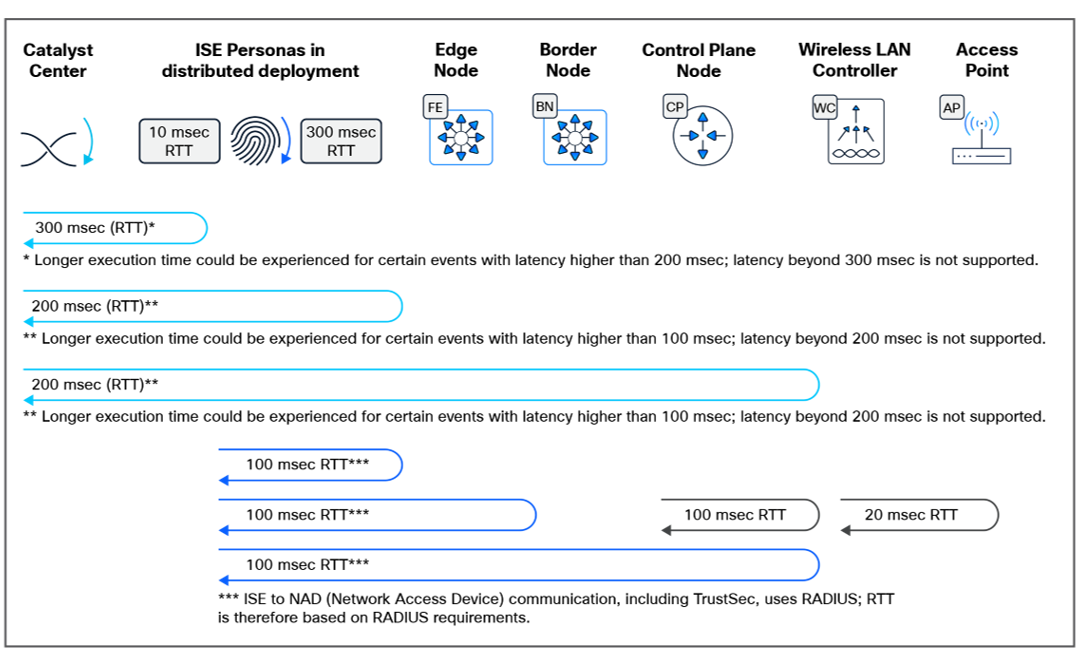
Maximum latency supported, roundtrip time
Appliance scale
Catalyst Center offers flexible deployment options. It can be deployed on a hardware appliance or as a virtual appliance, on either VMware ESXi or AWS.
The third generation of the Catalyst Center appliance is available in three form factors and comes with the Catalyst Center image preloaded on it and ready for installation.
Tables 13 and 14 capture the scale information for Catalyst Center when deployed on physical appliances.
Table 13. Scale and hardware specifications
| SKU |
DN-SW-APL |
DN3-HW-APL |
DN3-HW-APL-L |
DN3-HW-APL-XL |
| Description |
Catalyst Center Virtual Appliance |
Cisco UCS C220 M6 Rack Server 32 cores |
Cisco UCS C220 M6 Rack Server 56 cores |
Cisco UCS C240 M6 Rack Server 80 cores |
| Catalyst Center system scale |
||||
| Total network devices1 |
5000 |
5000 |
8000 |
18,000 |
| M-Scale Profile 1 |
1000 (switch, router, WLC) + 4000 APs |
N/A |
N/A |
|
| M-Scale Profile 2 |
2000 (Switch, Router, WLC) + 3000 APs |
N/A |
N/A |
|
| L and XL Scale non-fabric |
N/A |
N/A |
2000 (switch, router, WLC) + 6000 APs |
5000 (switch, router, WLC) + 13,000 APs |
| L and XL Scale fabric |
N/A |
N/A |
4000 (switch, router, WLC) + 4000 APs |
8000 (switch, router, WLC) + 10,000 APs |
| Wireless sensors |
600 |
600 |
800 |
1600 |
| Concurrent endpoints |
25,000 |
25,000 |
40,000 |
100,000 |
| Transient endpoints |
75,000 |
75,000 |
120,000 |
250,000 |
| Ratio of endpoints to wired wireless |
Any Any |
Any Any |
Any Any |
Any Any |
| Site elements |
2500 |
2500 |
5000 |
10,000 |
| Wireless controllers |
500 |
500 |
1000 |
2000 |
| Physical ports2 |
48,000 |
48,000 |
192,000 |
480,000 |
| Combined physical2 and logical ports |
120,000 |
120,000 |
480,000 |
1,500,000 |
| API rate limit |
Rate limit is managed at a specific API level. |
Rate limit is managed at a specific API level. |
Rate limit is managed at a specific API level. |
|
| NetFlow flows/sec |
30,000 |
30,000 |
48,000 |
120,000 |
| Concurrent software image updates |
100 |
100 |
100 |
100 |
| Catalyst Center SD-Access scale |
||||
| Fabric sites3 |
500 |
500 |
1000 |
2000 |
| Catalyst Center scale per fabric site |
||||
| Layer 3 Virtual Networks |
64/site |
64/site |
128/site |
256/site |
| Fabric devices |
500/site |
500/site |
600/site |
3000/site4 |
| Scalable groups |
4000 |
4000 |
4000 |
4000 |
| Access contracts |
500 |
500 |
500 |
500 |
| Group-based policies |
25,000 |
25,000 |
25,000 |
25,000 |
| IP pools5 |
1006 |
1006 |
3007 |
20008,9 |
| Layer 2 Virtual Networks4 |
2006 |
2006 |
6007 |
20008,9 |
Table 14. Scale for 3-node DN3-HW-APL-XL cluster
| Description |
Supported scale |
| Devices1 |
10,000 |
| Wireless access points |
25,000 |
| Concurrent endpoints |
300,000 |
| Transient endpoints (over 14-day period) |
750,000 |
| Physical ports2 |
768,000 |
| Combined physical2 and logical ports |
2,000,000 |
| NetFlow |
250,000 flows/sec |
Hardware appliance specifications
The Catalyst Center appliance is available in three form factors and comes with the Catalyst Center image preloaded on it and ready for installation. For more detailed information on these Cisco UCS appliances, click on the data sheet link beside each hardware series in Table 15.
Table 15. Physical specifications
| Physical specifications |
DN3-HW-APL and DN3-HW-APL-L |
DN3-HW-APL-XL |
| Part number for ordering |
DN3-HW-APL and DN3-HW-APL-L |
DN3-HW-APL-XL |
| Hardware series |
Cisco UCS C220 M6 Rack Server |
Cisco UCS C240 M6 Rack Server |
| 2 hot-pluggable, redundant 2300W Titanium certified AC |
2 hot-pluggable, redundant 2300W Titanium certified AC |
|
| Physical dimensions |
Height: 1.70 in. (4.3 cm) Width: 16.9 in. (42.9 cm) Depth: 18.9 in. (48.0 cm) |
Height: 3.42 in. (8.7 cm) Width: 16.9 in. (42.9 cm) Depth: 18.9 in. (48.0 cm) |
| Temperature: operating |
Dry bulb temperature of 10°C to 35°C |
Dry bulb temperature of 10°C to 35°C (50°F to 95°F) |
| Temperature: nonoperating |
Dry bulb temperature of -40°C to 65°C |
Dry bulb temperature of -40°C to 65°C |
| Humidity: operating |
10% to 90% and 28°C (82.4°F) maximum dew-point temperature, non-condensing environment |
10% to 90% and 28°C (82.4°F) maximum dew-point temperature, non-condensing environment |
| Humidity: nonoperating |
5% to 93% relative humidity, noncondensing, with a maximum wet bulb temperature of 28°C across the 20°C to 40°C dry bulb range |
5% to 93% relative humidity, noncondensing, with a maximum wet bulb temperature of 28°C across the 20°C to 40°C dry bulb range |
| Altitude: operating |
A maximum elevation of 3050 meters |
A maximum elevation of 3050 meters |
| Altitude: nonoperating |
An elevation of 0 to 12,000 meters |
An elevation of 0 to 12,000 meters (39,370 ft) |
| Network and management I/O |
Supported connectors: One 1 Gigabit Ethernet dedicated management port Two 1/10 Gigabit BASE-T Ethernet LAN ports One RS-232 serial port (RJ-45 connector) One 15-pin VGA2 connector Two USB 3.0 connectors One front-panel KVM connector that is used with a KVM cable, which provides two USB 2.0s, one VGA, and one serial (DB-9) connector |
Supported connectors: One 1 Gigabit Ethernet dedicated management port Two 1/10 Gigabit BASE-T Ethernet LAN ports One RS-232 serial port (RJ-45 connector) One 15-pin VGA2 connector Two USB 3.0 connectors One front-panel KVM connector that is used with a KVM cable, which provides two USB 2.0s, one VGA, and one serial (DB-9) connector |
| Regulatory standards compliance: safety and EMC |
||
| Regulatory compliance |
Products should comply with CE Markings per directives 2014/30/EU and 2014/35/EU |
|
| Safety |
● UL 60950-1 Second Edition
● CAN/CSA-C22.2 No. 60950-1 Second Edition
● EN 60950-1 Second Edition
● IEC 60950-1 Second Edition
● AS/NZS 60950-1
● GB4943 2001
|
|
| EMC: Emissions |
● 47CFR Part 15 (CFR 47) Class A
● AS/NZS CISPR32 Class A
● CISPR32 Class A
● EN55032 Class A
● ICES003 Class A
● VCCI Class A
● EN61000-3-2
● EN61000-3-3 KN32 Class A
● CNS13438 Class A
|
|
| EMC: Immunity |
● EN55024
● CISPR24
● EN300386
● KN35
|
|
Virtual appliance requirements
Catalyst Center can be deployed as a virtual appliance on AWS or VMware ESXi. For the system requirements, see Tables 16 and 17.
Table 16. Virtual appliance requirements for VMware ESXi
| Specification |
Requirement |
| Processors |
32 vCPUs with 64 GHz dedicated to the VM |
| Memory |
256-GB Dynamic Random Access Memory (DRAM) dedicated to the VM |
| Storage |
3 TB |
| ESXi |
VMware vSphere (which includes ESXi and vCenter Server) 7.0.x or later, including all patches |
| I/O bandwidth |
180 MB/sec |
| Input/output Operations Per Second (IOPS) |
2000 to 2500 |
| Network Interface Card (NIC) |
1 Gbps network per network port |
Table 17. Virtual appliance requirements for AWS
| Specification |
Requirement |
| Instance type |
r5a.8xlarge |
| Cores |
32 vCPU, either Intel- or AMD-based host |
| RAM |
256 GB |
| Storage |
4 TB |
| Storage type |
GP3 EBS |
Fabric VN scale
Table 18 captures the fabric VN limits for devices in the fabric when deploying Catalyst Center Release 3.1.6.
Table 18. Fabric VN limits (The current maximum VRF validation is based on a lower limit of 1 and an upper limit of 128, even if the device can support more than 128).
| Device series |
Max VRFs |
| Cisco Catalyst 6800 Series Switches |
1000 (128) |
| Cisco Catalyst 6500 Series Switches |
1000 (128) |
| Cisco Cloud Services Router 1000V Series |
4000 (128) |
| Cisco ASR 1000 Series Aggregation Services Routers |
4000 (128) |
| Cisco 4000 Series Integrated Services Routers |
4000 (128) |
| Cisco 4400 Series Integrated Services Routers |
4000 (128) |
| Cisco 4200 Series Integrated Services Routers |
4000 (128) |
| Cisco 4300 Series Integrated Services Routers |
4000 (128) |
| Cisco Catalyst 9300/9300X Series Switches |
256 |
| Cisco Catalyst 9300 L Series Switches |
256 |
| Cisco Catalyst 9500 Series Switches |
256 |
| Cisco Catalyst 9500H Series Switches |
256 |
| Cisco Catalyst 9400 Series Switches |
256 |
| Cisco Catalyst 9200-L Switch Stack |
1 |
| Cisco Catalyst 9200 Switch Stack |
4 |
| Cisco Catalyst 9200-24PB Switch |
32 |
| Cisco Catalyst 9200-48PB Switch |
32 |
| Cisco Catalyst 9200CX Switch |
16 |
| Cisco Catalyst 9600 Series Switches |
256 |
Compatibility matrix
Catalyst Center provides coverage for Cisco enterprise switching, routing, and mobility products. For a complete list of Cisco products supported, please see our compatibility matrix, which is updated regularly.
Catalyst Center compatibility matrix:
Cisco SD-Access compatibility matrix:
https://www.cisco.com/c/dam/en/us/td/docs/Website/enterprise/sda_compatibility_matrix/index.html.
Deploy Catalyst Center where it best fits your organization: on a dedicated physical appliance, in your VMware environment, or as a cloud-hosted virtual appliance on AWS or Microsoft Azure. Each option provides centralized network management through a unified platform.
● Physical appliance: deploy on Cisco hardware for dedicated, on-premises network management.
◦ Built on Cisco UCS servers, available in three sizes for different network scales.
◦ Preloaded with Catalyst Center software, ready for on-premises installation.
◦ Supports enterprise-scale networks with high device and endpoint capacity.
● Virtual appliance: deploy in virtualized environments or cloud infrastructure.
◦ VMware ESXi Virtual Appliance.
◦ See Catalyst Center 3.1.x on ESXi Deployment Guide.
◦ Deploy Catalyst Center as a virtual machine on VMware vSphere (ESXi and vCenter Server) 7.0.x or later.
◦ Requires 32 vCPUs, 256 GB RAM, 3 TB storage, and 180 MB/sec I/O bandwidth.
◦ Enables rapid deployment, operational flexibility, and leverages existing virtualization infrastructure.
◦ Supports high-availability features through VMware vSphere.
◦ AWS or Microsoft Azure virtual appliance.
◦ See Catalyst Center 3.1.5 on AWS Deployment Guide and 3.1.x on Azure Deployment Guide.
◦ Provides cloud operational flexibility and faster time to value without on-premises hardware.
◦ Software-only deployment running natively on AWS cloud infrastructure or on Microsoft Azure cloud environments.
Unified licensing
Unified licensing in a Cisco Networking Subscription or Enterprise Agreement is available for Cisco next-generation Smart Switches and Wi-Fi 7 access points. To learn more about the Cisco Networking Subscription, go to the data sheet.
Cisco Smart Accounts
Licenses are managed on-premises through Cisco Smart Accounts. For a more detailed overview on licensing, go to Cisco Software Licensing and Smart Accounts.
Creating a Smart Account using the Cisco Smart Software Manager (Cisco SSM) enables you to order devices and licensing packages and manage your software licenses from a centralized website. You can set up Cisco SSM to receive daily email alerts and to be notified of expiring add-on licenses that you want to renew.
Cisco Smart Licensing is a flexible licensing model that provides you with an easier, faster, and more consistent way to purchase and manage software across the Cisco portfolio and across your organization. And to do so securely — you control what users can access.
Cisco Enterprise Agreements
The Cisco Enterprise Agreement (EA) is a flexible licensing solution that simplifies the purchase, management, and deployment of Cisco technologies.
By combining multiple Cisco software and services into one agreement, the EA provides easy access to a wide range of products, including networking, security, collaboration, and data-center solutions.
This approach reduces administrative tasks, offers predictable costs, and allows for scalability and adaptability. With the flexibility of the Cisco EA, organizations can drive digital transformation and innovation while maintaining control over their IT investments. For more information, go to Cisco Enterprise Agreement.
See how Catalyst Center helps you move faster, lower costs, and reduce risk: https://cisco.com/go/catalystcenter.